Disclosure: Some links in this post are affiliate links. As an Amazon Associate I earn from qualifying purchases, at no extra cost to you. Learn more
Specs are compiled from manufacturer listings and verified buyer reviews and can change over time — please confirm the key details on the product page before buying.
A third-party PS4 controller makes sense when your DualShock’s thumbsticks have started drifting and you won’t pay full retail for another pad that will do the same thing in a year. The catch is that the cheap end of this shelf is crowded with lookalikes that lose their Bluetooth pairing mid-match.
This guide is built by comparing the manufacturers’ published specifications and the patterns across verified customer reviews, so you get each pick’s real strengths and trade-offs instead of marketing spin.
Every controller here fits a PS4, PS4 Pro, or PS4 Slim, but they are not interchangeable in quality. Some pair over Bluetooth in seconds, some need a USB cable for that first handshake, and a few have quirks around the headphone jack or the touchpad. If you want a controller that feels right in your hands and keeps working past the first month, the picks below cover the realistic range of what a best third-party ps4 controller can be.
Top Picks
How To Choose The Best Third-Party PS4 Controller
The right controller depends on how you play, not on how many features it lists. A weekend FIFA player and a competitive shooter player need different things from the same shelf, so the decision depends on three trade-offs: stick durability, charging method, and if you need one controller or two.
Sticks first, buttons second
Stick drift is the slow death of every analog controller. It happens when the carbon film inside the thumbstick wears down and the console starts registering movement you did not make. Hall effect sticks use magnets instead of physical contact, so there is nothing to wear out. If you have already killed two controllers to drift, pay for Hall effect sticks instead of extra buttons.
Match the battery to your sessions
You get roughly 8 to 12 hours of play from a 1000 mAh battery (a measure of stored power) in most third-party controllers. Charge time ranges from about 2 hours on a dedicated dock to as long as 4 hours over a standard USB cable. If you play in long evening blocks, a controller that charges overnight beats one that needs a mid-session top-up. A charging dock simplifies the routine, but only if it charges reliably.
Know your connection and your port
Almost every third-party PS4 controller pairs over Bluetooth, but many need a one-time USB cable handshake before wireless will work. Note what kind of port it uses — Micro USB is the older, chunkier standard and USB-C is the modern reversible one. If your household has moved to USB-C cables, a Micro USB controller means keeping one old cable around just for it.
Side-by-Side Comparison
| Model | Best For | Battery | Charge Time | Connection | Amazon |
|---|---|---|---|---|---|
| PlayStation DualSense Wireless Controller – Gray Camouflage★ Best Overall | PC and PS5 crossover play | Rechargeable | — | Bluetooth / USB-C | Amazon |
| CHENGDAO Controller for PS4Best Value | Budget solo play with RGB flair | 1000 mAh | 2 hours | Bluetooth | Amazon |
| Wuthur 2 Pack Wireless Controller | Two players, one purchase | 1000 mAh | 2 hours | Bluetooth / USB-C | Amazon |
| Fisherg 2 Pack Controllers with Charging Dock | Households that want a hidden charging station | — | 1.8 hours | Wireless / wired | Amazon |
| Ubsvaky Wireless Controller for PS4 | Programmable buttons on a tight budget | 1000 mAh | 2-4 hours | Bluetooth | Amazon |
| Boowen 2 Pack LED Backlit Controllers | Kids who want flashy lights | 1000 mAh | — | Bluetooth | Amazon |
| Nacon Revolution 5 Pro | Competitive play and drift prevention | 10-hour battery | — | USB-A wireless adapter / wired | Amazon |
Detailed Reviews
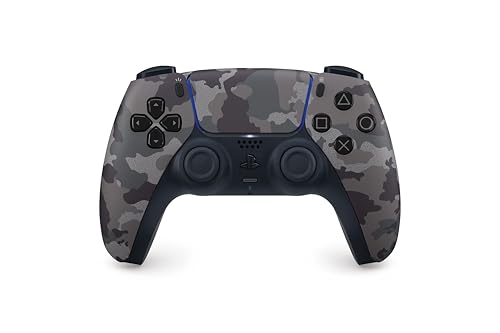
1. PlayStation DualSense® Wireless Controller – Gray Camouflage
Our pick — 4.5+★ from 49,500+ verified ratings; the strongest balance of quality and price.
The one controller here that adds feel, not just function, to every game you play.
If you split your gaming between a PS5 and a PC, this is the controller that does both without a second purchase. It pairs over Bluetooth or a USB-C cable, and it is officially rated for Windows PC and Mac as well as the PlayStation 5. Sixteen buttons, an iconic layout, and a 3.5mm headset jack mean your chat and controls work the same way they do on console.
What separates it from every other pick on this page is haptic feedback and adaptive triggers — motors and tension systems that let you feel in-game surfaces and weapon resistance through the grips. The built-in microphone and speaker add another layer when supported games use them. The texture and ergonomics earn the most praise from owners, and a Starlight Blue buyer wrote that it “connected to my PS5 without any issues” with responsive buttons and joysticks that stayed comfortable through long sessions.
The honest trade-off is how long it lasts. Drift complaints (the stick moving on its own) exist here too, and one long-term owner who moved to this from Xbox hardware noted it “outlasted two Xbox controllers over ~2 years with 0 stick drift” — a good sign, but not a guarantee for every unit. This is the highest-rated controller on the list at 4.5+ stars, and for a licensed product that works wired or wireless on PS5 and PC, that consistency is why it earns the top spot.
Official Sony build
- Haptic feedback and adaptive triggers give physical feedback no third-party copy matches
- Works on PS5, Windows PC, and Mac via Bluetooth or USB-C
- Built-in microphone and speaker plus a 3.5mm headset jack
No back paddles
- Drift can still develop with heavy use — the most-discussed concern among owners
- Bluetooth re-pairing occasionally needs a manual reconnect
- No back paddles or programmable buttons from the start
PS5 owners: you play across PS5 and PC and want the controller both systems recognize natively.
Budget shoppers: your priority is extra mappable buttons for shooters.
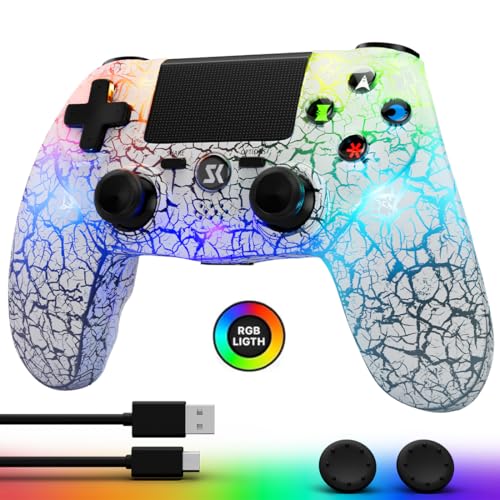
2. CHENGDAO Controller for PS4
Twin vibration motors, a 6-axis sensor, and RGB lights for a fraction of a licensed controller.
The CHENGDAO is the pick for players who want the full PS4 controller feature set without paying the licensed markup. A 1000 mAh rechargeable battery delivers 8-12 hours of gaming per charge, and it takes 2 hours to top up — roughly 11% longer than the Fisherg dock bundle below at 1.8 hours, a gap you will barely notice in practice. Five adjustable light modes let you pick between breathing, randomized flashing, gradient, solid, or off entirely.
You can use it across PS4, Pro, Slim, PC, iOS, and Android, with a Bluetooth range of up to 33 feet after the initial USB pairing. The non-slip grips and clickable touchpad handle the basics well, and owners consistently describe the joysticks as snappy with no drift — one put it plainly: “Great third-party controller.” The cracked finish and LED effects are what draw the most compliments in the reviews, especially from parents buying for kids.
Budget wireless option: the complaints center on lag, with one buyer reporting “a 5 second lag while playing any game,” and the USB port is the older Micro USB format rather than USB-C. The cycling LED colors also cannot be locked to a single shade, and the white shell is noticeably bright in a dark room.
Light gamers: a strong first third-party controller for casual PS4 play, provided you are fine with a Micro USB cable in the drawer.
3. Wuthur 2 Pack Wireless Controller
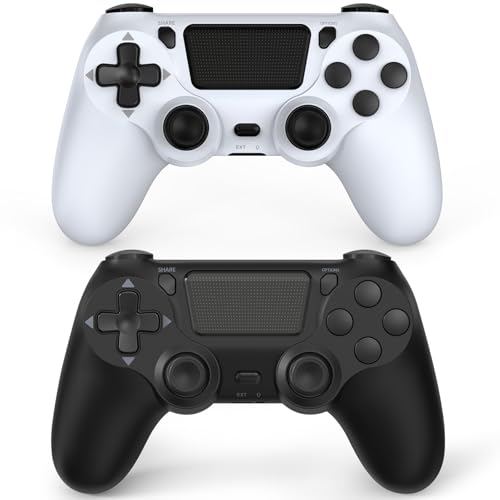
Two complete controllers in one box — enough to turn a solo console into a couch co-op setup.
Bundles like this one solve a specific problem: one player has a working controller and the friend on the couch does not. You get two controllers, two USB-C charge cables, and a manual for a price that lands under many single licensed pads. Each one carries a 1000 mAh battery that charges to full in 2 hours and is rated for 20 hours of continuous play, plus dual vibration motors, a 6-axis motion sensor (a chip that tracks tilt and rotation), a multi-touch pad, share button, light bar, speaker, and a 3.5mm headphone jack.
First-time pairing needs the included USB-C cable to activate the unit, and PC players pair by holding SHARE and HOME together for 3 seconds. The black-and-white color pair makes it obvious which controller belongs to whom. Quality is the praise point owners return to most, and it holds a 4.0+ rating across a solid base of buyers — respectable for a value bundle with this much onboard.
Where buyers split is consistency. Some report smooth connections and long battery life, while others hit pairing trouble and shorter runtime than the 20-hour rating suggests. A small number report controllers that stopped holding a charge. It is the usual math of a two-pack: you are buying convenience, and if one unit misbehaves the other still keeps you playing.
Multiplayer homes: families and friend groups who need two pads and do not want to pay licensed prices twice.
Solo players: you need guaranteed identical performance from both controllers — the value tier here is honest about its variance.
4. Fisherg 2 Pack Controllers with Charging Dock Station
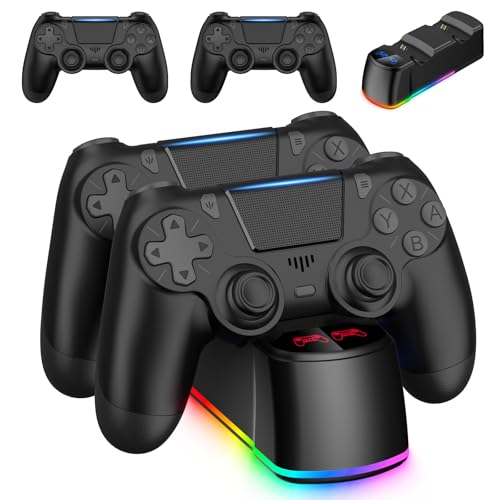
Two controllers plus a dock that recharges them in 1.8 hours — the fastest full charge in this lineup.
If you hate hunting for a cable every time your controller dies, this bundle answers that directly. The included dock powers off the PS4 console, a PC, or an AC adapter through a Micro USB connection, and it fills a controller in 1.8 hours — faster than the 2 hours the CHENGDAO and Wuthur controllers need, so a drained pad is ready before your next session. Blue indicates full charge, red means it is still topping up.
Each controller carries the standard loadout: vibration motors, a 6-axis motion sensor, a multi-touch touchpad, a share button, a light bar, a speaker, and a 3.5mm audio jack. The build is widely compatible with PS4, Pro, Slim, and PC, and the wired USB option works when you want a lag-free connection. Owners generally find the controllers comfortable and responsive, and the dock keeps the shelf tidy.
The honest catch is reliability. Most units sync and hold fine, but a minority report connection drops mid-game — one buyer describes remotes turning off during Call of Duty Mobile until they re-register. Charging through the dock is the other variable; most find it convenient, but a few units arrive that will not charge at all. Understanding that this is a value-tier two-pack, it delivers a lot for the category.
Tidy setups: anyone who wants two pads and a place to store and charge them without cable clutter.
Travel often: a rock-solid wireless sync is non-negotiable for competitive play.
5. Ubsvaky Wireless Controller

M1 and M2 programmable buttons retain their assigned function even after the controller loses power.
This is the value pick for players who want extra mappable buttons without stepping into niche-tier money. Two programable M1 and M2 buttons sit on the back, and once assigned they remember their function after a power loss — you toggle them with the OPTION, SHARE, and M1 or M2 key combo. For shooters and fighters where a reload or crouch command needs to be under the ring finger rather than your thumb, that reactive control is the reason to choose it.
The core specs are solid: high-performance Bluetooth with a 33-foot control range, a 1000 mAh battery that charges in 2-4 hours for 15-20 hours of play, dual vibration motors, a 6-axis motion sensor (a chip that tracks tilt and rotation), a light bar, a built-in speaker, and a 3.5mm headphone jack feeding a Type C charging cable. High refresh rate joysticks are tuned to give fast feedback on your inputs. Durable build quality is the second-most praised trait among owners, behind overall quality.
Responsiveness and compatibility are where opinions diverge. Sticking buttons and a few connectivity hiccups appear in the feedback, and the price is judged mixed — worth it to some, overpriced to others. For a single controller with macro buttons and a one-year warranty, though, it occupies a spot most budget pads do not even attempt.
PS4 slim owners: you want programmable back buttons and trigger-ready sticks without paying boutique prices.
Pro users: if you prefer plug-and-play with zero button tuning, go with a simpler pad.
6. Boowen 2 Pack Wireless Controller

Adjustable 7-color backlighting and a glacial crack finish make these the pair kids ask for by name.
Two controllers that light up in seven selectable colors and pair with PS4, Pro, Slim, PC, iPad, iPhone, Steam, Android, and MacOS — which explains why parents gravitate toward them. Each carries a 1000 mAh battery rated for 8-10 hours of gameplay, dual motors, a 6-axis gyroscope, a touchpad, a built-in speaker, a 3.5mm audio jack, and a light bar. The share button rounds out the standard feature set.
Lighting and color-changing are the hooks, with one parent writing that “the color and glow makes it fun for my kiddos to play the games.” Quality holds up better than the price suggests, and the vibe is unmistakably aimed at younger players and anyone who wants their setup to stand out. The upgraded grip and trigger buttons keep long sessions comfortable.
The honest caveat is durability. Connectivity and charging receive mixed feedback, with some units hitting pairing snags, and a small number losing charge function over time. For a two-pack at this price, the value proposition still holds if you want flashy controllers that share well between siblings.
Style seekers: you are buying for kids or a household that appreciates a controller with personality.
Long sessions: you need the most neutral-looking pad for a shared living-room setup.
7. Nacon Revolution 5 Pro Wireless Controller
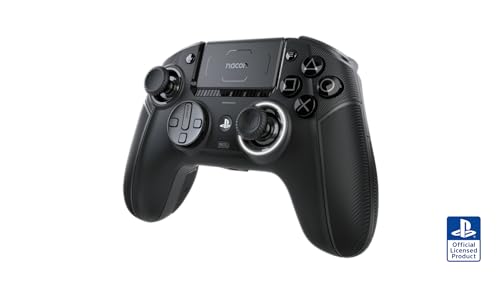
Hall effect thumbsticks and triggers mean no drift — the single spec that justifies the premium.
For a player who has burned through controllers to stick drift, this is the pick that ends the cycle. Both the joysticks and the triggers use Hall effect magnetic sensors instead of mechanical contact, which the manufacturer claims eliminates drift while boosting precision and durability. Four Omron micro-switch back paddles are remappable on the controller, and trigger blockers let you flip between long and short pulls to suit your game type. A specialized D-pad made with pro fighting game player Mister Crimson swaps out for a traditional pad whenever you want.
Thirty buttons in total, a USB-A wireless adapter for PS5, PS4, and PC, up to 10 hours of battery, and a 3-meter USB-C to USB-A cable for wired competitive play. The ergonomics fit bigger hands especially well — one owner with large hands calls it the most comfortable controller they have ever used and reports 700+ hours of Call of Duty with no drift. The build and the control layout win consistent praise in the feedback.
The trade-offs are real and worth knowing. Wireless is dongle-only, so you cannot connect straight over Bluetooth, and it will not wake your console from sleep — one owner specifically warns against plugging the dongle into the rear PS5 USB port, where it can overheat. The USB-C port is recessed in a way that standard cables do not fit, so you need the included cable. Vibration also does not work on PS5. At the highest price in this lineup, this is a pick for someone who has decided drift is the problem worth solving.
Pro-grade customization
- Hall effect joysticks and triggers eliminate the drift complaint found on every standard stick
- Four remappable Omron back paddles plus switchable D-pad designs
- Up to 10 hours of wireless battery and a 3-meter USB-C to USB-A wired cable included
High price tag
- Wireless requires the USB-A dongle — no direct Bluetooth, and it cannot wake the console
- The dongle can overheat if plugged into the rear PS5 port
- Vibration does not function on PS5
Competitive players: drift-free play and pro-grade button mapping if you take your shooters and fighters seriously.
Casual gamers: you want a simple wireless pad that wakes the console and needs no dongle.
Know the Specs
Battery capacity and charge time
Most third-party PS4 controllers use a 1000 mAh rechargeable battery, which is enough for roughly 8 to 12 hours of play depending on the model — the Boowen rates 8-10 hours, the CHENGDAO rates 8-12, and the Ubsvaky stretches to 15-20. Charge time matters just as much: a dedicated dock can fill the Fisherg set in 1.8 hours, while the CHENGDAO and Wuthur need 2 hours, and the Ubsvaky runs 2-4 hours over a standard cable. If your sessions run long, factor in charge time as much as runtime.
Hall effect versus standard analog sticks
Standard thumbsticks use physical contact that wears over time — that wear is what produces drift, the phantom movement that makes your character wander when you are not touching the stick. Hall effect sticks use magnetic sensors with no contact, so there is nothing to wear out. That is why the Nacon Revolution 5 Pro, the only controller here with Hall effect joysticks and triggers, commands the highest price. If drift is your recurring frustration, this is the spec to pay for.
The 6-axis motion sensor and rumble motors
The 6-axis motion sensor tracks the controller’s tilt and rotation so your physical movement translates into camera and vehicle control in supported games. Dual vibration motors — one on each side — deliver different rumble intensities based on what happens on screen. Five of the seven controllers here include both features, and they are the reason a third-party pad can feel close to the original for driving and action games.
Wired and wireless pairing
Almost every controller in this list connects over Bluetooth, but the first pairing usually needs a USB cable handshake before wireless will work. Wireless ranges reach up to 33 feet on several models, which is enough to sit back on the couch. The Nacon is the exception — it pairs through a USB-A wireless adapter or a 3-meter cable, not Bluetooth. Check which port the controller uses too: Micro USB is older and chunkier, USB-C is the modern reversible option.
Common Questions
Will a third-party PS4 controller work with a PS4 Pro and PS4 Slim?
Do third-party PS4 controllers need a USB cable to pair the first time?
How long does a 1000 mAh controller battery actually last?
What is stick drift and why do so many controllers develop it?
Can I use a third-party PS4 controller on PC?
Is a two-pack controller bundle worth it over buying one premium controller?
Do these controllers have a headphone jack for chat?
What do M1 and M2 programmable buttons do on a controller?
Do I need a USB dongle for the Nacon Revolution 5 Pro?
Why does my third-party controller lag or drop its connection?
The Bottom Line
For most PlayStation owners, the best third-party ps4 controller is the PlayStation DualSense Wireless Controller – Gray Camouflage because it pairs across PS5 and PC over Bluetooth or USB-C and adds haptic feedback and adaptive triggers nothing else in its class matches. If drift has been your problem and you want it gone for good, the Nacon Revolution 5 Pro with Hall effect sticks and four remappable back paddles is the pick worth stretching for. And for a second controller without the licensed price, the CHENGDAO Controller for PS4 delivers its 1000 mAh battery, 6-axis sensor, and RGB lighting as a clean entry point.
How we choose
We do not accept paid placement. Every pick is matched to a real buyer and a real use-case; we do not hands-on test units.
Sources
Specifications: manufacturer listings and product documentation. Review insights: verified customer reviews, as of October 2026. Pricing: not shown on this page (it changes often); check the current price via the retailer link.
As an Amazon Associate, Aappliancez earns from qualifying purchases. This does not affect which products we feature.