Disclosure: Some links in this post are affiliate links. As an Amazon Associate I earn from qualifying purchases, at no extra cost to you. Learn more
Specs are compiled from manufacturer listings and verified buyer reviews and can change over time — please confirm the key details on the product page before buying.
The hardest part of buying a robot building kit is not the price. It is guessing whether your kid will actually finish the build, or whether you will end up doing it at 10 p.m. while they watch. This guide sorts that out for you. Every pick below is judged on piece count, how clear the manual really is, what the finished robot can actually do, and how long it runs before the battery quits.
This guide is built by comparing the manufacturers’ published specifications and the patterns across verified customer reviews, so you get each pick’s real strengths and trade-offs instead of marketing spin.
A kit with 473 pieces and a clear colour manual will get an eight-year-old to the finish line on their own, while a mid-range set with 600+ blocks and a phone app keeps the build going for months. Here is everything you need to compare before choosing from the Best Robot Building Kits.
Top Picks

How To Choose The Best Robot Building Kits
A robot building kit is bought for one of two reasons. Either your child loves figuring out how things fit together, or you want them off a screen for a Saturday. Both are good reasons, but they point to different kits. The sections below break down the four things that actually decide whether a kit gets finished or gets shelved.
Piece count and who does the building
More pieces means a longer, more involved build. A kit with 430 to 473 pieces is a solid afternoon for a confident eight-year-old. Sets that climb past 600 pieces stretch across several sessions. That is great for a kid who loves the assembly itself, and frustrating for one who just wants the robot to be done so they can drive it. Match the piece count to your builder, not to your budget.
Remote control versus app control versus real coding
These are three different things and the listings blur them. A plain radio remote (often 2.4GHz) gives you forward, back, and turn — nothing to program. A Bluetooth phone app usually adds path drawing, gyro steering, and simple drag-and-drop coding blocks. A true coding platform, like one built around Arduino, lets you edit example code and change what the robot does. Decide which of the three you actually want before you compare models.
Batteries: built-in packs versus disposables
Many kits now ship with a built-in rechargeable battery and quote a play time per charge, such as 30 or 40 minutes. That is convenient, but the run time is real and short — you will be charging between play sessions. Others need AA batteries, which are not included on several kits here. Check that box before you wrap it as a gift, or the first build ends in a hunt for batteries.
Age labels versus age reality
Printed age ranges are optimistic. The pattern across the reviews is that the labelled starting age often needs one adult sitting nearby for the first build. A six-year-old can help sort and snap pieces, but the fine screw work and the wiring usually want an eight-year-old or an adult hand. Buy for the age your child builds at, not the number on the box.
Side-by-Side Comparison
| Model | Best For | Pieces | Control | Age Range | Amazon |
|---|---|---|---|---|---|
| Sillbird Robot Building Kit (RC)★ Best Overall | Best overall first big build | 473 | Remote & App | 8 years and up | Amazon |
| Robot STEM Kits 5-Set (Yutin)Budget Starter | Budget multi-build starter | 5 separate kits | Wire & solar powered | 8 – 14 years | Amazon |
| Henoda Robot Toys App/RemoteMost Popular | Most popular build-and-drive kit | 468+ | Remote & App | 8 years and up | Amazon |
| LECPOP 5-in-1 RC Kit | Construction-vehicle fans | 430 | Remote & App | 8 – 12 years | Amazon |
| Demkia 4-in-1 Robotics Kit | Articulated robot detail | 588 | 2.4GHz Remote & App | 8 years and up | Amazon |
| Makeblock mBot | Real coding from Scratch to Arduino | Metal build kit | App, Remote & Code | 8 years and up | Amazon |
| Sillbird APP & Remote Kit | Speed and stunt builds | 631 | Remote & App | 8 years and up | Amazon |
| Sillbird 5-in-1 STEM Kit | Progressive five-model building | 488 | Remote & App | 6 – 16 years | Amazon |
| Sillbird Robot Car Kit | Biggest piece count build | 727 | Remote & App | 8 years and up | Amazon |
| ELEGOO UNO R3 Robot Car V4 | Camera and Arduino learning | Arduino-based kit | App, IR Remote & Code | 12 years and up | Amazon |
| Apitor Robot X 12-in-1 | Longest-lasting build variety | 600+ | App Remote & Coding | 8 years and up | Amazon |
Detailed Reviews
1. Sillbird Robot Building Kit
Our pick — 4.5+★ from 900+ verified ratings; the strongest balance of quality and price.
Five robots, one box, and a manual a kid can actually follow alone.
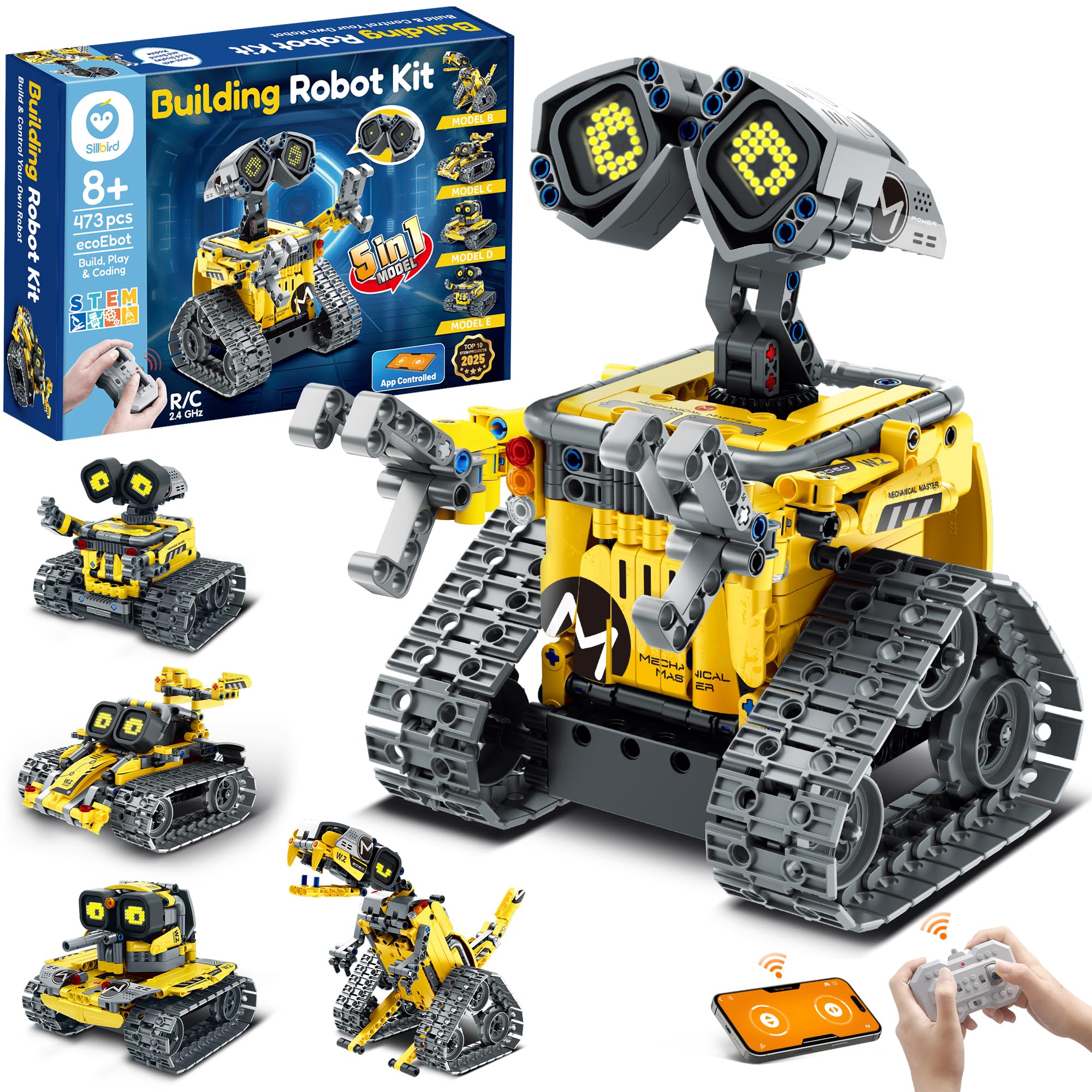
This is the pick that gets the balance right. You get 473 pieces that rebuild into five different models — a robot, a dinosaur, a stunt car, a tank, and more — so the box does not die the day the first build is finished. The instruction book is clear and step-by-step, laid out so a child can work independently.
The finished robot has digital eyes and sound effects that change with each movement, which is what keeps a younger builder coming back after assembly is done. Control works two ways: a handheld remote or Bluetooth on your phone. The built-in rechargeable battery gives up to 40 minutes of continuous play on a charge, so there is no midnight run for AA batteries. A small button next to the power switch mutes the sound.
What wins people over is how much play comes out of it. The build is the attraction, but the driving and the eye-and-sound reactions are what hold attention afterwards. Expect the harder steps to need a hand: the reviews are honest that the more complex assemblies take patience, and a younger builder will want an adult nearby for those sections. That is a normal trade for a 473-piece kit, not a flaw. Weighing 0.99 kg against the 0.38 kg Yutin five-set for a similar recommendation band, this is a substantially more substantial box in the hand — you feel the piece count before you open it.
remote control driving
- 473 pieces build five different models, so the kit keeps giving after the first robot.
- Clear step-by-step manual lets a confident kid build alone — as buyers report, “My son built it by himself in a few hours.”
- Up to 40 minutes of play on the built-in rechargeable battery, with no AA purchases needed.
- LED eyes and sound effects react to every movement; the sound can be muted with one button.
assembly takes patience
- The trickier builds genuinely take patience; some steps want an adult.
- Forty minutes per charge means the charger becomes part of the routine.
start here: the strongest all-round starting point for a builder aged eight and up who wants five different robots from one box.
skip the wait: your child is impatient with assembly — a 473-piece build rewards the kid who enjoys the process.
2. Robot STEM Kits
Five small robots instead of one big one — and a solar car that actually runs.
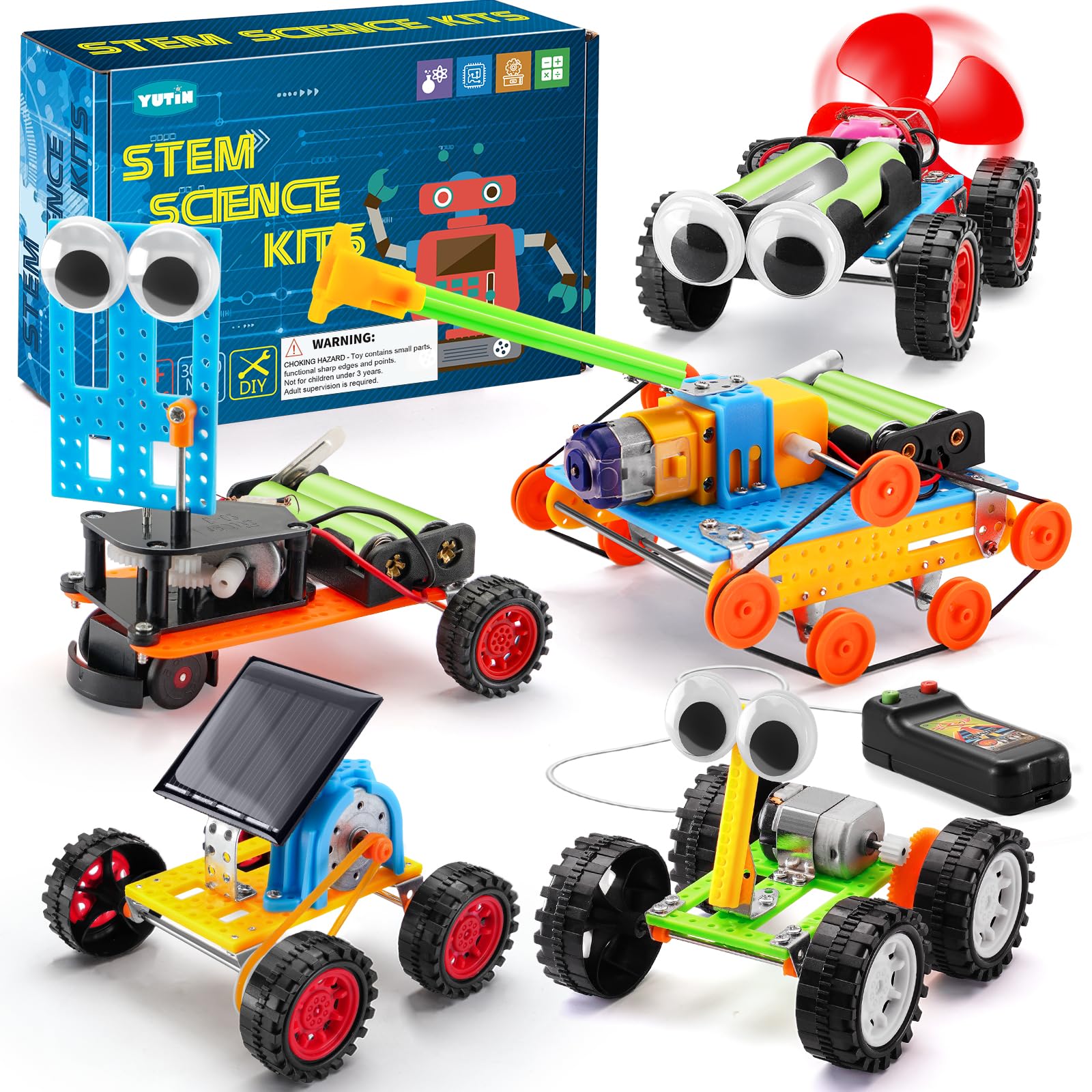
If you want to test whether your child even likes this hobby, this is the sensible spend. The box holds five separate cars: a solar-powered car, a wind-powered car, an obstacle-avoidance robot, a tank, and a wire-controlled car. Each one is a short build, which keeps a younger kid from losing steam midway through a 400-piece marathon. The dimensions here are tiny — 3.15 x 3.3 x 3.15 inches, at 0.38 kg — so the whole set stores in a shoebox between sessions.
The quality is what carries it. The parts feel solid and the builds are genuinely educational, teaching basic motor and circuit ideas without a lecture. The solar car is the one kids reach for first. The trade-offs are real, though: the wires are fragile and want careful handling, the tiny screws are hard to seat, and you need two AA batteries that are not in the box. Some of the vehicles need to be built exactly right to run. The instruction-following matters here more than on a snap-together brick kit. Set expectations accordingly: this builds fine-motor skills and patience, and a five- or six-year-old will need an adult on the screws.
Compared with the Sillbird above, this is a fraction of the size and a fraction of the build time per model — that is the point. You are buying five quick wins rather than one long project. Where it earns its place is the breadth: five different power and control mechanisms a child can compare side by side.
young beginner friendly: five small builds covering solar, wind, wire control, and sensor-based movement give a child a taste of several robot types before you commit to a big single kit.
limited build depth: fragile wiring and small screws mean a younger child needs an adult hand, and two AA batteries are not included.
try it out: you want a low-commitment way to find out if building robots is your child’s thing.
look elsewhere: you are after one impressive finished robot — these are five small cars.
3. Robot Toys APP Remote Control
The build everyone asks about first, with a face that keeps kids grinning.
This is the most-reviewed kit on this list, sitting at 4.5+ stars across 1,800+ ratings. That popularity is easy to explain once you see it move. The 468+ pieces build a robot with glowing eyes and flexible rotating hand joints, and it drives in every direction including a full 360-degree spin. It weighs 1.6 pounds, so it is a real model in the hand rather than a pocket toy.
Control is unusually generous for the price tier. You get a 2.4GHz handheld remote with a working range over 20 meters, plus a phone app over Bluetooth that open up path mode, voice control, a gravity sensor, and simple drag-and-drop programming. The parts arrive in individually numbered bags with a colour manual that uses red boxes and arrows to mark each step. That bagging system is the difference between an eight-year-old building alone and an eight-year-old building with you hovering.
The thing everyone raves about is how it looks once finished. Reviewers talk most about how it looks, and the transforms and spinning hand joints get played with longest. The recurring gripe is the connections between pieces — some builders find certain pieces hard to seat. Note also that at least one reviewer expected full programming and found it remote-control-led in practice, so treat the “programmable” label as app-based movement modes rather than a full coding language. It is a children’s toy first.
popular with kids: 468+ pieces, 2.4GHz remote with over 20 metres of range, and app modes — the whole package lands with kids aged eight and up.
check the app: a few owners find some pieces stiff to connect, so expect a firm press and an occasional adult hand on tight joints.
4. LECPOP 5-in-1 Building Block Kit

An RC excavator, a loader, and four more builds for the kid who loves diggers.
Here is the one for a child who would rather dig than duel. The 430 pieces rebuild into five machine styles, and the standouts are the RC excavator and the construction loader alongside the robot. Build quality is what most of the feedback talks about, and it holds up: 2 pounds of thick ABS, certified to ASTM and CPSIA safety standards, with a smooth finish and no sharp edges. The set uses alkaline batteries and ships in frustration-free packaging.
Control comes two ways: a four-channel remote with front, back, left, and right, plus a phone app with gyro steering, a driving-simulation mode, path navigation, and simple programming blocks. The 360-degree rotation is the party piece — kids spin it and come back to it first. Instructions are colourful and easy to follow, with each model rated at a similar difficulty. The backhoe build has enough mechanical linkage to push a full water bottle across carpet.
Where it asks for patience is the assembly itself. The instructions are the most frequently flagged weak spot, and the builds run hard for a six-year-old — nine-year-olds get through them but find them more demanding than a familiar brick brand. If your child already builds confidently, this is a satisfying step up. If not, plan on sitting beside them for the first model.
five builds in one: 430 pieces, five construction-vehicle builds, dual remote and app control, and a four-channel drive that handles a 360-degree spin — plus certified safe materials you can hand over without checking.
excavator arm fiddly: the manual is the soft spot; the builds are challenging enough that a younger builder will want help with the first assembly.
fits builders: the digger-obsessed builder who wants something that moves dirt instead of walking around.
not for tinkerers: a first-time six-year-old building solo — the assembly demands more than the box suggests.
5. STEM Robotics Kit
Posable fingers, a swinging head, and a chest panel that opens flat.
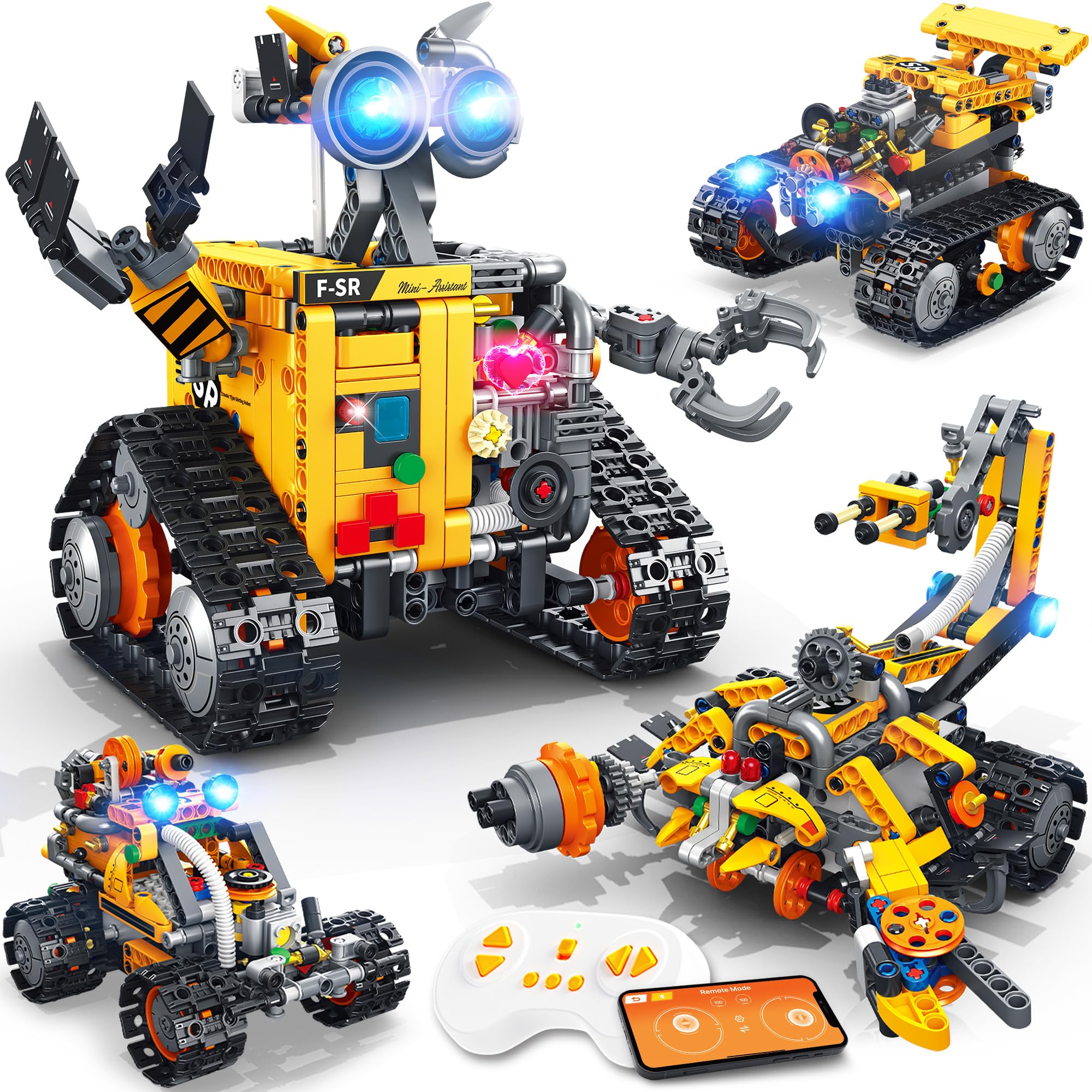
Most kits in this price band give you a blocky robot with a fixed pose. This one has 588 pieces and actual articulation — fully movable fingers, palms, and arms, plus a head that automatically turns side to side as the tracks move. The chest panel opens flat to create extra play space. Build it four ways: Wall Robot, Scorpion Crane, Engineering Grader, or Scout Tank. That variety is what keeps a nine-year-old coming back after the first model is done.
Control splits between a 2.4GHz remote and a Bluetooth app with four modes: Control, Driving, Path, and STEM Coding. Movement is smooth through a full 360 degrees and the structure holds up to active play. Power comes from a built-in 3.7V 500mAh lithium battery embedded in the motor block — a full charge takes about 80 minutes and gives up to 45 minutes of play. The remote needs two AAA batteries, which are not included, so check that before the first session.
Two things to plan for. The instructions are clear and cover all four models, but a younger builder will need adult help — several owners noted “6+” on similar kits is misleading, and eight and up is the honest starting point. Also, the parts are not sorted per build step, so assembling the scorpion takes organisation. Lay everything out first and it goes smoothly. The reward is a robot with more personality in its joints than most of the boxy alternatives.
Next to the LECPOP, this trades the digging theme for movement detail — fingers and a turning head instead of an excavator arm — and the 588-piece count sits well above the 430 on that kit. If your child is drawn to how a robot moves rather than what it lifts, this is the better fit.
moves smoothly: fine articulation and a swinging head that no other kit here matches.
order with care: two AAA batteries for the remote are not in the box, and parts are not pre-sorted by step.
6. Makeblock mBot STEM Coding Toys Robotics for Kids Ages 8-12

The kit that turns a robot into a real coding lesson, Scratch first, Arduino next.
If your child has already built a dozen remote-control robots and wants to make one do something new, this is the step up. The mBot builds in about 15 minutes from clear instructions, and once it is running you can control it as a line-following, obstacle-avoiding car — but that is only the starting line. From there, kids program it on the Scratch drag-and-drop platform and graduate to Arduino. It is the only kit here that names a real programming language as a goal.
The build itself is a mix of metal and plastic parts, which makes it feel more like a piece of equipment than a toy. Assembly is the stand-out strength: some buyers put it together in one evening, and it earns top marks for ease of build even from adults who admit to being nervous about wiring. The materials hold up to repeat use. Expandability is the other big draw — the open-source system accepts 100+ electronic modules and 500+ parts from the Makeblock platform, and it is compatible with LEGO parts, so the build can grow well past the box.
The catch to know about is batteries. You need four AA batteries for the robot and a CR2025 for the remote, none of which are included. The Bluetooth connection also does not always reconnect on its own, needing a quick restart. For a child who wants a toy, that is a hurdle. For a child who wants to code, it is worth it. This is the pick for the scientist in the family, not the racer.
real coding lessons: a 15-minute build, then a gradual path from Scratch blocks to Arduino code, with an open source platform that accepts 100+ modules and 500+ parts.
price runs high: batteries for the robot and remote are not included, and Bluetooth pairing can drop mid-session.
good for coders: a curious builder who wants to learn coding — this is the most educational kit here.
skip the cost: your child just wants a robot to drive around the living room; the coding focus will feel like homework.
7. Sillbird Robot Building Kit APP

Six builds, a stunt car with drift, and eyes that light in eight app colours.
The number that sets this apart is 631 — more pieces than the 473-piece Sillbird above, and a real step up in build ambition. It rebuilds into six models, starting with a retro yellow robot and a stunt car before climbing to the more complex designs. The stunt car is the headline: two high-performance motors push it fast enough to drift and flip. For a kid who finds most robot kits slow and plodding, that speed is the reason this one wins.
The little details are where it holds attention. The robot’s eyes and conduits light up in red, blue, and green from the remote, and the app lets you pick from 8 colours instead of 3. Control comes over Bluetooth or the handheld remote, and the rechargeable battery gives up to 30 minutes of play per charge. Assembly runs off a clear, colourful manual. A couple of fit issues show up in the feedback — one eye socket rim is reported as malformed and a power plug can be stiff to seat — so keep the included screwdriver handy and don’t panic if a piece needs a gentle persuasion.
One build detail matters before you buy. The compact lithium battery means shorter play sessions than the larger packs, and as Wall-E the charger port is awkward to reach once assembled. The on-off switch also needs the included screwdriver. If your child will mostly rebuild and display rather than run it for hours, those quirks fade. If they want a long-running driver, plan on more charging breaks.
app plus remote
- 631 pieces build six different models, so the kit has real staying power.
- Twin motors deliver drift and flip stunts that keep speed-hungry builders engaged.
- App gives you 8 eye colours versus 3 on the remote, adding a customisable flourish.
- Clear colour manual and up to 30 minutes of play on the built-in rechargeable battery.
minor part quirks
- The battery is compact, so sessions are shorter than you might like.
- Charging port is awkward to reach in some builds; the on-off switch needs a screwdriver.
- A few fit issues with eye sockets and power plugs are reported.
stunt focused fun: this is the one to buy when your builder wants speed, drifting, and flipping over steady plodding.
know the quirks: plan for more frequent charging and keep the included screwdriver on hand for the on-off switch.
8. Sillbird STEM Robot Building Kit
Difficulty that starts easy and climbs — the kit that grows with a builder.
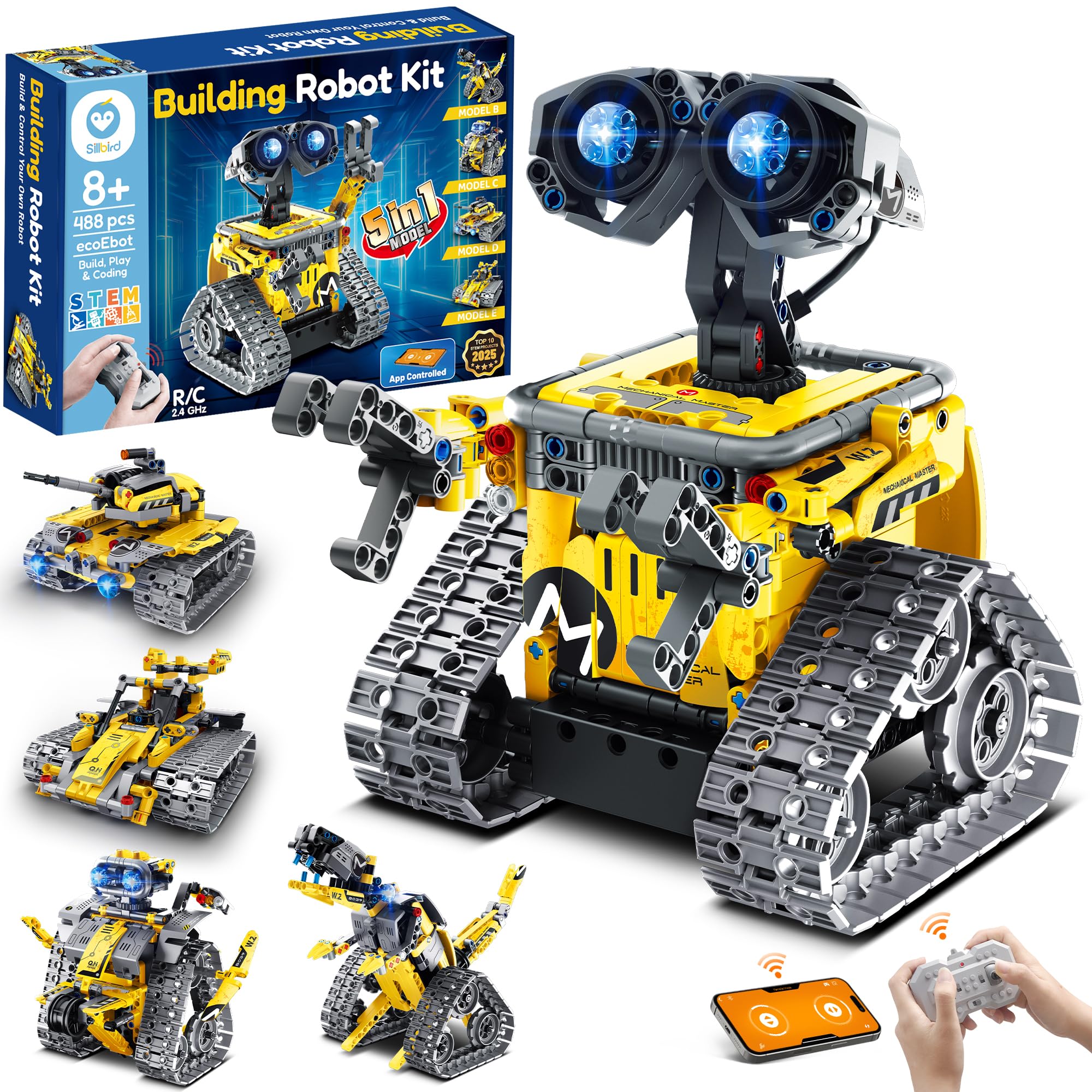
Some kits hand a child one model and call it done. This one is built around progression. The 488 pieces form five models — a robot, a dinosaur, car, tank, and more — and the difficulty rises from model to model. That means a young builder can start on the simplest build and work upward over the months, which is why the box holds value so well. Adjustable head, arms, and tail allow for poses between drives.
Whether that progression works depends entirely on the child. For a builder who follows visual instructions and sticks with a problem, this is one of the best-loved kits here — an eight-year-old can spend four hours on the first robot independently, needing help only a few times, and end up with controls that work better than expected. The manual is clear, colourful, and step-by-step. The built-in rechargeable battery gives up to 40 minutes of play per charge, matching the larger Sillbird for runtime. At 1.8 pounds, it is a substantial finished robot.
Where it can fall short is the exact same territory. The assembly is long. A less patient child will need a parent nearby, and the more difficult models push past a quick Saturday build. The remote-control functions are the most frequently flagged soft spot — they work, but they do not feel like the strongest part of the kit. Controls via the tablet tend to land better. Set it up as a multi-session project and keep the remote as a backup; the app is where the fun lives.
progressive build steps: five models at rising difficulty and 488 pieces give a builder a ladder to climb, with 40 minutes of rechargeable play at the top.
one joint wobbles: the remote is the least impressive part of the package — the app and tablet control are what make it shine.
pick for growth: a patient builder who likes a challenge that gets harder each time.
choose another kit: your child loses interest in long assemblies — four hours on one robot is the honest expectation here.
9. Sillbird Robot Car Building Kit
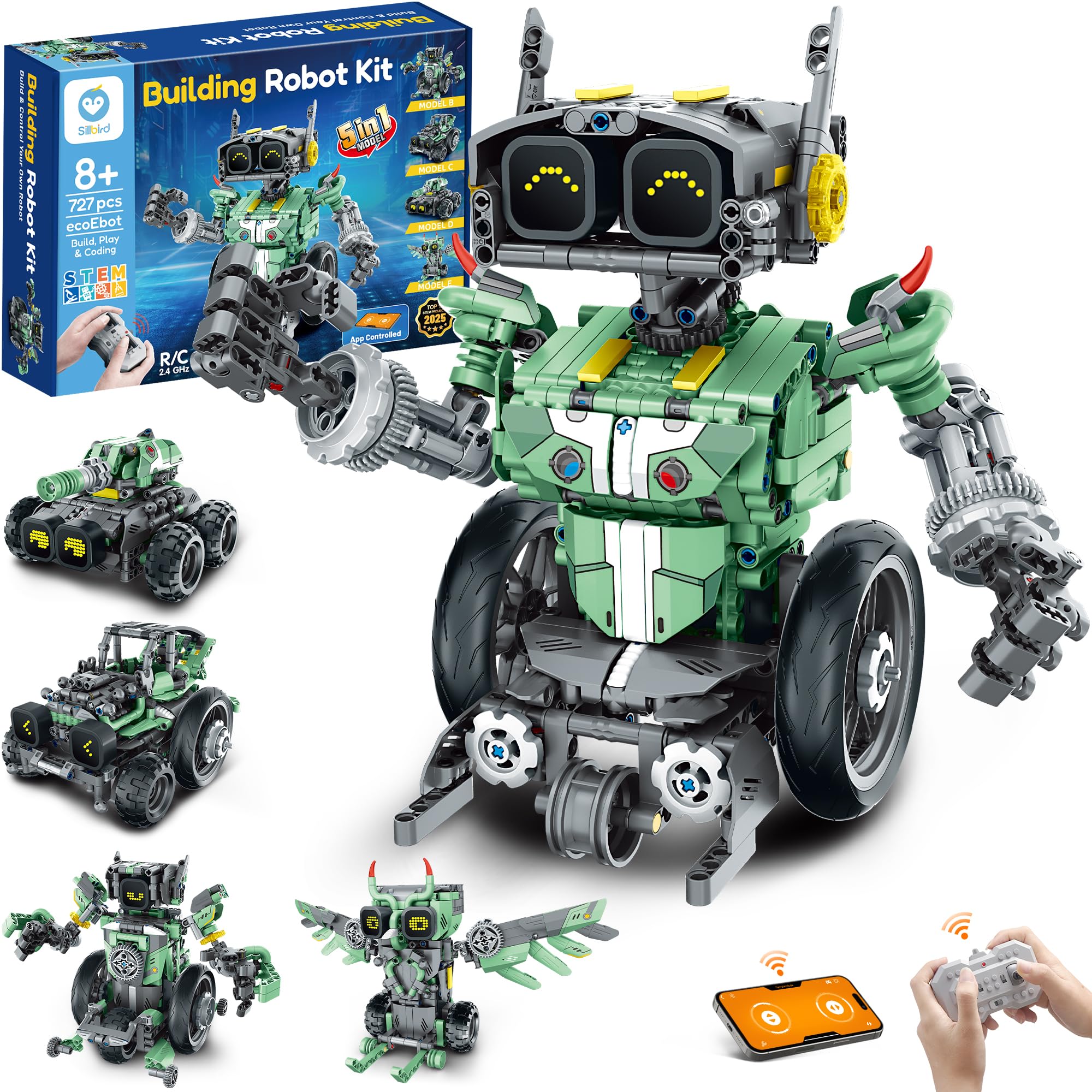
727 pieces — the marathon build of the group, for the kid who counts the parts.
This is the biggest piece count here, and that is the whole pitch. 727 pieces rebuild into five designs including a robot, car, tank, and owl. It is a long build broken into shorter ones, which suits a child who loves the assembling as much as the driving. The finished robot has LED eyes that change expression and sound effects, and it moves forward, back, and rotates. Control runs over Bluetooth app or the handheld remote.
The full-colour instruction book is one of the better ones in this group — clear enough that a confident builder can work independently and finish each model with a sense of accomplishment. The built-in rechargeable battery gives up to 40 minutes of continuous play on a single charge. It is a complete, self-contained kit: no missing parts reported on delivery, everything sealed and present. That reliability matters when the box is a birthday gift opened in front of a child.
The honest note is the app. Getting it paired can take a workaround — one owner found the robot only connected after choosing a specific 3.0 series model from the app list and pressing the Bluetooth button. If it does not connect first time, power-cycle and try again. The remote and the coding features work once connected. It is not a reason to avoid the kit, but set it up with your child the first time so they do not stall before the fun starts.
Against the 631-piece stunt Sillbird above, this wins on pieces and build time, while that one wins on raw speed and stunt play. If your child would rather build for a week than race around the room, this is the better pick.
endurance project: 727 pieces and five models make this the longest, most satisfying assembly project in the group.
heads up slow: pairing the app can take a workaround, so plan to sit with your child for the first Bluetooth connection.
10. ELEGOO UNO R3 Smart Robot Car Kit V4

A live camera feed, an onboard Arduino board, and code you can actually rewrite.
Most kits on this list stop where the coding begins. This one starts there. The robot carries an ELEGOO UNO R3 controller board and an ESP32-WROVER-based camera and Wi-Fi module, so you get live FPV video through the onboard camera. You can also line-track, avoid obstacles with the ultrasonic sensor, and auto-follow. The kit includes the motors, sensors, IR remote, and a 2000 mAh rechargeable lithium-ion battery. At 1.23 kg and 8 x 7 x 6 inches, it is the heaviest and most serious-feeling machine on this list.
The design decision that saves beginners is the wiring. Keyed XH2.54 connectors make it hard to plug a cable into the wrong slot, and the illustrated tutorial walks you from chassis assembly to first run. Assembly is what people talk about most positively — the parts are well-labelled and many builds are complete in about an hour. Then Arduino IDE opens up real programming: change the example code, give it new routes, new reactions, new sensor logic. This is a robot that keeps teaching well past the first build.
The catch is the age on the box. The recommended age is 12 years and up, with adult guidance for first-time builders, and that feels right. This is for a teen or an adult who wants to learn Arduino, or for a parent-and-child weekend project. The instructions are the most-discussed mixed point — very good for some, not clear enough for others, so plan on a slow first hour. Also know that obstacle avoidance can stall on shallow angles, and the piano-black acrylic picks up fingerprints fast.
camera vision kit: live FPV camera, ultrasonic obstacle avoidance, and Arduino IDE access make this the most technical kit here, and the 2000 mAh battery keeps it running.
wiring gets tricky: 12 years and up is the real starting line, the instructions test some beginners, and the glossy acrylic needs a wipe-down.
choose for vision: you want a genuine electronics project — Arduino board, live camera, sensors, and code you can edit.
avoid if rushed: your child is under twelve and building solo; this wants an adult guide.
11. Apitor Robot Building Kit 12-in-1
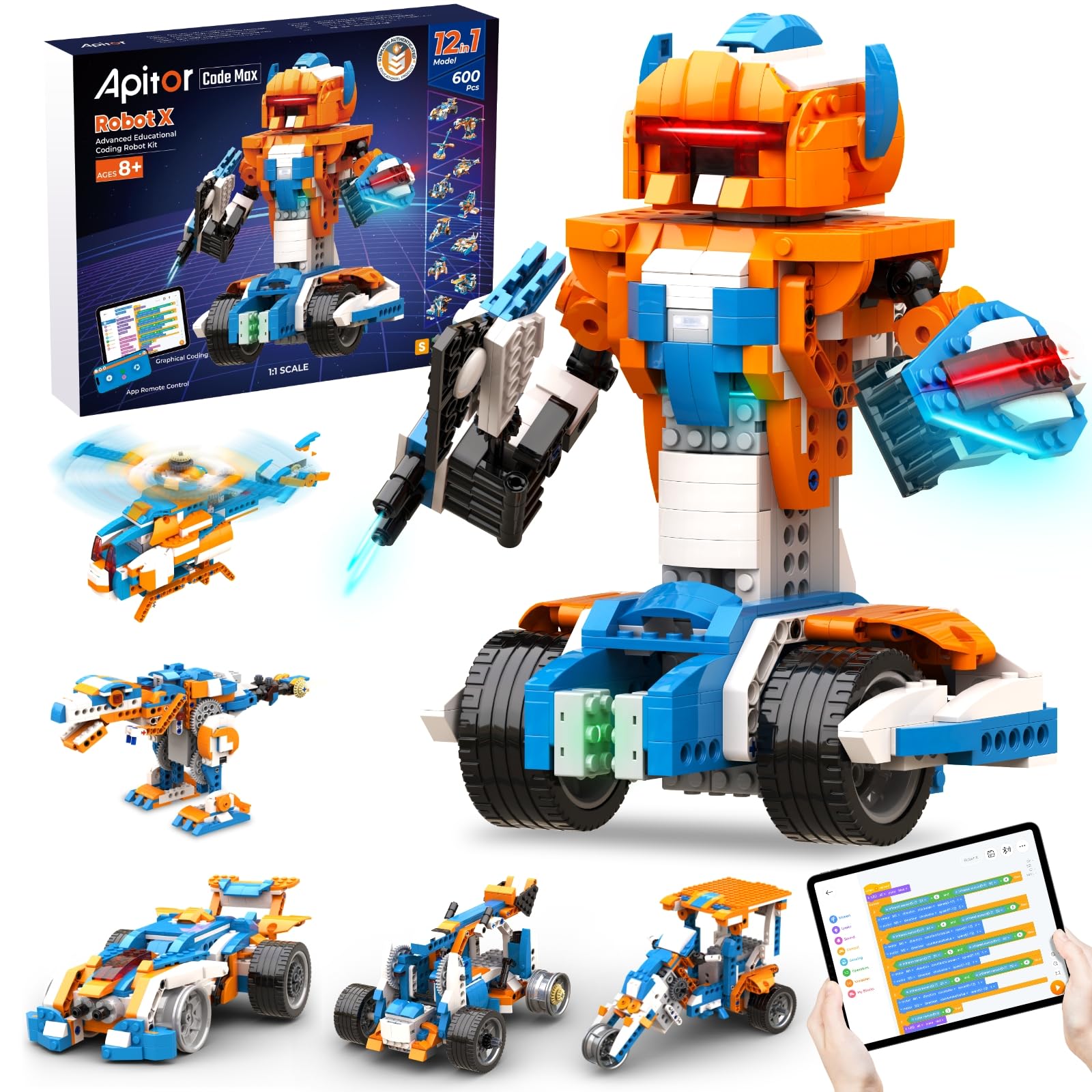
Twelve robots from one box — the kit that keeps a child busy for a whole season.
Twelve builds is the number that matters here. This set carries 600+ blocks, a control unit with 7 multicolour LED lights, 2 infrared sensors, 1 colour sensor, and 3 motors, and it all rebuilds into 12 different robots. For a child who loses interest once a kit is finished, this is the answer: the build is always new. The pieces are Lego-compatible, so they mix with the bricks already stacked under the bed. It requires 3 AA batteries, not included.
The build can get ambitious. One owner reports a full five hours on a single robot for an adult, and a nine-year-old sometimes needs dad to finish. App pairing can be slow at the start, and some of the more involved builds want an adult hand. This is the kit for the family that will treat it as a long project rather than a quick gift. The reward is twelve robots instead of one, and a coding interface a child can actually learn from.
Next to the 727-piece Sillbird, this trades single-build size for range — 600+ blocks arranged into 12 models rather than 5. If your child loves variety, that trade is very much in your favour.
most variety: 600+ blocks, 12 builds, and three motors mean the box keeps producing new robots long after a single-model kit is done.
budget extra parts: expect adult help on the first complicated build, and 3 AA batteries are not included.
Know the Specs
Piece count and build time
The piece count is the clearest signal of how long a build will take. A kit with around 430 pieces is an afternoon for a confident builder; one with 600+ stretches across several sessions. Neither is better — they suit different kids. A child who loves assembling wants more pieces. A child who wants the robot finished so they can drive it wants fewer. Match the count to the builder, and the build gets completed.
Play time per charge
Kits with a built-in rechargeable battery often quote a play time per charge, like 30 or 40 minutes. Treat that number as the real session length before the charger comes back out. It is a fair trade for not hunting for AA batteries. Kits that run on disposable batteries may last longer per session but you have to buy and replace them — and on several kits here the batteries are not included.
Remote versus app control
A handheld remote (often 2.4GHz with a range around 20 metres) gives simple forward, back, and turn driving. A phone app over Bluetooth adds modes like path drawing, gyro steering, and drag-and-drop coding blocks, and on some kits LED colours. Decide which you want: a remote is instant and reliable; an app opens up more play but needs pairing and a charged phone or tablet.
Age labels versus real age fit
The printed starting age is often optimistic. When a box says six and up, that usually means six with an adult doing the screws and wiring; the real solo age is closer to eight. For kits built around a coding board, twelve and up is closer to the truth. Buy for how your child builds, not the number on the box, and gift a kit the child canfinish with some help rather than alone.
Common Questions
How many pieces is too many for an eight-year-old?
Do these robot building kits need batteries that are not included?
What is the difference between remote control and programmable on these kits?
How long does a charge last on a rechargeable robot kit?
Are the building blocks compatible with LEGO?
Is a coding robot kit better than a plain remote-control robot?
Can a six-year-old build one of these kits alone?
How long does the finished robot keep a child interested?
Do I need a phone or tablet to use the app-controlled kits?
What safety standards should a robot building kit meet?
The Bottom Line
For most families, the robot building kits winner is the Sillbird Robot Building Kit with Remote Control because its 473 pieces rebuild into five different robots, the manual lets a child work independently, and the built-in rechargeable battery gives up to 40 minutes of play without hunting for AA batteries. If the child is a coder in the making, grab the Makeblock mBot, which builds in around 15 minutes and then teaches Scratch and Arduino. And for a builder who wants the longest project in the box, the Sillbird Robot Car Kit at 727 pieces is the one to reach for.
One last note if you are buying as a gift: the top pick is the popular one for a reason — it carries a 4.5+ star rating across 900+ ratings, which is the strongest score in this group. Buy the piece count that matches your builder, check the battery list before the wrapping paper comes out, and the build will finish in the same weekend it started.
How we choose
We do not accept paid placement. Every pick is matched to a real buyer and a real use-case; we do not hands-on test units.
Sources
Specifications: manufacturer listings and product documentation. Review insights: verified customer reviews, as of October 2026. Pricing: not shown on this page (it changes often); check the current price via the retailer link.
As an Amazon Associate, Aappliancez earns from qualifying purchases. This does not affect which products we feature.