Disclosure: Some links in this post are affiliate links. As an Amazon Associate I earn from qualifying purchases, at no extra cost to you. Learn more
Specs are compiled from manufacturer listings and verified buyer reviews and can change over time — please confirm the key details on the product page before buying.
The hardest part of a small build is not the small case — it is finding one that still swallows your graphics card, your power supply and your cooler without turning your desk into a wind tunnel. The short answer: buy a case that lists its graphics card clearance in millimetres before you buy anything else. Everything below clears that bar, and each one solves the space-versus-heat problem differently.
This guide is built by comparing the manufacturers’ published specifications and the patterns across verified customer reviews, so you get each pick’s real strengths and trade-offs instead of marketing spin.
You will see wood fronts, panoramic glass, mesh boxes with no glass at all, and one case with a carrying handle. Each entry states its real clearances so you can check your own parts list. Here is the honest, spec-first rundown of the micro atx computer case that fits your hardware and your room.
Top Picks


How To Choose The Best Micro ATX Computer Case
A Micro ATX case (often shortened to mATX) is a box built around the smaller Micro ATX motherboard size — a board that is shorter than a full ATX one but still gives you four expansion slots. The whole buying decision rests on four numbers, and all four are printed on every listing if you scroll far enough.
Start with graphics card clearance, not case volume
Your graphics card is usually the longest part in the build, so its length sets the real limit. The picks here range from 320mm of clearance up to 415mm, and a modern triple-fan card can run well past 330mm. Buy the case that clears your card with a little air left over, because the card also needs breathing room at the front.
Then check radiator and cooler height
Liquid cooling is measured by radiator size in millimetres — a “240” radiator carries two 120mm fans, a “360” carries three. Air coolers are measured by height instead, and the tall dual-tower designs often need 160mm or more. If you already own a cooler, match its number to the case’s published limit before anything else.
Decide how much glass you actually want
Mesh panels let air through and hide cable mess; tempered glass shows off your parts but traps heat unless the case also vents elsewhere. Panoramic cases put glass on the front and side, which looks dramatic and asks more of your fan layout. Pick mesh for temperatures, glass for the look.
Measure the power supply, then the desk
Full-size ATX power supplies are longer than the small-form-factor SFX type, and some compact cases only fit a short one comfortably. Check the supported power supply length and type on the listing. Finally, check the case’s own footprint: a case that fits under your desk is worth more day to day than one that technically holds more hardware.
Side-by-Side Comparison
| Model | Best For | GPU Clearance | Radiator Support | Motherboard | Amazon |
|---|---|---|---|---|---|
| Lian Li A3-mATX (A3X-WD)★ Best Overall | Big hardware in a small footprint | 415 mm | 360 mm | mATX / ITX | Amazon |
| NZXT H3 FlowTop Performer | First-time builders wanting airflow | 377 mm | 280 mm front / 240 mm top | Micro-ATX | Amazon |
| JONSBO Z20 | Moving a small rig between rooms | 363 mm | 240 mm | Mini-ITX / Micro-ATX | Amazon |
| ASUS Prime AP201 | Maximum ventilation, no glass | 338 mm | 280–360 mm | Micro-ATX | Amazon |
| MONTECH AIR 100 ARGB | Fans and lighting already installed | 330 mm | 280 mm front / 240 mm top | Micro-ATX / Mini-ITX | Amazon |
| Okinos Aqua 3 | Panoramic glass on a small desk | 320 mm | — | MATX / ITX | Amazon |
| Thermaltake View 170 TG ARGB | Dual-glass look with fans included | 340 mm | 280 mm top | Micro-ATX | Amazon |
Detailed Reviews
1. Lian Li A3-mATX PC Case
Our pick — 4.5+★ from 450+ verified ratings; the strongest balance of quality and price.
A 26.3-litre box that takes a 415mm graphics card, which is a sentence most small cases cannot finish.
That 415mm figure is the reason this case sits at the top. Grabbing a near-26-litre footprint and still clearing a 415mm graphics card is what owners describe as the “best choice for mATX mesh cases” — the old trade-off between small and capable simply is not there. It holds four internal bays against the MONTECH AIR 100’s two, and its 360mm radiator support edges past the MONTECH’s 280mm.
The other headline is the walnut wood front panel. It is a real material choice, not a printed finish, and it is the thing that pulls the eye in a room where a black box would just disappear. Around it sits steel mesh on the side and top panels, and the whole build is modular, which is why first-time builders describe it as intuitive to assemble. Fan support reaches 10 x 120mm, a number the Okinos Aqua 3 cannot approach with its 3 x 120mm allowance — though no fans come in the box, so budget for those.
The catch is cable management. It is the one aspect owners do not all agree on, and the tightness is real: the case fits an ATX board but leaves little room behind the tray, which a compact-build veteran shrugs at and a beginner will find fiddly. Plan the cable runs before you screw anything down. One owner put it plainly about the airflow result — “GPU fed from below; temps under 76°C gaming (9800X3D, RX 9070XT)” — which is the outcome the mesh panels are there to deliver.
Where it earns its place
- 415mm GPU clearance and 360mm radiator support in a 26.3L chassis
- Walnut wood front panel over steel mesh side and top panels
- Modular structure with front or side power supply mounting
- Four internal bays against the MONTECH’s two
What to plan around
- No fans included — the 10 x 120mm capacity is capacity, not contents
- Cable management is tight and the split on that point is the loudest disagreement in the reviews
- M.2 slots tucked under the graphics card are hard to reach once the build is finished
Reach for this if: you want a small desk footprint but refuse to shrink your graphics card or radiator choice.
Look elsewhere if: you are building your first PC and want generous cable room behind the tray.
2. NZXT H3 Flow — Micro-ATX Airflow PC Case, Black
The case that makes a small build feel like a full-size tower while you are working inside it.
Three graphics card numbers live on this listing and they matter. It fits a GPU up to 377mm with no front fans, 352mm with front fans, and 317mm once a front radiator and fans are in. That three-stage drop is the whole story of compact building: every cooling part you add steals length from your card. Owners call it out directly, so measure your card and pick which of those three figures applies to your plan.
Airflow is where the H3 Flow earns its name. Ultra-fine steel mesh covers the panels and the power supply shroud, which filters dust while still moving air. Cooling support reaches a 280mm radiator at the front, a 240mm at the top, and up to seven fans total. A single F120Q fan ships at the rear, so you get exhaust from the first boot rather than a bare shell.
What wins people over most is the design — it builds like a full-size tower, with routing space and tie-downs behind the tray, in a chassis that still tucks under a desk. The recurring gripe is the power supply orientation: it mounts fan-side up, which several builders find awkward mid-build but not a reason to regret the purchase. One word of warning the reviews raise is that you should confirm your card length before ordering, because this is a case where a few millimetres decide it.
Airflow-first thinking: mesh panels front to back plus a rear exhaust fan from the start make this the easiest case here to cool well without planning a fan map.
The honest trade-off: your usable graphics card length shrinks from 377mm to 317mm the moment a front radiator and fans go in, so decide your cooling before you buy.
Suits: a first or second build where you want airflow handled and cable routing that forgives a learning curve.
Think twice if: you want to front-mount a thick radiator and keep a very long graphics card at the same time.
3. JONSBO Z20 Micro-ATX Mini Tower

Slightly over 20 litres with a handle bolted on, so the rig that lives under the desk can also travel.
The carrying handle is the obvious hook, and it is genuinely detachable, so you are not stuck with a loop on top of your desk build forever. Underneath it, though, the panels are the interesting part: 2mm integrated bent steel across the panel and top, cut with a large field of square openings. That is a metal case making airflow its structure rather than bolting fans onto a solid shell.
Clearance is generous for the footprint. It takes a graphics card up to 363mm depending on other hardware, a 240mm radiator at the top with up to 60mm thickness, and a CPU air cooler up to 164mm on Intel or 163mm on AMD. Storage splits as two 2.5-inch drives plus one 3.5-inch drive, or three 2.5-inch drives. Front I/O brings one USB 3.2 Gen 1 Type-A, one USB 3.2 Gen 2 Type-C and separate audio and mic jacks.
Build quality is the praise that lands hardest — rigid, powder-coated, no sharp edges, with removable panels and racks for easy access. The friction points are smaller: storage mounting is limited, so this suits a build running NVMe drives with one or two 2.5-inch drives at most. The power light is also unusually bright, and the bottom edge of a Micro ATX board sits close enough that you want the front-panel wires connected before you seat the board.
Why it travels well
- Detachable carrying handle on a chassis of only about 20 litres
- 2mm bent steel panels with a magnetic dust filter covering the openings
- 363mm graphics card clearance and a 240mm top radiator at 60mm thickness
- All parts removable, which makes a long graphics card far easier to fit
Where it asks for care
- Storage is limited to two 2.5-inch plus one 3.5-inch drive, or three 2.5-inch drives
- The blue power LED is bright enough to notice in a dark room
- Instructions are pictorial, and the bracket removal order takes some working out
Buy it because: you move your rig between rooms or to a friend’s place, and a metal chassis with a real handle beats a glass box you carry with two hands under it.
Accept the cost: a drive-heavy build with several spinning disks is the wrong fit — this one is happiest on NVMe storage.
4. ASUS Prime AP201 Micro-ATX PC Case

A 33-litre box with more than 57,000 precision-machined 1.5mm holes in its panels.
That hole count is not decoration. The mesh design is what the AP201 is built around, and it lets the case breathe on every face while giving you a view of the parts inside — without a single pane of glass to trap heat. For a hot graphics card, this all-mesh box is built to keep temperatures down. It supports 280mm and 360mm radiators and up to six fans.
Space efficiency is the second trick. Despite the 33L footprint, it swallows ATX power supplies up to 180mm long, graphics cards up to 338mm long, and room for custom liquid cooling. Side panels come off with a clip mechanism and no tools, and the motherboard tray is extended with a 32mm gap behind it to tuck cables out of sight. Compared with the Lian Li’s 415mm clearance, the ASUS gives up some card length — 338mm against 415mm — in exchange for a taller, glass-free box.
What buyers keep returning to is the build experience: panels that pop off in seconds, dust filters on the intake faces, and cable room that never feels like a puzzle. The honest caveat is storage. The interior is tight for adding many drives, 3.5-inch mounting points do not line up in every configuration, and you may need a separate bracket. A separate note: the bottom sits low, so give it clearance if the case lives on carpet.
For the airflow purist: no glass, mesh on every panel and room for six fans means temperature control is the design goal here, not a side effect.
The storage reality: plan on M.2 and 2.5-inch drives — a stack of 3.5-inch hard disks will fight the mounting points.
Pick the AP201 if: you want the coolest-running small build with no glass to clean and no lighting to configure.
Pass on it if: you have a large hard-drive library or you want to show off your parts through a window.
5. MONTECH AIR 100 ARGB Micro ATX Case

Four 120mm ARGB fans and a controller ship in the box, so the build lights up on day one.
Most cases here make you buy cooling separately. This one does not: four 120mm ARGB fans, an included controller, and control either from a button on the case or through your motherboard’s lighting software. For a first build, that saves a fan shopping trip and an afternoon of wiring. The fine-mesh front panel pops off without tools for cleaning, and the swivel tempered-glass door opens for quick access to parts.
The chassis measures 405 x 210 x 425mm and takes both Micro-ATX and Mini-ITX boards. Clearances are 330mm for a graphics card, 161mm for a CPU cooler, and 160mm for an ATX power supply, with a 280mm radiator at the front or a 240mm on top. Cable loops and Velcro straps are pre-installed, so power and data cables have defined paths rather than a pile behind the tray.
Case quality is what people talk about, and the assembly experience backs it up — standoffs line up, panels latch tool-free, and the finish does not feel like cheap metal. Fans are the one deliberate cut: they are DC rather than PWM, so they are not speed-controlled by the motherboard, and a few builders swap them out later for quieter aftermarket ones. One buyer of the larger card fit put it simply: “great case, fits pny5080 and 240mm aio, changed all the stock fans to arctic freeze.”
Ships build-ready
- Four 120mm ARGB fans plus a controller included
- Pre-installed cable loops and Velcro straps in the box
- Tool-free fine-mesh front panel and a swivel glass door
- Top and bottom dust filters as a second barrier
Know before you click buy
- Fans are DC, not PWM, so motherboard speed control is off the table
- 330mm card clearance is the tightest of the full-tower group here
- The power supply and drive cage are tight — a modular supply and SSDs make life easier
Best for: a builder who wants the lighting and airflow settled before the first screwdriver turn.
skip it if: you plan around a graphics card much longer than 330mm or insist on PWM fan control.
6. Okinos Aqua 3 Micro ATX Case

Two panes of glass meeting at a diamond-cut corner, with the fans already spinning behind them.
The 270° panoramic design puts glass on the front and the side, which is the closest thing here to a display case. Three 120mm 3-pin ARGB fans come pre-installed — two at the top and one at the rear — laid out as a vertical airflow path. There is also a four-port ARGB controller at the back that syncs with your motherboard, and a 1.2mm steel mesh that is finer than the 3.0mm mesh common on other cases.
Practical details are strong for the footprint. The front glass releases without screws on a rivet-mounted mechanism, which reduces the chance of a clumsy break. Inside, it takes a graphics card up to 320mm and a CPU cooler up to 164mm, which covers a 4070-class card. Front I/O includes two USB 3.0 ports, audio jacks, and a Type-C 3.2 Gen 2 port rated at 10Gbps for fast transfers. Magnetic dust filters sit on the top and bottom.
Owners describe the glass as unusually clear and the side panel as sliding open with one finger. The caveats are build-material and assembly: the metal is thin, the PCIe slot covers are punch-out rather than reusable, and there is no dedicated 2.5-inch SSD mount. There is also a standoff-screw step that is fiddly on a Micro ATX board, and the top fans leave little room, so fit the CPU cooler first. As owners sum it up, it is “very well built and rivals cases that are much more expensive.”
The showpiece angle: 270° of glass plus three pre-installed ARGB fans means the case looks finished before you add a single accessory.
Build-order note: mount the CPU cooler before the top fans go in, and expect thin metal with punch-out slot covers rather than reusable ones.
Made for: a desk build where the case is on display and the lighting is part of the look.
Not made for: anyone planning multiple 2.5-inch SSDs or a card longer than 320mm.
7. Thermaltake View 170 TG ARGB Black Micro-ATX Case
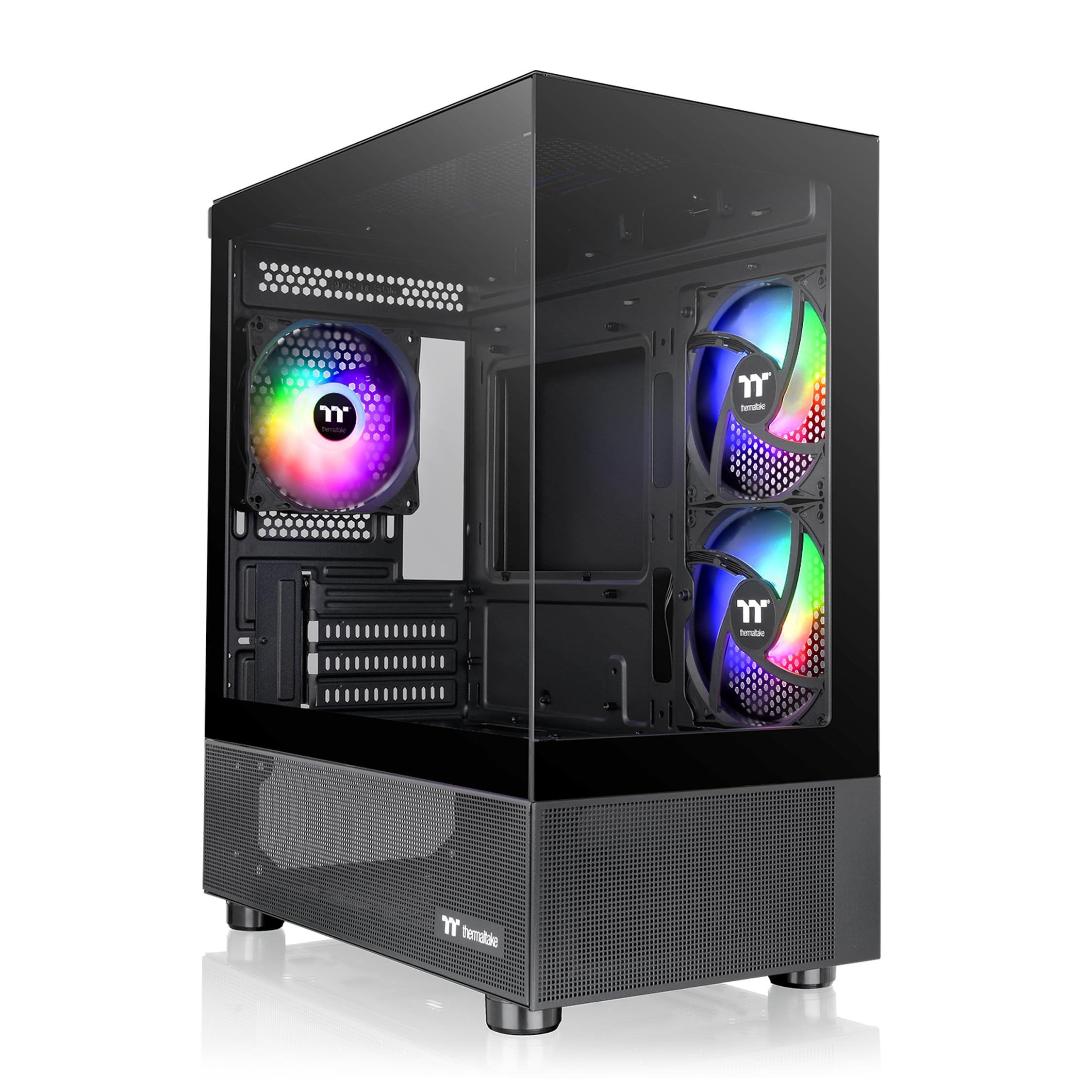
A pillarless front-and-side glass wrap with three ARGB fans already mounted and a three-year warranty behind it.
The pillarless design is the giveaway: front and side glass meet without a metal strip between them, so the corner vanishes and the build reads as one continuous panel. Three 120mm ARGB fans are included to light it, and the case supports a 280mm radiator at the top. Graphics cards clear up to 340mm, and the front I/O carries two USB 3.0 ports plus one HD Audio jack.
Assembly is the recurring good news. Owners describe plenty of cable-routing room and slot placement that makes custom lighting easy to hide. A 240mm liquid cooler goes in without drama, and the compact dimensions sit neatly on or under a desk. Cooling method support covers both air and water, and there are three internal bays.
Where you should be careful is routing around a Micro ATX board. The power supply cable has to travel up and over, and one honest note from the reviews is that a quality 24-pin extension cable makes that run far easier. Build quality splits opinion — some find it solid once fully assembled while others call it flimsy from the start. It firms up considerably once every panel and screw is in place, which is worth knowing before you judge it on the first unpacking.
What the glass buys you
- Pillarless front and side tempered glass for an uninterrupted view
- Three 120mm ARGB fans included, so lighting is solved upfront
- 340mm graphics card clearance and a 280mm top radiator
- Covered by a three-year warranty
Where to slow down
- A 24-pin extension cable helps route the power lead around a Micro ATX board
- Build quality reads as light before assembly and solid after it
- The interior gets cramped once larger components are in
Choose it when: the look of the build matters as much as the parts list and you want the fans included.
Look elsewhere when: you want a case that feels heavy and rigid the moment you lift it from the start.
Know the Specs
GPU Clearance
This is the maximum length of graphics card the case can hold, measured in millimetres. A longer number means you can fit bigger triple-fan cards without removing front fans. Watch out: adding a front radiator and fans eats into that figure on many cases, so the usable length can drop well below the headline number.
Radiator Support
Radiators are named by how many 120mm fans they carry — a 240 takes two, a 360 takes three. The listed size tells you the biggest liquid cooler the case will hold, and the placement (front or top) tells you where it goes. A 360mm radiator gives more cooling headroom but needs a longer, taller chassis.
CPU Cooler Height
Air coolers are measured by how tall they stand, and the case lists a maximum in millimetres. Tall dual-tower designs often need 160mm or more, while low-profile coolers need far less. Check this figure against your cooler before ordering, because a cooler that is even slightly too tall will not let the side panel close.
Motherboard and PSU Fit
A Micro ATX board is shorter than a full ATX one but keeps four expansion slots. Most cases here take both Micro ATX and the smaller Mini-ITX boards. Power supplies come in full-size ATX and the shorter SFX and SFX-L types; some compact cases fit only one type comfortably, and the listed maximum length is the number to check.
Common Questions
Will a full-size ATX power supply fit in a Micro ATX case?
How do I know if my graphics card will fit?
Is a 240mm or 360mm radiator better for a small build?
Do mesh panels really keep a build cooler than glass?
What is a back-connect motherboard and does it change the case I need?
Can I fit a tall air cooler instead of liquid cooling?
Are the included fans usually good enough, or should I replace them?
What is 270° panoramic glass and is it harder to build in?
How many fans can these Micro ATX cases actually hold?
Do Micro ATX cases support Mini-ITX motherboards too?
The Bottom Line
The strongest pick for most builds is the Lian Li A3-mATX, because 415mm of graphics card clearance and 360mm radiator support inside a 26.3L chassis is the hardest balancing act on this list to pull off — and the walnut front panel means you do not pay for that in looks. It also carries a 4.5+ star rating across 400+ owner reviews. If cable room matters more than card length, the NZXT H3 Flow routes more easily and ships with a rear exhaust fan. For a build that travels, the JONSBO Z20 and its detachable carrying handle are the practical answer. And if you want the lighting and airflow sorted before you open the box, the MONTECH AIR 100 ARGB arrives with four fans and a controller already wired in. Measure your graphics card against the clearance figures above and pick the case that clears it.
How we choose
We do not accept paid placement. Every pick is matched to a real buyer and a real use-case; we do not hands-on test units.
Sources
Specifications: manufacturer listings and product documentation. Review insights: verified customer reviews, as of October 2026. Pricing: not shown on this page (it changes often); check the current price via the retailer link.
As an Amazon Associate, Aappliancez earns from qualifying purchases. This does not affect which products we feature.