Disclosure: Some links in this post are affiliate links. As an Amazon Associate I earn from qualifying purchases, at no extra cost to you. Learn more
Specs are compiled from manufacturer listings and verified buyer reviews and can change over time — please confirm the key details on the product page before buying.
Your Switch cursor keeps creeping across the screen while your thumbs sit still — that is stick drift, and it is why you are here. A full-size wireless pad fixes it, and the best ones now use Hall Effect sticks (magnetic sensors that read movement without the physical contact that wears out) so the drift stops coming back every few months. Below are the seven pads that make the most sense right now, from a Pokémon-themed showpiece to a two-pack that outfits the whole family.
This guide is built by comparing the manufacturers’ published specifications and the patterns across verified customer reviews, so you get each pick’s real strengths and trade-offs instead of marketing spin.
You will see which pads wake your console from sleep, which ones actually fit smaller hands, and where each one falls short before you commit. The short answer: for most Switch owners, the right Joycons for Switch replacement is the pad that pairs in seconds, wakes from sleep, and keeps its sticks honest after a year of play.
Top Picks

How To Choose The Best Joycons for Switch
The single biggest decision is the stick technology. Standard analog sticks use physical contact that eventually grinds down, which is exactly why your original Joy-Cons drift. Hall Effect and TMR sticks use magnetic sensing instead, so there is nothing to wear out in the same way. If drift is what pushed you to shop, start there.
Wake-up and pairing: the feature you will use every single day
A pad that can wake your console from sleep means you never dig for the Joy-Cons again. On Switch 2 this is a headline feature, but it is not automatic on every third-party pad. Some require one USB-C connection to the dock first so the console remembers the controller — after that, the HOME button does the waking. Check the setup steps before you buy, because a pad that will not wake your console is half the convenience gone.
Battery: hours per charge versus swappable AA cells
Rechargeable pads list their capacity in mAh (milliamp-hours — a measure of how much charge the battery holds) and their playtime in hours. Pads that run on AA batteries sit at the other end: you never wait for a charge, but you do buy batteries. Both approaches work; match it to how you play. A pad that lives in a dock bag wants a USB-C rechargeable cell, while a family-room pad that sees constant use may suit swappable AAs.
Size and hand fit
Full-size pads do not fit everyone the same way. Several of the pads below are noticeably smaller than a standard pro controller, which helps kids and smaller hands but feels cramped to adults. Others are large and weighty, which suits big hands and long sessions but can tire small ones. Read the fit notes on each pick before you commit.
Side-by-Side Comparison
| Model | Best For | Stick Type | Battery / Playtime | Switch 2 Wake-Up | Amazon |
|---|---|---|---|---|---|
| PowerA Enhanced Wireless (Pokémon Blossom)★ Best Overall | Smaller hands and Pokémon fans | Standard analog with anti-friction rings | Up to 30 hours per charge | Yes | Amazon |
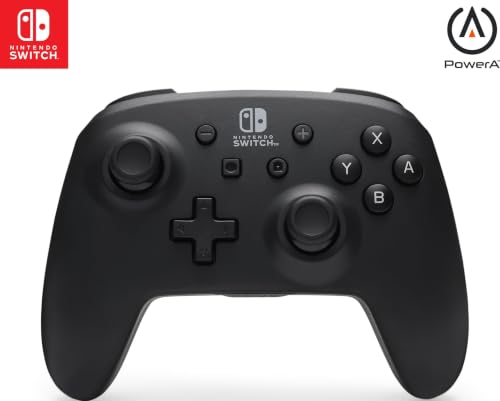
| PowerA Wireless Controller (Jet Black)Budget Friendly | Budget-friendly AA-powered backup | Standard analog | Up to 40 hours on AA batteries | Yes | Amazon |
| ZRZLMVP Wireless Switch Controllers | RGB looks and PC crossover play | Standard analog | 1200mAh, 18 hours | Yes | Amazon |
| VidPPluing 2 Pack | Outfitting two players on a budget | Standard analog | 800mAh rechargeable | Yes | Amazon |
| AceGamer 2 Pack (Hall Effect) | Two drift-free pads for the family | Hall Effect | 800mAh, 12 hours | Yes | Amazon |
| EasySMX S10C | Switch 2 voice chat and instant wake | Hall Effect | 1000mAh, up to 22 hours | Yes | Amazon |
| EasySMX S10 Elite | Pro-style features without the Pro price logic | TMR anti-drift | 1200mAh, up to 17 hours | Yes | Amazon |
Detailed Reviews
1. PowerA Enhanced Wireless Controller Pokémon Blossom
Our pick — 4.5+★ from 650+ verified ratings; the strongest balance of quality and price.
The Pokémon showpiece that still fits smaller hands — and runs 30 hours per charge.
Where this PowerA earns its spot at the top is the sheer breadth of what it does at once. The rechargeable lithium-ion cell is rated at up to 30 hours per charge — enough that you can go several long evenings without reaching for a cable. The two mappable Advanced Gaming Buttons sit on the back where your middle fingers rest, so you can move a face-button action there and keep your thumbs on the sticks. And the embedded anti-friction rings around the thumbsticks reduce the grinding feel that tends to develop on cheaper analog hardware over time.
It connects over Bluetooth 5.0 (the wireless standard the console speaks), which is the same connection the official pad uses, so pairing is quick and the input stays responsive. It is a 16-button layout — a full-size face, shoulder, and trigger set plus the two rear paddles — so nothing feels missing compared with the official controller. And it works with Switch 2, with the one documented caveat that the C button does not function here.
You buy this pad for the look — the Pikachu Blossom print is the draw, and both the print quality and the grip texture hold up. Buyers report one real caveat: as one puts it, “I love this controller and the color way but after only a couple of months of having it I am experiencing minor stick drift issues, nothing to bad but I do wish that I had more time playing on it before it started breaking down.” Stick drift can hit any standard analog pad — which is exactly why the Hall Effect picks further down exist. If drift is what you are escaping, weigh that against the Pokémon print before you decide.
What makes it feel like the right buy
- Up to 30 hours per charge on the built-in rechargeable cell, so you rarely chase a cable
- Two mappable Advanced Gaming Buttons on the back, plus anti-friction thumbstick rings
- Official Pokemon Blossom design that buyers consistently call gorgeous and collector-worthy
- Ergonomic grips that suit smaller hands, with a 16-button layout that matches a full pro pad
What to know before you commit
- Standard analog sticks, so drift can develop over time on any unit — this is not a Hall Effect pad
- The C button is inactive on Switch 2
- 8-ounce weight is a touch heavier than a stripped-down pad, though that is why it feels planted
Pick this one if: you want a beautifully finished, officially licensed pad with the longest battery life on this list and a layout that suits smaller-handed players.
Look elsewhere if: drift prevention is your top priority — the Hall Effect picks below address that directly.
2. PowerA Wireless Controller Jet Black
The AA-powered pad that runs 40 hours and never asks you to plug in.
Here is the cleanest way to think about this one: it is the pad for the household that keeps a pack of AA batteries in a drawer and hates remembering to charge things. Two fresh alkaline AA batteries get you up to 40 hours of play — the longest stated runtime on this list. Swap in rechargeable AA cells and you never buy disposables again. That 40 hours makes it the outright endurance leader against the 18 hours of the ZRZLMVP further down; if battery chores are your pet peeve, that gap is meaningful.
You get fewer buttons to work with — 9, against the 16 on the Enhanced Pokémon pad above. Nothing essential is missing, though: you still get precision-tuned analog sticks, a full-size D-pad, ABXY, and L/R/ZL/ZR shoulder buttons. What you do not get is rear mappable paddles, HD rumble, an IR camera, or Amiibo NFC support — the pad simply does not include those features. What it does include is a 7.04-ounce body, 14% lighter than the Enhanced Pokémon model. Buyers find that quick to swing around and easy to hold on longer sessions, though it can feel less substantial in a larger palm.
The tone in the review pages is warm on the fundamentals — crisp connectivity, comfortable grip, and quick pairing. But durability is genuinely mixed; a vocal handful report stick drift and joystick trouble at heavy-use intensity, and the AA cover and plastic finish get neglected attention. Treat this as an excellent-value everyday pad and mind the sticks, and it will serve. Go elsewhere if you put in daily Fortnite-level hours and expect years of flawless sticks.
Where it shines: up to 40 hours on AA, 9-button layout with a full-size D-pad and precision analog sticks, all for a budget price with a 2-year limited warranty. Fast pairing, no input lag, and it works on Switch 2, Switch, Switch Lite and OLED.
The honest note: durability is the recurring question mark — a small share of owners mention stick drift and fast joystick wear under heavy play. It is a super value for casual sessions; if you race Fortnite daily, plan on replacing it or stepping up to a Hall Effect pad.
Perfect for the shared living-room pad: AA power, 40-hour runtime, and a budget price make it easy to stock two.
Think twice if: you want rear buttons or HD rumble, or put in daily heavy play where stick wear is a real risk.
3. ZRZLMVP Wireless Switch Controllers

A galaxy-print pad that lights up in ten modes and runs 18 hours per charge.
You get up to 18 hours of play per charge from the 1200mAh rechargeable cell (mAh measures how much charge a battery holds) — and that is with the LED lighting switched on. A flat battery refills in about 2-3 hours over USB-C, so a dead pad is a coffee break rather than a lost evening. It also plays while charging, so you never truly stop.
Where the ZRZLMVP earns its keep is the customisation for the competitive-curious player. Twenty buttons in total, and the two rear macro buttons can be mapped from up to 21 inputs — including stick clicks and D-pad directions, not just ABXY. Turbo runs at three speeds: 6 shots per second, 10 shots per second, and 20 shots per second. You also get a 6-axis gyro (the motion sensor that lets you steer by tilting the pad) and four levels of vibration. That is a lot of mechanical control for the price tier.
The looks are the point for a lot of buyers — the cosmic nebula finish and ten lighting modes make it the flashiest pad on this list. Where it can disappoint is button responsiveness; some players report glitches under heavy use, and durability is a mixed report. Treat it as a fun, feature-rich pad rather than a tournament-grade stick, and it rewards the asking money well.
What it brings: 1200mAh battery for 18 hours of play, 20 buttons with programmable N1/N2 rear macros, three turbo speeds, 6-axis motion control, and 10 LED light modes on a Starry Blue nebula finish. Works across Switch, Switch 2, OLED, Lite, iOS, Android, and Windows.
The caveat: button responsiveness is the recurring weak spot — glitches under hard play and occasional inconsistent durability show up in the review mix. Fine for arcade, action, and casual play; less ideal for precision tournament sticks.
The choice for show-offs: a 10-mode light show and 20-button macro setup that turns heads and handles arcade twitch games with ease.
Hold back if: you want certainty on button feedback — for precision play the Hall Effect pads further down feel tighter.
4. VidPPluing 2 Pack Switch Controllers
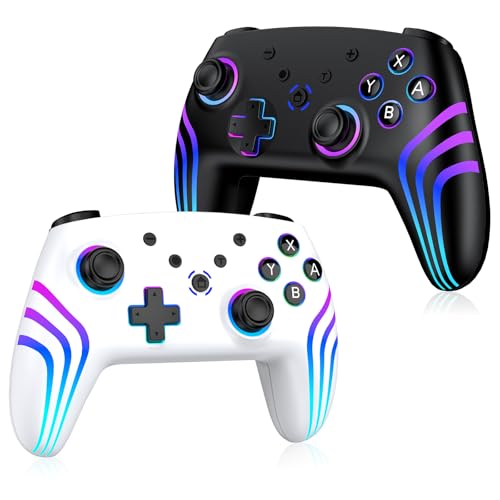
Two RGB-lit pads in one box, so a second player never has to sit out.
The whole reason to look at this set is the number two — you get two wireless controllers for one purchase, which is what a family with siblings or a regular couch co-op pair actually needs. Each pad carries an 800mAh rechargeable cell with play-while-charging support, low-battery alerts, and auto-sleep after 5 minutes of inactivity so an unused pad does not quietly drain itself. Thirteen buttons, dual vibration motors with four intensity levels (100%, 75%, 50%, off), and turbo on the A/B/X/Y and 7 other keys at three speeds.
Where it gets fun is the RGB — flowing colours, breathing effects, and solid colours all adjustable in brightness and hue. Owners call the lighting a genuinely fun touch rather than a novelty, and the thick textured handles make the pad easy to keep hold of through a long session. Motion control covers the tilt-and-twist games, and it works across Switch, Switch 2, Lite and OLED, plus Android, iOS, and PC.
Pairing is the honest sticking point. Some units connect first try; others need a specific order — plug in over USB-C in handheld mode, toggle the Bluetooth setting, then use the Change Grip/Order screen. Once connected it is stable, and battery life gets called long-lasting. The joy-sticks also occasionally miss a small aim correction, so treat this as a family co-op set rather than a competitive pad.
Reasons families grab this set
- Two controllers in one purchase, so co-op is covered from day one
- 800mAh battery with play-while-charging and auto-sleep after 5 minutes idle
- Adjustable brightness/hue RGB lighting across flowing, breathing and solid modes
- Thick textured handles and four-level vibration for comfortable long sessions
What to set expectations on
- Pairing can need a specific USB-C-first sequence before it sticks
- Joysticks occasionally miss small aim adjustments, so not a precision-shooter pick
Grab the pair if: you regularly play with a partner or kids and want two fun RGB pads without doubling your spend on a single pad.
Skip the pair if: you play competitive shooters where every stick input needs to land precisely.
5. AceGamer 2 Pack Wireless Controller

Two Hall Effect pads for the price of one — the drift problem, genuinely solved.
Hall Effect sticks use magnetic sensing rather than physical contact, which solves the drift problem instead of just delaying it. AceGamer rates its sticks for up to 5 million rotations. That rating is far beyond normal play, which is why this pair belongs near the top for anyone whose last pad died from drift. That is the direct contrast with the standard-analog Pokémon Blossom pad above — faster tracking, longer-lived sticks.
You get two pads — red and blue, matching Switch neon — in one purchase. Each carries an 800mAh rechargeable cell rated for 12 hours of continuous play, with a 3-4 hour charge over the included USB-C cable. The 6-axis gyro handles motion-control games, and you get one-button vibration cycling through four levels (0%, 30%, 70%, 100%). The M1/M2 programmable buttons can be assigned from up to 16 inputs, with single or multi-assignment modes, and turbo runs at 5, 12, and 20 shots per second.
Pair it first with your hands off the sticks — touch them during pairing and the pad can be misread and show drift until you reconnect. Do that and you get a crisp connection with no lag. A few customers note occasional Mario Party incompatibility, and one controller in a handful of pairs glitches for a few seconds. Treat that as a fit note rather than a pattern, since the vast majority work straight through four-hour sessions.
Why the sticks matter most: Hall Effect joysticks rated for up to 5 million rotations (magnetic sticks that resist the wear that causes drift), plus 6-axis gyro (motion sensing for tilt controls), four-level vibration, M1/M2 programmable buttons with turbo on three speeds, and 800mAh for 12 hours — two of them in the box.
Setup quirk worth knowing: pair before touching the sticks, or the pad can show a drift reading until you reconnect. A few report Mario Party incompatibility and occasional joystick glitches — most pairs run without a hitch.
Choose this for confidence: two drift-resistant pads in red and blue for the whole family, backed by a 1-year warranty.
Not for you if: Mario Party is your main game, or you want a compact pad — these sit larger than the original Joy-Cons.
6. EasySMX S10C Wireless Switch 2 Pro Controller
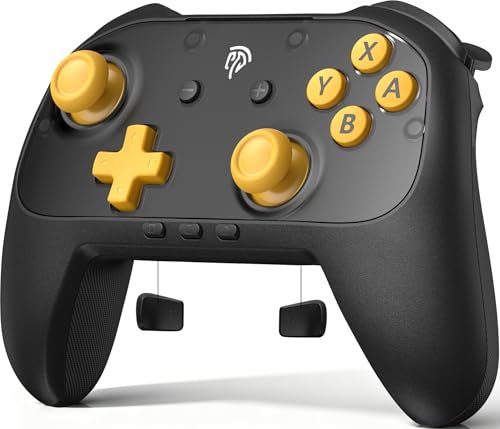
The 22-hour pad with a working C button and a one-press wake on Switch 2.
This is the pick for the player who actually uses what Switch 2 adds. The C button enables in-game voice chat — something several third-party pads simply strip out — and the one-press wake means the controller powers the console from sleep without fumbling for the originals. That combination puts it ahead of the PowerA picks above if Switch 2 is your main console and you play online with friends.
Under the shell it is a genuine upgrade. Hall Effect sticks resist drift by design, and silicone glide rings cut the friction so the sticks move smoothly through long sessions. You get 9-axis motion control (the sensor setup for aiming, steering, and swinging), two programmable rear buttons, mechanical ABXY buttons with a satisfying clicky feel, adjustable vibration, and swappable faceplates. The 1000mAh battery is rated for up to 22 hours per charge, which sits well above the 12-hour AceGamer pair.
The honest caveat is hand size. This is a full-size, weighty pad — one buyer notes it is not ideal for small hands, and can tire a smaller grip quickly, though larger hands find it comfortable. If smaller hands are the household norm, the Pokémon Blossom pad at the top is the better fit. Everyone else gets a controller that buyers describe as exceeding the official Pro pad on feel for the price — a genuine third-party stand-in rather than a compromise.
what separates it: Hall Effect sticks with silicone glide rings (smooth collars that keep the stick moving freely), 1000mAh for up to 22 hours, a C button for voice chat, 9-axis motion control, swappable faceplates, and mechanical ABXY buttons — plus one-press wake on Switch 2.
Where it may not fit: it is a large, weighty pad, so smaller hands will find it cumbersome. It does not include a charging dock, and the hard-plastic finish is not as plush as the Pro pad materials.
Reach for this if: Switch 2 is your main machine and you want voice chat, instant wake, and drift-resistant sticks in one pad.
Look at the smaller pads if: your players have small hands — this one is built for an average-to-large grip.
7. EasySMX S10 Elite Wireless Controller
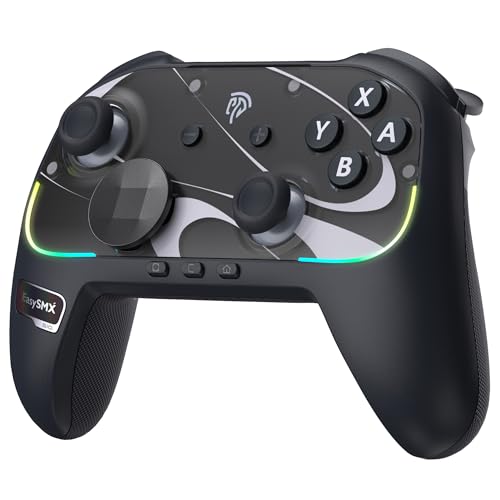
Magnetic TMR sticks, NFC for Amiibo, and a pro pad’s feature set in one shell.
TMR joysticks are the headline here. They use magnetic modules instead of the physical contact that wears down in standard analog sticks, so they cut wear and drift over time and give smoother, more precise control. If drift keeps recurring, this is the cleanest break from it on the list — and it adds NFC (for Amiibo figures), a swappable D-pad, magnetic faceplates and adjustable RGB lighting over the Hall Effect S10C above.
The rest of the package is deep. Seventeen buttons, two programmable rear buttons, mechanical micro-switch face buttons with crisp tactile feedback, 6-axis motion control for aiming and swinging, HD rumble, and NFC for Amiibo figures. A 1200mAh rechargeable cell is rated up to 17 hours per charge over USB-C. Multi-device support covers Switch 2, Switch, PC, iOS, and Android, so the same pad can follow you from the TV to a laptop.
What keeps this honest is one recurring gripe: the triggers are digital micro-switch buttons, not analog, so racing games lose the fine throttle control that analog triggers give you. A few also note a faint input delay versus Joy-Cons in timing-sensitive games, and at least one unit had a trigger fail — which the maker’s support resolved. For a fighting-and-platforming library that is a non-issue, and for Switch 2 players who want the Pro-controller feature set without the Pro price, few pads come this close.
The headline: TMR anti-drift joysticks rated to reduce wear over time, 17 buttons, NFC for Amiibo, swappable D-pad, magnetic faceplates, adjustable RGB, HD rumble, and 6-axis motion — 1200mAh for up to 17 hours.
The trade-off: triggers are digital micro-switches rather than analog, so racing games lose throttle finesse, and some players notice slight input lag versus Joy-Cons. A handful had a trigger issue, which EasySMX support addressed.
Buy this for the full pro feature set: TMR sticks, NFC, mechanical buttons, and swappable faceplates at a premium tier that still undercuts the official Pro pad logic.
Think again if: racing games dominate your library — the digital triggers will hold you back on throttle control.
Know the Specs
Hall Effect vs TMR vs standard analog sticks
Standard analog sticks use a physical contact that wears down over time — that slow grinding is what causes drift. Hall Effect sticks sense movement with a magnetic field instead, so there is no contact to wear, which is why pads like the AceGamer pair and the EasySMX S10C resist drift. TMR sticks on the S10 Elite use a magnetic module design that reduces wear over time while keeping power draw low. When you are choosing, look for Hall Effect or TMR explicitly in the specs.
Battery capacity in mAh and playtime in hours
Milliamp-hours (mAh) measure how much charge a battery holds, not how long it lasts on its own. Two pads with the same mAh can hit different playtime depending on the chip and lighting in use — the 1200mAh ZRZLMVP gets 18 hours, the 1200mAh S10 Elite up to 17 hours, and the 1000mAh S10C up to 22 hours. Rechargeable pads top up over USB-C in a few hours; AA-powered pads like the Jet Black swap in fresh cells and never wait.
Wake-up, pairing order, and the USB-C first-connection trick
On many third-party pads, the console remembers the controller only after a first wired pairing over USB-C, which enables the HOME button to wake it from sleep on later sessions. That one setup step is what separates constant re-pairing from instant play. The S10 Elite spells out its own sequence: hold HOME for three seconds in S mode until the LED flashes, then use Change Grip/Order on the console.
Motion control, rumble, and gaming extras
Motion control uses a gyro sensor (the 6-axis or 9-axis array that detects tilt and rotation) to steer or aim by moving the controller — essential in games built around it. Rumble is the vibration feedback, and the better pads let you dial it from off to strong. Extras like turbo, programmable rear buttons, and NFC for Amiibo figures add flexibility; NFC is specific to the S10 Elite, while the PowerA Jet Black does not support HD rumble, IR camera, or Amiibo NFC.
Common Questions
Will these third-party controllers work with the original Switch as well as the Switch 2?
Do Hall Effect joysticks actually fix drift, or do they just delay it?
Why does my new controller act like it has stick drift right after pairing?
Can a third-party controller wake the Switch from sleep?
Which controller is best for kids or smaller hands?
How long does a rechargeable controller battery take to charge?
Do these controllers support Amiibo and HD rumble?
Can I use these controllers with PC, phone, or other devices?
What are programmable back buttons and turbo actually used for?
Do these pads work in Mario Party and motion-control games?
The Bottom Line
For most Switch owners shopping for joycons for switch, the winner is the PowerA Enhanced Wireless Controller. It pairs the longest battery life here — up to 30 hours per charge — with an officially licensed Pokémon Blossom finish, 16 buttons including two rear mappables, and grips that suit smaller hands. If drift is the specific problem you are escaping, grab the AceGamer 2 Pack, which puts two Hall Effect-sticked pads in the box at one friendly price point. And for the Switch 2 owner who wants the full pro feature set with TMR sticks and Amiibo NFC, the EasySMX S10 Elite is the one to reach for.
How we choose
We do not accept paid placement. Every pick is matched to a real buyer and a real use-case; we do not hands-on test units.
Sources
Specifications: manufacturer listings and product documentation. Review insights: verified customer reviews, as of October 2026. Pricing: not shown on this page (it changes often); check the current price via the retailer link.
As an Amazon Associate, Aappliancez earns from qualifying purchases. This does not affect which products we feature.