Disclosure: Some links in this post are affiliate links. As an Amazon Associate I earn from qualifying purchases, at no extra cost to you. Learn more
Specs are compiled from manufacturer listings and verified buyer reviews and can change over time — please confirm the key details on the product page before buying.
The best gaming system for seniors is the one with a screen you can actually see and buttons that co-operate on the first press. Most retro handhelds sold today are designed for young thumbs and tiny text, which is exactly the problem this guide solves. Below are five systems that put readability, simple controls, and familiar games first — plus honest notes on where each one asks a bit of patience.
This guide is built by comparing the manufacturers’ published specifications and the patterns across verified customer reviews, so you get each pick’s real strengths and trade-offs instead of marketing spin.
You’ll see how screen size, paddle controls, and battery life separate these machines, so you spend on the one that fits your hands. The picks below show what separates a gaming system for seniors from a shelf full of cramped toys.
Top Picks
How To Choose The Best Gaming System for Seniors
Start with the screen, not the game list. A console crammed with thousands of titles is useless if you cannot make out the score in Asteroids or read a menu without leaning in. The first thing to check is the diagonal measurement in inches, because that number decides whether you play comfortably from an armchair or squint from six inches away.
Screen size and resolution you can read from the couch
A 4.3-inch screen (measured corner to corner) is pocket-sized and sharp, but it demands close focus. A 7-inch panel gives you roughly half again the picture area at the same distance, which is the difference between relaxed play and a headache. Resolution follows the same logic: a 1024×768 panel (that’s the count of pixels across and down) keeps text and sprites crisp, while a 720×1280 panel on a 4.96-inch screen is denser still and rewards close-up play.
Controls that respect stiff hands
The control layout matters as much as the screen. Games built for a paddle (a knob you twist) or a trak-ball (a rolling ball set into the deck) are far gentler on the hands than a d-pad you have to mash repeatedly. Look for a system that includes the original-style input for the games you loved — a spinner for Breakout, a trak-ball for Centipede — rather than forcing everything onto a stiff thumb pad.
Battery life and how you’ll power it
Battery capacity is quoted in mAh (milliamp-hours — a bigger number means a longer run between charges). A 4000mAh or 5000mAh pack typically carries you through an evening of play. If you’d rather not think about charging at all, note whether the unit runs on standard AA or AAA batteries you can swap in seconds, or a built-in rechargeable cell you plug in.
Playing on the big TV instead
An HDMI port lets you pipe the console into your living-room set, turning a handheld into a proper home machine. For anyone who wants to play with grandchildren on a 55-inch screen instead of hunched over a 4-inch one, that port decides the purchase. Check the listing for HDMI output before you commit.
Side-by-Side Comparison
| Model | Best For | Screen Size | Storage | Power | Amazon |
|---|---|---|---|---|---|
| My Arcade Atari Gamestation Go★ Best Overall | Big-screen nostalgia | 7 inches | 5 GB | Built-in rechargeable battery | Amazon |
| RG43H Pro Retro HandheldBiggest Library | Huge game library | 4.3 inches | 64 GB | 4000mAh battery | Amazon |
| Trimui Smart Pro | Crisp compact screen | 4.96 inches | 64G TF card built in | 5000mAh battery | Amazon |
| Teacher’s Choice Buzzer System | Group trivia nights | — | — | 2 AA per buzzer, 2 AAA console | Amazon |
| JubileeTV Remote Care System | Family connection | — | — | Alkaline batteries | Amazon |
Detailed Reviews
1. My Arcade Atari Gamestation Go
Our pick — 4.0+★ from 400+ verified ratings; the strongest balance of quality and price.
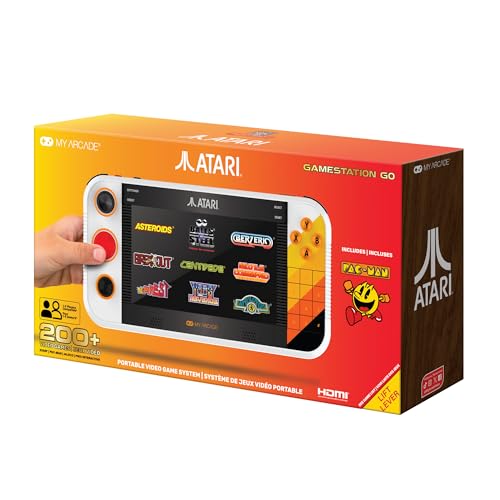
A 7-inch Atari deck with a real paddle, so Breakout finally feels like Breakout again.
The screen is the whole argument here. That 7-inch full-color display is the largest in this group, and it sits well above the 4.3-inch panel on the RG43H Pro below. For anyone who has given up on handhelds because the score is a blur, a picture this size means you play from a comfortable distance instead of leaning in. It is also lightweight for its size, with the layout spread out rather than jammed together.
The bigger draw is the controls. Alongside the d-pad and gamepad buttons, this unit carries an integrated paddle (a knob you twist) and a trak-ball (a rolling ball set into the deck), plus a numeric keypad and bumpers. That means Centipede plays on the spinner it was built for, and Breakout responds to a proper paddle rather than a thumb pad. One 64-year-old left-handed player was so taken with Centipede and the pinball bumpers that they ordered a second controller for two-player games. That same 64-year-old player found the spread-out layout comfortable and the paddle and trak-ball responsive.
What wins people over is the plain fun of the thing — the Atari titles land exactly where the nostalgia lives, and switching it to a 55-inch TV over HDMI turns it into a family-room machine. A built-in rechargeable battery keeps it portable, and Wi-Fi handles firmware updates. The catch is reliability: some units glitch or freeze, so treat it as a device that may need a restart now and then. The value question is real too, and the included game list has gaps — Defender, Ms Pac-Man and Space Invaders are absent, and the Pac-Man control takes some getting used to.
What earns its place up top
- 7-inch screen is the biggest here, so text and scores stay readable
- Integrated paddle and trak-ball for the games that need them
- HDMI output to the living-room TV
- A built-in rechargeable battery and Wi-Fi for updates
Where it asks patience
- Some units arrive glitchy or freeze mid-game
- The game list skips several famous Atari titles
- Pac-Man control is fiddly with the standard pad
Reach for this if: you want the biggest screen and true paddle-and-trak-ball play for a lifetime of Atari favourites.
Look elsewhere if: you need a rock-solid unit that never needs a restart, since reliability is the fair caveat here.
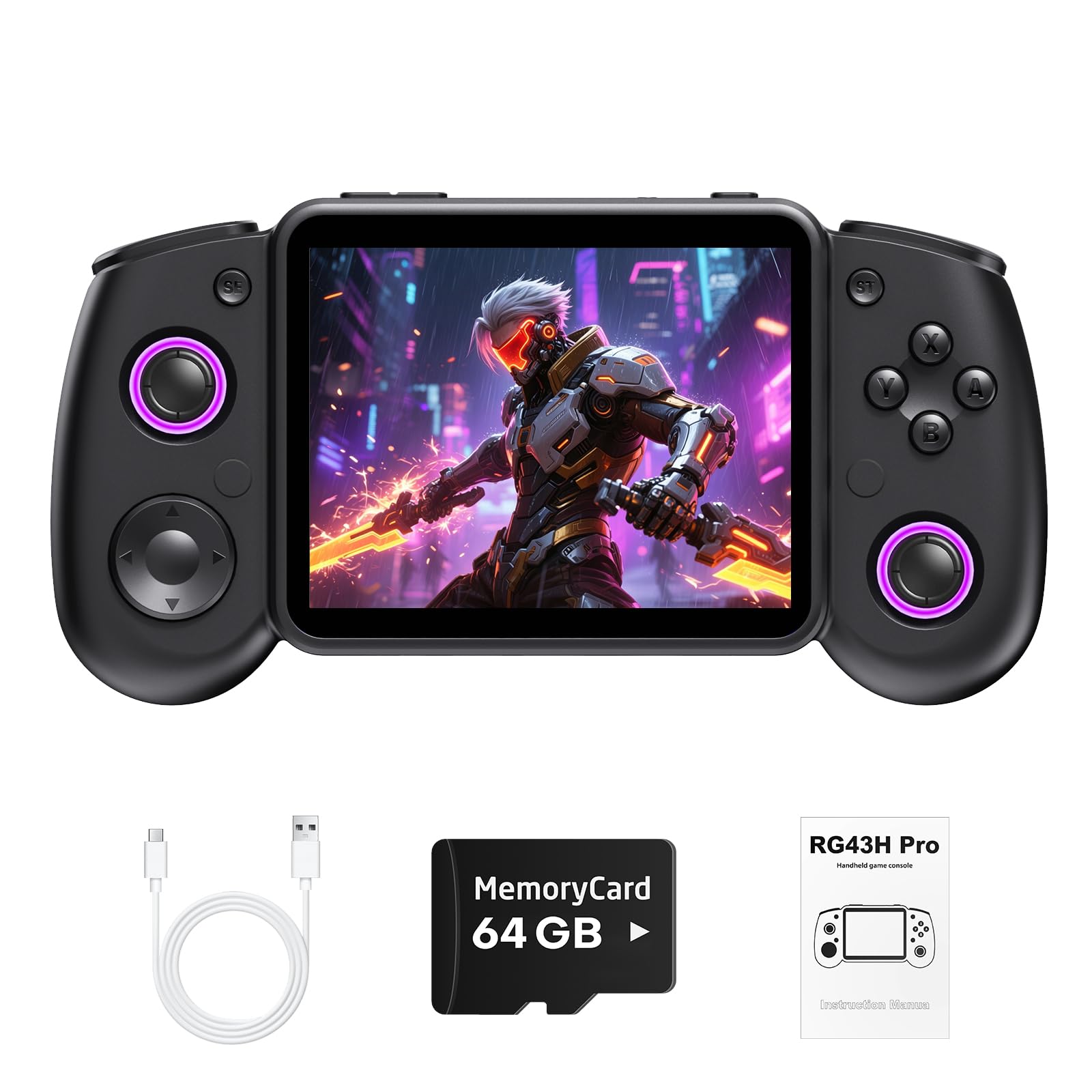
2. RG43H Pro Retro Handheld Game Console
Two systems in one shell, with 5,000 games ready before you touch a cable.
If the appeal of a retro handheld is sheer volume, this is the one to study. It boots into EmuELEC (an open-source retro gaming system) with 5,000 games already loaded, then switches to a second system where you can browse and download 20,000+ more over 2.4G WiFi. The 64GB of storage outpaces the Atari’s 5GB, and it grows to 512GB with a card. The screen is a 4.3-inch IPS panel at 1024×768, which is bright and colourful but noticeably smaller than the 7-incher above — read the score from close range.
Inside sits a Rockchip RK3562 quad-core processor, and the point of that chip is smooth play on 3D titles and ported games, not just the 8-bit classics. You also get dual 3D joysticks, shoulder buttons, a vibration motor for tactile feedback and RGB ambient lighting on the sticks. A 4000mAh battery covers a long session, and HDMI output lets you push it to a TV. The honest catch, summed up plainly by buyers: ‘Good for what it is but not for me. Too many old junk games.’ The library is vast, but it is not curated, so a good share of what you scroll past will not interest you.
The library math: you get 5,000 games already loaded plus 20,000+ you can download — the largest collection in this guide by a wide margin. WiFi (a wireless internet connection) means you never need a PC to add more.
What to weigh: the 4.3-inch display and the mixed-bag catalogue mean this suits a tinkerer who enjoys sorting through games, not someone who wants five favourites and nothing else.
Best matched to: the player who gets a kick out of exploring a massive catalogue and doesn’t mind filtering out the filler.
Think twice if: a big, easy-to-read screen is your priority, because this panel is the smallest of the retro handhelds here.
3. Trimui Smart Pro Game Console, 4.96-Inch 720×1280 IPS Screen
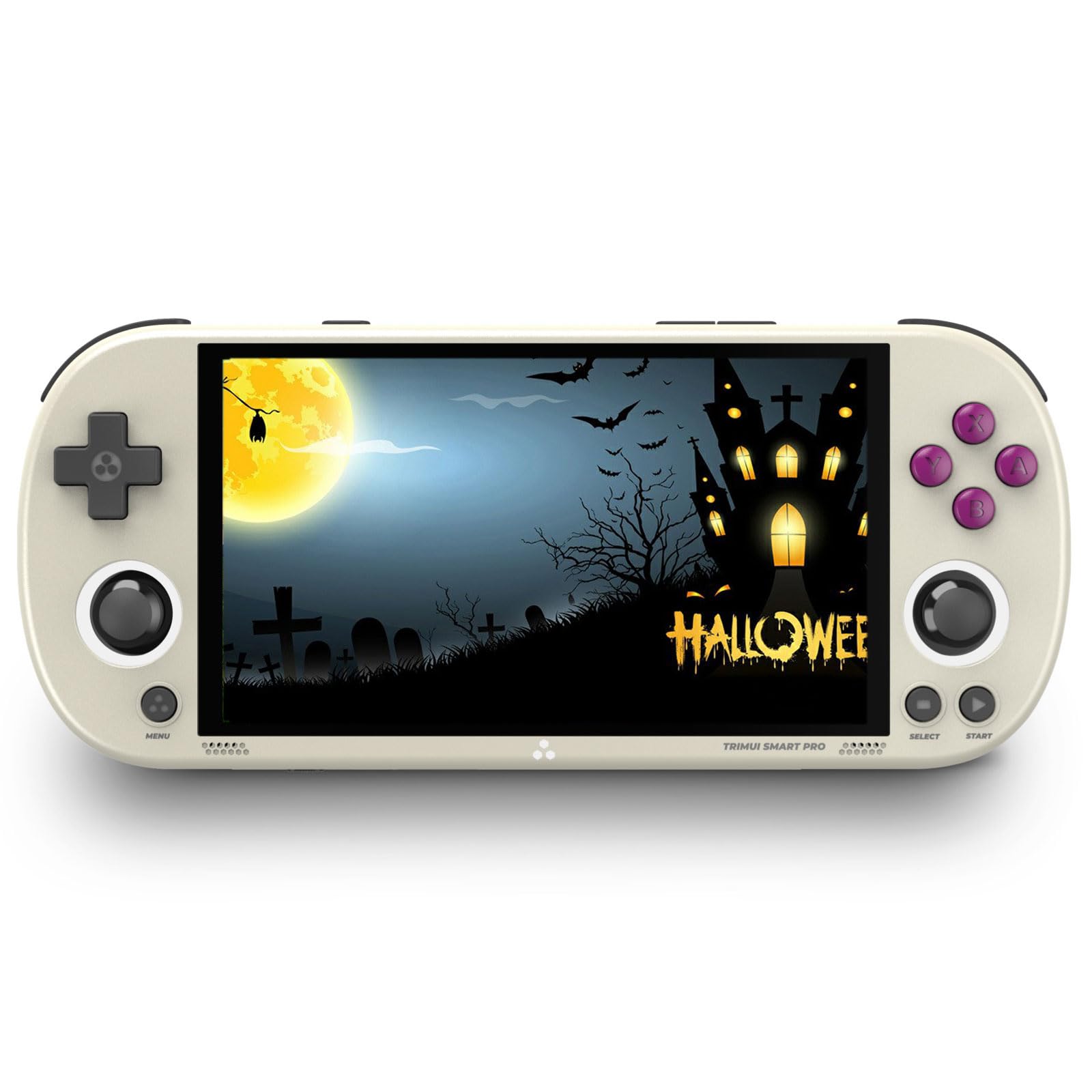
A 4.96-inch laminated screen that stays sharp, paired with a battery that just keeps going.
The display is where this one earns attention. It is a 4.96-inch IPS panel at 720×1280 with OCA full lamination (the glass is bonded to the screen, which cuts glare and keeps colors punchy). That pixel count is denser than the 4.3-inch 1024×768 panel on the RG43H Pro, so close-up play looks cleaner. The frame itself measures 8.2 x 4 x 1.6 inches against the RG43H’s 7.2 x 3.2 x 0.81 inches — bigger and chunkier, but easier to grip for a long session.
You get long play sessions without hunting for a charger. A 5000mAh lithium battery (a rechargeable pack rated in milliamp-hours, a measure of capacity) is rated for 6 hours, and one owner reported ‘Good battery (70% after hours).’ Inside, an A133plus Cortex-A53 quad-core processor (a chip with four cores that runs up to 1.8GHz) drives a Linux-based interface, so it handles more than 20 game formats across multiple simulators (software that mimics older consoles). A 3.5mm headphone jack lets you play without disturbing anyone, and an external Wi-Fi module (a plug-in wireless adapter) supports online multiplayer. Charging runs through USB-C at 5V/1.5A, and you can charge it while it’s off.
Here is the snag worth knowing before you buy: it does not ship with a memory card, so you bring your own SD card. Adding games means a new card, some file-management work and possibly an adapter — doable, but not plug-and-play. The preloaded selection leans heavily on Neo Geo with some Sega and a few PSP/PS1 titles, and SNES or N64 have to be added yourself. The games are also mostly old classics, which suits someone chasing memory lane and less so a younger player.
The screen and stamina story: a high-density laminated 4.96-inch display plus a 6-hour 5000mAh battery make this the long-session pick for crisp, close-up play.
The setup tax: no SD card in the box means some homework before the fun starts, so budget an evening for tinkering.
Go this route when: you want the sharpest picture and the longest battery stretch, and you’re happy to load your own games.
Pass if: you want to switch on and play with zero file work — the missing card and manual setup will frustrate.
4. Teacher’s Choice 4 Player Wireless Handheld Game Buzzer System
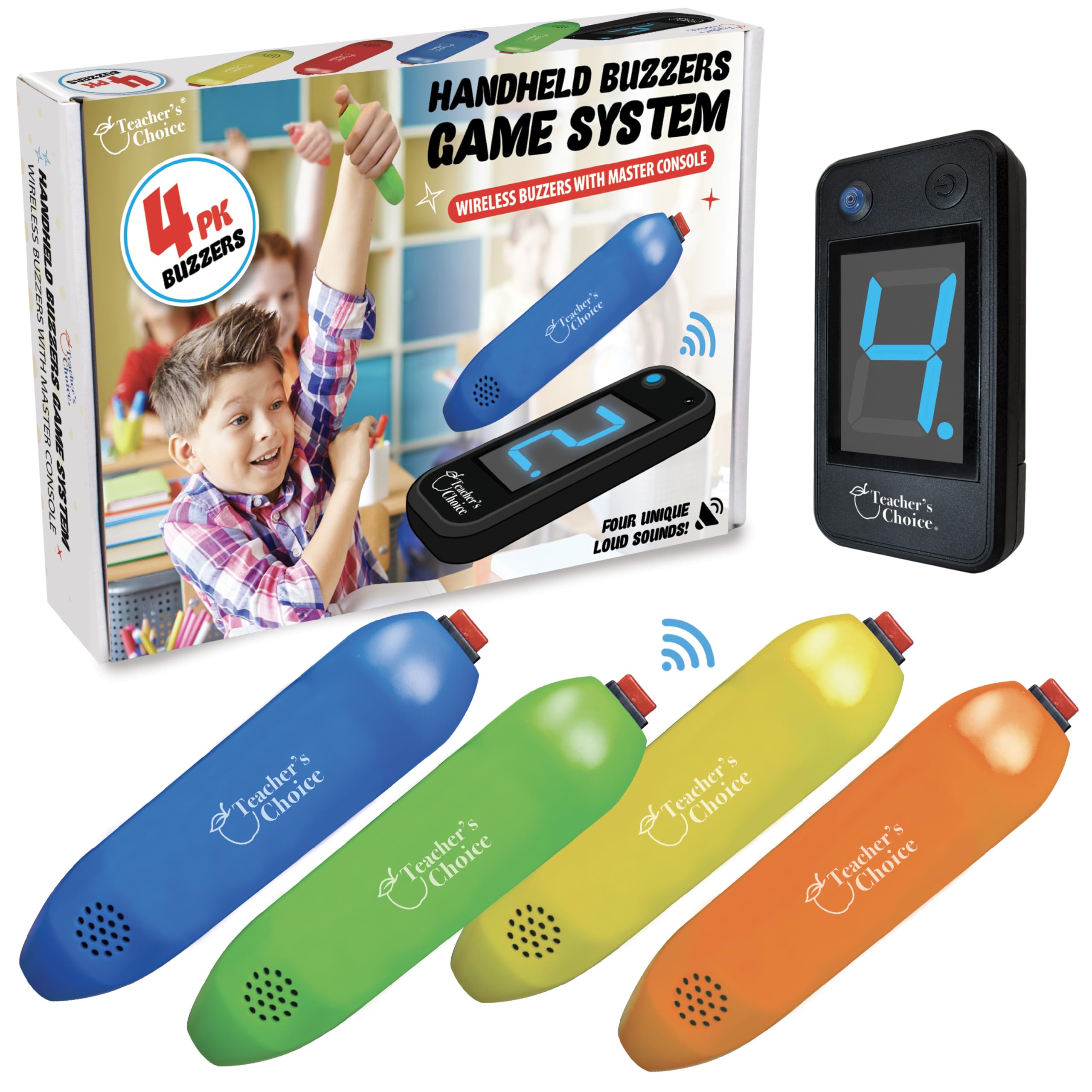
A quiz-night kit that turns any living room into a game show, no screen required.
Not every gaming evening needs a display. This set hands four wireless joystick buzzers to players, and a master console lights up the number of whoever pressed first, then locks the others out for 10 seconds so there’s no arguing. The game-show angle is its strength: it fits trivia, spelling bees, Jeopardy and Family Feud-style play, and the wireless range means players can spread around a room rather than crowd one table. Another practical touch is that you can run fewer buzzers — two for a Family Feud face-off, all four for trivia — and each button keeps its own number and sound.
For a senior activity program, the fit is clear. One reviewer put it well: ‘They would do great for any senior citizen activity. Everybody loved these.’ The clear plastic shell keeps the set at 0.37 kg, and upkeep is just swapping batteries. That battery side is the key detail — each joystick needs 2 AA batteries and the console needs 2 AAA, none of which are included, so buy a pack before your first game night.
The fair caveat is reliability. The recurring gripe is the battery springs — they don’t always hold cells securely, which can interrupt play mid-round until you open the cover and reseat them. A handful also note the buzzer sounds aren’t uniformly loud, so seat quieter players closer. Check that the battery springs are holding the cells before each game night, and the set does its one job well.
Where it shines
- Four wireless buzzers with a first-buzz readout and 10-second lockout
- Flexible player count from two to four
- Lightweight at 0.37 kg with minimal upkeep
Niggles to plan around
- Battery springs don’t always grip cells firmly
- Buzzer volume is uneven across units
- Batteries for all buzzers and console not included
Made for: family game nights, senior centre activities and classrooms where the fun is in the race to buzz in.
Not your pick if: you’re after a screen-based console for solo play — this one is built entirely around the group.
5. JubileeTV Remote Care System for Seniors
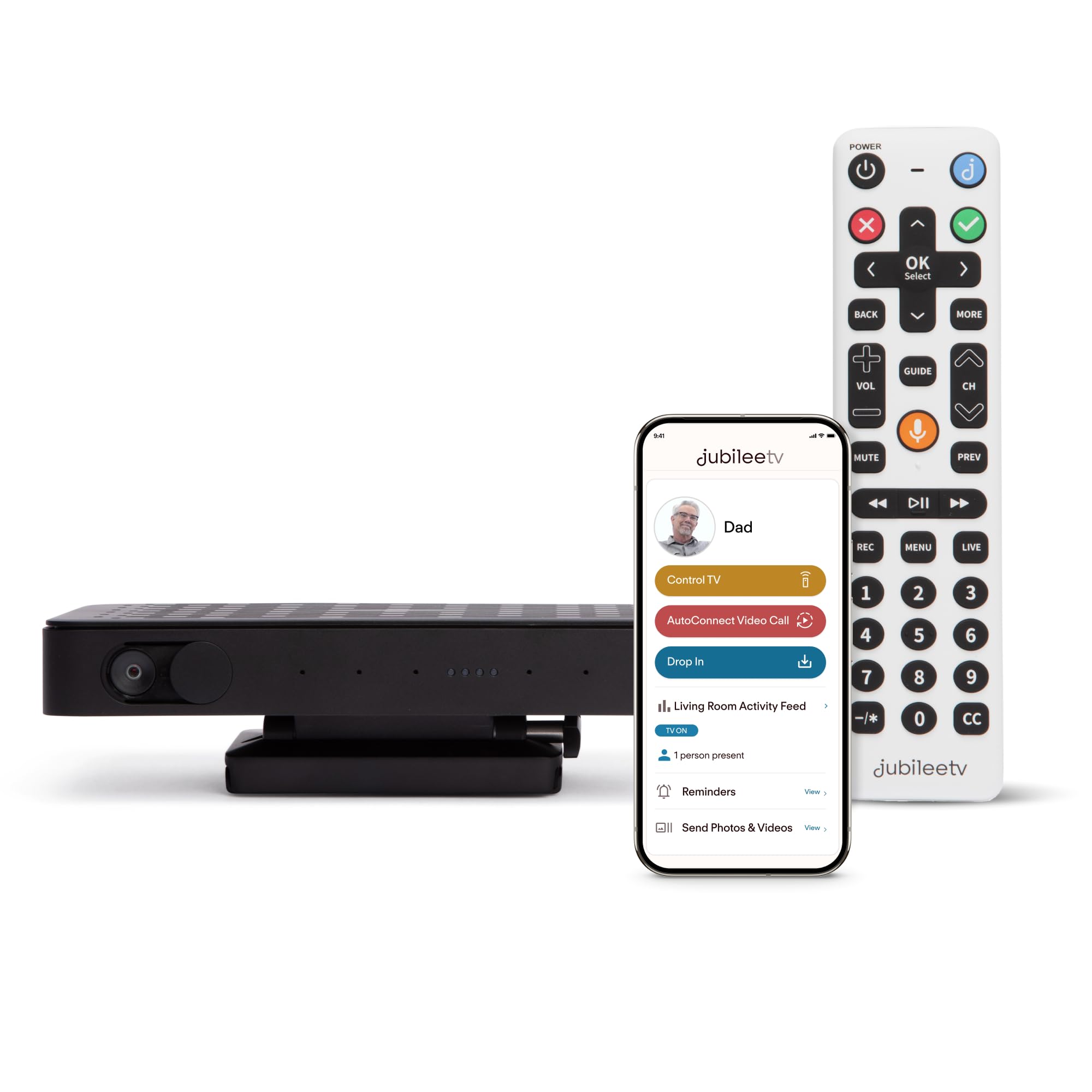
For the family who wants a loved one gaming and watching TV without a single confusing remote.
This is a different kind of system, and worth its place because staying connected is its own form of play. The centerpiece is a large backlit voice remote designed for seniors, including those with cognitive decline. From your phone, wherever you are, you can turn the TV on or off, change channels, adjust volume, manage logins and troubleshoot. The auto-answer video call works the other way too — you call straight to their TV screen, and it picks up without them touching a button.
There’s a care layer underneath. One-way video and audio let you drop in for a quick glance that all is well. Medication reminders, notes, photos and videos land right on the TV, so there’s no app to learn. The system works with most setups — you need a TV with an HDMI port, Wi-Fi, and an existing cable, satellite or streaming device. Its voice remote covers up to 4 devices and reaches 10 meters. For adult children managing a parent’s TV from another state, that remote control is the whole point.
Be clear on the ongoing cost before you commit: it requires an active membership after setup, listed at /mo, /yr, or one-time, U.S. only. Setup runs longer than you’d expect, though the instructions are color-coded and the support team is patient. There are occasional lag or connection quirks that a Wi-Fi extender can fix. If you’re fielding daily calls to assisted-living staff about a stuck remote, the membership can pay for itself in saved aggravation.
The connection payoff: remote TV control plus auto-answer video calls means you can help and check in without your parent learning a new app.
The commitment to note: a recurring membership is required, and setup is more involved than the box suggests — budget an afternoon and consider a Wi-Fi extender.
Worth it when: you’re managing a parent’s TV from another town and want confidence through the screen they already love.
Hold off if: you want pure gaming — this is a care-and-connection system, and the subscription is part of the deal.
Know the Specs
Screen Size and Resolution
Screen size is measured in inches along the diagonal, and a larger number means a bigger, easier-to-read picture from a comfortable distance. A 7-inch panel like the Atari’s gives you far more viewing room than a 4.3-inch one. Resolution is the pixel count — 1024×768 or 720×1280 — and a denser count keeps small text and sprites crisp, especially on a compact display.
Battery Capacity and Runtime
Battery capacity is quoted in mAh, and a bigger number generally means longer play between charges. A 5000mAh pack on the Trimui is rated for 6 hours, while the RG43H uses a 4000mAh cell. Some systems, like the Teacher’s Choice buzzers and the JubileeTV remote, run on standard AA or AAA batteries you swap in, which avoids waiting for a recharge.
Paddle, D-Pad and Trak-Ball Controls
Classic arcade and Atari games were designed around specific inputs: a paddle (a twist knob), a trak-ball (a rolling ball) and a d-pad (a four-way thumb pad). Playing a paddle game on a d-pad can feel stiff and tiring. A system that includes the original-style input lets you play the way the game was built, which is gentler on the hands during longer sessions.
HDMI and Connectivity
An HDMI port pipes the console’s picture to a standard TV, so a handheld becomes a home machine for group play. Wi-Fi handles firmware updates and, on some systems, downloading extra games without a computer. A 3.5mm headphone jack helps in shared spaces, and USB-C charging keeps the cable count low.
Common Questions
What screen size is easiest to read for older eyes?
Can these systems connect to a regular TV?
Do I need to buy batteries separately for the buzzer system?
Does the Trimui Smart Pro come with a memory card?
How long does the battery last on these handhelds?
Are the preloaded games good, or are they filler?
Is the JubileeTV worth the ongoing membership fee?
Are the controls comfortable for hands with arthritis?
Can a senior set up these systems without help?
The Bottom Line
For most seniors, the winner is the My Arcade Atari Gamestation Go. Its 7-inch screen and real paddle and trak-ball (a rolling ball control) make classic games genuinely easy to see and play, and it pipes to the TV over HDMI (the standard video cable). If a huge game library and WiFi downloads call to you, grab the RG43H Pro. And for family quiz nights that need no screen at all, the Teacher’s Choice buzzer system is the one to reach for. Whichever you pick, read the battery type first — the systems that run on standard batteries spare you a charging routine entirely.
How we choose
We do not accept paid placement. Every pick is matched to a real buyer and a real use-case; we do not hands-on test units.
Sources
Specifications: manufacturer listings and product documentation. Review insights: verified customer reviews, as of October 2026. Pricing: not shown on this page (it changes often); check the current price via the retailer link.
As an Amazon Associate, Aappliancez earns from qualifying purchases. This does not affect which products we feature.