Disclosure: Some links in this post are affiliate links. As an Amazon Associate I earn from qualifying purchases, at no extra cost to you. Learn more
Specs are compiled from manufacturer listings and verified buyer reviews and can change over time — please confirm the key details on the product page before buying.
Here is the uncomfortable truth about this shelf: most “typewriter keyboards” are round keycaps on a plastic tray, and most “digital notebooks” are slow tablets in a journal cover. Very few products give you both the typewriter feel and an actual screen worth looking at. This guide covers nine of them — mechanical boards with built-in tablet stands, e-paper notepads that digitize your handwriting, and one genuine electronic typewriter with a real LCD line display.
This guide is built by comparing the manufacturers’ published specifications and the patterns across verified customer reviews, so you get each pick’s real strengths and trade-offs instead of marketing spin.
The trick is deciding which of the three screens you actually need: a keyboard stand, a status display, or a full e-paper writing surface. This breakdown of the digital typewriter with screen separates the boards that type well from the boards that only look the part.
Top Picks

How To Choose A Digital Typewriter With Screen
Start by naming the screen you mean. Three different things get called a “screen” on these products, and they solve completely different problems.
The Screen Comes In Three Kinds
The first kind is a tablet stand or slot — a built-in holder that props your iPad or phone up behind the keys so the keyboard and the display work as one desk unit. The second is a status screen built into the board itself, which shows keyboard information, the time, and lets you control the backlight. The third is a full e-paper writing screen, where the device is the notebook and your handwriting is the content.
Decide which of the three you want before you compare models. If you already own a tablet and want a typewriter to type on, a stand-style board is cheaper and simpler. If you want a paper replacement you carry instead of a bag of notebooks, you need the e-paper type.
Switch Type Decides How The Keys Sound And Feel
Mechanical keyboards use a physical switch under every key. The feel and the noise come from that switch, not from the keycap shape. Clicky blue switches give you a sharp audible click and a firm bump. Tactile switches give you the bump with a softer, deeper sound. Linear switches give you a smooth press with no bump at all.
For a shared office or a room with other people in it, that click is the thing to think about first. A deep, dampened thock blends into background noise, while a clicky blue carries across a room and into a video call.
Hot-Swap And Programmable — Why They Matter
A hot-swappable board lets you pull a switch out and press a new one in without soldering. That means if the clicky feel wears on you, you swap it rather than buying a new keyboard. QMK and VIA support go a step further, letting you reprogram what each key does and build custom layouts.
Form Factor And The Number Pad Trade-Off
A 75% board keeps the main keys plus a function row but drops the separate number pad. You get more desk space and a shorter reach to your mouse, but you lose the quick number entry that accountants and spreadsheet workers rely on. Compact boards with 83 or 84 keys are the common size in this category.
Side-by-Side Comparison
| Model | Best For | Key Count | Connection | Screen Type | Amazon |
|---|---|---|---|---|---|
| YUNZII QL75★ Best Overall | Everyday typing with a tablet propped up | 84 | Bluetooth / 2.4GHz / USB-C | Built-in tablet stand | Amazon |
| EPOMAKER GlyphBest On-Board Display | Screen on the board plus heavy customization | 83 | 2.4GHz / Bluetooth / USB Wired | Status screen with GIFs | Amazon |
| Taiahiro Retro WirelessLoudest Clicky | Clicky typewriter sound on a tighter budget | 83 | Bluetooth / USB-C | Tablet slot | Amazon |
| Adventurers Typewriter-Style | Multi-device switching on a budget | 83 | Bluetooth / USB-C | Tablet slot | Amazon |
| Geniatech Kloudnote Slim | Reading and handwriting on one e-paper screen | — | Wi-Fi | 10.3″ E Ink, 1404×1872 | Amazon |
| iFLYTEK AINOTE Air 2 | Meeting notes and AI summaries, without the case | — | Wi-Fi / Bluetooth | 8.2″ E Ink, 1440×1920 | Amazon |
| iFLYTEK AINOTE Air 2 with Folio | The same notepad bundled with a folio case | — | Wi-Fi / Bluetooth | 8.2″ E Ink, 1440×1920 | Amazon |
| Nakajima WPT-150 | Real paper printing with a one-line LCD | — | USB | One-line LCD display | Amazon |
| Brother SX-4000 (Renewed) | Line-by-line paper printing with view mode | — | USB | LCD display | Amazon |
Detailed Reviews
1. YUNZII QL75 Retro Typewriter Hot Swap RGB Keyboard
Our pick — 4.5+★ from 450+ verified ratings; the strongest balance of quality and price.
The board that makes your iPad look like it fell out of a 1950s newsroom.
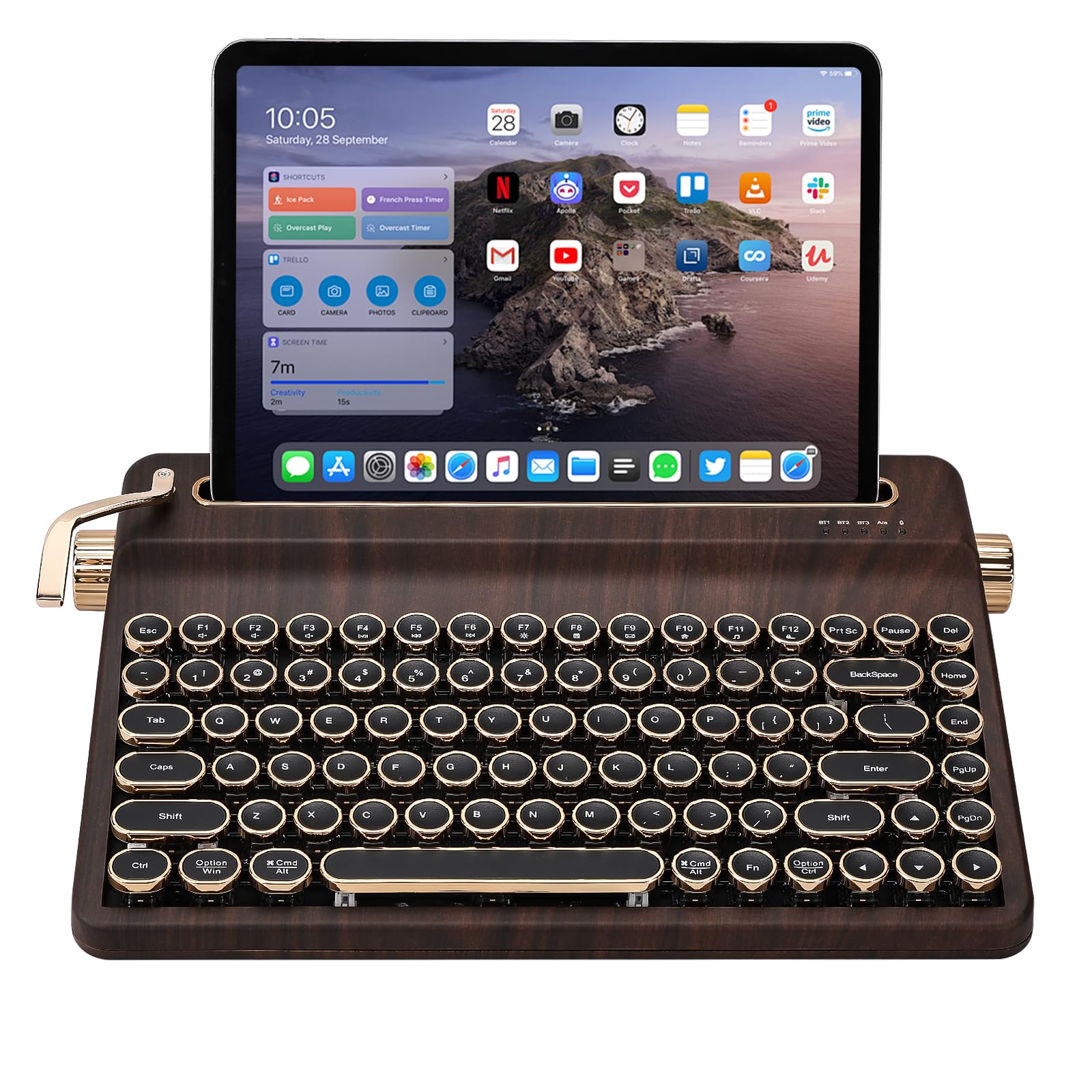
The QL75 is the one to buy if you want a keyboard and a tablet stand welded into a single piece of furniture. It carries 84 keys, and every row of keys steps up gradually rather than sitting flat — the same ascending slope as a real typewriter, which is what makes it comfortable to type on for hours instead of minutes. The built-in stand holds your pad, phone, or tablet firmly behind the keys, so your screen sits where your eyes already are.
What wins people over is the typing feel. The switches come pre-lubed and the frame is packed with dampening foam, so keystrokes land as a deep, low thock instead of a hollow rattle. Buyers report the sound is subtle enough to type on during a meeting. The same enthusiasm carries into the look — owners keep describing how completely it changes the desk, with spherical typewriter keycaps, two metal knobs (one for volume, one for tri-mode switching), and a side lever for the Enter key that actually functions.
Customization runs deeper than the category norm. You get QMK/VIA support for full key remapping, per-key RGB backlighting that dims from very bright down to very dim, and hot-swap sockets that accept both 3-pin and 5-pin switches. On the connectivity side you get Bluetooth, 2.4GHz wireless, and USB-C, with memory for switching between 5 devices — tablet, phone, PC, console, TV.
This is not a board you carry out of the house. It measures 12.9 by 8.4 inches across and sits on a plastic body heavy enough to feel solid rather than portable. One buyer summed up the small maintenance hiccup: “Stopped working after 1-2 weeks but fixed in under 3 minutes via instructions; recurred twice more but deemed worth it.” Worth knowing before you commit: the tablet holder grips a 12.9-inch iPad Pro in portrait only, and the plastic holder is secure but can be popped out.
What you gain
- 84 keys on a stepped, typewriter-sloped frame that eases long typing sessions
- Pre-lubed switches plus foam damping produce a deep thock rather than a rattle
- Built-in stand turns your tablet or phone into part of the keyboard
- QMK/VIA remapping and hot-swap sockets that take 3-pin or 5-pin switches
- Three modes of connection with switching across 5 devices
What to weigh
- Plastic body and a 12.9 by 8.4 inch footprint keep it on the desk
- The tablet holder only takes the biggest iPad in portrait
- Occasional unit needs a quick reset from the start
Go for it if: you want a retro centerpiece that types as well as it displays, with an iPad parked behind the keys.
Think twice if: you need a number pad, since 84 keys means the layout is condensed and the pad is gone.
2. EPOMAKER Glyph Wireless Typewriter Retro Mechanical Keyboard
When the reader means a screen on the keyboard itself, this is the board that delivers.
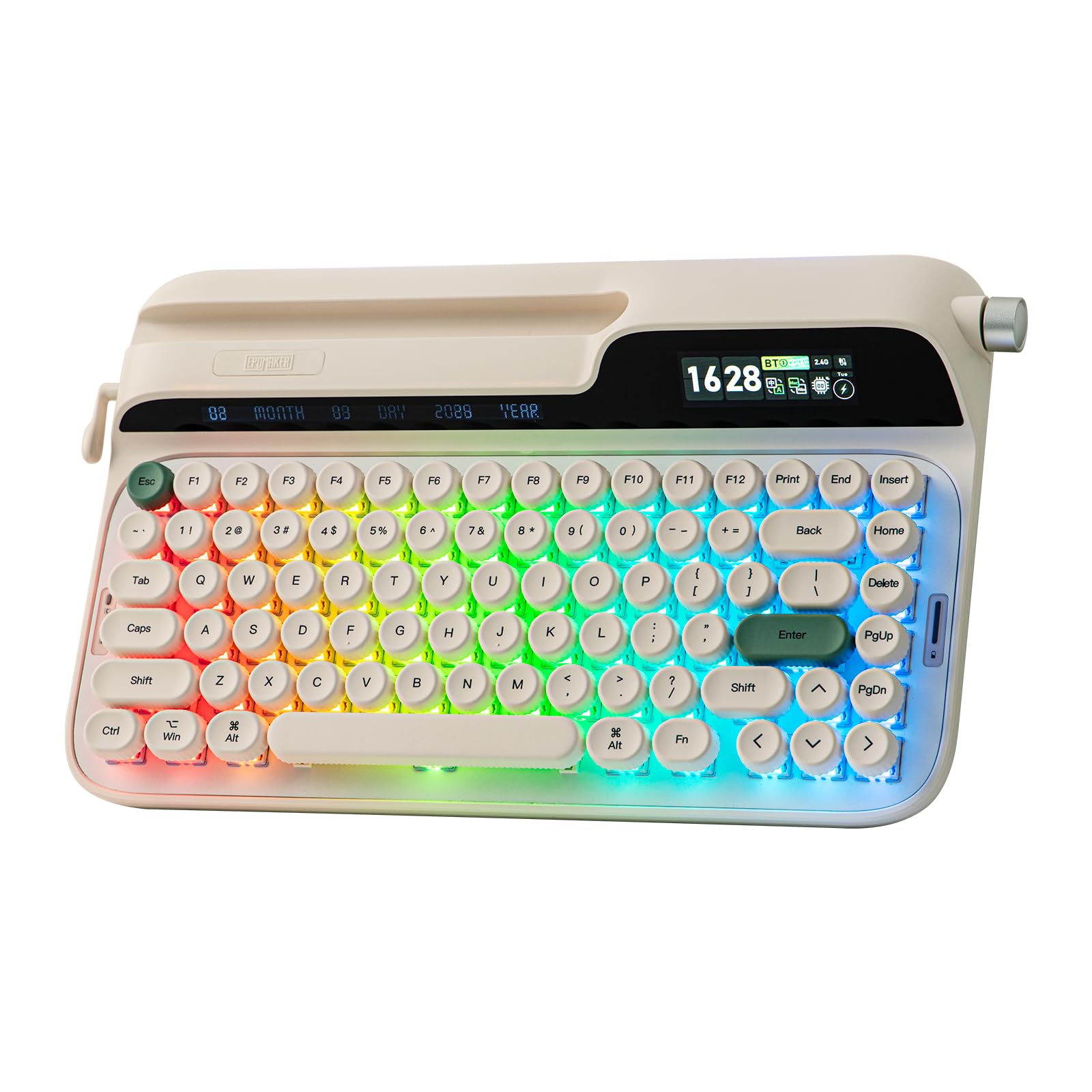
The Glyph puts a smart display right on the deck. It shows keyboard status and the time, controls the RGB backlight, and displays GIFs and images — sports logos or whatever else you load onto it. A dual-mode rotary knob switches between media duties and screen navigation with FN plus the knob. It is the only pick here that gives you a literal screen built into the typing surface.
The build backs the showpiece up. The plate mixes ABS and aluminum, the mount is top-mounted so the pressure of each keystroke spreads evenly across the frame, and a 5-layer sound stack filters the noise down to a deep creamy thock. The 46gf factory-lubed switches are heavy enough that resting your hands does not trigger keys, and light enough for a long writing session. A silicone wrist rest ships in the box, and the silicone feet flip to set either a 1-degree or 2-degree incline.
Round PBT keycaps sit at a uniform modern height rather than the uneven rows of a genuine typewriter, which cuts finger fatigue over long stretches. The return lever on the side doubles as the backspace, and the front slot takes a tablet or phone in portrait or landscape at any size. Connectivity covers 2.4GHz wireless, Bluetooth, and USB wired, plus EPOMAKER 3.0 software for Mac and Windows remapping.
The honest weak point is long-term reliability on some units, with a few reports of keys skipping after a few months. Charging is another quirk — it charges through a computer rather than a wall outlet, and a full recharge from dead can run long. The front slot is a holder, not a powered dock, so your tablet needs its own charge.
Where it stands out: nothing else in this lineup puts status, time, RGB control, and GIF display on the keyboard itself while also offering a 46gf lubed switch and a hybrid ABS-aluminum plate.
Where to be careful: it is a plastic-enclosure board with a documented weak point in durability over months, and the 83-key layout drops the number pad.
The right call for: someone who wants the screen built into the keyboard and will use the software to remap keys.
Look elsewhere if: you need a set-and-forget workhorse or you rely on a wall charger for overnight top-ups.
3. Taiahiro Retro Typewriter Wireless Mechanical Gaming Keyboard
Blue switches that genuinely sound like a typewriter — which cuts both ways in a shared room.
If the click is the reason you are shopping in this category, this board leans into it hardest. Blue switches give a sharp, audible click and a firm tactile bump on every press, and the sound is the thing that sells it — it lands close to a real typewriter rather than a generic keyboard rattle. Then 14 white backlight modes mean you can see the round punk-style keycaps in a dark room, with a stainless-steel lever and left and right knobs for brightness and volume.
It runs fewer keys than the YUNZII above — 83 versus 84 — a difference of one key, so do not expect a big layout change between them. The Taiahiro does add a metal frame alongside the plastic for extra stability, and it keeps the hot-swap sockets so you can pull the switches and change the feel. Two connection paths, USB-C and Bluetooth, carry it across three devices and both Windows and macOS.
The ergonomics require a small adjustment period. The deck sits high with no wrist support, and the learning curve on the round keys is real — most people adapt within a day. The tablet slot is shallow, so a 13-inch iPad does not sit deep enough unless you add a case. Bluetooth pairing on a Mac is quick, and the keys are clearly labeled for both platforms.
Noise is the trade-off you accept. The click carries into a Zoom call and across a shared office, so the mic gets muted first or the room gets a warning. An occasional unit arrives with a backlight fault or a loose carriage return piece, and the exchange process handles it.
The sound is the product: 62 separate buyer comments land on how it sounds, second only to how it looks — and the click really is the point of buying this one.
Pick this one when: the audible click is what you came for and you work somewhere that tolerates it.
Pass if: you share a quiet space or record audio all day, because that click will be on every recording.
4. Adventurers Typewriter-Style Retro Mechanical Keyboard

Hot keys that flip between three Bluetooth devices are the reason to look at this one.
The Adventurers board earns its place on device juggling. Dedicated hot keys switch between three paired Bluetooth devices, a right-hand knob controls volume, and a PC/Mac switch on the back handles platform changes. In a day of moving between laptop, tablet, and phone, that is the feature you touch most. Laser-engraved legends are described as resistant to fading, and the 83-key layout keeps the footprint at 12.3 by 6.6 inches.
The white single-color backlight is genuinely useful in a dark room — the adjustable flash speed lets you set how the keys glow, though there is no rainbow option. The chassis has real weight to it, which keeps the board planted while you type. Battery life on light use runs at least a day.
Two caveats come up repeatedly. Bluetooth sleep is aggressive, dropping the link after a short idle and taking a moment to wake, which frustrated more than one owner until they switched to USB mode and the problem disappeared. The plastic components are the other honest note, and durability has been the weak spot for a share of buyers, with some reporting failure within months. The clicky keys are also loud enough to distract coworkers.
Keyboard quality is what buyers praise above all else, which tells you the typing itself is solid — the risk sits in the electronics over time rather than in the feel. For a lighter-duty role like a second desk or a tablet companion, that trade is easier to accept.
Best fit: someone juggling three devices who wants a weighty, clicky, retro board without much outlay and does not mind a Bluetooth wake delay.
Fair warning: if this is your only keyboard and you need years of trouble-free service, the durability reports argue for spending more.
Worth it for: the three-device hot keys and the planted, weighty build at an entry-level position in the lineup.
Reconsider if: you need a heavy-duty daily driver, since durability is this board’s weak link.
5. Geniatech Kloudnote Slim 10.3″ Digital Notebook

The largest writing surface here, and the one built to be read on as much as written on.
The Kloudnote Slim gives you a 10.3-inch E Ink glass screen at 1404×1872 resolution, which works out to 227ppi — a paper-sharp density where text edges stay crisp at normal reading distance. The 1.8GHz A55 quad-core processor, 2GB RAM, and 64GB memory handle notes and books on one device. It measures just 5.3mm thick and weighs 390 grams, so it slides into a bag without bulk.
Battery is the practical headline. A 3000mAh lithium-ion cell is rated for up to 40 hours of work time, enough for a week of commutes and meetings between charges. You get 39 note templates to start from, plus extras like OCR, ASR, document encryption, reading annotations, to-do items, audiobook playback, recording, one-click screen projection, and note sharing. The Kloudnote cloud gives 500MB of free space and connects to Microsoft OneDrive, Dropbox, and Baidu Network Disk.
The trade-off here is polish. The AppStore is Geniatech’s own and the app selection is limited, and the system improves through online updates rather than arriving finished. Setup is the other friction point — a few owners hit trouble adding email or getting templates to behave as shown, and there is no protective case in the box, which you will want on a device this slim.
When the software cooperates, the writing experience justifies the price. Notes feel natural with no lag, and importing books or exporting notes is easy.
Why choose it: the 10.3-inch 227ppi screen gives you the biggest, sharpest reading and writing surface in this bunch, backed by 40 hours of rated battery.
The catch: its own app store is thin and the software expects updates, so buy it for notes and reading rather than as a general Android tablet.
Suits you if: you want a large e-paper surface for reading documents and writing by hand, with cloud sync built in.
Not for you if: you expect a finished app ecosystem or a case in the box.
6. iFLYTEK AINOTE Air 2 8.2″ E Ink Tablet
A notepad that records the meeting, transcribes it, and hands you the action items.
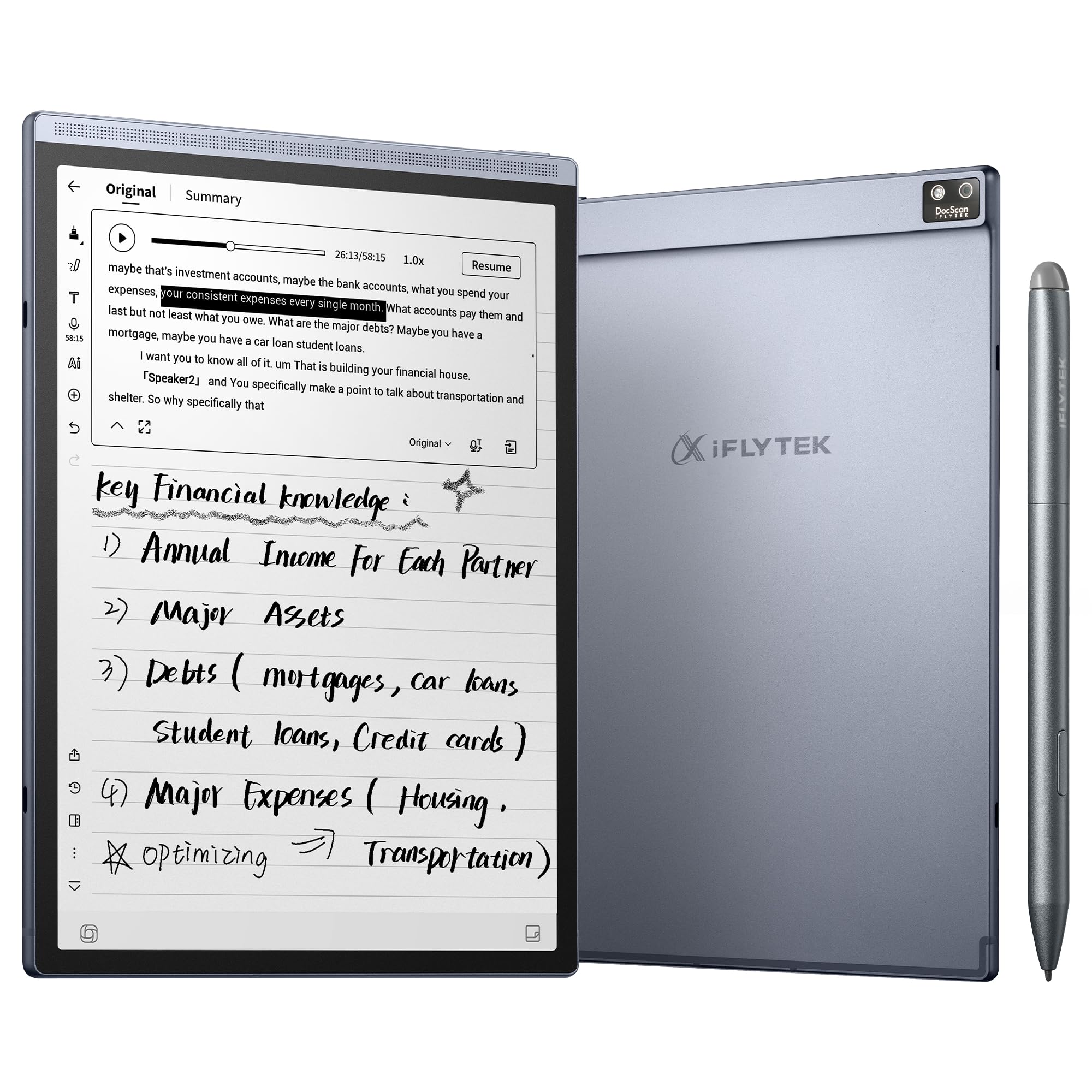
Most writing tablets stop at taking the note. This one keeps working afterward. Tap record and it runs real-time voice-to-text transcription, then generates an AI meeting summary that structures the discussion and pulls out the key points. You can ask questions about the note afterward and get answers drawn from its content, which is how you revisit a decision without replaying an hour of audio.
The handwriting side is just as deliberate. The 8.2-inch E Ink display has a matte surface and 4,096 levels of pressure sensitivity, with eight pen styles to pick from, so the page responds to how hard you press. Mark a point with a star, triangle, or circle and the system turns it into a to-do or focus item, with a weekly plan view for your schedule. Voice transcription covers 18 languages, handwriting-to-text is tune for English handwriting across 100+ languages, and translation spans 14 languages.
Portability is where it wins over the Kloudnote. At roughly 7.6 by 5.4 inches, 8.1 ounces, and a 5 to 6.5mm profile, it fits in a handbag and comes out in one motion. The 2600mAh battery is rated at 5 weeks of average life, and warm and cool reading lights with 24 brightness levels make PDFs and eBooks readable at night. It connects over Wi-Fi and Bluetooth and holds a 4G cellular option.
Know the two limits before you buy. Voice transcription and handwriting-to-text cannot run at the same time, so you choose one mode per session. The screen also behaves like E Ink rather than glass — page turns and scrolling refresh with a faint afterimage, which is normal for the technology and not a fault.
The mixed reports center on performance and value. Some owners find it slow and the UI clunky, and offline audio transcription has been unreliable for a few, while the compact size is exactly what others wanted. If you work with Outlook under company restrictions, check sync support, since calendar sync leans on Google Calendar.
Reasons it earns a spot
- AI meeting summaries plus note Q&A turn a recording into a usable recap
- 4,096 pressure levels and eight pen styles on a matte E Ink surface
- 2600mAh battery rated at 5 weeks of average life
- 18-language voice transcription and 14-language translation
- 8.1 ounces and a 5 to 6.5mm profile that fits a handbag
Where it holds you back
- Transcription and handwriting conversion cannot run together
- E Ink refresh lag and faint afterimages on page turns are unavoidable
- Some owners find the interface slow and the AI error-prone
- Calendar sync favors Google over other providers
This is your pick if: you sit in meetings all day and want the summary written for you while you listen.
Choose the larger Kloudnote instead if: you mostly read and write longhand and want a bigger page rather than AI features.
7. iFLYTEK AINOTE Air 2 with Black Folio Case

Same 8.2-inch Air 2 hardware, now with the cover that keeps it safe in a bag.
This is the Air 2 you want if you already know you will carry it daily. The device is identical in spirit — an 8.2-inch E Ink display with a matte surface and 4,096 pressure levels, eight pen styles, real-time transcription across 18 languages, handwriting-to-text across 100+ languages, and translation in 14. The added Black Folio Case is the difference, and it matters on a device that measures 5 to 6.5mm thin.
The writing feel is why people stay with it. The Wacom pen writes with a natural response that owners compare favorably to an iPad stylus, with no noticeable lag in the note-taking flow. The scheduler and task list, Android app support that includes Kindle, and multi-day battery make it a genuine desk replacement rather than a novelty. It syncs with OneDrive and Google Drive, and custom PDF templates are supported.
The friction points are worth mapping before you commit. Wi-Fi handling is the big one — captive-portal networks in hotels and cafés have failed for several owners, who fell back on a phone hotspot. The side magnet that holds the pen is weak, so the stylus can slip and drop, and no spare nibs come in the box. Page switching is slow, and the pen position can accidentally trigger other features.
The AI also divides opinion. Speech-to-text is accurate for some and error-prone for others, and the interface takes a learning curve before it feels natural. It is a strong meeting companion; treat it as a work in progress rather than a finished business tool.
What you are really buying: the same notepad as the pick above, with the folio case bundled and a writing feel that earns the higher position for anyone carrying it every day.
What to plan around: weak pen magnets and no spare nibs mean budgeting for replacements, and captive-portal Wi-Fi may not connect at all.
Reach for this if: you want the Air 2 with protection included and you carry a notepad to work every day.
Look elsewhere if: you rely on hotel Wi-Fi or need a fully polished, predictable interface from day one.
8. Nakajima WPT-150 Electronic Typewriter

The only machine here that puts ink on actual paper, with a one-line LCD to check yourself first.
This is a real electronic typewriter, not a keyboard pretending to be one. The display is a one-line LCD, which lets you see the line you are typing and correct it before it prints — a one-line correction memory handles word and character erase. Automatic centering, underlining, and carriage return take the fiddly parts off your hands, and it prints at 12 characters per second.
The paper handling is serious. A 13-inch carriage with a 9-inch print width takes full-size sheets, and three pitch and line-spacing settings let you set the density of the page. The unit weighs 13 pounds and measures 21 by 9 inches, so it lives on a desk rather than traveling in a bag. Connectivity is listed as USB.
Two setup steps catch people out. You need to open the top and remove the foam block under the lid before use, and you need to pull the plastic piece off the ink cartridge before typing — skip that and the ink will not flow. Once set up, owners describe it as lightweight, compact, and easy to use for what it does.
Where it may not suit you: the printed ribbon has been reported arriving on the older side, printing blue rather than black, and the keys are on the small side if your eyesight is not what it was. Return handling has been a sore point for at least one buyer, so confirm the condition terms before you order if there is any chance of sending it back.
Best for: writers who need an actual printed page on demand, with a one-line LCD to proof the line before the ribbon commits it.
Skip if: you want a digital notes workflow — this one lives on paper and deserves the desk space it takes.
9. Brother SX-4000 LCD Display Typewriter (Renewed)

View mode lets you read the line on the LCD before the machine prints it.
The SX-4000 is the paper-printing option for someone who wants to check the work before committing it. View mode shows the typing line on the LCD display, so you catch a mistake before the page is permanent. Automatic paper insertion and automatic carriage return remove the manual feeding and returning that make old typewriters fussy, and forward and reverse indexing let you move the paper up or down a line deliberately.
The keyboard is the other reason to consider it. Brother calls it the Perfectype professional touch keyboard — a finger-feel designed for sustained typing rather than hunting and pecking. Line-by-line printing gives you control over when each line goes to the page. Print is monochrome, in black.
This is a renewed unit, so condition is the honest variable. A few arrive with carriage arms unattached, and the roller has been described as loose enough to make advancing paper difficult. Power is another practical issue for buyers outside the US, where adapter differences have made it unusable. It connects over USB and is built for desktops, laptops, and tablets in the compatibility list.
For a longtime typewriter user, the SX-4000 handles line-by-line paper printing and fades into the daily workflow. That is exactly the standard it needs to hit, and it does when it arrives intact.
The case for it: view mode plus automatic paper insertion and carriage return make it the easiest of the two paper printers to proof and feed.
The honest catch: renewed stock means condition varies, and outside the US the power adapter can stop it working altogether.
Choose it when: you want to proof each line on the LCD before printing and you type professionally on paper.
Consider the Nakajima instead if: you want a new unit rather than a renewed one, or you do not live in the US.
Know the Specs
Key Count And Layout
Key count tells you how compact the board is. An 83-key or 84-key layout is a 75% board — the main alphanumeric block plus a function row, with the separate number pad removed. That frees up desk space and shortens your mouse reach, but you lose quick numeric entry. If you work with spreadsheets or invoices daily, the missing pad is a real cost, not a convenience trade.
Switch Type And Weight
The switch is the mechanism under each key, and its weight is how hard you must press, measured in grams of force. A lighter switch suits long writing sessions with less finger effort. A heavier one prevents accidental key presses when your hands rest on the board. Clicky switches add an audible click, tactile switches add a bump without the loud click, and linear switches are smooth throughout the press.
Hot-Swap Sockets And QMK/VIA
Hot-swap means the switches pull out and push in without soldering, so you can change the feel later rather than buying a new keyboard. QMK and VIA are the software layers that let you remap keys and build custom layouts. Compatibility matters — a board that accepts both 3-pin and 5-pin switches takes a wider range of replacements than one limited to a single pin count.
E Ink Resolution And Refresh
E Ink screens are measured in pixels and pixels per inch (ppi), the same density figure used for a phone screen or a printed page. Higher ppi means crisper text at reading distance. E Ink also refreshes differently from an LCD — page turns flash briefly and faint afterimages can linger, which is the technology working as designed rather than a defect.
Common Questions
What does “digital typewriter with screen” actually mean?
Will a typewriter-style keyboard work with my iPad or Mac?
Are clicky blue switches too loud for an office?
Can I change the switches in these keyboards without soldering?
How long does an e-paper tablet battery actually last between charges?
Is an E Ink screen worse than a regular tablet screen for writing?
Do the paper typewriters need special paper or ribbons?
Can these devices transcribe a meeting while I also write by hand?
Do the tablet stands on these keyboards hold a phone as well as a tablet?
Which is better, a keyboard with a tablet stand or a dedicated e-paper notepad?
How thin and light are the e-paper notepads compared to a paper notebook?
The Bottom Line
For most people shopping a digital typewriter with screen, the YUNZII QL75 is the one that holds up — 84 keys on a stepped frame, pre-lubed switches with foam damping, a built-in tablet stand, and switching across 5 devices. It is the board that gets both the look and the daily typing right.
If the screen has to be on the keyboard itself, the EPOMAKER Glyph is the only pick that puts status, time, RGB control, and GIF display on the deck, with a 46gf lubed switch and an ABS-aluminum plate behind it. Want the clicky typewriter sound on a tighter budget? The Taiahiro Retro Wireless delivers it with 14 backlight modes.
And if your screen is meant for writing rather than a tablet propped behind keys, the iFLYTEK AINOTE Air 2 is the strongest e-paper choice for meeting work — 4,096 pressure levels, 18-language transcription, and AI summaries that structure the discussion for you. Pair it with the folio version if you carry it daily, or reach for the Geniatech Kloudnote Slim when you want the biggest, sharpest 227ppi writing surface in the group.
One last nudge: the typewriter keyboard field is crowded with lookalikes, so buy the one whose defining feature you will actually touch every day — the stand, the click, the screen, or the paper. Buy the feature you will touch daily, or the board becomes a desk ornament instead of a tool you reach for before your laptop.
How we choose
We do not accept paid placement. Every pick is matched to a real buyer and a real use-case; we do not hands-on test units.
Sources
Specifications: manufacturer listings and product documentation. Review insights: verified customer reviews, as of October 2026. Pricing: not shown on this page (it changes often); check the current price via the retailer link.
As an Amazon Associate, Aappliancez earns from qualifying purchases. This does not affect which products we feature.