Disclosure: Some links in this post are affiliate links. As an Amazon Associate I earn from qualifying purchases, at no extra cost to you. Learn more
Specs are compiled from manufacturer listings and verified buyer reviews and can change over time — please confirm the key details on the product page before buying.
Buying a laptop configured to your own spec is really a bet on one thing: that the processor, the memory and the cooling will still feel quick in three years. Get those three right and the machine ages gracefully. Get them wrong and you are stuck with a heavy, hot, loud notebook that you overpaid for. This guide separates the machines that earn their place from the ones that just look good on a spec sheet.
This guide is built by comparing the manufacturers’ published specifications and the patterns across verified customer reviews, so you get each pick’s real strengths and trade-offs instead of marketing spin.
You will see exactly where the money goes inside each chassis, which upgrades actually matter, and where the honest compromises hide. The picks below are the ones that hold up best as custom built laptops.
Top Picks



How To Choose The Best Custom Built Laptops
A custom-built laptop is a set of trade-offs you choose on purpose. The trick is knowing which trade-off costs you nothing in daily use and which one you will feel every single day.
Start with the chip, not the sticker
The processor (CPU) is the engine that runs your everyday apps. An Intel Core Ultra 9 275HX or an Apple M5 chip is a different class of engine than a Ryzen 5. Match the chip to your real workload before you look at anything else.
If you edit video, run AI models or compile code, a high core count pays off. If you browse, write and stream, a mid-tier chip with more memory usually feels faster day to day.
Memory headroom is your future-proofing
RAM is the desk space your open apps sit on. 32GB of DDR5 gives you room for dozens of browser tabs, spreadsheets and a chat client at once. On Apple’s machines the memory is unified, meaning the CPU and graphics share one pool — 24GB unified memory behaves generously, but you cannot add more later.
Screen specs you will actually notice
Refresh rate, measured in hertz, is how many times the screen redraws each second. A 240Hz panel makes motion look fluid; a 60Hz panel is fine for text work. Brightness in nits decides whether you can see the screen near a window, and panel type — OLED, mini-LED or IPS — decides contrast and color.
Cooling decides real speed
A fast chip in a thin chassis throttles when it heats up, which means your benchmark numbers only last a few minutes. Look for a vapor chamber, multiple fans and real exhaust vents if you plan to push the machine hard.
Side-by-Side Comparison
| Model | Best For | Processor | Memory & Storage | Display | Amazon |
|---|---|---|---|---|---|
| Apple MacBook Pro M5 14.2″★ Best Overall | Creatives who want silence | Apple M5, 10-core CPU | 24GB unified / 1TB SSD | 14.2″ Liquid Retina XDR, 1600 nits | Amazon |
| MSI Stealth 18 HX AIDesktop Replacement | Desktop-replacement gaming | Intel Ultra 9-275HX, 5.4 GHz | 32GB DDR5 / 2TB SSD | 18″ QHD+ 240Hz | Amazon |
| NIMO 15.6″ Light GamingBest Budget Gaming | Student gaming on a budget | AMD Ryzen 7 Pro 6850U, 4.7 GHz | 32GB LPDDR5 / 1TB SSD | 15.6″ FHD IPS anti-glare | Amazon |
| HP Flagship 17 Business | Spreadsheet and office work | AMD Ryzen 5 7430U, 4.3 GHz | 32GB RAM / 1TB SSD | 17.3″ FHD anti-glare IPS | Amazon |
| GEEKOM GeekBook X14 Pro | Commuting all day | Intel Core Ultra 5 125U, 4.3 GHz | 16GB LPDDR5 / 512GB SSD | 14″ 2.8K OLED 120Hz | Amazon |
| HP ProBook 465 G11 | Business multitasking | AMD Ryzen 7 7735U, 4.7 GHz | 16GB DDR5 / 512GB SSD | 16″ FHD+ 1920×1200 | Amazon |
| Microsoft Surface Laptop 13.8″ | All-day battery on the go | Snapdragon X Plus, 10 core | 16GB RAM / 512GB SSD | 13.8″ touchscreen | Amazon |
| Alienware 16 Aurora | Gaming and heavy art | Intel Core 7 240H, 5.2 GHz | RTX 5060 / 16″ WQXGA | 16″ 2560×1600, 300 nits | Amazon |
| Thunderobot Storm 17 5070 | High-refresh 1440p gaming | Intel i7-13620H, 4.9 GHz | 32GB DDR5 / 1TB SSD | 17.3″ QHD 165Hz | Amazon |
| Samsung Galaxy Book5 Pro 360 | 2-in-1 stylus work | Intel Core Ultra 7 258V, 4.8 GHz | 32GB / 1TB | 16″ 3K AMOLED 120Hz | Amazon |
| Dell 16 Plus | Data-heavy workflows | Intel Core Ultra 9 288V, 5.1 GHz | 32GB RAM | 16″ QHD+ 16:10 | Amazon |
| ASUS ROG Strix G16 | Competitive high-frame gaming | Intel Core Ultra 9 275HX, 5.4 GHz | 32GB DDR5 / 1TB SSD | 16″ 2.5K 240Hz | Amazon |
| Lenovo Legion Pro 7i Gen 10 | No-compromise rendering rig | Intel Ultra 9 275HX, 5.4 GHz | 64GB RAM / 2TB SSD | 16″ OLED 2560×1600 240Hz | Amazon |
Detailed Reviews
1. Apple 2025 MacBook Pro with M5 Chip, 14.2-inch
Our pick — 4.5+★ from 450+ verified ratings; the strongest balance of quality and price.
The creator machine that renders in near silence and still has battery left over.
You get smooth video editing without the fan roaring like a jet engine, thanks to the M5 chip. It pairs a 10-core CPU (the main processor) with a 10-core GPU (the graphics processor), and 24GB of unified memory (one shared pool the processor and graphics both draw from) sits between them. Because they share that pool, a heavy timeline never starves the app you are also running.
The 14.2-inch Liquid Retina XDR screen is the other reason this holds the top slot. It hits up to 1600 nits peak brightness and 1,000,000:1 contrast, which is why HDR footage looks like the footage rather than a washed-out copy of it. Add an SDXC card slot, HDMI port and three Thunderbolt 4 ports, and the dongle pouch stays at home.
What wins people over is sustained speed with no drama. In a buyer-reported render test, two one-hour ProRes and H.264 exports took 11 minutes here versus 26 minutes on an older Windows laptop with a discrete card. The trade-off is weight at 3.41 pounds and a premium price; this is a machine for people who bill for their time, not for casual browsing. On Apple’s own product pages it holds 4.5+ stars across 400+ ratings.
Where it earns the crown
- 10-core CPU and 10-core GPU share 24GB of unified memory, so tabs, timelines and AI tools all stay live at once.
- 1600 nits peak brightness on the XDR panel keeps color accurate in a bright room.
- Three Thunderbolt 4 ports, HDMI, SDXC slot and MagSafe 3 charging — no adapters needed for a camera card.
- Silent in normal use; the aluminum build survives a commute in a backpack.
What to weigh before you buy
- Memory is fixed at 24GB — you cannot add a stick later, so buy the headroom you need on day one.
- The setup wizard divides opinion; some buyers found the app-drag install style unfamiliar after years on Windows.
- At 3.41 pounds it is noticeably heavier than an Air, and the price sits at the top of the stack.
Made for: editors, developers and photographers who value silence and battery over upgrade slots.
Cheaper models win on: raw core counts and open RAM doors — but nothing in this list runs this cool under a sustained render.
2. MSI Stealth 18 HX AI Gaming Laptop
An 18-inch slab of pixels and vapor-chamber cooling for people who want the desk gone.
The spec that defines this machine is the pair of drives and the 18-inch 240Hz panel. The Intel Ultra 9-275HX runs up to 5.4 GHz, and the 2TB SSD holds twice the storage of the NIMO below it — which for a Steam library is the difference between installing everything and choosing.
Graphics work is handled by an RTX 5080 with ray tracing and DLSS, and a vapor chamber with two fans and four exhausts keeps it from melting. The 99.9Whr battery means it runs unplugged for real work stints. Wi-Fi 7 and a SteelSeries per-key RGB keyboard round out the kit.
The recurring gripe is heat and fan noise once the GPU spikes — that 18-inch body is warm under load, and buyers describe roughly 4-5 hours of light use and a lot less in game. It is also heavy. The upsides are outsized: buyers report Cyberpunk, Far Cry, Elden Ring and Call of Duty all running at max settings with good frame rates, and the 2560×1600 panel looks sharp even if it is not 4K. The 32GB of DDR5 and 2TB NVMe give this desktop replacement enough memory and storage to hold a full game library and a heavy editing project at once.
The honest read: this is a machine for a desk, a decent cooling pad, and a gamer who wants to see everything. The 240Hz refresh rate matters most in fast shooters.
The caveat: buy it knowing it will run warm and loud at load — the chassis is built for brutal cooling around a lunging chip, not for lap use.
Grab it if: you want a 18-inch gaming display and a 240Hz panel that never leaves the desk much.
Look elsewhere if: you want quiet, cool and light — the GeekBook below is the opposite trade.
3. NIMO 15.6″ FHD Light-Gaming Laptop
An eight-core Ryzen laptop that plays the Sims and Battlefield without asking for a second mortgage.
Eight cores and sixteen threads from the AMD Ryzen 7 Pro 6850U, running up to 4.7GHz, form the heart of this one. It pairs with 32GB of LPDDR5 memory and a 1TB PCIe 4.0 SSD, which means you can run a game and a browser and a chat client without a stutter. The AMD Radeon 680M handles the graphics.
Portability is the pitch. The 15.6-inch FHD IPS anti-glare screen fills 85% of the lid, and the 100W USB-C charger fills the battery in 15 minutes for up to 2 hours of use. A metal chassis and a fingerprint reader on the touchpad round it out, plus a 2-year warranty and 90-day return window.
The catch is the GPU. The 680M is integrated, so demanding titles on high settings will struggle — it is a light-to-medium gaming machine, not a workstation. Owners who pushed it into heavier games found the default RAM allocation needed a BIOS fix and the fans run loud when they kick in. What wins people over, though, is the configuration at the price: the 32GB and 1TB are real, and the speed is crisp for the money.
What you actually get
- 32GB LPDDR5 memory and a 1TB PCIe 4.0 SSD at a budget-friendly tier.
- 100W USB-C charging — a 15-minute top-up buys up to 2 hours of use.
- Fingerprint sign-in on the touchpad and a backlit keyboard.
The fine print worth reading
- Integrated Radeon 680M graphics — heavy AAA games need settings turned down.
- RAM ships allocated low by default and needs a BIOS change for some games.
- Heavier games expose fan noise and warm surfaces.
Pick it when: you want an eight-core laptop with generous RAM and SSD space without premium-tier outlay.
Think twice if: your library leans on the newest AAA releases at ultra settings.
4. HP Flagship 17 Business Laptop

A 17.3-inch desk-filler that treats spreadsheets as the main event.
The size is the story: a 17.3-inch Full HD anti-glare IPS panel at 1920×1080 and 60Hz, which is generous real estate for a data grid or two documents side by side. Inside, a hexa-core AMD Ryzen 5 7430U boosts to 4.3 GHz with 16MB of L3 cache — enough for office multitasking and streaming without drama.
HP pairs it with 32GB of RAM and a 1TB SSD, so app switching stays snappy and you are not managing storage monthly. The battery is rated at up to 9 hours, and HP Fast Charge refills to 50% in 30 minutes, so a short break covers your next meeting block.
This one is honestly a small-sample machine in the review data, so treat the early feedback as directional rather than proven. The trade-off you should expect from a 17.3-inch panel is weight and bulk — this is a stay-put laptop, not a daily commuter. It fits professionals and students who want a big screen and a lot of memory rather than raw graphics muscle.
Best use case: spreadsheet work, online classes and document-heavy days where screen width beats portability.
What to know: 60Hz is a plain refresh rate — fine for text, less fluid for fast video games.
Suits you if: you want the biggest screen and the most memory you can get at a budget-friendly tier.
Skip if: you need to carry it daily — the ProBook below is the better commuter.
5. GEEKOM GeekBook X14 Pro
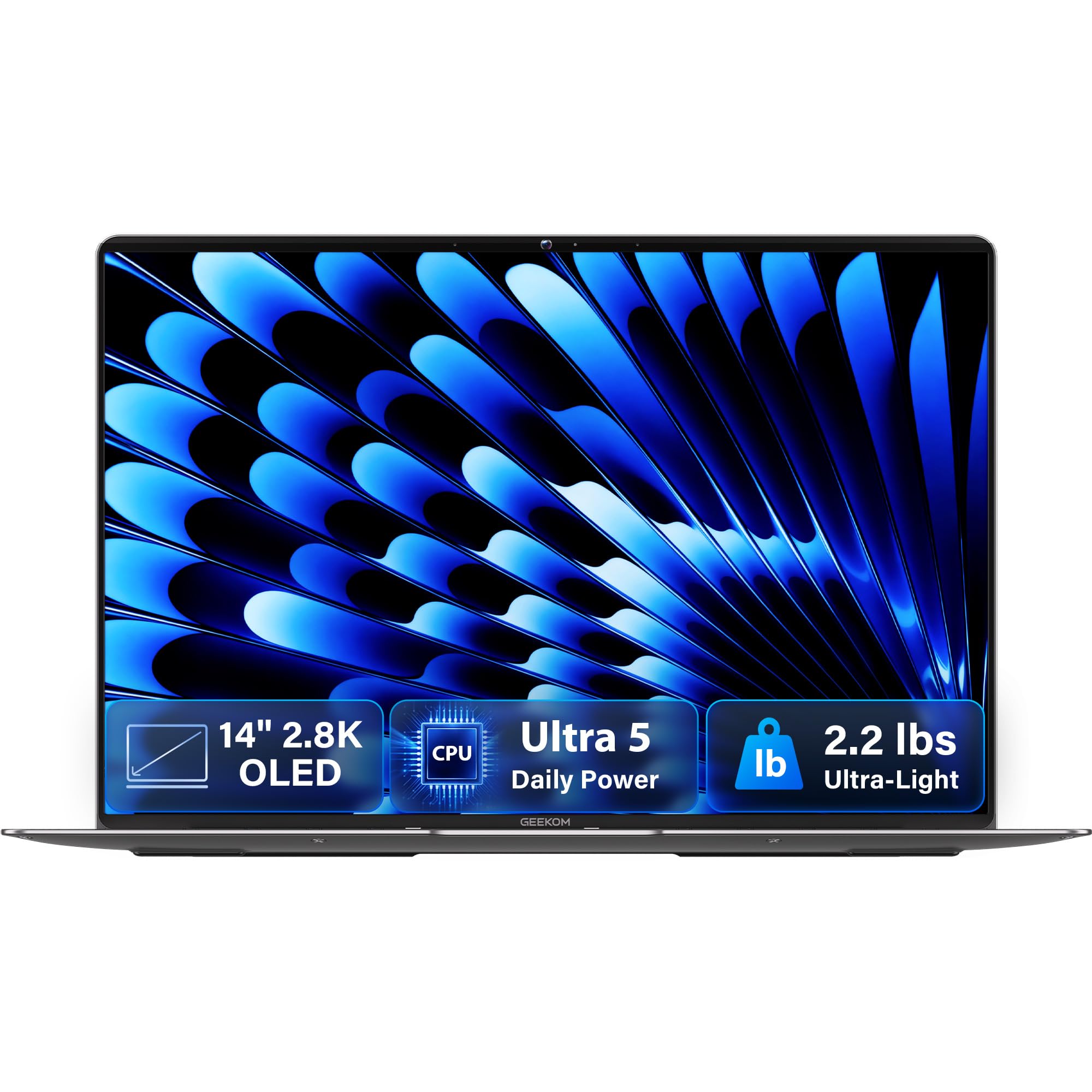
Two point two pounds of magnesium alloy that still has an OLED display inside.
At 2.2 pounds and 0.23 inches thick, this is the laptop that disappears into a bag — the aerospace-grade magnesium alloy chassis is what makes that possible. The 14-inch 2.8K OLED panel runs at 120Hz and covers 100% of DCI-P3, so photos look accurate and scrolling feels smooth.
Inside sits an Intel Core Ultra 5 125U with 12 cores and 14 threads up to 4.3 GHz, plus a dedicated NPU for on-device AI tasks like background blur and noise reduction. You get 16GB of LPDDR5 at 6400MHz, a 512GB PCIe Gen4 SSD, Wi-Fi 6E, Bluetooth 5.4 and an included docking station.
The 72Wh battery is rated at up to 16 hours of unplugged use, and the 65W GaN charger reaches about 80% in roughly an hour. What wins people over is portability and a genuinely good screen — the OLED is the star. The trade-offs are real: 16GB of memory is fixed, and the touchpad has drawn mixed feedback from users, who describe it as finicky.
Why it travels well
- 2.2 lb magnesium chassis and a 72Wh battery rated at up to 16 hours.
- 2.8K OLED, 120Hz, 100% DCI-P3 — a serious panel for a light laptop.
- Two 40Gbps USB4 ports, HDMI 2.1, fingerprint open up and a physical camera shutter.
Where it asks you to compromise
- 16GB memory is soldered, so buy the storage you need now.
- The touchpad is the recurring comment in the data — some buyers find it inconsistent.
- No discrete GPU, so heavy 3D work is out of scope.
Choose this when: you commute, work from cafés and want an OLED screen you can see near a window.
Pass if: you need to run heavy GPU work — the MSI and Alienware above are built for that.
6. HP ProBook 465 G11
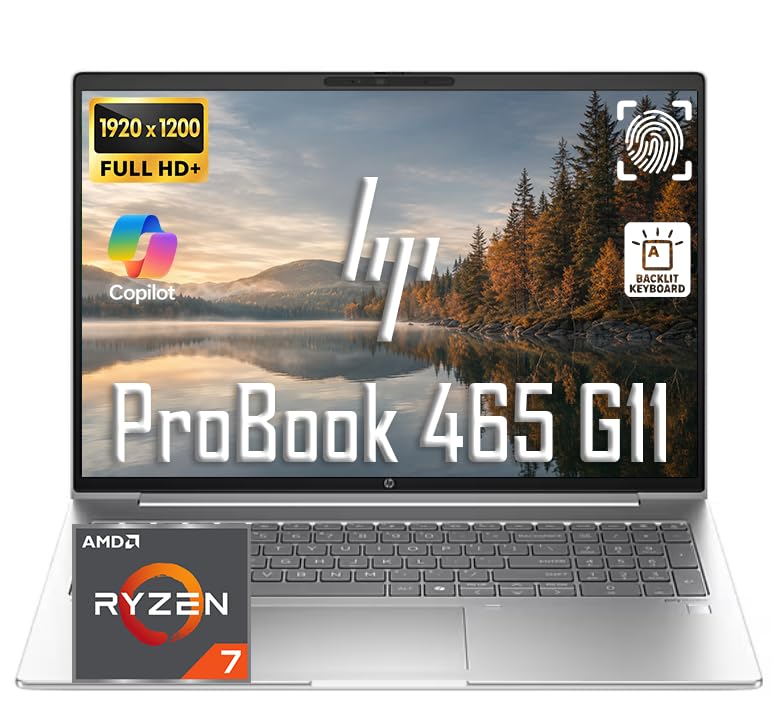
The 16:10 screen and numeric keypad that make a full workday shorter.
A 16-inch IPS display at 1920×1200 with a 16:10 aspect ratio is the quiet hero here — that extra vertical space shows more spreadsheet rows and document lines before you scroll. The AMD Ryzen 7 7735U brings 8 cores and 16 threads up to 4.7GHz, backed by AMD Radeon 680M graphics.
The memory and storage are configured for real work: 16GB DDR5 for browser tabs and office apps, with 1TB for files and projects. A full port set — two USB-C 3.1/3.2 Gen 2, two USB-A 3.1/3.2 Gen 1, Ethernet, HDMI and a headphone jack — means most offices will not need a dock at all. A fingerprint reader and backlit keyboard with numeric keypad complete it.
The honest note is that reliability has drawn mixed feedback in the data, so the extended service options matter more than usual on this one. Otherwise buyers describe the processor as quick and the setup as easy. The keyboard and the 16:10 panel are the parts most people actually live with, and they are solid.
What carries the day: the 16:10 display, work-ready port selection and a proper numeric keypad for data entry.
Before you commit: check the service plan, since a small number of buyers reported reliability issues.
Reach for this if: you want a business laptop that handles numbers, tabs and external monitors without an adapter bag.
Bear in mind: the integrated Radeon graphics will not run demanding games at high detail.
7. Microsoft Surface Laptop (2024), 13.8″

A full workday of battery in a body that weighs about as much as a hardback book.
The headline number is 20 hours of rated battery life — enough to leave the charger at home on a normal workday. Powering that is a 10-core Snapdragon X Plus chip with 16GB of RAM and a 512GB SSD, built as a Copilot+ PC with AI features baked into Windows 11.
The 13.8-inch touchscreen is bright with HDR support, and the aluminum chassis is thin and quiet. Ports include USB-A and two USB-C plus Wi-Fi 7 and Bluetooth 5.2 — practically more wiring flexibility than the Air it is clearly aimed at.
The honest limit is software compatibility: the Snapdragon is an ARM-based processor, not an x86 Intel or AMD chip, so some older USB peripherals and certain drivers do not play nicely. Owners mention printers eventually working but sometimes needing patience, and one described failing to resume from sleep with accessories. Pick it for streaming, writing, email and Office — not for heavy gaming or legacy hardware.
Strengths you will feel daily
- Up to 20 hours of battery life — genuine all-day unplugged use.
- 13.8″ touchscreen with bright HDR display and a comfortable keyboard.
- USB-A plus USB-C ports and fast magnetic charging.
- Quiet, cool operation and a fingerprint-resistant finish.
Limits to go in with eyes open
- ARM architecture means some older drivers and USB accessories can be fussy.
- Not a gaming or graphic-design machine — the Snapdragon graphics are modest.
- Heavy all-day use can still need a top-up by evening.
Best match for: commuters, students and field workers who prize battery above raw compute.
Not for: you if your work depends on niche Windows peripherals or heavy graphics software.
8. Alienware 16 Aurora Gaming Laptop

An RTX 5060 and a 300-nit 16-inch panel in a body that skips the rear thermal shelf.
The spec worth knowing is the display: a 16-inch 16:10 WQXGA panel at 2560×1600 with 300 nits of brightness and an anti-glare coating. That resolution on a 16-inch screen is about sharp pixels without the overkill. Powering it is an Intel Core 7 240H boosting to 5.2 GHz alongside an NVIDIA RTX 5060 built on the Blackwell architecture.
Cooling is the design story — Alienware’s Cryo-Chamber structure pushes airflow directly at the core components, and the chassis does it without the rear thermal shelf that used to make these machines too deep for a desk. A 180W adapter is in the box. Dell adds a year of onsite service.
The honest split is heat. These machines run warm under sustained load and the fans get loud, which is normal for this class but not invisible. Reliability has drawn scattered negative feedback in the data, so the onsite service matters. For gaming, artwork and video work, it delivers.
The standout: that 2560×1600 anti-glare panel and the RTX 5060 give a strong picture-per-dollar balance.
The trade: expect the surface to warm and the fans to ramp under a long session.
Fits you if: you want a mid-range gaming machine with a clean, non-gamer look and onsite support.
Consider the G16 instead if: you want the highest frame rates and a 240Hz panel to match.
9. Thunderobot Storm 17 5070

A 17.3-inch 1440p panel at 165Hz with enough room inside to swap your own drives.
The Intel Core i7-13620H offers 10 cores and 16 threads up to 4.9 GHz, paired with an RTX 5070 and 32GB of DDR5. That is a well-fed configuration for gaming and creative work. The 1TB PCIe M.2 SSD is the starting point, and there is room to add more — one buyer swapped in higher-capacity drives.
Text and fast motion both stay crisp on the 17.3-inch QHD panel (2560×1440 resolution, 165Hz refresh rate — it redraws the screen 165 times a second), a balance between sharp and fast. Cooling is elaborate on paper: thin copper fins, dual 12V turbofans (high-speed cooling fans) and a one-click forced-cooling mode. Wi-Fi 6 (the current mainstream Wi-Fi standard) keeps the network side current.
The trade-offs come from the power budget. The battery is a 53Wh unit, and buyers describe 3-4 hours of browsing and much less in game. The fans get loud under heavy loads, and the BIOS is described as a work in progress. Still, the performance-per-core value is strong and the case is upgradable.
The upside of ownership
- i7-13620H and RTX 5070 with 32GB DDR5 — serious frames for the class.
- 17.3″ QHD 165Hz panel with crisp detail and no dead pixels reported in the data.
- Upgradable RAM and storage access is a rare and welcome feature.
The fine print
- 53Wh battery means 3-4 hours of browsing and much less while gaming.
- Fans get loud under graphics-heavy loads.
- Build quality varies — at least one buyer received a unit with a damaged screen.
Buy it if: you want a big high-refresh screen and the option to upgrade the internals later.
Not ideal if: you need all-day battery — a 53Wh pack will not get you there.
10. Samsung Galaxy Book5 Pro 360

A 16-inch 3K AMOLED screen that folds flat and takes a stylus.
The centerpiece is a 16-inch touchscreen at 2880×1800 with a 120Hz refresh rate and an anti-reflective coating, so colors stay rich from off-angles. The Intel Core Ultra 7 258V handles the compute, with 32GB of RAM and 1TB of storage, and the NPU is rated as high as 47 TOPS for on-device AI tasks.
Samsung’s ecosystem is the extra card: the included S Pen makes handwriting and drawing feel natural, and Phone Link syncs your Galaxy phone for calls and texts. The 2-in-1 hinge flips the screen around so it becomes a tablet. Weight is 3.72 pounds in a CNC aluminum chassis 12.7mm thick.
What wins people over is that screen — buyers describe it as gorgeous and the machine as fast. The known risk in the data is screen stability: multiple customers note cracks developing within months with no obvious cause. Battery life also divides opinion, with some users getting through a day and others reporting far less. Treat it as a machine to protect and you will love the display.
The reasons to pick it
- 3K AMOLED 120Hz touchscreen with the S Pen included for notes and art.
- Core Ultra 7 with 32GB and 1TB — genuine workstation headroom.
- Phone Link and Multi Control integrate with Samsung phones and tablets.
The reasons to pause
- Screen cracks have been reported within three months — a real risk for a premium panel.
- Battery life is inconsistent across users.
- No discrete graphics; this is not a rendering machine.
The pick for: note-takers, students and artists who want a tablet and a laptop in one.
skip it if: you need the toughest screen or a whole-day battery guarantee.
11. Dell 16 Plus Laptop

A QHD+ 16:10 screen and an Ultra 9 chip aimed at people who live in spreadsheets.
The Intel Core Ultra 9 288V runs up to 5.1 GHz with 12MB of cache, and 32GB of RAM backs it up. On a 16-inch 16:10 QHD+ panel, that means more rows and more windows side by side. The FHD+ webcam supports Windows Hello for fast, secure sign-in.
Dell built this as a durable aluminum machine and submitted it to military-grade testing, though you only feel that on the road rather than the desk. A year of onsite service comes with it, too. The one real limitation to note is ports: this configuration has just one USB-A, one USB-C, one Thunderbolt and an audio jack, with no card reader.
What people praise most is the speed in heavy multitasking — Photoshop, multiple apps, lots of tabs. The battery and screen look good in the data, and setup is easy. If you spend eight hours a day in a data grid, this is the machine most likely to reduce eye strain while keeping up.
What it gets right: a fast Ultra 9 chip, 32GB of RAM and a sharp 16:10 screen for documents.
The honest note: limited ports and no card reader demand an adapter for photographers.
Your match if: your work is spreadsheets, data, photo editing and professional multitasking.
Look elsewhere for: gaming — this is a productivity-first machine, not a gaming rig.
12. ASUS ROG Strix G16 (G615LW-AS96)

A 240Hz 2.5K panel with an RTX 5080 behind it and a vapor chamber to hold the line.
The display runs at 240Hz with a 3ms response, and the 2.5K resolution on a 16-inch panel keeps detail crisp while motion stays fluid. The GPU is an RTX 5080 with DLSS 4 and Max-Q, and an Intel Core Ultra 9 275HX boosts to 5.4 GHz to feed it. Memory is 32GB of DDR5-5600, storage a 1TB PCIe Gen 4 SSD.
ASUS’s cooling is the other talking point: an end-to-end vapor chamber, tri-fan technology and liquid metal on the chipset. A full-surround RGB light bar syncs with the keyboard, and a Stealth Mode kills all the lighting for a work setting.
The honest notes are heat and software setup. Under max load some buyers sit around 81°C, and the fans are loud when they ramp.What wins people over: the 240Hz panel paired with the 5080 makes competitive shooters feel fluid, and switchable graphics stretch battery life between sessions.
The catch: the Armory Crate software is intrusive and required, and the default settings needed a fix from day one to stop crashes.
Worth it for: competitive gamers and AI/ML tinkerers who want raw frame rates on a 240Hz screen.
Think about the price first: the Legion below trades a little frame rate for an OLED panel and more memory.
13. Lenovo Legion Pro 7i Gen 10

An RTX 5090, 64GB of RAM and a 16-inch OLED — the machine that does not ask what the workload is.
Nothing in this list stacks up to the raw configuration here. The Intel Ultra 9 275HX brings 24 cores (8 performance plus 16 efficiency) and 36MB of cache, and 64GB of RAM with 2TB of storage means video files, huge datasets and 3D scenes all stay loaded. The 16-inch 2560×1600 OLED runs at 240Hz, which combines OLED contrast with a fast refresh — rare even among premium rigs.
Gaming performance is the headline. The RTX 5090 (Blackwell) runs any game on max settings at the highest resolution with headroom to spare. Power modes — Quiet, Auto, Normal and Overdrive — let you dial the machine down when you want silence and up when you need it. OLED burn-in protection (taskbar dimming, screen dimming) shows Lenovo thought about long-term display life.
The honest trade-off is physics. This is a heavy, hot, short-battery machine, and AI developers have hit GPU compatibility snags that need Python Torch nightly and CUDA above 12.8 to work. One owner also reported a scratched touchpad on arrival. If you want a fixed desk and top-tier rendering, this is as good as it gets.
Why it tops the stack
- RTX 5090 with 24-core Ultra 9 and 64GB of RAM — the most capable configuration here.
- 16″ OLED running at 240Hz — both contrast and speed.
- Multiple power modes and OLED burn-in protection.
What you accept in return
- Heavy and hot, with poor battery life on the move.
- GPU compatibility for AI frameworks requires specific driver and library versions.
- Occasional cosmetic damage in transit has been reported.
For you if: you render, train models or game at maximum settings on a fixed desk.
Stay clear if: you need portability — this machine lives plugged in.
Know the Specs
Processor and graphics — the real engine
The CPU handles your everyday apps and the GPU handles visuals. Intel’s Core Ultra 9 275HX, for example, is a high-core chip that multitasks heavily and pairs well with a discrete RTX 5080. Apple’s M5 packs both the CPU and GPU cores and shares one pool of memory, which keeps performance consistent on battery or plugged in. If the GPU is integrated — like the Radeon 680M in the NIMO — expect solid work performance but heavier games tuned down.
Refresh rate, brightness and panel type
Refresh rate in hertz is how many times the screen redraws each second. A 240Hz panel makes motion fluid for gaming; a 60Hz panel is fine for text. Brightness in nits decides whether you can read the screen near a window. OLED delivers deep blacks and accurate color but is more fragile and reflect-prone; mini-LED (the Apple’s Liquid Retina XDR) balances brightness and contrast without the OLED burn-in risk.
Memory and storage
More RAM means more open apps without slowdown — 32GB is a comfortable workload buffer, while 64GB is reserve for heavy rendering and AI models. Storage type matters more than size: PCIe Gen 4 and Gen 5 SSDs load games and apps in seconds. Watch whether RAM is soldered (fixed forever) or upgradable (you can add later) — that decision shapes how long the machine lasts.
Cooling and battery
A fast chip in a thin body throttles when it heats up, so real-world speed depends on thermal design. Vapor chambers, multiple fans and rear exhausts keep sustained performance high. Battery capacity in watt-hours sets unplugged time — a 72Wh pack with a 16-hour rating will last a workday, while a 53Wh pack in a gaming machine is more like 3-4 hours of browsing.
Common Questions
Should I buy a custom-configured laptop or a ready-made one?
Is 32GB of RAM enough for video editing and gaming?
Can I upgrade the RAM or storage on a custom laptop?
How much battery life can I realistically expect from a gaming laptop?
Which laptop processor is better for AI work — Intel Core Ultra or Apple M5?
Is OLED better than IPS for a laptop screen?
Do I need a dedicated GPU for gaming and design work?
What is a vapor chamber and does it matter?
How long will a high-end custom laptop stay fast?
Will a US-configured laptop work with my printer and older USB accessories?
The Bottom Line
For most people, the best of these custom built laptops is the Apple MacBook Pro with M5. It pairs a 10-core CPU and 24GB of unified memory with a 1600-nit XDR display (a screen that hits 1600 nits of brightness, so it stays readable in bright light), and it does all of it in near silence. If raw gaming frame rates are your goal, the ASUS ROG Strix G16 brings the 240Hz panel and RTX 5080 to match. And if you want the single most capable configuration on this list, the Lenovo Legion Pro 7i Gen 10 pairs an RTX 5090 with 64GB and a 240Hz OLED. Match the machine to your real workload and it will stay quick for years instead of months.
How we choose
We do not accept paid placement. Every pick is matched to a real buyer and a real use-case; we do not hands-on test units.
Sources
Specifications: manufacturer listings and product documentation. Review insights: verified customer reviews, as of October 2026. Pricing: not shown on this page (it changes often); check the current price via the retailer link.
As an Amazon Associate, Aappliancez earns from qualifying purchases. This does not affect which products we feature.