Disclosure: Some links in this post are affiliate links. As an Amazon Associate I earn from qualifying purchases, at no extra cost to you. Learn more
Specs are compiled from manufacturer listings and verified buyer reviews and can change over time — please confirm the key details on the product page before buying.
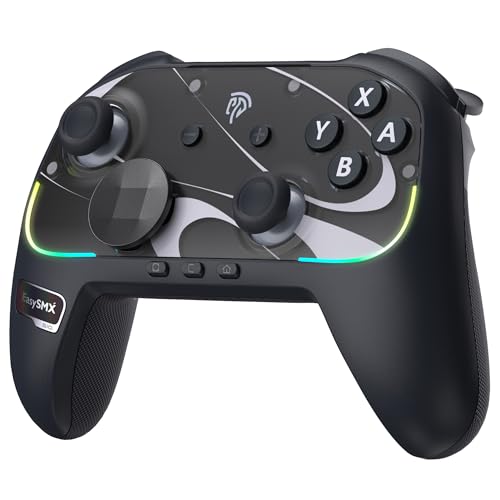
You want real keys and a mouse pad under your thumb without giving up the grip of a gamepad — and that tension is exactly where this list lives. A controller with a keyboard built in solves one very specific problem: games that need letters, numbers, and menu hotkeys while you are sitting on a couch, not a desk. Some of these are true dual-sided hybrids, some are half-keyboards, and a couple give you the whole desk setup in a bundle. The short answer: if you play on Switch 2 or a PC and want the closest thing to a Pro controller with extra tricks, look at the EasySMX S10 Elite first.
This guide is built by comparing the manufacturers’ published specifications and the patterns across verified customer reviews, so you get each pick’s real strengths and trade-offs instead of marketing spin.
The trickiest part is knowing which games actually accept keyboard-and-mouse input on a console, because a hybrid only works where the game allows it. Here is a plain-English walk through the controller with keyboard options worth your attention, from full hybrids to keypads and bundles.
Top Picks

How To Choose The Best Controller With Keyboard
The single biggest mistake buyers make here is assuming “keyboard built in” means the same thing on every product: a full gamepad, a half-keyboard, and a desk bundle all qualify. It does not. One product is a full gamepad that wakes your console and also carries a keyboard; another is essentially a slice of a keyboard shaped to hold; a third is a bundle of separate desk gear. Decide first which of those you actually want, then match the specs.
Does the game actually accept keyboard input?
This is the make-or-break check, and it is a game problem, not a hardware problem. Some titles on Xbox, PlayStation, and PC accept keyboard and mouse natively; many do not. The IFYOO GTP01 states plainly that it only supports Xbox, PS4, and PS5 games that must support keyboard and mouse. Read the listing for your specific game before you buy, or you will be fighting a device that is working exactly as designed.
Trackpad versus tiny keys: pick your aiming method
A trackpad replaces the mouse — you slide your thumb to aim, and some add a gyroscope (a motion sensor that reads the tilt of the pad) for fine turning. A thumb keyboard replaces the letter keys. Most hybrids give you a bit of both at a size that fits your two hands. If precise aiming matters most, weigh the trackpad and gyro specs heavily; if you mainly type searches and chat, the keyboard quality matters more.
How much desk do you want to give up?
A full-size wired bundle keeps every key at normal spacing but locks you to a surface. A pocket keyboard or dual-sided pad fits in a bag and works from the sofa. The trade is always the same: fewer keys and tighter spacing the more portable you go. Match that trade to where you actually sit when you play: a desk for the full-size wired bundle, a sofa or bag for the pocket keyboard and dual-sided pad.
Side-by-Side Comparison
| Model | Best For | Connection | Key Spec | Extra Feature | Amazon |
|---|---|---|---|---|---|
| EasySMX S10 Elite★ Best Overall | Switch 2 with Pro-style control | Bluetooth / USB-C | TMR anti-drift joysticks | One-key wake-up | Amazon |
| IFYOO GTP01Trackpad Aiming Pick | Couch FPS on console/PC | 2.4GHz Wireless | 6-stop trackpad speed | Gyro aiming | Amazon |
| FUNDIAN X1 CookieRun | Portable dual-sided hybrid | Bluetooth | QWERTY keypad + touchpad | 5 pairing modes | Amazon |
| Orzly RX-250 | Full desk bundle on a budget | Wired | 104-key keyboard | 4-in-1 with headset | Amazon |
| Razer Tartarus V2 | MMO and hotkey-heavy play | USB-A | 32 programmable keys | 8-way thumbpad | Amazon |
| FUNDIAN Pocket Keyboard V2 | TV and media control | Bluetooth | 58 buttons | Audio pairing | Amazon |
| Bewinner 4-in-1 Mobile Combo | Android mobile play | Bluetooth 5.2 / USB | 120 FPS mapping | Phone stand included | Amazon |
Detailed Reviews
1. EasySMX S10 Elite Wireless Controller
Our pick — 4.5+★ from 550+ verified ratings; the strongest balance of quality and price.
The Switch 2 pad that wakes your console and swaps out its own D-pad.
If you play Switch 2 and want the closest thing to a Pro controller without the Pro controller price label, this is the one to beat. The headline piece is the pair of TMR magnetic joystick modules — magnetic sticks that resist the slow drift that wears out ordinary sticks over time — so your aim stays centered instead of veering left after a few hundred hours. Around that you get 2 mappable back buttons, mechanical micro-switch buttons with a crisp click, swappable D-pad shapes, magnetic faceplates, NFC for Amiibo, 6-axis motion sensors, HD vibration, and adjustable RGB lighting.
Battery life is the part that quietly wins people over: a 1200mAh rechargeable cell rated for up to 17 hours on a full charge, topped up over USB-C. The one-key wake-up is the feature reviewers keep circling back to — it powers on the console just like the official pad, though the first-time setup needs a specific dance (set the back toggle to “S,” hold HOME for three seconds, pair under Controllers, then reattach a Joy-Con once within 20 seconds to activate wake-up). It also runs Bluetooth and USB-C wired across Switch, PC, iOS, and Android.
The catch is small but real. The triggers are digital rather than analog, so racing games where you feather the throttle lose some nuance — better suited to action, platformers, and fighting games. A few owners also notice a slight button input delay compared to Joy-Cons and find the rumble reads closer to a first-gen feel than the newest HD scheme. And one unit had an L2 button fail, though warranty support sent a replacement without needing the return. None of that shakes the overall picture: this is the premium-feel alternative that most Switch 2 players end up preferring.
What earns its keep
- TMR magnetic sticks built to resist drift over time
- Up to 17 hours from a 1200mAh cell over USB-C
- Wakes the Switch 2 just like the official pad
- Two programmable back buttons without any app
Where it gives ground
- Digital not analog triggers — weaker for racing
- First-time wake-up setup takes several steps
- A bit light in the hand for some tastes
Made for: Switch 2 owners who want Pro-style control, drift-resistant sticks, and a console that wakes at a button press.
Think twice if: you race sims and need the graded feel of analog triggers.
2. IFYOO GTP01 2.4G Wireless Gaming Touchpad
A gamepad-sized slice of keyboard with a mouse pad under your thumb.
This is the one for shooters on the couch. IFYOO packs a keyboard and a mouse into a single gamepad-shaped shell, so you aim with a precision trackpad (a smooth pad you slide your thumb across, exactly like the pad on a laptop) instead of a joystick. Six adjustable track speeds and six gyro speeds let you dial in how fast your view whips around. The gyroscope itself also has 3 modes and 3 turning axes, so you can tilt to fine-tune a shot after the trackpad gets you close.
The buttons are micro-switch, the joystick is an ALPS unit, and there are back buttons plus scroll wheels. You also get an FN modifier key that flips the D-pad and other buttons to a second set of bindings, which is how a pad this small covers twenty-plus keys. Setup is plug-and-play over the 2.4GHz dongle with no driver, and it runs on Xbox, PS4, PS5, PC, Mac OS, and Windows 11/10. The 0.37 kg body is light enough to hold one-handed while you tap the trackpad with the other.
Budget for the learning curve: owners describe roughly a month of adjustment and about eight hours before trackpad aim muscle memory clicks. Owners describe roughly a month of adjustment and about eight hours before trackpad aim muscle memory clicks. The trackpad is the star; the button scatter is where opinions split, with some finding the layout intuitive and others calling it confusing and physically cheap. There is no remapping software and no battery indicator, and a couple of units had the right mouse trigger give out early. It also only supports games that natively accept keyboard and mouse, so check yours first. Charge it over USB-C and it holds about three days between top-ups.
Who it converts: FPS and ARPG players who want mouse-like speed from a gamepad and are willing to spend a week or two rewiring their thumb.
The honest trade: expect a keyboard-cheap feel in the hand and a trackpad that wants in-game sensitivity tuning per title — this is a specialist tool, not a do-everything pad.
Reach for this if: you play Warzone, Apex, or Cyberpunk-style shooters on console or PC and want gyro plus trackpad aiming.
Look elsewhere if: your game does not support keyboard and mouse input at all.
3. FUNDIAN X1 Bluetooth Game Controller
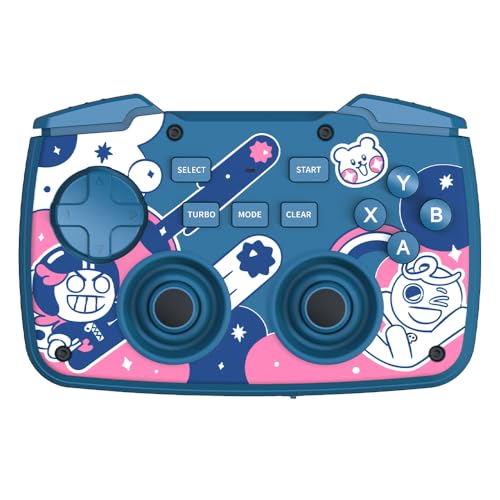
A gamepad on one side, a backlit keyboard on the other, small enough for a pocket.
Here is the concept that makes the FUNDIAN X1 genuinely clever. It is built as two halves — a joystick side and a keyboard side — and a flip switch swaps which one is active, so you are not accidentally mashing keys mid-fight. That dual personality is why it beats a phone’s on-screen joystick for mobile play: you get real, tactile buttons for Retro and arcade titles, then flip to a backlit QWERTY keypad and touchpad when you need to type a search on your TV or navigate a streaming box. Five Bluetooth pairing layouts cover phones, tablets, PCs, and streaming devices like Nvidia Shield TV, Chromecast with Google TV, and Fire TV.
Owners who use it as a couch PC control pad call it surprisingly useful — the back keyboard handles media controls and Windows navigation well, and the gamepad is decent for retro and emulator play. The keys feel tactile and quiet with a rubbery grip, the touchpad is genuinely handy for menus, and pairing is fast. As a living-room companion for a TV or smart stick, it earns its place.
The trade-off lives in the ergonomics. Because the keyboard sits on the underside, the grip feels awkward in both modes, and the trackpad is very small. Mode switching means memorizing several key combos, and on iPad the multi-device pairing is fiddly. The gamepad side registers as a separate Bluetooth device on some setups, so you disconnect and reconnect to switch between keyboard and control. Cheap-feeling plastics on the power and mode switches are the other knock. None of it kills the appeal for casual use — but it is a compact all-in-one, not a replacement for a full keyboard or a high-end controller.
Ideal for: mobile arcade fans and TV/streaming users who want one pocketable device for both joystick and typing.
Not your pick if: you need a full-size keyboard or a serious competitive controller.
4. Orzly Hornet RX-250 4-in-1 Gaming Bundle

The whole desk in one box — keyboard, mouse, pad, and headset, wired and RGB-lit.
This is not a single pad you hold; it is the full keyboard-and-mouse setup, wired, for a desk. The RX250-K is a full-size 104-key membrane keyboard with 19-key rollover (so pressing many keys at once does not drop inputs), anti-ghosting, and plug-and-play across PC, Mac, PS5, PS4, Xbox Series X/S, Xbox One, Steam Deck, and ROG Ally. It is rated for 8 million keystrokes with spill-resistant drainage and foldable anti-slip feet. The bundle adds a 90g ambidextrous mouse with four DPI levels (1200, 1600, 2400, 3200), a mouse pad with an anti-skid base, and a stereo headset with a foldable mic that rotates 120 degrees.
What wins people over is the sheer completeness for the money — keyboard, mouse, pad, and headset in one box, with color-changing LED lighting that kids in particular love. The keyboard feels solid and chunky with good key response and multiple backlight modes, and the headset pumps out deep bass with a clear mic. Buyers describe it as an easy starter kit that holds up to rough handling.
Set expectations honestly. The keyboard hardwires to a cord and its high-profile keys feel bulky to some, and the mouse’s RGB cannot be turned off on some units while its tracking can lag occasionally. The bigger gripe in the reviews is durability: keys can wear or stick, and the occasional headset arrives dead. Those are the reasons to size this as a budget-friendly starter bundle for younger gamers rather than a long-term competitive rig. As a gift box that lights up and works out of the carton, it delivers.
The value read: four pieces of gear for the price of one peripheral makes this the easiest first setup to hand a new PC or console player.
Best fit: parents and first-time PC or console gamers who want a full wired desk kit in one purchase.
Skip it for: competitive play where you need analog feel and rock-solid long-term durability.
5. Razer Tartarus V2 Gaming Keypad

Half a keyboard built for one hand and a hundred hotkeys.
If you want a slice of keyboard just for your left hand to run macros and hotkeys, the Tartarus V2 is the specialist choice. It carries 32 mecha-membrane keys — a hybrid that gives you the tactile click of a mechanical switch but on a soft rubber-dome base — so typing and mashing both feel cushioned. The 8-way directional thumbpad maps to WASD movement, which is the bridge that lets console players transition to keyboard-and-mouse without relearning footwork. Razer Hypershift lets you remap every key and keypress combination to run complex command chains, and the 16.8 million color RGB lighting syncs with games and other Razer gear.
The MMO and creative-workflow crowd is where it shines. Owners run the Tartarus V2 for 16-hour sessions without hand fatigue thanks to the ergonomic wrist rest, and designers map Adobe shortcuts to Synapse profiles alongside their game binds. Console players who never touched a keyboard describe it as the gentlest on-ramp they have tried, because the thumbpad handles movement while your fingers learn the keys.
Two things hold it back. It needs Razer Synapse software to configure, and some find the app sluggish with profiles that auto-launch. There is no onboard memory, so your layout lives on the PC, not the device. Durability is generally solid, with a worn wrist pad after years of use, though one unit’s D-pad switch failed early and support took weeks. Worth knowing: it is shaped for larger hands, so smaller hands may find the edge keys a stretch, and the D-pad placement can make jump-while-moving awkward.
The wins that matter
- 32 programmable keys plus Hypershift for extra schemes
- 8-way thumbpad maps WASD for smooth transition
- Comfortable wrist rest through long sessions
What to weigh
- No onboard memory — Synapse software required
- Shaped for larger hands; edge keys a stretch for small hands
Go for it if: you play MMO or hotkey-heavy games, or want one-hand macros for creative work.
Pass if: you want a self-contained controller with no software install.
6. FUNDIAN Bluetooth Pocket Keyboard V2

The remote that types, points, and pipes sound to your headphones.
Picture a keyboard small enough to sit on the arm of the sofa, with a pointer built in so you do not have to reach for a mouse. That is the Pocket Keyboard V2: 58 buttons, a backlit keypad, and an analog jog stick that handles the pointing so your greasy fingers never touch a real mouse. It carries a separate audio pairing too, so you can connect headphones straight to the keyboard for hands-free sound. The rechargeable battery runs a week between charges and it tops up over USB-C.
Owners using the Pocket Keyboard V2 as a living-room or HTPC (home theater PC) remote praise the responsiveness and analog stick pointer, and one calls it the best TV keyboard they have used. It pairs with a wide spread of devices — Nvidia Shield TV, Chromecast with Google TV, Fire TV, Xiaomi TV Stick, Mi Box, Android TV boxes, phones, tablets, and Windows or Mac machines. There are separate pairing routines for Android touch-mapping (via the ShootingPlus V3 app) and iOS, so you can tune it to the device in your hand.
Buy it for what it is, though. The layout is non-QWERTY with some keys in unusual spots, so expect a learning curve, and the cursor takes deliberate presses rather than fluid sweeps. Gaming on Android is where it is weakest — some find the game-controller latency noticeable. As a compact typing and media remote it works well and holds a charge for the week; as a serious game controller it does not compete. If typing on a TV with a fat-fingered remote drives you up the wall, this fixes that and little more.
Your match if: you want a small backlit keyboard and pointer for a streaming stick, media PC, or tablet.
Not the one if: gaming is the main job and you need responsive triggers, not a media remote.
7. Bewinner 4-in-1 Mobile Game Combo Pack

A one-handed keyboard, mouse, converter, and phone stand in a single Android kit.
This kit is aimed at one very specific player: someone who wants a keyboard and mouse for Android mobile games, not a console. You get four pieces — a keyboard and mouse converter, a 4D gaming mouse, a one-handed K13 keyboard, and an adjustable phone stand — that together turn a phone into a cramped desktop setup. A 5V 2000mA output charge path keeps the phone fed while you play, and Bluetooth 5.2 or wired mode handles the connection. Its 120 FPS mapping runs without modifying official game data, so anti-cheat systems do not flag it.
The setup is meant to be simple: one-click mouse pointer activation, no macros or companion app to learn. The one-handed keyboard and mouse layout is built for competitive FPS, and you can show or hide individual game keys and split them so a single input covers multiple actions. On the right phone with the right game, it does its job.
The honest caveat is compatibility and connectivity. This is an Android-only kit, and the reviews show it can be fussy — Bluetooth pairing does not always take, the English instructions are hard to find, and some phones simply will not connect even over the wire. When it connects, players report it plays well. When it does not, there is little support to fall back on. Match it to an Android phone and a mobile game you know supports mapping, and it is a satisfying budget entry. Expect to spend a little time in setup and to troubleshoot the pairing yourself.
Where it fits: Android gamers who want a keyboard-and-mouse feel for competitive mobile FPS and do not mind a wonky pairing session.
Pick it up for: an affordable Android mobile keyboard-and-mouse kit with a phone stand included.
Look past it if: you game on iPhone or console, or need plug-and-play reliability on the first try.
Know the Specs
Trackpad and Gyro Aiming
A trackpad is a flat slide surface that replaces a mouse — you drag your thumb to move the cursor. The gyroscope is a motion sensor that reads the tilt of the device so you can fine-tune a shot by rotating your hands. Together they let a gamepad-shaped device offer mouse-like aiming, though most buyers need weeks to build muscle memory before it feels natural.
Programmable Keys and Onboard Memory
Programmable keys are buttons you remap to run any action or macro. Onboard memory decides whether those layouts live inside the device or on your PC. If a keypad has no onboard memory, as the Tartarus V2 does not, your custom layout depends on the companion software being installed, so consider how much you rely on plugging into different machines.
Common Questions
Will a controller with keyboard work with any game?
Does the EasySMX S10 Elite work with anything besides Switch 2?
How long does the IFYOO GTP01 battery last between charges?
Is the Razer Tartarus V2 a full keyboard?
Do I need software to set up the Tartarus V2?
Will the Bewinner mobile combo work on an iPhone?
What is the difference between the FUNDIAN X1 and the FUNDIAN Pocket Keyboard V2?
Is the Orzly RX-250 bundle wired or wireless?
Can I charge a phone while using the Bewinner mobile kit?
The Bottom Line
For most players, the controller with keyboard winner is the EasySMX S10 Elite because it delivers Pro-style control with drift-resistant TMR sticks, up to 17 hours on a charge, and a wake-up feature that makes it feel native to the Switch 2. If your priority is couch FPS aiming with a trackpad and gyro, the IFYOO GTP01 is the specialist to reach for. And if you want one pocketable device that switches between gamepad and keyboard for mobile and TV use, the FUNDIAN X1 is the smart-fit hybrid.
How we choose
We do not accept paid placement. Every pick is matched to a real buyer and a real use-case; we do not hands-on test units.
Sources
Specifications: manufacturer listings and product documentation. Review insights: verified customer reviews, as of October 2026. Pricing: not shown on this page (it changes often); check the current price via the retailer link.
As an Amazon Associate, Aappliancez earns from qualifying purchases. This does not affect which products we feature.