Disclosure: Some links in this post are affiliate links. As an Amazon Associate I earn from qualifying purchases, at no extra cost to you. Learn more
Specs are compiled from manufacturer listings and verified buyer reviews and can change over time — please confirm the key details on the product page before buying.
If you want one answer before you scroll: buy a controller with magnetic Hall-effect sticks and confirmed Mac support, because drifting thumbsticks are what force most people to replace a gamepad in the first place. The DualSense is the safest all-round pick for a Mac: Sony lists macOS among its supported devices, and owners praise its build quality more than anything else. Below you get seven controllers that actually pair with a Mac, sorted by what each one is genuinely good at.
This guide is built by comparing the manufacturers’ published specifications and the patterns across verified customer reviews, so you get each pick’s real strengths and trade-offs instead of marketing spin.
Mac gaming has a nasty habit of turning a great gamepad into a paperweight, so the picks below are chosen for real macOS pairing rather than a vague “PC compatible” badge. Here is the honest shortlist of the best controller for Mac.
Top Picks

How To Choose The Best Controller for Mac
The mistake most Mac buyers make is assuming “works with PC” means “works with my Mac.” Those are two different operating systems, and a controller built for Windows drivers can refuse to pair at all. Start by checking the compatibility line for the word Mac, then work down to the sticks.
Check the Mac compatibility line first
Look for macOS, Mac, or Apple named outright in the supported devices. A controller that only lists Windows may still work through Steam, but you are gambling on software wrappers. Apple-listed models skip that guesswork, which is why the DualSense and the 8BitDo Ultimate 2 lead this list.
Pick magnetic sticks over standard ones
Standard analog sticks wear a physical contact pad, and that wear is what turns into drift — the cursor creeping when your thumb is still. Hall-effect and TMR sticks (magnetic sensors that never touch each other) sidestep the wear entirely. If you play a few hours a week, this is the single spec that decides how long the controller lasts.
Decide between Bluetooth and a 2.4GHz dongle
Bluetooth means no dongle to lose and instant pairing with a MacBook. A 2.4GHz dongle (a small USB receiver) usually gives a steadier, lower-lag signal. Several picks here ship with a charging dock that also holds the dongle, which solves the “where did the receiver go” problem.
Side-by-Side Comparison
| Model | Best For | Connection | Stick Type | Battery | Amazon |
|---|---|---|---|---|---|
| PlayStation DualSense (Midnight Black)★ Best Overall | Mac all-rounder | USB-C / Bluetooth | Standard analog | Rechargeable | Amazon |
| EasySMX D05Dock Value Pick | Dock value | Bluetooth / dongle | Hall sensor | Dock-charged | Amazon |
| QRD Spark N5 | Console crossover | Bluetooth 5.3 | Hall-effect | 800mAh | Amazon |
| Xbox Wireless Controller (Carbon Black) | Plug-and-play PC | USB-C / Bluetooth | Standard analog | AA batteries | Amazon |
| 8BitDo Ultimate 2 (WUCHANG) | Low-lag precision | 2.4G / wired / Bluetooth | TMR | Dock-charged | Amazon |
| NYXI Imperial | Adjustable feel | 2.4GHz / Bluetooth / wired | TMR | 1200mAh | Amazon |
| DualSense Marathon Limited Edition | Limited-run looks | USB-C / Bluetooth | Standard analog | Rechargeable | Amazon |
Detailed Reviews
1. PlayStation DualSense® Wireless Controller – Midnight Black
Our pick — 4.5+★ from 50,000+ verified ratings; the strongest balance of quality and price.
Sony’s own pad, with a Mac compatibility line in black and white.
The reason this takes the top slot is simple: Sony states the DualSense plays on Mac computers over Bluetooth or a USB Type-C cable. That removes the biggest Mac headache — wondering whether your controller will be recognized at all. It weighs 280 g and carries 18 buttons, including a touchpad, a built-in speaker, and a 3.5mm headset jack. The adaptive triggers add resistance that changes with what happens in the game, so a bowstring actually feels taut. The haptic feedback simulates in-game surfaces and impacts through the grips. Both need a game that supports them, which is where the honest catch lives.
The craftsmanship is what wins people over — build quality is the most-discussed thing about this controller by a wide margin, and it shows in the dense, textured plastic. The Midnight Black finish is the understated one of the family. Comfort holds up over long sessions thanks to that evolved layout and enhanced sticks. Pairing is the other repeated note: it works across several devices, though it occasionally needs re-pairing after a switch.
Now the trade-off. The sticks are standard analog, not Hall-effect, so the review pages carry a steady hum of drift and dead-zone complaints after heavy use. Battery life draws mixed feedback too — enough for a session, not a marathon. If you have worn out a DualSense stick before, pair this with a repair kit or look at the 8BitDo below. At the same time, owners who have pushed both brands put it bluntly: “Outlasted two Xbox controllers over ~2 years with zero stick drift.” That is a real vote for durability from someone who used it hard.
What earns its keep
- Mac support stated by Sony over Bluetooth and USB-C
- Adaptive triggers and haptic feedback in supported games
- Built-in speaker, microphone, and 3.5mm jack in one pad
- Comfortable, weighted 280 g frame for long sessions
Where it asks patience
- Standard sticks can develop drift after heavy use
- Battery life draws mixed reports
- Occasional re-pairing when switching devices
Buy this if: you want the lowest-risk Mac pairing and play games that use adaptive triggers.
Think twice if: you rack up hundreds of hours and want magnetic sticks that resist drift long-term.
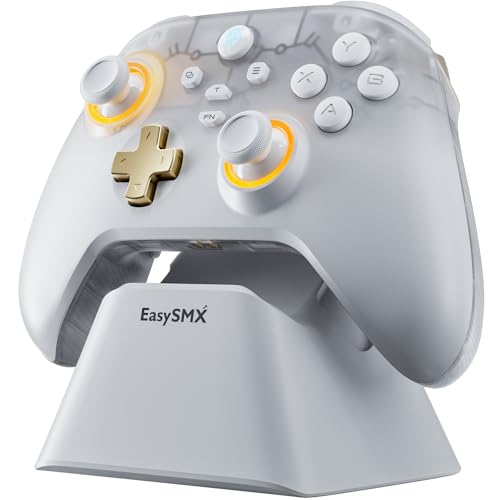
2. EasySMX D05 PC Controller
A charging dock and drift-free sticks for a fraction of the flagship asking.
If you keep a controller on your desk and want it topped up every time you pick it up, the D05’s included dock is the feature that earns its place. The sticks use Hall sensors (magnetic, contact-free sensors) instead of rubbing pads, and the listing promises no dead zone. Two programmable back buttons and RGB lighting round out a package that feels premium in the hand. The grippy back texture is a small thing that matters in long sessions.
What wins people over here is the desk-side convenience. The dock’s receiver slot keeps the dongle in one place, and you wake the controller with the middle button. Buyers who moved from pricier pads describe the feel as non-clunky and the controls as snappy. The Bluetooth hookup on a gaming laptop is quick, and fast charging gets mentioned too.
The honest limit is durability over years. The stick mechanism itself is the weak spot — “Lasted only 2 months: left joystick cracked then broke off.” Connectivity also has a handful of complaints, including pairing drops and a receiver that can disconnect on busy desks. Neither is universal, but if you plan on ten hours a week, budget for a replacement sooner than you would for a flagship. For light to moderate Mac play, though, the value is hard to argue with.
What the dock buys you: a controller that is charged when you sit down, plus a place for the dongle so it does not vanish.
The honest caveat: a couple of reported joystick failures at the two-month mark, so treat this as a light-to-moderate-use pick.
Reach for it if: you want drift-free sticks and a charging dock without paying flagship money.
Look elsewhere if: you want a pad you can hammer daily for years — the flagship sticks are sturdier.
3. QRD Spark N5 Wireless Controller
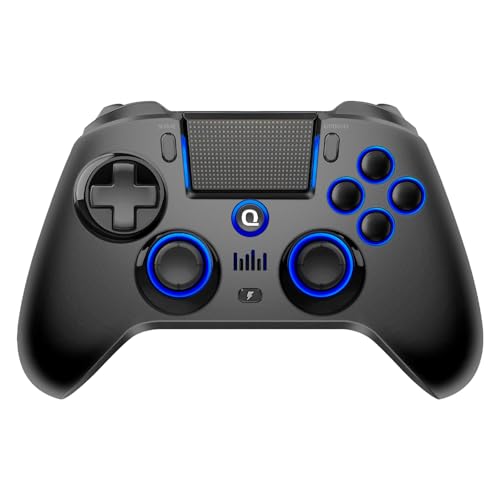
Twenty-two buttons and PS-style extras packed into a smaller, lighter shell.
The Spark N5 is the pick for someone who wants a PlayStation feel without paying for a DualSense — and it throws in more inputs. It runs 22 buttons against the DualSense’s 18, so you get two rear macro buttons and turbo on top of the standard layout. It is also shorter front to back: 3.94 inches deep versus the DualSense’s 7.5 inches. The Bluetooth 5.3 radio connects to Mac, PC, PS4, PS3, Steam Deck, and Android, and it packs a touchpad, a 6-axis motion sensor, a speaker, and a 3.5mm jack.
The magnetic Hall-effect sticks are the reason to shortlist it. They are claimed drift-resistant by design, and adjustable sensitivity and a manual calibration mode let you correct center offset yourself. What earns its keep across the board is overall build quality, followed by how many devices it handles. Battery comes in at 800mAh.
Two things to know before you buy. First, QRD requires a firmware update for stable pairing — do that before you play, not halfway through a session. Second, charging rules: it wants a standard 5V USB source, so avoid fast chargers and 9V or 12V adapters. Quality control draws a mix of notes too, from a sticky d-pad to early drift on one unit, and PS4 rumble is reportedly missing while native PS5 titles do get it. Set expectations and it delivers for the price.
Extra inputs to love
- 22 buttons including two rear macro keys and turbo
- Hall-effect sticks with adjustable sensitivity and calibration
- Bluetooth 5.3 across Mac, PC, PS4, PS3, Steam Deck, Android
- Smaller and lighter than a DualSense
Setup grounds to know
- Firmware update required before stable pairing
- Charges only from standard 5V USB sources
- Mixed quality-control reports on d-pad and sticks
The fit is clear: a Mac gamer who also owns a PS4, PS3, or Steam Deck and wants one pad for all of them.
The sticking point: you will want to run the firmware update before you play, and the rear buttons feel flat rather than clicky.
4. XBOX Wireless Gaming Controller + USB-C Cable | Carbon Black
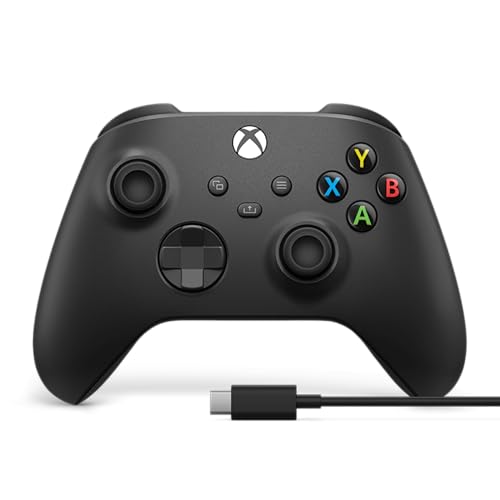
The Windows workhorse that plugs in and plays without any pairing dance.
For anyone who wants zero setup friction, this is the one. You plug the included 9-foot USB-C cable into a computer and you are playing — no adapter, no Bluetooth pairing. That cable also solves the battery question: it is a wired pad whenever you want it to be, and it takes standard AA batteries for wireless play, with a claimed 40-hour run on a set. A textured hybrid D-pad, textured triggers and bumpers, and a Share button complete a refined layout.
Functionality is exactly what people praise. The controls feel solid and the buttons press cleanly. The Bluetooth holds up over distance, pairing to PC, laptop, and iPad, and the 9-foot cable kills lag when plugged in. Comfortable sizing and balanced weight cut fatigue. If you like the Xbox layout, this is a natural fit for your Mac’s Steam or streaming setup.
The honest catch is two-fold. Mac compatibility is inferred here rather than stated — the listing names Android, iOS, Windows, and Xbox, so confirm it before you buy if native Mac pairing matters. There is also no rechargeable battery included, which some see as a plus and others as a surprise. And a few reports mention PC disconnects. None of that dims its appeal for anyone who likes the Xbox shape and wants a corded fallback.
Where it shines: the 9-foot USB-C cable means a guaranteed zero-latency wired session with no pairing step.
Where it asks politely: no rechargeable battery and Mac support is not on the device list — double-check before buying.
Reach for it if: you want the Xbox layout, AA batteries you can swap, and wired play that never asks you to pair.
Look elsewhere if: you want confirmed built-in Mac support or a rechargeable battery.
5. 8Bitdo Ultimate 2 Wireless Controller

One thousand reports a second, and magnet sticks built to stay centered.
The number that matters most here is the polling rate: 1000Hz over 2.4G and wired, which means the controller reports your stick position a thousand times a second, so fast direction changes land instantly. That is paired with TMR joysticks — magnet-backed sensors with wear-resistant rings that push precision higher and drift lower. Apple is named right in the compatibility list, so a MacBook recognizes it without heroics. Add a trigger-mode switch that flips between linear Hall-effect triggers and a tactile click, and a built-in charging dock that keeps it topped up.
What wins people over is build and feel. The TMR sticks draw a very consistent positive read, and the roomy shape keeps large hands comfortable for hours. Its 8Speed 2.4G link is rated under 1ms latency with a stable signal up to 10 meters. It rounds out with a rechargeable battery that lasts several sessions per charge and on-board memory profiles that persist without software or an account.
Now the fine print. This is a larger pad at 630 g, so small hands may find it a stretch. Compatibility, button mapping, and trigger feel all draw mixed notes — Star and Square are not remappable, and the triggers want sensitivity tuning. On an iPad, a couple of buttons are reported to trigger system menus. These are the sort of limits you learn to work around, not dealbreakers, and the price undercuts the flagship pads by a wide margin.
The precision case: 1000Hz polling and TMR sticks make it the sharpest response on this list for fast, aim-heavy Mac games.
The one to learn: it is heavier than the DualSense and some buttons are locked, so plan on customizing around its defaults.
You will love it if: responsive aiming and drift-free sticks matter more than a light, featherweight body.
Try another if: you have small hands or need every single button remappable.
6. NYXI Imperial PC Gaming Controller
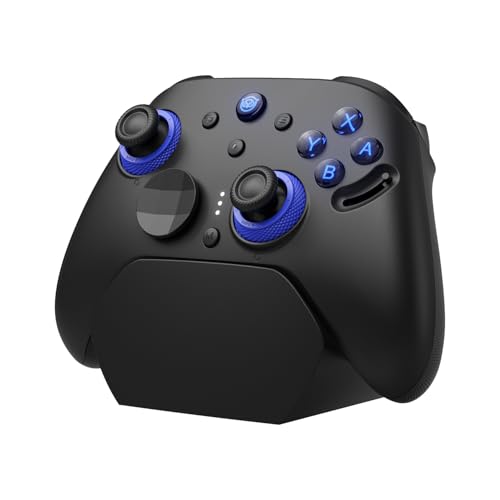
Dial the sticks from 40gf to 80gf and change how the pad feels under your thumb.
The Imperial’s party piece is adjustable stick tension you can dial in steplessly from 40gf to 80gf — grams-force, the amount of push the spring gives you. Softer tension means all-day comfort, stiffer means precision aiming, and the centering is quick and drift-free. Under it sit TMR magnetic sensors rated to withstand millions of cycles, plus 1000Hz polling on 2.4G and wired, which NYXI says transmits inputs far faster than a standard pad. A hardware trigger toggle gives you a hair-trigger click for shooters or linear Hall-effect control for racing. Its 1200mAh battery is rated up to 15 hours, and the magnetic charging dock wakes the pad instantly so you never hunt for a cable.
Owners single out how long one charge lasts — days, not hours. Connectivity across Switch devices and PC is easy, the TMR sticks feel precise, and programmable back buttons plus interchangeable ABXY caps let you flip between PC and Switch layouts. The dock is the unexpected favorite — a weighty, attractive stand that also lets the wireless dongle plug in for pass-through.
Two honest notes. The Mac-style setup is not the primary target — the supported devices are PC, Windows, Steam Deck, Android, and Switch, so Mac users should confirm before buying. And a few owners describe the vibration misbehaving at times, staying on or firing on a button press until you power cycle. That said, most describe this as one of the best pads they have used, and the flexibility is real.
The flexibility you pay for
- Stepless stick tension from 40gf to 80gf
- Dual-mode trigger toggle — click or linear
- 1200mAh battery rated to 15 hours
- Weighty magnetic charging dock with dongle pass-through
Bumps in the road
- Mac is not the headline platform — verify compatibility first
- Occasional vibration glitch fixed by a power cycle
- Heavier build than the DualSense
The match: a player who cares about feel — racers, fighters, and RPG fans who want to tune the sticks to their thumb.
The mismatch: someone looking for the most straightforward Mac-first pad, since its roots are in PC and Switch.
7. PlayStation DualSense Wireless Controller
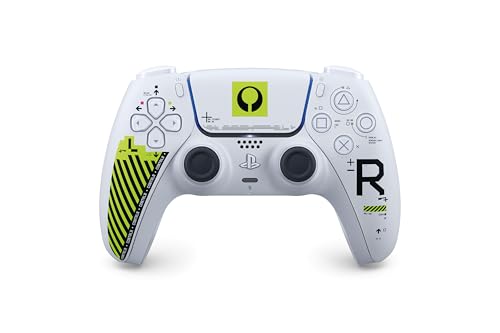
The same DualSense internals, dressed in a limited Marathon paint job.
Under the paint this is the pad most people already know, with Sony listing Mac computers among its supported devices over USB-C or Bluetooth. The Marathon Limited Edition adds a painted finish with lime green accents and understated details near the buttons and d-pad. The layered haptic feedback, adaptive trigger tension, touchpad, built-in microphone, and built-in speaker are all here. What you are really paying for is the look — this is the same core controller, made to be a keeper.
The design lands in person, and the tone reads off-white rather than pure white, with the lime green popping against it. Owners describe the grip as balanced and the buttons and sticks as responsive. Pairing is simple whether you go PS5 or PC, and it connects to a Steam Deck just as easily. Those using it across devices find the setup straightforward once it is connected.
One thing to know: the internals match the standard DualSense, so the same stick-wear concern applies. That means drift can show up over time on heavy use, which is the price of the standard analog sticks. If you love the limited finish and want a collectible-feeling pad that doubles as your daily, that trade is clear enough. If you want the longest-lasting sticks, look at the magnetic options above instead.
Why it earns a spot: a genuine limited-edition finish on a Mac-compatible flagship pad, with its own painted design rather than a sticker.
The straightforward caveat: standard analog sticks like the standard model, so expect the same potential drift over years of heavy play.
Buy it for: the Marathon finish and the familiar DualSense feel, without losing Mac compatibility.
Skip the upcharge if: the design is not a draw — the standard Midnight Black does the same job for less.
Know the Specs
Hall-Effect vs Standard Sticks
Standard analog sticks use physical contact pads that wear down, and that wear is what turns into drift — the cursor creeping while your thumb is still. Hall-effect and TMR sticks use magnetic sensors that never touch, so there is nothing to wear out in the same way. If you play a few hours a week and want the pad to outlast your interest in replacing it, choose magnetic sticks. The DualSense and Xbox pads on this list use standard analog sticks, so they are the ones to watch for drift over years.
Polling Rate and Latency
Polling rate is how many times per second the controller reports your stick position to the computer — 1000Hz means a thousand reports per second, so fast direction changes land with less delay. The 8BitDo and NYXI pads both list 1000Hz on 2.4G and wired. A lower polling rate can feel softer in fast shooters, though it is fine for slower games. Latency is the gap between your press and the screen’s reaction. A wired connection is usually the steadiest, which is why the Xbox pad ships with a 9-foot USB-C cable as a corded fallback.
Common Questions
Which controllers on this list are confirmed to work on a Mac?
Do Hall-effect sticks really prevent drift on a Mac controller?
Can I connect a Bluetooth controller to my Mac without a dongle?
What is the difference between a 2.4GHz dongle and Bluetooth?
Will a PlayStation controller work with Steam on a Mac?
How long does a controller battery last on one charge?
Is a wired connection better for gaming on a Mac?
Why does the QRD Spark N5 need a firmware update before pairing?
Can I use a PS5 controller on a Mac without a converter?
What is stick tension and does adjusting it help accuracy?
The Bottom Line
The safest call for most Mac owners is the PlayStation DualSense Midnight Black, because Sony lists Mac support outright and the build quality is the most consistently praised thing about it. If you want magnetic sticks and a charging dock in one package, grab the 8BitDo Ultimate 2 and its 1000Hz polling. And for a PS-style pad that also handles PS4, PS3, and Steam Deck, the QRD Spark N5 is the crossover to reach for — just run the firmware update first.
How we choose
We do not accept paid placement. Every pick is matched to a real buyer and a real use-case; we do not hands-on test units.
Sources
Specifications: manufacturer listings and product documentation. Review insights: verified customer reviews, as of October 2026. Pricing: not shown on this page (it changes often); check the current price via the retailer link.
As an Amazon Associate, Aappliancez earns from qualifying purchases. This does not affect which products we feature.