Disclosure: Some links in this post are affiliate links. As an Amazon Associate I earn from qualifying purchases, at no extra cost to you. Learn more
Specs are compiled from manufacturer listings and verified buyer reviews and can change over time — please confirm the key details on the product page before buying.
Your embroidery machine is only half the setup. The computer running your digitizing software decides whether a 20,000-stitch design loads in seconds or stalls each time you add a color. This guide walks you through the desktops and laptops that handle embroidery files, Artspira, and InStitch without choking — plus a few embroidery machines themselves that come with the software support you need.
This guide is built by comparing the manufacturers’ published specifications and the patterns across verified customer reviews, so you get each pick’s real strengths and trade-offs instead of marketing spin.
You will see which machines suit a beginner versus a small shop, and where RAM and storage actually matter for embroidery work. Read on for the clearest picks to pair with your computer for embroidery software.
Top Picks



How To Choose The Best Computer for Embroidery Software
Embroidery software is lighter than video editing but heavier than a browser tab. The files you open — DST, DSB, PES — can carry tens of thousands of stitches, and the software redraws every one of them on your screen. That is why a machine that feels snappy for email can feel sluggish in a digitizing program.
Memory and storage decide your workflow speed
RAM (temporary working memory) is what keeps your design, your reference photo, and your browser open at once. 16GB DDR5 handles that comfortably. 32GB and 64GB give you headroom when you run a digitizing program beside a chat window and a design library. A PCIe SSD (a solid-state drive that reads faster than an old spinning disk) is what makes a big pattern file open in a second instead of a minute.
USB and Wi-Fi transfer are how your designs reach the machine
A USB port is the simplest bridge between computer and machine — you export the file, load it on a thumb drive, and the embroidery machine reads it. Wi-Fi is the tidier path: machines like the Brother PE900 and Poolin EOC06 accept files straight from your computer over the network. Either way, check that the computer has enough USB Type-A ports for your keyboard, mouse, and a thumb drive at the same time.
How much screen real estate you actually need
Digitizers work with a timeline, a preview, and a color panel all at once. A desktop with three DisplayPort outputs or a laptop with Thunderbolt lets you hang a second monitor off the machine for reference art or a tutorial. For anyone who steps through a design stitch by stitch, that second monitor is worth more than the spec sheet suggests.
Where an embroidery machine fits into the equation
Some buyers want the machine and the connected software support in one purchase. The Poolin EOC05 and EOC06 bundle starter software and Wi-Fi transfer, and the Brother PE900 pairs with the Artspira app for phone-based design. Those are worth considering if you would rather not manage a separate computer setup — but a dedicated desktop or laptop still gives you more editing room for serious digitizing work.
Side-by-Side Comparison
| Model | Best For | Processor | Memory | Storage | Amazon |
|---|---|---|---|---|---|
| Brother PE900★ Best Overall | Beginner embroiderers | — | — | 193 built-in designs | Amazon |
| Dell Pro Tower Plus QBT1250Top Performer | Business multitasking | Intel Core Ultra 5 235 | 16GB DDR5 | 512GB SSD | Amazon |
| GIGABYTE AERO X16Portable Power | Portable creative work | AMD Ryzen AI 9 HX 370 | — | — | Amazon |
| HP Pro Tower 290 G9 | Everyday home office | Intel Core i5-12500 | 16GB DDR4 | 512GB SSD | Amazon |
| HP ProDesk 600 | Multi-display office | Intel Core i5 | 16GB DDR4 | 1TB SSD | Amazon |
| Poolin EOC05 | First machine, tight space | — | — | 7″ touchscreen | Amazon |
| HP OmniDesk M03-0060 | AI-assisted productivity | Intel Core Ultra 7 265 | 32GB DDR5 | 2TB SSD | Amazon |
| Poolin EOC06 | Large-hoop home studio | — | — | 200 built-in designs | Amazon |
| Dell Tower Desktop (Ultra 7-265) | Heavy office multitasking | Intel Core Ultra 7 265 | 32GB RAM | — | Amazon |
| Janome Horizon MC9850 | Sewing plus embroidery | — | — | Touchscreen controls | Amazon |
| Dell Precision 3490 | Workstation-class laptop | Intel Core Ultra 5 135H | 64GB DDR5 | 2TB SSD | Amazon |
| HP OmniDesk M03 (64GB) | High-capacity business | Intel Core Ultra 7 265 | 64GB DDR5 | 2TB SSD | Amazon |
| Smartstitch S-1201 Plus | Commercial embroidery business | — | — | 12″x16″ embroidery area | Amazon |
Detailed Reviews
1. Brother PE900 Wireless Embroidery Machine with WLAN
Our pick — 4.5+★ from 300+ verified ratings; the strongest balance of quality and price.
The machine that skips the thumb drive and takes your PC designs straight over Wi-Fi.
The PE900 solves the biggest daily friction for anyone pairing a computer with an embroidery machine: getting the file across. Its built-in wireless LAN (a Wi-Fi connection the machine uses to talk to your network) lets you send designs from your PC to the machine with the free Design Database Transfer software. There is also a built-in USB port if you prefer the older route. PC-to-machine transfer, no thumb drive required.
You can stitch a large back-panel motif on a hoodie or a canvas tote without buying extra hoops, thanks to the 5″ x 7″ maximum embroidery area (the largest design the machine can stitch in one go). Bulky items slide easily under the head because there is 7.4″ of space from needle to arm. On the software side, 193 built-in designs and 13 lettering fonts (9 English, 3 Japanese, 1 Cyrillic) mean you can test the machine before spending money on patterns.
The 3.7″ LCD touchscreen runs the editing: letter editing, enhanced zoom, resizing, rotating, repositioning, and combining designs. Advanced Color Sort rearranges a multi-color design so the machine stitches colors in a smoother order and cuts down on thread changes. Jump Stitch Trimming automatically trims the loose thread jumps between color blocks, which saves you an hour with a pair of scissors. The Artspira mobile app adds 50 free designs and lets you draw custom patterns on your phone or tablet.
What buyers get right away
- Wi-Fi design transfer from a PC with no extra hardware.
- 193 built-in designs and 13 fonts included, so you can stitch on day one.
- 5″ x 7″ hoop area and 7.4″ needle-to-arm clearance take larger designs.
- 3.7″ touchscreen lets you resize and rotate without a computer at all.
Where owners get stuck
- An occasional unit arrives defective — one reviewer noted a jammed threader and a torn fabric before returning it.
- It is an embroidery-only machine and cannot sew a straight seam.
- The Artspira app’s digitizing features carry a subscription.
Built for: the first-time buyer who wants a Wi-Fi path to their PC and a set of designs already loaded.
Think twice if: you also need a standard sewing machine, because this one only embroiders.
2. Dell Pro Tower Plus QBT1250 Desktop
A 14-core desktop that chews through digitizing software without pausing.
Dell’s QBT1250 pairs the Intel Core Ultra 5 235 (14 cores — six performance cores and eight efficiency cores — plus 14 threads) with up to 5.0 GHz Max Turbo and 24 MB cache. That headroom keeps a digitizing program responsive while you stream a tutorial and browse a design library. The 16GB of DDR5 RAM is the newer, faster generation of working memory, so multiple applications can sit open without a stall. A 512GB PCIe SSD holds your design files and opens them fast.
You can move big design files fast in a design office, because the port selection is where this one earns its keep. One USB 3.2 Gen 2×2 Type-C port runs at 20 Gbps (fast enough for a mirrored external drive), plus one USB 3.2 Gen 2 at 10 Gbps and a bank of USB 3.2 Gen 1 and USB 2.0 ports for your keyboard, mouse, and thumb drive. Three DisplayPort 1.4a outputs let you hang multiple monitors, so your digitizing timeline and a reference photo sit side by side. The included 8x DVD+/-RW drive handles legacy media if you still burn backups.
Burned once, twice shy: reliability is the mixed note here. One review describes a machine that hit blue screens during Windows setup and refused recovery, ending in a refund. That is not the pattern across most of this desktop’s small pool of ten reviews, but it is a real caution.
Windows 11 Pro is preinstalled with domain join and enterprise management tools, which matters more if this is a shop computer at a small business than a home desk. Just be ready to source your own monitor and audio adapters, since buyers report needing them from the start despite a Wi-Fi adapter being included.
Reach for this if: you want a 14-core desktop with three display outputs for a multi-monitor digitizing station.
Look elsewhere if: you need a computer that arrives verified working on the first boot — the return trail here is thin and inconsistent.
3. GIGABYTE AERO X16 Laptop
A 0.65-inch thin laptop that runs digitizing software — and a game — without breaking a sweat.
The AERO X16 is the pick for anyone who wants a serious design machine they can carry to a craft show or a client meeting. It measures 16.75 millimeters (0.65 inches) thin and weighs 1.9 kilograms (4.18 lbs) — light enough to slip into a tote beside your hoop. Inside sits the AMD Ryzen AI 9 HX 370 processor and the NVIDIA GeForce RTX 5070 Laptop GPU, which together handle both digitizing software and the kind of graphics work the machine is built for. Battery runs up to 14 hours, so a full day away from an outlet is realistic.
The 1600p display (higher resolution than the 1440p panels common on mid-range gaming laptops) is a genuine step up, and it is sharp enough that stitch-by-stitch previews read clearly. The performance aspect is what earns the most praise — this laptop keeps the CPU and GPU at mid-60s °C under long loads with a cooling pad, without throttling. An aluminum build and a fast SSD round out the package.
Why designers gravitate here
- 16.75mm thin and 1.9kg — genuinely portable for a creative workstation.
- RTX 5070 Laptop GPU handles heavy rendering beside everyday digitizing.
- Up to 14 hours battery gets you through a full event day.
- 1600p display is sharper than a typical 1440p laptop panel.
The honest friction
- Fan noise climbs under heavy load, so headphones or a custom fan curve help.
- Some units report crashes — one buyer ran into the same instability others have flagged, though a fresh Windows image fixed the worst of it.
- Only one USB-C port, which is thin if you plan to dock a lot of peripherals.
Best suited to: the embroiderer who wants one machine that travels, digitizes, and still plays games at the end of the day.
Consider a desktop instead if: you never move your setup and want more USB-C and monitor outputs without paying for a discrete GPU.
4. HP Pro Tower 290 G9 Business Desktop

A six-core tower that quietly runs your whole digitizing bench for a home office.
The i5-12500 inside this Pro Tower brings six cores, up to 4.6 GHz Turbo, and 18 MB cache. For a home office running embroidery software, that is plenty to keep the program responsive while you browse and answer messages. The 16GB DDR4 RAM handles multiple apps at once, and the 512GB PCIe NVMe SSD gets you to your files almost instantly. A compact 11.92″ x 6.1″ x 13.27″ tower fits under a desk or on a shelf beside the sewing table.
It comes with Wi-Fi and Bluetooth, four USB 3.0 ports on the front (so your thumb drive and machine are both in reach), HDMI and VGA for dual displays, and an RJ-45 Ethernet port for a wired connection. The included HP keyboard and mouse mean you are not shopping for extras. A TPM 2.0 security chip and an 80 Plus Gold 180W power supply round out a business-ready setup.
The quiet workhorse angle: owners respond most to steady performance and silent running. One buyer called it a breeze to set up with no noise at all, and the compact size keeps it out of the way.
The honest limit is heavy multitasking. Load it with too many large programs at once and it strains — the 512GB drive fills faster than a 1TB would, and Bluetooth has been a sticking point for a few owners. For digitizing, browsing designs, and running a machine on the same desk, this is more than enough computer.
Pick this when: you want a low-drama desktop for routine design work and a home office.
Skip the 512GB if: you hoard high-res design files or run several heavy programs simultaneously — go up a tier in storage.
5. HP ProDesk 600 Desktop Computer
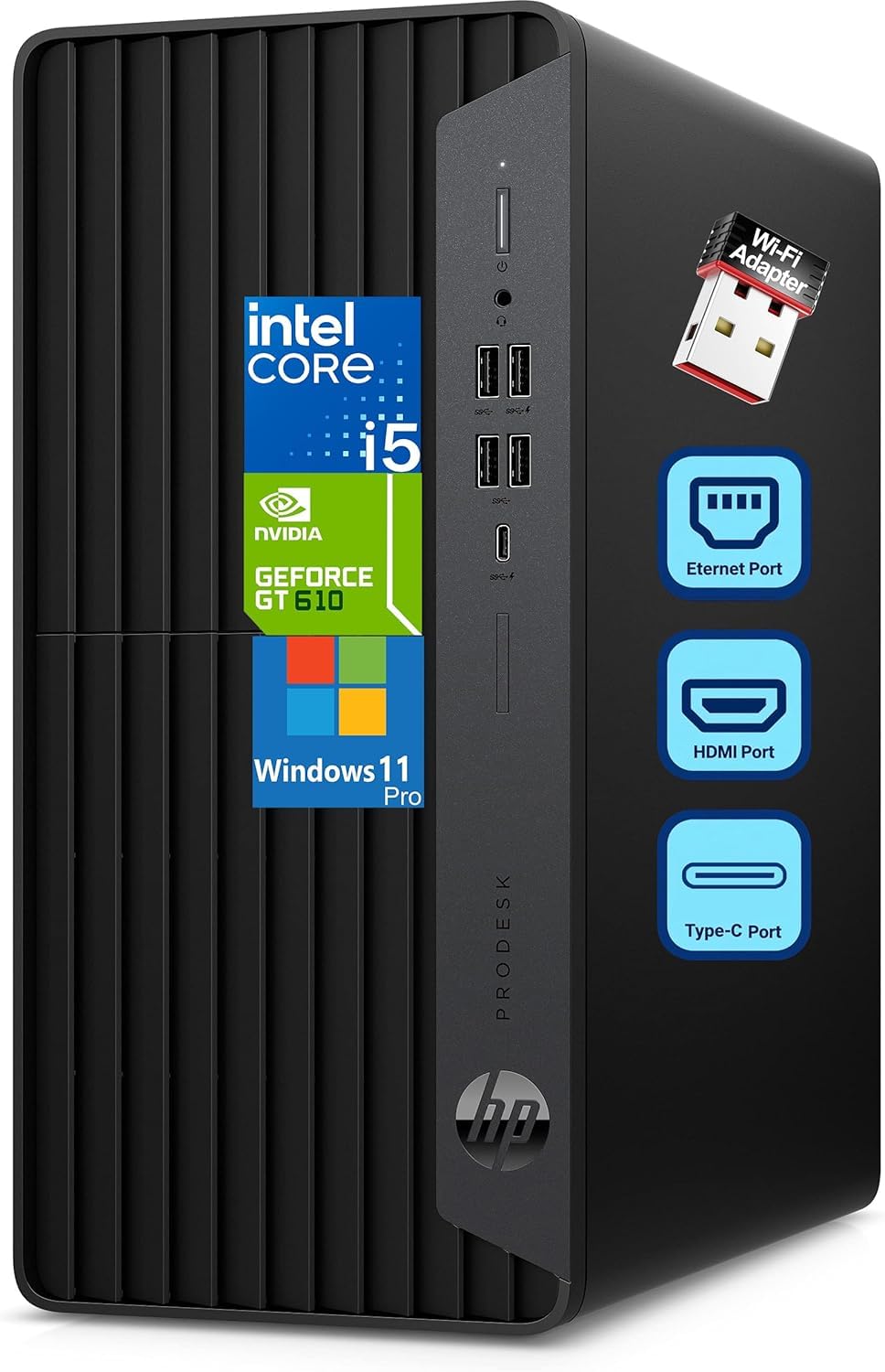
A dedicated graphics card and a full terabyte of storage for a spreadsheet-and-stitch studio.
You get steady everyday speed for business applications, accounting software, and digitizing work from the ProDesk 600’s 6-core Intel i5 (2.90GHz base, up to 4.30GHz turbo) with 16GB DDR4 RAM. If you run multiple monitors, the standout is the GeForce 2GB dedicated graphics card with HDMI, DVI-I, and VGA outputs. A dedicated card (a separate graphics processor rather than one baked into the CPU) gives you more display connections and steadier output across a dual- or triple-screen setup.
Storage is the reason this one stands apart from the cheaper Pro Tower: a full 1TB PCIe NVMe SSD instead of 512GB. You can keep a deep library of embroidery files, reference art, and client projects on the machine without an external drive. Front connectivity includes a USB Type-C at 10Gbps, two USB Type-A at 10Gbps, and two more USB Type-A at 5Gbps, plus a headphone/mic combo. The 5.98″ x 11.93″ x 13.27″ microtower fits easily under a workbench, and a Wi-Fi adapter is included for wireless flexibility.
Speed you notice first: owner feedback centers on how much faster everything feels. One buyer mentioned they had not realized how slow the old machine was until this one was hooked up, and the Wi-Fi adapter held strong even with the router in another room.
Be honest about the limits: this is not an expandable gaming tower — owners mention little room for a bigger cooler, more memory, or extra PCI slots, and the stock cooler gets loud above 65C.
For embroidery software specifically, none of those limits bite. You get enough GPU to drive two monitors, a full 1TB of fast storage, and a compact tower. The 180W power supply is sized to the parts that ship with it.
The right call for: anyone running a dual-monitor digitizing desk who wants storage headroom and a dedicated graphics card.
Better to avoid if: you plan to add a big aftermarket GPU down the line — this case has very little expansion room.
6. Poolin EOC05 Embroidery Machine for Beginners

A starter machine that ships with software, a 7-inch touchscreen, and Wi-Fi design transfer.
If your “computer for embroidery software” question starts with “do I even need a separate computer yet,” the EOC05 is a low-friction answer. It includes free embroidery design software, and the Institch website lets you manage the machine over Wi-Fi. The 7-inch color touchscreen (a display you tap and drag on) guides you through editing without a desktop at all. For a first machine, that means you can draft and edit straight on the unit.
The 4″ x 9.25″ embroidery area is sized for shirts, hoodies, bags, and gifts without being so large it overwhelms a beginner. Powered by Institch OS2, the control system is built to feel simple for someone with no prior experience. The starter kit is unusually complete: one hoop 4×9.25, one hoop 4×4, six rolls of thread, 30 pieces of stabilizer, 25 pre-wound bobbins, a thread stand, nine needles, a USB drive, and a tool kit. You can embroider the day it arrives.
Where it wins people over: the support system is what owners talk about more than any single feature — the 1-on-1 training, the Facebook user group, and the video tutorials draw consistent praise for getting beginners unstuck.
Worth knowing upfront: you have to update the firmware via USB before the full feature set open up, and custom designs still require embroidery software on a computer — the machine does not digitize from scratch on its own.
A fair share of buyers find the initial learning curve real even with the guided setup. But those who follow the directions report consistent, clean stitching on pillows, aprons, and bag tags. It is a hobby machine, not a commercial one, and it performs like a well-equipped beginner unit rather than a production workhorse.
Made for: the absolute beginner who wants a machine, starter thread, and entry-level software in one box.
Not the pick if: you already need a 10-inch-plus hoop for full-size designs or plan to run a production schedule.
7. HP OmniDesk Desktop PC M03-0060

A wood-faced tower with 2TB of storage and enough AI overhead to future-proof your workflow.
The OmniDesk’s headliner is the Intel Core Ultra 7 265 processor paired with 32GB of DDR5 RAM and a 2TB PCIe Gen4 NVMe M.2 solid-state drive. 2TB of fast storage holds years of digitized files, exported DSTs, and reference art without clearing space. The DDR5 memory’s higher bandwidth keeps your design program, a browser, and a chat window running together without lag. The Ultra 7 also carries an AI Boost NPU (a dedicated chip for AI workloads) to accelerate supported applications.
Quad display support via four video outputs lets you run a digitizing screen, a reference monitor, and an art board simultaneously. Connectivity includes Wi-Fi 6 and Bluetooth 5.4, plus one USB Type-C at 10Gbps, one USB Type-C at 5Gbps, two USB Type-A at 10Gbps, and two USB Type-A at 5Gbps on the front panel. Windows 11 Home with Microsoft Copilot is preinstalled, and three months of PC Game Pass come bundled.
The honest catch: reliability is the split note on this one — for some buyers it delivers exactly what the specs promise, while a few flagged crashes severe enough to send them back to another machine. If you do hit trouble, the path forward is Amazon support rather than an HP warranty card.
The wooden finish is a genuine conversation piece in a home studio, though it is still plastic at heart. Setup has been reported as slow when Outlook or Office365 trips the Windows 11 first-run screens — expect to switch to Chrome for setup if Edge stalls. Once past that, the waiting-to-load time is the part of the spec sheet that actually matters here: a 2TB drive and 32GB of memory mean your heaviest design files open without a hitch.
The satisfying pick for: someone building a long-term design workstation who wants storage capacity, AI acceleration, and a warm aesthetic in the room.
Worth a pause if: a rock-solid track record matters more to you than future-proof specs — this one’s reliability record is genuinely uneven.
8. Poolin EOC06 Large Hoop Embroidery Machine
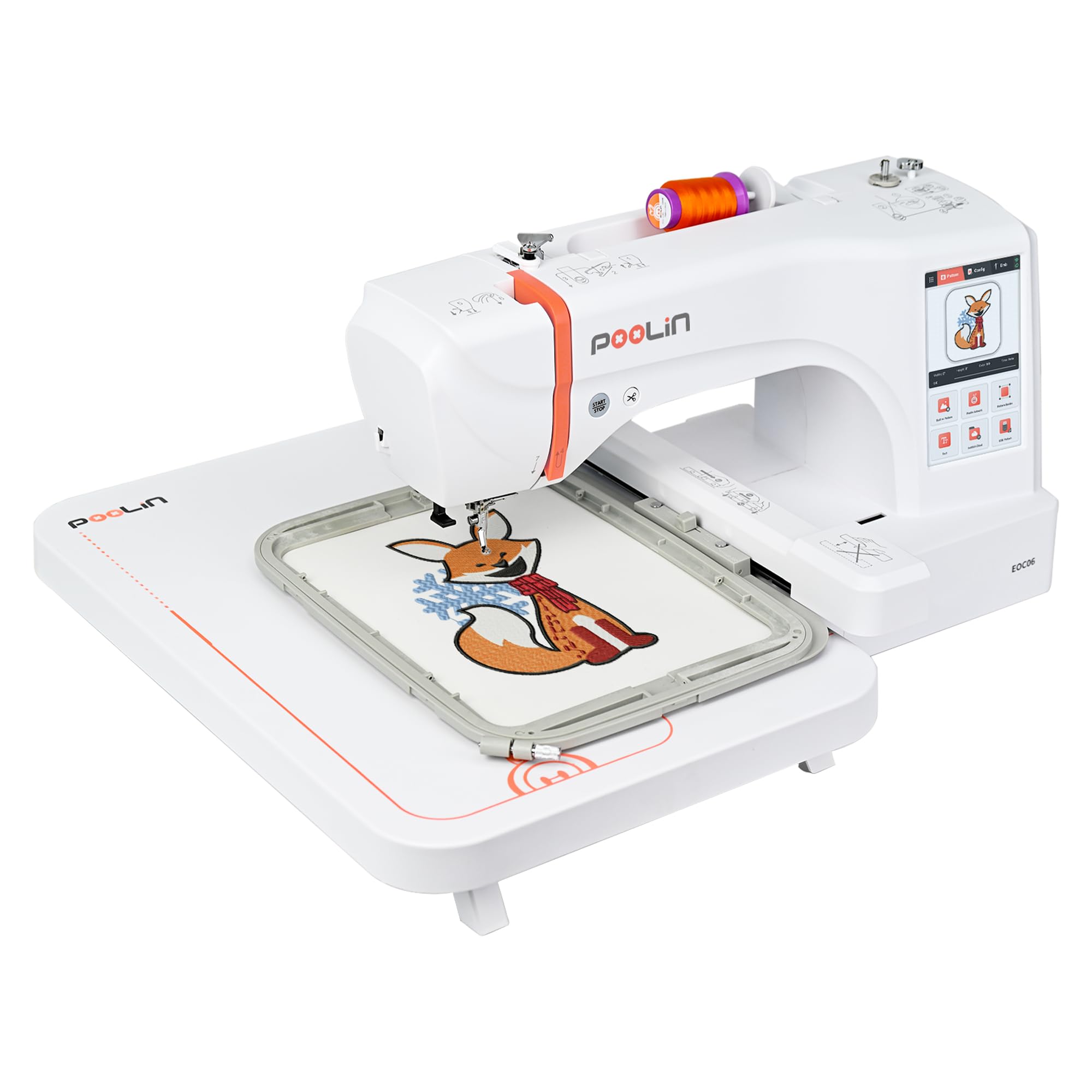
Four hoops up to 11 inches across, so full-size garment designs finally fit in one pass.
The EOC06’s 11″ x 7.9″ maximum embroidery area is the whole argument for this machine. An 11″ x 7.9″ area stitches a full back-panel design or a large T-shirt motif in a single hooping. The box includes four hoops — two 5.5″ x 5.5″, one 7.9″ x 7.9″, and one 7.9″ x 11″ — so you can jump between small monogram work and big garment pieces without ordering extras.
The InStitch i3 computer system is built for beginners, letting you select, edit, combine patterns, and add multi-color lettering on the 7-inch color touchscreen. InStitch Doodle Digitizing Software (a program that lets you open, view, and edit embroidery files) is included. Design files export in DST or DSB format and travel to the machine by USB flash drive or wireless LAN. That wireless path is the one that keeps your computer and machine in sync without shuttling a thumb drive across the room.
what separates it
- 11″ x 7.9″ max area with four hoops included — big-garment ready.
- 200 built-in patterns, 8 fonts, and 10 languages onboard.
- DST and DSB export plus Wi-Fi and USB transfer to the machine.
- InStitch Doodle Digitizing Software bundled with the machine.
The trade-offs to weigh
- The instruction-set and cloud setup is clunky for a first-timer — expect to use a tutorial.
- It weighs 35 pounds, so it stays put rather than traveling to a guild meeting.
- Some customers note a missing hoop clip in the box or software that takes patience.
Ideal for: a home studio that needs a large hoop, several sizes in one box, and Wi-Fi design transfer from a computer.
Recommend choosing a lighter unit if: portability matters — at 35 pounds, this one belongs on a dedicated table.
9. Dell Tower Desktop with Intel Core Ultra 7-265

A tool-less tower with 32GB of memory and four display outputs for a serious digitizing bench.
You can run a digitizing program, a browser, and a reference gallery at once, because the Core Ultra 7-265 at the heart of this tower reaches up to 5.3 GHz with 30 MB cache and pairs with 32GB of RAM. What makes it a genuine workstation for the money is the display and upgrade flexibility. It drives up to four FHD monitors over DisplayPort with daisy chaining, or two 4K displays using the HDMI 2.1 port and DisplayPort. Map out a design on one screen while watching a stitch preview on another — this is the output set that matters.
The tool-less entry and removable side panel let you add memory or swap drives without a screwdriver — a real advantage when you plan to grow into the machine over a few years. A hardware TPM security chip and a built-in lock slot cover the data side. Dell includes a 1-year onsite service agreement, so a hardware issue gets handled where the tower sits rather than in a shipping box.
Fast and quiet, mostly: buyers repeatedly describe it running fast and reliably while barely audible. One notes the 32GB of memory kept it responsive even while copying and pasting across spreadsheets for hours.
Port-related caveat: the USB-C count is thin — one USB-C among the rear USB 3 ports — and there is no second M.2 slot, so plan around that expansion limit.
For embroidery software and routine office work, this computer has headroom to spare. Its limiting factor only shows up if you plan to add a large graphics card down the line or need a second internal drive bay.
Suits you if: you want a quiet, roomy desktop with generous multi-monitor output and a case you can open without tools.
Think hard if: you need many USB-C ports or a second internal M.2 slot — this one does not offer either.
10. Janome Horizon Memory Craft 9850

The two-in-one that stitches a seam and then embroiders a design without swapping machines.
The MC9850 is for the buyer who refuses to choose between sewing and embroidery. It combines a sewing head with a computerized embroidery system, so you can run a straight seam on a hem and then switch to an embroidered motif on the same machine. Memory Craft technology stores custom patterns and stitch combinations so a favorite project opens in a few taps rather than a full setup. The touchscreen interface handles pattern selection and stitch customization, with on-screen prompts that tell you which presser foot and setting a given step needs.
Owners are drawn to the switch — moving from standard straight stitching into embroidery mode is reported as simple and quick. The 9mm stitch width gives you wide decorative stitches that read clearly on a quilt or garment trim. The open left carriage makes it easier to snip threads during embroidery, and the needle threader works when you handle it carefully. Material is metal, weight comes in at 23 pounds, and the machine runs on AC power.
Where it shines for the right owner: it suits an intermediate or experienced sewer who wants one machine for both jobs, and the stitching quality draws near-universal praise. The onboard embroidery design library is limited, but a thumb drive can load more.
The catch worth knowing before you buy: the file conversion and onboard design-selection experience frustrate some owners, and the automatic needle threader has failed for at least one buyer. Accessories are Janome-specific and on the costly side. And it is not a machine for a first-timer — more than one owner cautions beginners to start elsewhere.
The right tool for: a quilter or garment maker who wants sewing and embroidery on one 9mm-stitch platform.
Not for you if: you are brand new to embroidery — the learning curve is aimed at intermediate hands.
11. Dell Precision 3490 Mobile Workstation Laptop
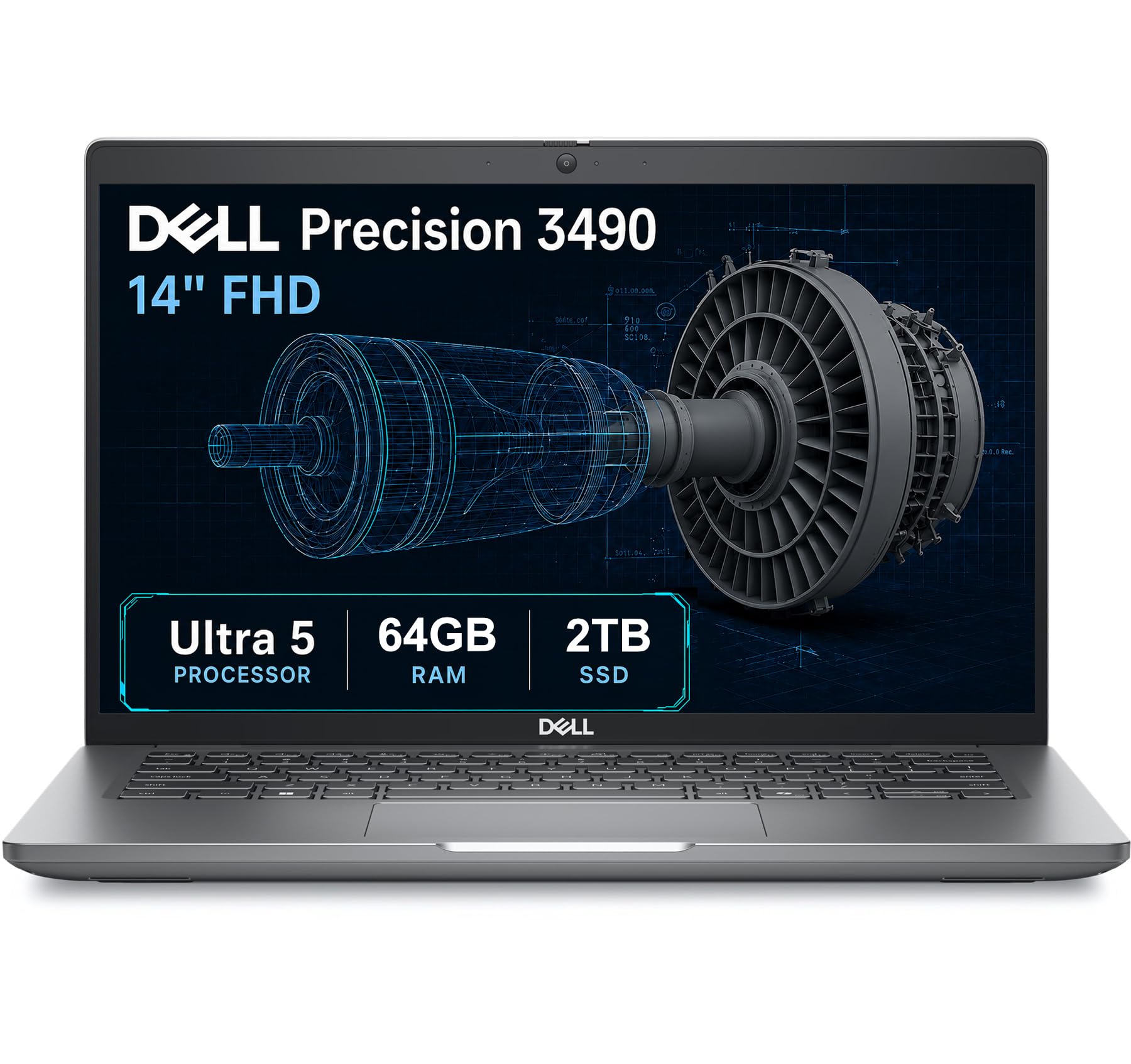
64GB of workstation memory in a 3.09-pound frame that can run three external monitors.
The Precision 3490 is the laptop for a digitizing studio that does more than embroidery. Its 64GB of DDR5 RAM and 2TB SSD mean you can keep a full design archive and a memory-hungry program open at once — 64GB is a workstation-class amount that leaves ordinary laptops in the dust. The Intel Core Ultra 5 135H (14 cores, up to 4.6 GHz) with Intel graphics handles multitasking and AI-assisted tasks without a stutter. It weighs just 3.09 lbs and is tested to MIL-STD 810H military standards, which describes durability testing against drops, vibration, and temperature swings.
The 14″ FHD (1920×1080) display reads clearly for stitch previews and design software. It supports up to three external monitors through HDMI and Thunderbolt ports at 4K@60Hz without a docking station — Thunderbolt being a fast port that carries video and data on one cable. A designer can run the laptop screen plus three external monitors without a docking station. Two Thunderbolt 4 ports, two USB-A, HDMI, Ethernet, and an audio combo jack cover the connectivity side, and Wi-Fi 6 and Bluetooth keep wireless stable. A 1080p FHD HDR RGB webcam with privacy shutter is built in.
Built for heavy workloads: the ISV certifications (manufacturer compatibility testing for professional applications) suit CAD, rendering, and design software. It also swaps between a fingerprint reader and a backlit keyboard for hands-on convenience.
The one thing to watch: some early units ran dangerously hot on browser-only use, per one buyer’s experience, though the seller’s replacement response was described as responsive.
Keep in mind this laptop has been opened and resealed to upgrade the memory and SSD, with a three-year warranty on those upgraded parts while Dell covers the rest until March 2027. It is a small footnote that shapes the warranty path if something later fails.
Right sized for: a professional who needs workstation memory and multi-monitor support in a laptop they can carry to a client site.
Think twice if: you want a factory-sealed machine or only light digitizing work — this much muscle is overkill for a home hobby.
12. HP OmniDesk M03 Premium Business Desktop
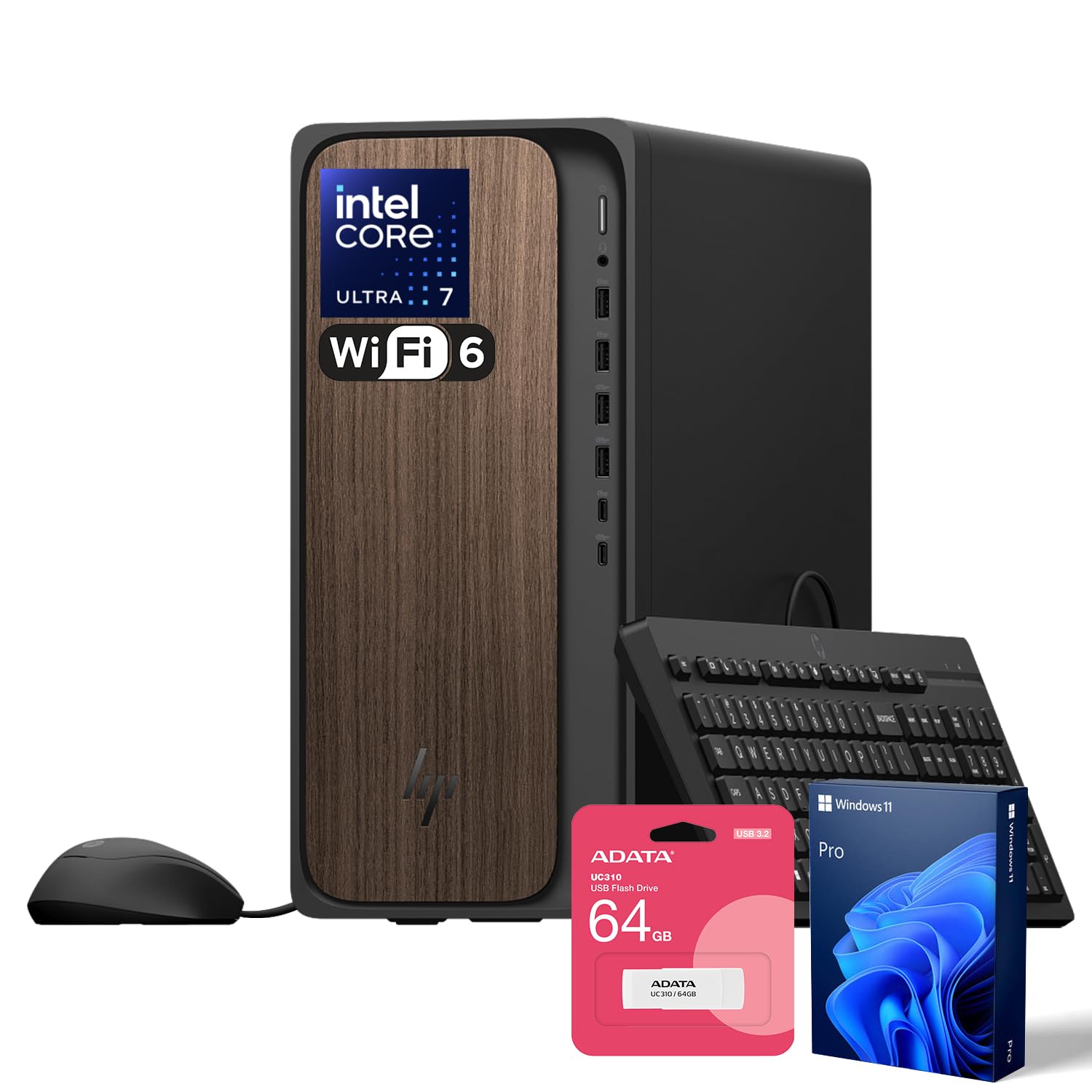
The memory ceiling raised: 64GB of DDR5 and a 2TB drive for the heaviest design archive.
The OmniDesk M03’s 64GB of DDR5 RAM is the headline for anyone who keeps dozens of browser tabs, a digitizing suite, and reference images open together. Buy this version if you plan to keep the tower for years and grow into it rather than out of it. The Intel Core Ultra 7 265 (20 cores, 20 threads, 30 MB L3 cache, up to5.3 GHz max turbo) sits at the heart, with Intel Graphics for visuals. A 2TB PCIe M.2 SSD means years of DST files, exports, and client projects fit without a separate drive.
Port spread is generous: on the front, one USB Type-C at 10Gbps, one USB Type-C at 5Gbps, two USB Type-A at 10Gbps, two USB Type-A at 5Gbps, and a headphone/mic combo. Round the back you get four USB Type-A 2.0 ports, audio-out, DisplayPort, RJ-45 Ethernet, and HDMI. Wi-Fi 6 and Bluetooth handle wireless, and a wired keyboard and mouse are included. A bundled ADATA 64GB USB flash drive adds a handy way to shuttle designs to your embroidery machine.
The real risk to weigh: the reliability record is the weak spot. A few reviewers point out stubborn boot failures, and one describes cold boots that dragged on with a black screen and beep codes before the display cut out entirely. Treat that as a genuine caution rather than a pattern, since the data pool here is very small.
The seal has been opened to upgrade the RAM and SSD, and PCOnline US provides a three-year warranty on those upgraded parts while the remaining components keep the original one-year manufacturer coverage. That split matters if you ever need service. For pure capacity and memory, nothing else on this list matches the 64GB-plus-2TB combination.
Choose it when: maximum RAM and storage are your priority and you want a business-grade tower you can fill for years.
Weigh the warranty split first: the opened-and-upgraded setup means your coverage is handled by two different parties, so know who to call before you buy.
13. Smartstitch S-1201 Plus 12-Needle Embroidery Machine
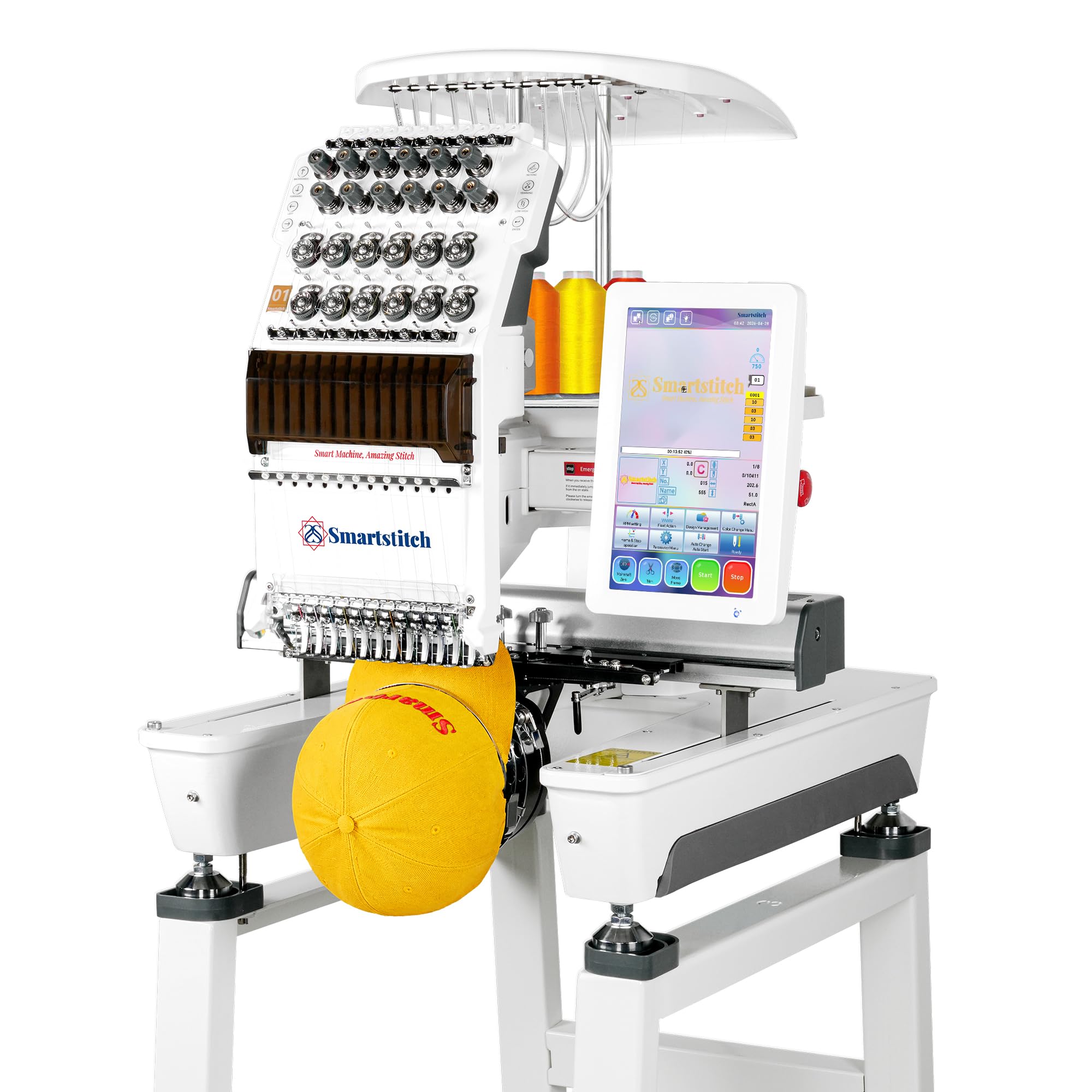
A twelve-needle commercial workhorse that reads DST and DSB files straight off your computer.
This is the pick for someone turning embroidery into a business. The S-1201 Plus runs 12 needles at up to 1200 SPM (stitches per minute) with a 12″ x 16″ embroidery area — the machine for full back-panel designs, hats, and T-shirts at production speed. A direct vertical guiding system keeps it stable and quiet, which matters when it runs for hours. The Smart control system V7 stores up to 100 million stitches of memory, so a large design library lives on the machine rather than in a stack of thumb drives.
Automation is where it earns its keep: auto thread trimming, auto color changing, a self-lubrication system, thread break detection, and laser embroidery positioning all reduce the babysitting a single-needle machine demands. The 10″ touch screen handles file selection and editing, and designs reach the machine from your computer as DST or DSB files over USB — the same workflow a digitizing program on any desktop or laptop produces. A starter pack of threads, stabilizers, and bobbin threads ships with it, plus physical buttons for the steps you do most.
Why a shop would buy it
- 12 needles and up to 1200 SPM handle commercial volume.
- 12″ x 16″ area takes full-size garment designs in one pass.
- Auto color change, auto trimming, and thread break detection cut downtime.
- Smart control system V7 stores up to 100 million stitches of memory.
The honest setup cost
- It is a serious machine at 29 inches tall — the stand needs assembly and it wants floor space.
- Mandatory training via video call is part of the onboarding, so budget time for it.
- Stitch quality depends on how well your design files are digitized.
Built for: a small commercial embroidery business or a serious multi-needle upgrade after years on a single-needle unit.
Not a first machine: the required training, floor footprint, and learning curve point to someone ready to run a shop, not a hobbyist at a kitchen table.
Know the Specs
What RAM does for embroidery software
RAM is your computer’s short-term workspace — the more you have, the more programs and design files can sit open at once. 16GB is comfortable for a digitizing program plus a browser. 32GB and 64GB give you room for large files, reference galleries, and a video tutorial in the background. More RAM does not make stitches look better; it stops the machine from stalling when you juggle tasks.
Why an SSD beats a spinning drive
An SSD (solid-state drive) reads data with no moving parts, so a big DST or DSB file opens in a second instead of a slow crawl. A PCIe NVMe SSD is the faster family, and the capacity — 512GB versus 1TB versus 2TB — decides how many projects fit before you reach for an external drive. For design work, speed and room both matter.
How designs reach the machine
A USB port is the simple bridge: export the file, load it on a thumb drive, plug it into the machine. Wi-Fi transfer skips the drive entirely — the Brother PE900 and the Poolin EOC06 both accept files from your computer over the network. Whichever route you choose, check that the computer has ports for your keyboard, mouse, and a thumb drive at once.
Multi-monitor outputs
Digitizing means juggling a timeline, a stitch preview, and a color panel. A desktop with three DisplayPort outputs or a laptop with Thunderbolt lets you hang a second or third monitor off the machine, so your design and your reference photo never fight for the same screen. DisplayPort, HDMI, and Thunderbolt are simply different cable standards that all carry video.
Common Questions
How much RAM do I need to run embroidery digitizing software smoothly?
Can I transfer embroidery designs from my computer to the machine over Wi-Fi?
What file formats do embroidery machines read from a computer?
Is a desktop or a laptop better for running embroidery software?
Do I need a dedicated graphics card for digitizing?
How much storage should I plan for my embroidery file library?
Will a computer with only one USB-C port be enough for an embroidery desk?
Should I buy an embroidery machine with bundled software instead of a computer?
What processor speed matters for embroidery design software?
Do I need a monitor with the desktop picks?
The Bottom Line
You get the single easiest path from design to stitches with the Brother PE900 — it handles Wi-Fi file transfer from your computer, ships with 193 built-in designs, and keeps the whole workflow in one box. If you need a dedicated computer to run your digitizing software, the Dell Pro Tower Plus QBT1250 pairs a 14-core Intel Core Ultra 5 235 with 16GB of DDR5 and three DisplayPort outputs for a multi-monitor setup. For a small commercial operation, the Smartstitch S-1201 Plus runs twelve needles at up to 1200 SPM and takes DST and DSB files straight off your computer.
How we choose
We do not accept paid placement. Every pick is matched to a real buyer and a real use-case; we do not hands-on test units.
Sources
Specifications: manufacturer listings and product documentation. Review insights: verified customer reviews, as of October 2026. Pricing: not shown on this page (it changes often); check the current price via the retailer link.
As an Amazon Associate, Aappliancez earns from qualifying purchases. This does not affect which products we feature.