Disclosure: Some links in this post are affiliate links. As an Amazon Associate I earn from qualifying purchases, at no extra cost to you. Learn more
Specs are compiled from manufacturer listings and verified buyer reviews and can change over time — please confirm the key details on the product page before buying.
You shot the card full, and now the whole job is sitting still while a slow reader crawls through your files. The right card reader fixes that in one move: it has a slot for the card type you shoot and a speed rating at least as high as your card’s. The five picks below cover the whole spread — a multi-slot desktop reader for photographers juggling CF and SD cards, a slim UHS-II adapter for laptop editors, a case-and-reader combo for people who lose track of loose cards, a budget workhorse with three slots, and a tiny microSD reader that has a following in one very specific community.
This guide is built by comparing the manufacturers’ published specifications and the patterns across verified customer reviews, so you get each pick’s real strengths and trade-offs instead of marketing spin.
The trick is not buying the biggest number on the box — it is matching slots to your cards and the connector to your computer’s port. These five are the ones worth plugging in.
Top Picks


How To Choose The Best Card Reader for Computer
The most common mistake is buying a reader that is faster than the card in your camera bag. A memory card has its own ceiling, and the reader can only run as fast as the slower of the two. So check the speed printed on your card first, then pick a reader that reaches at least that number. That single step saves you from paying for speed you will never see.
Match the slot to the card, not the brand
Full-frame DSLRs and pro camcorders often use CompactFlash (a thick, older card format still common in pro gear), while mirrorless cameras, drones, and phones lean on SD and microSD. A multi-slot reader covers all three so you stop hunting for the one adapter that fits today’s shoot. If you only ever pull microSD out of a drone or a dashcam, a single-slot reader is smaller and simpler to carry.
The connector decides whether it plugs in at all
A USB-A plug (the wide rectangular one) fits older desktops and many laptops. A USB-C plug (the small oval one) fits modern MacBooks, most thin laptops, and many tablets and phones. Buy the wrong end and you are back to hunting for an adapter, so confirm your machine’s port first. Some readers ship with a short cable in the box, which matters more than people expect — a stiff or very short cord can make a reader awkward to place on a desk.
Build and portability are a real trade-off
A heavier reader with a wide base tends to sit still on a desk and shrug off daily handling. A pocket-sized reader travels easily but is easier to lose and usually has a short cord. If the reader stays on your desk, pick a heavier one with a wide base; if it travels, pick a pocket-sized one and accept the shorter cord.
Side-by-Side Comparison
| Model | Best For | Max Speed | Card Slots | Connector | Amazon |
|---|---|---|---|---|---|
| Lexar Multi-Card 3-in-1★ Best Overall | Photographers with mixed card types | Up to 312MB/s (SD/microSD) | SD, microSD, CompactFlash | USB 3.1 (USB-C/A cable) | Amazon |
| uni USB-C SD 4.0Top Performer | Laptop and tablet editors on the go | Up to 312MB/s (UHS-II) | SD, microSD | USB Type-C | Amazon |
| UGREEN USB C SD Card Reader | Travelers who lose loose cards | Up to 170MB/s | 2 SD + 2 microSD (with case) | USB Type-C | Amazon |
| Transcend RDF9 | Desktop users reading UHS-II and CF | Up to 260MB/s | SD, microSD, CompactFlash | USB 3.1 Type-A | Amazon |
| SanDisk MobileMate USB 3.0 | microSD-only users, dashcam and drone cards | Up to 170MB/s | microSD | USB 3.0 Type-A | Amazon |
Detailed Reviews
1. Lexar Multi-Card 3-in-1 Card Reader
Our pick — 4.5+★ from 850+ verified ratings; the strongest balance of quality and price.
One reader for the full-frame body, the hybrid, and the drone — without swapping adapters.
The number that earns this pick its spot is 312MB/s on SD and microSD, with up to 160MB/s on CompactFlash — that is fast enough that a card full of raw frames lands on your drive in a single coffee sip rather than a lunch break. But the real reason photographers keep it plugged in is the slot lineup: SD, microSD, and CompactFlash in one housing. If you shoot a pro DSLR that still uses CF cards, this saves you from owning a second reader just for that format.
What wins people over is pure function — it works with every card type they own, and owners routinely move thousands of photos across in a couple of minutes. The housing is solid and heavier than a pocket reader, which is a plus on a desk: the cord will not drag it off the edge. One buyer clocks BlackMagic speed tests around 82MB/s on CompactFlash and roughly 255MB/s on SD read, and notes the card itself becomes the limiting factor — exactly what you want from a reader that is not the bottleneck.
The trade-off is portability. That same weight and footprint make it a stay-at-home device, better suited to a workstation than a camera bag. Durability also gets a slightly mixed read in owner feedback, so treat the slots with a little care rather than jamming cards in. If you only ever pull microSD, the smaller SanDisk farther down is a handier travel companion.
Where it earns its keep
- SD, microSD, and CompactFlash slots in one unit — no second reader for pro CF cards
- Up to 312MB/s on SD and microSD keeps big raw and video transfers short
- Weighty, stable housing that stays put on a desktop
- Backwards compatible with UHS-I cards, so older cards still work
What you give up
- Heavier and bulkier than a pocket adapter, so it lives at your desk
- Owner feedback on long-term durability is mixed — handle the slots gently
Go for it if: you juggle CompactFlash and SD cards from more than one camera and want a single desk-side reader that keeps up.
Think twice if: you need something that slips into a camera bag — this one is built to stay plugged in.
2. uni USB-C SD 4.0 Card Reader
The slim UHS-II adapter that turns a MacBook port into a card bay.
This is the reader for the person editing on a laptop that has no SD slot and no patience for slow transfers. It hits up to 312MB/s over UHS-II, the faster SD standard that pro cards use, and it is a fraction of the Lexar’s size. That size difference is concrete: it measures 1.79 by 1.3 by 0.38 inches and weighs almost nothing, so it disappears into a laptop sleeve. The Lexar, by comparison, is a 3.15-inch-square block built to sit on a desk.
Plug it into a USB-C port (the small oval one) and it works with no drivers — MacBook, Windows laptop, tablet, or a modern phone. DITs and editors who move footage on set are the crowd this serves best, and the transfer speeds hold up under large video files. A first-time corded-reader user pulled about 160 drone photos off a 250GB card with no stalls or flicker, and preferred the cord because it gives the card more handling room than a slot-stuck adapter.
Know the one compatibility catch before you buy: it will not work with an iPad or iPhone that still uses a Lightning port — this is a USB-C device only. A few owners also find the cable stiff, and there is minor mixed feedback on card ejection and long-term durability. But for pure speed on a modern USB-C machine, it is the quicker tool in the bag.
Speed where it counts: 312MB/s over UHS-II matches fast SD cards, so raw footage and big photo sets move without the wait.
The honest limit: USB-C only — Lightning-port iPads and iPhones are out, and the cable is on the stiff side.
Reach for this if: your laptop or tablet has a USB-C port and you shoot fast UHS-II SD cards.
Look elsewhere if: you are still on a Lightning-port device or need a CompactFlash slot.
3. UGREEN USB C SD Card Reader with SD Card Holder
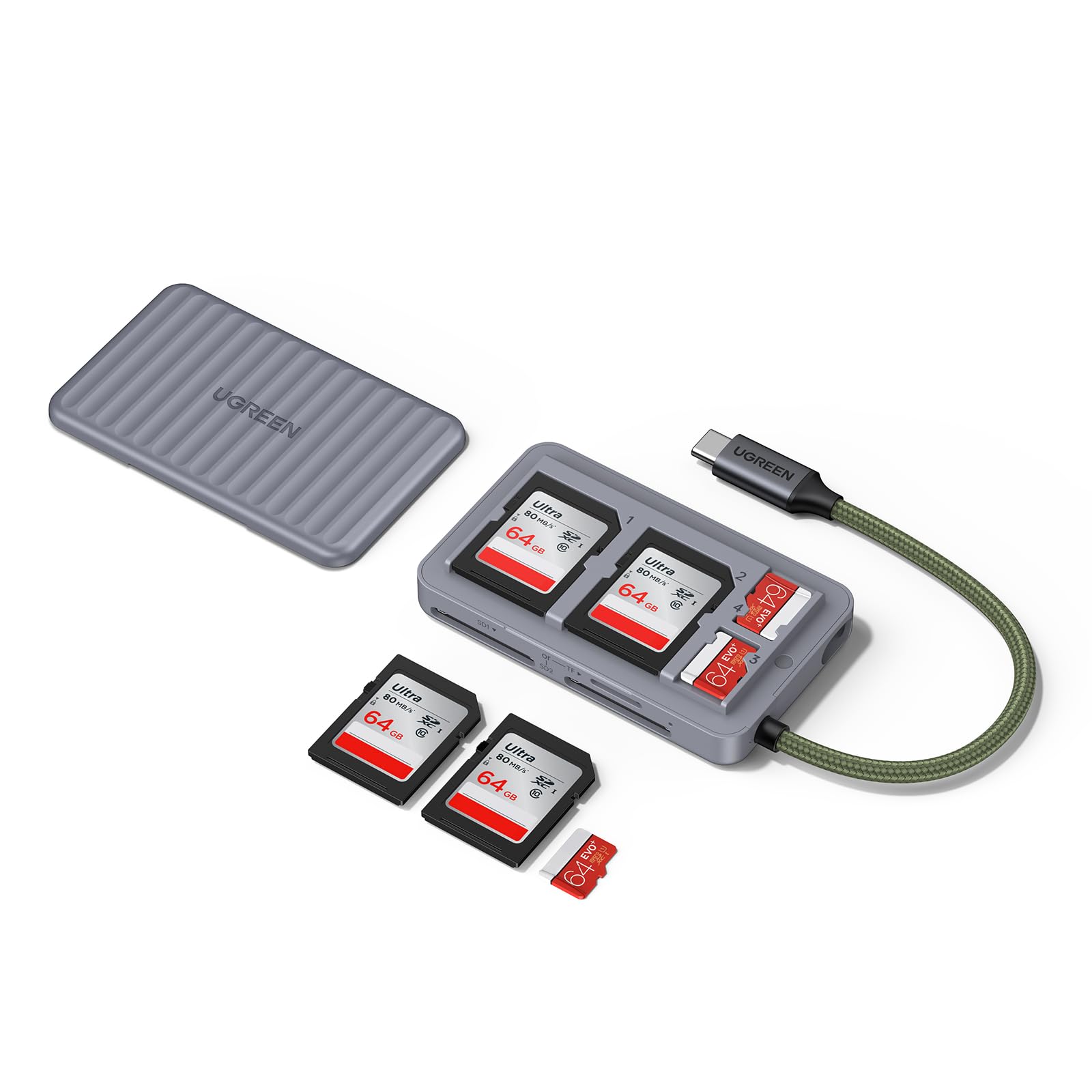
A reader that doubles as a card case, so the card that was in your pocket stays found.
Losing a memory card is the quiet disaster of this hobby, and this design tackles it head-on. The reader holds four cards inside — two SD and two microSD — under a magnetic lid that snaps shut. So the thing that reads your cards is also the thing that stores them, and you stop buying a separate case. It supports up to 170MB/s, which is the right match for mainstream high-speed SD and TF cards rather than the ultra-premium tier.
It also reads two cards at the same time — one SD plus one microSD, or two SD cards — which saves you from swapping back and forth when you are offloading two cameras after a shoot. The build feels solid, and the compact body slips into a bag or camera case without fuss. Owners who take it backpacking report the lid has held up on rough trips, which is more than you might expect from a hinged cover.
Here is the catch: the two-card-at-once trick shares the connection, so it is about convenience, not doubling your speed in parallel. And some wish the case were larger to hold more cards. For keeping a couple of spare SD and microSD cards organized and always on hand, though, it solves a problem the other picks ignore.
Why it stands out
- Reader and card case in one, with room for two SD and two microSD cards
- Reads two cards at once to move files from two cameras in one sitting
- Magnetic lid keeps cards protected and accounted for in a bag
- Up to 170MB/s handles mainstream high-speed cards fine
Worth knowing first
- Top speed is 170MB/s — not the tier for ultra-fast premium cards
- A few owners wish the built-in case held more cards
Pick this one if: you are tired of loose cards rattling around your bag and want storage built into the reader.
Pass on it if: you need UHS-II peak speeds for large video offloads.
4. Transcend RDF9 Card Reader

Three slots, UHS-II support, and a small footprint that sits still on a desktop.
If your computer still has the wide rectangular USB-A port, this reader is built for it — a USB 3.1 Type-A connection, no adapter needed. It carries the same three-slot spread as the Lexar (SD, microSD, and CompactFlash) with UHS-II support and up to 260MB/s, but it is noticeably smaller at 2.66 by 1.77 by 0.6 inches. That compact body still sits stable on a desk, and owners note the cord does not drag it around.
What the crowd here talks about is speed — it delivers the UHS-II rate it promises, and the SD read speeds stay near the advertised figure while the unit runs cool. It also handles CompactFlash cards well, which keeps it relevant for older pro bodies. One owner swapped it in for a popular competing model and found this one clearly quicker. The short cable is included, though it is not pictured.
Two things to plan for. First, the three slots show up as separate drives and share the USB bandwidth, so reading from all three at once will not hit peak speed on any one. Second, SD card removal is a grab-and-pull affair — no spring-loaded eject — so you have to pull the card out by hand. Neither is a dealbreaker for desk use; both are worth knowing.
Where it delivers: UHS-II speed up to 260MB/s plus SD, microSD, and CF slots, all in a compact USB-A body.
The fine print: the slots share bandwidth when used together, and SD cards come out with a manual pull.
Good match for: desktop and older-laptop owners with USB-A ports who want CF and UHS-II support without a big footprint.
Not the one for: USB-C-only machines or anyone who wants a push-button card eject.
5. SANDISK MobileMate USB 3.0 microSD Card Reader

One tiny slot for microSD, and a devoted following among dashcam and drone owners.
This reader does one job: it takes a microSD card and hands its files to your computer over USB 3.0 at up to 170MB/s. It has no SD slot, no CompactFlash, and no cable — just a small body that plugs straight in. That simplicity is the point. If all your cards are microSD (drones, action cams, dashcams, phones), the single-slot design is smaller and less fussy than a multi-slot reader, and it disappears into a pocket.
The reason it has such a loyal crowd is reliability in one very specific spot: dashcam and security-camera use. Owners who swapped their car’s factory USB drive for a microSD plus this adapter found it worked where several other adapters threw errors. Plug-and-play transfers of photos and videos come through cleanly, with the card sitting securely in the slot. The USB 3.0 connection is quick — the card, not the reader, is usually the bottleneck.
Now the honest bit: the card can sometimes lose connection if the adapter gets bumped, so seat the card firmly and leave the unit alone while it works. It is also microSD only and ends in USB-A, so USB-C laptops need a separate adapter. Given how many of these are out there and how long they have been sold, though, those are small caveats on a proven tiny tool.
Where it shines: a single microSD slot at up to 170MB/s over USB 3.0, small enough to keep with your drone or dashcam cards.
Watch for: a bump can interrupt the connection, and it is microSD-only with a USB-A plug.
Best for: anyone whose cards are all microSD and who wants a tiny, no-fuss reader that just works.
Skip if: you shoot full-size SD or CF cards, or your laptop has only USB-C ports.
Know the Specs
Transfer speed (MB/s)
This is how many megabytes move per second, and it is capped by whichever is slower — your card or the reader. A reader rated up to 312MB/s only reaches that with a card that can too. Buy a fast reader for a slow card and you pay for speed you never see, so check the number printed on your card first.
UHS-II vs UHS-I
These are speed classes for SD cards. UHS-II is the faster standard used by pro cards, and a UHS-II reader open up that speed. A UHS-I reader tops out lower. If your cards are UHS-II, pick a UHS-II reader so the card is not held back.
CompactFlash and microSD slots
CompactFlash is a thick, older card format still common in pro DSLRs and camcorders. microSD is the tiny card in drones, phones, and dashcams. Full-size SD sits in the middle. A multi-slot reader covers several formats so you are not buying a separate adapter for each camera.
Connector type
USB-A (wide rectangular) fits older desktops and many laptops. USB-C (small oval) fits modern MacBooks, thin laptops, tablets, and phones. A USB-A reader will not fit a USB-C-only laptop without an adapter, so check your port first.
Common Questions
Will a UHS-II card reader make my old UHS-I card faster?
Do I need USB-C or USB-A on my card reader?
Can a card reader read two cards at the same time?
Why does my card reader run slower than its rated speed?
Is a CompactFlash card reader still worth buying?
What is the difference between an SD and a microSD slot?
Do card readers need drivers or software?
Will these readers work with a phone or tablet?
How long does a memory card reader last?
Is it safe to leave a card in the reader?
The Bottom Line
The crowd favorite for a reason, the Lexar Multi-Card 3-in-1 is the pick to beat — it covers SD, microSD, and CompactFlash at up to 312MB/s, so one reader handles every camera in your bag. If you edit on a USB-C laptop and shoot fast UHS-II cards, the uni USB-C SD 4.0 is the quicker, slimmer tool. For keeping spare cards organized on the move, the UGREEN turns storage into part of the reader. Whichever you pick, match the reader’s speed to your cards and its connector to your port.
How we choose
We do not accept paid placement. Every pick is matched to a real buyer and a real use-case; we do not hands-on test units.
Sources
Specifications: manufacturer listings and product documentation. Review insights: verified customer reviews, as of October 2026. Pricing: not shown on this page (it changes often); check the current price via the retailer link.
As an Amazon Associate, Aappliancez earns from qualifying purchases. This does not affect which products we feature.