Disclosure: Some links in this post are affiliate links. As an Amazon Associate I earn from qualifying purchases, at no extra cost to you. Learn more
Specs are compiled from manufacturer listings and verified buyer reviews and can change over time — please confirm the key details on the product page before buying.
If you want the short answer: the Amazon Kindle Paperwhite 16GB is the safest pick for most people. It has the largest reader crowd behind it, the longest battery life here at up to 12 weeks per charge, and a 7-inch screen that stays readable in direct sun. If you borrow library books or hate being tied to one store, the Kobo Clara BW is the smarter buy. If you need to annotate PDFs and run Android apps, the Onyx and BOOX models are built for exactly that. The rest of this page walks you through which of the nine is genuinely right for how you read.
This guide is built by comparing the manufacturers’ published specifications and the patterns across verified customer reviews, so you get each pick’s real strengths and trade-offs instead of marketing spin.
A glare-free E Ink screen that skips notifications matters more than raw power, and this breakdown of every major book reader tablet shows you which display, storage, and battery combination fits your reading habits.
Top Picks



How To Choose The Best Book Reader Tablet
A book reader tablet is not a tablet in the way you probably think of one. There is no video streaming, no social feed, no notification pinging you every four minutes. These devices run an E Ink display (a screen made of tiny ink capsules that hold a static image without using power), which is why a single charge lasts weeks instead of hours and why a two-hour session does not leave your eyes stinging.
Screen size and how you hold it
A 6-inch screen fits in one hand and slips into a coat pocket, which is why commuters and bedtime readers tend to prefer it. A 7-inch screen gives you more words per page and handles comics and PDFs far better, but it needs a slightly more deliberate grip. If you read one-handed on your side in bed, a 6-inch screen beats a 7-inch one.
Battery life in weeks, not hours
E-readers are quoted in weeks because the screen only draws power when the page changes. That is why one model here stretches to 12 weeks per charge while another manages 6. Turn Wi-Fi and Bluetooth off and those numbers get noticeably better. A frontlight (a soft built-in glow that lights the page instead of the room) is the biggest battery variable after wireless.
Where your books actually come from
This is the decision most buyers underestimate. Amazon’s Kindle store is enormous and Kindle Unlimited bundles millions of titles. Kobo leans on library borrowing through OverDrive and Libby plus the Kobo Store. Android-based readers let you install the Kindle, Libby, Hoopla, and Google Play Books apps side by side. Pick the store first, then the hardware.
Side-by-Side Comparison
| Model | Best For | Display | Storage | Battery | Amazon |
|---|---|---|---|---|---|
| Amazon Kindle Paperwhite (2024)★ Best Overall | Most readers, all-round | 7″ glare-free | 16 GB | Up to 12 weeks | Amazon |
| Kobo Clara BWBest For Libraries | Library borrowers | 6″ E Ink Carta 1300 HD | 16 GB | 2 weeks | Amazon |
| Amazon Kindle (2024)Best Budget Pick | Budget first-timers | 6″ glare-free | 16 GB | Up to 6 weeks | Amazon |
| PocketBook Verse Lite | Format flexibility | 6″ E Ink Carta | 8 GB | Up to 2 months | Amazon |
| Ocean 64GB (Musnap) | Android apps and notes | 7″ E Ink | 64 GB | Weeks (with tweaks) | Amazon |
| Kobo Libra Colour | Color covers and comics | 7″ Color E Ink Kaleido 3 | 32 GB | 4 weeks | Amazon |
| PocketBook Era Color | Multilingual and audio | 7″ Kaleido 3 | 32 GB | Up to 1 month | Amazon |
| Onyx Go 7 | Sharp monochrome text | 7″ E Ink Carta 1300, 300 PPI | 64 GB | About a week | Amazon |
| BOOX Go Color 7 Gen II | Color plus stylus work | 7″ Kaleido 3, 300 PPI B/W | 64 GB | 1–3 weeks | Amazon |
Detailed Reviews
1. Amazon Kindle Paperwhite 16GB (2024 model)
Our pick — 4.5+★ from 23,000+ verified ratings; the strongest balance of quality and price.
The model that does most things right, and then keeps working for three months.
This is the one to buy if you simply want an e-reader that does not ask anything of you. The 2024 Paperwhite steps up to a 7-inch glare-free display, which gives you more words on every page than the 6-inch screens in this lineup, and it is the widest display gap in this group — 7 inches against the 6 inches on the PocketBook Verse Lite. That extra inch is what makes PDFs and graphic novels readable instead of squinty.
Battery is the headline. Amazon rates a single USB-C charge at up to 12 weeks, and that is double the 6 weeks the standard Kindle claims — which matters if you read on a plane, on a train, or in bed every night and do not want a charging cable anywhere near your nightstand. Owners who leave airplane mode on describe the gauge barely moving after days of reading.
The screen goes from white to amber, so late-night sessions do not flood your eyes with blue light, and it is waterproof — which sounds like a spec until you remember you read in the bath. There is no social media, no notifications, no apps pulling at you. The thing everyone raves about is that battery, and the value read is close behind — a device this capable at a mid-range price is why it is the crowd favorite here, holding 4.5+ stars across 23,000+ owners.
Where it pulls ahead
- 7-inch glare-free screen, the largest in this group against the 6-inch Verse Lite
- Up to 12 weeks per charge — double the 6 weeks the standard Kindle quotes
- Adjustable white-to-amber light for reading in the dark without extra lamps
- Waterproof body built for the bath or the pool
- 16 GB holds thousands of titles, with over 15 million available in the Kindle Store
What to weigh first
- You are inside Amazon’s store — Kindle Unlimited is a separate subscription
- E Ink means no color, so comics read in grayscale
- The power button placement takes some getting used to for former Paperwhite owners
Buy this if: you read novels most nights and want one charge to cover a season of bedtime reading.
Think twice if: your library card is your main book source — the Kobo Clara BW handles OverDrive borrowing more naturally.
2. Kobo Clara BW
The library card specialist — borrow, sideload, and read on your own terms.
If you are tired of being told which store your books must come from, this is your reader. The Clara BW runs a 6-inch E Ink Carta 1300 HD panel with ComfortLight PRO, which lets you dial brightness, color temperature, and blue light independently — so you can warm the screen at midnight to keep the page gentle. It carries the same 16 GB of storage the Paperwhite does, which Kobo lists as room for up to 12,000 eBooks.
The 6-inch size is the real story for one-handed readers. Buyers with arthritis and readers who just want a palm-sized book describe holding it for long stretches without fatigue. Kobo paired that with a back-mounted power button, which avoids the accidental presses that front buttons invite. Page turns are quick, fonts and margins resize, and Dark Mode is there for nighttime reading. It scores 4.5+ out of 5, matching the Paperwhite on rating, while the PocketBook Verse Lite sits a little lower at 4.0+ — though note the Paperwhite has the bigger crowd behind it.
The catch is store depth. Amazon’s catalog is the largest of the three ecosystems, and Kobo’s Store is smaller, so if a specific new release is Kindle-exclusive you will not find it here. What you get instead is built-in library borrowing through OverDrive and Libby, plus sideloading for your own files — and that combination is why readers who borrow most of their books rarely go back.
Why it holds its own: 16 GB of storage, an IPX8 rating that survives 60 minutes in up to 2 metres of water, and recycling-conscious construction — a lot of reader for the mid-range tier.
One thing to know: OverDrive borrowing requires your local library to support it, so check before you buy.
Reach for this if: most of your reading comes from the library and you want a compact reader that lives in a pocket.
Look elsewhere if: you rely on Kindle Unlimited, which does not run on Kobo hardware.
3. Amazon Kindle 16 GB (2024 model)
Pocket-sized, pocket-friendly, and honest about what it is: a book machine.
The entry Kindle is the smallest, lightest way into the ecosystem, and for a lot of readers that is the entire pitch. The 6-inch glare-free display is now 25% brighter at its maximum setting than before, which is the difference between readable and squinting when you are lying in bed with the lamp off. Storage lands at 16 GB — enough for thousands of books — and it holds up to 6 weeks of reading per charge, which is half the 12 weeks the Paperwhite quotes but plenty for most people.
What buyers keep coming back to is the size. It fits in one hand like a small paperback and goes wherever you go, and page turns are quick enough that you stop noticing them. Case users report it holds up well to being knocked around in a bag.
There are two honest compromises. Battery life in reader reviews is the most debated point — some owners get weeks, some get far less, and heavy Wi-Fi use is usually the culprit. And the flush screen means the Home and Library taps need a firmer press than you would expect, with occasional multi-page skips if you flip fast. Neither is a dealbreaker at this tier; both are worth knowing before you buy the cheapest Kindle.
The value read: a genuine e-reader experience with the recycling story to match — 75% recycled plastics, 90% recycled magnesium, and fully recyclable packaging.
Know this going in: no warm-light adjustment, so late-night pages stay on the cooler side compared to the Paperwhite.
Best fit: a first e-reader, a gift for a reader, or a second device that lives in a bag.
Worth paying more if: you read for hours at night and want the bigger, adjustable-warmth screen of the Paperwhite.
4. PocketBook Verse Lite 6″ E-Ink Carta Touchscreen eReader

For anyone whose book collection lives in twelve different file types.
This is the reader for people who own files, not just store purchases. The Verse Lite opens more than 25 eBook and graphic formats — EPUB, PDF, MOBI, TXT, DOC/DOCX, HTML, and both Adobe DRM and LCP DRM-protected files — so the book you already own rarely needs converting. That is a wider net than the Kobo Clara BW’s EPUB, PDF, and MOBI set, and it is the reason tinkerers and sideloaders gravitate here.
The 6-inch E Ink Carta touchscreen is glare-free and paper-like in direct sun, with a built-in frontlight for reading after dark. Storage comes in at 8 GB, which is half the Kobo Clara BW’s 16 GB — so if you read heavy manga or comics, plan accordingly. PocketBook rates the battery at up to 2 months per charge, the longest battery claim in this lineup.
Battery numbers and manga volume go hand in hand for the readers who love it — a buyer who had not finished a book in six months reports reading more manga in three weeks than in that entire stretch. The most-cited trade-off is the store: it stays out of the Amazon ecosystem entirely, and the PocketBook store leans European with limited English selection. If your library is sideloaded from a computer, that barely registers. If you want the Kindle catalog, it is the wrong reader.
What works in its favor
- Supports 25+ formats including Adobe DRM and LCP DRM
- Up to 2 months between charges on the internal lithium-ion battery
- Wi-Fi and cloud sync for keeping your library consistent across devices
- Compact, lightweight body with a glare-free frontlit touchscreen
The honest trade-offs
- 8 GB is half the storage of the Kobo Clara BW and Paperwhite
- Does not read Kindle or Barnes & Noble proprietary formats
- The store’s English-language selection is thinner than Amazon’s
Pick this when: your books arrive as DRM-protected library files and downloaded EPUBs you manage yourself.
skip it if: you want one-tap buying from a huge English-language store.
5. Ocean 64GB+4GB 7″ eBook Reader with Handwriting Support

An Android e-reader that runs every book app you already use, with room to spare.
Here is the case for paying more: this is not a locked-down reader, it is an Android device with an E Ink screen. That means the Kindle app, Libby, Hoopla, and Google Play Books all live side by side, so no store decision is permanent. The hardware backs it up — an octa-core 2.2GHz processor with 4GB of RAM and 64GB of storage, which is the kind of headroom that makes app switching feel like a normal tablet instead of a reader grinding through pages.
The 7-inch E Ink display is glare-free with adjustable brightness and color temperature, so comics, manga, books, and magazines all render legibly. Handwriting works through a Musnap stylus, which is sold separately and is not in the box — worth flagging before you plan on note-taking. Connectivity covers Bluetooth, Wi-Fi, and USB.
The build and screen earn the praise here. Buyers describe it as fast, responsive, and power-efficient, with one noting a full 650–700 pages on a single charge when Google services are toggled off — and another reporting a week or more of battery with the same trick. The honest limits are practical: case and accessory options are thin, this is not a great note-taker, and the pen is an extra purchase. Treat it as a reading machine that happens to run apps, not a writing tablet.
What sets it ahead: 64 GB of storage and 4 GB of RAM is the most generous combination in this group, and Android 14 keeps the app store current.
Budget for the pen: the Musnap stylus is required for handwriting and is not included.
Made for: readers juggling multiple book apps who want Android flexibility on an E Ink screen.
Not the one if: you want a single-store, zero-setup reader — the tweaking is part of owning it.
6. Kobo Libra Colour eReader, 7″ Color E Ink

Book covers in color, page-turn buttons under your thumb, and a battery that lasts a month.
If your shelf is comics and graphic novels, this is the reader the lineup has been building toward. The 7-inch Kaleido 3 panel renders in full color, so covers, illustrations, and annotations stop looking like photocopies. It carries 32 GB — Kobo lists that as up to 24,000 eBooks or 150 audiobooks — and quotes 4 weeks per charge, which is double what the Clara BW manages. Page-turn buttons sit on the bezel with left/right rotation, and the whole thing is IPX8 waterproof to 60 minutes in up to 2 metres of water.
The compromise with color E Ink is that it is inherently softer than a phone screen. Kobo’s own setup notes call color E Ink darker and grayer than LCD — that is the technology, not a fault — and buyers describe the color here as muted and washed-out compared to a tablet. What it does well is text: black-and-white pages stay crisp, and the frontlight is adjustable. Buyers who came from a Kindle Oasis tend to prefer this hardware’s feel.
There are a few quirks the manual does not tell you. Bluetooth audio needs Wi-Fi switched on to work, which drains the battery noticeably faster when you listen. The screen is also not very scratch-resistant — a buyer who used one for five months reported two scratches from everyday handling. A case solves that, and it is money well spent on a device this size.
Why color changes the read
- 7-inch Kaleido 3 color display for covers, comics, and highlighted notes
- 32 GB handles up to 24,000 eBooks or 150 audiobooks
- 4-week battery life — double the Kobo Clara BW’s 2 weeks
- IPX8 waterproof and page-turn buttons for one-handed reading
- Works with Kobo Stylus 2 (sold separately) for annotations in color
Things buyers report
- Color is muted and grayer than an LCD screen, per Kobo’s own notes
- Bluetooth needs Wi-Fi on, which speeds up battery drain
- Screen scratches relatively easily without a cover
Choose it for: comic readers, journal keepers, and anyone who wants color without giving up week-long battery life.
Stay monochrome if: you read novels only — the Kobo Clara BW gives you crisper text for less.
7. PocketBook Era Color Ereader, 7″ Kaleido 3

Turns any book on your shelf into an audiobook, and reads it out loud itself.
This is a specialist device, and its specialty is audio plus file freedom. The 7-inch Kaleido 3 screen gives you color and sharp black-and-white text, and the SMARTlight lets you adjust brightness and color temperature to suit the room. Storage is 32 GB, the battery is rated at up to one month per charge, and the IPX8 waterproofing covers splashes, rain, and drops in water. Built-in speakers and Bluetooth mean you can listen your way, and the Text-to-Speech function turns any text title into spoken word.
The reason it stays on this list despite a lower score is sideloading. KOReader installs without a jailbreak, format support spans Adobe DRM including Libby, and buy-in from multilingual readers is strong — offline dictionary support works well for non-English titles, and the build and page-turn buttons get consistent praise. Buyers who read Cyrillic or FB2 files call it ideal for their use case.
The trade-off is speed and feel. Page turns are on the slow side, the plastic buttons lack separation in the dark, and the software is not as polished as a Kindle’s — this is not a reader you hand to someone who wants plug-and-play. The color is also muted and lower-resolution, and the monochrome screen runs darker than an equivalent Kindle. Come in knowing you will manage your own books and it delivers; come in expecting an appliance and it frustrates.
The niche it fills: speakers, Bluetooth, and Text-to-Speech in one device, so audiobooks and ebooks live on the same reader.
The honest caveat: page-turn speed is slow and the interface takes patience — this is a reader for people who enjoy tuning a device.
Get this if: you read in multiple languages, sideload your own files, and want a reader that reads aloud to you.
Better served elsewhere if: a fast, fuss-free interface is your top priority.
8. Onyx Go 7 E Ink Tablet, 7″ B/W 300 PPI
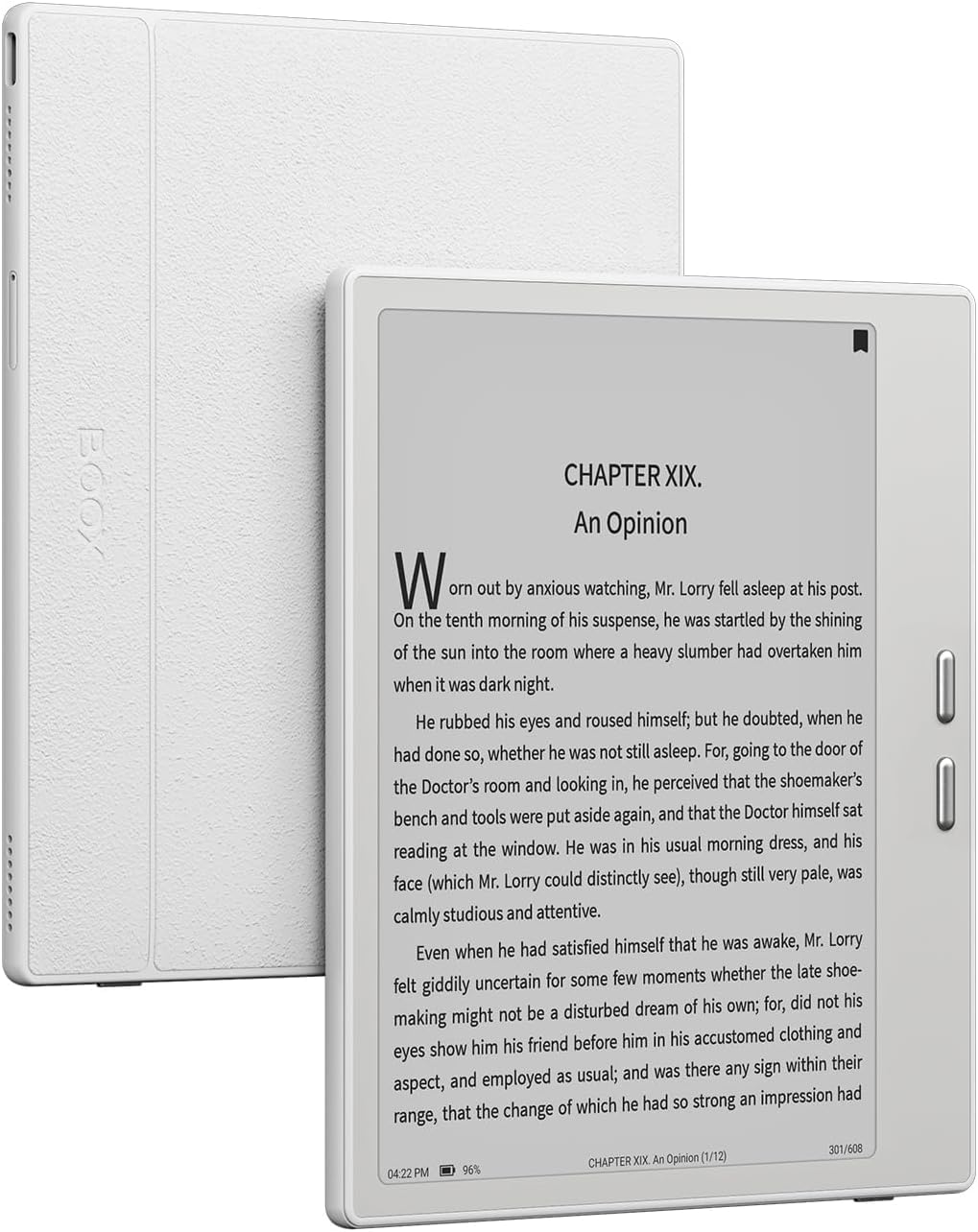
The monochrome purist’s pick: 300 PPI text so sharp it stops reading like a screen.
If black-and-white text quality is the whole ballgame for you, this is where the sharpest pixels in the lineup sit. The E Ink Carta 1300 panel packs 300 PPI (pixels per inch, the measure of how dense and crisp text looks), which is the highest text density here and the reason it reads like ink on paper rather than gray digital type. The flush screen keeps the front glass smooth and gives the body a modern, sturdy feel, and there is 64 GB of storage — matching the Ocean’s generous capacity, and double the Kobo Clara BW’s 16 GB.
What owners notice is speed. Pages render almost instantly, and the page-turn buttons are tactile and quick, with the ability to swap sides so left-handed readers are covered. The native NeoReader app handles a wide span of formats including AZW3, EPUB3, FB2, DJVU, MOBI, and PDF, and the Word Menu lets you highlight, annotate, or search a passage right from the page. The adjustable front light goes from cool white for focus to warm amber for late nights.
Two things to plan around. First, this is not a Kindle — you will install a Gboard keyboard or tweak E Ink settings to get it feeling right, and book apps like Kindle and Kobo need their own adjustments. Second, feel is subjective: some owners find the screen slightly darker and yellower than they expected, and the screen itself is delicate, so a case is worth buying on day one. Nobody should carry one of these around loose.
What makes it stand out: 300 PPI Carta 1300 text with a flush 7-inch screen and 64 GB of storage, matched to snappy page-turn buttons and a customizable monochrome front light.
What it asks of you: setup and app tweaking are part of ownership — this is Android, not a locked ecosystem.
The right call for: readers who prioritize page clarity and want full Android freedom to install whatever reading apps they like.
Overkill for: anyone who just wants to tap one store and start reading.
9. BOOX Tablet Go Color 7 Gen II E Ink Tablet

One E Ink device for color reading, note-taking, and every reading app you own.
The Go Color 7 Gen II is the most capable device in this list, and it is also the one that asks the most of you. The 7-inch Kaleido 3 screen renders 4,096 colors with a 1680 x 1264 resolution — 300 PPI in black-and-white and 150 PPI in color — so text stays sharp while illustrations get actual tones. Inside you get an octa-core processor, 4 GB of RAM, 64 GB of storage, and Android 13, which means Kindle, Nook, Libby, and Hoopla all install and run.
The extras are what separate it from the plain readers. There is a G-sensor that auto-rotates the screen, front light with both warm and cold modes, USB-C that can also serve as an audio jack, a microSD slot for expandable storage, and built-in speakers and a microphone for audiobooks and language apps. Note-taking works through an Active Stylus InkSense, which is not included in the box and does not support EMR styluses.
Set your expectations on the screen. Color E Ink is inherently darker and grayer than an LCD, so colors here are muted rather than vivid — that is the technology, not a defect, and BOOX is upfront about it. Battery is another dividing line: owners mention anywhere from one to three weeks depending on settings and apps, and some find it shorter than they hoped. Then there is durability — a screen that cracks without a drop is rare, but it happens, and the screen protector or case is genuinely worth buying. This is a device you handle with a little care.
Where it leads: 64 GB of storage, 4 GB of RAM, Android 13, a microSD slot, and speakers in a single 7-inch color E Ink body — the deepest feature set here.
Stated plainly: color E Ink is grayer than an LCD screen, and the stylus is a separate purchase.
For the reader who wants it all: color, apps, notes, and expandable storage in one E Ink device.
The caveat: a carry case is basically part of the purchase — this screen rewards care.
Know the Specs
E Ink display technology
An E Ink screen holds a static image without drawing power, which is why these readers are quoted in weeks per charge rather than hours. A frontlight (a soft built-in glow that lights the page from the side) is what lets you read in the dark, and its color temperature setting controls whether the page looks white or amber. Color E Ink, like the Kaleido 3 used on the Kobo Libra Colour and BOOX Go Color 7, adds color capability on top of that same paper-like base — but the panel is inherently darker and grayer than an LCD, so colors read muted.
Storage and file formats
Storage is measured in gigabytes, and for books, smaller numbers go further than you might expect — the Kobo Clara BW’s 16 GB is listed as up to 12,000 eBooks, while the Kobo Libra Colour’s 32 GB is listed as up to 24,000. Audiobooks and comics eat into that number far faster. Format support matters just as much: EPUB, PDF, and MOBI cover most books, but wide format support plus Adobe DRM and LCP DRM is what lets a device open library-borrowed and store-purchased files without conversion. Check the numbers on the model you want before assuming a book will load.
Common Questions
Can I read Kindle books on a Kobo or PocketBook reader?
How much better is a 7-inch screen than a 6-inch one?
Do I need Wi-Fi on to read on an e-reader?
Is color E Ink worth it for comics and graphic novels?
Can I borrow library books on these devices?
How long does the battery really last between charges?
Are these readers waterproof?
Do I need a stylus for note-taking?
Can I install regular apps on an e-reader?
How much storage do I actually need for books?
The Bottom Line
For most people buying a book reader tablet, the Amazon Kindle Paperwhite is the pick that keeps paying off — a 7-inch glare-free screen, 16 GB of storage, up to 12 weeks per charge, and a waterproof body you can carry anywhere. If your library card does the heavy lifting, the Kobo Clara BW gives you built-in OverDrive borrowing in a 6-inch body built for one-handed reading. For comics and color covers, the Kobo Libra Colour brings a 7-inch Kaleido 3 panel and 32 GB. And if you want apps, stylus support, and expandable storage, the BOOX Go Color 7 Gen II covers the most ground. Pick the store you actually buy or borrow from, and the hardware decision makes itself.
How we choose
We do not accept paid placement. Every pick is matched to a real buyer and a real use-case; we do not hands-on test units.
Sources
Specifications: manufacturer listings and product documentation. Review insights: verified customer reviews, as of October 2026. Pricing: not shown on this page (it changes often); check the current price via the retailer link.
As an Amazon Associate, Aappliancez earns from qualifying purchases. This does not affect which products we feature.