Disclosure: Some links in this post are affiliate links. As an Amazon Associate I earn from qualifying purchases, at no extra cost to you. Learn more
Specs are compiled from manufacturer listings and verified buyer reviews and can change over time — please confirm the key details on the product page before buying.
If your smart TV’s built-in apps crawl, stall, or take forever to load, the fix is a small streaming box or stick that plugs into an HDMI port — and the right one is the pick that streams 4K smoothly on your Wi-Fi and gives you a remote that actually works. Most people should start with the Roku Express 4K+: it holds the strongest owner satisfaction of the group, streams in 4K and HDR, and its voice remote controls your TV’s power and volume so you stop juggling three remotes. If you run a home theater with a receiver and a big local movie library, the NVIDIA Shield Android TV Pro is the one that plays practically anything. Everyone else splits by ecosystem — Fire TV, Google TV, or Roku — so the rest of this guide sorts out which stick or box fits your setup.
This guide is built by comparing the manufacturers’ published specifications and the patterns across verified customer reviews, so you get each pick’s real strengths and trade-offs instead of marketing spin.
Here is what actually separates a good 4K streamer from a frustrating one, and how each of these six handles live TV, voice search, and heavy streaming before you commit to the best 4k media streaming device.
Top Picks


How To Choose The Best 4K Media Streaming Device
The biggest mistake buyers make here is chasing picture specs before wireless and processor. A 4K streamer only looks 4K when the signal reaches it cleanly — so the wireless standard (how it talks to your router) and the processor inside (how fast menus and apps open) decide your day-to-day happiness long before resolution does.
Match the wireless standard to your router
Wi-Fi 6 is the newer, faster form of the wireless your router broadcasts, and it keeps 4K steady when the rest of the house is online. Wi-Fi 6E adds a fresh, less crowded band on top of that. If your router is older, every stick here still connects, but a crowded network is the usual cause of buffering.
No wireless at all is a quiet advantage too: a streamer with an Ethernet port (a wired network jack) sidesteps Wi-Fi congestion entirely. That matters most for people streaming very large local files or live sports.
Stick or box — pick by where it lives
A stick is tiny and plugs directly into an HDMI port, hiding behind the TV. A box sits on a shelf, usually runs cooler, and tends to add ports — Ethernet, USB, or a microSD slot — for wired internet and extra storage. If your TV’s HDMI ports are hard to reach, a box with a short cable is easier to manage.
Check storage and the remote before you buy
Storage fills up with apps and games, and when it runs low you get nagging pop-ups. A remote with TV power and volume buttons lets you drop the TV remote for good — while a voice remote lets you search across apps by talking instead of typing.
Side-by-Side Comparison
| Model | Best For | Max Resolution | Wireless | Storage | Amazon |
|---|---|---|---|---|---|
| Roku Express 4K+★ Best Overall | Most households | 4K / HDR | Wi-Fi | 16 GB | Amazon |
| NVIDIA Shield Android TV ProHome Theater Pick | Home theater & local files | 4K / Dolby Vision | Gigabit Ethernet, dual-band AC Wi-Fi, Bluetooth 5.0 | 16 GB | Amazon |
| Fire TV Stick 4K (Like-New) | Budget Alexa setup | 4K / Dolby Vision | Wi-Fi 6 | — | Amazon |
| Fire TV Stick 4K Max | Fast Fire TV streaming | 4K / Dolby Vision | Wi-Fi 6E | 16 GB | Amazon |
| XIAOMI TV Stick 4K (2nd Gen) | Travel & hotel TVs | 4K / Dolby Vision | Wi-Fi 6 | 8 GB | Amazon |
| Roku Ultra | Cord-cutters with headphones | 4K / HDR | Ethernet, HDMI, USB | — | Amazon |
Detailed Reviews
1. Roku Express 4K+
Our pick — 4.5+★ from 103,000+ verified ratings; the strongest balance of quality and price.
The plug-in stick that survives a crowded household network and a full house of remotes.
For the person who just wants 4K to work without becoming their family’s IT department, this is the safest bet in the whole group. It streams in HD, 4K, and HDR, and the wireless connection is tuned for a smooth picture even on a busy network. Setup is about as close to zero-effort as streaming gets: you plug it into your TV’s HDMI port, connect to the internet, and start watching.
It holds a 4.5+ star rating across 100,000+ owner reviews. What wins people over is raw, everyday performance, and it is a standout at this tier. A fast wireless connection keeps 4K steady, and the customizable home screen lets you push the channels you actually watch to the front instead of scrolling past promos. The voice remote handles TV power and volume, so one clicker replaces the three you keep losing in the couch cushions.
The content angle is the real selling point for cord-cutters, with 350+ free live TV channels baked in alongside the premium apps. Siri, Alexa, and Hey Google all work with it, so you can keep whichever voice assistant you already talk to. Its 3-inch by 1.6-inch by 0.83-inch frame disappears behind even a wall-mounted TV.
Where it earns its keep
- 4K and HDR picture tuned for a faster wireless connection
- One remote powers the TV, sets the volume, and controls the stick
- 350+ free live TV channels plus the big premium apps
- 16 GB of storage for apps and updates
The honest trade-offs
- No Ethernet port — it lives and dies by your Wi-Fi
- Occasional connectivity and remote hiccups surface in owner feedback
- Roku’s own interface, so no Fire TV or Google TV apps ecosystem
Grab this one if: you want dependable 4K, live channels from the start, and a remote that ends remote roulette.
Think twice if: your router is far from the TV and you would rather have a wired Ethernet jack.
2. NVIDIA Shield Android TV Pro
The heavy-hitter that turns a receiver-and-speaker stack into a proper cinema brain.
This is the pick for the person who owns an AV receiver, a big local movie library, or a Plex server — and refuses to babysit a laggy stick. The NVIDIA Tegra X1+ chip (the processor that drives the whole interface) powers real-time AI upscaling, meaning it sharpens ordinary HD footage toward 4K on the fly rather than just passing it through untouched.
Audio is where it separates itself. Dolby Vision HDR (the picture format that brightens highlights and deepens blacks scene by scene) pairs with Dolby Atmos and Dolby Digital Plus surround sound, so a well-set-up soundbar or receiver gets a genuinely cinematic feed. Owners running it through an Atmos receiver report it beats the Apple TV 4K and Roku Ultra at removing dark-background artifacts and auto-detecting video settings.
In-home speed and expandability seal it. Gigabit Ethernet (a wired network jack for maximum stability), dual-band AC Wi-Fi, Bluetooth 5.0, and 3 GB of RAM with 16 GB of storage mean few bottlenecks. Two USB 3.0 ports open the door to extra storage, cameras, keyboards, or controllers. The remote adds backlit buttons with motion activation, IR control for your TV, and a locator for when it slips behind the sofa.
Where it wins big: native 4K playback is described as flawless, and owners running big or awkwardly encoded file libraries say nothing else they’ve tried keeps up. It runs full Android, so it handles apps and sideloaded tools that locked-down sticks can’t. from the start, the Android TV interface is couch-friendly, and USB peripherals — Bluetooth keyboards, mice, controllers — all play nicely.
The honest edge: the interface still shows streamed ads unless you tweak it, the remote can go unresponsive and does need the occasional battery-in, hold-home and d-pad reset, and there is no DVR. Some buyers also wish a newer model shipped with the AV1 codec (a next-gen video format) and sharper upscaling.
Reach for this if: you run a receiver, an Atmos system, or a Plex/BluRay library and want the box that plays nearly everything.
skip it if: you only stream Netflix and casual apps — the fancy hardware is overkill for that.
3. Amazon Fire TV Stick 4K

The budget lever that gets you full 4K, Dolby Vision, and Alexa without paying full retail.
If you already lean on Alexa and want the cheapest path to a real 4K upgrade, this refurbished stick is the smart move. It is refurbished, tested, and certified to look and work like new, and it ships with the same limited warranty as a new device — just possibly in a generic Amazon-branded box. Setup is where this one shines brightest in owner feedback: buyers consistently describe quick, painless setup, smooth streaming, and a crisp 4K picture with 1.8 million-plus titles to sift through.
The smarts are more useful than they sound. The AI-powered Fire TV Search lets you find movies by actor, plot, or even an iconic quote, and Alexa+ takes natural-language requests. Wi-Fi 6 (the newer wireless standard) keeps 4K steady even when other devices are hammering the router. You also get Dolby Vision, HDR10+, and Dolby Atmos support, plus preset buttons and TV power/volume control on the remote. Cloud gaming is a bonus — stream Xbox titles like Call of Duty via Game Pass without owning a console.
Its main friction is connectivity, which comes up mixed in owner feedback, with some set-ups clashing with particular TVs. The remote and long-term reliability draw more negative noise here than on the pricier picks, with reports of the remote flaking out and the device wanting restarts. For a refurb at this price point, though, the trade-offs are squarely in “for the money” territory.
Best budget move: the Alexa loyalist who wants 4K, Dolby Vision, and cloud gaming for as little as possible — and can live with the occasional restart.
Not for you if: you want a spotless reliability record or already fight your Wi-Fi; the wired, box-style picks handle a flaky network better.
4. Amazon Fire TV Stick 4K Max

The Max version that turns a sluggish smart-TV menu into an instant, ad-lite-feeling dashboard.
This is the pick for someone whose TV’s built-in apps have become a slow, pixelated chore. A powerful processor, Wi-Fi 6E (the newest, least-crowded wireless band), and 16 GB of storage — double that of Fire TV Stick 4K Plus and the other Fire sticks — combine to give you the snappiest Fire TV experience of the lineup. Apps launch fast, the interface navigates fluidly, and low-storage pop-ups stop interrupting your shows.
Owners who upgraded from older Fire sticks notice the leap most in menu navigation. Owners upgrading from older Fire sticks report instant menu navigation and fast 4K HDR over Wi-Fi 6E. Alexa+ search is genuinely useful — press the voice button and talk naturally to find something to watch, control smart home gear, or dig into almost any topic. The upgraded remote adds a recents button and dedicated channel buttons for live TV, plus TV power and volume control.
The extras round it out: 4K Ultra HD with Dolby Vision, HDR10+, and Dolby Atmos, plus a Fire TV Ambient Experience that displays over 2,000 pieces of art and photography when you’re not watching. It also handles cloud gaming on Amazon Luna and offers access to hundreds of thousands of movies and shows.
What owners note: setup is often under five minutes, apps feel fast, and Wi-Fi 6/6E keeps 4K smooth without buffering. Price is higher than the non-Max stick and the home screen still shows ads — a minor tax for the speed bump.
Worth it for: anyone stuck with a slow TV processor who wants menu lag gone and needs more storage for apps and games.
Look elsewhere if: you’re on a tight budget or you have no Wi-Fi 6/6E router — the standard Fire TV Stick 4K gets you most of the way for less.
5. XIAOMI TV Stick 4K
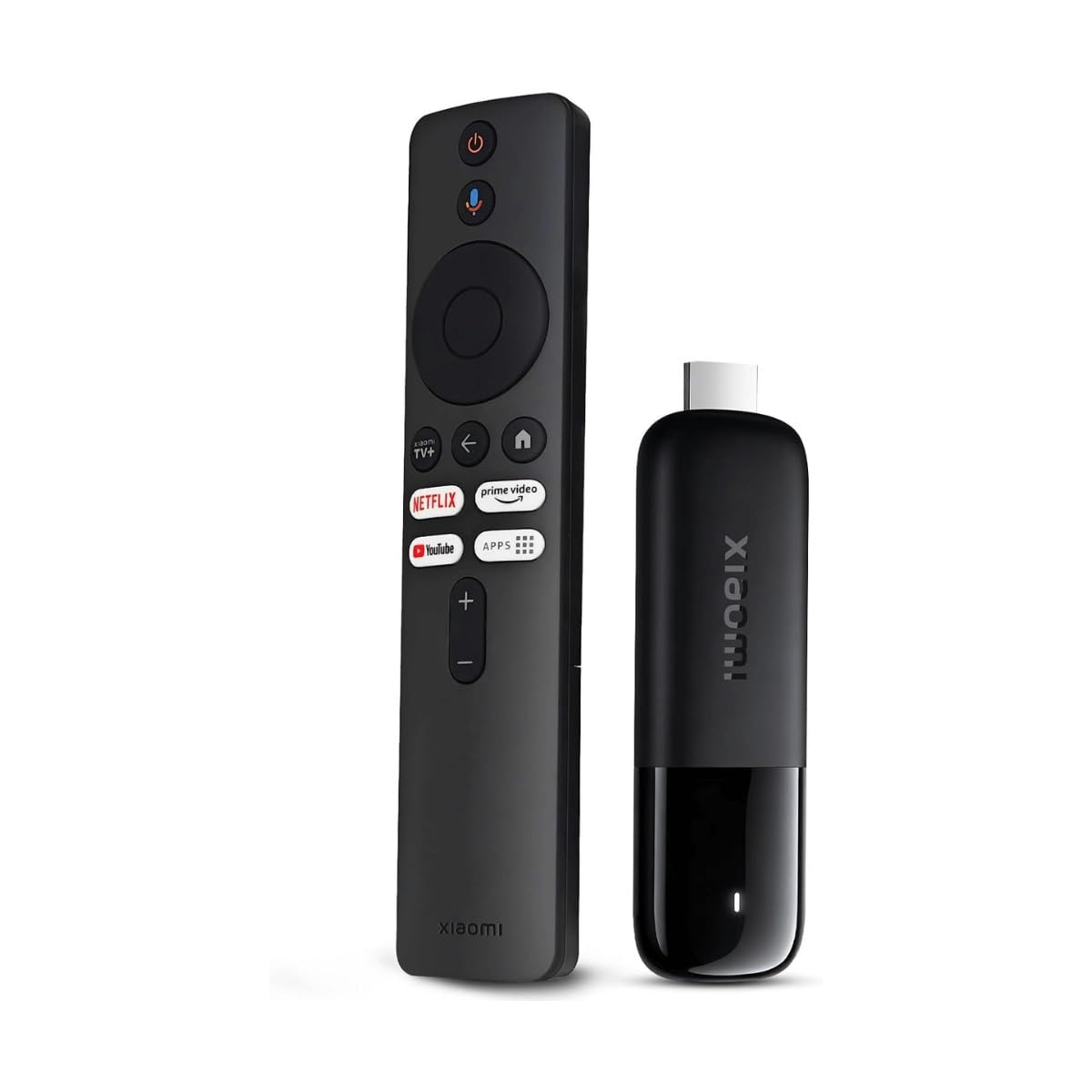
The pocket-sized Google TV stick that turns a hotel TV into your streaming setup.
Frequent travellers and Google-account households are the audience here. Weighing just 28 grams — lighter than a deck of cards — this stick drops into a bag and turns any HDMI-equipped hotel or guest-room TV into your personal streaming center, with your profiles and apps following you on the go. The 8 GB of storage is on the lean side, so this one makes most sense for streaming apps rather than heavy game downloads.
Specs are impressive for the footprint. A 6nm, 2.5GHz quad-core CPU (the processor) keeps streaming lag-free, and dual-band Wi-Fi 6 keeps the connection stable for 4K playback even when others are on the network. You get 4K Ultra HD with Dolby Vision and HDR10+ for picture, plus Dolby Atmos and DTS:X for sound — a movie-theater audio spec that most sticks in this size ignore.
The software is the appeal for many buyers: Google TV organizes your movies and shows across apps into one place, then the Bluetooth voice remote lets you search, play, or control compatible smart home devices by voice. Free live channels cover news and sports, Google Cast mirrors from your phone, and the HDMI extender helps it fit tight ports.
Why travellers like it
- 28 g and pocket-sized — built for the road
- Google TV interface plus a Bluetooth voice remote
- Dolby Vision, HDR10+, Dolby Atmos, and DTS:X support
- Dual-band Wi-Fi 6 and a 6nm, 2.5GHz quad-core CPU
Where it comes up short
- Only 8 GB of storage — tight for apps and games
- No Ethernet port, so it relies entirely on Wi-Fi
- Fewer long-term owner reports than the big-name picks
Pick it up for: travel, a spare TV, or if you live in Google’s ecosystem and want Google TV curation.
Pass if: you need maximum storage or a wired connection for a fixed home setup — the Fire and Shield options handle both better.
6. Roku Ultra Streaming Media Player 4K/HD/HDR
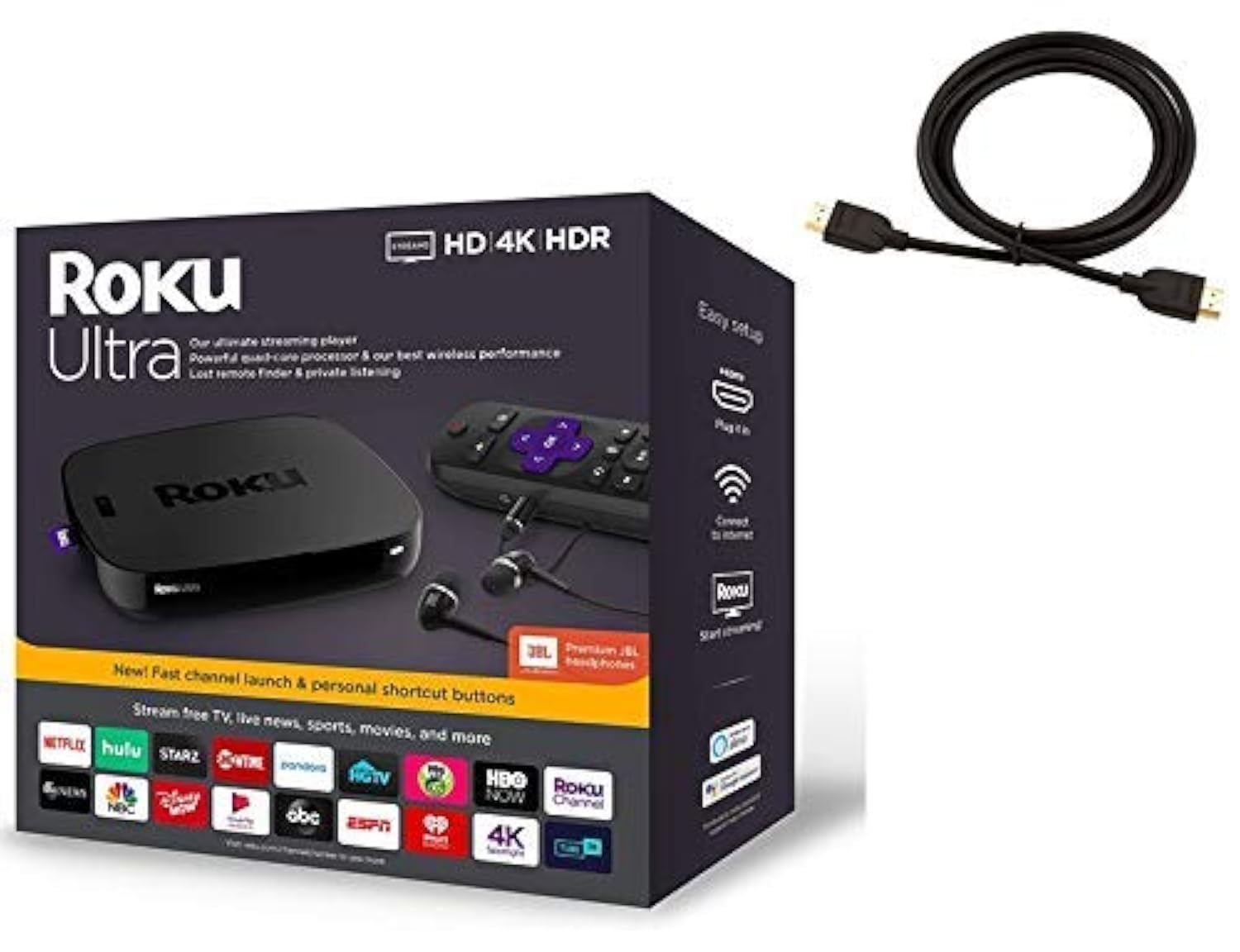
The loaded media box that hands you private-listening headphones and a wired jack.
This is the pick for the household that streams for hours and wants everything hard-wired and hands-on. Roku Ultra packs a quad-core processor and Roku’s best wireless, and it connects over Ethernet (a direct cable to your router) for rock-solid stability — no Wi-Fi congestion getting between you and a live game. It also adds USB and microSD ports for extra storage, plus a USB port for playing local media.
The remote is unusually generous. It has an enhanced voice remote with TV controls and a lost-remote finder, plus — an unusually nice touch — included Premium JBL headphones for private listening, so you can crank a movie without waking the house. Content-wise, it reaches 500,000+ movies and TV episodes plus free live TV, 24/7 news, and sports on The Roku Channel. Compared to the Fire TV Stick 4K Max above, the picture core is comparable but the Ultra trades Wi-Fi 6E for a wired Ethernet jack and physical headset output.
It costs more than the sticks here, but draws the most consistent owner praise of the group. Buyers report it revives sluggish smart TVs and cuts cable bills, with one remote controlling both the TV and soundbar. Owners repeatedly call setup easy, and the box includes a 6-foot high-speed 4K HDMI cable.
Best at: private listening, wired stability, and a remote that runs your whole entertainment system. The included JBL headphones and lost-remote finder are the kind of extras most streaming boxes just don’t bother with.
The one cosmetic catch: it ships in a purple box, not the black shown in some listing photos — purely a look thing, since the unit itself works fine.
The right call for: a fixed home setup with Ethernet nearby, and anyone who wants headphone listening or heavy daily streaming over Wi-Fi.
Leave it if: you only casually stream on one TV — a cheaper stick covers that need fine.
Know the Specs
Wireless Standard (Wi-Fi, Wi-Fi 6, Wi-Fi 6E)
Wi-Fi is simply how the streamer talks to your router without a cable. Wi-Fi 6 is a newer, faster version that stays stable when many devices share the network. Wi-Fi 6E adds a fresh, uncrowded band on top. If you stream a lot in a busy home, this matters more than resolution — a fast 4K stream with a crowded Wi-Fi signal will buffer just as badly as an old 1080p one.
4K, HDR, Dolby Vision, and Atmos
4K means roughly four times the detail of standard HD, so text and fine detail hold up on a big screen. HDR (High Dynamic Range) is the picture technology that brightens highlights and deepens shadows. Dolby Vision is an advanced HDR format that adjusts the picture scene by scene. Dolby Atmos is the surround-sound format that positions audio in 3D space — it needs a compatible soundbar or receiver to be heard at full strength.
Storage and RAM
Storage is where your apps, games, and updates live. When it fills up, low-storage pop-ups interrupt your shows. RAM is the working memory that keeps the interface snappy and lets apps open fast. More of both generally means less waiting and fewer interruptions.
Stick vs. Box — and Why Ports Matter
A stick plugs directly into HDMI and hides behind the TV, while a box sits on a shelf and usually runs cooler. Boxes often add Ethernet (a wired network jack), USB, or microSD ports. Ethernet bypasses Wi-Fi congestion entirely, which is why it matters most for live sports and large local files.
Common Questions
Will a 4K streaming stick work on an older 1080p TV?
Do I need a Wi-Fi 6 or Wi-Fi 6E router to use these devices?
Is a streaming box better than a streaming stick?
How much storage do I need on a streaming device?
Can I use these devices to cut cable and watch live TV?
Which of these supports Dolby Vision and Dolby Atmos?
Is a Like-New or refurbished streaming device a good idea?
Can I play Xbox games on a Fire TV Stick 4K without a console?
What is the difference between a voice remote and a standard remote?
Do I need a separate HDMI cable?
The Bottom Line
The short version: the strongest overall pick here is the Roku Express 4K+, because it pairs 4K and HDR picture, 350+ free live channels, and a TV-controlling voice remote with the most consistent owner satisfaction of the group. If you run a receiver or a large local movie library, the NVIDIA Shield Android TV Pro is the one that plays practically everything and handles Dolby Atmos properly. And if you’re a cord-cutter who wants a wired connection plus private-listening headphones, the Roku Ultra is the box to reach for. Whichever you choose, match the pick to your ecosystem and your network first.
How we choose
We do not accept paid placement. Every pick is matched to a real buyer and a real use-case; we do not hands-on test units.
Sources
Specifications: manufacturer listings and product documentation. Review insights: verified customer reviews, as of October 2026. Pricing: not shown on this page (it changes often); check the current price via the retailer link.
As an Amazon Associate, Aappliancez earns from qualifying purchases. This does not affect which products we feature.