Disclosure: Some links in this post are affiliate links. As an Amazon Associate I earn from qualifying purchases, at no extra cost to you. Learn more
Specs are compiled from manufacturer listings and verified buyer reviews and can change over time — please confirm the key details on the product page before buying.
Here is the short answer: buy the cart that stays still, not the one that rolls. A 3D printer lays down layers thinner than a human hair, and every bit of sway in your table shows up as a shifted wall or a rough face on the finished part. The seven carts below all hold real machines, but they split hard into two camps — the ones with locking wheels and the ones with screw-down leveling feet. If you print fast, feet win. If you reorganize your shop every weekend, wheels are the better trade. This guide sorts them by feet versus wheels, load rating, and spool capacity, so you pick the stand that matches how you print.
This guide is built by comparing the manufacturers’ published specifications and the patterns across verified customer reviews, so you get each pick’s real strengths and trade-offs instead of marketing spin.
Filament storage, a built-in power strip, and a stable top matter more than the finish you pick, and this breakdown of the 3d printer cart makes it easy to match one to your machine and your room.
Top Picks

How To Choose The Best 3D Printer Cart
A 3D printer is not a paper printer. It moves a heavy bed back and forth hundreds of times per minute, and it does that for hours on end. That motion goes straight into whatever surface it sits on. A cart that would be perfectly fine for a laser printer can turn into a shaker under a fast printer. So the first thing to look at is not shelf count or color — it is how the stand meets the floor.
Feet versus wheels: the real decision
Screw-adjustable leveling feet press down hard and cancel out the small uneven spots in a floor. A cart with those feet behaves like a fixed workbench, which is what you want under a machine that vibrates. Casters, even lockable ones, sit on a small contact patch and can rock or slide when the printer accelerates. If you plan to park the printer in one spot and leave it there, feet are the better choice. If the cart lives in a shared room and needs to move for cleaning or storage, lockable casters are worth the tiny bit of give.
Match the top surface to your printer footprint
Measure your printer’s base, then add a few inches on each side so the spool holder, cables, and a purge bin have somewhere to sit. A 24-inch-wide top fits most mid-size enclosed printers with room for a spool holder. Under that, you want open or ventilated shelving. Electronics and filament both dislike trapped heat, so an open frame keeps air moving around the machine.
Filament storage you will actually use
Spools take up far more room than people expect. A single 1 kg reel is roughly 8 inches across. A rack rated for dozens of spools keeps your whole filament library off the floor and away from dust. Look for a design that holds both 500 g and 1 kg spools, since starter printers often ship with the smaller size.
Load rating and assembly effort
Enclosed printers can weigh well over 30 pounds, and the heavier machines get the more leveling matters. Check the stated load capacity against your printer’s weight plus spools, then leave yourself headroom. Assembly is the other practical question. Most of these carts go together solo in under an hour with the included tools, but a cart with a dozen small bolts is worth tightening deliberately rather than fast.
Side-by-Side Comparison
| Model | Best For | Load Capacity | Filament Storage | Mobility | Amazon |
|---|---|---|---|---|---|
| Fannova Printer Stand★ Best Overall | Mixed office and printer duty | 100 lbs top shelf | — | Feet plus lockable casters | Amazon |
| AHOWPD 3D Printer Stand with Filament StorageBest for High-Speed Printing | High-speed printing with no wobble | 300 lbs | Up to 60 spools | Adjustable leveling feet | Amazon |
| EasyCom 3-Tier Rolling Cart | Small spaces and tight corners | — | — | Locking wheels, wheels optional | Amazon |
| AHOWPD 3D Printer Table with Power Strip | Powering a full print station | — | Two levels of spool racks | — | Amazon |
| Natwind 3 Tier Printer Stand | Craft rooms and adjustable clearance | 300 lbs | — | Lockable casters plus foot pads | Amazon |
| Unikito Rolling File Cabinet | Lockable storage beside the printer | — | — | Four locking casters | Amazon |
| Unikito Large Printer Stand | Printer plus shredder in one tower | 200 lbs | — | Six adjustable feet | Amazon |
Detailed Reviews
1. Fannova Printer Stand with Storage Shelf
Our pick — 4.5+★ from 400+ verified ratings; the strongest balance of quality and price.
A printer stand that swallows 100 pounds on top and still ships with both feet and wheels.
The Fannova is the pick that does not force you to choose between stability and mobility. It arrives with a set of adjustable feet and a set of rolling casters, and two of those four wheels lock. Start with the feet, and the cart behaves like a fixed bench — the 22-inch-wide, 18-inch-deep tabletop sits still under any printer you put on it. Swap to casters when you need to pull the machine out for a nozzle change. Each shelf rests on a steel tube running underneath rather than being screwed straight into the side panels, which is why the top shelf is rated for 100 pounds. A large laser printer or an enclosed 3D printer fits with room to spare.
Storage is where this one separates itself. There is a tall slot with an internal measurement of 23.6 inches high, 10.6 inches wide, and 18.9 inches deep — deep enough for most PC cases and tall enough that a paper shredder or a mini fridge slides in. The middle floating shelf holds tools, spare filament, or a stack of build plates. Better still, you can flip that middle shelf to the opposite side to match how your room is laid out. Overall the Fannova measures 23.62 x 18.9 x 31.89 inches.
The catch is the casters. They are plastic, and on smooth laminate they do not swivel cleanly, so if you plan to roll this thing daily you will notice the drag. The simple fix most people land on is mounting the supplied feet with felt sliders instead, which keeps the cart parked and quiet. Assembly runs about 20 minutes for one person, and the hardware comes numbered with a spare screw for each type — a small touch that saves a trip to the hardware store when one goes missing.
Where this stand earns its keep
- The top shelf carries 100 pounds, and the whole frame is steel-tube supported rather than side-screwed.
- Both feet and casters come in the box, so you can go fixed or mobile without buying anything extra.
- A reversible middle shelf lets you mirror the layout to suit your room.
- Numbered parts plus spare screws for every type make assembly a 20-minute job.
What to weigh before buying
- The plastic casters drag on laminate and do not pivot cleanly.
- One buyer wanted the unit a half inch deeper for rack-mount modifications.
- At 31.89 inches tall it sits above a standard desk height, so measure your clearances first.
Built for: anyone who wants one cart to hold the printer, the filament, and the tools — and who values being able to switch from parked to rolling whenever the mood strikes.
The honest trade: plan on the feet over the casters if your floor is laminate.
2. AHOWPD 3D Printer Stand with Filament Storage
The one stand here that deliberately skips wheels — and out-stores every other cart on the list.
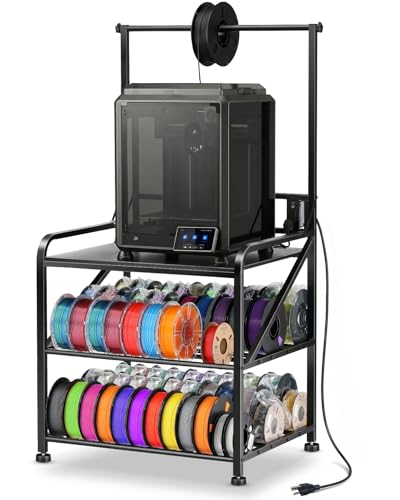
Where the Fannova gives you the option of rolling, this AHOWPD makes the opposite call on purpose. There are no casters at all. Instead you get heavy-duty adjustable leveling feet that screw down to make a flat, vibration-resistant surface. That matters the moment you push print speed up, because a printer that runs fast throws its own weight around and a wobbly stand turns that motion into visible layer shifts. The rack holds up to 60 spools of filament in total — 10 on top, with two lower layers sized for both 500 g and 1 kg reels. Buyers report it holds 40+ filament reels with room to spare, which is a lot of material off your floor.
The frame is 0.78-inch thick metal with a baked-on wood surface that resists rust, and it is rated to support up to 300 pounds. That is the same figure as the Natwind further down, but this one spreads it across three storage levels. Total footprint runs 29.2 x 23.2 x 59 inches tall, and the top solid-wood surface is 27.5 x 23 inches — enough for an enclosed printer or an open-frame machine plus a spool. Assembly is quoted under 15 minutes with a video guide, and the sides come pre-built so most of the work is already done.
Stability is the honest sore spot, and it splits both ways. Several owners run large machines on it with no meaningful sway. Others find it shakes under a fast printer, and one pointed out that the under-table bars only fit bare spools — a spool still in its box has to be balanced rather than slotted. The cure that keeps coming up is to add threadlocker to the bolts and tighten everything again after a week of printing, since vibration slowly loosens what you set by hand.
What you get for the storage: 60 spools of capacity in a tower that stands 59 inches tall, with two lower shelves sized for mixed 500 g and 1 kg reels.
Where it needs a hand: the bolts need re-tightening after the first week, and boxes do not slot into the spool bars.
Reach for this if: your printer lives in one place and you want it planted on leveling feet with your whole filament library underneath.
Look elsewhere if: you need to wheel the setup between rooms or you keep spools in their original boxes.
3. EasyCom Large Printer Stand with Drawer
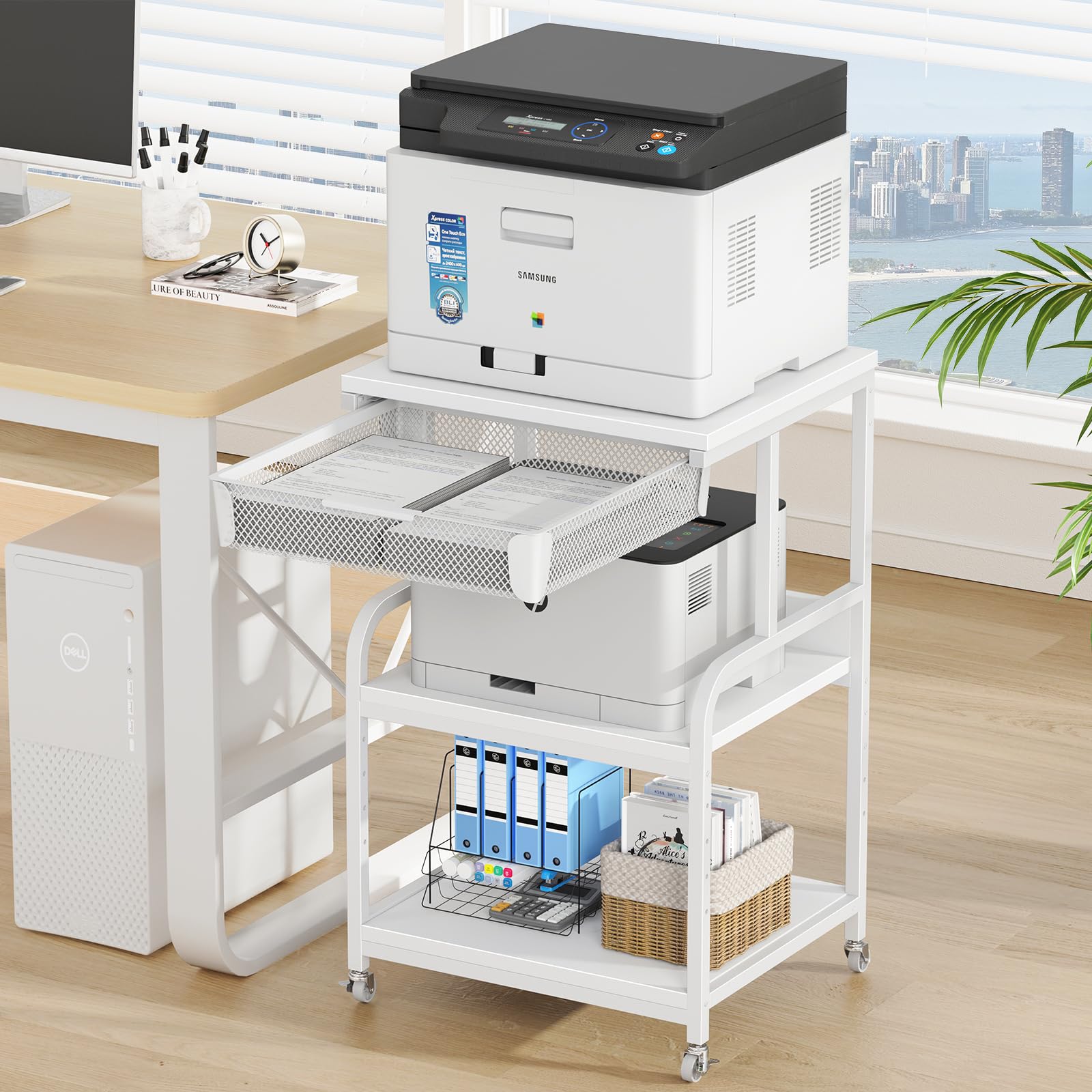
Five height settings, a mesh drawer, and a footprint that tucks into a corner.
If your print station shares a room with a bed or a desk, the EasyCom is the one built around cramped space. It stands 32.5 inches tall on a 19.7 x 15.7 inch footprint, so it slides into a gap where a full workbench will not go. The middle shelf has five adjustment positions, which lets you drop the top down for a short printer or raise it to clear a tall spool holder. Panels are FSC-Certified wood, and the frame is reinforced steel, so the whole thing weighs 20.2 pounds and moves easily when you need to sweep around it.
The mesh drawer is the clever part. It holds paper, ink, cables, or a set of hex keys, and the mesh keeps the contents visible so you are not digging for a nozzle wrench. Wheels are heavy-duty and all of them lock, and you can build the cart with or without them. Owners talk about the engineering first — the solid frame is the thing that gets praised most — and a good number mention how well it works as a dual setup with two printers side by side.
Here is the limit for a 3D printer specifically: this cart is a shaker. One buyer who tried it under a 3D printer moved it to PC-tower and ink-printer duty instead, and said it works well there. The plastic casters also slide a little even when locked, so the parked position is not rock solid. Treat this as an office organizer that can host a printer — not as a vibration-resistant print bench. Assembly takes roughly 45 minutes solo, and the drawer slider may need a small adjustment before it glides clean.
The space read: a 19.7 x 15.7 inch footprint and 32.5 inches of height put it in corners where a bench will not fit, and the 20.2-pound build is light enough to reposition alone.
The print-bench caution: it is not the pick for a fast machine — owners who tried it under a 3D printer moved it to office gear instead.
Suits: small apartments and dorms where the printer has to share a corner with everything else, and where a ventilated drawer saves a shelf.
Think twice if: you run a high-speed printer and need the stand to sit dead still — this one trades stillness for compact footprint.
4. AHOWPD 3D Printer Table with Filament Storage Rack
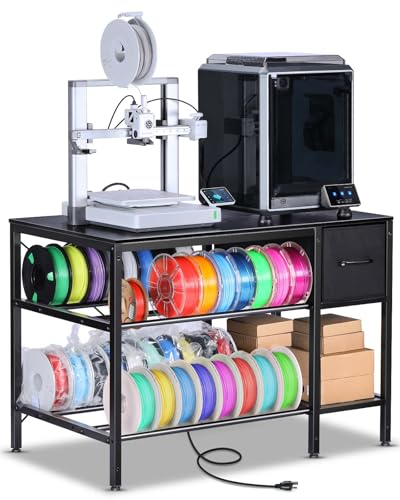
Two plugs, two USB ports, and a 140 cm cord built right into the tabletop.
The most common annoyance in a print room is not the printer — it is the outlet being halfway across the room. This AHOWPD solves that by embedding a power strip with 2 AC outlets and 2 USB ports into the stand itself, on a 140 cm power cord. That is enough to run the printer, a filament dryer, and a small air purifier at once without a power brick dangling off the side. The top measures 39.4 inches long by 23.7 inches wide, so two large printers can sit side by side — owners mention fitting an A1 and a SW-X2 on the same surface.
Filament storage sits on two levels, each with a metal tube rack on the middle and bottom shelves, and there are fabric drawers for screws, wrenches, and maintenance bits. The whole stand weighs 37 pounds and uses a high-quality metal frame, which is why it holds steady at high print speeds. Assembly runs about 30 minutes.
Two things to know before you commit. First, the stand can wobble if you do not tighten every bolt firmly — the frame is bolted together, and vibration works loose anything set by hand. Second, the outlet placement is centered at the middle back of the top, which one owner found awkward to reach once the printer was on the surface. A few units have shown up short on screws, so count the hardware before you start and you will save a return. The included Allen wrench is soft and strips easily — bring your own hex key and assembly goes faster.
Why it earns a spot
- Built-in 2 AC outlets and 2 USB ports on a 140 cm cord keep the whole station on one plug.
- A 39.4 x 23.7 inch top fits two large printers at once.
- Metal tube racks on the middle and bottom shelves hold spool rows in two tiers.
- Fabric drawers keep tools and small parts within reach.
Sizing it honestly
- Wobble appears if the bolts are not tightened firmly, and vibration loosens them over time.
- Screw counts have come up short on some units — check the bag first.
- The rear-centered outlet is hard to reach once a printer sits on the top.
The match for: a print corner that already has a dryer and a purifier and needs one place to plug everything in.
The caveat: budget ten minutes to re-tighten the frame after the first week of printing.
5. Natwind 3 Tier Large Printer Stand

Three pre-drilled shelf positions and a steel frame rated for 300 pounds.
The Natwind gives you a 24 x 20 inch tabletop and a middle shelf you can drop into any of three pre-drilled holes spaced 4 inches apart. That range is the point. A tall enclosed printer needs clearance above it, a short one wants the shelf raised so the storage below stays useful, and 4 inches of travel covers both. The frame is a 1 inch by 1 inch powder-coated steel tube with extra reinforcement under the top board, rated to support up to 300 pounds — the same figure as the AHOWPD storage tower, but here it holds a single wide surface instead of three narrow shelves.
Power is built in at the rear: 3 AC outlets on a 5-foot cord, enough to run a printer, a filament dryer, and a laptop together. The stand comes with lockable universal casters for moving and 4 spare foot pads for when you want it stationary. Owners praise the build most, then the sturdiness — it handles a large-format printer plus two cutting machines with room for paper underneath.
Two fit notes worth knowing. The casters raise the stand to roughly 32 inches against a 30-inch desk, so if you are matching height, use the fixed feet instead. And the power strip protrudes about an inch from the back, which gets in the way if you push the cart flush against a wall. Both are easy to plan around once you know they exist.
The adjustable read: three shelf positions on 4-inch spacing let you tune the clearance to your machine, and the 300-pound rating leaves room for a heavy enclosed printer.
The wall-clearance catch: the rear power strip sticks out about an inch, so leave a gap behind the cart.
Pick this one when: you have a tall printer and a short printer and want a single stand that can clear both.
skip it if: your cart has to sit flush against a wall — the rear outlet block needs breathing room.
6. Unikito Rolling File Cabinet

A file cabinet that doubles as a printer cart, with a door that actually locks.
This Unikito is the only pick here with a locking door, which changes what it can do. Filament, spare nozzles, and finished prints can go behind a lock where kids or coworkers cannot get to them. The cabinet stands 26 inches tall on a 17.2 x 23.6 inch footprint, so it slides beside or under a desk. Inside there is a door with a lock, two open shelves, and adjustable shelf heights. A built-in strip gives you 3 power outlets and 2 USB charging ports, and the whole thing rolls on 4 locking casters.
The build is MDF board on a metal frame, and it handles real weight. One owner runs a 3D printer of roughly 40 to 50 pounds on top and notes it rolls easily with the locking wheel tabs engaged. The frame is also rated to support a multi-function laser printer with supplies. Assembly lands around 30 minutes with all parts labeled and the tools included — even a Philips screwdriver.
The weak link is the lock itself. The metal plate is thin enough to bend under pressure, and one owner discarded it after it deformed during installation. It will keep honest hands out, but treat it as a privacy latch rather than a security device. The casters also roll well on hardwood and poorly on thick carpet, so keep that in mind if your print room is carpeted. The USB ports are rated for small devices only, so do not expect them to fast-charge a tablet.
What makes it different
- A lockable door keeps filament and finished parts away from curious hands.
- 3 outlets and 2 USB ports are built into the cabinet on a power strip.
- Four locking casters roll smoothly and lock securely in place.
- Adjustable shelf heights adapt to binders, folders, and printer supplies.
Where it falls short
- The lock plate is thin and can bend during installation.
- The USB ports are low wattage — small devices only.
- Casters struggle on thick-padded carpet.
Worth it for: a home office where the printer, the files, and the filament all need one locked home.
Know before you buy: the lock is a latch, not a safe — do not rely on it for real security.
7. Unikito Large Printer Stand with Power Outlet

The stand that gives your printer a home and your paper shredder a slide-out drawer.
Most print rooms end up with a shredder on the floor because there is nowhere else to put it. This Unikito solves that with a right-side shelf on a slide rail and handle — the shredder rides in and out like a drawer, so you use it without lifting anything. The top surface handles the printer itself, and the enclosed side door takes paper, ink, and other supplies. Built into the cabinet are 2 power outlets and 3 USB charging ports, enough to keep a printer and a shredder on one plug.
Structure is the strongest part of the story here. The steel frame is thickened with a thick pipe wall and uses threaded holes rather than wood inserts, so the boards rest on metal instead of pulling out of soft wood over time. The stand is rated to bear up to 200 pounds and measures 16.5 x 31.5 x 34 inches, with six adjustable feet to stop it rocking on an uneven floor. Owners praise the build quality above everything else, then the look of the rustic brown and black metal.
The shredder door is the recurring gripe — several people report it not staying closed on its own. There is also no cord hole at the top back of the enclosed shelf, which means drilling one yourself if you want to route a cable cleanly; put painter’s tape over the spot first so the board does not split. Assembly runs under 2 hours, most of that laid out with clear instructions.
The organization win: a slide-out shredder shelf and a side cabinet keep paper, ink, and a shredder off the floor, all under one 200-pound-rated steel frame.
The small frictions: the shredder door does not always stay shut, and there is no pre-cut cord hole at the back.
Best for: an office that already has a shredder and no idea where to put it — this gives it a proper slot beside the printer.
The reality check: budget extra time for assembly and plan a short drill session if you want clean cable routing.
Know the Specs
Load capacity in pounds
This number tells you how much weight the stand is built to hold, and it matters because a 3D printer is heavier than it looks once you add a full spool and a build plate. A stand rated at 300 pounds will sit solid under a heavy enclosed printer plus the spools and tools around it. A stand rated at 100 pounds on the top shelf still carries a 68-pound laser printer with room to spare. Check your printer’s weight plus a full spool against the rating and leave yourself some headroom.
Leveling feet versus casters
Leveling feet are screws you turn to press the stand flat against the floor, which cancels uneven spots and keeps the surface steady while the printer moves. Casters, even lockable ones, sit on a small contact patch and can rock when the machine accelerates. Lockable casters are the better pick when the cart has to move between rooms. Feet are better when it stays parked. Some stands ship with both, which lets you test and decide.
Filament spool capacity
A 1 kg spool runs roughly 8 inches across, and two or three of them take the space of a small drawer. A rack rated for dozens of spools keeps your whole library off the floor and away from dust. Look at whether the rack fits both 500 g and 1 kg reels, since starter printers often ship with the smaller size. A rack that only slots bare spools means a spool still in its box has nowhere to go.
Built-in power outlets
An embedded strip saves you from reaching for an extension cord every time you add a filament dryer or a small purifier. The port count matters more than the cord length in a tight room — 2 outlets and a couple of USB ports covers a printer and one accessory, while 3 outlets gives you room for two. USB ports on these strips are typically rated for small devices, so treat them as phone chargers rather than tablet chargers.
Common Questions
Will a 3D printer wobble on a cart with wheels?
How much weight should the top shelf handle for a 3D printer?
Can I fit an enclosed printer on these carts?
How long does assembly take on a 3D printer cart?
Do the built-in USB ports charge a tablet?
How many filament spools will these racks actually hold?
Is a file cabinet better than a printer stand for a 3D printer?
What is the best way to stop a stand from shaking during a print?
Will a tall cart fit under a standard desk?
Can I move a loaded 3D printer cart without unloading it?
The Bottom Line
The winner for most people is the Fannova Printer Stand, because it ships with both feet and casters — you get a steady bench when you need it and a rolling cart when you do not, plus a top shelf rated for 100 pounds. If you print at high speed and want the surface planted with no wheels at all, the AHOWPD storage stand gives you leveling feet and room for up to 60 spools. And if your office already has a shredder looking for a home, the slide-out shelf on the Unikito large stand puts it right where you work.
One last nudge: whatever you pick, mount the feet first and re-tighten every bolt after your first week of printing. Re-tightening after the first week does more for print quality than any upgrade you can buy.
How we choose
We do not accept paid placement. Every pick is matched to a real buyer and a real use-case; we do not hands-on test units.
Sources
Specifications: manufacturer listings and product documentation. Review insights: verified customer reviews, as of October 2026. Pricing: not shown on this page (it changes often); check the current price via the retailer link.
As an Amazon Associate, Aappliancez earns from qualifying purchases. This does not affect which products we feature.