Disclosure: Some links in this post are affiliate links. As an Amazon Associate I earn from qualifying purchases, at no extra cost to you. Learn more
Specs are compiled from manufacturer listings and verified buyer reviews and can change over time — please confirm the key details on the product page before buying.
If your character creeps sideways while your thumbs sit still, you already know the frustration. Stick drift is the real problem here, not looks. The good news: every controller below uses magnetic Hall effect sticks or TMR sensors (parts that read position without the friction that wears ordinary sticks out). So the thing that killed your last pad is designed away from the start.
This guide is built by comparing the manufacturers’ published specifications and the patterns across verified customer reviews, so you get each pick’s real strengths and trade-offs instead of marketing spin.
You will see which pad suits Smash sessions, which one carries the classic GameCube trigger feel, and which one is only worth it if you play on PC. Here is how each pick shakes out in a real living room, and my full breakdown of the Best Wireless GameCube Controller stands below.
Top Picks

How To Choose The Best Wireless GameCube Controller
The GameCube layout is not a generic gamepad with a different sticker. You get one big A button, a smaller B, kidney-shaped X and Y, and the C-stick — the second thumbstick that sits below and to the right of the face buttons. Smash players build muscle memory around that exact cluster. Your job is to decide how faithful you want the throwback feel to be, and how much modern convenience you are willing to trade for it.
Sticks first, everything else second
A classic analog stick tracks your thumb with a physical wiper rubbing against a carbon pad, and that contact wears a groove over time. That groove is drift. Hall effect sticks replace the contact with a magnetic field, and TMR (tunnel magnetoresistive) sensors are a related magnetic design. In plain terms: the stick still moves, but nothing rubs away. If you play anything with a camera or a kart, this is the single upgrade worth paying for.
The gate shape changes your inputs
The gate is the shaped opening your stick moves inside. An octagonal gate gives you eight distinct corners, so a diagonal input lands cleanly and stays there. That is why some pads ship swappable octagonal and round guards. A round gate is smoother for free camera movement. Neither is better in absolute terms; it depends on if you want locked-in angles or fluid sweeps.
Triggers: click or squeeze
Classic GameCube triggers had a long pull with a click at the bottom. Modern pads split this into two modes. A microswitch or tactile trigger fires in a few millimetres of travel for shooters, while a Hall or linear trigger gives you a smooth analog squeeze for throttle and braking. Some pads let you swap between the two with a switch, which is the most flexible setup for a mixed library.
Side-by-Side Comparison
| Model | Best For | Stick Type | Buttons | Connection | Amazon |
|---|---|---|---|---|---|
| NYXI Wizard 2★ Best Overall | Switch, Wii and PC all-rounder | TMR Hall effect | — | Bluetooth | Amazon |
| PowerA GameCube Style (Toad)Closest to the Original | Authentic GameCube feel for Smash | — | 14 | Bluetooth 5.0 | Amazon |
| PowerA Wireless (Jet Black) | Long sessions on AA batteries | — | 9 | Bluetooth | Amazon |
| AceGamer Stinto Pro 2-Pack | Family game nights on a budget | Dual Hall effect | 14 | Wireless | Amazon |
| Retro Fighters BattlerGC | Couch play on a real GameCube | — | 12 | RF | Amazon |
| 8BitDo Ultimate 2 | Charging dock convenience | TMR | 12 | USB | Amazon |
| FLYDIGI Vader 5 Pro | Competitive PC and Switch play | Hall effect | 20 | Wired / Bluetooth / 2.4G | Amazon |
Detailed Reviews
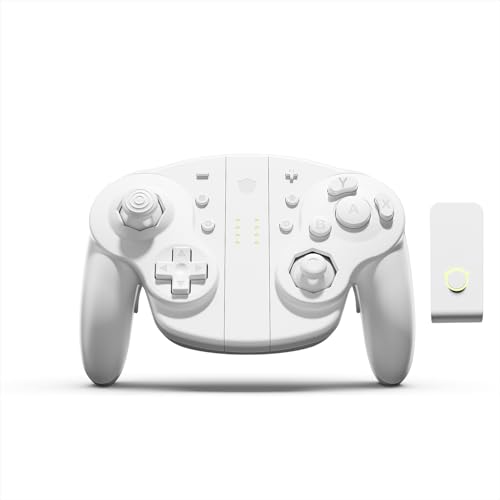
1. NYXI Wizard 2 Wireless Switch Controller
Our pick — 4.5+★ from 200+ verified ratings; the strongest balance of quality and price.
The only pad here that hands you both GameCube-style triggers and a modern shooter trigger, on one switch.
The thing that separates the Wizard 2 from every other pad on this page is its dual-mode trigger. A small switch toggles between Hall and Microswitch. Hall mode gives you the long, smooth squeeze of a classic GameCube trigger — the kind you want for throttle control in Mario Kart. Microswitch mode fires within 3 mm of travel with a 0.2 ms response time, so a tap registers before your brain finishes the thought in a shooter. You genuinely get two trigger personalities from one controller.
Under your thumbs sit TMR Hall effect joysticks — a magnetic sensor design that reads stick position without any physical contact, so the wear that causes drift is designed out. NYXI rates the micro mechanical A/B/X/Y switches for up to 5 million clicks, with the same 3 mm actuation and 0.2 ms response. You also get HD Rumble, a 6-Axis Gyroscope for motion control, NFC, and programmable buttons. Controller quality is what wins people over here by a wide margin, and functionality sits right behind it.
One catch you need to hear plainly: this pad is slide-in, not magnetic, and on Switch 2 it connects over Bluetooth only. Switch 2’s handheld mode, mouse mode, and wake-up function are not supported. Buyers report the build feels sturdy and weighty with clicky buttons and a good D-pad, though the concave left stick ships without a replacement and some found it caused missed inputs in Mario Kart Wii and Melee.
What earns the top spot
- TMR Hall effect sticks mean no drift from worn contacts
- Switchable Hall and Microswitch triggers cover racing and FPS in one pad
- Up to 5 million clicks rated on the A/B/X/Y micro switches
- Works with Switch, Wii and PC, backed by a 2 year manufacturer warranty
Where it asks you to adapt
- Switch 2 support is Bluetooth only — no handheld mode, mouse mode or wake-up
- The concave left stick has no replacement in the box
- Battery life is the one weak spot that keeps coming up
Reach for this if: you want one controller that handles Zelda, Mario Kart and a shooter without swapping pads.
Look elsewhere if: you play Switch 2 in handheld mode or rely on wake-up from sleep.
2. PowerA GameCube Style Wireless Controller (Toad)
The nostalgia play — a licensed GameCube shell that keeps the C-stick where your hand expects it.
If Smash is the reason you are shopping, start here. This is the only pad on the list officially licensed by Nintendo, and it keeps the classic GameCube shape while adding a larger D-pad and an extra left shoulder button. It runs Bluetooth 5.0, carries motion controls and system buttons so it works across the Switch library, and shows a player indicator plus a low battery warning LED.
It also carries the highest button count of the PowerA pair — 14 buttons against the 9 on the Jet Black model — which is why the Smash crowd gravitates to it. It is also slightly more compact at 5.43 x 4.06 x 2.64 inches versus 6.02 x 4.41 x 2.48 inches on the Jet Black, so it sits differently in the hand. A two-year limited warranty backs it.
What is not here is motion control on every unit, and one buyer found the buttons sticky enough to register wrong inputs on a pair of faulty units. That is a small slice of the picture rather than the pattern. The far more common experience is a pad that pairs fast, feels right in the hands, and keeps working — with some owners reporting nearly six years of heavy use. That longevity is the strongest argument for the licensed version.
The Smash case: the C-stick placement and the added left shoulder button are exactly what a competitive Smash player’s hands expect, and the Bluetooth link holds without lag.
The honest caveat: AA batteries mean a swap rather than a charge, and the occasional faulty unit slips through — worth a return window check.
Best fit for: Smash and Wind Waker players who want the throwback shell without giving up wireless freedom.
skip it if: you want rechargeable convenience built in and no battery swaps mid-session.
3. PowerA Wireless Controller — Jet Black
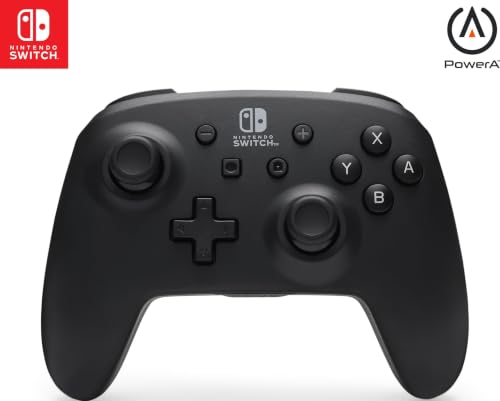
Forty hours on a fresh set of AAs — the pad that outlasts every other controller on this page.
Battery life is the headline spec here. It runs up to 40 hours on fresh alkaline AAs, the longest of any pad in this guide. You also get motion controls, a full-size D-pad and full shoulder set (L/R/ZL/ZR), with an LED indicator for player number and low battery. It is officially licensed and covers Switch, Switch OLED model and Switch Lite.
Compared with the Toad GameCube pad above, this one carries 9 buttons rather than 14 and is a touch wider at 6.02 x 4.41 x 2.48 inches. It also has a larger body with fewer dedicated GameCube flourishes — this is a modern gamepad, not a nostalgia piece. Quality is the thing that wins people over most, with connectivity close behind, and the design earns steady praise for looking good on a shelf.
The one honest limit: skipping HD rumble, IR Camera and Amiibo NFC. If you want those features, this is not the pad. Durability is also a split picture — some owners are still going strong after heavy daily play, others hit a faulty unit. Given how long it has been on sale, that pattern looks like a bad-luck lottery rather than a design flaw.
What the AA setup buys you: no charging dock, no cable, no waiting — swap in a fresh pair and keep playing. Rechargeable AAs work here too.
The trade you accept: no HD rumble, no IR camera and no Amiibo support, and the odd unit develops drift after a short run.
Pick this for: marathon sessions and households that already keep AAs on hand.
Pass if: Amiibo scanning or HD rumble is on your must-have list.
4. AceGamer 2 Pack Stinto Pro Wireless Controller
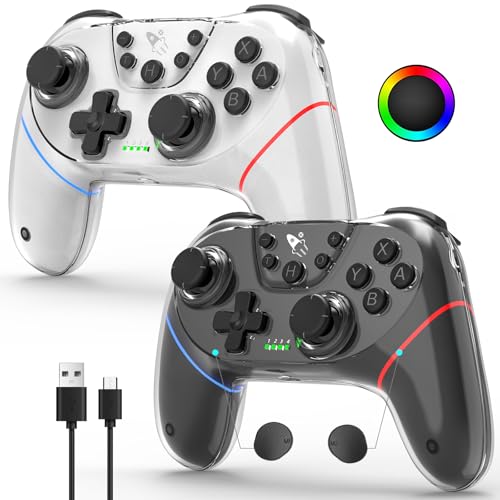
Two drift-free pads in one box, built for co-op nights rather than competitive Smash brackets.
Dual Hall Effect joysticks and Hall linear triggers at this tier is the headline — the same magnet-based design that resists drift, without paying premium money for it. You get two controllers, one charging cable and a manual. The M1/M2 back buttons can be programmed to macros, there is a 3-speed Turbo function, and a 4-way D-pad that blocks diagonal input for precise commands in fighting and classic games.
Small details go further than the size suggests. The vibration runs on four levels — 0%, 30%, 70% and 100% — so you can dial it from subtle to intense, and three dynamic LEDs light the grips. Battery life is rated at 10+ hours. These are compact controllers, and the pressed-in stick design cuts down on storage wear, which makes them easy to toss in a travel case.
Two things to know before you buy. There is no dongle receiver in the box, and these do not work with Xbox, PS4 or PS5. The bigger practical snag is Mario Party — the pairing works with Switch generally, but owners mention trouble specifically with Mario Party titles and the occasional odd connection. For Switch 2 owners, the one-touch wake-up works, but you need to connect via the included USB cable to the dock first so the console remembers the pad.
Why families grab this pair
- Dual Hall effect sticks and triggers on both controllers
- Two pads, one cable, one box — co-op ready right away
- 4-level vibration from 0% to 100% and RGB grip lighting
- Programmable back buttons and 3-speed Turbo for both players
Where it gets awkward
- No dongle receiver included, and no Xbox or PlayStation support
- Mario Party titles are the recurring trouble spot for pairing
- Only one charging cable for two controllers
Built for: two-player households and family nights where budget and drift resistance both matter.
Think twice if: Mario Party is your main game or you expect a dongle in the box.
5. Retro Fighters BattlerGC Wireless Controller
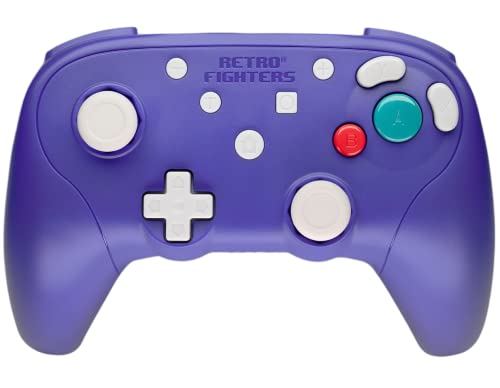
Built for the original hardware — plug the dongle into a GameCube and play from the couch.
This is the one for people who still have a GameCube under the TV. It uses RF — radio frequency, the same simple wireless approach as the old Wavebird — and comes with a Wavebird-style dongle so it plugs into the console without any driver fuss. It carries 12 buttons, weighs 340 g, and has dual Z buttons along with analog PS4-style triggers. Controller quality leads the way with buyers, with reliability right behind it, and the plastic has the familiar indigo look retro fans recognise.
Compatibility goes wider than the console. It works on PC and Switch too, with the Home button toggling between Xinput and Dinput. That makes it a real option if you split your time between original hardware and emulation.
The honest limit is gyro (motion sensing) — there is none, so if you want motion aiming, this is not the pad. Triggers are the other mixed note: they lack the second click that the classic GameCube trigger gives, and a small number of owners hit left stick drift early. That is a narrow slice rather than the rule, and most of what customers note depends on a controller that feels great in hand and connects instantly — the kind of plug-and-play you can hand to a friend.
Retro-fan angle: the Wavebird-style dongle and driverless setup on PC, Switch and GameCube is the whole point — no software, no pairing menu.
Be realistic about: no gyro, weak rumble and triggers that stop short of the classic click, plus a handful of early stick-drift reports.
Worth it for: GameCube owners who want to play from the couch without a cable across the floor.
Not for you if: motion controls or heavy rumble are part of how you play.
6. 8BitDo Ultimate 2 Bluetooth Controller

The pad you never think about charging — lift it off the dock and it reconnects itself.
Nobody else on this list ships with an integrated charging dock that auto-reconnects when you pick the controller back up. That small convenience changes how you play: the pad is always charged and always ready, so there is no battery health to manage between sessions. Add TMR joysticks with wear-resistant rings and an RGB Fire Ring, and it looks as good as it behaves.
The trigger switch is the second clever bit. You can flip between linear Hall effect triggers — the smooth analog squeeze for racing — and non-linear tactile triggers that click for shooters. There is also Turbo, motion control and vibration for Switch, plus support for 8BitDo Ultimate Software V2 for remapping and profiles. One thing to be straight about: Switch 2 compatibility requires both the controller and the adapter to be on the latest firmware, so update before you judge it.
A used-to-be-Pro-2 owner switching to this would not feel a downgrade — most buyers reading the pages describe it as an alternative to, or better than, the official thing. The catch is the shape. Some hands find the vertical profile cramps the palm, and the thumbsticks need decent tension. On the surface, though, connectivity holds steady with no disconnects or pairing trouble, and there is no stick drift after months of play.
Why it earns the premium slot: a dock that keeps the pad charged and reconnects on pickup, plus TMR sticks and switchable Hall or tactile triggers — it is the most turnkey pad here.
For hands that disagree: the vertical shell is a fit question, not a defect — some palms cramp, and looser sticks need a firmer thumb.
The right buy for: players who want set-and-forget charging and a premium feel across Switch and Windows.
Hold off if: you have large hands and prefer the wider, flatter GameCube shell.
7. FLYDIGI Vader 5 Pro PC Controller

The overkill option — forty grams of stick tension adjustment and enough buttons to map a full loadout.
FORCEFLEX is the feature that makes this pad different. You can physically dial the stick tension anywhere from 40gf to 100gf — grams of force, which is how stiff the stick pushes back against your thumb. Lighter tension means quicker camera whips in an FPS; heavier tension means finer steering and aiming in racing and sports games. There is nothing else on this list where you can tune that by hand.
The rest is built for people who count frames. A 216MHz main control chip and Flydigi’s precision-tuned algorithm deliver 3 ms latency wired and 4 ms wireless. Its Hall effect sticks are rated for a million cycles with zero drift, and the FORCESWITCH triggers switch between Micro Mode for shooters and Hall Effect Linear Mode for throttle and braking. You get 20 buttons, including C+Z customizable inputs, 2 mini shoulder buttons and 4 detachable rear buttons. Four-motor vibration spreads feedback across both triggers and the grips.
The reality check: this is a PC-first pad with Switch support, and it does not work with Xbox or PlayStation. Flydigi’s software is functional but clunky — single-key-only binds, controller-only macros, and the occasional error pop-up. It is heavier than most controllers too. Buyers who do love it point to the button placement and tactile feel most, and the controller quality sits at the top of what they mention.
Why the tinkerers love it
- FORCEFLEX sticks adjust from 40gf to 100gf of tension by hand
- 3 ms wired and 4 ms wireless joystick latency from a 216MHz chip
- 20 buttons with 4 detachable rear paddles and 2 mini shoulder buttons
- 4-motor vibration across triggers and grips, plus a 1000mAh battery
What will slow you down
- PC and Switch only — no Xbox or PlayStation support
- Software is functional but clunky, with occasional error pop-ups
- Heavier than most pads, and the dock is sold separately
Made for: competitive PC and Switch players who want to tune their own stick feel and map a full loadout.
Wrong pick if: you want a lightweight pad you can hand to a kid without a tutorial.
Know the Specs
Hall Effect and TMR Sticks
An ordinary analog stick uses a physical wiper that rubs a carbon pad, and that contact wears into a groove that becomes drift. A Hall effect stick reads position with a magnetic field instead, so nothing wears out the same way. TMR — tunnel magnetoresistive — is a related magnetic sensor design that 8BitDo and NYXI both use. In plain terms, the magnetic approach is why these pads are sold as drift-resistant, and it is the single spec most worth checking before you buy.
Trigger Modes and Actuation
Trigger actuation is how far the trigger travels before it registers a press. A microswitch or tactile trigger fires in a few millimetres — the Wizard 2 quotes 3 mm and 0.2 ms — so it feels instant in a shooter. A Hall or linear trigger gives you a long smooth squeeze for throttle and braking in a racing game. Pads that let you switch between the two give you the best of both, which matters most if your library is mixed.
Connection and Latency
Latency is the delay between your input and what happens on screen, measured in milliseconds. Bluetooth is the easiest wireless standard and works without a dongle, but is not always the quickest. A 2.4G dongle usually responds faster, and a wired USB connection is the most stable of the three. The Vader 5 Pro quotes 3 ms wired and 4 ms wireless from its 216MHz chip — the tightest figures in this guide. Most players will not feel the difference; competitive players will.
Battery and Power
Two power paths dominate here: AA batteries and built-in rechargeables. AA power is convenient when a set runs down — swap and go — and the Jet Black PowerA pad stretches to 40 hours on fresh alkaline AAs. Rechargeable pads like the AceGamer pair or the Vader 5 Pro (1000mAh battery) need a cable or dock, but you never hunt for batteries. For a household that already keeps AAs on hand, AA power saves a lot of small hassles.
Common Questions
Will a wireless GameCube controller work on the Switch 2?
What is stick drift and why do Hall effect sticks prevent it?
Do these controllers have the original GameCube trigger click?
Can I use a wireless GameCube controller for Smash Ultimate?
How long does the battery last on a wireless GameCube controller?
Is the PowerA GameCube pad better than the official Nintendo Switch Online version?
Can I use these on PC as well as Switch?
Does the AceGamer pair include a dongle receiver?
Does the 8BitDo Ultimate 2 need firmware updates for Switch 2?
The Bottom Line
For most buyers, the wireless gamecube controller to reach for is the NYXI Wizard 2, because it hands you switchable GameCube and shooter triggers on one pad with TMR sticks that resist drift. If authentic Smash feel is what you are after, the PowerA GameCube Style Toad pad keeps the C-stick where your hands expect it and is officially licensed. And for a co-op household that wants two drift-free pads in one box, the AceGamer Stinto Pro pair is the one to grab. My nudge: whichever you pick, buy on the rating and the Hall or TMR stick spec — those two together are the honest sign you are buying a pad that will still feel right in a year.
How we choose
We do not accept paid placement. Every pick is matched to a real buyer and a real use-case; we do not hands-on test units.
Sources
Specifications: manufacturer listings and product documentation. Review insights: verified customer reviews, as of October 2026. Pricing: not shown on this page (it changes often); check the current price via the retailer link.
As an Amazon Associate, Aappliancez earns from qualifying purchases. This does not affect which products we feature.