Disclosure: Some links in this post are affiliate links. As an Amazon Associate I earn from qualifying purchases, at no extra cost to you. Learn more
Specs are compiled from manufacturer listings and verified buyer reviews and can change over time — please confirm the key details on the product page before buying.
If your gaming PC still stutters on a 1Gb line, the fix is usually the antenna, not your internet plan. A proper WiFi antenna for PC gaming pulls a cleaner signal from the router, which means lower ping in matches and downloads that stop crawling. The short answer: an Intel-based PCIe card is the fastest route for a desktop that sits near open space, and a USB adapter with external antennas is the smarter move when your tower is boxed in or you cannot open the case.
This guide is built by comparing the manufacturers’ published specifications and the patterns across verified customer reviews, so you get each pick’s real strengths and trade-offs instead of marketing spin.
Some cards here need Windows 11 before they will touch the 6GHz band, and one needs a free USB 2.0 header just for Bluetooth. Sort those two details out first and the rest gets easy, which is the whole point of this breakdown of the best WiFi Antenna for PC Gaming.
Top Picks


How To Choose The Best WiFi Antenna for PC Gaming
The mistake most people make is buying the biggest speed number on the box. Your antenna can only pull what your router sends, and it can only work on a band your motherboard and Windows version allow. Get those three things lined up and a mid-range card will beat a premium one on a mismatched setup.
Band support: the gate almost everyone trips over
The 6GHz band is where WiFi 6E and WiFi 7 cards get their cleanest channels. To use it you need a router broadcasting on 6GHz, and in most cases Windows 11. A card that needs a 320MHz channel has nowhere to go on a WiFi 5 router, so your speed gain flattens out fast.
If your router is still WiFi 5 or 6, a card with beamforming and adjustable external antennas will do more for your ping than a faster chip wearing short stub antennas.
PCIe card or USB adapter
A PCIe card slots into the motherboard and gives you a direct line with less interference from other USB traffic. It is the better pick for a tower you can open. A USB adapter with a cable lets you lift the antennas up and out of a crowded desk or a metal shelf, which often beats a card crammed against a wall.
One practical snag with many USB adapters: they need a powered USB 3.0 port to run at full tilt. Plugging into a front-panel port can throttle them, so plan on the rear ports.
Antenna placement beats antenna count
Two antennas on a magnetic base that you can sit on top of the desk will usually outperform four antennas hidden behind a monitor. Look for adjustable or movable antennas and a cable long enough to reach open air. Line of sight to the router does more for latency than any spec sheet claim.
Side-by-Side Comparison
| Model | Best For | Max Speed | Interface | Windows 11 Required | Amazon |
|---|---|---|---|---|---|
| WiFi 6E AX210 PCIe Card★ Best Overall | Best overall for desktop gaming | 5400 Mbps | PCIe | Windows 10/11 | Amazon |
| TP-Link Archer TX20U PlusBest Range Value | Big-room reception on a budget | 1800 Mbps | USB 3.0 | Windows 10/11 | Amazon |
| MSI Herald-BE WiFi 7 MAX | AMD builds that want WiFi 7 | 5.8 Gbps | PCIe | Windows 11 | Amazon |
| NETGEAR Nighthawk A7500 | Plug-in upgrade for a locked-down PC | 1.8 Gbps | USB 3.0 | Windows 10/11 | Amazon |
| BrosTrend BE6500 | Portable 6GHz range on a laptop | 6500 Mbps | USB 3.0 | Windows 11 for 6GHz | Amazon |
| WAVLINK BE6500 | Four-antenna Wi-Fi 7 desk setup | 6452 Mbps | USB 3.0 | Windows 11 for 6GHz | Amazon |
| TP-Link Archer TBE550E | Top-tier Wi-Fi 7 PCIe gaming | 9300 Mbps | PCIe | Windows 11 only | Amazon |
Detailed Reviews
1. WiFi 6E AX210 PCIe WiFi Card with Bluetooth 5.3
Our pick — 4.5+★ from 850+ verified ratings; the strongest balance of quality and price.
A PCIe card that swaps a stuttering tower’s WiFi for steady 6GHz gaming.
You get the 6GHz band on a card that slides into a PCIe slot — the fast, uncrowded lane your WiFi 5 motherboard never had. Its ceiling rides at 5400 Mbps of combined throughput, and the AX210 chipset spreads that across 6GHz, 5GHz and 2.4GHz. For a desktop on a WiFi 6E router, that is the difference between fighting for airtime and having a lane to yourself.
Bluetooth 5.3 rides along on the same card, which means your headset and controller stop competing for a USB dongle. A low-profile bracket is in the box, so it fits slim cases too. What wins people over most is the build-and-install side of the experience — the card itself feels solid in the slot and the setup steps are short. The plain-English version: plug it in, grab the Intel driver, and your wireless stutter tends to disappear in games like Helldivers or during long calls.
Speeds move in real terms as well. Buyers report “WiFi stable, rose ~250 to ~420 Mb/s with Eero 6+ repeater on 1Gb service” — meaning the card picked up range a plain stick adapter never could. At 110 g it is compact enough to slot in without crowding the board.
What pulls you in
- True 6GHz tri-band with 5400 Mbps ceiling
- Bluetooth 5.3 on the same card, no extra dongle
- Low-profile bracket included for slim builds
- Frees up USB ports you were using for WiFi
Where it asks for patience
- Driver lives on a disc, so no optical drive means searching Intel’s site
- Bluetooth needs a spare motherboard USB header
- The bundled antennas feel light in the hand
Reach for this if: you can open your case and run a WiFi 6E router — this is the smoothest path to low-latency gaming on a desktop.
Look elsewhere if: your board has no free USB header and you need Bluetooth working on day one.
2. TP-Link USB WiFi 6 Adapter (Archer TX20U Plus)
Two adjustable antennas you can point at the router from across the room.
For a gaming PC jammed behind a monitor stand or on the far side of the house, this adapter’s party piece is reach. The twin high-gain antennas angle independently and beamform toward the router, so reception gets better without moving the tower. Its AX1800 rating spreads across 1201 Mbps on 5GHz and 574 Mbps on 2.4GHz. In raw capacity it trails the AX210 card up top (1800 Mbps versus 5400 Mbps), but it reaches places a PCIe card cannot.
The 1-meter USB 3.0 cable is the underrated bit. You can run the antennas up onto a shelf or out from behind a metal desk, which is often where the stutter actually comes from. MU-MIMO and OFDMA help on a busy network, and WPA3 rounds out the security. Recognize, though, that this is a Windows 11/10-only device — nothing for Linux or Mac.
What the review pages show: many buyers see a jump, going from a slow crawl to a usable stream once the antennas are positioned. The recurring gripe is reliability — a subset of units randomly disconnect or need a driver reinstall, and the coiled cable weight can tip the base. Size it honestly: plenty of people run these for years, but it wants a stable, powered USB 3.0 port to behave.
The honest read: a range-first adapter for a room where drilling a cable run is not an option, and the WPA3 plus dual antennas genuinely earn their keep.
Plan for this: set it up on a rear USB 3.0 port with the base on a secure shelf — the cable is heavier than the stand wants.
Best fit for: a built-in-WiFi-less desktop or laptop sitting far from the router.
Think twice if: you need a guaranteed drop-free link every single day — the disconnection chance is real, if a minority.
3. MSI Herald-BE WiFi 7 MAX PCIe Card

A Qualcomm-based WiFi 7 card built to play nice with Ryzen boards.
Here is the pick for the AMD builder who wants WiFi 7 without the Intel-driver headache. It runs a Qualcomm WiFi 7 module rated to 5.8 Gbps, with 320MHz channels on 6GHz and Bluetooth 5.4. The Max version ships with a metal shield some owners believe tempers interference — a small thing, but a fair extra on a card aimed at older boards.
Owners upgrading from legacy WiFi report dramatic jumps, going from a few hundred Mbps to around 1200 Mbps on a 1G plan over a WiFi 7 router. One buyer put it plainly: “Works amazing boosted my speeds from my B450 motherboard WIFI from 300mbps to about 1200 mbps.” It responds well even when the slot caps it below spec.
The catch is software age, and the maker states it outright: this card is Windows 11 only. On Windows 10 the WiFi half simply will not engage, even though Bluetooth may. Bluetooth also needs a usable motherboard USB header — one buyer on an ASUS Prime X570-P ran square into an unwired header and could not get it to connect. If your board is modern and you are on Windows 11, this is the safest way into WiFi 7 on AMD.
Why AMD owners gravitate here
- Qualcomm module sidesteps Intel-on-AMD quirks
- 5.8 Gbps with 320MHz channels on 6GHz
- Bluetooth 5.4 and WPA3-ready WiFi 7
- Rock-solid on B450-class chipsets
The fine print
- WiFi 7 half demands Windows 11
- Bluetooth depends on a properly wired header
- Drivers come on disc; grab them from MSI’s site
Who it suits: a Ryzen build on Windows 11 that wants a real WiFi 7 future without paying premium-tier money.
Who should pass: anyone locked to Windows 10, since the fast half of this card stays dormant.
4. NETGEAR Nighthawk WiFi 6 USB 3.0 Adapter (A7500)

A USB stick that gets a WiFi-starved older PC online in minutes.
Nobody wants to open a prebuilt. This thumb-drive-shaped adapter slots into a USB 3.0 port, and its flexible antenna finds the strongest signal so you can leave the case sealed. It packs AX1800 WiFi 6 rated up to 1.8 Gbps, and it works with any WiFi 6 or WiFi 5 router or mesh system — so no matching-brand purchase is needed.
Its flash-drive format is a real split personality. That compact build makes it easy to pack, but the same shape can sit flush against your neighbor’s USB port and block it. It is also heavier than the TP-Link dongle, at 3.84 ounces, so it hangs out of the port with a bit more pull. Setup is genuinely simple; the maker notes a Windows 10 or 11 machine is required, and buyers with dead onboard WiFi report this got them back online fast.
The core function is what everyone raves about — it just works as a WiFi replacement. It does stop short of the 6GHz band, though, so it supports 2.4, 5 and 6 but not 6E. If your router is a WiFi 6E or WiFi 7 unit, that ceiling is not the card’s fault; it is simply the standard it speaks.
Real life with it: an older tower or laptop goes from unusable to usable with the included setup thumb drive, no internet needed to start.
Know before you click: it will not see a 6E network, and the wide body may crowd the USB port next to it.
Pick this when: a sealed case or dead onboard chip means the easiest fix is a plug-and-play stick.
Skip it when: your router already broadcasts on 6GHz and you want that lane.
5. BrosTrend BE6500 USB WiFi 7 Adapter

A 28.5 g WiFi 7 adapter that pulls in distant 6GHz networks.
This is the travel case for a gamer who moves between setups. The BE6500 rates up to 6.5 Gbps split as 2882 Mbps on 6GHz, 2882 Mbps on 5GHz and 688 Mbps on 2.4GHz. Dual external antennas with beamforming aim your signal at the router, and at just 28.5 g it slips into a bag without a second thought. Four separate high-gain antennas on a desktop base beat it on raw coverage, but nothing in this list is easier to carry.
Owners mention it logs extra access points in crowded areas — one noted it picked up seven more networks than a built-in receiver. Full-speed downloads, easy install, and stable 6GHz even at distance show up repeatedly. Note it does not support MLO (Multi-Link Operation, which lets a card talk on two bands at once), so you are getting WiFi 7 speeds without that specific trick.
Setup is the honest friction point. The driver is pre-loaded but the install is not always the plug-and-play the box implies, and a minority of units have arrived faulty. On the flip side, one bent unit was reported to bend back and keep working. Fine for a patient tinkerer, slightly rougher for a first-timer.
The standout trait: 6GHz reception at a laptop-friendly 28.5 g makes it the one to throw in a backpack before a LAN night.
One caveat worth knowing: no macOS or Linux support, and the 6GHz band needs Windows 11 to open up.
Good for: laptop gamers and anyone who wants stronger 6GHz range without a permanent slot taken inside the case.
Less ideal if: you expect true no-driver plug-and-play or run Linux.
6. WAVLINK BE6500 USB WiFi 7 Adapter
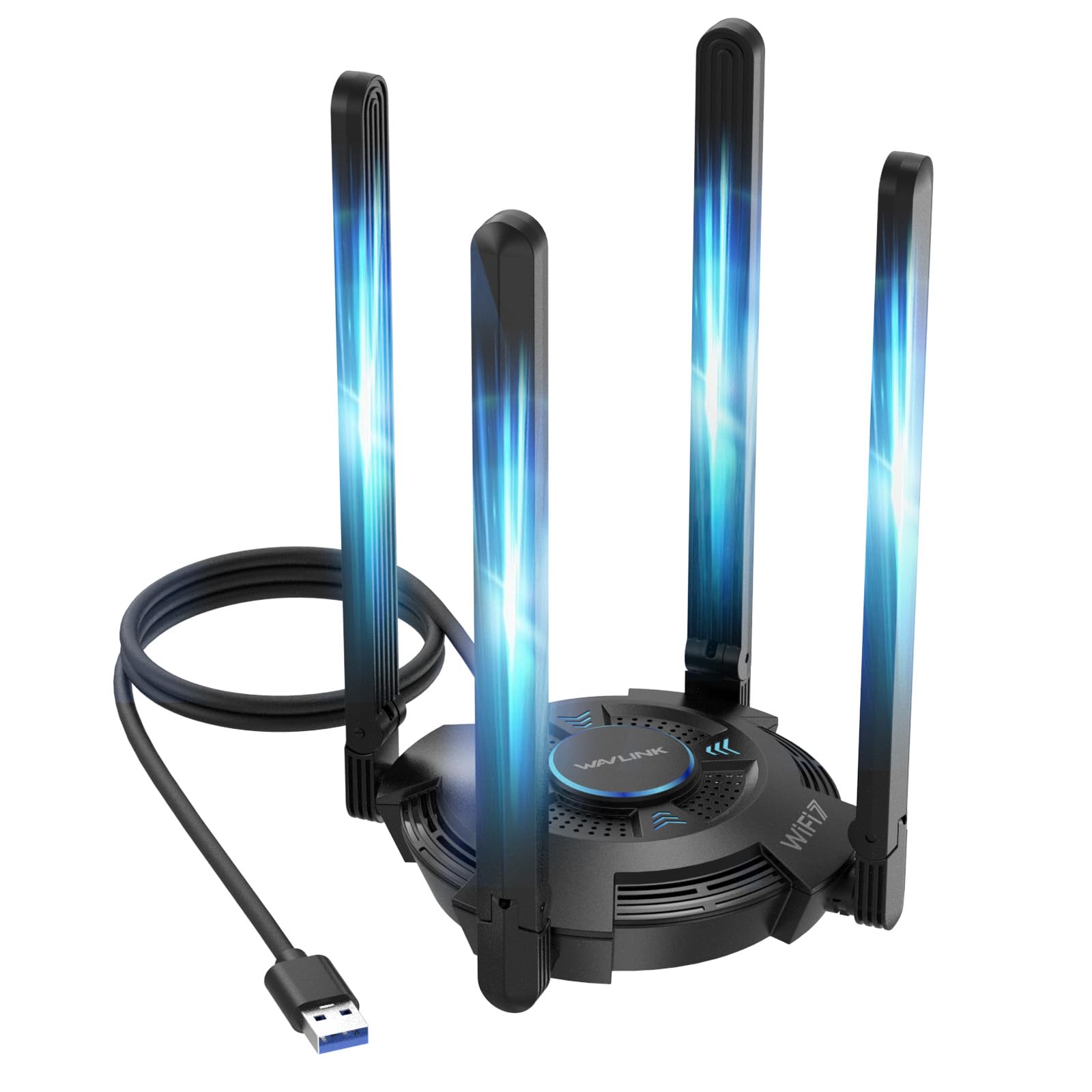
Four foldable 5dBi antennas and a status LED for a fixed desktop setup.
Four high-gain 5dBi antennas is the visual headline here, and the foldable design means you can angle them out for coverage or tuck them flat for storage. Rated up to 6452 Mbps across tri-band, with 2882 Mbps on each of the 5GHz and 6GHz lanes and 688 Mbps on 2.4GHz. Compared to the BrosTrend above, it trades carry weight for antenna count and a built-in driver across Windows 10 and 11.
Connectivity is the part everyone praises — it stays linked and pulls a strong signal. A multicolor LED shows network status and doubles as desktop flair, and a built-in driver auto-installs in most cases. Hotspot Mode is a neat extra: flip it and share the PC’s connection to phones and tablets. It does need a free USB 3.0 port and reads best with a WiFi 7 router; on a WiFi 6 router its full speed stays locked away.
Two things worth flagging. The folded ventilation body is 550 g, so it wants a stable spot. And on older boards it can be hungry for USB power and bus bandwidth — some setups needed a rear port and a couple of retries before it ran clean. Fresh Windows 11 builds usually see drivers arrive automatically.
Strong points
- Four adjustable 5dBi antennas for a wide signal spread
- Built-in driver for Windows 10 and 11
- Hotspot Mode shares your PC connection wirelessly
- Multicolor LED shows network status at a glance
Things to decide on
- Needs a powered USB 3.0 port on older boards
- Full speed waits on a WiFi 7 router
- At 550 g it is a stay-put device, not a travel one
The right match: a desktop that lives in one spot and wants maximum antenna spread plus hotspot flexibility.
Not the one for: a laptop bag or an older motherboard short on USB power.
7. TP-Link Archer TBE550E WiFi 7 PCIe Card

The fastest card here at 9300 Mbps, with a magnetic antenna base you can place anywhere.
If your PC is the bottleneck and your router already speaks WiFi 7, this is the ceiling of the list. It tops out at 9300 Mbps across tri-band, with 5760 Mbps on 6GHz, 2880 Mbps on 5GHz and 688 Mbps on 2.4GHz. That bandwidth headroom sits well above the 5400 Mbps AX210 card up top — meaningful if you are chasing local network throughput, wasted if your router caps below it.
The magnetic antenna base is the practical win. A 1-meter braided RF cable lets you set the antennas on top of the desk or the windowsill where the signal actually lives, and a multicolor LED on the base shows status. MLO, OFDMA, MU-MIMO and 4K-QAM all work together to cut lag on a busy network. Bluetooth 5.4 rounds it out for your headset.
Two limits define the buyer. First, it runs only on Windows 11 — the 6GHz and driver stack simply do not come alive on Windows 10. Second, Bluetooth needs an open USB 2.0 motherboard header, and the included cable is on the short side. Competitive players report far lower latency than their old USB dongles once the driver is installed. If your rig is modern and your router matches, this is the endgame card.
The payoff: wired-feel stability and lower ping than the 5400 Mbps AX210, with 9300 Mbps of headroom.
The trade-off: Windows 11 only, plus a desk footprint for the magnetic base and a free USB header for Bluetooth.
Best for: an all-in modern build on Windows 11 with a WiFi 7 router and a desk with room for the antenna base.
Not worth it if: your router caps at WiFi 6 or below — the headroom stays unused.
Know the Specs
Max data transfer rate (Mbps and Gbps)
This is the top combined speed the card can move across all its bands at once — think of the fat size of the pipe, not the speed of the water. A 5400 Mbps card and a 9300 Mbps card can both feel identical on a 500 Mbps plan, because your router’s ceiling sets the real limit. Use the number to compare cards to each other, not to predict your actual game speed.
Tri-band and the 6GHz lane
Tri-band means the card can talk on 2.4GHz, 5GHz and 6GHz. The 6GHz band is the new, wide, less-crowded highway — but it needs a router that broadcasts it, and usually Windows 11. On a WiFi 5 or 6 router, a card with a great 6GHz rating simply holds that feature in reserve until you upgrade the router.
MU-MIMO and OFDMA
These let one router serve several devices at once instead of taking turns. In a house with phones, tablets and a console all pulling bandwidth, that is what keeps your game ping steady while someone else streams. They matter most on a busy network, less in a solo apartment.
Bluetooth 5.3 and 5.4
Both are radio versions for wireless accessories like controllers and headsets; the higher number is the newer edition. The practical difference is tighter, faster pairing and lower audio lag. On PCIe cards, Bluetooth needs a small cable to a free USB header on the motherboard — check the board before you buy.
PCIe card versus USB adapter
A PCIe card fits a slot inside the case and gives a stable internal connection. A USB adapter plugs into a port and is easier to fit in a locked-down or older machine. USB adapters want a powered USB 3.0 port; front-panel ports often throttle them.
WPA3 security
The newest of the WiFi password standards. It replaces the older WPA2 and is built to keep a hacked password from exposing everything on the network. Any modern router has it; the card simply has to be WPA3-ready to join those networks.
Common Questions
Does a WiFi antenna card actually reduce ping for gaming?
Will a WiFi 7 card work with my WiFi 6 router?
Do I need Windows 11 for the 6GHz band?
Do PCIe WiFi cards need a USB header for Bluetooth?
Is a USB WiFi adapter worse than a PCIe card for gaming?
How many antennas do I actually need?
Can I use a WiFi adapter and ethernet at the same time?
Why does my new adapter show lower speeds than advertised?
Will a WiFi card interfere with my wireless mouse or headset?
Does the antenna need a clear line of sight to the router?
The Bottom Line
For most gamers, the wifi antenna for pc gaming winner is the WiFi 6E AX210 PCIe Card because it pairs 6GHz channels, Bluetooth 5.3 and a 5400 Mbps ceiling with a straightforward slot install. If you want the ultimate headroom and run a WiFi 7 router with Windows 11, the TP-Link Archer TBE550E at 9300 Mbps is the endgame card. And for a sealed case or a laptop that cannot take a card, the TP-Link Archer TX20U Plus with its adjustable antennas is the practical reach. The AX210 is the crowd favourite, backed by a large pool of satisfied owners. Decide your router band and your Windows version first, and every pick above becomes simple.
How we choose
We do not accept paid placement. Every pick is matched to a real buyer and a real use-case; we do not hands-on test units.
Sources
Specifications: manufacturer listings and product documentation. Review insights: verified customer reviews, as of October 2026. Pricing: not shown on this page (it changes often); check the current price via the retailer link.
As an Amazon Associate, Aappliancez earns from qualifying purchases. This does not affect which products we feature.