Disclosure: Some links in this post are affiliate links. As an Amazon Associate I earn from qualifying purchases, at no extra cost to you. Learn more
Specs are compiled from manufacturer listings and verified buyer reviews and can change over time — please confirm the key details on the product page before buying.
The device you pick for Xbox Remote Play has one job, and it is not raw horsepower: it has to hold a clean, low-lag video stream from your console and make the controller in your hands feel like it is wired straight into the box. Get that wrong and you get the classic stutter-and-drift experience — the kind that ruins a Halo firefight. Get it right and you can finish the campaign you started at home from the couch, a hotel room, or a plane seat.
This guide is built by comparing the manufacturers’ published specifications and the patterns across verified customer reviews, so you get each pick’s real strengths and trade-offs instead of marketing spin.
You will see what actually determines stream quality — the screen refresh rate, the Wi-Fi chip inside, and the controller behind the glass — plus which units double as a full handheld PC. Every pick below is judged on how well it serves the Xbox cloud and remote streaming job, and here is the rundown of the best Xbox Remote Play Device for your setup.
Top Picks

How To Choose The Best Xbox Remote Play Device
For remote play, your bottleneck is almost never the device’s processor — it is the stream. The console does the rendering; the handheld does the decoding and the screen. That flips the usual spec priorities upside down.
Refresh rate beats raw power for streaming
A 120Hz panel (120 screen redraws per second) makes a 60fps stream land evenly, so panning the camera across a map stays smooth instead of juddering. A 90Hz screen splits a 60fps feed less cleanly. If you mostly stream from your own Xbox over your home network, buy for the screen and the Wi-Fi chip, not the GPU.
The Wi-Fi module is your real lifeline
Wi-Fi 6E (the 6GHz band, which is less crowded than the usual 2.4GHz and 5GHz channels) keeps input lag low when neighbours are hammering their own routers. MU-MIMO (multiple antennas talking to your router at once) helps too. A device with a weak radio 10 feet from the router will stutter no matter how good its chip is.
Battery in watt-hours, not marketing words
Watt-hours (Whr) tell you the actual energy tank. A 60Whr pack in a Windows handheld realistically gives you a couple of hours of heavy gaming, while a streaming-only Android device on a 6,000 mAh battery can push far longer because decoding a video feed draws much less power than rendering a game. Match the battery to how long you actually play away from a wall outlet.
Side-by-Side Comparison
| Model | Best For | Screen | Refresh Rate | Battery / Weight | Amazon |
|---|---|---|---|---|---|
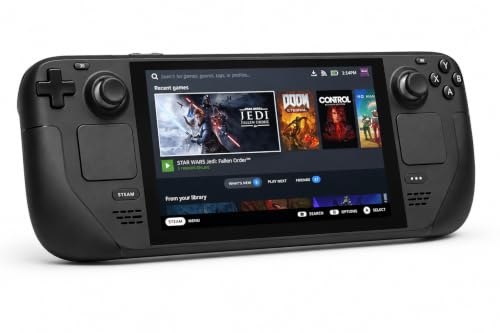
| Valve Steam Deck OLED 1TB★ Best Overall | Streaming with a huge local library | 7.4″ 1280 x 800 HDR OLED | Up to 90Hz | 50Whr / 3.7 lb | Amazon |
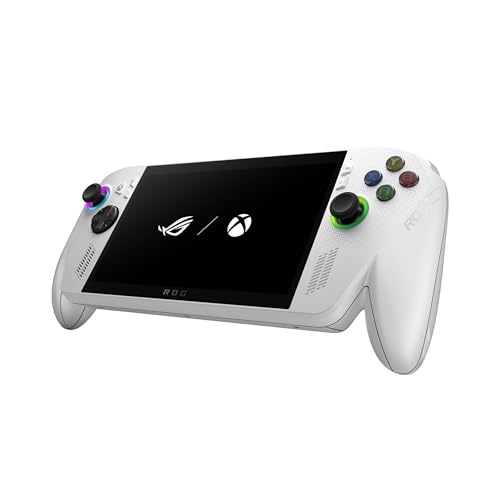
| ASUS ROG Xbox Ally (3-month Game Pass)Top Performer | Xbox-native handheld streaming | 7″ 1080p touchscreen | 120Hz | 60Whr / 1.47 lb | Amazon |
| Lenovo Legion Go SBig Screen Pick | Big-screen Windows handheld PC | 8″ 1080p IPS | 120Hz | 55.5Whr / 1.6 lb | Amazon |
| ASUS ROG Xbox Ally (512GB) | Windows handheld, Xbox-tuned | 7″ 1080p IPS touch | 120Hz | 60Whr / 2 lb | Amazon |
| BACKBONE Pro | Phone-based remote play, wireless freedom | Your phone’s screen | Your phone’s refresh | 40 hrs (BLE) / 0.49 kg | Amazon |
| OnePro Cloud Handheld (abxylute) | Cheapest dedicated cloud handheld | 7″ 1080p touchscreen | Not listed | 8+ hrs / 430g | Amazon |
| BACKBONE One (Xbox Edition) | Low-latency phone streaming | Your phone’s screen | Your phone’s refresh | USB-C powered / 10.56 oz | Amazon |
| Logitech G Cloud Bundle | Streaming-ready with a case included | 7″ 1080p touchscreen | 60fps stream target | 6,000 mAh / — | Amazon |
| Logitech G Cloud (standalone) | Budget cloud-only handheld | 7″ 1080p touchscreen | 60fps stream target | 64GB storage / 463g | Amazon |
Detailed Reviews
1. Valve Steam Deck OLED 1TB Handheld Gaming Console
Our pick — 4.5+★ from 600+ verified ratings; the strongest balance of quality and price.
Seven and a half inches of HDR OLED that makes a compressed stream look almost local.
Start with the panel, because for Remote Play it is the whole show. This one carries a 7.4-inch 1280 x 800 HDR OLED screen (OLED means each pixel lights itself, so blacks go truly black) behind anti-glare etched glass, running at up to 90Hz. In plain terms: a dark corridor in your streamed game reads as deep shadow rather than grey mush, and the etching kills window glare so you can actually play near a window. The 1TB NVMe SSD (NVMe is a fast storage type) means you can keep a big local library for the times you are offline — streaming is only half of what this box does.
Where it quietly wins is endurance and library. Battery is rated 3 to 12 hours depending on the content, and the 50Whr pack pairs with a Wi-Fi 6E radio for the 6GHz band that keeps interference low. Against the ROG Xbox Ally it trails on two numbers — the Ally runs a 120Hz panel versus this Deck OLED’s 90Hz, and a 60Whr battery versus 50Whr — but that OLED contrast is a real advantage the LCD units cannot match. What wins people over most is build quality: the reviews are packed with owners calling the hardware premium, and the consensus is that setup is easy and the value is real. As owners put it: “I love this deck. Much nicer and easier controls than my previous Switch.”
Why it takes the top spot
- 7.4″ HDR OLED with anti-glare etched glass gives deep blacks and vivid colour for streamed games
- 1TB NVMe storage plus microSD keeps a huge offline library on board
- Wi-Fi 6E connectivity for a less-congested 6GHz band
- 3-12 hours of battery, content-dependent, on a 50Whr pack
Where it falls short
- 90Hz panel is beaten on refresh by the 120Hz ROG Xbox Ally
- At 3.7 pounds it is noticeably heavier in the hands than a phone-clip controller
- Streaming an Xbox console needs a third-party app, since this is not an Xbox-native device
Best for: the player who wants one device that streams their Xbox remotely and also plays a full local Steam library without a phone in the mix.
Think twice if: a pure, light, Xbox-first handheld is your whole goal — this is a heavier, deck-shaped machine with its own ecosystem.
2. ASUS ROG Xbox Ally White
The handheld that boots straight into Xbox, wired for the smoothest frame pacing on this list.
If your whole goal is Remote Play and you want the Xbox experience without bolting a controller to your phone, this is the one built for it. It boots right into the Xbox experience like a console, and the Xbox Game Bar pops up with a tap of the Xbox button. Under the glass sits a 7-inch 1080p panel at 120Hz with FreeSync Premium (variable refresh rate, which syncs the screen to the incoming frame to kill tearing). It hits 500 nits of brightness — bright enough to read a streamed game in a lamp-lit room — and the touchscreen is Gorilla Glass.
Power and endurance are where it steps ahead. The AMD Ryzen Z2 A processor plus 16GB of LPDDR5 RAM at 6400MHz and a 512GB SSD keep the interface snappy and the stream decoding clean. That 120Hz screen is the headline for streaming, and it outruns the Steam Deck OLED’s 90Hz panel. The 60Whr battery also beats the Deck OLED’s 50Whr, and fast charging takes the 60Whr pack from 0% to 50% in 30 minutes — so a quick plug-in over lunch resets a whole evening. It weighs 1.47 pounds with grips styled after the Xbox Wireless Controller. The extra copy here differs: this bundle throws in 3 months of Xbox Game Pass Premium, which owners said makes the value obvious. The performance is what earns the praise — smooth visuals, sharp 1080p, and long sessions that stay comfortable.
The catch is honest: this runs Windows 11, so it is a PC, not a locked-down console. Games and apps from Steam, Epic and Xbox PC stores all work, but it asks for a bit of PC knowledge now and then. Comfort holds up over hours, and the responsive sticks and shoulder buttons get called out. The recurring caveat is that the Y button and D-pad sit awkwardly for smaller hands, and the occasional frame drop shows up in very busy fights.
Built for the couch: dual USB Type-C ports let you charge and output to a TV at the same time, so it doubles as a docked console when you connect a controller.
The honest trade: with two USB-C ports, plenty of connectivity (Wi-Fi, Bluetooth 5.2, USB, AUX), and a 3-month Game Pass Premium kickstart, this is best for someone who is fine tinkering inside Windows to get the most out of it.
Reach for this if: you want an Xbox-branded handheld that streams smoothly and can still run your PC games natively from Game Pass, Steam or Epic.
Look elsewhere if: you want zero PC fiddling — this is Windows 11 under the hood, not a sealed console.
3. Lenovo Legion Go S Glacier White
An 8-inch screen you can actually read — the biggest panel in this lineup for remote play comfort.
When you are streaming from your living-room Xbox to a device across the house, screen size is the daily difference between squinting and relaxing. This one carries an 8-inch Lenovo PureSight IPS display at 120Hz (IPS means wide viewing angles and steady colour), with 500 nits of brightness and 100% sRGB colour accuracy so streamed games stay punchy, not washed out. It also supports 10-point touch, and that larger panel is the reason this pick earns its spot — the Steam Deck OLED is 7.4 inches and the ROG Ally is 7 inches, so this is the roomiest view of the three.
Inside, an AMD Ryzen Z2 Go chip and AMD Radeon graphics do the heavy lifting, with 16GB of memory and 512GB of storage for fast launches. Battery is a 55.5Whr pack, and the ergonomic Legion TrueStrike controllers use an anti-slip texture for grip during long sessions. You also get 3 months of PC Game Pass and EA Play. Owners consistently report the gameplay and the screen as the strong suits — a bigger, more colourful view of whatever you stream.
Here is the honest bit: performance and battery get mixed reads. Some owners find it runs well and lasts decently, others report it chokes on demanding titles and drains fast. That is a real fit note, not a dealbreaker — treat it as a big-screen handheld for lighter and mid-weight games plus streaming, not a desktop replacement. The Windows OS side is welcome, though, since it opens up Epic, EA, Steam and Xbox stores in one place.
The screen is the pitch: an 8-inch 120Hz panel with 500 nits and 100% sRGB makes streamed Xbox games look vivid, and 10-point touch keeps the interface direct.
Where to plan around it: with a 55.5Whr battery and heavy AMD internals, most owners keep a charger nearby for longer sessions — the 65W USB-C charger in the box helps.
Pick it for: the player who prioritises a big, bright, sharp 8-inch view over ultra-light portability, and who likes the flexibility of a Windows library.
Skip it for: all-day unplugged play — the battery and heavy titles are the weak point reviewers flag most.
4. ASUS ROG Xbox Ally 16GB / 512GB
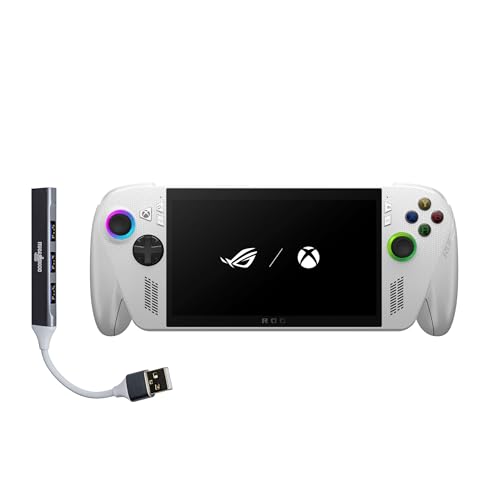
The same 120Hz Xbox-first idea, tuned for a full Windows PC library alongside your streams.
The headline spec here is the 7-inch 1080p IPS touchscreen at 120Hz, backed by FreeSync Premium to keep streamed frames tear-free and 500 nits to stay readable in daylight. That is the number that matters for Remote Play: 120 refresh cycles per second makes a 60fps stream land evenly. It runs a 60Whr battery with fast charging that takes the 60Whr pack from 0% to 50% in 30 minutes, and Wi-Fi 6E plus Bluetooth 5.4 keep the connection current.
The chipset is the AMD Ryzen Z2 A with AMD RDNA 2 graphics, 16GB of RAM and a 512GB SSD, and it weighs 2 pounds with contoured grips borrowed from the Xbox Wireless Controller. On the software side, ASUS Armoury Crate wraps a console-like layer over Windows, so launching Game Pass, Steam or Epic titles feels less like a PC. The consensus from owners is that game quality is the star — more games run here than on a Steam Deck, and the controls, screen and build all clear the bar. The one thing everyone flags is battery, which simply does not last long on demanding titles; most owners play plugged in or top up often.
The case for it
- 120Hz FreeSync Premium display keeps streamed motion smooth and tearing low
- Wi-Fi 6E and Bluetooth 5.4 for modern wireless headroom
- Handles more games than a Steam Deck, per the broad owner consensus
The reality to plan for
- Battery life is the recurring weak spot — plan to play near a charger on heavy titles
- Windows needs some upfront tinkering to reach peak performance
- No black colour option, if that matters to you
Who it suits: someone who wants the Xbox-first 120Hz handheld experience and is comfortable docking it or charging often for long play.
The honest catch: demanding games drain the 60Whr pack quickly, so treat it as a couch-and-plug-in machine rather than an all-day traveller.
5. BACKBONE Pro Gaming Controller
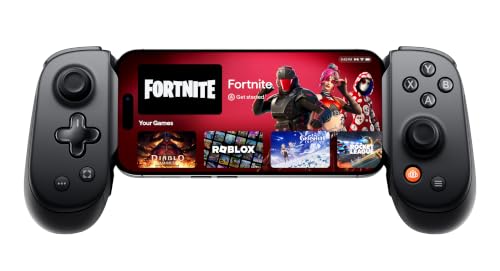
Turns the phone you already own into a full Xbox controller with three ways to connect.
Skip the dedicated handheld and let your phone do the streaming — that is the case here, and it is a good one. The Backbone Pro grips your phone like a controller and connects three ways: Handheld mode (your phone’s battery powers it), Wireless mode over BLE (Bluetooth Low Energy) with 40 hours of untethered play, and Wired mode over USB-C for the lowest latency. That USB-C wired path is the one to use for Remote Play, since a direct connection sidesteps Bluetooth delay and keeps aim tight.
It plays well with all the Xbox streaming routes. Via the Backbone app you can stream Xbox Game Pass Ultimate, remote-play from your Xbox or PC, and pull in PlayStation and PC titles too. It packs 12 buttons and supports USB-C iPhones from the 15 series up on iOS 17.3 or later, plus USB-C Android on Android 10 or later, with magnetic adapters so you can leave your case on. What owners praise loudest is performance — it just works across a range of games, and the ergonomics feel like a familiar console pad in hand.
The trade to know: value and connectivity get mixed reads. The price feels steep to some, and the app and firmware side can take a little patience. It is also a phone-holder, so it inherits your phone’s screen and battery — no built-in display here.
The draw: 40 hours of BLE wireless play, 12 buttons, and case-friendly magnetic adapters make it the flexible way to turn a device you own into an Xbox remote play setup.
Who it fits: phone-first players who want console-style controls and a wired low-latency option without buying a whole handheld.
Best fit: you already carry a capable phone and want the cheapest route to great Xbox streaming controls with a wireless mode for travel.
Not for: buyers who want one self-contained gadget — you are still leaning on your phone’s screen and battery.
6. OnePro Cloud Handheld 64G

A featherweight streaming handheld that skips horsepower and pours it all into the stream.
This is a cloud-first machine, and it makes no secret of it. It runs on the MediaTek Genio 510 chip with a 2T2R MU-MIMO Wi-Fi module (two antennas talking to your router at once) for low-latency streaming, and the maker claims a 300% performance gain over the first generation. It handles Xbox Cloud Gaming, GeForce NOW, Amazon Luna, PlayStation Plus Premium and Boosteroid, and remote-plays locally via Moonlight, PlayStation Remote Play, Steam Link or PXPlay. Just bring your own subscriptions — the device is the vehicle, not the service.
Comfort and endurance are its real strengths. At 430 grams it is ultra-light in the hands, the 7-inch 1080p display is bright and sharp, and the battery runs 8+ hours with fast charging, far longer than the Windows handhelds here. It also outputs up to 4K to a TV or AR glasses. Owners single out performance as the thing they praise most — it runs surprisingly well on its own and shines with PlayStation and Xbox streaming, with near-zero latency and a bright, crisp screen.
The honest limit: native power is weak. This is not a device for running demanding PC games locally — that is what the ROG and Legion picks are for. And with two short-throw, Switch-like joysticks, precision FPS aiming takes more effort than on a full-size pad. One unit in the review pile died within days, so buy with a return window in mind.
For the streamer: you play mostly cloud or remote and want a light, long-endurance, bright-screen handheld that beats a phone for the job.
Not for: anyone who wants to run big PC games on the device itself, or who needs pinpoint FPS stick precision.
7. BACKBONE One Mobile Gaming Controller, Xbox Edition, USB-C
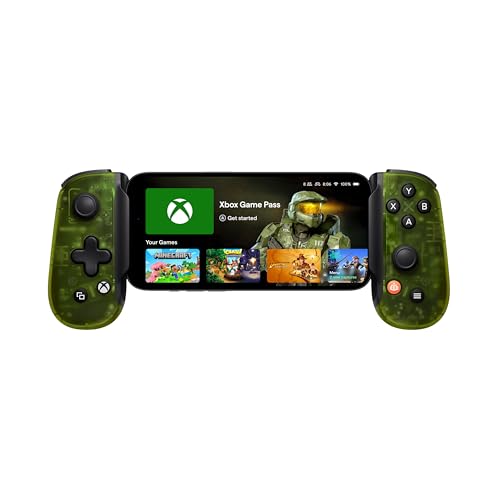
A wired phone clip built with Xbox that plugs straight into USB-C and stays out of the way.
This one is the no-fuss choice for phone-based Remote Play. It is built with Xbox, so the layout mirrors the familiar Xbox Wireless Controller with an improved D-pad, 8 buttons, tactile sticks and magnetic adapters. Connection is USB-C, which means no charging to think about and lag-free wired input — the single most useful thing for keeping your stream responsive. Your phone slides in and the whole rig stays recognised with no extra setup.
The Backbone app wraps it all together: Xbox Game Pass Ultimate, remote-play from your Xbox or PC, Apple Arcade and Steam Link sit in one hub. It even chargers your phone while plugged into a wall, which owners clearly lean on — a phone that keeps its charge through a long session is the difference between finishing a boss and watching the battery die. What earns it the most praise is portability.
Now the fit note, and it is worth reading before you buy. Build quality draws mixed views — plenty find it sturdy, some call it light — and durability has come up as a gripe, with a couple of units developing joystick or connection faults over time. For a durable long-term rig with no surprises, it is worth buying with a return window or warranty in hand. For everyone else it is a quick, cheap, Xbox-authentic way to stream.
The reason it works: a USB-C link with pass-through charging keeps the input tight and your phone alive through long sessions without a controller battery to babysit.
Buy it knowing: build and durability have split owners — treat it as a portable convenience controller rather than a forever rig.
Choose it when: you want Xbox-authentic controls for phone streaming and the simplicity of a wired fit with phone charging.
The caveat: some units wear poorly over months, so keep your warranty handy and don’t count on years of heavy use.
8. Logitech G Cloud Gaming Handheld Bundle

A cloud-built handheld shipped with a strap-on case, so it travels as safely as it streams.
This bundle exists to be carried. You get the Logitech G Cloud handheld plus the official carrying case with a detachable, size-adjustable strap, so it stows secure on a commute or a flight. The device itself streams up to 1080p at 60fps over Wi-Fi from cloud services — Xbox Cloud Gaming and NVIDIA GeForce NOW are built in, and more come via the Google Play store. It also handles Xbox Remote Play and Steam Link, which makes it a genuine remote-play companion for your console.
What owners value most is the reliability of the streaming link. It streams hundreds of AAA titles over Wi-Fi with no download or install step, and users who run Forza and Halo over Xbox Cloud talk up the experience. Pair it with the case and the strap, and it becomes the easy grab-and-go pick for travel.
The honest trade-off: with a 6,000 mAh battery, it lasts through sessions, but the spec sheet is not powerful — it is a streaming tool, not a local-game machine. If you stream from your own Xbox or a cloud service, that is exactly the right trade. One unit in the review set saw an internal joystick break after heavy use, so handle it with a little care.
Why the bundle wins: the official case with a detachable, adjustable strap means you can toss it in a bag without worrying about the screen — a real travel-ready package for a streamer.
Best with: Game Pass and GeForce NOW subscriptions, since the hardware is tuned for cloud rather than native play.
Best for: the traveller who wants a ready-to-go cloud and remote-play handheld that arrives with a protective case, not as a bare slab.
Know the limit: it streams beautifully but won’t run demanding games on its own — keep it for cloud and console remote play.
9. Logitech G Cloud Gaming Handheld
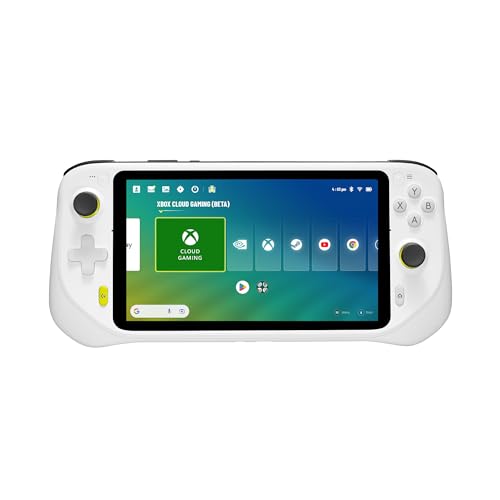
The lean, cloud-only G Cloud with a 7-inch 1080p screen and a light 463-gram body.
Here is the stripped-back version of the G Cloud, and it is honest about its job. The 7-inch touchscreen runs 1080p for cloud streaming from Xbox Cloud Gaming, NVIDIA GeForce NOW and Google Play, with Bluetooth and Wi-Fi on board and 64GB of storage. At 463 grams it stays light enough to hold through a long session, and its long battery is the reason it is a solid couch companion. Whatever you stream, the screen is bright and the build feels solid in hand.
Where owners are divided is responsiveness and streaming. The gaming experience itself is the thing they praise most — it meets and exceeds expectations for most buyers — but the streaming and responsiveness draw mixed feedback, and a segment finds a real lag on weaker internet. If your router is strong and your subscriptions are ready, that swings in your favour.
Two practical notes. Precision aiming suffers from a noticeable joystick dead zone (the stick’s neutral zone before input registers), which slows down twitch shooters. And for anyone with larger hands, the small bottom buttons can cramp fingers after about an hour — one owner returned it over exactly that. For normal-sized hands and couch play, it is a well-priced way to stream Xbox.
Worth it for: budget-minded cloud streamers with normal-sized hands who play from a strong Wi-Fi setup and want a light 7-inch 1080p handheld.
Reconsider if: you have large hands, you need pinpoint FPS aim, or your internet is patchy — those are where the complaints land.
Know the Specs
Refresh rate (Hz) and why it rules remote play
Hz measures how many times per second the screen redraws. For a stream that arrives at 60 frames per second, a 120Hz panel can land each frame evenly, so camera pans look smooth. A 90Hz panel splits that 60fps feed less cleanly. On a local-game handheld the graphics chip matters more; for Remote Play, the screen and the radio are what you feel in your hands.
Wi-Fi band and MU-MIMO
Wi-Fi 6E opens the 6GHz band, which is quieter than the crowded 2.4GHz and 5GHz channels — fewer neighbours means fewer dropped frames. MU-MIMO lets the device trade data with your router over multiple antennas at once, which steadies the stream. A strong radio close to the router matters more than a fast chip far from it.
Battery in Whr versus mAh
Watt-hours (Whr) measure the energy tank; milliamp-hours (mAh) measure charge at a given voltage. A 60Whr Windows handheld and a 6,000 mAh streaming device are not comparable directly, because the Windows machine is rendering games locally. Match the battery type to your habit: rendering needs a bigger tank, pure streaming gets far more hours from a smaller one.
OLED versus IPS
OLED pixels light themselves, so blacks are truly black and contrast is high — great for dark streamed games. IPS is a solid LCD type with wide viewing angles and steady colour, and it often runs brighter. For a compressed video feed, OLED tends to flatter the picture; IPS keeps costs sensible.
Common Questions
Do I need an Xbox console to use a Remote Play device?
Will a phone controller like the Backbone work with my iPhone or Android phone?
Is 90Hz enough for Xbox Remote Play or do I need 120Hz?
How much battery life should I expect from a remote play handheld?
Can these devices stream from a gaming PC as well as an Xbox?
What internet speed do I need for smooth cloud and remote play?
Is a dedicated handheld better than clipping a controller to my phone?
Do these devices need a Game Pass subscription to stream Xbox games?
Can I output these handhelds to a TV for a bigger remote play screen?
Which handheld should I pick if I also want to play PC games locally?
The Bottom Line
For most players, the xbox remote play device winner is the Valve Steam Deck OLED 1TB — its 7.4-inch HDR OLED screen makes a streamed game look richer than any LCD here, backed by Wi-Fi 6E and a roomy 1TB drive for when you play offline. The crowd backs it, too: it holds 4.5+ stars across 600+ ratings, the highest rating in this lineup. If you want the Xbox-first experience with a 120Hz screen and Game Pass built in, reach for the ASUS ROG Xbox Ally. And if your budget points toward cloud streaming with a bright 7-inch screen and long battery, the OnePro Cloud Handheld punches far above its weight for the job.
How we choose
We do not accept paid placement. Every pick is matched to a real buyer and a real use-case; we do not hands-on test units.
Sources
Specifications: manufacturer listings and product documentation. Review insights: verified customer reviews, as of October 2026. Pricing: not shown on this page (it changes often); check the current price via the retailer link.
As an Amazon Associate, Aappliancez earns from qualifying purchases. This does not affect which products we feature.