Disclosure: Some links in this post are affiliate links. As an Amazon Associate I earn from qualifying purchases, at no extra cost to you. Learn more
Specs are compiled from manufacturer listings and verified buyer reviews and can change over time — please confirm the key details on the product page before buying.
If you take calls with a laptop lid shut, or you share a room with three or four other people, a plain camera is not enough. You need one box that carries the picture, the voice pickup, and the sound going out to everyone else. That is the whole idea behind an all-in-one webcam, and it is exactly what you should buy if you are tired of juggling a separate microphone and a speaker on your desk.
Every pick below is checked against the manufacturer’s published specs and the patterns in verified customer reviews.
There are two specs you should settle first: how wide the lens sees, and how far the microphones can pull a voice, because those decide whether the frame fits your room. If you want the short answer, the AIRHUG 3 in 1 is the unit that keeps a small huddle room sounding full without extra gear, which is why it tops this list of the best webcam with microphone and speaker.
Top Picks


How To Choose The Best Webcam With Microphone and Speaker
Most people buy one of these because they are tired of hearing their own voice echo back or leaning into the laptop so the far end can hear them. One device on the desk handles the camera, the microphones, and the speaker at once. Three specs decide whether it works in your room.
Match the viewing angle to how many people are with you
The field of view (how wide a slice of the room the lens captures) is the first number to check. A 76° lens is a tight, personal framing built for one person at a desk. A 94° lens is noticeably wider, so two or three people can share the frame without shuffling into each other. If you routinely fit a whole table, an adjustable lens that swings between 60° and 98° gives you the most control.
Check how far the microphones reach before you buy
Microphone pickup distance in feet tells you how far you can sit or stand from the unit and still be heard. A short reach suits one person at a desk; a long reach covers a room where people move around. Voice pickup range is the spec that decides whether you talk normally or shout.
Fixed focus versus autofocus
A fixed-focus camera stays locked at one distance, so it is sharpest when you sit at the distance the maker set. An autofocus camera reads the scene and hunts for the sharpest point, which helps when you lean in or hand a document to the lens. Neither is wrong — it depends on whether your position changes during a call.
Side-by-Side Comparison
| Model | Best For | Max Resolution | Field Of View | Focus Type | Amazon |
|---|---|---|---|---|---|
| AIRHUG 3 in 1★ Best Overall | Small huddle rooms | 1080p | 76° | Fixed Focus | Amazon |
| 3 in 1 USB C WebcamWidest View | Wide-angle desk calls | 2K | 94° | Auto Focus | Amazon |
| NexiGo N660P Pro | Sharper stills and streaming | 4K | — | Auto Focus | Amazon |
| EMEET C980 PRO | Team and whiteboard shots | 1080p | 60°-98° | Fixed Focus | Amazon |
| NUROUM C10 | Travel and huddle rooms | 1080p | 90° | — | Amazon |
| RayBit 4K Conference Camera | Meeting rooms with a remote | 4K (UHD) | 94° | — | Amazon |
| TONGVEO Wireless PTZ | Churches and classrooms | 1080p | — | — | Amazon |
Detailed Reviews
1. AIRHUG 3 in 1 1080P Webcam with Microphone & Speaker
Our pick — 4.0+★ from 100+ verified ratings; the strongest balance of quality and price.
One USB cable, one box, and a small room suddenly sounds like a proper conference setup.
This is the pick to grab if you run a huddle room with three to five people around a table. The camera shoots at 1080p and 30 frames per second (that is 30 still pictures every second), which keeps lip movement smooth on a normal call. Its 2.07 megapixel sensor pairs with auto white balance, so skin tones do not drift when the overhead lights change.
The speaker is where this unit earns its keep. It is rated at 5 watts with a maximum volume of at least 90 decibels, which is loud enough to fill a room rather than just the space in front of your keyboard. The microphones reach up to 6 feet, carry a sensitivity rating of -38 decibels, and apply 65 decibels of noise reduction along with automatic volume adjustment. In plain terms, you can talk at a normal level from across a small table and the far end still hears a steady voice.
Owners lean on it for mini PCs and shared desks because a single USB port solves video and audio at the same time. What wins people over most is the value it delivers for what you pay, and the setup routine is short enough that most people are running within minutes. The catch is the 76° field of view, the tightest on this list — against the 94° on the 3 in 1 USB C model above, you are giving up a lot of side-to-side coverage. Buyers report one honest limit: “I could not adjust the focal length so at 3 feet, my head was too large for the frame.” Sit close to a desk and you will fill the picture; this one wants a bit of room between you and the lens.
What It Gets Right
- Speaker rated at 5W with at least 90dB maximum volume — loud enough to carry a whole room
- Microphones reach up to 6 feet with 65dB noise reduction and auto volume adjustment
- No drivers and no extra gear — Windows, Mac, and a single USB cable
- Compact 5.5×2.8×2.3 inch body weighing 5.9 oz fits in a bag
Where It Gives Ground
- The 76° lens is the narrowest here, so it is wrong for a big table
- Fixed focus means you must sit at the distance the lens was set for
- Audio quality draws mixed feedback — the speaker can sound low to some ears
Grab this one for: a huddle room or a mini PC desk where one box needs to handle picture, voice, and sound at once.
Think twice about: a conference table with more than a few people, because the 76° lens will crop anyone sitting off to the side.
2. 3 in 1 Webcam
The wide-angle option that pulls a whole table into frame without shuffling anyone into position.
When two people sit side by side, this one simply fits them both. The 94° field of view is wider than the AIRHUG’s 76°, and it matters most when you work in a shared space or push your chair off to one side. The lens pushes out 2K resolution (a step above standard 1080p) with autofocus, so the camera hunts for the sharpest point instead of staying locked at one spot.
Audio is a genuine strong point when it works. Speakers use 360-degree diffusion, the microphone array picks up voices from as far as 15 feet, and the unit filters background noise so a busy cafe does not bleed into your call. Owners who use it for closed-laptop meetings say callers hear them clearly, and the sound beats a MacBook Air’s built-in speakers. This one also merges four pieces of gear into one tube on top of your monitor, and the privacy cover is built in — you push a slider rather than hunting for a clip-on cover.
The trade-off is that the wide lens cuts both ways. Some users find the angle too wide for a single person, and durability is worth a thought: owners mention “After 2 years of daily use, speaker failed (plays 0.5s scratchy audio after restart, then quits; driver troubleshooting failed).” The mount is the other soft spot — it does not grip every monitor edge tightly. Versus the NexiGo above, this one trades still-image resolution for a far wider, more forgiving frame.
The value read: Four devices folded into one unit with a 15-foot mic reach and true 360-degree speaker spread, which is hard to assemble yourself for the same outlay.
The honest caveat: A 94° lens makes one-person framing feel distant, and the screen mount is the part most likely to disappoint on a thick monitor bezel.
Reach for this if: your calls regularly put two or three people in the frame and you want the camera to auto-adjust.
Look elsewhere if: you take solo calls and want a tight, face-filling picture that fills the screen.
3. NexiGo N660P Pro 4K Webcam with Distortion-Free Lens
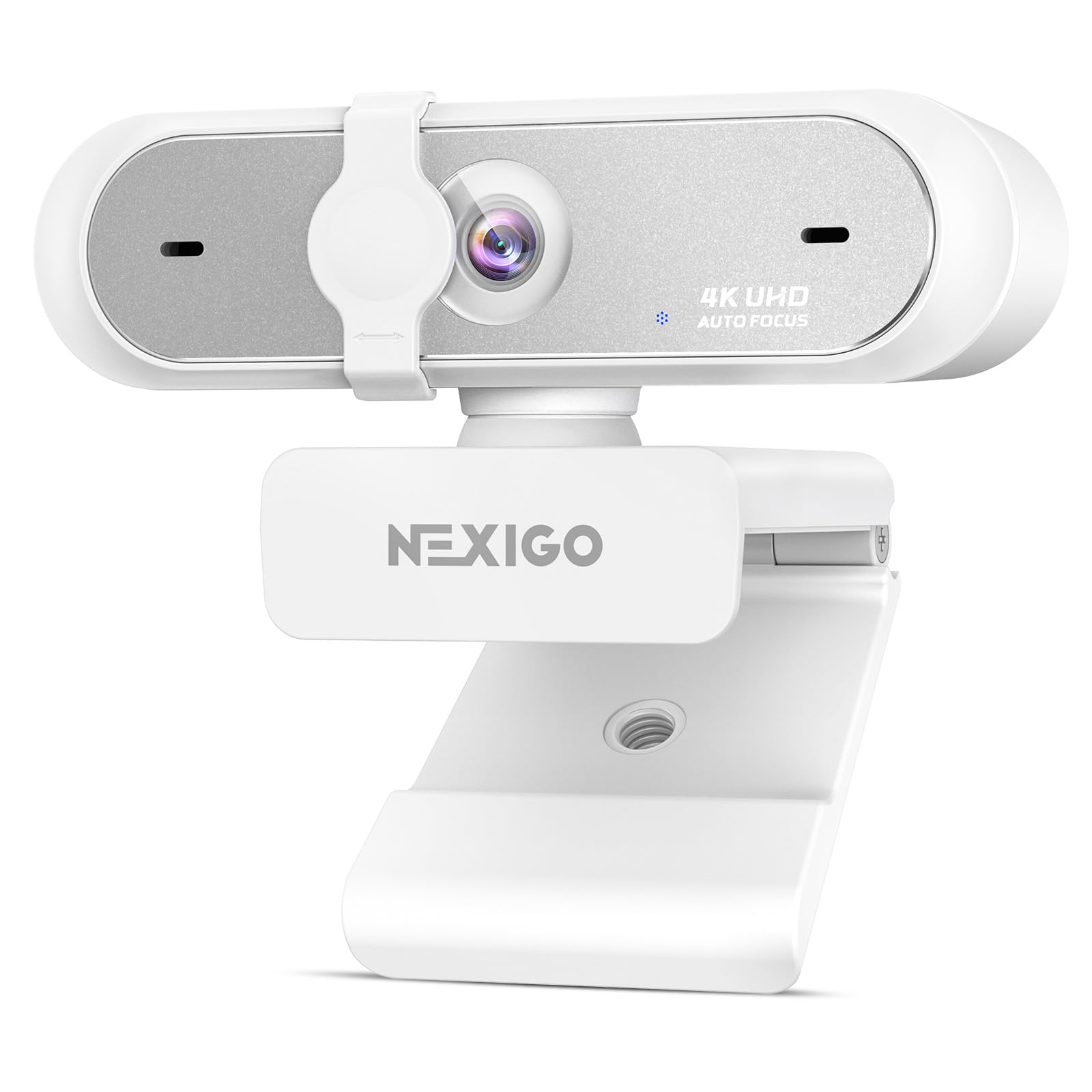
A 4K sensor built to keep straight lines straight and grain out of a dark room.
If your main worry is picture quality rather than filling a room with sound, start here. The sensor captures 3840 pixels across the top of the frame, and the gap versus the AIRHUG’s 1080 pixels is the largest resolution difference on this list. The lens is built to avoid the bowed “fisheye” look, so door frames and shelves behind you stay straight instead of curving.
Grain control is the second trick. Built-in 3D noise reduction reads each frame and strips visual speckle in real time, which is the setting that saves you in a dim home office. An external sliding shutter physically blocks the lens between calls, and there is no app or Wi-Fi setup to fight through — you plug the USB cable in and go.
Mounting flexibility is generous, with a 360-degree swivel base and a standard 1/4-inch tripod thread so you can clamp or stand it anywhere. The honest knock is that this is a camera first and a speaker system second — the microphone is well regarded, but there is no dedicated loudspeaker pushing sound into a room the way the AIRHUG does. A couple of the sharper reviews also flag that recorded video can come out fuzzy even at a fixed distance, so it rewards good lighting more than its spec sheet suggests.
Why It Leads On Detail: 3840-pixel resolution plus 3D noise reduction means text on a whiteboard and fabric detail survive the call intact.
Pick this if: you stream, game, or present on camera and image sharpness outranks room-filling audio.
Skip the upgrade if: your priority is a loud speaker for a shared table, because this one is built around the lens.
4. EMEET C980 PRO Webcam

The only pick here that lets you dial the lens from a tight single shot out to a full-room sweep.
Teams that flip between a one-on-one and a whiteboard demo get the most out of this one. The field of view slides between 60° and 98° (60° for a close-up of your face, 98° for a group and whatever you are writing on), and the autofocus holds sharpness across a range of nearly 2 to 197 inches, so moving toward the lens does not blur your picture.
Audio hardware is stacked: four omnidirectional microphones (mics that hear from every direction at once) plus two speakers, with active noise cancelling and automatic echo cancellation. That combination is what lets one USB cable replace both a separate speakerphone and a camera, freeing a port on a crowded laptop. Low-light correction brightens a dim room automatically, and the whole thing is plug-and-play across Windows 10 and 11 and macOS.
One thing to plan around: this unit draws more current than some ports supply, so the maker warns against running it through a USB hub. Owners who plug it straight into the machine describe rock-solid setup, but a few note that audio can occasionally freeze when you switch between meeting apps, and a quick unplug-and-replug clears it. There is no pan or tilt control, so if you want a narrower frame you adjust the zoom in software, not by hand.
What Buyers Rave About: Picture quality that customers note shows what true 1080p in a webcam should look like, backed by four mics and two speakers in one body.
One Detail To Note: Plug it directly into the computer, not a hub, or the reduced current can cut the connection.
Best fit for: meeting rooms that swing between solo calls and group whiteboard sessions, where the frame needs to change on the fly.
Less ideal when: you want a fixed, hands-off setup, since the wide default angle shows more of the room than some people want.
5. NUROUM C10 1080P Conference Webcam with Microphone Speaker

Built to disappear into a carry-on and still hold a conference call from a hotel desk.
Anyone who works from hotel rooms, field offices, or a rotating desk should look at this unit first. It runs on a folded USB-C cable with a Type-C to USB-A adapter tucked into the base, so there is no power brick to pack and no driver to install. You simply pick it as your video and audio device and start talking.
The picture comes from a 90° lens on a 2 megapixel CMOS sensor (the chip that turns light into the image), shooting 1080p at 30 frames per second with automatic low-light adjustment. Sound is handled by a four-element noise-cancelling microphone array paired with full duplex technology — that means you can hear and speak at the same time without one cutting off the other, so conversations stop feeling walkie-talkie stiff.
Automatic gain control keeps your level steady even from 10 feet away, and four touch buttons let you mute, cut the camera, and adjust volume without opening any software. It is light enough at 384 grams to move between rooms all day. Two things trip up new owners: the cable is short, so if your computer sits on the floor the camera may not reach your desk, and there is no Bluetooth, so everything runs over that wired connection. At higher volume, far-end callers have reported a little echo.
Standout Feature: Full duplex audio with automatic gain control holds a steady voice up to 10 feet, which is what makes one small box cover a whole huddle space.
Worth Knowing: The short built-in cable is the one spec to check against your desk layout before you commit.
Your match if: you travel with a laptop and want conference-grade audio that fits in a bag with no extra cables.
Better to pass if: your PC tower sits on the floor far from your desk, since you would need an extension cable.
6. 4K Pro Conference Room Camera

A room camera you can drive from across the table without touching a keyboard.
Meeting rooms where the camera sits at the far end of a table call for this one. The included remote controls the whole show from a distance — microphone on and off, zoom in and out, speaker volume, plus saved camera presets so you can snap back to a set view. No walking over to fix the frame mid-call.
The lens captures 4K (UHD) at 94° and uses AI face detection to frame the shot automatically as people join or leave, with presenter tracking that follows whoever is speaking. Audio uses built-in dereverberation (software that strips the echo a hard-walled room creates) along with full duplex, a microphone array, and a high-fidelity speaker, so both ends hear cleanly without shouting into a bare conference space.
The trade-offs are real. At full 4K the feed can lag, and the picture is smoothest at lower settings, so if you stream live you may want to step it down. The speaker is described as serviceable rather than rich — clear speech, thin bass. And the accessory matters: at least one unit shipped without the remote that the listing promises, and a call for support went unanswered, so confirm the remote is in the box as soon as it lands.
Why Room Teams Like It
- Remote controls zoom, mute, volume, and presets from anywhere in the room
- AI auto-framing with presenter tracking adjusts to whoever is talking
- 5X digital zoom and 94° wide angle cover a long conference table
The Limits To Weigh
- 4K output can lag — 4K works best kept for stills, lower settings for live motion
- Speaker handles speech well but is not built for music
- At least one unit arrived without the promised remote
Suits you when: you run a conference room and want hands-off framing plus a remote within reach of every seat.
Not the match if: you need crisp live 4K motion or rich room audio for anything beyond speech.
7. TONGVEO AI Wireless PTZ Camera System
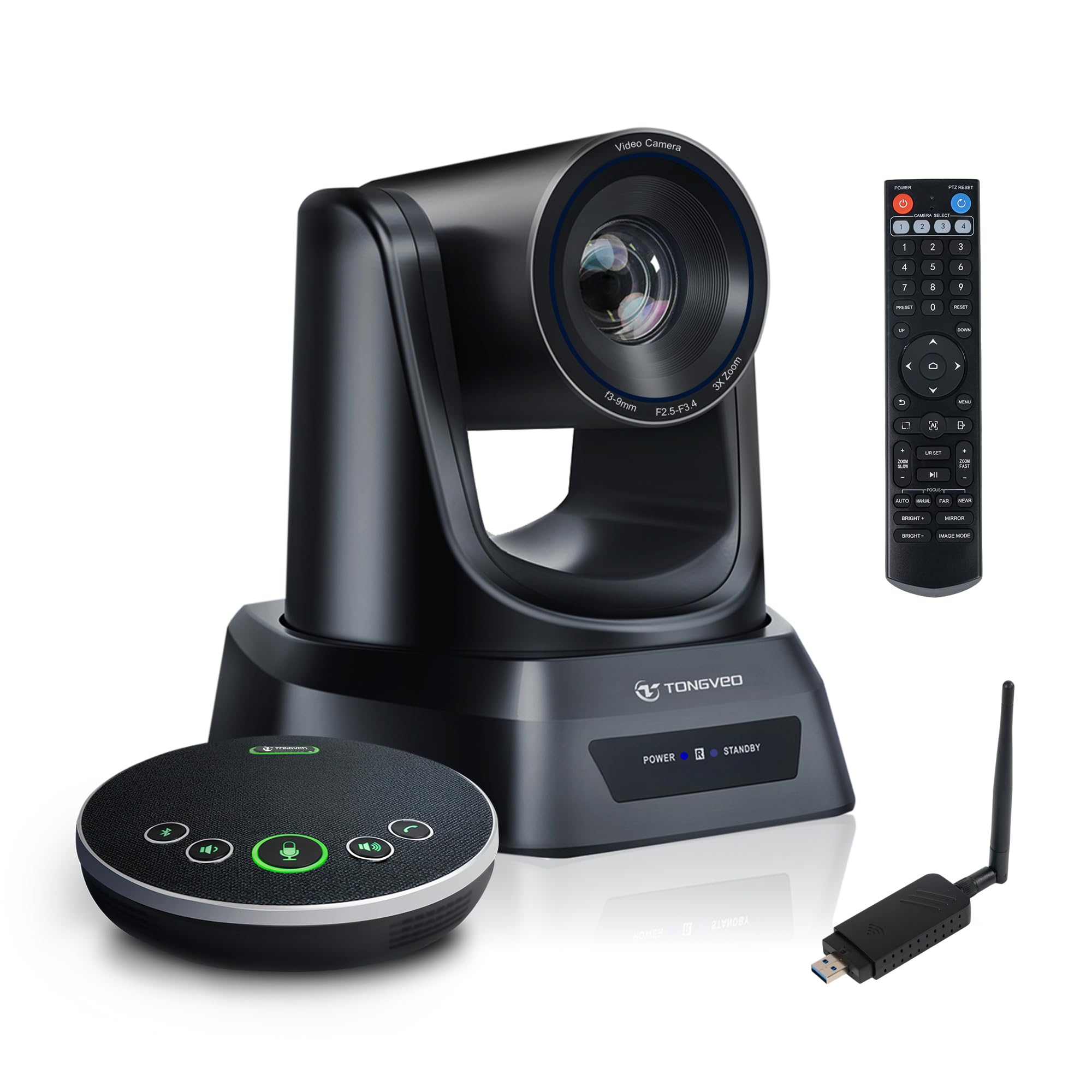
A wireless pan-tilt-zoom rig made to follow a preacher, a teacher, or whoever is on their feet.
Churches, classrooms, and training halls are where this earns its place. The camera turns, tilts, and zooms to track the active speaker automatically using built-in human detection, so no one has to sit behind a laptop nudging the frame. It shoots 1080p at 60 frames per second — twice the frame rate of several picks above, which keeps motion smooth when someone walks across the front.
The zoom is optical rather than digital: 3X optical zoom (glass magnification, not a software crop) lets you push in on a speaker or a presentation board without softening the image. The included speakerphone picks up voices from every direction around a table with 360° omnidirectional capture, and echo cancellation plus noise reduction clean up the signal before it reaches remote viewers. Small to medium rooms of six to ten people are the target.
Setup runs over a 5.8GHz wireless link — plug the USB antenna dongle into your computer, power the camera on, and you get a connection up to 33 feet with no cable stringing across the floor. What people praise most is the video quality, and the sharpness of the zoom and the smoothness of the frame rate back that up. The honest wrinkles: wireless reliability draws mixed reports, the camera needs power and has a rated 4-hour running window between charges, and the remote can feel unresponsive. Presenter tracking is driven by motion, so it can occasionally follow movement rather than the actual voice.
Where It Shines
- 3X optical zoom holds sharpness that digital zoom cannot match
- 1080p at 60fps keeps motion smooth for livestreamed worship or lectures
- 360° speakerphone with echo cancellation and noise reduction for 6-10 people
- Wireless link reaches up to 33 feet with no floor cable
Honest Watch-Outs
- Wireless connection draws mixed reports — placement matters
- Rated battery life of 4 hours between charges
- Remote responds sluggishly for some users
- Motion-based tracking can fix on movement rather than the speaker
Made for: a church, classroom, or training room where the speaker roams and nobody wants to run a camera.
Reconsider if: you need rock-steady wired reliability or around-the-clock runtime, since it runs wireless and on a rated 4-hour window.
Know the Specs
Field of View (how wide the lens sees)
Field of view is the width of the scene the lens captures, measured in degrees. A 60° setting frames you tightly like a passport photo. A 98° setting sweeps a whole table and the whiteboard behind it. If your room holds more than one person, a wider angle saves you from constantly re-seating everyone; if you sit alone and want your face to fill the screen, narrow is better.
Resolution and frame rate
Resolution is how many pixels make up the picture — 1080p, 2K, and 4K stack up from sharp to sharper, and higher means finer detail survives the call. Frame rate, measured in frames per second, is how many still images the camera captures each second; 30fps is standard, while 60fps keeps fast motion like a walking presenter smooth rather than choppy.
Microphone pickup and noise reduction
Pickup range in feet tells you how far you can sit or stand and still be heard — some units reach 6 feet, others as far as 15 feet. Noise reduction, rated in decibels, is how much background hiss the microphones strip out. Together they decide whether a busy room or an open office stays out of your call.
Speaker output and full duplex
Speaker volume is measured in decibels, and a higher ceiling means more people can hear the far end without leaning in. Full duplex is the ability to send and receive audio at the same time, the same way a phone call works — without it, conversations feel clipped, as if only one side can talk at once.
Common Questions
Do I need a webcam with a built-in speaker if I already have good headphones?
How far away can I sit and still be heard clearly?
Is a wider field of view always better for a group call?
What is the difference between fixed focus and autofocus?
Will a 4K webcam work on an older laptop?
Can I use these webcams with Zoom, Teams, and Skype?
How do I know if my camera is actually being blocked for privacy?
Should I plug a conference webcam into a USB hub?
What does full duplex audio actually do for a call?
Why would I choose a wireless PTZ camera over a clip-on webcam?
The Bottom Line
If you want the simplest path to a small room that sounds and looks right, the AIRHUG 3 in 1 is the pick — one USB cable, a speaker rated at 5W with at least 90dB maximum volume, and microphones that reach 6 feet, which is the combination that makes a huddle space work without extra gear. If your calls regularly put two or three people in frame, the wider 94° lens on the 3 in 1 USB C Webcam fits them without shuffling. And for a church or classroom where the speaker walks around, the TONGVEO Wireless PTZ follows them on a 5.8GHz link with 3X optical zoom. Match the field of view and the microphone reach to your room and you will not need to upgrade for a while.
How we choose
We do not accept paid placement. Every pick is matched to a real buyer and a real use-case; we do not hands-on test units.
Sources
Specifications: manufacturer listings and product documentation. Review insights: verified customer reviews, as of October 2026. Pricing: not shown on this page (it changes often); check the current price via the retailer link.
As an Amazon Associate, Aappliancez earns from qualifying purchases. This does not affect which products we feature.