Disclosure: Some links in this post are affiliate links. As an Amazon Associate I earn from qualifying purchases, at no extra cost to you. Learn more
Specs are compiled from manufacturer listings and verified buyer reviews and can change over time — please confirm the key details on the product page before buying.
You know the moment. You reach for something in a virtual world and your avatar’s leg stays behind, or your hips snap sideways while your real body stands perfectly still. That gap between what you do and what your avatar does is exactly what VR trackers close — and picking the wrong tracking method is why so many buyers end up frustrated. This guide breaks down the nine strongest tracker options on Amazon right now, sorted by what each one actually does well, so you can pick the tracking method that fits your room, your PC, and your session length.
This guide is built by comparing the manufacturers’ published specifications and the patterns across verified customer reviews, so you get each pick’s real strengths and trade-offs instead of marketing spin.
A smooth VR session versus a stuttering one usually depends on three things: how the tracker senses motion, how long its battery lasts, and whether your PC can actually talk to the hardware. Below is an honest breakdown of the best VR trackers for full-body immersion.
Top Picks


How To Choose The Best VR Trackers
Picking trackers starts with one question: does your setup have base stations? A base station (a small wall-mounted box that beams infrared light around the room) is what lets the most accurate trackers know exactly where they are. Without one, you are relying on a different tracking method entirely, and the gear you should buy changes completely.
Base station versus camera-free tracking
Trackers that need base stations deliver extremely precise positional data, but they demand a clear line of sight. A blanket, a couch, or a coffee table between the tracker and the base station can break the signal. Camera-free and sensor-based systems skip the base stations but tend to drift over long sessions and often need recalibration.
How many trackers you actually need
Full-body tracking commonly starts at three trackers — typically waist plus both feet — and grows from there if you want chest or elbow coverage. Each tracker needs its own USB dongle or a free USB port on your PC, so check your port count before you buy a multi-pack.
Battery hours that match your sessions
Battery life is where kits separate fast. Some trackers run for hours on a charge; others are designed to be powered by a strap system so you are not hunting for chargers mid-session. Read the battery figure carefully and think about how long your typical VR night actually runs.
Side-by-Side Comparison
| Model | Best For | Tracking Type | Battery | Weight | Amazon |
|---|---|---|---|---|---|
| HTC VIVE Tracker (3.0)★ Best Overall | Best all-round full-body tracking | Base station (SteamVR) | Up to 7.5 hours | 8 ounces | Amazon |
| Rebuff Reality Trackstrap PlusLongest Runtime | Long sessions without recharging | Tracks Vive Tundra models | Up to 20 hours | 1.2 pounds | Amazon |
| Vive Tracker (3.0) 99HASS001-00 MN747Import Classic | Import buyers wanting the classic tracker | Base station (SteamVR) | Up to 7.5 hours | — | Amazon |
| bHaptics TactSuit Pro | Feeling impacts, not just seeing them | Haptic feedback (32 motors) | — | 4.1 pounds | Amazon |
| Tobii Eye Tracker 5 | Sim racers and flight simmers | Head and eye (no wearables) | — | 97 g | Amazon |
| Sony mocopi | Motion capture and content creation | Six-sensor wireless | Up to 10 hours | 8g per sensor | Amazon |
| HTC 3 Pack VIVE Tracker with TrackBelt | One-click full-body bundle | Base station (SteamVR) | Up to 8 hours per tracker | 2.3 pounds | Amazon |
| Meta Quest 3 512GB Bundle | The headset that anchors it all | Headset (standalone) | 2.2 hours | — | Amazon |
| Roto VR Motion Gaming Chair | Seated 360° immersion | Motorized head tracking | — | — | Amazon |
Detailed Reviews
1. HTC VIVE Tracker (3.0)
Our pick — 4.5+★ from 2,000+ verified ratings; the strongest balance of quality and price.
The puck that made full-body VR feel normal, now lighter and longer-running.
This tracker earns its spot on hardware alone: 4.5+ stars across 2,000+ ratings, with no subscription and no phone in the loop. At 8 ounces it is 15% lighter than the 2018 model, so it rides less heavily on your foot or hip during a long session. It captures full-body motion with as few as three trackers, and its 240° field of view (the spread of angles it can see and be seen from) means you can scatter base stations around the room without every angle needing to be perfect.
Battery is where this version made its biggest leap. HTC rates it at up to 7.5 hours, which is 75% longer than the 2018 Tracker. That gap matters next to the Rebuff Reality strap kit’s 20-hour figure, roughly a 2.7x difference. One long VRChat night? Both survive it. Four nights back to back without charging? The strap system wins. What wins buyers over here is stability: reviewers describe a system that needs only that first avatar calibration and then holds position, drifting rarely and desyncing even less so long as the base stations sit well.
Here is the honest catch. This tracker is blind in a very literal sense — it needs constant line of sight to a base station, so a blanket draped between the puck and the station cuts it off. You also need Lighthouse base stations (sold separately) and a free USB port for the dongle, so the real cost is the system, not the puck. Connectivity draws the most mixed signals in the feedback, usually from buyers who underestimated the dongle and bandwidth requirement. Get the base stations and dongle right and this tracker holds position through long VRChat sessions with little drift.
What holds up over months
- Up to 7.5 hours per charge, 75% longer than the 2018 Tracker
- Quality is the most-praised trait among buyers, with tracking close behind
- 240° field of view gives you placement flexibility around the room
- Full-body capture from as few as three trackers
What to plan around
- Base stations and software sold separately — real total cost climbs fast
- Line of sight is mandatory; furniture or fabric between tracker and station breaks tracking
- Each tracker needs its own free USB port for its dongle
Aim for this one: If you already own Lighthouse base stations and want the lowest-hassle path to accurate full-body tracking, this is it.
Check your room first: Anyone who cannot guarantee clear sightlines to a wall-mounted station should look at how the strap kits and camera-free systems work instead.
2. Rebuff Reality Trackstrap Plus Vive Ultimate Tracker Straps
Twenty-hour straps that keep your trackers alive through a full weekend of dance.
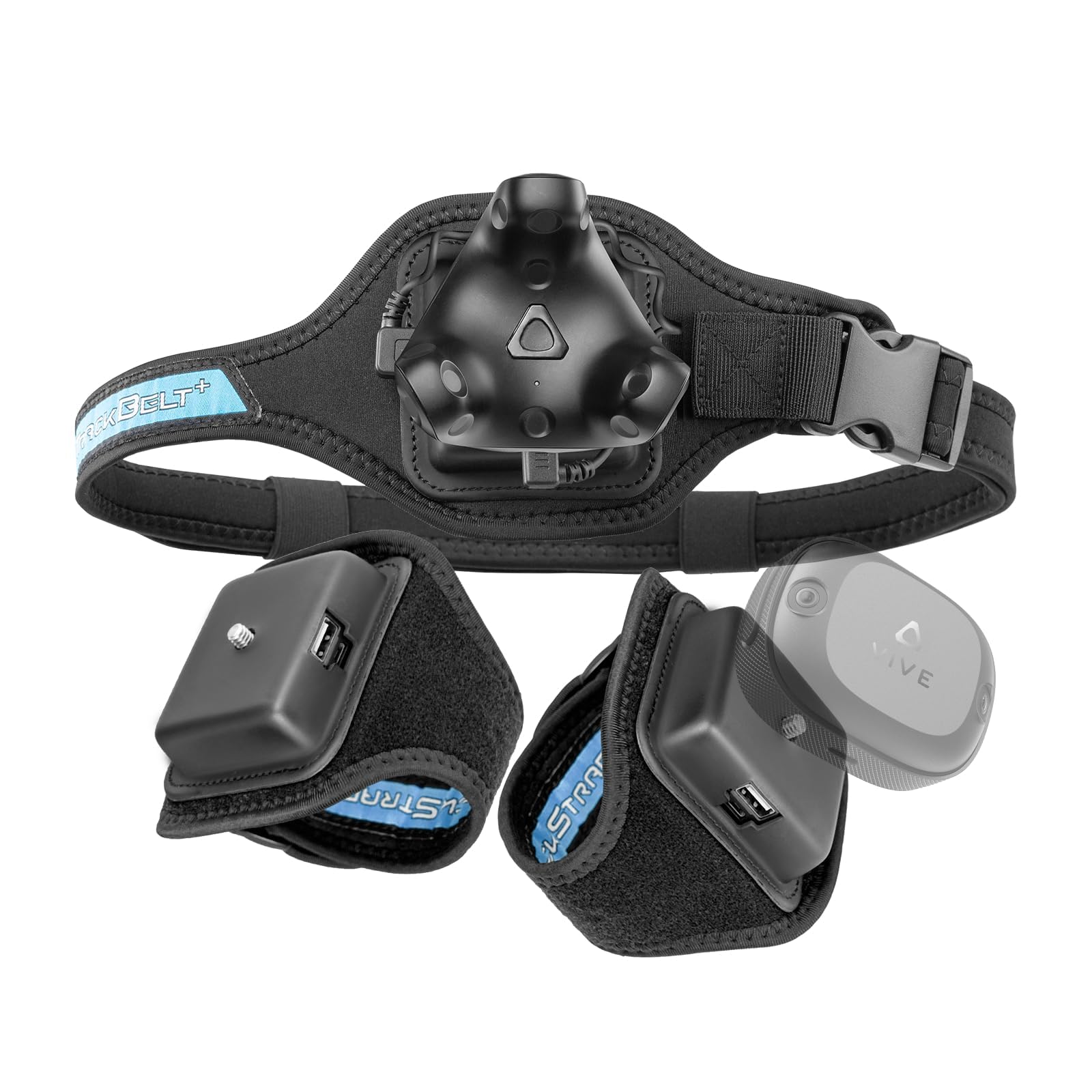
Dance in VR and you already know the routine of ripping trackers off your feet to charge them. This kit answers that with a built-in power source rated for up to 20 hours, against the 7.5 hours of the HTC VIVE Tracker above. Size is the other measured difference: at 4.9 x 4.6 x 3.9 inches the kit is bulkier than the 4 x 4 x 3.4 inches of the bare HTC tracker, roughly a 23% larger footprint you notice more on the belt than on the foot.
What ships in the box is the real argument: two Trackstrap Plus foot straps, one Trackbelt Plus waist strap, plus three Micro-USB and three USB-C cables. The elastic neoprene is breathable, and the fit holds its position through fast movement — the straps are not sliding around mid-dance. It works with the Vive 3.0, Vive Tracker 2.0, Vive Ultimate Tracker, and Tundra Tracker, so you are not locked to one puck. The thing everyone raves about is the quality of the build, and comfort sits high on that list too, since the padding stays steady through a several-hour session.
The recurring gripe lands on one specific part: the Velcro. Dancers running around seven hours a day report the closure losing grip within about a month, needing careful re-pressing and the occasional tightening. It is a wear item, not a failure — the rest of the strap holds together without fraying — but if you are a heavy daily user, budget for that. A comfortable fit for most body types, with a note that the strap loops run on the snug side for larger legs.
The runtime math: At up to 20 hours per charge versus 7.5 on the bare HTC tracker, this is the strap kit for people who forget where their charger is.
Fit note worth knowing: The Velcro closure is the weak link over time, especially for high-intensity daily use — treat it as a consumable and it holds up fine.
Built for the daily dancer: Long, sweaty, high-motion sessions are exactly this kit’s home turf, and the included belt and cables get you running the same day.
Go lighter if: You only play seated or in short bursts — the extra bulk and hook-and-loop upkeep are more than you need.
3. 【国内正規品】 Vive トラッカー (3.0) 99HASS001-00 MN747
The same workhorse puck, packaged for buyers who want the original HTC part number.
This is the Vive Tracker 3.0 under its Japanese-market listing, model 99HASS001-00, and the physical specs are familiar. HTC’s own copy says the 2018 model was shrunk to smaller, lighter dimensions with roughly 70% better battery life, and the listing carries a 110° field of view for the tracking cone. It is compatible with Base Station 1.0 and 2.0, the VIVE and VIVE PRO series, Cosmos Elite, and Valve Index. What you are really buying is the tracker itself in a black finish with a USB-C connection.
Owners describe the tracking as genuinely sharp — the positional accuracy is the whole reason people move off cheaper IMU-based trackers, which rely on internal motion sensors alone and tend to drift. Buyers report that spark of understanding the first time they use it. The battery side is the quieter story: one multilingual review puts runtime at more than 7 hours, and the weight is light enough to forget it is strapped to your waist. For the chest, waist, and feet arrangement that most full-body rigs use, this covers it without fuss.
The trade-off is the same as every base-station tracker — environment. You need room, you need base stations positioned thoughtfully, and you need to accept that a tightly packed room can cause tracking loss unless you get clever with height and angles. This is a smaller review pool than the standard US listing, so you are buying on the spec sheet and the hardware reputation rather than a wall of feedback. That is fine, but know it going in.
Why tracking snobs pick it: Positional accuracy that holds up next to Tundra-based setups, with a wide compatibility list across base stations and headsets.
The honest limit: Base stations and floor space are on you, and this listing draws fewer buyer reports than the mainline version — read the specs closely before ordering.
Choose this if: You specifically want the HTC 3.0 hardware in its Japanese-market packaging and already have the base-station infrastructure to run it.
Look at the standard listing if: You would rather buy from the version with the larger owner base behind it.
4. bHaptics TactSuit Pro
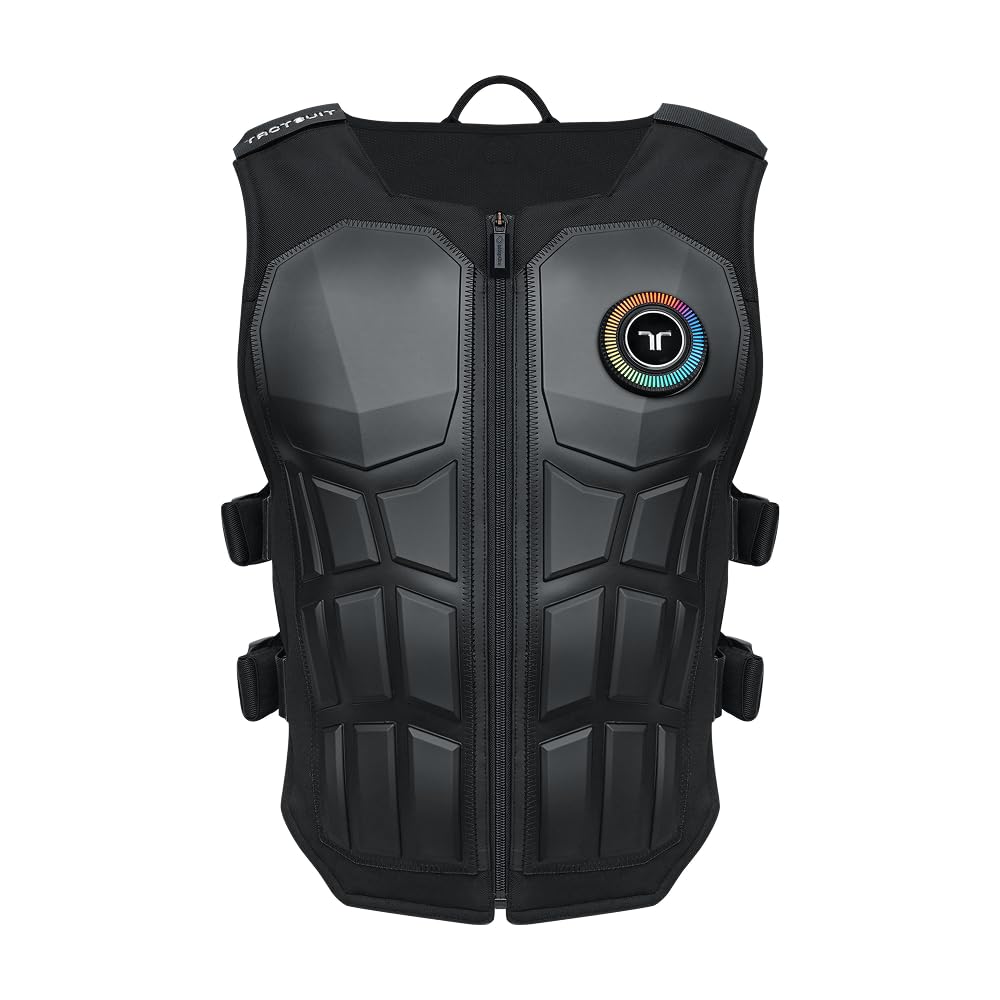
A vest that turns a gunshot into a thump against your ribs.
Trackers tell the game where your body is. This vest tells your body where the game is — 32 motors spread across the torso, translating audio or native haptic data into directional taps, recoil, and impacts. It works across 300-plus supported games, and the audio-to-haptics mode means anything with sound — a movie, a stream, a track — can drive the motors even without built-in support. The 4.1-pound shell uses nylon and polyester with a breathable mesh lining, adjustable shoulder snaps, and side straps, and it includes a Bluetooth dongle plus a USB-C charging cable.
Fitting is more forgiving than the vest shape suggests. Adjustable snaps and side straps let it sit on a range of body types, and it stays firm rather than riding up during a session. Build quality earns the most consistent praise, and the tactile payoff in something like Arizona Sunshine is genuinely rich once all 32 motors are firing. Pairing to a Quest 3 through the bHaptics Player app takes a couple of minutes, and the battery arrived charged on at least one report. It is thin and light enough that you forget the weight after a few minutes.
Now the part a buyer should hear clearly: this vest does not do what trackers do. It does not track your limbs, and in a room where you move a lot the trackers you are wearing can get in the way of the vest settling properly. VRChat haptics need per-avatar setup, and Quest haptics run noticeably weaker than on PC. Reliability is the mixed note in the feedback — a few units have died early, and the setup software and power button have drawn criticism. Buy this as a haptic layer on top of your trackers, not as a replacement for them.
The feeling it delivers: Directional impacts and recoil across 32 motors, with audio-to-haptics covering anything that makes noise.
Where the design asks patience: Setup takes fiddling, per-avatar VRChat haptics are manual work, and the vest does not replace limb trackers — it adds to them.
For the sensory chaser: Anyone who wants their VR to hit back, whether in shooters, racing, or music-driven experiences, will find this the most physical upgrade on the list.
Skip the vest if: You are trying to solve full-body tracking — that job belongs to the puck-and-strap picks, and this is a companion, not a substitute.
5. Tobii Eye Tracker 5
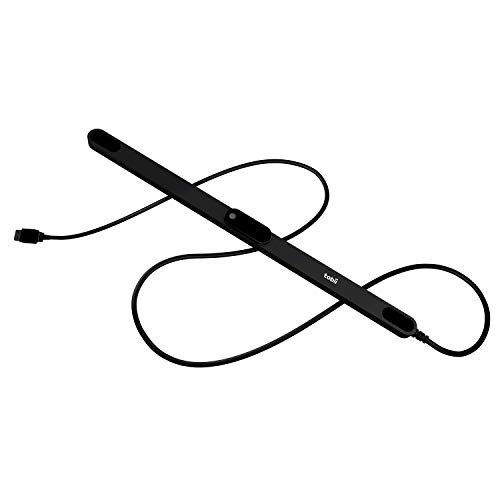
No straps, no pucks, no charging — your eyes steer the camera.
Not everyone wants hardware strapped to their ankles. This is a single bar that mounts under your monitor and watches your head and eyes, so looking at the corner of the screen moves your in-game view there. It weighs 97 g and mounts magnetically, including on curved ultrawides without issue. It works in all light conditions — pitch black or bright daylight — and it is compatible with Windows 10 and Windows 11, plus Windows Hello for biometric sign-in. There are 170-plus enhanced games, with Star Citizen, Microsoft Flight Simulator, War Thunder, and Euro Truck Simulator at the front of that list.
In sims, the payoff is real. Flight simmers describe a hands-free look-around that makes cockpit scanning feel natural, and truck-sim drivers like the combined head-plus-eye scrolling. Setup can be easy or it can be a project: calibration is quick on a clean install, but the balance between head and eye sensitivity needs slider tuning before it feels right, and binding a recenter key is close to mandatory. Tracking is described as instant and responsive on good hardware, with recalibration a matter of seconds when you shift position.
Compatibility is the wall. It shines in the sims built around it and struggles in the many games that never added support, and peripheral conflicts happen — flight pedals and certain yokes have knocked it offline entirely in some setups. Monitor height matters too; a sensor sitting low loses accuracy. If your library is DCS, MSFS, and racing sims, this bar adds hands-free cockpit look-around to your flat screen without a wearable. If you play a broad mix, check the enhanced-games list before committing.
Where it shines
- Hands-free head and eye camera control in 170-plus enhanced games
- Magnetic mount handles curved ultrawides without complaint
- Works in complete darkness or bright daylight
- 97 g bar that adds no wearables to your sessions
Where it asks you to compromise
- Outstanding in supported sims, close to useless in unsupported titles
- Sensitivity sliders need real tuning before it feels natural
- Peripheral conflicts can disconnect it in some sim rigs
The sim specialist: Flight and racing simmers who want to look around a cockpit without a tracker on their head will get the most out of this bar.
Not a VR tracker: Full-body avatars in VRChat are a different job entirely — this watches your face, not your feet.
6. Sony mocopi

Six tiny sensors, no base stations, and a smartphone doing the heavy lifting.
Sony’s approach strips the room out of the equation. You get six sensors at about 8g (0.28 oz) each, attached with the included head, wrist, ankle bands and a waist clip, and the system runs without base stations or cameras. That makes it usable in a small bedroom where a Lighthouse setup would never fit. Battery runs up to 10 hours of continuous use, dustproofing and water resistance cover indoor and outdoor recording, and the whole kit travels in a charging case. The mocopi VR app is free, and a PC app is available for live streaming and longer recordings.
The hardware is genuinely interesting for motion capture work. Calibration is minimal — you step forward and the system starts tracking — and the sensors are light enough to wear while doing other things. For creators capturing movement to bring into 3D tools, the freedom from a dedicated space is the headline. Sony’s own listing is refreshingly honest that a paid PC app open up the professional workflows, and that data can flow into tools like SlimeVR if you put in the setup time.
Complaints cluster around software and drift. The phone app can freeze and sensors can disconnect, and tracking drifts, with chest and ankle positions needing periodic recalibration, especially over a long capture session. The straps are basic hook-and-loop and can slip. Most importantly, standalone Quest users should hear this clearly: as one buyer put it, mocopi is “very baddd like very badddd unless you have a PC.” Plan on VRChat with a standalone headset and this is not the kit. Run a PC pipeline as a creator and the wireless capture is the draw.
What it does that base stations cannot: Captures full-body motion in a small room, outdoors, or anywhere without a fixed rig — at 8g per sensor and 10 hours of runtime.
The software caveat: Phone app stability and tracking drift are the recurring themes, so budget time for recalibration and expect the PC workflow to be where it earns its keep.
Made for mocap creators: If you are recording motion for animation, streaming, or 3D content and need portability, this is the most flexible capture kit on the list.
Wrong tool for VRChat-only players: A standalone headset plus mocopi is a frustrating pairing — the base-station trackers serve that need far better.
7. HTC 3 Pack VR VIVE Tracker (3.0)

Three trackers, the belt, the straps, and the dongles — one box, no hunting.
If you are building a full-body rig from scratch, this bundle saves you the scavenger hunt. You get three HTC VIVE Tracker 3.0 units, three USB-C dongles with cradles, three USB cables, a Rebuff Reality TrackBelt, two TrackStraps, and a one-year warranty. The 2.3-pound package with the sweatproof straps is a coherent kit — everything plays together. Three trackers plus the included dongles is the standard starting point for waist-and-feet tracking, and the belt and straps make the transition from box to first session short.
Owners mention a mostly quiet experience once it is running. One buyer set it up for a Valve Index and had no tracking or play issues, with the straps fitting well. Battery lands around up to 8 hours per tracker with charge left in the tank. The tracker hardware itself is the same 3.0 puck covered above, so you get the same 240-degree field of view and base-station accuracy. The bundle’s real value is convenience and the comfort of one warranty covering the whole set.
The setup story deserves a straight answer. This is not an out-of-the-box experience on a Quest 2. You need two Valve 3.0 base stations and a capable PC, and the configuration steps are genuinely fiddly the first time. Full-body tracking then only works with SteamVR games through the PC, not Oculus titles. If you go in knowing that, the bundle gets you to three-tracker waist-and-feet tracking in one purchase. If you expect plug-and-play, the first evening will be a learning curve.
The convenience win: Three trackers, three dongles, belt, and straps in one purchase with a single warranty — the shortest path from empty room to full-body rig.
The setup reality: Base stations and a PC capable of SteamVR are prerequisites, and the first configuration is a tinkerer’s task rather than a plug-and-play one.
Start here if you are building fresh: A full body-tracking kit in one box is the least painful way to go from zero to tracked, assuming the base stations and PC are sorted.
Already own trackers? Buying a single puck or a strap kit makes more sense than duplicating hardware you already have.
8. Meta Quest 3 512GB
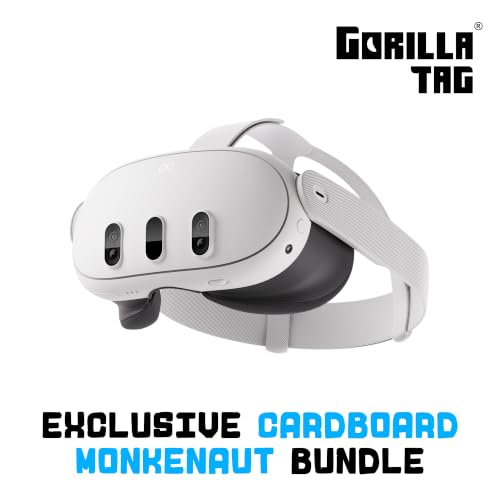
The headset most people build their tracker setup around — and it earns it.
Before you buy a single tracker, you need a headset to attach it to, and for a huge share of buyers that headset is the Quest 3. The display runs a 4128×2208 maximum resolution and a 120Hz refresh rate, powered by the Snapdragon XR2 Gen 2 processor, with 8GB of RAM and a 512GB storage capacity in this version. It is untethered, tracks room boundaries on its own, and uses two RGB color cameras for full-color passthrough so you can see your real room while virtual objects appear in it. This bundle adds a Gorilla Tag Cardboard Monkenaut package and a 3-month Meta Horizon+ trial with access to 100-plus games.
What wins people over is how far the visuals have come. The pancake lenses and sharp text feel like a real generation leap next to older headsets, and even older games run smoother. Wireless PCVR streaming holds up well for buyers coming from wired rigs, with no latency issues reported. Setup is quick, the controllers feel natural, and full-body tracking on a SteamVR game is reachable through the PC pipeline. Hand tracking and color passthrough make it feel usable beyond gaming.
Battery is the trade-off nobody escapes. The headset is rated at 2.2 hours, and heavy sessions can burn through that far quicker depending on what you are running. You can charge while playing, so a long cable fixes the problem, but budget for the habit. The bundled head strap is also a common complaint — an aftermarket strap is a common first upgrade. Neither kills the value; both are easy to fix.
The strengths that land
- 4128×2208 display at 120Hz with sharp text and vivid color
- Untethered and standalone — no base stations or PC required for most play
- Full-color passthrough blends your real room into the game
- 512GB storage is roomy for a large app and game library
The honest trade-offs
- 2.2-hour battery life means a charging cable for long sessions
- The stock head strap is the first thing most owners replace
- Full-body tracking still needs PC-side setup with a tracker system
The starting point: If you are buying into VR and plan to add trackers later, starting with the headset that most tracker setups are built around makes the rest of the journey simpler.
Fix the strap: Budget for an aftermarket head strap on day one — the included one is not the strength of the package.
9. Roto VR Motion Gaming Chair

A chair that physically turns when you look — VR for people who sit still.
If your VR is seated and your tracking frustration comes from not being able to look around a cockpit or room naturally, this chair reframes the whole problem. A motorized base rotates with your head via an included head tracker, synchronized with in-game movement for a 360-degree seated experience. It adds full-body haptics, adjustable rotation speed and haptic intensity, adjustable height, an integrated cable magazine, and locking rollers. It is built from a metal frame with foam fill and measures 30 inches deep, and it stands at about waist height to a typical desk chair.
The safety angle is the unexpected argument for it. Locking rollers mean the chair is not rolling into a wall or TV mid-session, and seated rotation removes the standing fall risk entirely. Owners who use it daily describe it as a way to stay engaged for long sessions without the headset swapping worlds and losing them. Assembly is reported as straightforward, and the motor is quiet enough to use in a living room without drawing complaints. For users with mobility limits, keeping the session in a chair is the practical difference between playing and not playing.
The honest limit is reliability. The list of one-off reports is real: a head tracker that disconnects and overheats, a unit that only hums, a puck clip that broke, and support that has not always responded quickly. Assembly is easy, but “it works from the start and keeps working” is not a guarantee the listing can make for every unit. This is a sit-and-play accessory for people who accept that risk and want the seated 360-degree experience. It is not a standing full-body tracking solution, and anyone who wants to dance is better served by a strap kit.
What it solves: Sitting still while looking around — motion can reduce disorientation for seated players and keeps you safely in one place during a session.
Where the risk sits: Hardware reliability and after-sales response are the recurring concerns, so buying from a source with a clear return policy matters here.
For seated immersion: Players who want 360-degree motion without standing, and users with mobility limits, get the most out of a motorized chair like this.
Skip if you dance: Anyone doing room-scale fist-pumping should invest in trackers and a belt — the chair is built for sitting still.
Know the Specs
Field of View (The Tracking Cone)
Every base-station tracker lists a field of view — the spread of angles it can see and be seen from. A 240° figure means a wide tolerance for base station placement; a narrower 110° cone means closer positioning matters. In plain terms, the wider the cone, the fewer dead zones you have to worry about when you move.
Battery Hours (What You Actually Get)
A rating like 7.5 hours or 20 hours is measured from a full charge under spec conditions. Actual runtime depends on the tracker model, the dongle, and how often it wakes. A strap system with a built-in power source tends to outlast bare trackers by a wide margin, so match the number to your real session length rather than the maximum.
Weight Per Sensor (Comfort Over Time)
Trackers ride on your ankles and waist. A 8-ounce puck feels fine at the start of a session and noticeable after two hours. Strap-based systems spread the weight across the leg with padding, which reduces the rolling feel that heavier pucks produce.
USB Ports and Dongles
Each base-station tracker needs a dongle that plugs into your PC. Three trackers means three free USB ports, plus a headset or any other accessory. Count your free ports before you buy a multi-pack, and remember that a USB hub can introduce latency.
Line of Sight (The Hidden Requirement)
Base-station trackers use infrared light, and infrared does not pass through fabric, furniture, or walls. A blanket draped over a leg while sitting can drop a tracker entirely. Before you invest, walk your play space and confirm every tracker position can see a base station at all times.
PC vs Standalone
A standalone headset like the Quest 3 runs games on its own, but full-body tracking through trackers usually needs a PC in the loop. If you are committed to standing players and no PC, a motion-capture sensor kit like the mocopi or a seated chair like the Roto is a better fit than a base-station tracker.
Common Questions
Do I need base stations to use the HTC VIVE Tracker (3.0)?
How many trackers do I need for full-body tracking?
Can I use the Rebuff Reality Trackstrap Plus with any tracker?
How long does the VIVE Tracker battery actually last?
Does the Sony mocopi work with VRChat on a standalone Quest?
Can the Tobii Eye Tracker 5 replace body trackers?
What happens if a tracker loses line of sight to the base station?
Is the Meta Quest 3 a tracker?
Does the Roto VR chair help with motion sickness?
Will the bHaptics vest work alongside trackers?
The Bottom Line
For most people, the vr trackers setup that makes the most sense starts with the HTC VIVE Tracker (3.0). Its 4.5+ stars is the highest score of any tracker on this list, and its 7.5-hour battery plus 240° field of view gives you the widest base-station placement tolerance here. Dance and want the headset to stop dying mid-session? Add the Rebuff Reality Trackstrap Plus for its 20-hour power source and skip the charger hunts. Building a full-body rig from nothing? The HTC 3 Pack with TrackBelt puts three trackers, three dongles, and the straps in one box with a single warranty.
And if your heart is in the cockpit rather than the dance floor, the Tobii Eye Tracker 5 gives sim players hands-free head and eye control across 170-plus enhanced games without a single wearable. Match the tracking method to how you actually play — base stations for VRChat dancing, a strap kit for long sessions, Tobii for sims — and full-body VR stops being a source of frustration.
How we choose
We do not accept paid placement. Every pick is matched to a real buyer and a real use-case; we do not hands-on test units.
Sources
Specifications: manufacturer listings and product documentation. Review insights: verified customer reviews, as of October 2026. Pricing: not shown on this page (it changes often); check the current price via the retailer link.
As an Amazon Associate, Aappliancez earns from qualifying purchases. This does not affect which products we feature.