Disclosure: Some links in this post are affiliate links. As an Amazon Associate I earn from qualifying purchases, at no extra cost to you. Learn more
Specs are compiled from manufacturer listings and verified buyer reviews and can change over time — please confirm the key details on the product page before buying.
The right game system for an older player removes obstacles instead of adding them. Controllers with too many small buttons wear out hands. Twitchy action games punish slower reflexes. Tiny text on a small screen turns a fun evening into a squint. This guide focuses on systems that fit older players — bigger screens, simpler controls, motion-based play, and large libraries of familiar games.
This guide is built by comparing the manufacturers’ published specifications and the patterns across verified customer reviews, so you get each pick’s real strengths and trade-offs instead of marketing spin.
Some picks here are hands-free motion consoles that need no controller at all, while others are handhelds with a big bright screen and familiar classics. This page finds the best video game system for seniors without a pile of confusing spec sheets.
Top Picks

How To Choose The Best Video Game System for Seniors
Most older players do not need a powerful machine. They need one that stays out of the way. The three things that matter most are how you interact with it, how large the picture is, and whether the games are ones you already know how to play.
Controls and hand comfort
A gamepad with small shoulder buttons and tight analog sticks can cause cramping after an hour, especially for larger hands or stiff joints. Motion consoles skip the controller completely — you wave, punch, and squat — which sidesteps the problem entirely. Retro plug-and-play sticks sit in the middle: simple buttons, but you still hold a pad.
Screen size and TV connection
A 7-inch built-in display is fine for close-up handheld play. If you plan to play from a recliner across the room, a console that plugs into your TV over HDMI puts the picture on the biggest screen you own. Many of these systems support both.
Preloaded games versus subscriptions
Some systems promise tens of thousands of built-in games, but a large part of those catalogs can be alternate regional versions or duplicates. Others ship with five to fifty games plus an optional paid pass for more. Read what is actually included before you commit to a monthly pass.
Physical space and setup
Motion consoles need open floor space and a clear camera view, generally a spot in front of the TV with some distance from the sensor. Handhelds and plug-in sticks need almost nothing beyond an HDMI port and, often, Wi-Fi.
Side-by-Side Comparison
| Model | Best For | Control Type | Built-In Games | Screen / Display | Amazon |
|---|---|---|---|---|---|
| Nex Playground★ Best Overall | Hands-free active play | Body motion camera | 5 starter games | TV via HDMI | Amazon |
| Atari Gamestation GoTop Performer | Atari nostalgia | D-pad, paddle, trackball | 200+ | 7-inch, TV via HDMI | Amazon |
| abxylute One ProMost Versatile | Cloud and remote play | Digital joystick + gamepad | Emulator + Android titles | 7-inch 1080p, 4K output | Amazon |
| KINHANK MotionX | Second motion option | Body motion camera | 40+ free games | TV via HDMI | Amazon |
| Logitech G Cloud | Streaming handheld | Gamepad | Streamed library | 7-inch 1080p touchscreen | Amazon |
| Trimui Smart Pro | Budget retro handheld | Joystick | Multi-format emulation | 4.96-inch 720×1280 IPS | Amazon |
| Boltz Retro Stick | Huge retro library | 2x 2.4GHz wireless | 40,000+ | TV via 4K HDMI | Amazon |
| YOROSY TV Game Console | Budget plug-and-play | 2x 2.4GHz wireless + AR gun | 200+ listed | TV via HDMI | Amazon |
Detailed Reviews
1. Nex Playground
Our pick — 4.5+★ from 5,000+ verified ratings; the strongest balance of quality and price.
The console that asks you to stand up and swing — and forget there was ever a controller.
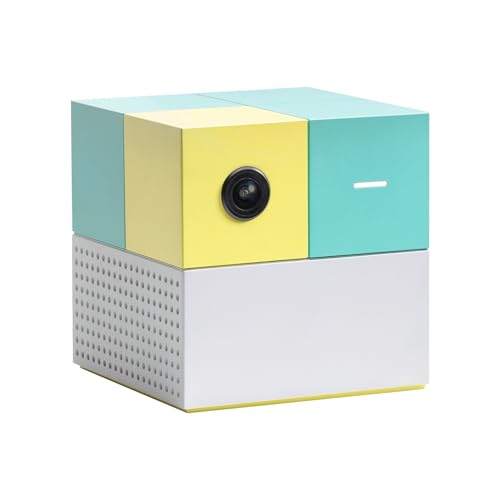
For an older player whose hands no longer get along with a gamepad, the Nex Playground is the most direct answer here. There is no controller at all. A wide-angle camera watches your body move, and the on-screen action follows — so a wave of the arm slices fruit in Fruit Ninja, and a squat or a punch drives the game forward. The unit connects to your TV with an HDMI cable, and setup takes minutes rather than a manual. At 13.76 ounces it is light enough to move between rooms or pack for a visit to the grandkids.
What wins people over most is the sheer fun of it — that is the single most-praised thing about this system. Family friendliness runs a close second, and the reasons show up in the reviews: a 3-year-old, a 7-year-old, an 18-month-old, and the adults all finding something to do on the same machine. Peppa Pig and Bluey are named as a big selling point for the little ones. One family reports that morning sessions before school helped their 7-year-old with ADHD and ASD focus, and teachers agreed. For the older player, the same principle works in reverse: a Gen-Xer or boomer who grew up on arcade games can swing at Whac-a-Mole without learning a controller layout.
The honest catch is the content model. You get five games in the box — Fruit Ninja, Starri, Whac-a-Mole, Go Keeper, and Party Fowl. Everything else, including Peppa Pig, Teenage Mutant Ninja Turtles, and Barbie, sits behind a separate Play Pass purchase. Plan the budget for the games you actually want, and set expectations early if you are buying for a household that expects a full catalog on day one.
Where this system earns its keep
- No controller at all — motion tracking reads your body, so no small buttons to learn or squeeze.
- Up to 4 players at once, which turns a visit from the grandkids into a group activity instead of a solo screen.
- kidSAFE+ COPPA certified, no ads, no in-app purchases, and motion data is not stored in the cloud.
- Set up in roughly ten minutes with an HDMI cable and Wi-Fi, with a magnetic lens cover protecting the camera.
What to plan around
- Only five games are included — the rest need a Play Pass purchase.
- You need open floor space between you and the camera for the tracking to work well.
Reach for this if: you want a living-room activity the whole family can join without learning a controller — especially useful for grandparents hosting young visitors.
Budget for more: the included game list is short, so factor the Play Pass into the total you plan to spend.
2. My Arcade Atari Gamestation Go
A 7-inch screen full of the arcade games you grew up feeding quarters into.
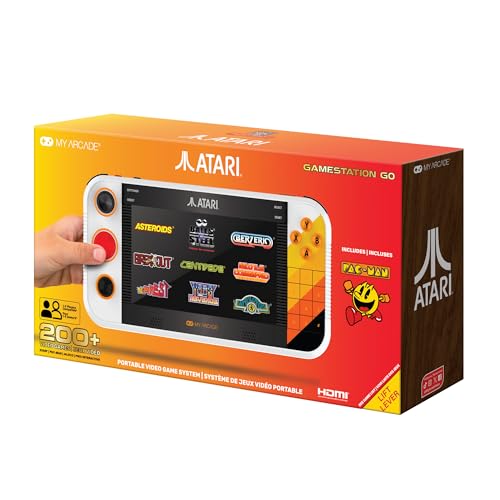
If your idea of a good evening is Centipede, Asteroids, or Missile Command, this is the system built for you. The Atari Gamestation Go comes loaded with 200+ titles drawn from the Atari 2600, 5200, 7800, and Arcade libraries, plus Recharged and Balls of Steel pinball tables. PAC-MAN is included too. The 7-inch full-color display is the biggest built-in screen on this list, and it connects to a TV over HDMI when you want it larger still. Built-in Wi-Fi handles firmware updates, and a rechargeable battery means it works away from a wall outlet.
You get the right controls for each game, not one pad forced onto everything. The unit includes an integrated paddle, a d-pad (a flat directional pad), a trackball, a numeric keypad, bumpers, and classic A/B/X/Y buttons — so each game plays the way it was originally designed. That matters if you remember exactly how a trackball should feel under your thumb. A 64-year-old owner describes the loaded library and sensitive controls as easy to handle, and specifically calls out the left-hander-friendly layout. The Centipede trackball and the pinball bumpers get singled out as excellent.
Gameplay and nostalgia dominate the feedback, which tells you what people actually care about here. The mixed notes are worth knowing. Some owners find the emulation on the Recharged titles glitchy, and a few describe the d-pad, spinner, and trackball feel as mediocre. Treat that as a difference in expectation rather than a defect — the built-in library is large, and an SD card slot (exFAT) lets you load additional ROMs if you want more.
The control argument: this is the only system on the list that gives you a trackball and a paddle in the same chassis — the closest thing to standing at an original arcade cabinet without leaving your chair.
The honest caveat: emulation quality varies by title, so a handful of the Recharged games may not feel as smooth as the classics.
Made for the arcade generation: buy it if the names Asteroids, Tempest, and Warlords mean something to you and you want them on a 7-inch screen with the right physical controls.
Look elsewhere if: you want a modern console experience — this is a nostalgia machine, not a platform for new releases.
3. abxylute One Pro Cloud Handheld
A 430g handheld that streams console games without a console in the room.
The One Pro answers a different question: what if you want to play modern games but do not want another box under the TV? It streams AAA titles over Wi-Fi from Xbox Cloud Gaming, GeForce NOW, Amazon Luna, PlayStation Plus Premium, and Boosteroid. It also does local remote play through Moonlight, PlayStation Remote Play, Steam Link, or PXPlay. For retro tastes, emulation covers PS2, GameCube, and other popular systems, and Android games run locally from Google Play. The 7-inch 1080p display is bright and sharp enough for small text, which is exactly what older eyes need.
It feels light in your hands at 430g — well under half the weight of a typical gaming laptop, and lighter than many tablet-plus-controller setups. Owners consistently point to performance as the standout, with cloud streaming running smoothly and near-zero latency (delay) on a strong connection. The MediaTek Genio 510 chipset (the processor) handles demanding titles, and the digital joysticks offer two modes — Circle for ultra-precise 0.2% tracking or Square for broader input — so you can dial in the feel rather than live with one fixed stick. Pro-level controls include haptics (vibration feedback) and a gyroscope (motion sensor). Battery life runs to 8+ hours, and 4K video output (3840×2160 pixels) handles a big TV or AR glasses.
There is a requirement buyers must plan for: you need broadband Wi-Fi at 5Mbps minimum, and you supply your own Xbox or PlayStation subscription for the streaming services. The joysticks divide opinion — some find them short-throw and imprecise for first-person aiming, and a few units reportedly arrived with a dead pixel or weak Wi-Fi at short range. If all you want is a hands-off living-room game for the grandparent set, the motion consoles above are a better fit. If you want access to a massive modern library portably, this is the most capable option here.
Best for the tech-comfortable senior: the one who already has a Game Pass subscription and wants their games on a handheld that goes from couch to guest room.
Not for the motion-first crowd: the learning curve is real — streaming apps, Wi-Fi quality, and account sign-ins all need patience.
Choose it for range: this is the pick with the largest modern game library in the smallest form, and the 7-inch 1080p panel keeps text readable.
Skip if: you want plug-and-play simplicity with no accounts or subscriptions to manage.
4. KINHANK MotionX AI Family Motion Play System
Swing, squat, and play — the second body-tracking console on this list, with a free starter pass.
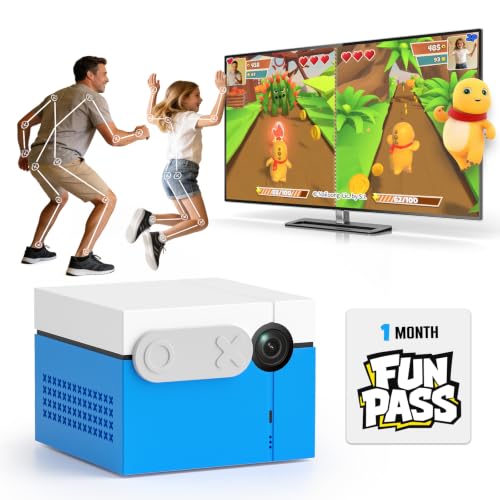
The MotionX takes the same controller-free idea as the Nex Playground and adds a free month of the full catalog. It ships with 40+ free games and one month of FUN PASS, which opens up adventure, rhythm, sports, fitness, and puzzle titles. Setup is an HDMI connection to your TV and an on-screen walkthrough that finishes in minutes. Privacy is handled with a physical camera cover plus on-device motion tracking — the camera video is never uploaded. At 1080p output, the picture holds up on a modern flat-screen.
Owners praise quality and gameplay most, and the practical details back that up. The kids’ games run in short bursts — one owner times the arcade titles at 5 to 10 minutes using arm and squat controls — which actually suits an older player who wants a quick round, not a three-hour session. Motion recognition (the camera reading your body movements) is generally quick and accurate in decent light, and a firmware update has reportedly sharpened it. You still need the included remote to navigate the screen, a small complaint many will not mind.
The two real-world limits are lighting and reliability. Owners consistently note that motion tracking gets unreliable in low light — evening sessions with the lamps down may frustrate. Some units have also arrived non-functional or struggled to hold a player in frame, which is a genuine reason to keep the packaging until you have tested it. PLAN the subscription after the free month, because the full catalog wants a FUN PASS to continue beyond it.
What it brings to the room
- 40+ free games included plus a full month of FUN PASS at no extra cost.
- Physical camera cover and on-device tracking keep the video local.
- Short 5-to-10-minute game rounds make it easy to play one session and stop.
Where it may frustrate
- Motion tracking gets unreliable in low light, so evening play needs the lamps up.
- The full catalog moves to a paid subscription once the free month ends.
A fair alternative: choose it over the Nex Playground if a free month of the full catalog is more valuable to you than the larger Nex game library.
Only if lighting allows: plan a well-lit play area, because tracking weakens in dim rooms.
5. Logitech G Cloud Gaming Handheld
Logitech’s cloud handheld is a light, bright screen with a gamepad attached — and one big ergonomic question mark.
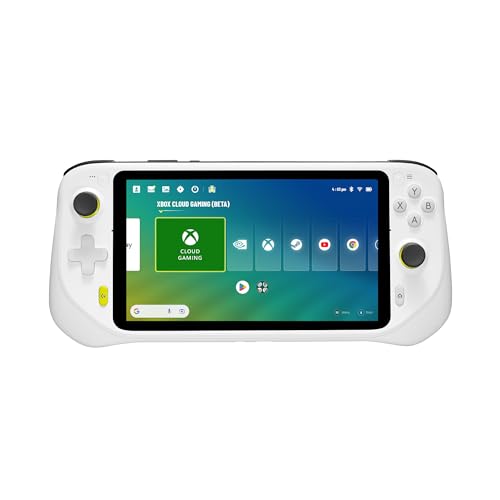
The G Cloud packs a 7-inch 1080p touchscreen, 64GB of storage, Bluetooth and Wi-Fi, and access to Xbox Cloud Gaming and NVIDIA GeForce NOW. At 463g it is light enough to hold one-handed between turns. On a stable connection, cloud streaming runs smoothly with minimal lag, and the responsive sticks and satisfying triggers feel right for retro and modern streaming alike. Many owners treat it as a backup or travel console — the kind of thing you grab for a hotel room rather than a main setup.
The critical decision point is the grip. Owners with larger hands report the small, cramped bottom buttons cause hand cramps and finger fatigue after roughly an hour of play, and at least one buyer returned the unit over it. For an older player with arthritis or a stiff grip, that is a serious concern — try one in person if you can, or plan short sessions. The responsiveness and streaming subsystems also draw mixed feedback, so expect cloud performance to depend on your home internet rather than the device alone.
The gaming experience itself is the strongest signal here, and most buyers come away satisfied. That is the case for buying this as a gift for the gamer in the family who already has Game Pass. It is not the plug-and-play, no-account option that a first-time senior player will find easiest.
What’s genuinely good: the 1080p 7-inch display, 64GB of storage, and Bluetooth/Wi-Fi connectivity make this a competent portable streaming device.
The grip caveat: plan for shorter sessions if your hands are large or tire easily — the bottom buttons are compact.
A good second screen: for someone who already owns a console at home and wants a lightweight cloud streaming handheld for travel.
Try before committing: hand size matters more than usual on this one, and larger-handed players often find the bottom buttons tight.
6. Trimui Smart Pro Handheld
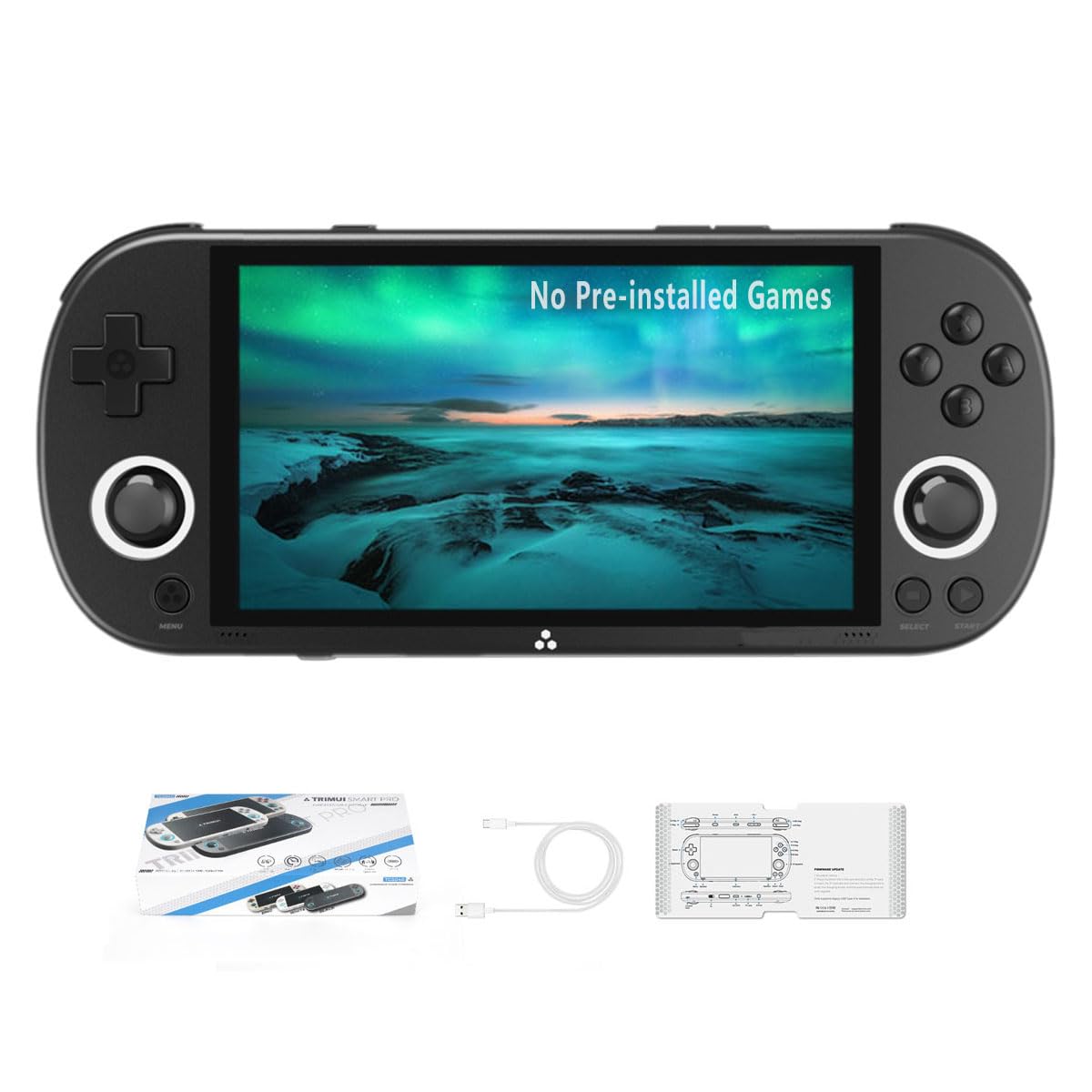
A small, well-built retro handheld with one important catch: no memory card in the box.
The Trimui Smart Pro targets a specific buyer — someone who wants classic games in a pocket-sized device and is comfortable loading their own files. It runs a Linux-based user interface on an A133plus Cortex-A53 quad-core chip at up to 1.8GHz, supports more than 20 emulated game formats, and includes a 4.96-inch IPS screen at 720×1280 resolution with full viewing angles. A 5000mAh lithium battery is rated for 6 hours of play. It charges over USB-C at 5V/1.5A and can charge while shut off.
The catch is stated plainly on the product page: this model does not come with a memory card. You bring your own SD card before you can play anything. Owners who know their way around emulation report it as a great-value device — pre-loaded Pokémon titles found by a 12-year-old, easy firmware updates through CrossMix OS, and graphics that run spot-on. But that fits a buyer who can handle downloading files on a separate computer. The graphics settings and SD card steps make this a poor first pick for someone who wants to turn the power on and start swinging.
A small number of buyers report a shoulder button failing after a few weeks, and there are notes about overheating and battery drain in longer use. It also has a relatively narrow set of reviews, so the reliability picture is less settled than the more established systems here. The upside is a genuinely pocketable design at 8.2 x 4 x 1.6 inches with a bright screen and a long-lasting battery.
The tech-savvy pick: only worth your time if “bring your own SD card” is a minor step rather than a wall.
The honest limit: some units develop shoulder-button issues, so buy with a return window in mind.
For the tinkerer: a good fit if you enjoy setting up emulation and want 6 hours of battery in a small form.
For the plug-and-play buyer: skip it — the no-card-in-the-box requirement makes it a poor choice for a hands-off first experience.
7. Boltz Retro Stick Gaming Stick

A 40,000-game promise in a stick the size of a flash drive — with a wildly mixed reality underneath.
The Boltz Retro Stick advertises 40,000 built-in games, 9 emulators, 128GB of storage, and a 4K HDMI output for modern displays. It ships with two 2.4GHz wireless controllers — 30 feet of wireless range, no tangled cords — plus an HDMI extension cable and a USB power cable. Setup is genuinely simple: plug the stick into the TV, connect power, and you are in. The included games span old-school consoles, and the 4K HDMI output stretches the picture onto a projector or big TV.
Buyer reviews split sharply, which is why this one comes with a strong warning. Some owners are delighted — easy plug-and-play, wireless controllers with no stick drift (the stick doesn’t drift off-center), hours of childhood favorites with the family, and good value for the sheer number of games. Others describe the opposite: games that start on their own with no apparent way to scroll, an included library that appears to be early 8-bit (very old, low-detail graphics) and public-domain content rather than the classics expected, and a large fraction of the 40,000 count being duplicates or save states. The 3.0+ star average tells you both camps are real.
For an older player, that inconsistency is the deciding factor. The controllers are simple button pads that suit the arcade-era feel, and the plug-and-play setup is easy. But you cannot be sure which experience will arrive in the box. If you buy, test the library in the first week while the return option is still open.
What it does well
- Plug-and-play HDMI setup with no installs or account sign-ins required.
- Two wireless controllers included, with no tangled cords across 30 feet of range.
- 128GB of storage holds a large retro library without extra cards.
What can disappoint
- The included library varies — some units ship with far less than the advertised count of real, playable titles.
- Small buttons and a simple menu can be hard to navigate for a first-time player.
Buy with eyes open: worth considering only if you want a cheap, two-player retro stick and are willing to test it immediately.
Not the reliable choice: the library inconsistency makes it a risky first console for an elderly buyer.
8. YOROSY TV Game Console with 200+ Games
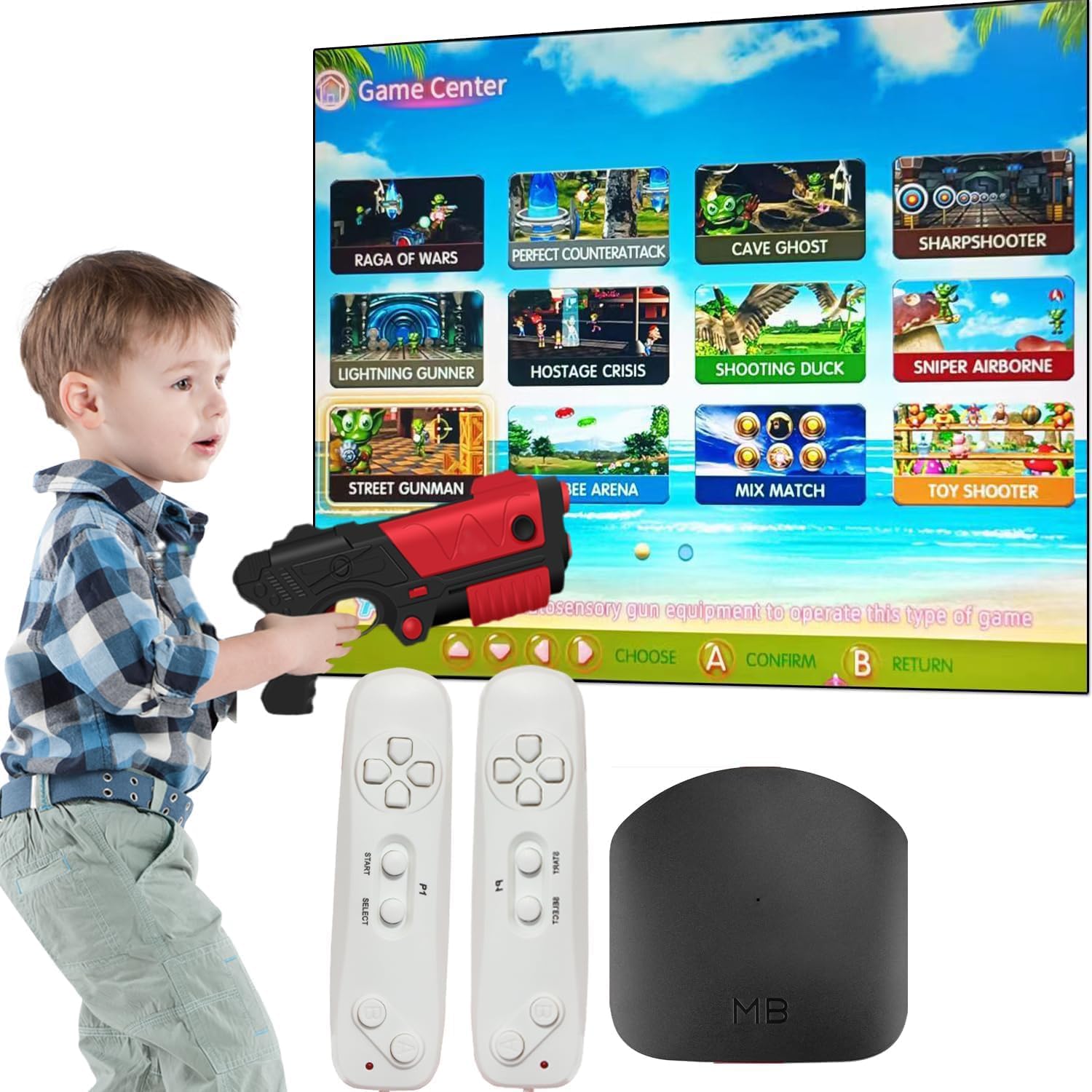
A budget plug-and-play stick aimed at kids — and the one pick on this list built for grandchildren more than grandparents.
The YOROSY console lists 200+ built-in games, plus 29 interactive and sport titles, an AR gun game, and two 2.4GHz wireless controllers. The package also calls out 21 AR Gun games, 72 puzzle games, and 800+ retro games across two overlapping product descriptions. Setup is straightforward: connect to power, plug into the TV’s HDMI port, switch to the HD channel, and play. The controllers do not include AAA batteries, so plan for that. At 0.95 kg the unit is light enough to move between rooms.
The experience is best understood as a Wii-style motion and light-gun console at a low cost. One happy buyer calls it “just like wii but with built in games,” and a grandparent reports the grandkids — ages 6 to 8 — loving the hundreds of options. The honest trade-offs are visible in the library itself: the games sit at NES and SNES-level graphics, controllers need batteries, and not every one of those 200+ titles will hold up over months of play. For a grandparent who wants something the grandkids will dive into during a visit, that trade-off is reasonable. For a senior who wants a system they will play alone for hours every day, it is a thinner proposition.
It also arrives in a fairly basic package and a few owners mention quality issues or a used-looking box. That is a reason to inspect on arrival and use the return window. The upside is a low-risk entry point for a grandparent who wants a screen of games for the grandkids without investing in a major console.
Why it earns a place
- Two wireless 2.4GHz controllers and an AR gun game included for group play.
- Simple HDMI setup — power, plug in, switch the input, play.
- Low-risk entry price for a household that wants a grandkid magnet.
What to expect
- Graphics sit at NES and SNES levels, not modern quality.
- Controllers need AAA batteries, which are not included.
Right for the grandparents’ house: buy it if the main goal is having something the grandchildren will grab during visits.
Not the long-haul system: for a senior who wants daily solo play, invest in the MotionX or Nex Playground instead.
Know the Specs
Motion Tracking and the Camera
A motion console uses a built-in wide-angle camera to watch your body and translate movement into game control. The key numbers are camera range and light sensitivity. You need open floor space between you and the TV, and decent lighting — tracking generally gets weaker in a dim room. On-device processing means the video stays local rather than going to a cloud server, and a physical lens cover protects privacy when the console is off. For an older player, motion tracking removes the controller problem entirely: no buttons, no learning curve, just movement.
Screen Size and Resolution
For a handheld, a 7-inch 1080p display (1920×1080 pixels) is the practical balance — large enough to read on-screen text, sharp enough to keep small icons distinct. A 4.96-inch 720×1280 screen is more compact but still readable at close range. The alternative is a TV connection: an HDMI output puts the picture on whatever sized screen you already own, the easiest way to make it readable for older eyes. Resolution labels like 1080p and 4K describe the number of pixels the device can send to a display, not how good the games look.
Preloaded Library Size
The number of built-in games is not a reliable measure of quality. A 40,000-game count can include many duplicates, regional variants, and save states, while a 40-to-50 game catalog may be more thoughtfully chosen. Read what the maker lists as actual titles. Emulators are the software that runs old game formats — nine of them on the Boltz, twenty-plus formats on the Trimui — and they set what you can actually play.
Battery Life and Charging
Battery numbers on these systems range from 6 hours (Trimui) to 8+ hours (abxylute). TV-connected consoles generally run from wall power, while handhelds need recharging. Check the charger type — USB-C with 5V/1.5A is one example — and whether the unit can charge while off, which makes overnight topping-up easy. A simple household rule: leave a handheld docked when not in use, and it will be charged when the grandkids arrive.
Common Questions
Do motion consoles like the Nex Playground or KINHANK MotionX need a controller to play?
How much room do I need in front of the TV for a motion game system?
Do I have to pay a subscription to play the Nex Playground?
Is a 7-inch screen big enough for someone with weaker eyesight?
What is an emulator, and why does the retro stick advertise thousands of games?
Do these systems need Wi-Fi, or can they run offline?
Can two people play at once on these consoles?
Is the abxylute One Pro the same as the Logitech G Cloud?
Do any of these need AAA batteries?
Which system is easiest for someone who has never owned a game console?
The Bottom Line
For most buyers, the video game system for seniors winner is the Nex Playground because it removes the controller entirely and turns gaming into a family-room activity that works for grandchildren and grandparents alike. It earns its 4.5+ stars across 5,000+ ratings, and the five included games cover a full evening without a Play Pass. If you grew up in arcades and want the real feel of a trackball and paddle in your hands, the Atari Gamestation Go is the pick, with a 7-inch screen and 200+ titles from the Atari era. And for the senior who already has a Game Pass account and wants modern games on a handheld, the abxylute One Pro delivers the lightest 7-inch cloud option on this list.
How we choose
We do not accept paid placement. Every pick is matched to a real buyer and a real use-case; we do not hands-on test units.
Sources
Specifications: manufacturer listings and product documentation. Review insights: verified customer reviews, as of October 2026. Pricing: not shown on this page (it changes often); check the current price via the retailer link.
As an Amazon Associate, Aappliancez earns from qualifying purchases. This does not affect which products we feature.