Disclosure: Some links in this post are affiliate links. As an Amazon Associate I earn from qualifying purchases, at no extra cost to you. Learn more
Specs are compiled from manufacturer listings and verified buyer reviews and can change over time — please confirm the key details on the product page before buying.
Most kids’ trackers fail for one boring reason: the cellular plan behind them. A watch that pinpoints your child beautifully on Monday can drop calls and show a stale pin on Friday if the SIM and network support are weak. The picks below separate the ones that hold a signal from the ones that leave you refreshing an app at pickup time.
This guide is built by comparing the manufacturers’ published specifications and the patterns across verified customer reviews, so you get each pick’s real strengths and trade-offs instead of marketing spin.
You will see how screen-free tags, calling watches, and full kids’ smartwatches differ in battery life, location refresh, and messaging speed, so you can match one to your child’s age and your own comfort level. Here is how to pick the best tracker for kids without paying for features your family will never touch.
Top Picks

How To Choose The Best Tracker for Kids
Start with the question that decides everything else: does your child need to talk back, or do you only need to know where they are? A voice-message tag with no screen keeps a kindergartener reachable without games or a browser. A calling watch suits an older kid who walks home alone and needs to ring you directly.
The SIM card and the monthly plan
Every cellular tracker here needs an active plan to send location and messages. Some arrive with a SIM already inside and a subscription bundled for a set period. Others need you to activate a card and pick a data plan yourself before the watch does anything useful. Read the plan terms before you buy, because a device you cannot connect is a paperweight.
Location method: GPS versus cell-tower and Wi-Fi
GPS (satellite positioning) is the accurate one, but it needs sky visibility and burns battery fast. LBS (cell-tower location, which guesses position from nearby towers) and Wi-Fi positioning fill the gaps indoors and in cities, at the cost of precision. A tracker that combines all three tends to hold a useful pin more often than one that leans on a single method.
Battery days versus refresh rate
A tracker that updates its location every minute is draining the battery every minute. Devices that refresh every couple of minutes and pause when your child is stationary stretch a charge across a school week. Decide which you value more: a tight live pin, or a device that survives to Friday without a charger hunt.
Build, band, and water resistance
Kids are hard on straps and screens. Silicone bands survive sweat and rain better than stiff plastic, and an IP rating (a water-and-dust resistance score) tells you whether splashes are fine. A screen-free tag clipped to a backpack takes far more abuse than a touchscreen on a wrist.
Side-by-Side Comparison
| Model | Best For | Connectivity | Battery | Location Method | Amazon |
|---|---|---|---|---|---|
| MOKAST Kids Smart Watch★ Best Overall | Games and camera on a budget watch | 4G | — | Dual GPS and LBS | Amazon |
| Garmin BounceAlso Great | Older kids who text and voice-message | 4G LTE | Up to 2 days | Real-time GPS tracking | Amazon |
| BoT Talk Kids GPS Tracker | Screen-free first step before a phone | Cellular (AT&T, T-Mobile, Verizon) | 7 days | GPS and Wi-Fi location | Amazon |
| MYLOC8 GPS Tracker with SOS | Clipping to a backpack or schoolbag | 4G, Bluetooth, Wi-Fi | 500 mAh rechargeable | Real-time via Wi-Fi, 4G, Bluetooth | Amazon |
| XPLORA Kidzi | Calling and texting from a kids’ watch | 4G | 900 mAh | GPS and Safety Zones | Amazon |
| Citfis 4G Girls Smart Watch | Young girls wanting a fitness-style watch | 4G | — | Built-in GPS | Amazon |
Detailed Reviews
1. MOKAST Kids Smart Watch
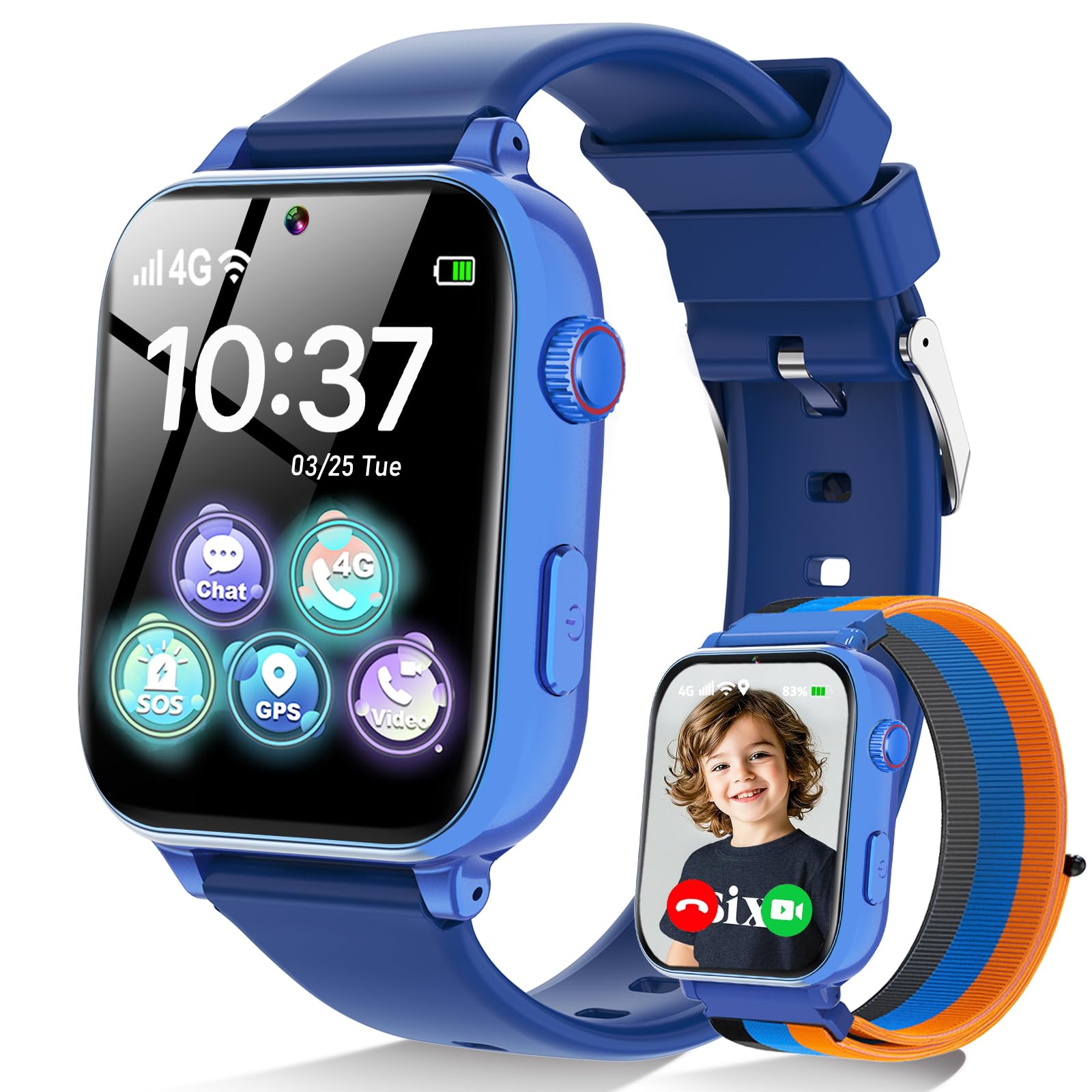
A gift watch with 15 games, a front camera, and a music player, plus dual GPS and LBS tracking.
If you are buying a birthday present rather than a pure safety device, the MOKAST is aimed squarely at that shelf. It packs 15 games, a front camera for two-way video calls, a music player, an alarm, and a class mode you control from your phone. On the tracking side it uses dual GPS and LBS positioning, supports a safety fence with alerts, and keeps a full day’s location history. The 1.54-inch curved screen sits on a soft silicone strap, and it comes with a Speedtalk SIM that works in the United States once you activate it on the Speedtalk site and pick a data plan.
Used as a fun watch, it has real appeal — kids like the games, the watch faces, and the styling, and when the connection is good, calls come through clearly and video chat works. The parent side of the app is genuinely useful too. You manage contacts, block unknown numbers, and check location from your phone, and the class mode lets you shut down play time remotely during school hours. That is a decent feature set for a gift watch.
The one thing to know before you buy is where the effort actually lands. Reviews are split right down the middle on whether the core functions hold up. A recurring complaint is call pickup — tapping the call icon can take several seconds to connect, which undermines the reason to have a calling watch. Some buyers report location losing accuracy or the screen lifting from the body after a couple of months. None of that means every unit fails, but it does mean this is the pick to buy for the games and the camera, not for the tracker. Expect the tracking to be a bonus rather than the feature you depend on.
What makes it fun: 15 games, a front camera for video calls, and remote class mode — a gift a kid is glad to unwrap.
Where it falls short: call pickup and location accuracy are the weakest links, so this is not the watch to rely on for safety alone.
The right buy for: a birthday or holiday gift where games and a camera matter more than pinpoint trackability.
The wrong buy for: a parent whose main need is a dependable location and a fast call button.
2. Garmin Bounce Kids Smartwatch
A swim-friendly watch with two-way texting, voice notes, and a live location pin in the Garmin Jr. app.
Where most kids’ wearables feel like a toy that tracks, the Bounce reads like a proper watch that a child wants on their wrist. It handles two-way text and voice messaging between the watch and the Garmin Jr. app on your phone. Location tracking shows up live in that same app, so you are not chasing a separate tracking service. The rechargeable battery runs up to 2 days between charges, and the case is built to survive a pool.
The hardware quality is what keeps people on board here — the case feels tough, kids take to the color touchscreen fast, and the daily-wear factor is high. One parent’s six-year-old sent a message saying she was somewhere and needed help; the dad pulled the live location and reached her within minutes. That is the whole point of a tracker, and the BoT delivers it when the cellular signal holds. What buyers also value is how plain the messaging is: a short text, a voice recording, or an emoticon, with no browser and no app store on the wrist.
The catch worth knowing before you commit: the watch leans on an active subscription and LTE connectivity to do its tracking, so it is not a standalone GPS gadget that works on its own. A charge also leans heavily on how much the child uses it — heavy texting and live tracking eat into that up-to-2-day figure. And the geofence alerts have a minimum radius that parents describe as larger than they expected, which limits fine-grained “tell me when she reaches the front gate” use.
Where the Bounce earns its spot
- Rugged, swim-friendly build that survives daily kid wear
- Two-way text and voice messaging straight from the wrist
- Real-time location plus enter-and-leave boundary alerts in the app
- Up to 2 days of battery between charges
What to weigh before buying
- Tracking and messaging need an active subscription and LTE signal
- Geofence minimum radius is wider than some parents want
- Message delivery and GPS refresh are noticeably slower than a phone
Reach for this if: your child is old enough to text back and you want one durable watch covering calls, messages, and location together.
Think twice if: you want a screen-free device or refuse a recurring subscription — a tag-style tracker fits that family better.
3. BoT Talk Kids GPS Tracker

A screen-free tag with one message button, a 7-day battery, and a location pin in the BoT app.
If your worry is a first phone arriving far too early, the BoT is built to sit in that gap. There is no touchscreen and no app store, so your child presses a button, records a short message, and it lands on your phone. Location updates flow into the BoT app about every 1.5 minutes rather than a constant live feed. A 1400 mAh cell is rated for 7 days of use, which lines up with a full school week on one charge, and the body carries an IP55 water-resistance rating for rain and splashes.
You get a location pin that lands where your child actually is, and the app saves route history you can scroll back through later. That accuracy is what wins people over on a screen-free tag this simple. Quiet Mode keeps it silent through class, so no beeps mid-lesson. Size is the smaller complaint parents note: at 1.94 ounces (about the weight of a few AA batteries) in a small plastic body, it tucks into a pocket, but it is chunky for the smallest kids and awkward in a tiny pocket. Messages run hot and cold. With strong signal they show up in minutes; in poor coverage the delay can stretch, and the recording only plays back aloud once it arrives.
Two things are non-negotiable with this device. It requires a BoT subscription and live cellular coverage to work at all, and the plan is not something you can pause indefinitely. Once activated, canceling leaves the hardware unusable. That is a real commitment, and it needs to sit in your budget for as long as your child carries it.
Who this suits best: a family that wants a screen-free first step, a full-week battery, and a location history rather than live calling.
The honest trade-off: messaging speed depends entirely on signal strength, and the subscription is permanent once activated.
the balance: parents of younger kids who want to reach them without handing over a phone — just budget the subscription before you click.
Look elsewhere if: you want live calls in real time, or you plan to cancel service in the off season.
4. MYLOC8 GPS Tracker with SOS Button
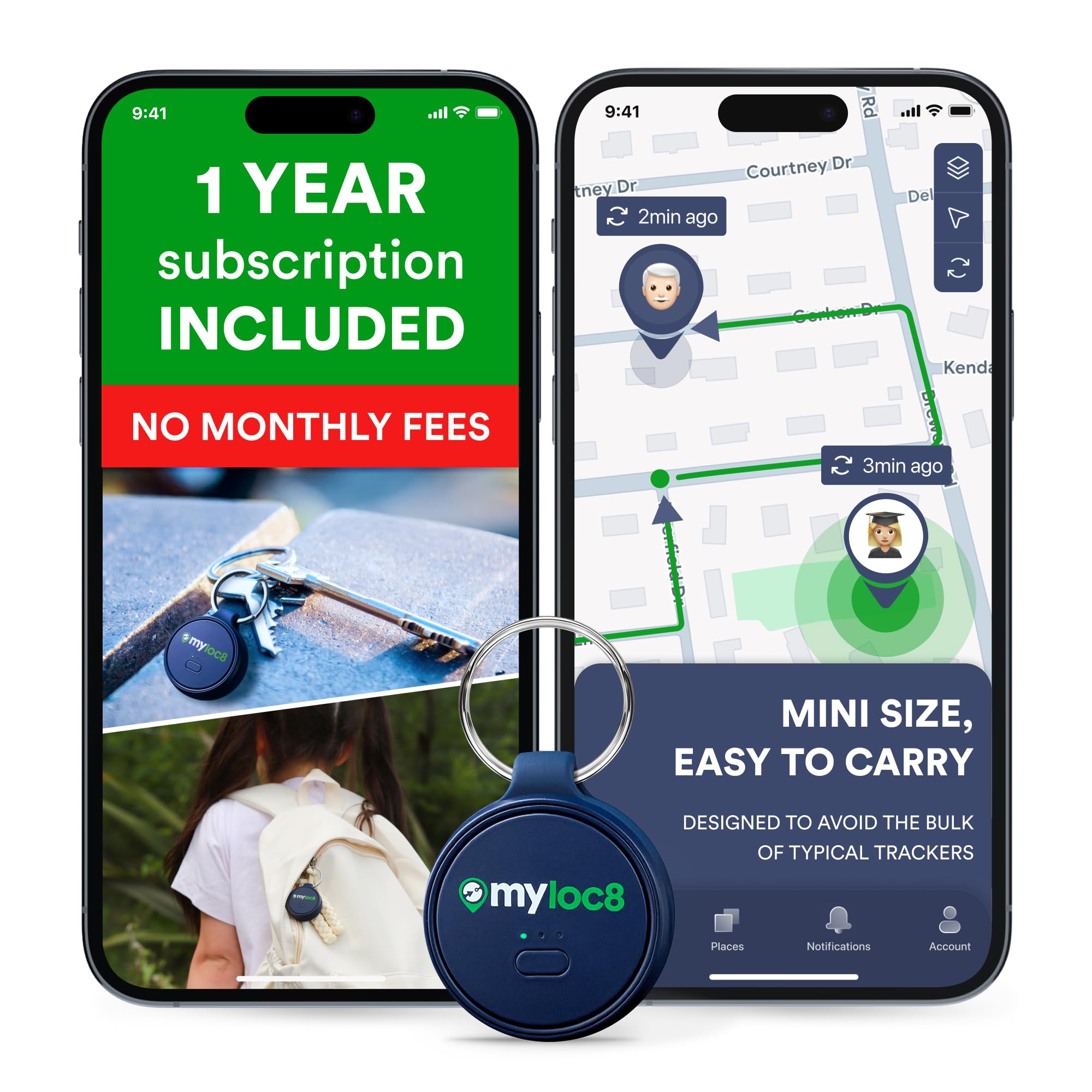
A keychain-style tag that clips to a schoolbag, with no strap to break and no screen to scratch.
This is the pick for a child who will not keep a watch on. It is a keychain-style tag, and it works on backpacks, schoolbags, keys, or a jacket pocket. It arrives with a built-in SIM and 12 months of subscription already paid, so setup is close to plug-and-play rather than a SIM hunt. The body is IP67 rated, meaning it survives rain and a dunk in a puddle, and it uses 4G, Bluetooth, and Wi-Fi together to place a location on your phone.
What the tracker does well is put a pin where the bag actually is — location lands within about ten feet when asked. The SOS button is one tap and pushes an alert to your app, and the app lets you rename the device, add a photo, and tune which notifications you get. The size sits small enough to clip on but thick enough to notice in a pocket. Where it asks a bit more from you is in daily charging. The 500 mAh cell is enough to get through a school day, but it needs regular time on the charger, and the smallest geofence area is still wider than most parents assume. If fine-grained “tell me when she arrives at this exact building” alerts are what you want, the fence radius will disappoint.
One honest billing point to check before you commit: the 12 months are included, and you sign into a tariff after that. Each unit needs its own subscription, so if you plan to track more than one child you are paying per tracker, not per account. Worth reading the plan details in the gallery, because that is where the ongoing cost lives.
Go for it if: your child loses or refuses watches and you want a bag-clippable tag with the first year already sorted.
Check the fence first if: you want tight boundary alerts, since the smallest area it allows is still broad enough to cover a neighborhood.
5. XPLORA Kidzi Kids Watch Phone

A 4G watch that calls pre-saved numbers, reads texts, and sends an SOS alert with its location.
The Kidzi is for a family that has moved past “just track them” and wants two-way contact. Your child can call pre-saved numbers, read texts, and reply with voice messages, emojis, or images. A dedicated SOS button alerts your contacts with the device’s location. It uses multiple location services for GPS, plus Safety Zones you can draw around home and school. The 4G radio runs on the pre-installed Xplora Connect SIM, and a 900 mAh battery powers the watch between charges.
The straightforward appeal here is the calling itself. For an older child walking home alone, having a dedicated call button on the wrist beats asking to borrow a phone. The SOS and Safety Zone features cover the basics of a check-in, and the app handles both. Where the watch asks for patience is in the day-to-day reliability. Calls and the SIM connection can be finicky, and tracking can lag or show the wrong spot at the worst moment — enough that a couple of families reported the watch falling short even on Wi-Fi. The build is not as tough as some, either. Kids are kids; straps and screens take a beating.
None of that makes it a bad watch — the hardware offers real calling, real SOS, and a working location service. It makes it a watch for an older child with a family who will take the time to test the setup at home before trusting it on the school run. Run a test call, confirm the pin, and confirm the SIM connects before day one.
The case for the Kidzi: a genuine 4G calling watch with SOS and Safety Zones, aimed at a kid old enough to manage a call.
The reality check: connection reliability and build durability are the two places it asks the most from you.
Best matched to: a family who wants the child to be able to call, and who will verify the SIM and location at home first.
Not the one for: a family that needs the watch to work flawlessly from the start with no setup patience.
6. Citfis 4G Kids Smart Watch
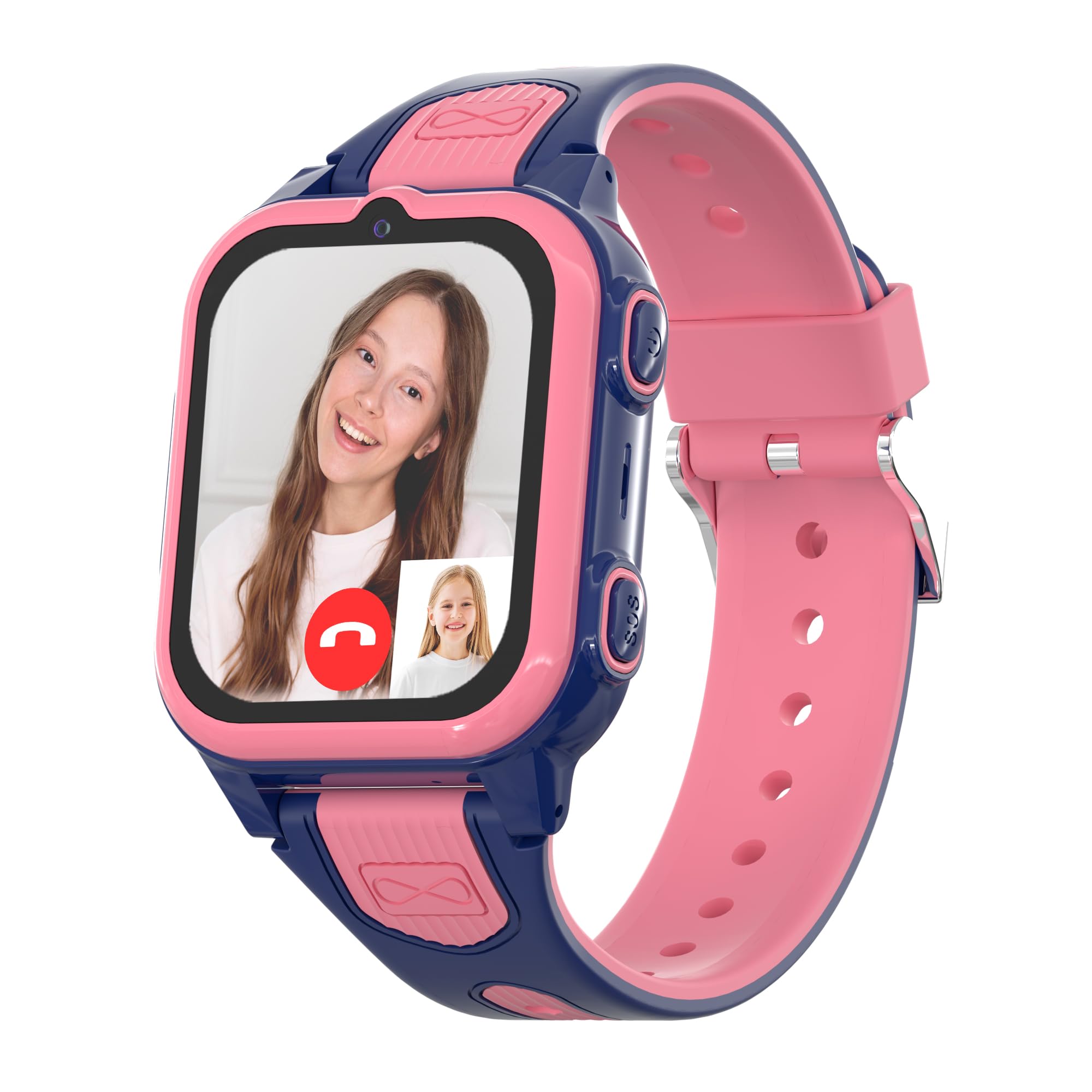
A pink 1.54-inch touchscreen watch with built-in GPS, a pedometer, and heart-rate tracking.
The Citfis leans into what a child wants to wear, not just what a parent wants to track. It comes in pink with a buckle silicone band, and the 1.54-inch screen is a comfortable size for a kid’s wrist. It carries a built-in GPS for location, plus heart-rate and pedometer metrics so it feels like a fitness watch, and it supports 4G cellular for calls and texts. Storage sits at 512 MB — enough for the watch’s own functions.
On good days the location is impressively sharp, nailing a specific spot rather than a general area. It’s simple enough that a young girl can wear it daily without fuss, and the step-tracking gives her a reason to keep it on. The setup is where this one is most likely to test your patience. The directions are sparse, and several of the watch’s controls live only in the app. Some buyers have hit a setup wall where the app connects once and then struggles, and a few report the location landing far off target — a signal or configuration issue rather than a defect in every unit.
Given how varied the setup experiences are, treat this as a pick that rewards a careful first hour. Activate the SIM, pair the app, confirm location and a test call, and only then hand it over. When the pieces connect, it’s a pretty, capable watch for a young girl. When they don’t, support is the path forward, and replacements have come through for buyers who hit a dead unit.
The one to consider if: your daughter wants a pink, fitness-flavored watch rather than a plain tracker, and you will do the setup yourself.
Hold off if: you want a device that configures itself without reading directions carefully.
Know the Specs
GPS, LBS, and Wi-Fi location
GPS is satellite positioning and gives the tightest pin when your child is outdoors with a clear view of the sky. LBS guesses location from nearby cell towers and fills in when GPS cannot see a satellite, at the cost of accuracy. Wi-Fi positioning uses nearby networks to place a child indoors. A tracker that combines methods tends to hold a useful pin in more places than one that leans on a single method.
Battery life and refresh rate
Battery is measured in days or in milliamp-hours (mAh, the cell’s capacity). A device rated for 7 days of use is built to refresh location less often and pause when your child stops moving. A device rated at up to 2 days refreshes more often and supports more two-way use. Higher mAh does not automatically mean longer life — refresh interval and screen use eat into it.
Geofencing and Safety Zones
A geofence is a virtual boundary you draw around a place like home or school, and the app pings you when your child crosses it. The radius matters. A fence with a wide minimum area covers a whole neighborhood, so you get an alert when your child is several streets away, not at the front door. Ask what the smallest fence is before you rely on fine-grained arrival alerts.
Subscription and SIM plans
Any tracker with cellular calls and messages needs an active plan. Some arrive with a SIM and a set subscription period bundled. Others need you to activate a card and pick a plan yourself. Check whether you can pause the service, whether each unit needs its own subscription, and how you cancel. Those plan terms decide the real ongoing cost far more than the hardware does.
Common Questions
Do kids trackers work without a monthly subscription?
Which tracker is best for a child too young for a phone?
How accurate is the location on a kids GPS tracker?
Can my child call me with a kids smartwatch?
How small can the geofence be on these trackers?
Is a GPS tracker waterproof enough for a rainy school run?
How often do kids GPS trackers update their location?
Can I track more than one child on one plan?
What happens if I cancel the subscription?
Is the Garmin Bounce worth it over a cheaper watch?
The Bottom Line
For most families, the winning tracker for kids is the Garmin Bounce. It pairs a rugged, swim-friendly build with two-way messaging and real-time location tracking, so your child can wear it every day. Want a screen-free first step and a full-week battery? Reach for the BoT Talk. If your child refuses a watch, the MYLOC8 tag clips to a schoolbag, and the first year of service is already included. Pick the one that matches your child’s age and your comfort with a recurring plan. Then test the setup at home before day one — that first hour of checking the pin and making a test call is what makes any of these trackers actually reliable.
How we choose
We do not accept paid placement. Every pick is matched to a real buyer and a real use-case; we do not hands-on test units.
Sources
Specifications: manufacturer listings and product documentation. Review insights: verified customer reviews, as of October 2026. Pricing: not shown on this page (it changes often); check the current price via the retailer link.
As an Amazon Associate, Aappliancez earns from qualifying purchases. This does not affect which products we feature.