Disclosure: Some links in this post are affiliate links. As an Amazon Associate I earn from qualifying purchases, at no extra cost to you. Learn more
Specs are compiled from manufacturer listings and verified buyer reviews and can change over time — please confirm the key details on the product page before buying.
If your last controller started drifting within months, the fix is the stick itself — a TMR (tunneling magnetoresistance) sensor reads stick position with magnets instead of a rubbing contact pad, so there is no wear surface to go bad. That single change is why this list exists, and it is the first thing worth checking before you spend a cent: TMR joysticks, adjustable tension, and a polling rate that matches how you actually play.
This guide is built by comparing the manufacturers’ published specifications and the patterns across verified customer reviews, so you get each pick’s real strengths and trade-offs instead of marketing spin.
Below you will find seven controllers ranked by what they actually do well, from a dock-packing all-rounder to a PC-only esports tool with an 8000 Hz polling rate. The short answer on the tmr controller question is that stick sensor type, trigger mode, and platform fit decide everything.
Top Picks


How To Choose The Best TMR Controller
Almost every controller on a store shelf looks the same in a photo. The differences that matter show up three months in, when a cheap stick starts pulling your aim sideways. Here is what separates a controller you keep from one you replace.
Start with the stick sensor, not the shell
A TMR joystick uses a magnetic sensor to read position, so nothing physically scrapes inside the stick. That is the whole reason this category exists: fewer moving wear points, and a reading that stays accurate over long sessions. When a listing says TMR, it is telling you the stick is built to hold its center.
Match the trigger mode to your games
Shooters want a short, clicky trigger pull that fires the instant you press. Racing games want a long, smooth analog sweep so throttle builds gradually. A dual-mode or switchable trigger gives you both from hardware, without digging through menus mid-match — worth having if your library spans both genres.
Check the polling rate against your platform
Polling rate is how many times per second the controller reports its position to your machine, measured in Hz. Higher numbers mean fresher input data. Just confirm the rate applies to the connection you will actually use — several controllers hit their top figure only over wired or 2.4GHz wireless, not Bluetooth.
Confirm the console you own is on the list
This is where most returns come from. Several controllers here are Switch and PC tools that will not talk to an Xbox at all, and one is PC-only by design. Read the compatible-device line before anything else — no amount of stick quality fixes a controller that cannot pair with your console.
Side-by-Side Comparison
| Model | Best For | Joystick Type | Polling Rate | Platforms | Amazon |
|---|---|---|---|---|---|
| 8BitDo Ultimate 2★ Best Overall | Switch and PC players who want a dock | TMR | — | Switch / Switch 2, Windows | Amazon |
| BEITONG KP40Best Value | Adjustable tension on a budget | TMR, 30–90gf adjustable (5400+ resolution) | 1000Hz | PC, Switch/Switch 2, Android, TV, Steam Deck | Amazon |
| NYXI Imperial | Long battery plus a charging dock | TMR, 40–80gf adjustable | 1000Hz (2.4G / wired) | PC, Switch, Windows, Android | Amazon |
| GuliKit TT MAX | Accessory-loaded customization | TMR, 720° stepless adjustable (4000-level) | — | Switch / Switch 2, Windows, Android, iOS | Amazon |
| BIGBIG WON BLITZ 2 Pro | FPS players who want polling speed | TMR electromagnetic | 2000Hz wireless / wired | PC, mobile, Steam | Amazon |
| GameSir G7 Pro | Xbox owners who want a dock and audio jack | TMR | 1000Hz (PC, wired / 2.4G) | Xbox, PC, Android | Amazon |
| Razer Wolverine V3 Pro 8K | Competitive PC players chasing latency | TMR, swappable caps | 8000Hz | Windows 11 PC only | Amazon |
Detailed Reviews
1. 8Bitdo Ultimate 2 Controller
Our pick — 4.5+★ from 250+ verified ratings; the strongest balance of quality and price.
The dock-packing all-rounder that quietly handles Switch and PC in the same evening.
Sixteen buttons is the headline number, and two of them — the R4 and L4 fast bumpers — sit under your fingers ready to remap without opening any software. For a Switch-and-PC household, the appeal is that one controller covers both: Bluetooth for the Switch, 2.4G or wired USB for Windows, and a USB-C adapter in the box. It also carries the strongest review base on this list at 4.5+ stars from 200+ owners, and the recurring note is that it feels premium the moment it leaves the dock.
The stick and trigger hardware is the part you actually feel. TMR joysticks handle aim with the sensitivity and precision the tech was built for, and the wear-resistant joystick rings around them guard the part that usually dies first. Then there is the trigger switch, a rear toggle that swaps between linear Hall Effect (a smooth, pressure-sensitive pull for racing) and non-linear tactile (a short clicky break for shooters). Owners describe it as clicky for shooters and smooth for racing, changed on the fly and without a menu. Connecting the controller to the Ultimate Software — wired USB or 2.4G on Windows or macOS — opens button mapping, stick and trigger sensitivity, vibration control, and macros built from any button combination.
The recurring gripe is worth knowing before you commit: the LEDs only hold 3 presets on the fly, and doing anything finer means sitting down with the software instead. Switch 2 support also needs the controller and adapter flashed to the latest firmware before it behaves. And you cannot access the software while the pad is sitting on its dock — lift it off, let it switch to USB, then tune. If you game on a Switch and a desktop in the same week and want one pad for both, this is the obvious starting point.
What earns the top spot
- 16 buttons including remappable R4 and L4 fast bumpers, no software needed to set them
- TMR joysticks with wear-resistant rings around the stick gates
- Rear switch flips between Hall Effect linear and tactile triggers
- Dock doubles as a charging stand with USB dongle pass-through to PC
- Full macro and sensitivity tuning through Ultimate Software on Windows or macOS
Where it asks for patience
- Only 3 presets for the RGB ring on the fly; the rest lives in software
- Switch 2 pairing needs both controller and adapter updated first
- Software access cuts out while docked
- Joystick grips can loosen and spin after heavy use
Reach for this if: you split your time between a Switch and a Windows PC and want a single dock-charged pad for both.
Think twice if: you want to tweak RGB or macros mid-session without undocking and waiting for the USB handshake.
2. BEITONG KP40 Controller
Adjustable stick tension and a 1000Hz polling rate for players who tune by feel.
Where the 8BitDo above gives you 16 buttons and a dock, the KP40 gives you something rarer at this tier: a 30~90gf stepless damping ring on each TMR joystick. That is real resistance adjustment you turn while playing, loaded with 5400+ resolution, so a twitchy shooter stick can become a heavier precision stick without opening an app. The 1000Hz polling rate runs over both wired and wireless, and Beitong claims 1ms latency out to a 10-meter range, which matters if you sit back from the screen rather than hunched over it.
The trigger setup goes further than most. A slide lock on the back moves the trigger between a 2mm light-touch action for rapid fire and an 8mm linear pull for pressure-sensitive throttle. Between that and the adjustable sticks, the KP40 is a genre-hopping pad — racing on a long sweep one match, flick-shotting on a 2mm pull the next. What wins people over beyond the hardware is the sheer amount of it: a 10-direction hybrid D-pad, ABXY optical micro switches rated for 10M+ presses, 6-axis gyro for PC and Switch motion, three macro keys, and RGB you can dial in. Six separate reviews single out build quality, and the sticks and triggers come up in that same breath.
Honesty requires a note on the button feedback, which is the one area the review page calls mixed. The engraved ABXY text sits in a way that does not suit everyone, and the board carries 11 buttons, so you get fewer programmable extras than the 16-button 8BitDo. Battery endurance is the bigger question mark — a 16-month-old unit reportedly stopped holding a charge longer than 2 hours, which points to aging cells rather than a day-one flaw. Small hands are also a poor match; it suits medium to large palms. For a first TMR controller on a tight budget, though, nothing else here pairs adjustable tension with 1000Hz at this tier.
Where the money goes: adjustable 30~90gf stepless TMR sticks, TMR dual-mode triggers, and 1000Hz wireless are the features here that usually live a tier or two up.
The realistic catch: 11 buttons is a modest count, and a two-year-old battery is a known soft spot — play wired from time to time and you will get far more life out of it.
Buy this one if: the idea of turning a dial to change how your stick feels appeals more than collecting extra buttons.
Look elsewhere if: you have smaller hands, or you need four programmable paddles rather than two extra buttons.
3. NYXI Imperial Controller
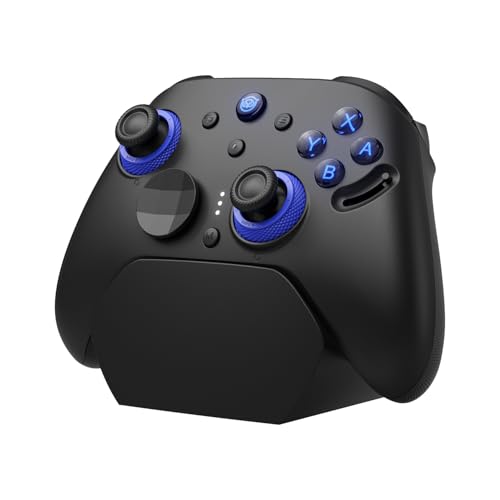
A 1200mAh cell and a magnetic dock that keeps the pad topped up between matches.
Fifteen hours on a single charge from a 1200mAh battery is the reason the Imperial earns a spot this high. Drop it on the magnetic charging dock and it wakes up ready with no cable hunt, and the dock has a 2.4GHz receiver passthrough. The stick side is serious too: TMR magnetic sensors with a 40gf to 80gf stepless tension dial, plus a 1000Hz polling rate on 2.4G and wired that NYXI says transmits inputs up to 8x faster than standard — a claim to weigh, not take as gospel, but the 1000Hz figure itself is the number to compare. Fifteen buttons, interchangeable ABXY caps for PC or Switch layout, and two back buttons round it out.
What buyers report fits the spec sheet closely: smooth compatibility across Switch and PC, a charge that lasts for days, and adjustable stick tension that gets called out as the standout tactile detail. The TMR sticks kill drift and stay precise, and switching between a Switch 2 and a PC is the part people single out as the biggest win. The trigger toggle between instant micro-switch and hall-effect linear is a game-specific precision tool — headshot click on one setting, throttle feel on the other.
The catch is on the edges of the experience rather than the center. Vibration occasionally misbehaves and stays on until the pad is powered off and back on. Build quality is rated merely okay by some — sticks can clack at the edges compared to pricier premium pads, and the left shoulder button needs an extra push to register. Ergonomic groans are rare, though; most describe it as sitting nicely in hand. If long battery life and a dock are your priorities, the Imperial delivers both without asking you to give up TMR sticks.
The battery case: a 1200mAh cell plus a magnetic dock, so the controller you left on the stand is the one that is charged when you pick it up.
The edges to accept: vibration can play up until you power-cycle the pad, and a shoulder button that needs a firm press will bother you if you spam it in fighting games.
Made for: a player who hates hunting for a charging cable and plays long sessions across Switch and PC.
Not the pick for: competitive fighting-game players who need every shoulder and trigger press to register with the lightest touch.
4. GuliKit TT MAX Controller

The spare-parts bin of a controller — four paddles, three stick heights, two D-pads.
Ask what is in the box and the TT MAX stops being a normal purchase. Four removable metal back paddles, two sets of Switch and PC keycaps, three stickcap heights, two interchangeable D-pads, a protective case, a data cable, and a Hyperlink 2 multifunction adapter that also pairs Xbox Series S/X, Elite Series 2, PS4/PS5, Switch Pro, and Xbox One controllers across Switch, Windows, SteamOS, and Android. On top of that, the TMR sticks use a 720° stepless adjustment with a hidden dial offering 4000-level precision, and the whole pad wakes a Switch 1 or 2 with a shake.
GuliKit’s own Hyperlink 2 Bluetooth link is the spec to weigh against the rest of the lineup — 2.62ms latency on PC, which is the kind of number you more often find on a PC-only esports pad than on a Switch-friendly one. The triggers switch between Hall effect and microswitch, the vibration has HD, Super Haptic, and Rotor modes with adjustable intensity, and there is a 950mAh battery behind it all. The D-pad and back buttons get the most love in reviews; buyers call the paddles easily programmable and the ergonomics good for long sessions, and the joystick response time earns its own share of praise. An APG function that records 10 minutes and plays it back, anti-snapback settings, and 4/8-way D-pad swap cover almost any tuning itch.
The honest trade-offs are worth reading carefully. One recurring complaint is the oversized D-pad fighting the left stick for space — a smaller or cross-style pad would have made this the pick for more players, and for at least one buyer it was a return. Sticks can arrive slightly out of calibration, and while a settings menu exists it is not universally loved. Switch 2 pairing sometimes needs firmware and Bluetooth updates and repeated attempts before it sticks. Setup requires patience — but the controller you end up with is one you tune to your own hand.
The customization haul
- 720° stepless TMR sticks with hidden tension adjustment and up to 4000-level precision
- 4 metal back paddles plus 2 D-pads, 3 stick heights, and 2 keycap sets in the box
- Hyperlink 2 Bluetooth rated at 2.62ms latency on PC
- APG 10-minute recording and playback, anti-snapback tuning, 4/8-way D-pad swap
- 950mAh battery and Switch 1/2 wake-up
What to brace for
- The large D-pad crowds the left stick and does not suit every game
- Sticks may need calibration from the start
- Switch 2 pairing can demand firmware updates and several tries
- Protruding paddles divide opinion
The fit: a tinkerer who wants four paddles, swappable caps, and a case in one box, and does not mind a setup evening.
The mismatch: an impatient buyer who wants perfect sticks on first power-on — expect to calibrate, and expect the D-pad to get in the left stick’s way.
5. BIGBIG WON BLITZ 2 Pro PC Video Game Controller
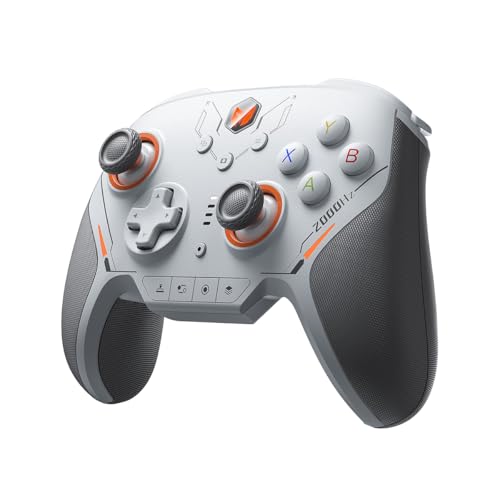
Aiming one at a 2000Hz polling ceiling and a 1000Hz gyroscope built for shooters.
If you play FPS on PC, the BLITZ 2 Pro is pointed at exactly your problem. A 2000Hz two-way polling rate over both wireless and wired is double what most of this list offers, and the 1000Hz gyroscope is there for motion aiming. Add 16 fully mechanical buttons — no carbon pads to wear through — plus TMR stick sensors and an ALPS adhesive nail bar under the buttons, and the hardware reads like it was drawn up for competitive play specifically. The grip is built for both four-finger and six-finger styles, so a claw player and a palm player both land somewhere usable.
Among owners, the takeaway is that this is a competitive tool that holds up. Rocket League players at a high rank call it the best controller they have owned — no button chatter, no stick drift, near-zero input lag over a year of wired use. There is also an undocumented PS5 mode in the companion app that emulates a DualSense Edge, which Steam Input picks up with all four extra buttons active; no other BigBigWon controller carries that. Switch Pro fans who liked the shape but outgrew the sticks find this the upgrade they wanted. Tuning runs through the Mojiang Assistant app on PC or mobile, which updates firmware and adjusts parameters without a computer in reach.
The trade-offs are real and specific. Shoulder buttons are loose with long travel, face buttons take effort to press at an angle, and the D-pad is stiff. One unit arrived with a left stick that would not register left or right, and the PC software being hosted on a cloud drive is a separate annoyance. The switches themselves are not the issue; it is the fit around them that divides players.
Built for aim: 2000Hz wireless polling, a 1000Hz gyroscope, 16 mechanical buttons, and a TMR electromagnetic stick make this a shooter-first controller.
Fit over spec: loose long-travel shoulders and a stiff D-pad suit shooters far better than fighting games.
The player it suits: a ranked FPS player who wants the highest wireless polling rate on this list and a gyro made for aim.
The player it does not: someone who lives in fighting games and needs a crisp, tight D-pad and snappy shoulder buttons.
6. GameSir G7 Pro Wireless Controller for Xbox, PC & Android
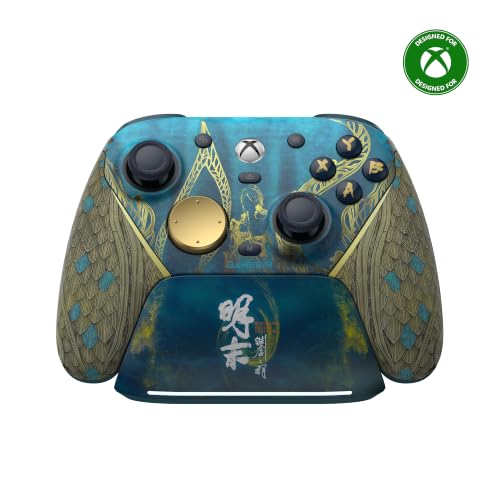
The one Xbox owners in this lineup can actually buy without a compatibility note.
Most of this list is Switch and PC territory. The G7 Pro is the exception — an officially licensed Xbox pad with 2.4G wireless, one-press wake-up straight to the console, and the tri-mode switch that moves you between Xbox, PC, and Android with Bluetooth 5.3 on the last one. On PC it holds a 1000Hz polling rate over both wired and 2.4G. The triggers are Hall Effect analog with clicky micro-switch stops, and holding M plus either trigger drops it into Hair Trigger Mode for the shortest possible pull.
The charging station is the detail that quietly changes your routine: set the pad down and the auto start-stop charging kicks in, pick it up and the Xbox wakes. A 1200mAh battery sits behind it, and the base of the dock has a storage slot for the receiver. Sixteen buttons include four extra back and bumper buttons, and the Nexus app handles remapping and tuning — a list that includes a Raw trajectory setting and 90 anti-deadzone for anyone who wants to chase tail. That app, rather than the Xbox accessories app, is where owners say the real customization lives.
With 1,300+ owners and a 4.0+ rating, the review pages describe a controller that gets the essentials right. Ergonomics vote the loudest — the pad sits well in hand and the clicky face buttons, D-pad, and trigger stops feel premium for the outlay. Owners mention sticks that stay tight with no wiggle or drift. The sizes run slightly small, so if you have broad shoulders the grip can feel less roomy than a stock Xbox pad; the back paddles are also easy to catch by accident, though you can switch them off. Small stuff, all of it, but worth knowing before you commit.
what separates it: it is the only controller here that wakes an Xbox on its own and ships with a charging station that stores the dongle.
The honest note: a compact body suits most hands but leaves broad-shouldered players wanting a little more grip, and the back paddles can be nudged until you disable them.
Pick it up if: your console is an Xbox and you want pro-tier triggers, back buttons, and a dock without adding an adapter.
Skip the upgrade if: you play almost entirely on Switch or PlayStation — this pad will not talk to either.
7. Razer Wolverine V3 Pro Controller

An 8000 Hz polling rate in a body light enough to forget you are holding.
8000 Hz is the number no other controller here touches — four times the polling rate of the 2000Hz BLITZ 2 Pro above, and it runs wired or wireless. That is a lot of input reports per second, and for a competitive PC player the difference shows up in how quickly your aim snaps to where your thumb went. The TMR thumbsticks use anti-drift magnetic sensors with swappable caps, the 4 mouse-click back buttons sit in the rubberized handles with 2 claw-grip bumpers above them, and Pro HyperTriggers can switch between a mouse-click fire and full analog travel.
The build choices are deliberate and, at first, strange. Razer cut rumble and RGB to make its lightest wireless esports controller, so it lands feeling lighter and smaller than the heft you may expect at this tier. Customers note it as extremely fast and responsive, grippy enough for sweaty hands, with a 4-paddle layout that stays comfortable, and the software lets you map any keyboard key to the 6 programmable buttons and store 4 onboard profiles. Coming from other premium pads, the consensus is that it simply feels faster — the weight is a trade you make for that speed, and it is on purpose.
Build quality draws the most discussion by a wide margin. Weight is the second-biggest talking point, and most owners count the lightness as a win. Value for money splits opinions most — premium packaging and a carrying case are in the box, so the outlay covers more than just the pad. Charging is slow, there is no low-battery prompt, and the USB-C port is tight. It is also PC-only — no Xbox, no PlayStation, no macOS, no mobile. For the player who wants the absolute lowest latency and plays only on a Windows machine, this is the summit of the list.
The speed case: a true 8000 Hz polling rate wired or wireless, TMR sticks with swappable caps, and 6 remappable buttons with 4 onboard profiles.
The weight consequence: no rumble and no RGB make it the lightest thing here, and the small, light body reads as less substantial to some hands — the trade you make for speed.
Reserve it for: a Windows 11 PC player chasing the lowest input latency on this list, with the desk space and setup to match.
Leave it be if: you want rumble, need Xbox or PlayStation support, or want a heavy, substantial grip in hand.
Know the Specs
TMR Joysticks Explained
TMR stands for tunneling magnetoresistance — a sensor that reads how a magnetic field changes as the stick moves, instead of scraping a carbon pad like an older analog stick. The practical upshot is that there is no contact surface wearing down, so the stick holds its center and does not slowly drift you into a wall. Some controllers here also add tension adjustment: the BEITONG KP40 dials between 30~90gf, the NYXI Imperial between 40gf and 80gf, and the GuliKit TT MAX offers a 720° stepless range with 4000-level precision. Turning a dial lets you make the stick heavier for precision aiming or lighter for all-day comfort.
Polling Rate and Latency
Polling rate is how many times per second the controller tells your console or PC where the sticks are, measured in Hz. The higher the number, the fresher the data your machine is working from, which shortens the gap between a thumb movement and the on-screen response. The range here is wide: 1000Hz on the BEITONG KP40, NYXI Imperial, and GameSir G7 Pro, 2000Hz on the BIGBIG WON BLITZ 2 Pro, and 8000Hz on the Razer Wolverine V3 Pro. Two things to check before you count the number: whether that rate applies to the connection you will actually use, and whether your platform supports it at all — many controllers only reach their top figure over wired or 2.4GHz, not Bluetooth.
Trigger Modes and Trigger Locks
A dual-mode trigger gives you two different pulls from the same physical trigger. The short, clicky mode fires the instant the switch closes, which is what you want in a shooter. The long, linear mode reads how far you press, which is what a racing game uses to build throttle. Switches on the BEITONG KP40 (2mm versus 8mm), the NYXI Imperial, the GuliKit TT MAX, and the Razer Wolverine V3 Pro do exactly this, and GameSir handles it with a Hair Trigger Mode that holds down M plus LT or RT.
Batteries, Docks, and Connection Types
Battery capacity is listed in mAh and tells you roughly how long a pad runs before it needs a charge — the NYXI Imperial and GameSir G7 Pro both carry a 1200mAh cell, the GuliKit TT MAX packs 950mAh, and the Wolverine V3 Pro lists 36 hours in its own feature summary. A charging dock changes daily use more than the raw capacity does: with the 8BitDo Ultimate 2, NYXI Imperial, and GameSir G7 Pro, you set the pad down and it tops up, so you never dig out a cable. On connection, Bluetooth is convenient but often slower than 2.4GHz wireless or wired — check which mode supports the polling rate you are buying for.
Common Questions
Will a TMR controller work with my Xbox Series X or PlayStation 5?
Do TMR sticks actually stop stick drift for good?
What is adjustable stick tension and why would I want it?
Is a higher polling rate really worth paying more for?
Can I use one TMR controller across Switch and PC?
Do these controllers need firmware updates before they work?
How long does the battery last and can I play while charging?
Is Bluetooth fast enough for competitive play or should I use the dongle?
Do TMR controllers have motion controls and gyro aiming?
Which one should I pick if I mainly play on PC only?
The Bottom Line
For most buyers, the tmr controller winner is the 8BitDo Ultimate 2, because it covers Switch and PC in one pad with TMR sticks, switchable triggers, a 16-button layout, and a dock that keeps it charged — the crowded favorite on this list for good reason. If you want the lowest input latency and play only on a Windows machine, the Razer Wolverine V3 Pro 8K is the one to reach for, with its 8000 Hz polling rate running wired or wireless. And if your console is an Xbox, the GameSir G7 Pro handles one-press wake-up, a charging station, and Hall Effect triggers without an adapter in sight. Whatever your platform, pick the controller whose connection modes and stick tension match how you actually play — the TMR sensor is the one upgrade every pick here shares.
How we choose
We do not accept paid placement. Every pick is matched to a real buyer and a real use-case; we do not hands-on test units.
Sources
Specifications: manufacturer listings and product documentation. Review insights: verified customer reviews, as of October 2026. Pricing: not shown on this page (it changes often); check the current price via the retailer link.
As an Amazon Associate, Aappliancez earns from qualifying purchases. This does not affect which products we feature.