Disclosure: Some links in this post are affiliate links. As an Amazon Associate I earn from qualifying purchases, at no extra cost to you. Learn more
Specs are compiled from manufacturer listings and verified buyer reviews and can change over time — please confirm the key details on the product page before buying.
Anyone can hit record on a tablet. Getting footage that isn’t blurry, dim, or bouncy is the hard part. Three fixed things decide it: where the front camera sits, how steady the screen is on a surface, and whether the tablet can keep writing a large file without stalling. Each pick below is sorted by what it actually solves for video work.
This guide is built by comparing the manufacturers’ published specifications and the patterns across verified customer reviews, so you get each pick’s real strengths and trade-offs instead of marketing spin.
Each pick below pairs a real camera and display spec with the catch owners hit in daily use, so you can match a tablet to your own setup before you commit. Here are the strongest contenders for a tablet to record videos.
Top Picks



How To Choose The Best Tablet to Record Videos
You probably want to film something specific — a video call for work, a class lecture, a cooking demo, a quick product clip. A tablet that looks great on a spec sheet can still fail you on the one thing that matters most: getting a clean frame with clear sound while it sits on a table or in your hand.
Start with where the front camera sits
Put the front camera on the tablet’s long edge and your framing changes. Turn the tablet sideways (landscape) for a call or recording, and the lens sits at the top center — not off to one side where your hand naturally rests. That one placement stops the “my fingers are in the shot” problem, which ruins more recordings than any other single issue.
Treat camera megapixels differently from screen pixels
A 12MP rear camera (12 million pixels per frame) records clips independently of what the screen shows. The rear camera’s megapixel count and its ability to record 4K (roughly 4,000 pixels across) matters for the actual footage quality; screen resolution only affects how good the preview looks while you’re recording. Don’t buy for the screen and ignore the camera.
Factor in microphone and speaker quality
Built-in microphones sit inside the tablet frame and pick up everything — air conditioning hum, room echo, fan noise. A tablet with dedicated microphone hardware (multiple mics, four speakers) gives you cleaner source audio, which means less work in editing or a clearer webcam feed for meetings. Check whether the manufacturer names specific microphone hardware; silence on this spec usually means standard single-mic quality.
Check battery life and charging speed before you commit
Video recording drains a battery faster than almost any other task. A tablet listed at 10 hours of video playback will record for fewer hours. Look at battery capacity in mAh and the included charger wattage — a 30W or faster charger means a shorter recharge break between sessions.
Side-by-Side Comparison
| Model | Best For | Camera | Display | Storage | Amazon |
|---|---|---|---|---|---|
| Apple iPad Pro 13-inch (M5)★ Best Overall | Serious video work and editing | 12MP Front + 12MP Back + LiDAR | 13-inch Ultra Retina XDR | 256GB | Amazon |
| Google Pixel TabletBest Value | Casual recording and streaming | Front and Rear | 11-inch, 60Hz | 128GB | Amazon |
| TECLAST Artpad Pro 12.7″Top Performer | Drawing and sketching on a budget | Front and Rear | 12.7-inch 2176×1600 2K | 256GB (expandable to 1TB) | Amazon |
| Lenovo Idea Tab | College students recording lectures | Camera accessories compatible | 11-inch 2.5K, 90Hz | 256GB (expandable to 2TB) | Amazon |
| BESTTAB T60 12-inch | Budget 2-in-1 recording bundle | 16MP Rear + 8MP Front | 12.2-inch 2400×1600, 90Hz | 256GB (expandable to 2TB) | Amazon |
| Lenovo Idea Tab Pro | Students and artists who type and draw | Front and Rear | 12.7-inch 3K LCD, 90Hz | 128GB (expandable via microSD) | Amazon |
| Fusion5 10.1″ Windows 11 Rugged | Field and industrial recording | Dual Full HD cameras | 10.1-inch 1920×1200 Full HD IPS | 256GB SSD (expandable via microSD) | Amazon |
| Apple iPad Air M3 (Renewed) | Budget Apple route to 4K recording | 12MP Rear + 12MP Front | 11-inch Liquid Retina 2360×1640 | 1TB | Amazon |
| Samsung Galaxy Tab S11 | All-day recording with included S Pen | Front and Rear | 11-inch Dynamic AMOLED 2X, 60Hz | 128GB (expandable via microSD) | Amazon |
| Samsung Galaxy Tab S10+ | Professional video editing on a large screen | Front and Rear | 12.4-inch 120Hz | 512GB (expandable via microSD) | Amazon |
Detailed Reviews
1. Apple iPad Pro 13-inch (M5)
Our pick — 4.5+★ from 800+ verified ratings; the strongest balance of quality and price.
The 12MP camera lives on the long edge so your recording stays landscape-clean even when your hands are busy.
The 13-inch iPad Pro gets the camera placement most tablets get wrong. Its 12MP Center Stage front camera (a selfie camera that keeps you centered in frame) sits on the landscape edge. Turn the tablet sideways for a call or session and the lens is at the top center, not off to one side where your hand rests. For the other direction, the rear 12MP Wide camera with adaptive True Tone flash (a flash that adjusts its color to the room light) covers any capture you need. The result is a clean landscape frame with no hand covering the lens.
The display matters too: the 13-inch Ultra Retina XDR screen with ProMotion (Apple’s adaptive refresh rate system that smooths motion at high frame rates) gives you a bright, accurate preview so you can see exactly what’s being recorded. Four studio-quality microphones and a four-speaker audio system mean the built-in recording doesn’t sound like you’re inside a tin can. Owners describe it as “surprisingly light” at 1.28 pounds and easy to set up, and praise the Ultra Retina XDR display for sharpness and clarity. Performance is what wins people over — the M5 chip handles heavy editing and multitasking without a stutter.
The honest catch: some owners find the battery life inconsistent, with mixed reports on how long it holds up under heavy use. A handful also balk at the premium price. The 256GB storage is fine for regular clips, though you’ll want to offload large projects. The 13-inch screen can also cause fatigue when you hold it one-handed for long stretches — a stand or keyboard case solves that. Buyers report the 35W charger brings it back quickly between sessions.
What earns it the top spot
- 12MP landscape front camera (lens on the long edge) keeps your video calls centered
- Four studio-quality microphones for clean source audio without an external mic
- 256GB storage — more than double the Pixel Tablet’s 128GB
- Ultra Retina XDR display with ProMotion gives an accurate preview while recording
- M5 chip handles heavy video editing and multitasking without lag
Where it asks for patience
- Battery life draws mixed feedback from owners
- Premium-tier pricing — the most expensive of the Apple picks here
- 1.28 lbs gets tiring in one hand during long recording sessions
- 256GB fills up quickly with large video files
Pick this if: you want the cleanest front-camera placement, pro-grade microphones, and M5 power for editing in one iPad.
Look at the iPad Air instead if: the premium price pushes past what you planned to spend on video work.
2. Google Pixel Tablet
Clean Android and a sharp 11-inch screen for the buyer who wants a video tablet without paying flagship money.
The Pixel Tablet’s 11-inch screen with adaptive brightness handles both the preview while you record and the editing afterward. Colors are brilliant enough for streaming, and the 16:10 aspect ratio (slightly wider than square) gives a natural landscape frame. The Tensor G2 chip keeps performance snappy — apps open instantly, multitasking runs without stutter, and the tablet handles video calls cleanly.
The recorded audio is the standout for its class. Owners describe the sound as “unusually good” for a tablet, and the display earns consistent praise for sharpness and clarity during video playback. The device is well-built, clean Android runs without Samsung bloat, and the Gemini AI adapts over time — the launcher can be changed to Nova if you want to skip Google’s standard setup. It’s a far better video device than a small phone, and streamed content and calls look great on the larger screen.
The catch most buyers hit is the camera: it’s functional for video calls but not a selling point, and several owners note it’s worse than expected. Battery life draws honest mixed reports — heavy use gets you through the day, but owners note it can struggle to go much longer. The 128GB storage has no memory card slot to expand it, so you’ll manage your video files carefully. Owners do report the battery lasting through a heavy workday — “battery life, however, OK but not excellent. Can get through the day with heavy use but that’s it” as buyers put it.
What actually decides it: The 11-inch screen, clean Android experience, and 12-hour listed battery life make it a strong everyday pick if recording is casual rather than professional. The 16:10 aspect ratio matters for landscape shooting, and the Google ecosystem integration (Gemini, Quick Share) multiplies its usefulness if you already carry a Pixel phone.
Honest limitation: No microSD slot on the 128GB model, and the rear camera is mediocre — fine for casual footage, not for anything you’d deliver to a client.
Worth it for: Pixel-phone owners who want a second screen for video calls and casual recording without stepping into flagship pricing.
Think twice if: you need expandable storage or professional video quality from the camera.
3. TECLAST Artpad Pro 12.7″
A 12.7-inch screen and a bundled stylus let you sketch and storyboard on the same surface you record with.
The Artpad Pro’s 12.7-inch 2176×1600 IPS display is the biggest screen on this list before you reach the Samsung Tab S10+. The 16:10 aspect ratio means it shows roughly 20% more display area than comparable tablets in the same aspect class, per the manufacturer — so your preview frame is physically larger while you record. A factory-installed tempered glass screen protector is a practical touch for a tablet that gets carted to class or a desk.
Under the glass, 20GB RAM (8GB physical plus 12GB virtual expansion) and 256GB UFS storage keep things moving. The 10,000mAh battery with 30W fast charging is the biggest capacity on this list, and the intelligent charging protection adjusts the rate based on the battery’s state. The T-Pen delivers 4096 pressure levels for sketching. A dedicated Smart Button switches display modes or launches apps with one press — handy for quickly hiding your editing UI while recording.
The honest trade-off: battery life draws mixed feedback, and a few owners say the 4.0+ star rating reflects some support and reliability bumps. The included stylus has been known to fail in rare cases, though the manufacturer honored it. The G99 processor (a mid-tier chip) will be taxed by heavy 4K editing. For sketching and everyday recording, though, the box is complete: tablet, pen, tempered glass, and a large screen at entry-level money.
Why budget artists gravitate here
- 12.7-inch 2176×1600 display with factory-installed tempered glass
- 10,000mAh battery with 30W peak fast charging
- Bundled T-Pen with 4096 pressure levels for sketching
- 256GB UFS storage expandable to 1TB via TF card
What you give up
- Mid-tier G99 processor strains under heavy 4K editing
- Battery life gets mixed feedback
- Stylus longevity reported inconsistently in rare cases
Match made for: artists and students who want a large drawing canvas and a full recording package at an entry-level price.
Less suited to: buyers who need flagship-speed editing for large 4K projects.
4. Lenovo Idea Tab

The 11-inch 2.5K screen at 90Hz is sharp enough for recording previews and reading back lecture notes the same night.
The Idea Tab was built around the student who needs a single device for recording lectures and keeping up with coursework. The 11-inch 2.5K IPS touchscreen (2,560 by 1,600 pixels — sharp enough to read text clearly at arm’s length) at 90Hz refresh gives a smooth preview while you record. The MediaTek Dimensity 6300 processor with 8GB memory handles the AI learning apps Lenovo bundled — Lenovo AI Note, Squid, Nebo, and MyScript Calculator — alongside recording duties.
Battery is listed at 12 hours of YouTube playback, and the included 20W charger restores it quickly when you’re between classes. The included Tab Pen is substantial enough not to get lost in a bag, and the folio case provides a reading angle. For video work specifically, the 2K display gives a cleaner frame check than a 1080p screen, and the quad Dolby Atmos-tuned speakers keep the recorded audio clear. Owners single out the build quality, and the pen-plus-folio bundle is hard to argue with at this tier.
The honest catch: there’s no AC adapter in the box — just the charging cable — so a compatible charger is an extra cost. The included folio case is thin and the stand angle is limited. And while Wi-Fi is generally solid, some owners mention connectivity quirks. None of these undercut the video recording basics: solid display, reliable performance, and long battery. The pen isn’t a professional drawing tool for detailed artwork; for lecture notes and quick sketches, it holds up fine.
Straight read: 256GB storage at 8GB RAM is generous for this tier, and the included pen plus folio case means you can start recording and note-taking without buying extras. The 90Hz screen smooths motion in both recording preview and playback.
Real caveat: No AC adapter bundled and a thin included case — plan for a charger and possibly a sturdier case if you carry it daily.
Fits best: college students who record lectures and study on the same device all day.
Might disappoint: buyers expecting a professional-grade stylus for detailed artwork.
5. BESTTAB T60 12-inch
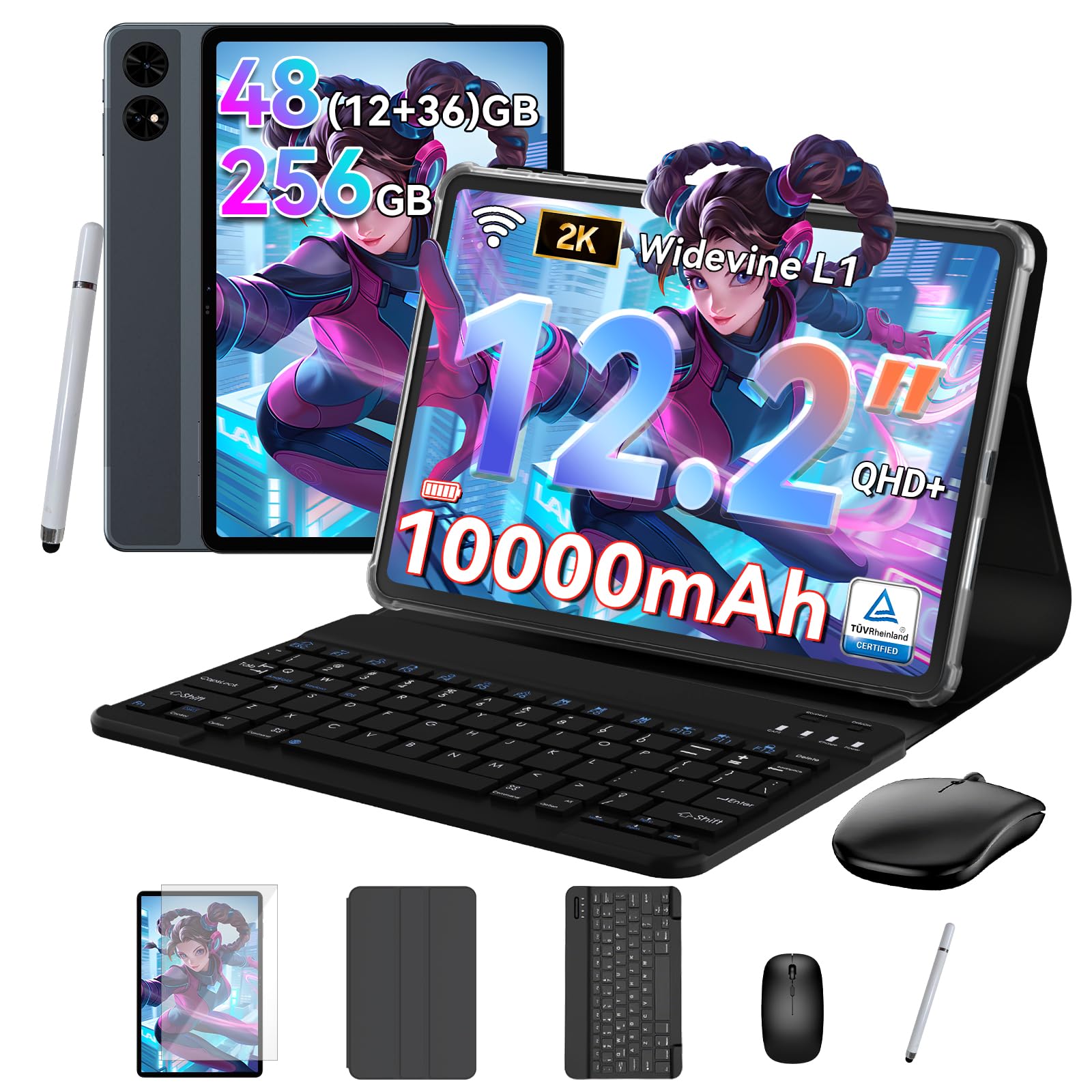
Sixteen megapixels on the rear and a full accessory bundle — the most complete starting kit on this list.
For a first video setup or a student starting out, the T60 packs an entire workstation into one box. The 16MP rear camera and 8MP front camera handle both directions of recording, and the 12.2-inch 2400×1600 display at 90Hz makes previewing footage easy. The Unisoc T7280 octa-core processor and Android 16 keep the workflow moving.
The 10,000mAh battery is rated for up to 14 hours of video playback. The bundle — keyboard, mouse, and stylus — means you don’t have to buy accessories separately. Buyers praise the T7280 performance first, with the big bright 90Hz screen following close behind. Build quality holds up: owners describe it as durable and not flimsy, and the included keyboard and mouse make work and navigation genuinely convenient.
The honest limits: the speakers lack bass and run quiet, and the camera image on close inspection is upscaled rather than natively crisp. Owners note graphic-intense games run choppy — fine for simple titles, less so for demanding ones. A few report battery discharge under heavy idle time. The 4-year warranty claim caused some confusion at registration, with a two-year extension offered as a resolution. For recording video calls and basic clips, none of these get in the way.
The all-in package
- 16MP rear camera and 8MP front camera for both directions of recording
- Keyboard, mouse, and stylus bundled — no extra accessory costs
- 10,000mAh battery rated up to 14 hours of video playback
- 12.2-inch 2.4K 90Hz display with TÜV Rheinland low blue light certification
Where you cut corners
- Speakers run quiet with little bass response
- Rear camera image upscaled rather than natively sharp
- Demanding games stutter on the T7280 processor
- Warranty registration details needed clarification for some buyers
Right match for: first-time buyers who want everything in one box for video calls and recording at a budget price.
Not the pick for: buyers who need native camera sharpness or quiet speakers for studio-quality audio.
6. Lenovo Idea Tab Pro

The 12.7-inch 3K screen and JBL speakers make this the laptop replacement that also happens to record lecture audio cleanly.
The Idea Tab Pro’s biggest draw is its 12.7-inch 3K LCD display (2,944 by 1,840 pixels) — sharp enough that recorded footage looks crisp in preview and text is legible from across a desk. The MediaTek Dimensity 8300 with 8GB memory handles multitasking fluidly, and quad JBL Dolby Atmos speakers deliver the strongest built-in audio on this list. The 90Hz refresh rate smooths motion during preview playback.
Battery is rated at 11 hours of video streaming, and the 45W quick charge gets you back working fast. The included Tab Pen Plus works with Circle to Search — circle anything on screen to search it instantly. With the folio case attached, several owners treat it as a laptop substitute for schoolwork. The screen size and 3K resolution make it excellent for video work, note-taking, and sketching. The included pen is one of the best-performing styli in this price range, tracking closely to the tip position.
The honest catch: the tablet is on the heavier side, and PC mode drains battery quickly without the optional fast charger. Some customers note weak Bluetooth range (a few meters) and dimmer outdoor brightness. The 8GB memory is adequate for most work but not designed for professional 4K editing on a deadline. The camera quality is described as poor and won’t deliver professional footage — for video calls, it’s fine.
The draw: A 12.7-inch 3K display (3K means roughly 3,000 pixels across) plus JBL speakers make the most rich media experience in this tier — movies and playback fill the frame and sound full. The included pen and folio turn it into a complete working package. For recording video alongside notes, this is the best of the mid-range options.
Fair warning: At 8GB memory and a mid-tier processor, this is not a professional video editing workstation. It’s a student and creator tool, not a production machine.
Best if you: want a large, sharp screen and good speakers for student work, with a pen that’s genuinely usable for sketching.
Consider alternatives if: you need professional camera quality or plan to edit large video projects.
7. Fusion5 10.1″ Windows 11 Rugged
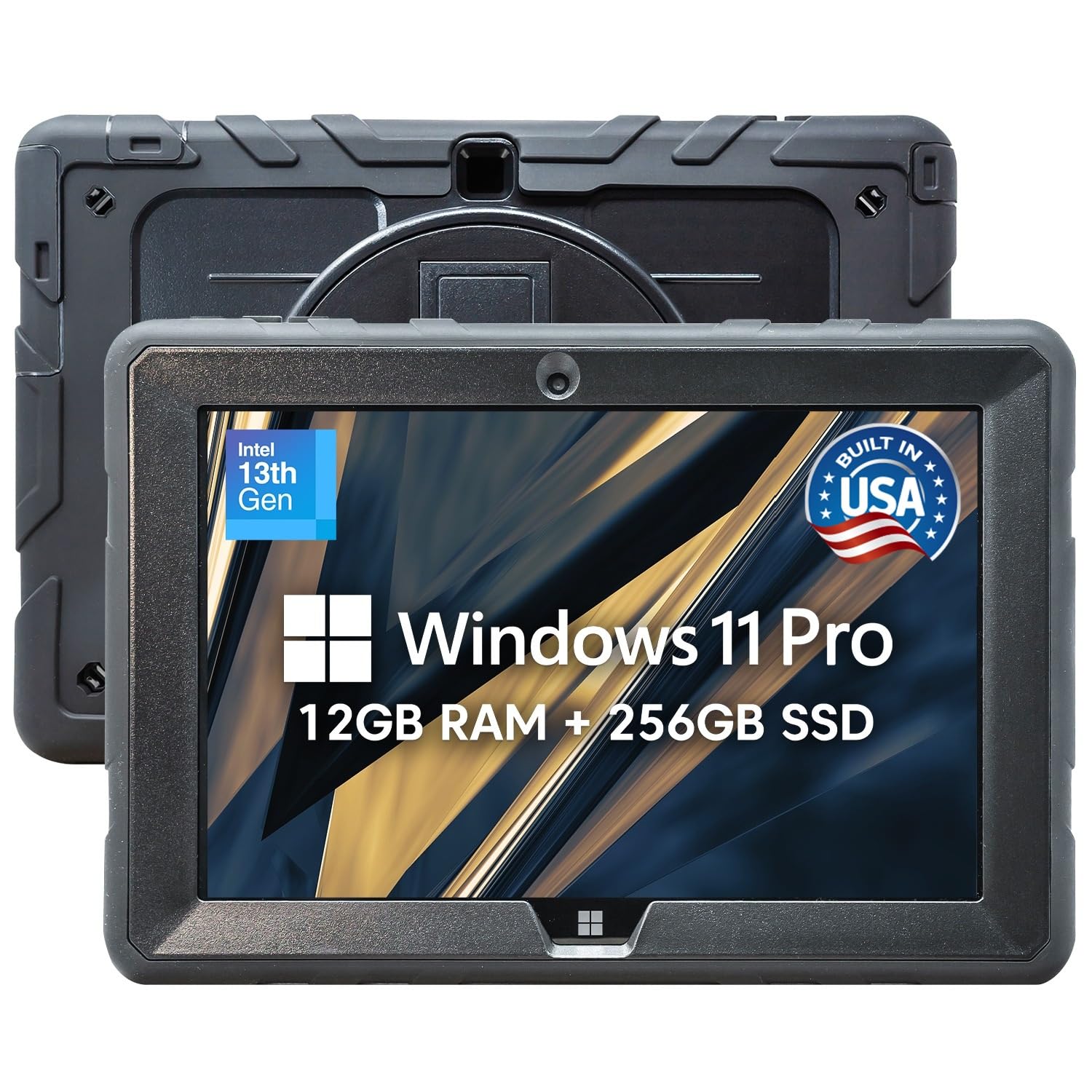
Full Windows 11 Pro, dual Full HD cameras, and a shockproof shell that survives sites a consumer tablet won’t.
This one exists for a different buyer: someone who records job-site walkthroughs or field inspections where a drop or dust cloud is expected. The 10.1-inch 1920×1200 Full HD IPS touchscreen with 2.5D G+G glass hits 500 nits brightness (bright enough to see the screen in direct sun). The hardware resists drops, dust, and daily wear. Dual Full HD cameras handle both directions, and the Intel 13th Gen N100 processor runs full Windows 11 Pro desktop applications — not app-store versions.
Video work gets easier because this runs Windows, so desktop editing software runs right on the tablet. The Micro HDMI and USB-C ports connect to a larger display without adapters. Dual-band Wi-Fi at 2.4/5GHz (two radio bands, so transfers stay fast) keeps file moves quick. FusionCharge fast charging includes a 30W Type-C charger. The bundled protection is the real differentiator: 24 months of warranty covering up to two accidental damage incidents — for a tablet that goes outdoors, that’s meaningful confidence.
What you trade for that ruggedness is battery capacity and camera polish. The 6000mAh battery is rated at up to 5 hours, well below the iPads and Samsungs here. Bluetooth compatibility gets mixed feedback from owners, and the Windows update process caused failures for some. This one earns its keep on a job site — not as a polished studio camera.
Built for hard places
- Shockproof, dust-proof rugged shell for field, industrial, and outdoor use
- Full Windows 11 Pro runs desktop editing software directly
- 2 Year Full Warranty with up to 2 accidental damage incidents covered
- Micro HDMI and USB-C ports for display connections without adapters
- 500 nits brightness keeps the screen visible in direct sunlight
What to plan around
- 6,000mAh battery rated at up to 5 hours — the shortest runtime here
- Bluetooth compatibility gets mixed feedback
- Windows updates caused instability for a small number of owners
The right tool for: field workers and outdoor shooters who need Windows software and drop protection in the same device.
Wrong tool for: buyers who record long sessions and can’t break for recharges every few hours.
8. Apple iPad Air M3 (Renewed)

Full 4K video recording and 1TB of storage for less than a new flagship.
The iPad Air with M3 chip was built for content work. Its 12MP rear camera records 4K video, and the 12MP ultrawide front camera supports Center Stage — the tracking feature that keeps you framed as you move during calls. The 11-inch Liquid Retina display at 2360×1640 resolution and 600 nits brightness gives you accurate color for editing and reviewing clips.
The M3 chip with 8GB memory runs editing apps without stutter, and the 1TB configuration gives you enough room for large video project files without external drives. The roughly 617g aluminum body stays portable, and the listed 10 hours of battery life covers a full recording session. As a Renewed unit, the device arrives with battery capacity guaranteed above 80% relative to new. Owners describe the renewed units arriving in near-new condition with low battery cycles.
The honest trade-off is the refurbished factor: condition varies, and some reviewers point out minor scratches on arrival. The warranty terms may differ from a new purchase, so confirm coverage. For the buyer who wants Apple’s camera quality without flagship pricing, it’s a sensible route — provided you accept that it’s not brand-new.
The value argument: 4K recording and 1TB of storage in an Apple device puts serious video capability within reach for buyers who wouldn’t stretch to a brand-new Pro. The M3 chip handles editing without lag, and the 11-inch screen hits 600 nits for outdoor viewing.
The refurb caveat: Condition can vary, and battery capacity is guaranteed only above 80% of original — not full health.
Strong choice for: Apple-first buyers who want 4K recording and generous 1TB storage without the new-unit premium.
Not for you if: you need a manufacturer-fresh unit with full warranty and no condition variance.
9. Samsung Galaxy Tab S11

The 11-inch Dynamic AMOLED 2X screen and 5.5mm thin body make this the most portable premium recording tablet here.
The Galaxy Tab S11 keeps the whole package remarkably slim: 5.5mm thin with an IP68 rating (protected against dust and water immersion — a real advantage for outdoor recording where rain or splashes are a risk). The 11-inch Dynamic AMOLED 2X display with Vision Booster delivers rich colors and clarity in bright light, so your preview stays accurate even outside.
Inside, 12GB RAM and the MediaTek MT6991 processor handle multitasking and video playback without slowdown. The included Galaxy Tab S Pen works with Note Assist and Drawing Assist to turn sketches into storyboards — useful for planning video shoots or recording live annotation. The 18-hour listed battery life is the longest on this list, and the microSD slot lets you add storage for large video files without carrying a drive. Owners single out the AMOLED panel as spectacular and note how thin and light the whole package feels.
The honest catch: the 11-inch screen is smaller than the Idea Tab Pro or the S10+, so if you’re editing long-form footage with timeline panels, you’ll be squinting. The processor is capable but not the fastest on this list for heavy 4K edits. A few owners note the S Pen has no replacement nibs sold separately, and the official keyboard case is premium-priced without a trackpad. The slippery finish means a case is almost obligatory if you use it on a desk.
The standout package
- IP68 rating protects against dust and water — safe outdoors and in light rain
- 18-hour battery — the longest on this list
- 5.5mm thin body for portability that doesn’t add fatigue
- 12GB RAM for fluid multitasking and video playback
- Included S Pen plus microSD for storage flexibility
Where it asks for patience
- 11-inch screen feels small for timeline editing of long video
- S Pen nib replacement parts not sold separately by Samsung
- Slippery finish makes a protective case close to essential
Built for: buyers who need outdoor-safe recording and the best battery life in this lineup — rain, desk spills, and long sessions included.
Skip the compromise if: your editing workflow demands a larger screen for timeline work.
10. Samsung Galaxy Tab S10+

The 12.4-inch 120Hz screen makes footage of every scene look real, and the S Pen lets you sketch while you plan shots.
At the top of this lineup sits the Galaxy Tab S10+, built around the largest high-refresh screen here: 12.4 inches at 120Hz (refreshing twice as often as the 60Hz Tab S11) for smooth, responsive preview and playback. The MediaTek Dimensity 9300+ processor with up to 512GB storage handles heavy editing and huge video libraries without a stutter. At 5.5mm thin with a magnetic pen, it stays portable for its screen size.
The camera setup and 5G connectivity give you options that the smaller Tab S11 doesn’t: direct high-speed upload of footage without relying on a WiFi network. The included S Pen delivers pen-on-paper precision for note-taking and sketching on the same screen you record with. Owners favor it for professional work — video, reading, email, and light document editing on a screen that’s easy on the eyes for long hours. Samsung Notes gets specific praise for recording lecture audio alongside written notes, with playback synced.
The honest catch: at this size the tablet is heavy and unwieldy for casual reading or handheld recording at eye level — a stand or keyboard case changes the experience. The price is premium-tier, and a few owners find the surface of the back gets warm around the magnetic pen area when placed on a flat surface. For video production where you mount it or set it up, those aren’t issues. For one-handed shooting, they are.
The case for it: 120Hz refresh plus a 12.4-inch screen and 512GB of storage make it the most capable editing surface in this lineup. Owners describe it as a powerful laptop replacement rather than a simple tablet — the P70-level processor and major storage headroom put real editing work within reach.
Real-world caveat: Large enough to need a stand — this is a tablet you set down, not hold up for long recording sessions.
Best fit for: professionals who want a large 120Hz canvas and enough storage to edit video projects on the go.
Look elsewhere if: you prefer a hand-held size for casual recording and reading.
Know the Specs
Camera megapixels and 4K recording
Megapixels (MP) describe how many pixels the camera sensor captures per frame. A 12MP camera records roughly 12 million pixels per photo or frame. “4K” recording means roughly 4,000 pixels across the width of the video — a standard used by YouTube, streaming, and professional workflows. When the spec mentions a 12MP rear camera that records 4K, both numbers matter for output quality. A screen’s resolution only affects the preview, not the recorded footage.
Display refresh rate (Hz) and camera placement
Refresh rate in hertz (Hz) means how many times per second the screen updates. A 90Hz screen updates 90 times per second, which looks smoother in playback and recording preview than a 60Hz panel. For video work, the more important spec is front camera placement — on the tablet’s long edge (landscape), the lens is at the top center when you turn the tablet sideways, so your hands don’t cover it. Rear-facing cameras handle the other direction and are what most phone-style recording relies on.
Battery capacity (mAh) and real recording time
Milliamp-hours (mAh) measure battery capacity — a 10,000mAh battery holds more charge than a 6,000mAh one. Recording video drains a battery faster than playback or web browsing, so a tablet rated for 12 hours of “video playback” will run for fewer hours while actively recording. Plan for shorter sessions and check the included charger wattage: 30W or faster gets you back to shooting quickly.
Microphone quality and speaker count
Built-in microphones pick up every sound in the room. A tablet with multiple microphone hardware (often described as “studio-quality microphones”) delivers cleaner source audio than a single-mic setup. Four speakers means fuller, clearer playback and improved echo cancellation for calls. This matters whether you’re recording narration for a video, attending a meeting, or reviewing footage on the go.
Common Questions
Can a tablet replace a dedicated video camera for recording?
How does front camera placement affect video recording quality?
Do I need 4K recording or is 1080p enough for tablet video?
How much storage do I need for recording video on a tablet?
Will a tablet’s built-in microphone be good enough for recording narration?
Is a 90Hz display important for video recording on a tablet?
Can I edit video directly on these tablets?
Does recording video drain a tablet battery faster than streaming?
Is an IP68 rating useful for outdoor video recording?
Should I buy a renewed iPad for video work instead of a new one?
Can I connect an external monitor to record or edit video on these tablets?
The Bottom Line
For the cleanest video recordings, the tablet to record videos winner is the Apple iPad Pro 13-inch (M5). Its 12MP landscape front camera sits exactly where your hands don’t, four studio-quality microphones capture clean source audio, and the M5 chip handles editing without a stutter. Want Apple’s 4K recording and 1TB of storage without the flagship premium? The iPad Air M3 (Renewed) delivers it. Recording outdoors where rain and dust are expected? The Samsung Galaxy Tab S11 pairs the longest battery life here — 18 hours listed — with an IP68 rating (sealed against dust and water) and a 5.5mm-thin body. Buyers back it too, holding 4.5+ stars across 600+ ratings. Match the tablet to the way you actually shoot — landscape lens, steady stand, enough storage — and the recordings take care of themselves.
How we choose
We do not accept paid placement. Every pick is matched to a real buyer and a real use-case; we do not hands-on test units.
Sources
Specifications: manufacturer listings and product documentation. Review insights: verified customer reviews, as of October 2026. Pricing: not shown on this page (it changes often); check the current price via the retailer link.
As an Amazon Associate, Aappliancez earns from qualifying purchases. This does not affect which products we feature.