Disclosure: Some links in this post are affiliate links. As an Amazon Associate I earn from qualifying purchases, at no extra cost to you. Learn more
Specs are compiled from manufacturer listings and verified buyer reviews and can change over time — please confirm the key details on the product page before buying.
If you write in Obsidian every day, the tablet you need is not the one with the biggest screen or the flashiest GPU — it is the one whose screen stays readable at 2 a.m. without frying your eyes, and whose battery outlasts your longest writing session. That single requirement reshuffles the whole tablet market. Glossy LCD panels bounce a lamp straight back at you, e-ink panels stay calm but lag when you scroll, and a few tablets sit cleverly between the two. This guide covers nine devices that actually make sense for Obsidian’s two-pane markdown-and-preview layout, ranked by how well they handle the work.
This guide is built by comparing the manufacturers’ published specifications and the patterns across verified customer reviews, so you get each pick’s real strengths and trade-offs instead of marketing spin.
Below you’ll find the tablets that get that balance right. For a tablet for obsidian, three things decide whether it feels good to use: the display type (how the screen is built and lit), storage headroom (free space for your notes and files), and battery. Raw benchmark scores matter less.
Top Picks


How To Choose The Best Tablet for Obsidian
Obsidian is a text app at heart, and text apps have a short list of real demands: a screen that stays legible, storage that doesn’t fill up, and a battery that survives a full writing day. Everything else — camera megapixels, speaker count, chip benchmarks — matters far less than you’d think. Here’s what to weigh before you buy.
Screen type decides your comfort, not the spec sheet
A glossy LCD reflects every lamp and window behind you, so you end up tilting the tablet to dodge glare instead of reading. A matte finish scatters that reflection, which is why paper-like panels win for long sessions. E-ink goes furthest: it reflects ambient light like real paper and adds almost nothing to eye strain. The trade-off is refresh speed — e-ink redraws slower than LCD, so fast scrolling feels deliberate rather than instant.
Storage headroom, because a vault grows quietly
Markdown files themselves are tiny — a few kilobytes each. The weight comes from attachments: screenshots, PDFs, images you drag into notes. A 128GB tablet is a comfortable floor for a serious vault, and 256GB gives you room to stop thinking about it. If a model offers a microSD slot, that’s an insurance policy against ever running out.
Battery life in hours, measured against your writing day
Obsidian is a lightweight app, so the screen dominates battery drain. A tablet rated around 10 hours gets you through a workday of notes with charge to spare. One rated around 12 hours or more comfortably covers a cross-country flight. E-ink devices stretch that to weeks, because the display only draws power when it changes.
One more thing worth checking: whether the Obsidian Android or iPadOS app is available on the device at all. E-ink writing tablets like the reMarkable run their own closed operating system, so they can open and annotate PDFs but can’t install the Obsidian app itself. Know that before you fall in love with a paper-like screen.
Side-by-Side Comparison
| Model | Best For | Display | Storage / RAM | Battery | Amazon |
|---|---|---|---|---|---|
| Apple iPad 11-inch (A16)★ Best Overall | All-around Obsidian machine | 11″ Liquid Retina | 128GB / — | All-day | Amazon |
| Google Pixel TabletCleanest Android | Clean Android + Google AI | 11″ / 60Hz | 128GB / 8GB | 12 hours | Amazon |
| Lenovo Idea TabStudent Value | Students who write by hand | 11″ 2.5K IPS / 90Hz | 256GB / 8GB | 12 hours | Amazon |
| Samsung Galaxy Tab A11+ | Family and multitasking | 11″ LCD / 90Hz | 256GB / 8GB | — | Amazon |
| Samsung Galaxy Tab S10 Lite | Long battery + S Pen | 10.9″ LCD | 128GB / 6GB | 16 hours | Amazon |
| TCL TAB A1 Plus NXTPAPER | Glare-free reading and writing | 12.2″ 2.4K / 120Hz | 256GB / 6GB | 10,000mAh | Amazon |
| Like-New Kindle Scribe (32GB) | Distraction-free note capture | 10.2″ 300 ppi e-ink | 32GB / — | Weeks (reading) | Amazon |
| Lenovo Tab M11 | Budget note-taking with pen | 11″ 1920×1200 / 90Hz | 64GB / 4GB | 10 hours | Amazon |
| reMarkable Paper Pro | Paper feel, color e-ink | 11.8″ Canvas Color e-ink | 64GB / — | 2 weeks | Amazon |
Detailed Reviews
1. Apple iPad 11-inch: A16 chip, Liquid Retina Display, 128GB
Our pick — 4.5+★ from 29,500+ verified ratings; the strongest balance of quality and price.
The safest bet in the category: an 11-inch Liquid Retina panel and an A16 chip that run Obsidian without a second thought.
This takes first place for most people because of its 11-inch Liquid Retina panel (Apple’s name for this screen). That sharp, evenly lit screen holds a notes sidebar and a markdown editor side by side without cramping either one. True Tone (a setting that shifts the screen’s white balance to match your room’s light) means a late-night session isn’t a blast of cold blue. The A16 chip (Apple’s processor) is the other half: Obsidian’s live preview redraws as you type, and that redraw plus vault search plus a quick app switch is the kind of load a fast chip handles without stutter.
Storage starts at 128GB, a sensible floor once your vault grows past plain text into PDFs and screenshots. Wi-Fi 6 (a faster Wi-Fi standard) keeps vault syncs quick when you edit on a phone during the day and want the changes on the tablet by evening. The 12MP front camera handles a video call while you cross-reference notes on the same screen. The 12MP back camera with True Tone flash is genuinely useful for scanning a whiteboard or a printed page straight into a note.
Buyers report that long-term ownership is the reassuring part. As one put it, “I got it to replace my old iPad that is at least five years old.” Reviewers consistently note fast performance, a screen that stays clear and bright, and battery that carries through a full day of use. The most common caution isn’t a fault at all: people who bought the 128GB version for heavy study work sometimes wish they’d gone to 256GB. The accessories — Pencil, keyboard folio — are sold separately, so budget for those if you want them.
What earns it first place
- True Tone shifts the screen’s color temperature to match the room, which keeps long reading sessions comfortable
- 128GB base storage gives a growing vault real headroom for attachments
- The A16 chip keeps Obsidian’s live preview and vault search feeling instant
- 12MP front and 12MP back cameras, the latter handy for turning a whiteboard into a note
- Touch ID in the top button open up without a passcode on the table
Where it asks more of you
- Pencil and keyboard folio are separate purchases, so the full working setup costs more than the tablet alone
- A handful of buyers on heavy study workloads find 128GB tight and point to 256GB instead
- Maximum screen brightness trails some phones and laptops, so direct sunlight is the weak spot
Go this way if: you want Obsidian to just work, with the largest app ecosystem and the fewest compatibility questions on the list.
Think twice if: your vault is attachment-heavy — step up to 256GB, because the 128GB base is the one upgrade most owners say they regret skipping.
2. Google Pixel Tablet — 11-Inch Screen, 8GB RAM, 128GB
Stock Android with no carrier skin or duplicate apps, so Obsidian gets a clean, quick runway.
Android is where you’ll find most Obsidian tablet setups, and the Pixel Tablet makes the strongest case for going vanilla. No carrier skin, no duplicate apps fighting over your storage — just the app and your notes. The 8GB of RAM is what makes that pleasant: keep Obsidian open in one split, a browser for research in the other, and switch back and forth without the vault reloading from scratch. The 128GB of storage matches the Apple pick at 128GB, and paired with 8GB of RAM it turns the page on the multitasking question.
Battery is rated at 12 hours — longer than the Lenovo Tab M11’s 10 hours — so a full day of reading and editing fits in one charge. The 11-inch screen with adaptive brightness (it dims and brightens to suit the room) is pleasant for both. The 60Hz refresh rate (the screen redraws 60 times a second) means scrolling a long note is smoother-than-stuttery rather than buttery. The Tensor G2 chip (Google’s processor) keeps app openings quick. Google’s AI tools are a bonus: Circle to Search lets you circle an image or block of text for an instant lookup without leaving the app you’re in — a quietly useful habit when you’re writing notes about something you’re still researching.
The honest catch is the one a few reviewers hit: no memory card slot, so 128GB is the ceiling unless you pick a larger variant. One reviewer simply wrote, “this is my second pixel tablet,” after breaking the first — a light note on durability, and also the kind of repeat purchase that says the workflow stuck. The camera is the other weak point you should know about before buying; it’s not going to be your document scanner. For Obsidian, neither limitation is a dealbreaker.
The RAM advantage: 8GB keeps a large vault resident in memory, so switching between your notes and a reference tab doesn’t force a reload.
The honest gap: no microSD expansion, and the rear camera is the weakest on this list — fine for Obsidian, not for scanning.
Best for: Android loyalists who want Obsidian on the cleanest possible build, with Google’s AI shortcuts close at hand.
Look elsewhere if: you plan to store video or photos alongside your notes — the fixed 128GB cap will find you eventually.
3. Lenovo Idea Tab 11″
A 2560 x 1600 panel plus the Tab Pen and folio in the box make it the sharpest study companion per dollar here.
Start with the screen, because it’s the part you’ll stare at for hours. The 2560 x 1600 resolution on an 11-inch panel is a genuine step up in text crispness — small markdown type renders with clean edges instead of the faint fuzz a lower-resolution tablets puts on letters. The 90Hz refresh rate makes scrolling a long note feel fluid, and 72% NTSC color coverage keeps highlighted text and colored tags distinct. Add the TÜV Rheinland Low Blue Light hardware treatment and you have a display built for long sessions.
Storage and memory are where this one quietly beats its neighbors: 256GB of storage and 8GB of memory, matching the Samsung Galaxy Tab A11+ on both counts. That’s double the memory of the Lenovo Tab M11’s 4GB and four times its 64GB of storage, and you’ll feel it as soon as Obsidian’s graph view or a large vault loads. Battery is rated at 12 hours of YouTube and the 20W charger refills it fast. The box includes the Tab Pen and a folio case, which is the reason this reads as a study kit rather than a tablet you have to kit out afterward.
Where it needs care: the connectivity reports are mixed, so if your writing spot has weak Wi-Fi, test it on day one. The included folio case is also the most-complained-about accessory — a few owners describe it as thin and prone to wobbling, though a third-party case is a cheap fix. The stylus uses an uncommon AAAA battery, worth knowing if you plan to handwrite into Obsidian’s canvas from the pen. On the positive side, build quality is what the review pages keep circling back to, and it’s clearly the attribute owners care about most. For a tablet that has to survive a semester in a backpack, that matters.
Where the money went: a 2560 x 1600 panel, 8GB of memory, 256GB of storage, and a pen in the box — the study essentials, with nothing spent on the extras.
The catch worth knowing: the bundled folio case is the weak link, and the stylus runs on a AAAA battery rather than charging.
Pick this if: you’re a student who wants a sharp, roomy tablet that comes with the pen and a case already in the box.
Consider a different route if: you rely on steady Wi-Fi in a dorm corner — connectivity is the one thing here that draws mixed feedback.
4. Samsung Galaxy Tab A11+ — 8GB RAM, 256GB Storage, 11″ 90Hz
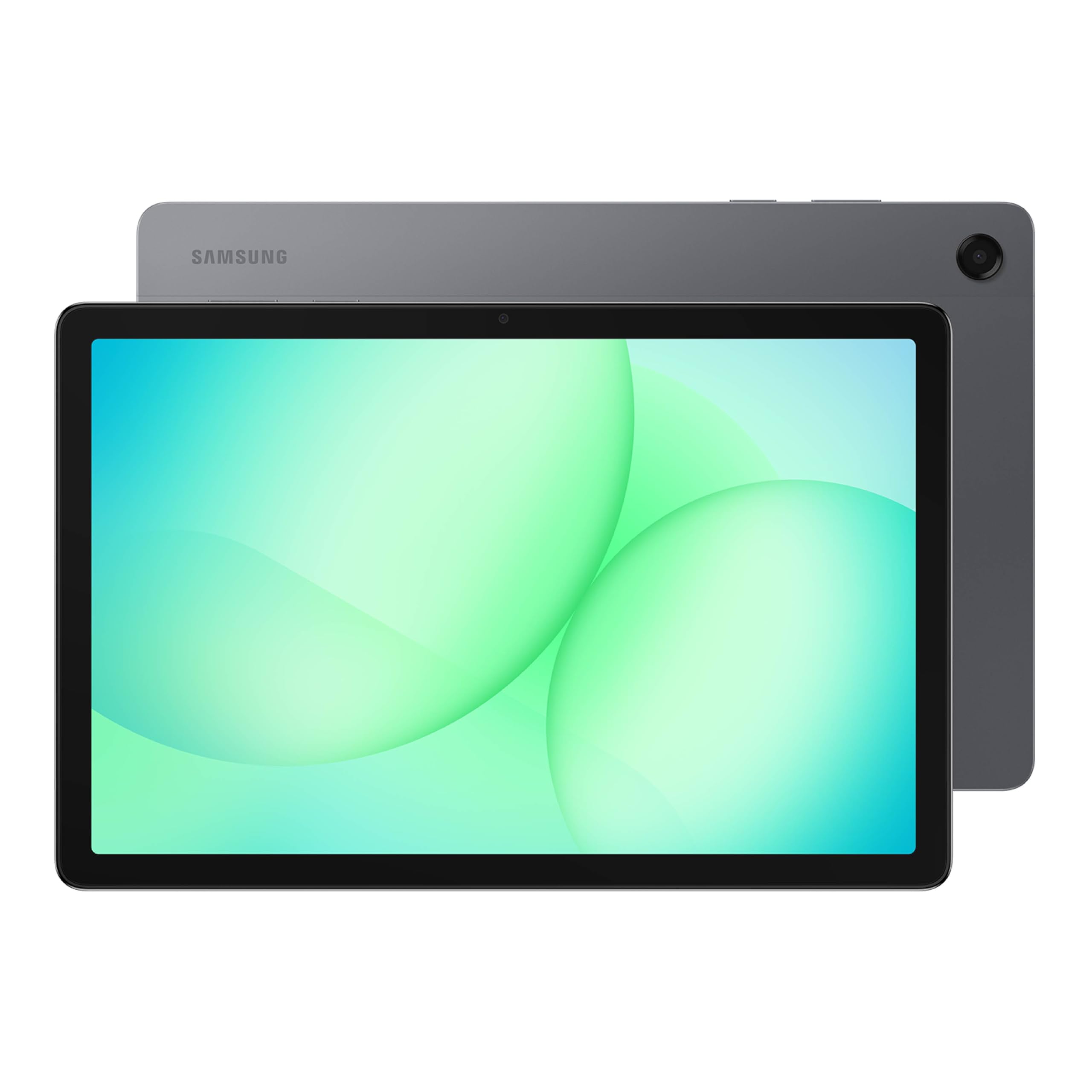
Shared-tablet stamina: 8GB of RAM and 256GB of storage for several people and several apps at once.
This one is built for the household tablet that gets passed around, and the specs back that up. The 8GB of memory plus 256GB of storage is the same generous pairing as the Lenovo Idea Tab, so a big Obsidian vault lives comfortably alongside a child’s game library. The 11-inch LCD runs a 90Hz refresh for smooth scrolling, and Samsung rounds it out with quad speakers tuned for Dolby Atmos — relevant if you write with background audio and don’t want to reach for headphones. Fast charging brings the battery back to full quickly, which is the difference between a tablet that’s always ready and one that’s always dead.
What wins people over here is build and everyday responsiveness. The chipset keeps day-to-day tasks — note apps, browsing, streaming, split-screen — moving without noticeable lag, and a few owners describe switching from cheap tablets that stuttered to this one and finding it as quick as their phone. It pairs with a stylus if you want to sketch into a note, and it works with Bluetooth keyboards and mice for a desk setup. There’s no wall adapter in the box, so plan for one if you don’t already have a USB-C charger.
One thing you should know if you buy early: earlier units had Wi-Fi dropouts that owners chased across multiple networks. A firmware update fixed the problem, and the reports from recent buyers describe stable connections, but you should still run the updates the moment you unbox. Beyond that, the honest sizing is that the 11-inch LCD is bright and competent rather than stunning — you get a great everyday screen, not a reference panel.
Why families gravitate to it
- 8GB of RAM and 256GB of storage give a shared tablet room for everyone’s apps and files
- 90Hz refresh keeps scrolling and split-screen dragging smooth
- Quad speakers with Dolby Atmos save you from hunting for headphones
- Fast charging means it spends more time usable and less time on the cable
The trade-offs in plain terms
- No wall adapter included in the box
- Early units had Wi-Fi dropouts that a firmware update addressed — update on day one
- The LCD is bright and clear, not a top-tier panel
Built for sharing: a household that wants one tablet with enough memory and storage for everyone’s apps.
Not the one if: you want premium screen quality above all else — this is an everyday panel that puts its budget into memory instead.
5. Samsung Galaxy Tab S10 Lite

A rated 16 hours of battery and the S Pen in the box — enough for a long writing day off-grid.
The headline here is a battery rated up to 16 hours, and with Super Fast Charging you’re back to full in about two hours. That combination matters for Obsidian users because writing often happens off-grid — a café without an outlet, a long-haul flight, a museum bench. Where the Google Pixel Tablet is rated 12 hours and the Lenovo Tab M11 is rated 10 hours, this one goes further. The screen is a 10.9-inch LCD tuned with Vision Booster, which nudges brightness to suit your surroundings, and the slightly smaller size makes it easy to hold one-handed while you’re standing up.
The included S Pen rounds out the package for anyone who wants to sketch a diagram or handwrite into a note. Memory and storage are the sensible-but-not-huge tier: 6GB of RAM and 128GB of storage. If your vault has video attachments, that’s the figure to keep an eye on — the microSD slot supports up to 2TB, and several owners lean on it, one popping in a 512GB card for music and movies. The Exynos 1380 processor keeps everyday tasks like reading, notes, and streaming fluid rather than fast and furious.
What most buyers notice first isn’t the battery — it’s the weight. Reviews repeatedly mention how light and slim the 10.9-inch build feels, a relief if you’ve ever held a two-handed slab above your face in bed. A small caution worth noting: some owners find the battery drains over long unused stretches, so it’s not the ideal device to leave in a drawer for weeks and expect to pick up at full charge. And with a keyboard, several owners treat it as a small travel laptop — one describing it as a lightweight 10-inch laptop that’s perfect for traveling.
The long-haul advantage: rated up to 16 hours, with Super Fast Charging for a full refill in about two hours.
The fine print: 128GB is the starting point, and storage is where buyers most often get caught out — check if you need the microSD card (a small removable memory card) before you commit.
Reach for this if: battery life and a slim, light body are the deciding factors for how you write.
Look elsewhere if: you want a large vault without an extra microSD card — the internal 128GB fills faster than you’d think.
6. TCL TAB A1 Plus NXTPAPER — 12.2″ 2.4K, 120Hz, 6GB, 256GB
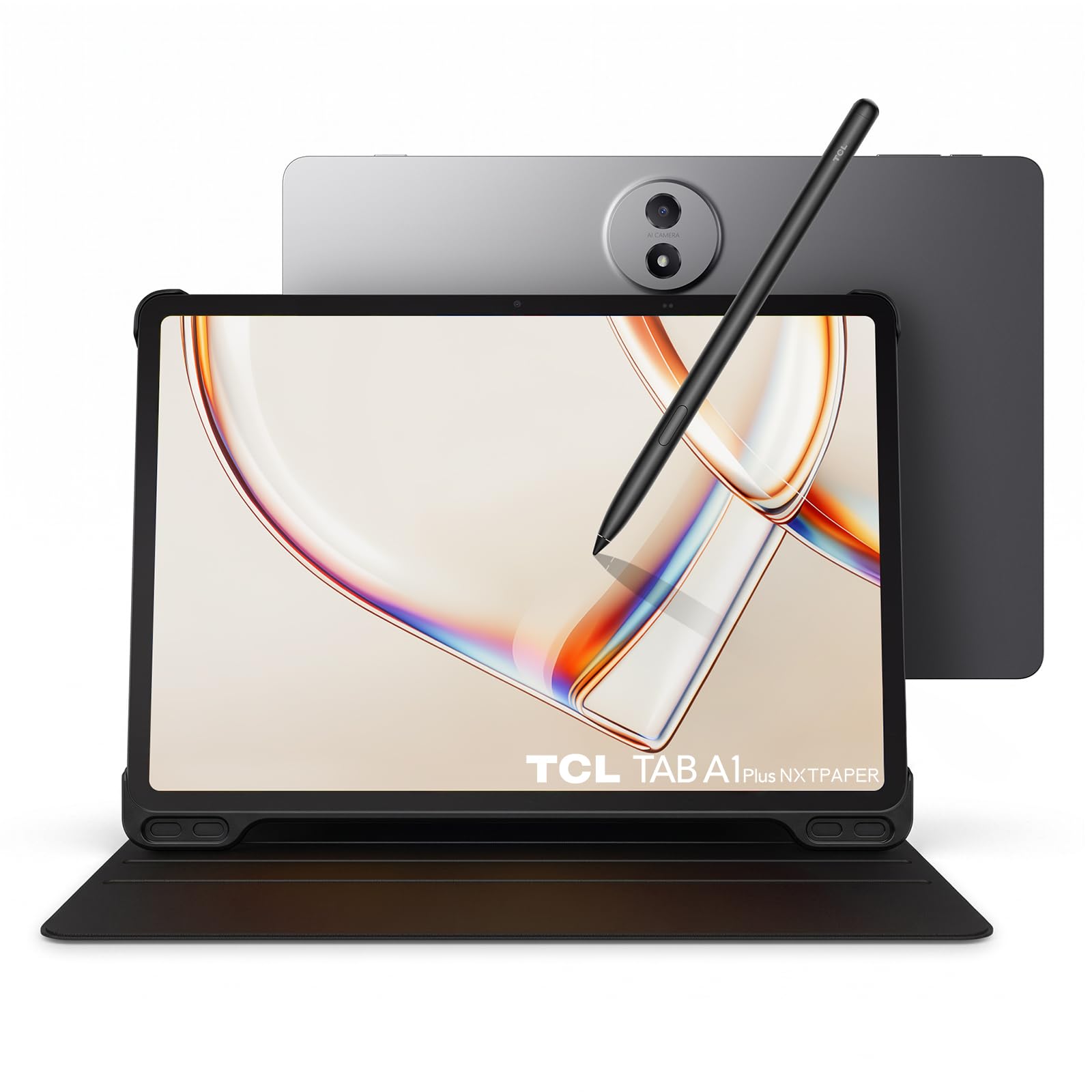
A matte 12.2-inch 3:2 screen that kills glare and fits more markdown lines than an 11-inch 16:10 panel.
For a plain-text app, the anti-glare matte panel here is the differentiator. Reflections that would bounce off a glossy iPad simply scatter, so you can read and edit at a window table without tilting the tablet away from the light. The screen is big: 12.2 inches at 2400 x 1600 with a 3:2 ratio, which means more vertical lines of markdown visible at once than an 11-inch 16:10 tablet gives you. The 120Hz refresh rate keeps scrolling calm rather than skippy, and the NXTPAPER Key flips the display between Ink Paper, Color Paper, and Regular Mode for different tasks.
The battery is the largest here at 10,000mAh, with 33W fast charging — you’ll get through a road-trip’s worth of writing and reading on one fill. The Snapdragon 4 Gen 2 chip with LPDDR5 memory is aimed at daily apps and light gaming rather than heavy lifting, but for Obsidian plus a browser tab it’s plenty. Storage is 256GB with microSD expansion, and the build is a slim 0.26-inch, 1.23-lb metal unibody with IP54 protection against splashes and dust. A T-Pen 2 with 4096 pressure levels comes with it, which is a genuine plus for anyone who sketches diagrams into notes.
Buyers praise the screen quality most, and the matte finish (a non-reflective surface) is the specific reason — reviewers describe it as easy on the eyes, with color still there when you want video. The caveats are worth naming. Stylus feedback is mixed: it works, but even fans call palm rejection (the screen ignoring your resting hand) uneven in some apps. Battery life is mixed rather than universal — some owners mention roughly six to eight screen hours rather than a full workday. Some units have also shipped without a working microSD card slot, so check the slot the day the tablet arrives.
The paper-first argument
- Matte NXTPAPER finish eliminates glare and reflections for reading-heavy work
- 12.2-inch 3:2 screen fits more markdown lines at once than an 11-inch 16:10 panel
- 10,000mAh battery with 33W fast charging
- 256GB of storage plus microSD expansion
- T-Pen 2 with 4096 pressure levels in the box
Before you commit
- Palm rejection is uneven in some handwriting apps
- Heavy-use battery reports run lower than the headline figure
- Some units ship with an unresponsive microSD slot — test it immediately
Best match for: writers who read and edit in bright rooms and want the glare gone without giving up speed.
Weigh the risk if: precise handwriting performance is central — the pen feedback is the one thin spot in an otherwise strong package.
7. Like-New Amazon Kindle Scribe (32GB) with Premium Pen

A 10.2-inch e-ink screen with no notifications and no social feed — just the note in front of you.
There’s a stubborn joke among Obsidian users that the hardest part of getting writing done is the browser tab sitting one tap away. The Kindle Scribe makes that structural rather than willpower-based — it’s a device built for writing and reading, with no notifications or social media to pull you away. The screen is a 10.2-inch glare-free, 300 ppi front-lit e-ink panel, and 300 ppi means text renders with printlike clarity, which is exactly the density you want for small markdown type and long read-throughs. Front-lighting means it works at night without turning a lamp on.
The writing workflow is the reason to own one. It’s a digital notebook — you can replace a stack of paper notebooks with a single device, take notes, sketch, erase, and redo, organize with folders, and convert messy handwriting into readable text. The Premium Pen needs no setup or charging, just start writing, and Active Canvas lets you write directly on a book’s page while the margins expand to fit your notes. PDFs and documents can be imported via Send to Kindle, and the AI notebook tools summarize or rework notes into a different length or tone.
Be clear about what this isn’t: it runs its own ecosystem, not Android, so it can’t install the Obsidian app. Think of it as a stash-box for your notes that you export and sync elsewhere. The honest sizing is in the interface — some owners find parts of it clumsy, and the general speed of the device is slower than an LCD tablet, which shows up in page turns and refreshes. Battery life stretches to weeks of reading on a single charge, and any buyer who doesn’t need the fastest redraw will find that trade remarkably comfortable.
What writing feels like: pen-on-paper friction on a 300 ppi front-lit panel that reads clearly in any light.
The honest boundary: it’s a notebook, not an Android tablet — no Obsidian app, and its interface moves at a reading pace rather than a scrolling one.
For the paper-first writer: someone who wants a note device with zero notifications and doesn’t mind a deliberate interface.
Not for you if: you need the Obsidian app itself on the same screen — this device can’t run it.
8. Lenovo Tab M11

The entry-level pen tablet: an 11-inch 1920×1200 screen, 4GB of RAM, and the lowest price on this list.
If your Obsidian vault is still mostly plain text and you want a pen for sketching into notes, this is the low-risk way in. The 11-inch 1920 x 1200 display and 90Hz refresh give you a big, readable canvas — plenty for note-taking, reading, and streaming. Battery is rated 10 hours, and owners describe it getting through a full shift. The MediaTek Helio G88 Octa-Core processor with 4GB of RAM is the area to be honest about: it’s built for note-taking and reading, not for gaming or heavy multitasking. Where the Lenovo Idea Tab gives you 8GB of memory and 256GB of storage, this gives 4GB and 64GB, so the two models sit in clearly different lanes.
The notetaking crowd is the one that gets the most out of it. One owner summed up the value plainly: “excellent notetaking tablet,” adding that hardware isn’t the draw but it holds up for school. The pen is a real plus, though it uses an AAAA battery and handwriting tracking is called mediocre — fine for jotting, not for serious illustration. Storage is 64GB, expandable with a microSD card, which is the way owners get past the small built-in capacity. There’s also a 3.5mm audio jack, which is getting rarer and is genuinely useful for plugging in a pair of headphones without a dongle.
The recurring gripe is bloatware. Owners describe spending a chunk of the first session uninstalling preloaded apps, and the ambient light sensor has drawn complaints for dimming the screen more than people want while watching video. Neither issue breaks the tablet; they’re the sort of rough edges a budget device often carries. If you want a pen-included tablet to run Obsidian and to read while staying affordable, it’s a sensible entry point — as long as your vault isn’t yet a hundred gigabytes of attachments.
The value proposition: a pen, an 11-inch 1920×1200 screen, and a 10-hour battery at the lowest commitment on this list.
The fair warning: 4GB of RAM and 64GB of storage feel tight for a growing vault, and the preloaded apps need clearing out.
Reach for it if: you want to test whether a pen-and-Obsidian workflow suits you before spending more on a bigger setup.
Skip if: your vault already carries heavy attachments — the storage math gets uncomfortable without a card.
9. reMarkable Paper Pro with Marker Plus — 11.8″ Color E-Ink
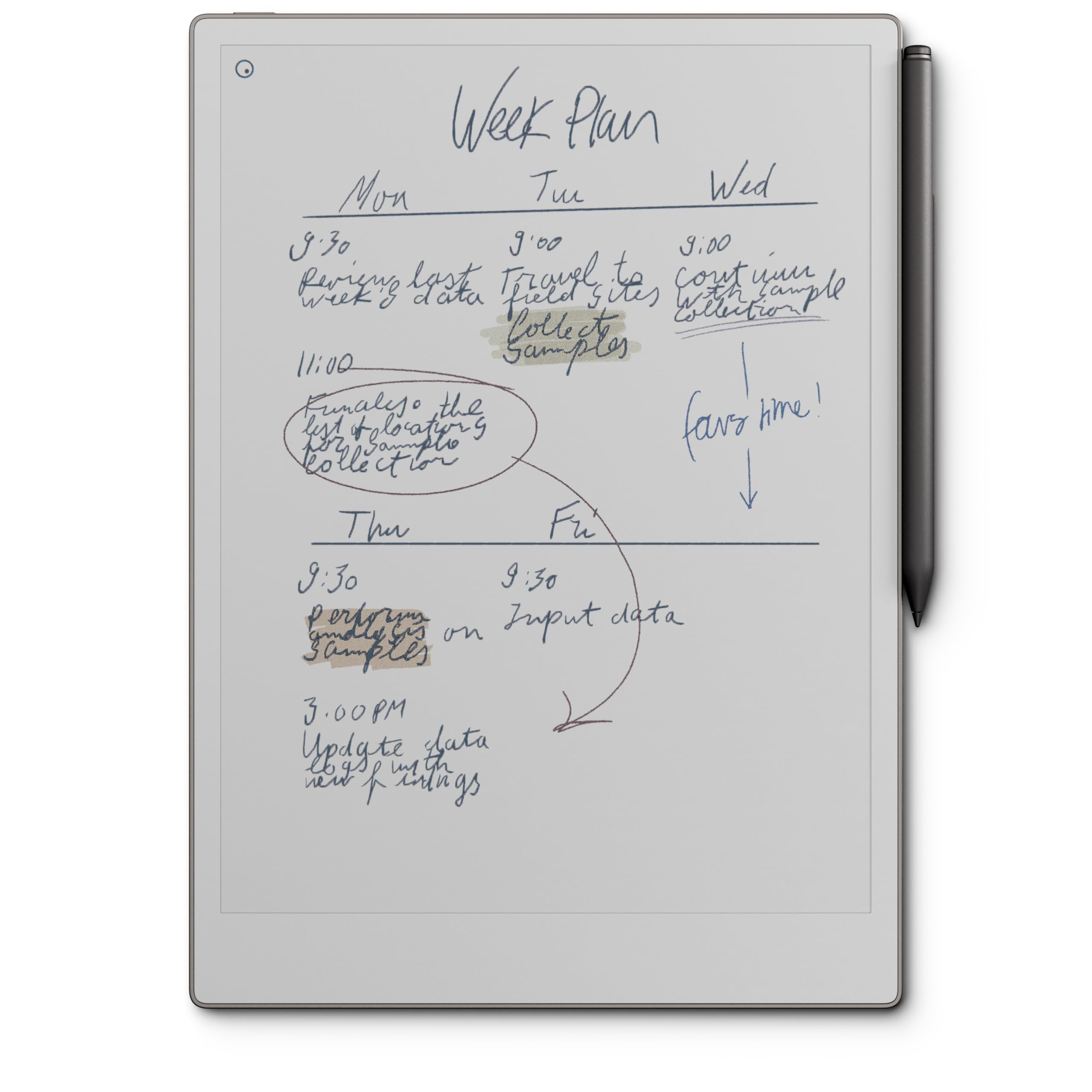
Color e-ink with friction — the closest thing to writing in a paper notebook, and priced like it.
The 11.8-inch Canvas Color e-ink display is the headline, and it’s a different kind of screen entirely. It reflects ambient light like paper, so it has low glare and doesn’t strain your eyes the way a backlit LCD does — you can even read it outdoors. An adjustable reading light lets you keep working after the lights go down. The battery is rated at two weeks, and the Marker Plus needs no charging before use because it attaches and writes from the start. At 2160 x 1620, text comes through crisp, and the device is thin enough to carry like a slim notebook.
Writing is where the money goes. The pen delivers realistic friction (the slight drag of pen on paper), and the notebook converts handwriting to typed text and arranges everything with folders and tags. It also reads and annotates PDFs. The distraction-free design is the point: no email, no messaging, no app store to dive into. A few owners describe it as the only tablet they don’t get pulled away from — and for studying or drafting, that focus is worth a great deal.
The honest caveats here are real and specific. It runs its own operating system, so you can’t install Obsidian on it — think of it as a capture and sketch tool you export and sync elsewhere. Color quality is mixed: the e-ink palette is muted, with blues and magentas blending together, so don’t buy it for a vivid screen. Full functionality for saving and syncing also requires a paid service, and the unit is expensive relative to the other tablets here. If you’re a heavy note-taker who wants a paper feel and a focused workflow, those trade-offs are the cost of admission; if you want Obsidian itself, this isn’t the device.
The case for paper feel
- 11.8-inch Canvas Color e-ink display reflects ambient light and stays low-glare
- Marker Plus delivers realistic friction and needs no charging
- Battery rated at two weeks per charge
- Handwriting converts to typed text and organizes with folders and tags
The cost-of-admission list
- Runs its own OS — you cannot install the Obsidian app
- Colors are muted and blur together at the edges
- Full save-and-sync functionality requires a paid subscription
- The highest-priced device on the list
Best suited to: a serious note-taker who wants the pen feel of paper and values a distraction-free device over app access.
Not the pick if: you need Obsidian running on the screen — you’ll be exporting notes to your vault rather than working inside it.
Know the Specs
Display type: LCD, matte, or e-ink
An LCD is bright and fast, so scrolling and typing respond immediately — but a glossy LCD reflects lamps and windows, which is why so many people tilt their tablet to dodge glare. A matte-finish panel scatters that light, keeping text readable in bright rooms. An e-ink display reflects ambient light like paper and adds almost no eye strain, but redraws slowly, so page turns feel deliberate. For Obsidian, the longer your sessions and the brighter your room, the more a matte or e-ink panel earns its keep.
Refresh rate and resolution
Refresh rate is how many times per second the screen redraws, measured in Hz. A 120Hz panel scrolls more smoothly than a 60Hz one, which matters when you are moving through a long note. Resolution and its per-inch version, ppi, decide how crisp small text looks; a higher figure makes dense markdown type easier to read for hours. A 300 ppi e-ink panel renders text with printlike clarity. Higher resolution isn’t just marketing here — you can feel it in your eyes after an hour of small type.
Common Questions
Can I run the Obsidian app on a Kindle Scribe or a reMarkable?
What is the minimum storage I should get for an Obsidian tablet?
Is a matte screen actually better than a glossy one for reading in bright rooms?
How much RAM do I need for Obsidian on Android?
Do I need a stylus for Obsidian?
Which is better for long writing sessions, LCD or e-ink?
Does Obsidian sync work on a tablet?
Will a 60Hz screen feel slow when scrolling long notes?
Does a tablet pen battery ever need replacing?
Can I expand storage on all these tablets?
Is a 12-inch screen too big for reading in bed?
The Bottom Line
For most people building a tablet for obsidian, the Apple iPad 11-inch (A16) is the one to buy. It gives you the largest app ecosystem, a display with True Tone comfort, 128GB of the storage your vault actually needs, and the fewest compatibility questions of anything on this list. If you want a clean Android build with Google’s AI shortcuts close at hand, the Google Pixel Tablet pairs 8GB of memory with 12 hours of battery. And for glare-free writing in bright rooms, the matte 12.2-inch TCL TAB A1 Plus NXTPAPER solves the reflections problem before it starts.
One honest note before you decide: the iPad has earned its place at the top of this list by carrying the larger share of owner satisfaction alongside its fast chip and roomy base storage. That combination is hard to argue with if Obsidian is going to be a daily habit rather than an experiment.
How we choose
We do not accept paid placement. Every pick is matched to a real buyer and a real use-case; we do not hands-on test units.
Sources
Specifications: manufacturer listings and product documentation. Review insights: verified customer reviews, as of October 2026. Pricing: not shown on this page (it changes often); check the current price via the retailer link.
As an Amazon Associate, Aappliancez earns from qualifying purchases. This does not affect which products we feature.