Disclosure: Some links in this post are affiliate links. As an Amazon Associate I earn from qualifying purchases, at no extra cost to you. Learn more
Specs are compiled from manufacturer listings and verified buyer reviews and can change over time — please confirm the key details on the product page before buying.
You want your local news, your network channels and the free stuff that does not need a login — and you want it on one screen without hopping between five apps. That is what a good streaming device for local channels actually does. For most homes the Roku Express 4K+ is the pick: 350+ free live channels and every paid app share one home screen, and setup is a plug-in job. Below you get seven real options sorted by what kind of local TV you actually get at your address — antenna, cable-replacement, or app-based.
This guide is built by comparing the manufacturers’ published specifications and the patterns across verified customer reviews, so you get each pick’s real strengths and trade-offs instead of marketing spin.
Local channels arrive three different ways, and the device you buy has to match the one your address supports. This breakdown covers exactly that match, so you can pick the right one the first time around with the best streaming device for local channels.
Top Picks


How To Choose The Best Streaming Device for Local Channels
Start with one question, not with the spec sheet: where do your local channels come from? A rooftop or indoor antenna is a radio broadcast that needs a tuner to catch it. A cable-replacement service is an internet feed of the same channels. An app like YouTube TV or Hulu with Live TV sits on the streaming device itself. Buy a box that does not match your source and it goes back in the box.
Antenna, cable replacement or app — match the device to the source
If you own an antenna, a plain streaming stick will not tune it. You need a device with a tuner built in, or a network DVR like the Tablo that takes the coaxial cable and spreads the signal across your house. If your locals come through a paid live-TV service, any solid Android TV or Google TV box will run the app — the box just needs enough storage and a strong enough Wi-Fi chip. Settle the source first and the shortlist drops to two or three devices.
Wi-Fi hardware matters more than the resolution badge
A 4K badge on the box is worthless if the stream stutters. Look at the wireless standard the device lists — Wi-Fi 6 is the newer, better-behaved version — and ask yourself where the router sits. A stick tucked behind a wall-mounted TV with the router two rooms away will buffer, while a box with an Ethernet port on a shelf beside the router streams cleanly. Local channels are often the thing that stutters first, because live feeds have no buffer to hide behind.
Storage, RAM and the remote are the quiet dealbreakers
Storage is measured in gigabytes (GB), and it fills up fast once you add a few streaming apps. A device with 8 GB of space runs out quickly; 16 GB or 32 GB gives you breathing room. RAM is the working memory that keeps menus snappy — 2 GB is fine, and one pick here lists 3 GB. And check the remote: a backlit or numbered remote makes finding your local news channel far easier than scrolling a grid of icons at 10 pm.
Side-by-Side Comparison
| Model | Best For | Storage | Max Resolution | Form Factor | Amazon |
|---|---|---|---|---|---|
| Roku Express 4K+★ Best Overall | Most homes, one-screen free TV | 16 GB | 4K / HDR | TV Box | Amazon |
| Roku Express (New) HDBest for Spare TVs | Spare or garage TV on a budget | 16 GB | HD | TV Box | Amazon |
| TiVo Stream 4K | Cable-style guide on Android TV | 8 GB | 4K UHD / Dolby Vision | TV Stick | Amazon |
| Tablo TV 4th Gen 2‑Tuner OTA DVR | Recording antenna channels, no fees | 128 GB | — | TV Box | Amazon |
| onn 4K Pro Streaming Device | Wired Ethernet plus Dolby Atmos | 32 GB | 4K UHD / Dolby Vision | TV Box | Amazon |
| Xiaomi TV Box S (3rd Gen) | Smallest footprint, Wi-Fi 6 | 32 GB | 4K UHD / Dolby Vision | TV Box | Amazon |
| DIRECTV Gemini Air | Cable-style channel numbers, existing subscribers | — | 4K HDR | TV Stick | Amazon |
Detailed Reviews
1. Roku Express 4K+
Our pick — 4.5+★ from 103,000+ verified ratings; the strongest balance of quality and price.
The box that puts 350+ free live channels on screen before you even sign up for anything.
Roku streams 350+ free live TV channels on this box, including the local news, weather and sports feeds people open first. Add an antenna-capable source or a live TV app and you have one home screen for everything. It streams in HD, 4K and HDR (high dynamic range, which keeps bright and dark scenes readable on a good TV), so a decent set is not held back by the box.
Setup is genuinely a plug-the-cable-in job. It connects over Wi-Fi, uses an HDMI connector into the TV, and one included remote powers the TV, adjusts volume and controls the Roku itself — no second remote on the couch. The remote also takes voice search, and it works with Siri, Alexa or Hey Google if you have one of those already. At 1.6 ounces it is light enough to sit behind a wall-mounted TV with the included adhesive strip.
This is a streaming device people keep buying — it holds a 4.5+ star score from 100,000+ ratings, and what wins people over is simply that it performs. The thing you should know before buying is that connectivity and reliability are the two areas that draw the most friction: a few setups have dropped their Wi-Fi connection, and the fix is usually a router or password double-check rather than the box. There is a known habit worth knowing — the base has to face outward or the remote signal gets blocked. Also worth noting: 16 GB of storage is the same as the cheaper Roku below, so this one earns its spot on the 4K/HDR output and voice remote rather than on space.
Where it pulls ahead
- 350+ free live channels built in, no antenna required
- One remote handles TV power, volume and Roku control
- HD, 4K and HDR output, so modern TVs get a full-quality feed
- 1.6 ounces with an adhesive strip — mounts behind the TV
What to weigh first
- 16 GB storage fills up once you install a lot of apps
- Remote is line-of-sight, so the base must face outward
- Live feeds can stutter on a weak Wi-Fi signal in another room
Reach for this if: you want one screen that mixes free live channels with paid apps, and you have a 4K TV worth feeding.
Look elsewhere if: your antenna is your only local source — this box streams apps, it does not tune a coaxial aerial.
2. Roku Express (New) HD Streaming Device
The garage-TV answer: a full app library and free live channels for the set you never bothered to upgrade.
Ask what a second TV really needs to do and this box answers nearly all of it. It streams in HD over fast Wi-Fi, arrives with a high-speed HDMI cable in the box, and carries the same free live TV channel selection as the 4K+ above — news, sports and entertainment feeds included. The remote is the simple kind: straightforward buttons, no voice, no TV power control. For a spare room, that is enough.
Reviewers keep landing on the same word: simple. The review pages sum it up: Plug and play easily in minutes
— apps already loaded, easy to navigate. Function and performance are what carry the feedback, and the recurring use is a second set that would otherwise get a new TV bought for it. One household bought it for the garage set and found it did the job without fuss. Storage matches the pick above at 16 GB, so the app shelf holds a healthy library.
The honest trade is weight and shape. This model lists at 8 ounces versus 1.6 ounces for the 4K+ — the same firmware in a chunkier housing, and heavier to hang behind a slim panel. You also give up voice search and TV power control on this remote. If you intend to use this box every evening on the main TV, spend the extra and take the 4K+ with the better remote and 4K output instead.
What it gets right: 16 GB of storage plus the full Roku app library, with an HDMI cable included so nothing extra needs buying.
The trade to accept: no voice search, no TV volume control on the remote, and a heavier body for a behind-the-TV mount.
Suits the second set: bedrooms, garages and anywhere the TV does not need 4K or a talking remote.
Not the one for: a main living-room TV that deserves voice search and HDR.
3. TiVo Stream 4K

One screen that gathers every app’s shows, so you stop hunting for which service your local feed lives on.
The TiVo Stream 4K is for the person who misses the old grid. It runs Android TV, lets you search across all your apps from one place, and supports 4K UHD with Dolby Vision HDR (the premium HDR format that fine-tunes brightness scene by scene) and Dolby Atmos sound. It is a stick, not a box, so it hides behind the TV, and the included remote carries full Android and Google Assistant controls. At 8 GB of storage it holds fewer apps than the Roku picks — 8 GB versus 16 GB — so plan your install list.
Where this stick genuinely earns its place is audio and app support. It handles 5.1 and Atmos in live feeds — which the Roku and Chromecast alternatives here have been found lacking on in some apps — and it runs the Android TV platform with full access to the Google Play Store. The interface pulls your services together so you don’t have to switch apps to find a show, and the remote has an Info button that keeps a channel guide a thumb-click away.
Reliability is the place to be realistic. The device is quick to set up and people do find it stable for months at a stretch, but the recurring theme is Wi-Fi weakness — dropouts and buffering when the signal is poor, and the odd restart loop that traces back to powering it from the TV’s USB port instead of the wall. Plug it into the included adapter, keep it close to the router, and it behaves. Also expect a TiVo-familiar interface rather than a bare Google TV grid — some people love it, some find it intrusive.
Why some buyers pay extra
- Dolby Vision HDR and Dolby Atmos audio on compatible hardware
- One guide and one search across all your installed apps
- Google Assistant voice control built into the remote
Where it asks patience
- 8 GB of storage runs out faster than the Roku boxes
- Wi-Fi dropouts show up when the signal is weak
- Must use the AC adapter, not the TV USB port
The pick for audio-first rooms: if your soundbar or receiver handles Atmos, this stick feeds it properly.
Skip if: your router sits far from the TV and you cannot run a cable or a mesh node.
4. Tablo TV 4th Gen 2‑Tuner OTA DVR (Renewed)

The only device here that tunes a real antenna and broadcasts it to every screen in the house.
Every other pick in this list streams. This one receives. Plug any TV antenna into the coaxial connector, hook it to your router by the included Ethernet cable or over Wi-Fi, and it turns ABC, CBS, FOX and NBC into a whole-home feed — phones, tablets, Roku, Fire TV, Android TV and Apple TV boxes all pull from it. It carries 128 GB of onboard recording space, which covers 50+ hours of shows, and you can add up to 8 TB of external USB storage if you record a lot. Two tuners mean you watch one live channel while recording another.
Where it shines is the channel count. Performance and channel count are what get talked about most, and pulling in a large batch of over-the-air stations is the whole point — one indoor antenna in this setup has been reported pulling 180 OTA channels. The no-subscription model is the other draw: you buy the hardware once, and apart from your internet, there is no recurring bill. For someone whose local signal is legitimately free over the air, that keeps the whole monthly cost down to a flat rate.
Be honest about the quirks before you buy. Setup is straightforward, but the interface takes a short learning curve, and channel numbers display small on screen. Recording a channel while watching it can briefly freeze the picture, and there is up to a 10-second buffer on 1080p (full HD) feeds. It also depends on a steady internet connection — if your router goes down and restarts, the Tablo can lose its grip until the network returns. This is a tool for a household with a solid router and an antenna that gets signal, not a plug-and-forget box.
The core value: one 128 GB DVR, two tuners, and no subscription fee, spreading free antenna channels to every compatible screen in the house.
The catch to size up: a short learning curve, small on-screen channel numbers, and a hard dependence on a stable home network.
For the antenna household: if you already get strong over-the-air signal and want to record it, nothing else here does the job.
Not your box if: you do not own an antenna and have no intention of installing one.
5. onn 4K Pro Streaming Device

An Ethernet port on a streaming box is rare — and it is exactly what live local feeds want.
The phrase “buffer-free” gets thrown around, but here is the spec that actually delivers it: this box has an optional Ethernet port in addition to Wi-Fi 6 (the newer wireless standard with better throughput and less waiting on busy networks). If a network cable can reach your TV shelf, live channels simply stop stuttering. The rest of the hardware is no slouch either — 32 GB of storage and 3 GB of RAM, which the maker describes as 50% more working memory than its 4K Plus model. That extra memory is what keeps menus and app switching smooth.
Picture and sound are the other reasons people land here. It outputs 4K Ultra HD with Dolby Vision and Dolby Atmos audio, so a decent TV and soundbar both get fed properly. Setup is genuinely quick: HDMI in, power on, and it walks you through the rest. It also has a Bluetooth remote with a find-my-remote feature and backlighting, plus the ability to sideload apps from outside the standard store. One household swapped a cable bill for this device plus a streaming service and reported an uninterrupted HD signal with the box sitting near their router.
The trade you should size up honestly is reliability under a weak connection. When this box runs on marginal Wi-Fi or on a network with interruptions, it stutters and app load can fail — the fix is nearly always the wired port or a closer mesh node. It also wants a Google account and is set up around Google TV, so if you are firmly inside another ecosystem, some of the appeal fades. Note it carries a 1.5-pound shipping weight and is a box rather than a stick, so it needs a shelf or a mount, not a dangle behind the panel.
Specs that solve real problems
- Ethernet port for a wired, uninterrupted feed
- 3 GB RAM and 32 GB storage — lots of headroom for apps
- Dolby Vision and Dolby Atmos on supported hardware
- Backlit remote with find-my-remote
What to keep in mind
- Wireless reliability depends on the signal reaching the box
- Box form needs a shelf or mount, not a dangle
- Google TV setup wants a Google account
Reach for this if: you can drop an Ethernet cable to your TV shelf and want local feeds with no buffering risk.
Look elsewhere if: everything in your house is a stick behind the TV and there is no cable run possible.
6. Xiaomi TV Box S (3rd Gen)
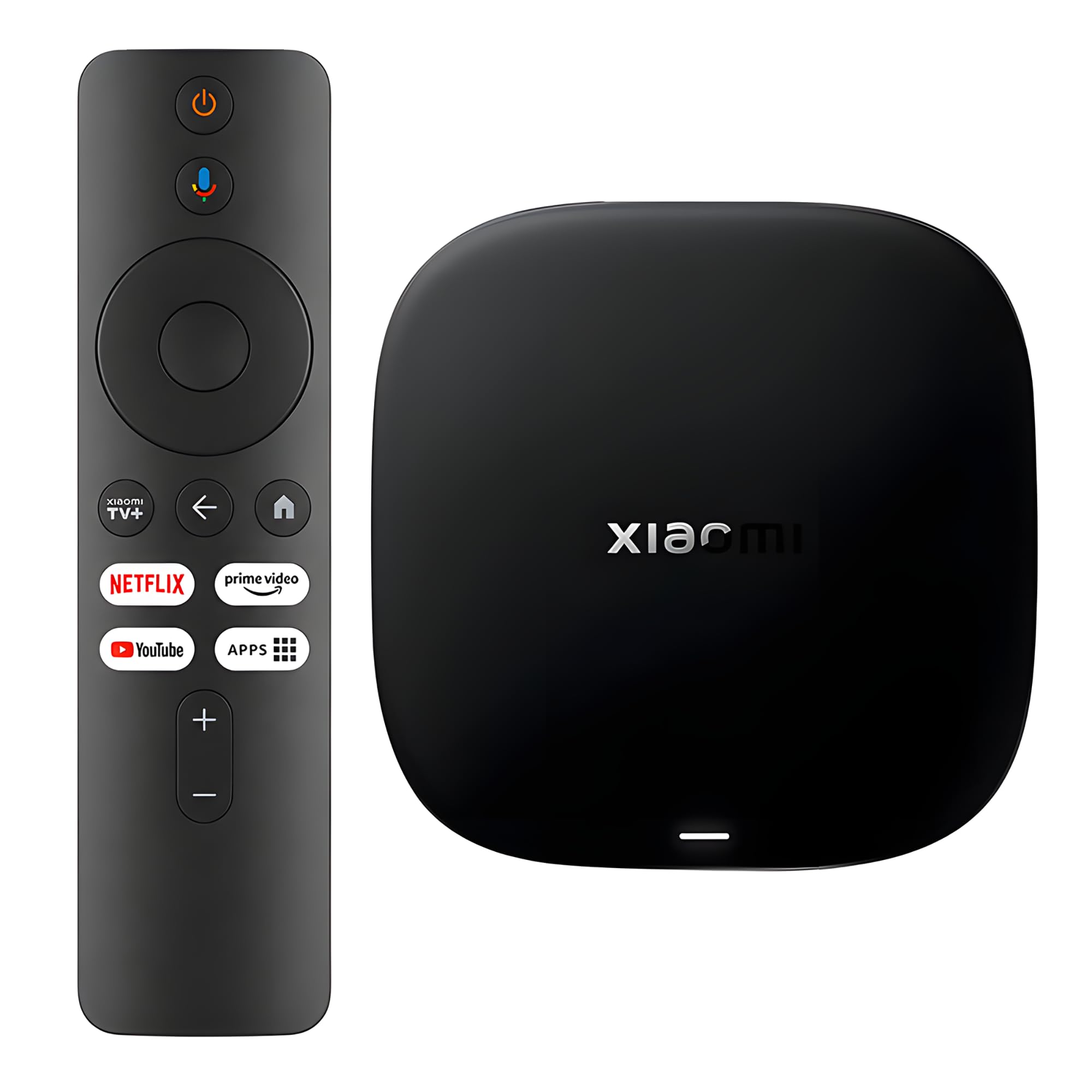
A tiny square box that leans hard on the newest Wi-Fi standard to keep live feeds steady.
This box is 91.2 grams — about a fifth of a pound — and it packs the newest wireless hardware in this list. It supports Wi-Fi 6 with OFDMA and MU-MIMO (two techniques that split the wireless channel more efficiently when several devices are online), and it needs a Wi-Fi 6 router to fully benefit. If your home has a Wi-Fi 6 router and half a dozen devices talking to it, this chipset makes a real difference to whether local feeds drop out. It also carries 2 GB of RAM plus 32 GB of storage, driven by a 6nm platform with a quad-core A55 CPU listed up to 2.5 GHz.
What stands out in the picture is the format support: HDR10+ and Dolby Vision on compatible content, plus Dolby Atmos and DTS:X audio. It ships with the HDMI cable in the box, so there is nothing extra to buy, and the 360° Bluetooth remote carries Google Assistant for voice search. A user with an older Vizio LCD found setup easy and noticed 4K upscaling versus an older stick, with fast app loading once connected. Storage is the other quiet win: 32 GB is four times what the TiVo Stream 4K offers here, and that means you can install without deleting.
The honest limit is the remote. Feedback on it is the weakest area for this box — several people describe it as a weak point, and the on-screen speed has drawn disagreement, with some finding it quick and others sluggish. So keep your expectations on the remote and check the box runs on your network before deciding the interface is slow. If your router is older and not Wi-Fi 6, you get less of this box’s upside and could pay the same for a simpler pick.
Why it earns a spot: Wi-Fi 6 plus 32 GB of storage in a 91.2-gram box, with HDR10+ and Dolby Vision for the picture and Dolby Atmos for the sound.
Known weak link: the remote is the piece buyers single out, so budget for a replacement pointer if you like one.
Best for Wi-Fi 6 homes: a small box that leans on a modern router to carry live local channels cleanly.
Skip if: your router predates Wi-Fi 6 — you would be paying for a standard you cannot use.
7. DIRECTV Gemini Air Streaming Box

The cable-box replacement with actual channel numbers on the remote, no dish on the roof.
If you are already a DIRECTV Stream subscriber and you miss typing channel 5 instead of scrolling a grid, this is the pick. The Gemini Air plugs into HDMI, connects over Wi-Fi, and pulls DIRECTV live channels plus cloud DVR and a 72-hour lookback into one interface. It runs Android TV 11 with access to the Google Play Store, so Netflix, Prime and Max sit beside the DIRECTV guide. It streams in 4K Ultra HD with HDR on compatible TVs, and the remote carries Google Assistant voice and backlighting.
Local channels are where this box behaves like the cable you gave up. You punch in a channel number and go; you rewind live TV through the 72-hour lookback; and the guide searches across DIRECTV content, recorded shows and streaming apps in one pass. Setup on an older Samsung TV took a few hours for one household because the remote’s mute, volume and voice buttons failed until they factory-reset the dongle, after which it behaved. Check TV compatibility first if your set is not from the last few years.
Two catches to weigh honestly. First, it needs a DIRECTV Stream subscription — this is not a free standing box like the Roku for free live channels. Second, the included remote is a known weak point; the batteries have been reported wearing out in as little as a week, so keep spares on hand or plan to bring a different remote. And do not expect to use it before you have a subscription — buy only if you are already paying for DIRECTV Stream, or plan to.
What makes it different: a numbered, backlit remote with a Google Assistant, plus a real 72-hour lookback for local news and sports you missed.
The hard prerequisite: without a DIRECTV Stream subscription it will not give you live channels, so buy it only when you already subscribe.
For the existing subscriber: if your locals already come through DIRECTV Stream, this is the interface that feels most like the box you gave back.
Not the right entry point: for someone who has never subscribed — start with a free-channel box like the Roku instead.
Know the Specs
Storage in GB
Storage is the shelf space inside the box for apps and recordings. A device with 8 GB holds fewer apps than one with 16 GB or 32 GB, and it fills up after a handful of large apps. For a Tablo the number is bigger because it records shows — 128 GB is the built-in disk here. When your storage fills, the box slows down or asks you to delete things.
Dolby Vision, HDR10+ and Atmos
These are premium picture and sound formats. HDR keeps bright skies and dark stadium shadows both visible; Dolby Vision tunes that scene by scene. Atmos is a surround-audio standard that places sound around the room. All of them need a compatible TV and sound system — without one, you get a good standard picture instead.
Wi-Fi standard and Ethernet
The wireless standard decides how cleanly data reaches the box. Wi-Fi 6 is newer and handles busy households better, and it works best with a Wi-Fi 6 router. An Ethernet port is the more reliable option — a cable from router to box removes Wi-Fi dropouts entirely. Live TV is the pickiest stream, so both matter while you watch a local channel live.
Tuners and over-the-air TV
A tuner is the radio receiver inside a device that catches broadcast TV from an antenna. A two-tuner DVR lets you watch one live channel while recording another. A streaming stick has no tuner, so it cannot turn an antenna signal into a picture — you need a DVR like the Tablo for that. Antenna channel availability depends on where you live.
Common Questions
Do I need an antenna to get local channels on a Roku or Android TV box?
Can the Tablo TV 4th Gen record shows without paying a subscription?
What is the difference between a streaming stick and a streaming box for local channels?
Why does my local channel stutter or buffer while other apps do not?
How much storage do I need on a streaming device?
Does DIRECTV Gemini Air work without a DIRECTV Stream subscription?
Will a Wi-Fi 6 box like the Xiaomi TV Box S make my local channels smoother?
Can I watch local channels in more than one room with a Tablo?
Do I need to plug my streaming device into the wall or can it use the TV USB port?
How do I know whether local channels in my area need an antenna or a streaming service?
The Bottom Line
The winner for most homes is the Roku Express 4K+ — 350+ free live channels built in, 4K HDR output, one remote for the whole TV, and a track record with 100,000+ ratings behind it. If your antenna is the source you actually want to record and carry around the house, take the Tablo TV 4th Gen with its two tuners and 128 GB of recording space. For a wired shelf beside the router, the onn 4K Pro and its Ethernet port is the one to reach for. And if you already pay for DIRECTV Stream and miss a numbered remote, the Gemini Air is the interface you want. Match the device to your source and your local channels will play without fuss.
How we choose
We do not accept paid placement. Every pick is matched to a real buyer and a real use-case; we do not hands-on test units.
Sources
Specifications: manufacturer listings and product documentation. Review insights: verified customer reviews, as of October 2026. Pricing: not shown on this page (it changes often); check the current price via the retailer link.
As an Amazon Associate, Aappliancez earns from qualifying purchases. This does not affect which products we feature.