Disclosure: Some links in this post are affiliate links. As an Amazon Associate I earn from qualifying purchases, at no extra cost to you. Learn more
Specs are compiled from manufacturer listings and verified buyer reviews and can change over time — please confirm the key details on the product page before buying.
A standard one-piece keyboard keeps your hands close together and angles your wrists outward, which is what starts aching by mid-afternoon. A split keyboard breaks that single slab into two separate halves you place at shoulder width, so your forearms run straight instead of angling in. This guide covers eleven split keyboards, sorted by what each one actually does for your body.
This guide is built by comparing the manufacturers’ published specifications and the patterns across verified customer reviews, so you get each pick’s real strengths and trade-offs instead of marketing spin.
Some halves tilt upward, some connect by cable only, and a few let you detach entirely — that difference in how the halves move matters more than any spec sheet suggests. Below you will find honest guidance on the best split keyboards for real desk setups.
Top Picks

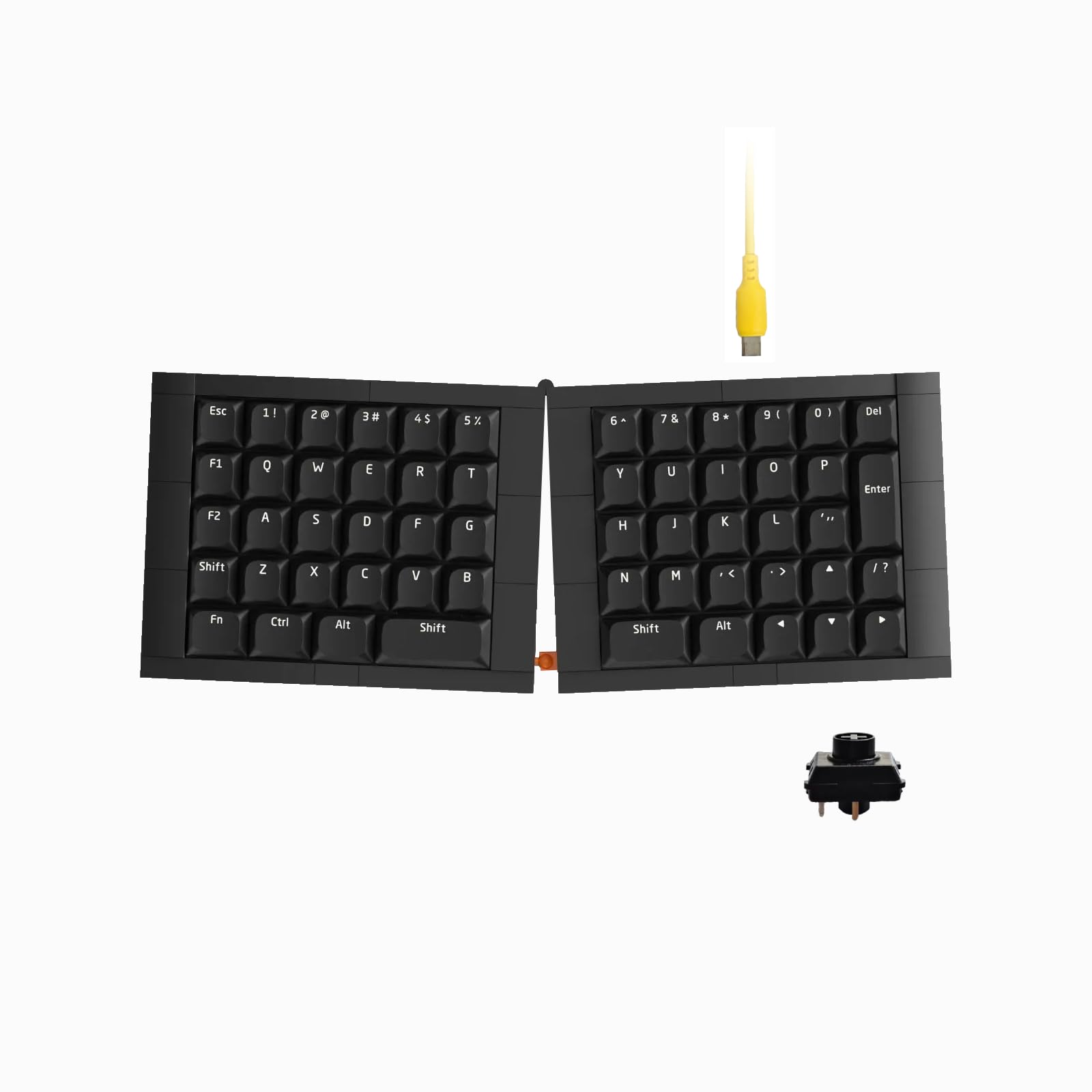

How To Choose The Best Split Keyboards
The first thing to get straight: “split” is not one design. Some boards are two physical halves you can move apart. Others are a single fixed shell with a V-shaped gap in the middle, like an Alice layout. Those two feel very different on your shoulders, and they cost very different amounts of retraining.
Separation: how far apart do the halves go?
Separation is the measurement that matters most, because it is what lets your elbows drop to shoulder width. On the Kinesis Freestyle2 the modules rotate and separate up to 9 inches. The Advantage360 Professional goes up to 10 inches with its included cable. On a fixed Alice-style board there is no separation at all — the gap is baked into the shell, so you get the angled wrist position but not the shoulder-width stance.
Tenting and tilt: the anti-roll feature
Tenting tilts each half upward at the outer edge so your palms face inward instead of rolling flat. Tenting is the most under-checked spec in this category. The Freestyle2 in this list ships pre-assembled with a VIP3 tenting accessory giving 5, 10, or 15 degrees. The Advantage360 Professional offers 3 adjustable tenting heights. The Cloud Nine C989M builds in 7 degrees at the wrist rests. A board with no tenting option leaves your palms flat, which you feel in your forearms after a long session.
Layout retraining: how much your muscle memory will fight you
Ortholinear means the keys line up in straight vertical columns rather than the staggered rows you grew up with. It teaches better finger travel, but it does require a learning period. Alice layouts keep the staggering you know and just angle the halves — a gentler transition. A few boards also move keys around in ways that matter: the EPOMAKER Split70 uses a right Shift that several buyers found too small, and the Advantage360 Professional places Backspace under a thumb key, which breaks common shortcuts until you reprogram.
Wrist support: padded, hard, or none
Split keyboards often ship with some form of rest, and the material matters. A soft memory-foam rest supports without pressure points, which is what ProtoArc uses on the EKM01 Plus. The Perixx PERIBOARD-535 uses a hard unpadded rest. The Freestyle2’s VIP3 tenting accessory includes integrated cushioned palm supports. Softer is not automatically better — several heavy typists prefer a firm surface that never wears a dent.
Side-by-Side Comparison
| Model | Best For | Separation | Connection | Layout / Keys | Amazon |
|---|---|---|---|---|---|
| ProtoArc EKM01 Plus Combo★ Best Overall | Full-size comfort with a mouse included | Curved fixed split frame | Bluetooth + USB, 3 devices | Full-size QWERTY | Amazon |
| KBDcraft 07Israfel 50%Build-It Kit | Builders wanting a Lego-compatible split kit | Hinge-split, 7 tilt options | USB-C wired | 50% ortho, 56 keys | Amazon |
| Perixx PERIBOARD-535BRTactile Ten-Key | Budget mechanical with a 10-key | Fixed curved split | USB wired | Full-size, 104 keys | Amazon |
| EPOMAKER Split70 | Wireless halves with a rotary knob | Detachable halves | BT 5.0, 2.4GHz, USB-C | 70% mechanical, 71 keys | Amazon |
| MechLands Feker Alice98 | Alice angle plus a full numpad | Fixed Alice frame | USB-C wired | Alice 98-key | Amazon |
| ZORNHER ST68 | Compact split gaming on a budget | Detachable halves | BT 5.0, 2.4GHz, USB-C | 65% mechanical, 68 keys | Amazon |
| NuPhy Air75 V3 | Ultra-thin travel keyboard | Fixed low-profile frame | BT, 2.4GHz, USB-C | 75% low-profile, 84 keys | Amazon |
| Kinesis Freestyle2 + VIP3 | Widest adjustable separation on a budget | Up to 9 inches | USB wired | Windows, 94 keys | Amazon |
| Logitech Ergo K860 | Quiet office use with three-device pairing | Fixed split with palm lift | Bluetooth + RF | Full-size, 61 keys | Amazon |
| Cloud Nine C989M | Split ergonomics with RGB and macros | Up to 8 inches | USB wired | Full-size, 104 keys | Amazon |
| Kinesis Advantage360 Pro | Serious contoured ergonomics | Up to 10 inches | Bluetooth wireless | Contoured, 108 keys | Amazon |
Detailed Reviews
1. ProtoArc EKM01 Plus Wireless Ergonomic Keyboard Mouse Combo
Our pick — 4.0+★ from 800+ verified ratings; the strongest balance of quality and price.
The one that hands you a matched mouse and a wrist cushion in the same box.
Start with the shape, because that is what you buy this for. The keyframe is curved and split across a full-size layout, holding your wrists and forearms in the relaxed angle instead of the flat pinch a straight board forces. The keys are scooped to the fingertip, so each press lands where your finger expects. Measuring 20.75 inches long and 11 inches wide, it is a desk anchor — measure before you commit.
Where this combo earns its keep is the small stuff. The curved wrist rest carries a soft memory-foam layer, and the tilt legs let you set the angle for either seated or standing work. Both the keyboard and mouse run on 500mAh lithium batteries, recharged over the included Type-C cable, with auto-sleep kicking in after 30 minutes of no operation. The mouse adds 2000 DPI and forward/back buttons for page browsing.
Device juggling is the hidden feature. One button flips between three paired devices over Bluetooth or the USB receiver, which handles Windows 7/8/10, Mac OS X 10.12 and Android 4.3 and up. That is a genuine cross-desk win — unlike the Advantage360 Professional’s Bluetooth, which buyers describe as troublesome, this one pairs and switches without drama. Buyers report paired to a computer and phone “in under 2 min.”
What the foam and the switches give you
- Memory-foam wrist rest and adjustable tilt legs, so long sessions don’t leave your wrists bent
- Quiet, non-mushy keys — office-friendly rather than clacky
- Three-device switching by a single button, across Windows, Mac and Android
- Mouse included, with 2000 DPI and page-forward/back buttons
Where it asks you to adapt
- No backlight — the maker states this plainly, so late-night typing is by monitor glow
- The oversized 0 key can miss presses unless you hit its center
- At 20.75 x 11 inches it claims real desk space
- Key-press effort runs slightly higher than some soft ergonomic rivals
Reach for this if: you want a split feel, a wrist cushion and a matching mouse sorted in one purchase, and you switch between a computer and a phone all day.
Look elsewhere if: you work in a dark room and need lit keys, or your desk is too narrow for a full-size frame.
2. KBDcraft 07Israfel 50% Ergo-Split Low-Profile Mechanical Keyboard
Half the size of a full-size deck, and you assemble the thing yourself.
This is the smallest-footprint entry here by a mile. At 11.61 inches long and 4.33 inches wide, it takes up a sliver of what the ProtoArc above needs — the ProtoArc’s 20.75-inch length and 11-inch width dwarf it on both counts. The 50% ortholinear layout aligns every key in straight vertical columns to match natural finger travel, which is the layout that teaches columnar typing. Fifty-six keys, and that is genuinely all you get.
The hinge-split design is the interesting part. Instead of two free halves, the deck hinges and holds at up to 7 different tilt angles, so you pick your ergonomic preference and lock it. An adaptive gasket mount absorbs keystroke vibration and keeps tactile feedback even across the board. The Core56 low-profile system uses 3-pin low-profile hot-swap sockets developed with Kailh, plus custom low-profile keycaps from KeyTok.
The 14-pin connecting cable is short, and owners mention it limits how far apart you can set the halves — worth knowing before you plan your desk. Assembly is part of the appeal: the Lego-compatible case turns the build into a project, the instructions are easy to follow, and the board runs on Vial software for remapping keys, macro commands and lighting. What wins people over is the Lego-compatible case and the build-it-yourself experience, and the case quality draws mixed feelings, with parts occasionally popping out under pressure.
The honest cost of small: a 50% ortho board means layers for numbers and punctuation, and the Vial software takes some figuring out. It is a tinkerer’s keyboard first.
This one is for: builders and programmers who want to learn ortholinear layout on a tiny deck and enjoy the assembly.
Think twice if: you need dedicated number keys or want to spread the halves wide — the short 14-pin cable caps that.
3. Perixx PERIBOARD-535BR Wired Ergonomic Mechanical Split Keyboard
Mechanical feedback with a number pad, for people who do heavy data entry.
Brown tactile switches are the story. They give you a noticeable bump at the press point so you know the key has fired, without the sharp noise of a clicky switch — the maker designed them for coding and typing loads. Combined with a split-key frame and curved shell, the board helps position your wrists and arms in a more natural posture through a long shift. There are 104 keys, including a full 10-key section.
Tilt is adjustable across 0, -4 and -7 degrees through the integrated palm rest, which lets you correct wrist pronation instead of just resting on it. Four macro keys and the remapping software let you assign custom actions and simplify repeated tasks. Dedicated Win and Mac keys switch between operating systems, and it pairs with Windows 7 through 11, Linux and Mac OS X over a 5.9-foot USB cable.
What owners talk about most is the keyboard quality and the ergonomic feel, and the quiet-but-tactile click lands well in shared rooms. The friction shows in two places. The front corners of that hard wrist rest sit oddly, and some typists find the palm area makes long sessions less comfortable than a soft pad would. A handful of units have also lost a key over time. Treat it as the mechanical value pick for a fixed split frame, not a moveable one.
The durability question: mechanical switches often outlast membrane boards, but this is the one model here where a key failure shows up in the feedback. A year in, several customers note the keys feeling unchanged; buy with the expectation of a long life, not a guarantee.
Suits you when: you want tactile mechanical feedback, a full number pad and a curved split frame, and you are happy to stay wired.
Pass on it if: you need your halves to move apart, or you prefer a soft padded rest under your palms.
4. EPOMAKER Split70 Wireless Ergonomic Keyboard

Two halves that come apart, link together, and run wireless on a 3000mAh cell.
Here is a real detachable split at a mid-range position. The 70% layout splits into halves you can separate for a natural typing angle, or link back together with a cable when you want a conventional board. Inside sit factory-lubed Wisteria Linear V2 switches with a creamy feel and 3-pin or 5-pin hot-swap sockets for swapping them later. A rotary knob handles volume, brightness and media with a spin.
Wireless is where it pulls ahead of the wired picks. Bluetooth 5.0, 2.4GHz and USB-C cable modes cover up to 5 paired devices at once — PC, Mac and Android tablet — with no re-pairing when you hop between them. The 3000mAh rechargeable battery fuels long sessions, and it holds 1000Hz polling in 2.4GHz and cable mode, which is what keeps keystrokes feeling immediate in games.
Five layers of padding — sandwiched latex, an IXPE switch pad, a PET sound-enhancement pad, bottom sponge and bottom silicone — mute hollow noise, and 71 south-facing LEDs handle the lighting. QMK and VIA support means full remapping with a custom JSON file. The trade-off is layout: the right Shift is small and sits in a spot that takes adjusting, and the number row is shifted. VIA lets you fix it, but only if you are willing to spend an evening remapping.
What makes it feel premium
- Genuinely detachable halves plus a link-back cable for a standard board when you need it
- 3000mAh battery with 1000Hz polling over 2.4GHz and wired
- Five layers of dampening for a deep, quiet thock
- Hot-swap sockets accept both 3-pin and 5-pin switches
- Five-device tri-mode wireless with VIA remapping
Why some buyers return it
- The small right Shift is a real adjustment, and a few buyers never settle into it
- The number row placement differs from a standard layout
- No tenting option, so the outer edges sit flat
- The halves must be cable-connected to split apart — they don’t separate wirelessly
Who it fits: wireless-first desk setups where you rotate between a PC, a Mac and a tablet, and you want the option of splitting or linking.
The catch to accept: if you type on autopilot and never open the VIA software, that small right Shift will keep catching your pinky.
5. MechLands Feker Alice98 Ergonomic Mechanical Keyboard
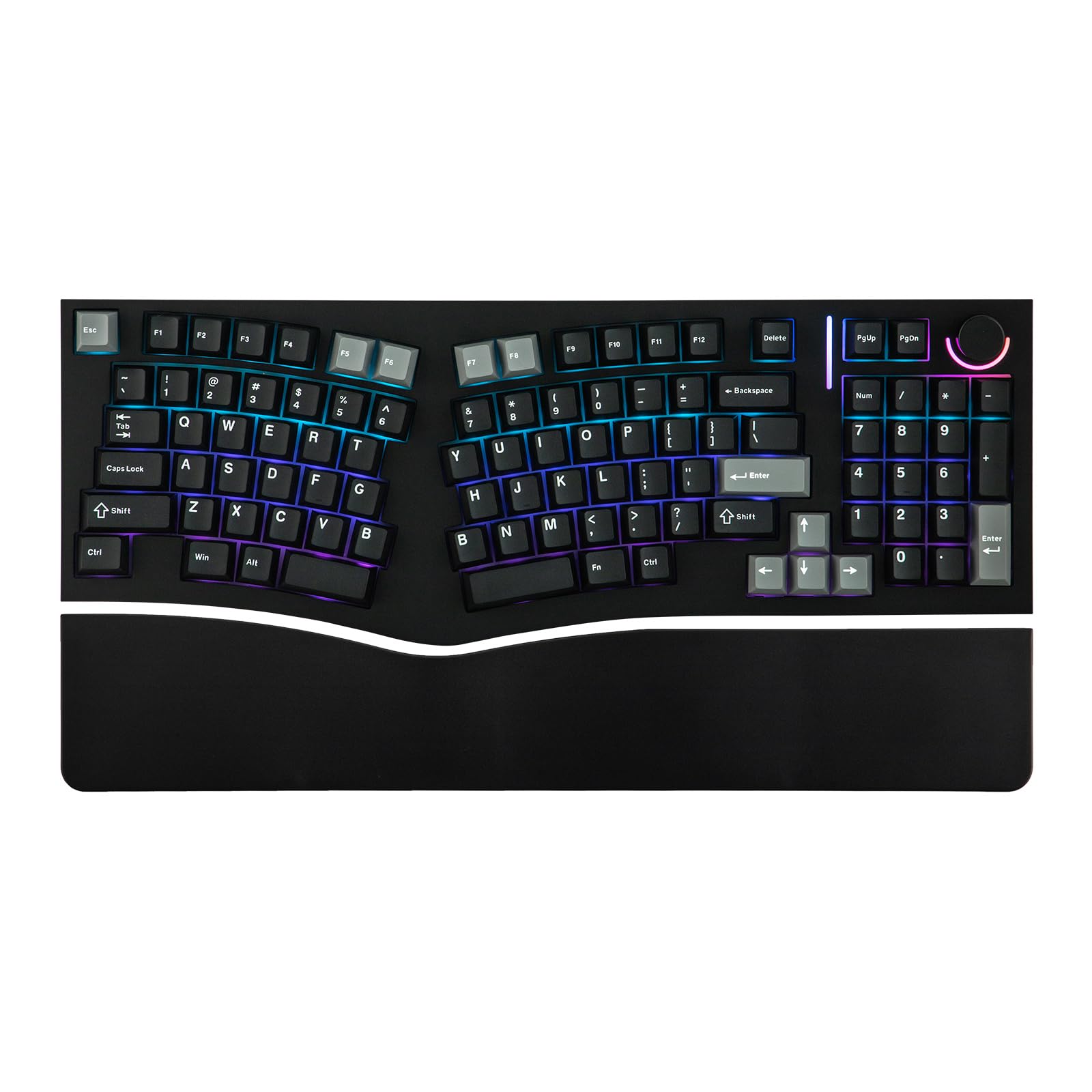
An Alice curve that refuses to give up the number pad.
Most Alice boards shed keys to make room for the angle. This one keeps 98 of them, including a full numpad, so you get the angled ergonomic stance without relearning your number entry. The keys sit angled to line up with your hands, a split spacebar follows the shape, and a media control knob sits up top. It measures 17.15 inches long by 6.17 inches wide — shorter than the ProtoArc by several inches, thanks to the compact key count.
The build is the value argument. A gasket mount with a polycarbonate plate gives a soft, consistent press across the whole board, backed by Poron sandwich foam, an IXPE switch pad, PET film, EPDM socket foam and case foam to shape the sound. South-facing RGB runs 21 lighting effects, the PCB is hot-swappable, and stabilizers come pre-lubed. NKRO means every keypress registers even during fast typing. VIA support handles remaps and macros.
The recurring sticker is the wrist rest. It looks cheap next to the board, fits imperfectly, and drifts slightly because it isn’t magnetic. Far more serious is the occasional unit arriving with key chatter or a misbehaving knob LED — that is a board-level fault, not a switch you can swap out. Set against the scale of its popularity, most owners type happily for a year or more with no degradation. Judge the value honestly and it is a strong wired buy.
The real-world read: 8 to 10 hour days on an Alice frame are exactly what this board was built for, and it delivers that with sound and feel well past its tier.
What to watch: test every key on arrival. Numpad and punctuation keys are where chatter tends to surface.
Buy it for: data-heavy work that needs a number pad alongside angled wrists, wired to one machine all day.
Skip the jump if: you need moveable halves — this is a fixed Alice shell, so the separation is built in, not adjustable.
6. ZORNHER ST68 Ergonomic Split Keyboard
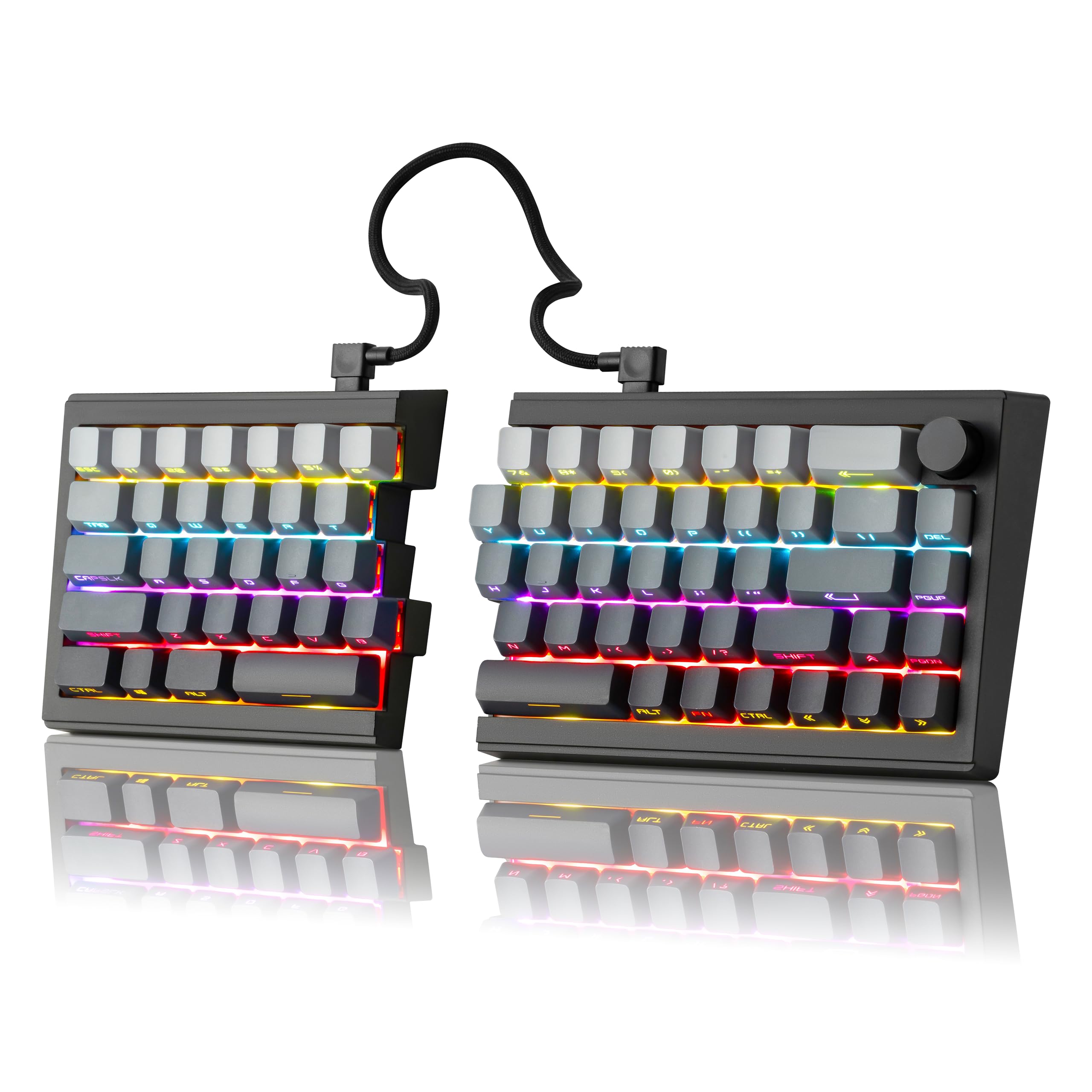
Adjustable split angle, triple wireless, and a coiled cable that doubles as a joiner.
The useful trick here is flexibility. You can set the two halves at whatever angle suits your posture, and when you want a conventional board you link them back together with the coiled cable. Sixty-eight keys in a 65% arrangement means no separate number pad, which keeps the footprint at 16.65 inches long by 7.99 inches wide. Dipped PBT keycaps resist shine, and the black gradient theme picks up the side-printed legends.
Factory-lubed creamy linear switches sit on a gasket mount for a soft but audible press — this is a rhythmic board rather than a silent one, so it is not the pick for a shared ultra-quiet space. RGB runs 22 preset modes with south-facing LEDs plus edge glow. Hot-swap sockets take both 3-pin and 5-pin switches without soldering, and the driver software covers remapping, macros and lighting.
Connection covers Bluetooth 5.0, 2.4GHz and USB-C across up to 5 devices, powered by a 3000mAh battery, and the included 1.8m nylon cable keeps it running wired. Buyers come away impressed by the build and the colorways in particular, and the price sits well below comparable split boards. The caution is consistency: some units work flawlessly, and a portion arrive with a function row that only works on one side, or a sticky space bar. Buy it for the value, and check it hard in the first week.
What impresses
- Adjustable half angle, with the option to link back into a standard deck
- 3000mAh battery and three connection modes across five devices
- Hot-swap 3-pin and 5-pin support, no soldering needed
- 22 RGB modes with south-facing LEDs and edge glow
- A two-year warranty backs the purchase
What to inspect on arrival
- The volume knob sits very close to Delete and Backspace
- The inter-half cable is short, which limits how wide you can place the halves
- The right half tilts in wired mode, and there are no adjustable feet for tenting
- No function key row, which some typists miss daily
Built for: gamers and work-from-home typists who want a real split angle, wireless freedom and a bright board without stretching the budget.
Mind the gap: expect a short half-to-half cable and a knob crowding your most-used editing keys — workable, but plan around it.
7. NuPhy Air75 V3 Low Profile Mechanical Keyboard
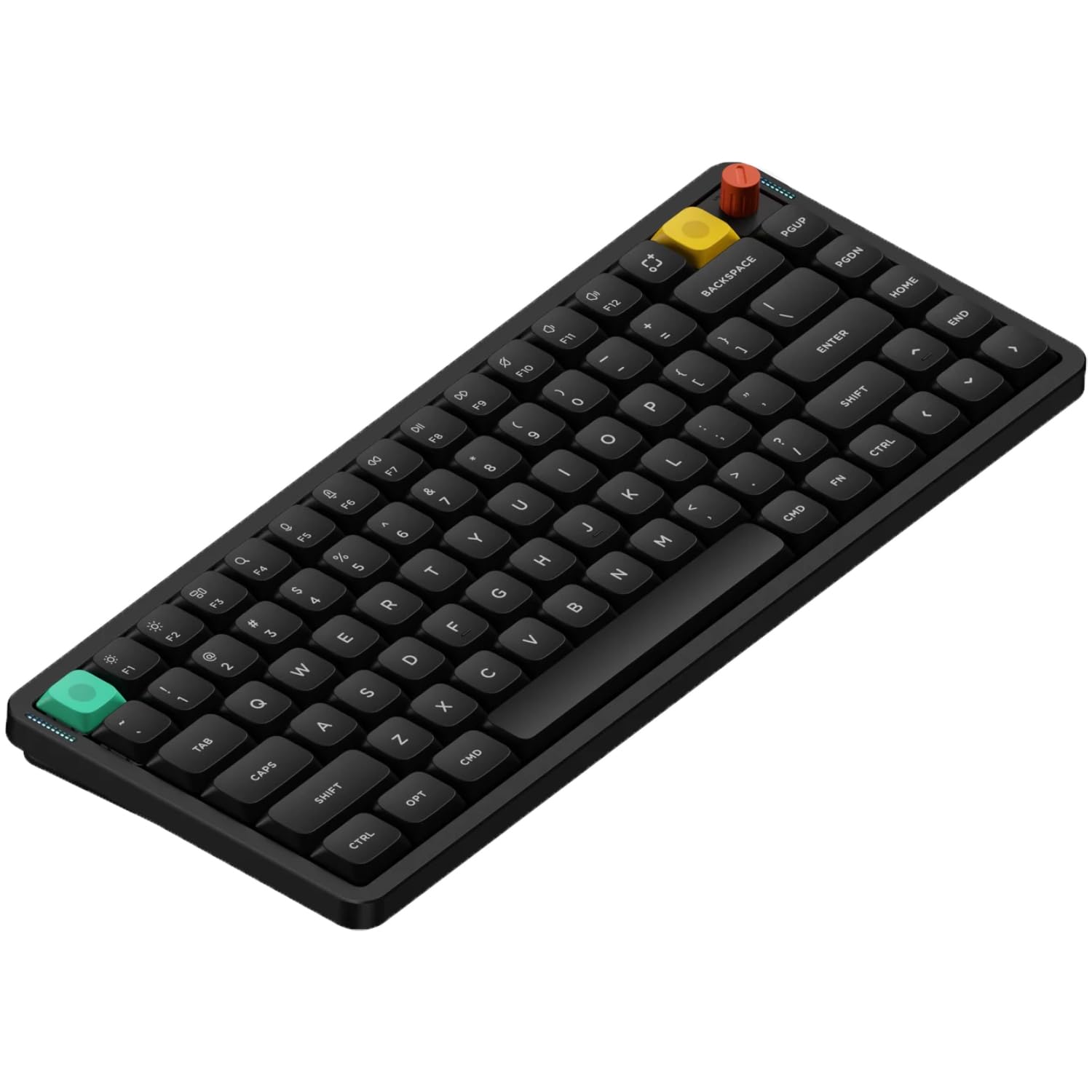
Thin enough to carry, deep enough to thock — the low-profile outlier here.
At 13.2mm thick, this is the slimmest board on the list, and it takes up 12.56 inches by 5.07 inches of desk when it’s there. The 75% layout packs 84 keys, so you keep a function row without the full-size width. Gasket mounting with silicone gaskets absorbs each press and kills hollow echo. Doubleshot PBT keycaps give colorfast legends and a durable surface, though the maker notes the originals are non-shine-through.
The 4000mAh battery is the largest capacity in this lineup, and it drives Bluetooth, 2.4GHz and USB-C modes across up to 5 devices. Polling reaches 1000Hz in wired and 2.4GHz modes, so the wireless link stays responsive. NuPhyIO runs in the browser with no driver install for remapping keys, writing macros and setting RGB, and the removable control knob is reprogrammable beyond its default volume duty. Mac and iOS keycaps ship in the box.
What wins people over is the quiet mechanical feel — colleagues hear a soft thock, not a rattle — and the portability that comes with a metal top cover. Connectivity is where the board draws mixed reports: some units suffer intermittent Bluetooth and 2.4GHz disconnects, and a portion of users see doubled key registers after a couple of months. Wired mode is the stable path. If you travel between desks, buy a few spare switches to keep on hand.
The trade you make: you trade a bit of wireless stability for the thinnest, quietest board here. Plug in for anything mission-critical.
Right for you if: you carry a keyboard between offices or travel, want quiet keys in an open room, and value a browser-based remap tool over dedicated software.
Not the one if: you need rock-solid wireless all day and want no maintenance — a wired split will serve you better.
8. KINESIS Freestyle2 USB-A Ergonomic Keyboard

Two free-floating halves you can rotate and pull up to 9 inches apart.
This is the adjustment champion. Unlike a fixed ergonomic shell, the Freestyle2 lets you rotate and separate the two key modules up to 9 inches, so the position is fit to your body rather than the other way round. The VIP3 tenting accessory ships pre-installed and offers 5, 10 or 15 degrees of tilt with integrated cushioned palm supports. A detachable pivot tether handles the splay angle.
The keys are a custom membrane switch with low activation force and a tactile bump, designed so fingers don’t have to work hard or travel deep. Ninety-four keys run a standard Windows layout with hotkeys for Cut, Copy, Paste and multimedia, plus an embedded numeric 10-key. No software or special drivers are needed. It runs over USB and measures 19 inches long by 12.5 inches wide when assembled, weighing 2 pounds.
What people rave about is the sheer range of adjustment, and heavy typists who spend 8-plus hours a day at the keys report the switch made a big difference within weeks. The recurring gripes are small and specific. Delete and Backspace are the same size and sit close together, which causes mistypes for fast hands. The B key sits on the left module, and the embedded numeric pad lives under an Fn key rather than a real pad. Those are habits to relearn, not faults.
Why the adjustment matters
- Up to 9 inches of separation, plus rotation, so the fit is genuinely custom
- VIP3 tenting at 5, 10 or 15 degrees with cushioned palm supports, pre-installed
- Low-force membrane switches ask very little of your fingers
- Dedicated Cut, Copy, Paste and Undo keys for daily shortcuts
- No software or drivers required
Where the habits bite
- Delete and Backspace are identical in size and sit close, inviting mistypes
- The B key lives on the left module, which throws off touch typing at first
- The embedded numeric pad means an Fn layer for number entry
- The two halves sit free, so it wants a real desk rather than a lap
The fit for: desk-bound typists and developers whose main goal is adjustable separation and true tenting, without a mechanical premium.
Reconsider if: you type on your lap or need a light, packable board — the free halves and 2-pound frame want a stable surface.
9. Logitech Ergo K860 Split Wireless Keyboard

The soft-touch office board that pairs to three machines on one receiver.
Its defining quality is the sound — or rather the lack of it. Keys take light pressure and land almost silently, which is what keeps this board in open-plan offices without complaint. The split, curved keyframe improves posture while the sloping shape eases strain on wrists and forearms. It runs a full-size layout with a number pad, 61 keys in total, and an adjustable palm lift with 3 tilt leg positions and a pillowed wrist rest.
Battery and pairing are set up for desk-switchers. Two-year life on the two included AAA batteries, plus connections to up to three devices over Bluetooth or the Unifying USB receiver. A single receiver can pair both a separately-bought mouse and this keyboard. It ships with Logi Bolt for secured connections and is certified in over 100 countries, and it works with Windows, Mac, Chrome OS and Linux over Bluetooth or RF. The maker states it was designed and tested with criteria set out by leading ergonomists.
The soft wrist rest is easy to clean and shows less wear than fabric pads. Two things hold it back from a top spot. There is no backlight, which is a real gap for a premium board at this size — 17.95 inches long and 9.17 inches wide. A run of units also fail within the first few months, and the value question looms over those failures. Choose it for quiet, comfort and multi-device pairing, and keep the receipt close.
The honest picture: the quiet, pillowed feel is exactly what a shared office needs, and the tactile feedback is well judged. Just know you are buying an unlit board, and that support will matter if a unit goes bad early.
Pick it when: you want a whisper-quiet split in a shared space and pair it to three machines on one receiver.
Look past it if: you work after dark or need a backlight — and if a keyboard failing early would bother you, a wired deck is safer.
10. Cloud Nine C989M Ergonomic Mechanical Keyboard

A full-size split that separates 8 inches and hands you ten macro keys.
This board does the two things a split keyboard should: it lets the halves come apart up to 8 inches, and it tilts your hands with 7 degrees of angle built into the wrist rests. What makes it different is the extras. Ten programmable macro keys, a full number pad, and a USB pass-through port live on a 104-key frame. Kailh tactile brown switches give a responsive bump, and per-key RGB lights the whole board in 19 modes.
As a workhorse it holds up. The build is beefy with quality keycaps and USB-C, and people report the split angle keeps everything aligned through a full working day. Mechanical keys have that firm, satisfying press that many typists describe as close to the classic IBM feel. It’s a full-size frame at 28.6 inches long and 9.1 inches wide, so a wide desk is required.
Two frictions appear consistently. The macro column sits where fingers wander, so a light accidental press can fire one — worth remapping the easy ones out of the way. And the connecting cable between halves is short, which cuts into that 8-inch claim. The lighting can also reset after sleep. Reliability draws mixed feedback, with a small share of units arriving with LED or USB faults; customer support has been quick for some and silent for others. Most units are fine, so the risk is real but not the norm.
What a heavy desk jockey gains
- Halves separate up to 8 inches, with 7 degrees of tilt built into the rests
- 10 programmable macro keys plus a USB pass-through
- Kailh tactile brown switches with responsive feedback
- Per-key RGB across 19 lighting modes
- Full-size layout with a number pad and USB-C
What you’ll bump into
- The short inter-half cable limits actual separation
- Macro keys sit in a spot where fingers land accidentally
- RGB modes can reset after the board sleeps
- 28.6 inches wide demands a lot of desk
Choose it for: office and gaming days that alternate, where RGB, macros and a full numpad all need to be on the same board.
Keep looking if: you want your halves truly far apart — the short connecting cable undercuts the separation spec.
11. KINESIS Advantage360 Professional Split Ergonomic Keyboard

Key wells that curve around your fingers, in a fully wireless build.
This is a different kind of ergonomic design. The patented shape carves split key wells into a concave curve, with thumb keys, an orthogonal layout, integrated tenting and palm supports all in one. The two halves separate up to 10 inches with the included cable, and you get 3 adjustable tenting heights to fit different body types. Kailh Box Pink Silent stems switch with low activation force, a linear feel and a rating of 50 million presses.
Wireless and programmable are its premium arguments. Bluetooth lets it run untethered with optional white backlighting, and power users can reconfigure the base layout through GitHub or a web-based GUI. It works plug-and-play across Windows 7-11, macOS, Linux and Chrome. You get 108 keys, two braided USB-C to USB-A charging cables, extra keycaps and a puller, a bridge connector, and a 3-year warranty with US tech support.
The learning curve is the price of admission. Typing speed drops for one to two weeks before it recovers, and the relocated Backspace thumb key breaks familiar shortcuts until you reprogram. This board also demands an honest fit check: hands on the smaller side report the upper pinky keys sit too far away. Bluetooth is the other soft spot — reliable with Apple hardware, intermittent on some Windows machines where a USB cable solves it. At 3.2 pounds it stays portable despite the size.
Who this rewards: people who type all day, are willing to relearn, and want the most contoured hand position you can buy in a split.
Who it frustrates: anyone needing full speed on day one, or anyone gaming with WASD without a heavy remap.
Best suited to:long-session typists and programmers who want contoured key wells, real wireless, and deep programmability.
Not for you if: you have smaller hands or need WASD gaming from the start — the reach and the shifted thumb keys will fight you.
Know the Specs
Separation and splay
Separation is how far apart the two halves can sit, and it is the spec that decides whether your shoulders can relax. The Freestyle2 reaches up to 9 inches, the Advantage360 Professional up to 10 inches with its cable, and the Cloud Nine C989M up to 8 inches. Splay is the angle each half rotates outward, which the Freestyle2 handles with a detachable pivot tether. A fixed shell like the PERIBOARD-535BR or the Feko Alice98 gives you the angled wrist position but no separation, so shoulder width is off the table. If you have broad shoulders or a wide desk, separation is the first number to check.
Tenting and tilt angles
Tenting lifts the outer edge of each half so your palms face inward instead of lying flat. The Freestyle2’s VIP3 accessory offers 5, 10 or 15 degrees, the Advantage360 Professional offers 3 heights, and the Cloud Nine C989M builds in 7 degrees at its rests. The PERIBOARD-535BR takes a different route with 0, -4 and -7 degree adjustments on its palm rest, which corrects wrist pronation. A board with no tenting — the EPOMAKER Split70 is one — leaves the halves flat, which is fine on a low desk but less kind over a long shift.
Layout families
Ortholinear boards like the KBDcraft 07Israfel line keys up in straight vertical columns to match how fingers actually travel. Alice layouts like the Feker Alice98 angle the halves while keeping the staggered rows you already know. A 65% or 70% layout trims the number pad and often the function row to save desk width. Low-profile boards like the NuPhy Air75 V3 and the KBDcraft sit closer to the desk, which changes wrist height. None of these is better in the abstract — each one asks a different amount of retraining.
Switch type and swap support
Linear switches press straight down with no bump, which suits fast typing and gaming. Tactile switches like the Kailh Brown and the Perixx brown give a bump so you feel the press register. Silent switches such as the Kailh Box Pink on the Advantage360 Professional cut the noise. Hot-swap sockets let you pull a switch out without soldering and push in a replacement — the KBDcraft, EPOMAKER Split70, ZORNHER ST68 and Feker Alice98 all support it, and the EPOMAKER and ZORNHER accept both 3-pin and 5-pin types.
Common Questions
How long does it take to get used to a split keyboard?
Can I use a split keyboard on my lap instead of a desk?
Is a split keyboard better than a standard ergonomic keyboard?
Do split keyboards work with a Mac?
How many devices can one split keyboard connect to at once?
Will a split keyboard help if I already have carpal tunnel or RSI symptoms?
Can I replace the switches in a split keyboard?
How much desk space does a split keyboard actually need?
Is a split keyboard good for gaming?
Do split keyboards have a number pad?
The Bottom Line
For most people, the winner among the split keyboards is the ProtoArc EKM01 Plus, because it hands you the curved split stance, a memory-foam wrist rest and a matching ergonomic mouse in one box — and it flips between three devices on a single button. If adjustable separation and real tenting matter more to you, grab the Kinesis Freestyle2 with VIP3 lifters, which spreads up to 9 inches and tilts to 5, 10 or 15 degrees. And for a full day at the keys with a number pad, RGB and macros on a mechanical frame, the Cloud Nine C989M is the one to reach for.
One last nudge worth knowing: a split board only earns its keep once your arms actually sit shoulder-width apart, so buy for separation and tenting before you buy for lighting or sound. Get those two right and the rest is preference.
How we choose
We do not accept paid placement. Every pick is matched to a real buyer and a real use-case; we do not hands-on test units.
Sources
Specifications: manufacturer listings and product documentation. Review insights: verified customer reviews, as of October 2026. Pricing: not shown on this page (it changes often); check the current price via the retailer link.
As an Amazon Associate, Aappliancez earns from qualifying purchases. This does not affect which products we feature.