Disclosure: Some links in this post are affiliate links. As an Amazon Associate I earn from qualifying purchases, at no extra cost to you. Learn more
Specs are compiled from manufacturer listings and verified buyer reviews and can change over time — please confirm the key details on the product page before buying.
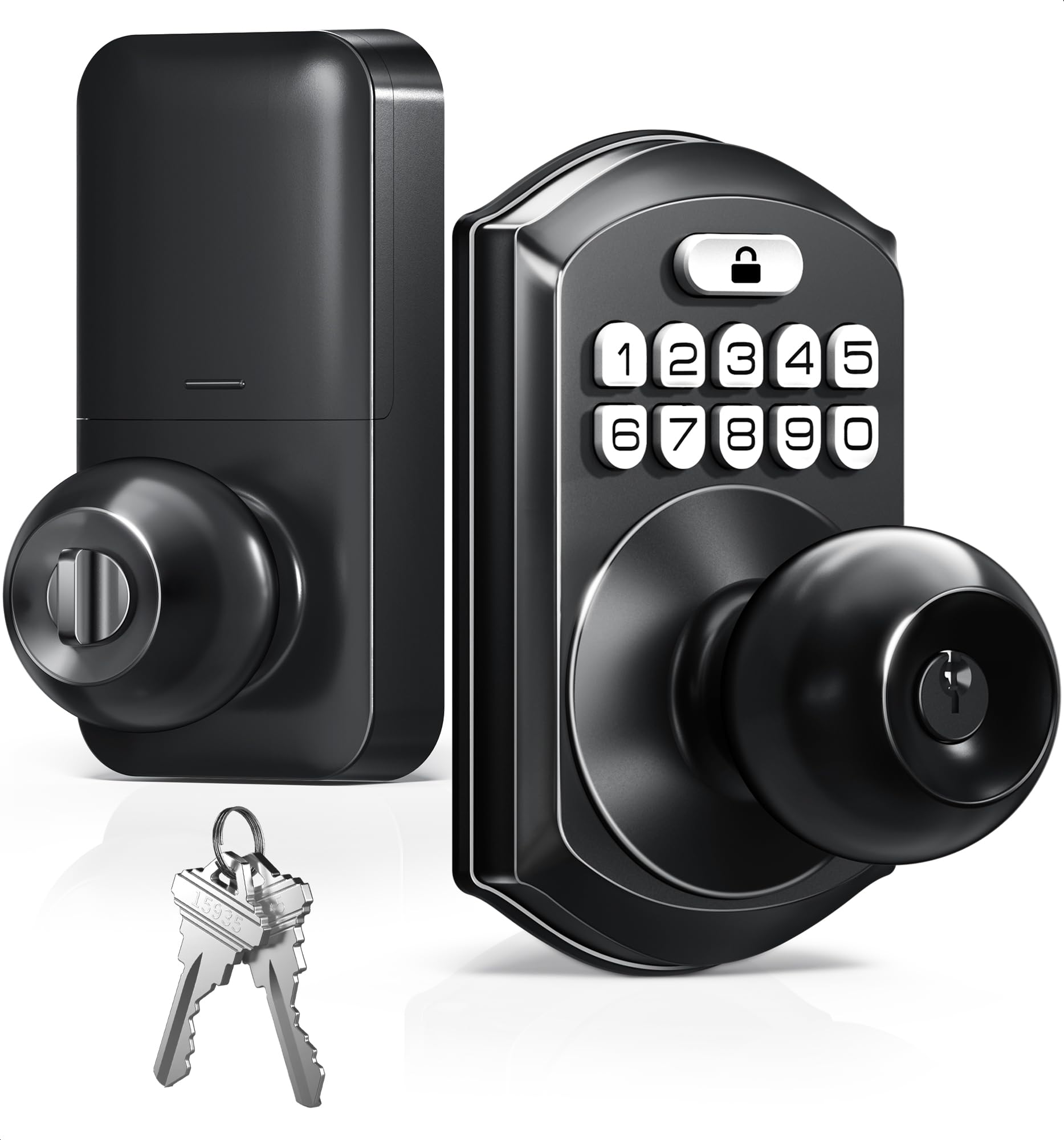
If you keep hiding a spare key under the mat or patting your pockets on the porch, a smart door knob fixes that in an afternoon. The short answer: the TEEHO TE003 is the one most people should buy. It gives you keypad entry with no app, no hub, and no monthly fee, and it sits at 4.0+ stars across 1,000+ ratings. Below are seven knobs and deadbolts that make sense for a front door, a rental, or a bedroom, sorted by who each one really suits.
This guide is built by comparing the manufacturers’ published specifications and the patterns across verified customer reviews, so you get each pick’s real strengths and trade-offs instead of marketing spin.
A keypad knob wins on simplicity, while a fingerprint deadbolt adds speed but more setup. Extra features also mean more battery changes. Every pick below is judged on how you open up, how long the batteries last, and how much install work your door demands. Those three things decide whether smart door knobs feel like an upgrade or a chore.
Top Picks

How To Choose The Best Smart Door Knobs
The first decision has nothing to do with brands. Look at your door and decide what you are replacing: a round handle (a knob) or the deadbolt above it. A knob swap is the easiest job and the cheapest way in. A deadbolt gives you a real lock on a front door, and most deadbolts ship without a handle, so you keep your existing one. Decide that first and half the list drops away.
Knob or deadbolt — match the hardware to your door
A keypad knob like the TEEHO TE003 replaces the whole handle assembly, so you need nothing else. A deadbolt like the Veise VE017 or the Philips models replaces the bolt and keypad section. Some kits, like the Veise VE06-L and the Philips 4200 Series, include a matching handle set so the whole door matches. Measure your door’s existing holes before you buy — several locks on this list expect a standard bore, and one owner had to chisel molding because the housing was wider than expected.
How you want to open up it
A code pad is the simplest way in: type four digits, walk in. A fingerprint reader adds speed for busy mornings but asks more of you at setup. The Philips locks on this list read a finger in 0.3 seconds, while some readers need a couple of taps to learn your print. App control turns a lock into a rental tool, because you can hand out a temporary code from your phone. Remote open up from anywhere is a separate feature again, and it usually needs either built-in Wi-Fi or a plug-in gateway (a small box that connects the lock to your network) sold separately.
Battery life and what drains it
Every lock here runs on AA batteries you supply yourself. The keypad-only TEEHO claims up to a year on four AA cells; the Philips DDL242X runs on 8 AA batteries that owners replace far more often. Wi-Fi radios and bright keypad lights are the usual culprits. If a lock sits in a hallway where the light bothers you at night, check whether the indicator can be turned off before you commit.
Side-by-Side Comparison
| Model | Best For | open up Methods | Power | Weather Rating | Amazon |
|---|---|---|---|---|---|
| TEEHO TE003★ Best Overall | Simple keyless front door | Keypad, 2 backup keys | 4 AA, up to 1 year | IP54 | Amazon |
| Veise VE017Top Performer | Fingerprint + app control | Fingerprint, app, code, fob, key | 4 AA, about 12 months | Weather resistant | Amazon |
| Veise VE06-L | Rentals with a handle set | App, code, fob, key, e-key | Not stated | IP54 | Amazon |
| Yamiry Smart Door Lock | Bedrooms and interior doors | Fingerprint, code, fob, app, key | Not stated | Not stated | Amazon |
| Philips Wi-Fi Deadbolt | Remote access without a hub | Fingerprint, app, code, key, voice | 8 AA | Not stated | Amazon |
| Philips 4200 Series | Full handle + deadbolt kit | Fingerprint, app, code, key, voice | 8 AA, up to 6 months | Not stated | Amazon |
| Schlage Encode Lever | Premium build and alarms | Touchscreen code, app, voice | Not stated | Not stated | Amazon |
Detailed Reviews
1. TEEHO TE003 Keypad Door Knob Lock
Our pick — 4.0+★ from 1,000+ verified ratings; the strongest balance of quality and price.
A whole keypad lock that asks for no app, no hub, and no monthly bill.
You get a full handle swap that turns any standard door into a code-entry door — the aluminum keypad and stainless steel handle replace your old knob outright. That simplicity is the point. You can store up to 20 user codes, hand out one-time passcodes that expire after a single use, and keep 2 physical backup keys for the day a battery quits. There is no phone pairing in the whole setup.
Fitting it is a screwdriver job, and buyers report installing one in around 30 minutes with no prior experience. The same buyer found the main code easy to program and the knob sturdy with no wiggle. What wins people over most is convenience: you can walk out without keys, and the lock still opens on batteries when the power dies. The matte black finish is the second thing that gets noticed. It looks pricier than it is, which is why it holds up so well against the rest of this list.
The catch is the lock’s own personality. It beeps on every lock and open up, and there is no way to silence that in the settings. A secondary code can be stubborn to program, and the red and green confirmation lights stay bright in a dark hallway. Auto-lock is off by default but adjustable from 10 to 99 seconds once you turn it on. A rare inside turn-lock jam can leave you unable to open from indoors, which matters most in a single-entry home. Rated IP54 (a weather rating that means it resists dust and splashing water), it shrugs off rain and splashes on a front or side door, so it is genuinely an outdoor lock, not just an indoor one.
Where it earns the crown
- Keypad entry with up to 20 user codes and one-time passcodes for guests or cleaners
- IP54 rated against rain, splashes, and dust for front and side doors
- Runs on 4 AA batteries for up to a year, with a red light below 15%
- Auto-lock adjustable from 10 to 99 seconds and one-touch locking by holding a key for 2 seconds
What to know before you commit
- The lock beeps on every lock and open up, and that cannot be switched off
- The red/green keypad light stays bright at night with no setting to dim it
- Since it replaces the handle itself, this is a knob, not a deadbolt
Go for it if: you want keyless entry on a front or side door with zero app setup and a budget-friendly price.
Think twice if: you need a real deadbolt on a main entry, or a silent lock in a bedroom hallway.
2. Veise VE017 Fingerprint Smart Door Lock with App Control
Fingerprint entry in under a second, with a slim deadbolt that fits where chunky locks will not.
The fingerprint reader is the headline feature, and it is fast. A dedicated chip verifies and open up in under 0.2 seconds, refining your print with each use. Add the app, a fob card, a code, or the mechanical key and you have 8 ways in. The physical footprint is the other quiet win. At 2.7 x 5.8 x 3 inches it is far more compact than the TEEHO knob at 5.43 x 3 x 3.5 inches, so it sits neater on a slim door frame. It is a deadbolt, so you keep your existing handle and the lock does the security work above it.
What wins people over is build quality, with installation close behind — owners describe a 10-minute fit with no drilling, and the KK Home app lets you set auto-lock, rename fingerprints, and hand out temporary or recurring codes. The app-side features that need the separately sold G1 gateway do remote open up and Alexa or Google voice, so budget for that if you want to open the door from the office. Data lives encrypted on the lock itself, which is a nice privacy touch for anyone renting out a unit.
The honest follow-up: this is a Bluetooth-first lock, so remote control is not built in. Auto-locking and connectivity drew mixed reactions, and a couple of units have had keypad trouble months in — though the support story is strong, with a replacement sent without argument. Expect the latch to jam if the door is not quite shut, so give it a firm push before tapping your finger.
Build quality first: the solid feel and the easy install are what owners talk about most, and the Schlage-style keyway adds a real backup key.
Plan for the gateway: remote open up, voice control, and live logs all depend on the G1 gateway sold separately.
Reach for this if: you want fingerprint speed and a compact deadbolt, and you are fine adding the gateway later for remote access.
Look elsewhere if: out-of-the-box Wi-Fi remote open up is a must.
3. Veise VE06-L Smart Deadbolt Lock with 2 Lever Handle Set

One box that replaces the bolt and both handles, built for a rotating cast of guests.
Short-term hosts get the most out of this one. It stores 250+ codes, and you can create permanent, scheduled, recurring, or one-time codes remotely that delete themselves after use. The IC card reader holds 1,000+ cards, the DDlock app and web portal charge no subscription, and a lockout after 5 wrong attempts shuts things down for 2 minutes. Because the kit includes 2 handles, the whole door matches in matte black instead of a smart bolt bolted onto an old brass lever.
Looks are what owners praise most here, with ease of use next — the zinc alloy body feels substantial, and the adjustable auto-lock can be set anywhere from 5 to 900 seconds. It is certified to BHMA/ANSI Grade 3 and IP54, so rain and dust are handled, and all code and access data is encrypted locally. Hand it a code with an expiry date and you can stop worrying about the guest who forgets to hand the key back.
The trade-off sits in the handle. A few owners have had one break off within months, so treat the lever as the wear part on a high-traffic door. Remote open up also needs the G2 gateway, which is sold separately, and the fob cards open up but cannot lock. If you run several units, that gateway is the smart add-on; for a single front door, plan to manage it in person or on Bluetooth.
The host-friendly parts
- 250+ codes with scheduled and one-time options that expire on their own
- Full handle set included, so both sides of the door match
- No subscription for the app or web portal
- IP54 rated and certified to BHMA/ANSI Grade 3
The maintenance realities
- Handle durability is the mixed spot — a lever can fail on a busy door
- Remote open up and voice control need the G2 gateway, sold separately
Best fit: Airbnb and rental hosts who want a matching handle set and self-expiring guest codes.
Less of a fit: a single quiet household that will not use the code-sharing features.
4. Yamiry Smart Door Lock, Biometric Fingerprint, Keyless Entry

Six ways in, a screwdriver install, and a reversible handle that works on either swing.
For a bedroom, a home office, or a rental where you want code and fingerprint access without rewiring anything, this is the easy pick. The reversible handle fits right- and left-handed doors, and mounting takes minutes with one screwdriver. You can open up with a fingerprint, a code, an IC card, the app, the key, or Alexa voice once you add a Yamiry gateway. The free app stores access records and lets you set permissions for family, friends, or guests.
Ease of use is what wins people over — owners describe a 10-minute install and a build that feels sturdier than its price suggests. The fobs and app open up cleanly, and for anyone with limited hand mobility a fob is a genuinely easy way to get in. Hand it a card or a print and it becomes a simple private lock for a child’s room or a short-term unit.
Be honest about reliability, though. Fingerprint reads miss now and then, and the tamper alarm has a habit of locking things down for about 60 seconds, so keep a card or phone on you. Door-hole dimensions matter more with this one — a smaller bore can leave a gap around the deadbolt. But the support is quick: a failed latch got replaced free within days, which takes the sting out of the odd hiccup.
Great for the price: a fingerprint lock with fobs, codes, and app access for less than most name-brand deadbolts.
Keep a backup handy: the reader is not perfect and the tamper alarm can lock you out briefly.
Worth picking if: you want affordable fingerprint access on an interior or rental door.
skip it if: this is your only front-door lock and you hate carrying a backup card.
5. Philips Wi-Fi Smart Deadbolt Lock

The lock that lets you open your front door from another city, with a finger or a tap.
Built-in Wi-Fi is what separates this from the Veise and Yamiry locks above — you lock and open up from your phone with no separate gateway to buy. Connect it to your 2.4GHz network, keep it within 65ft of the router, and the app reports who came and went, with alerts the moment the door opens. You can set up to 100 custom passcodes, share unlimited one-time or scheduled codes to guests and cleaners, and use Alexa or Google Assistant to lock up from across the room.
Owners rate the fingerprint sensor highest, at roughly 90% accuracy, and praise the value almost as often. Auto-lock is adjustable from 10 to 180 seconds, and Away Mode strips access down to the master code while you travel. A full metal body in aluminum and a brushed finish round out a lock that looks like it belongs on a nicer door than your old keypad did.
The catch is power. This lock takes 8 AA batteries, and battery life is the biggest complaint. Some owners burn through a set in a week; others replace them every 60 days, a real cost when you supply the batteries. There is no door sensor either, so it will happily throw the bolt while the door stands open. Thin documentation makes some setup steps trial and error, so budget a little patience for pairing.
Why remote hosts like it
- Built-in Wi-Fi means remote open up with no hub or gateway
- Up to 100 passcodes plus unlimited one-time and scheduled codes
- Fingerprint entry and voice control through Alexa or Google
What drains and dents it
- Battery life is the recurring gripe — 8 AA cells can need frequent replacement
- No door sensor, so it locks even with the door open
Choose this if: remote open up from anywhere without extra hardware is your priority.
Have reservations if: battery swaps are a chore you would rather not repeat often.
6. Philips WiFi Keypad Deadbolt with Handle (4200 Series)

A deadbolt and matching lever in one box, with a fingerprint reader that opens in 0.3 seconds.
This is the full front-door upgrade: a Wi-Fi deadbolt plus a matching lever, so you are not left hunting for a handle that matches. It connects straight to your 2.4GHz network with no hub, keeps a 33ft line to the router for the best signal, and reports lock status, access history, and alerts through the Philips Home Access App. The fingerprint sensor reads in 0.3 seconds, and you can store several fingers per person plus permanent, one-time, periodic, and recurring codes.
Ease of installation is the runaway reason people like it — owners describe it as plug-and-play with existing Philips hardware, with a clean app and a look that lifts the front door. One of the few locks that slips into the gap between a main door and a storm door, which is a headache for plenty of front-door setups. Auto-lock is off by default and settable from 0 to 180 seconds in the app, and a low-battery alert tells you when to swap the cells.
Power is the soft spot. It takes 8 AA batteries, and the listing puts life at up to 6 months, with battery life the main complaint in practice — set the auto-lock timer long and the sensor quiet to stretch it. The bolt will extend even if the door is left open, and the keypad clacks when it locks, which is loud in a quiet hallway. Overall the software and the build land well; it is the battery routine that needs managing.
One-box solution: deadbolt plus matching handle means a cleaner finish with fewer parts to buy.
Mind the batteries: 8 AA cells, and they are the part owners grumble about — plan your replacements.
Pick this if: you want a complete Wi-Fi handle-and-bolt set with fast fingerprint access.
Pass if: you already have a matching handle and only need the bolt.
7. Schlage Encode Smart WiFi Lock, Lever Handle, Century Trim
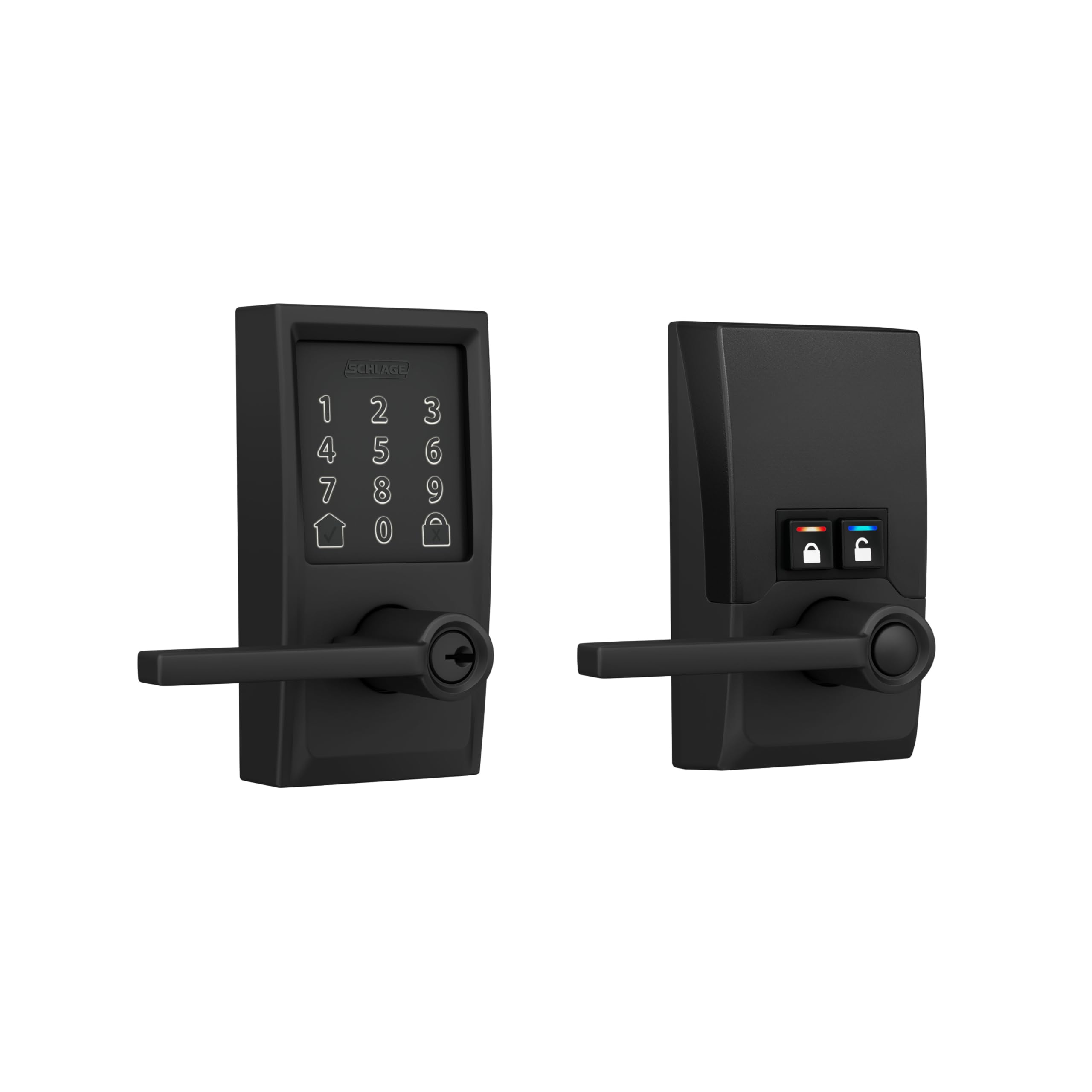
The heavy, quiet lever for the host who wants alarms and certified security in one box.
This is the premium anchor of the list, and the weight tells you why — 4.3 pounds of pro-grade build with a quiet lever and a fingerprint-resistant touchscreen. Built-in Wi-Fi means remote lock and open up from the Schlage Home app with no extra hub, and it pairs with Alexa, Google Assistant, Ring, and Airbnb. A customizable built-in alarm reacts to door movement and forced-entry attempts, and the lock carries the highest residential Security, Durability, and Finish rating from BHMA. You can store 200+ codes in the app and set up auto-lock with a delay of your choosing.
Owners describe a 15-minute install and a lever that locks smoothly. It is less sensitive to a deadbolt rubbing the faceplate than other models, which matters on a door that has shifted over the years. Short-term hosts treat it as the standard for a reason: Airbnb pairing can auto-program and wipe a code per guest, and you can lock the door remotely for confidence. Controls on the interior let you flip to an open up state for easy in-and-out during the day.
The honest note is the price-per-feature gap. There is no fingerprint reader, so this is code-and-app only, and the wider housing can mean chiseling door molding to fit. A dual-band Wi-Fi issue knocked one setup offline until the 5GHz band was disabled, so a simple 2.4GHz network is the safer bet. One unit failed outright after the return window, and support leaned on repeated resets — rare, but worth knowing if you are the kind of buyer who wants a brand to step up fast.
What the money buys
- Built-in Wi-Fi with app control and no separate hub
- Built-in alarm for door movement and forced entry
- Highest residential Security, Durability, and Finish rating from BHMA
- 200+ codes, auto-lock, and Airbnb code pairing
Where it stops short
- No fingerprint reader — you are on codes and the app
- The wider housing can require chiseling the door molding to fit
Made for: hosts and homeowners who want certified build, alarms, and remote control in one lock.
Hold off if: fingerprint entry or a no-tools fit matters more than the brand’s security rating.
Know the Specs
open up methods and what they cost you
A code is the simplest way in and needs no phone. A fingerprint reader is faster, but it asks for a clean, dry finger and a proper setup — the Philips 4200 Series reads one in 0.3 seconds. App control adds guest codes and access logs, and remote open up from anywhere usually needs either built-in Wi-Fi or a gateway sold separately. A fob card is the easiest option for someone with limited hand mobility, and a physical backup key is the thing that saves you when the batteries die.
IP ratings, batteries, and auto-lock
An IP54 rating is a dust-and-splash rating — it means the lock survives rain on a front door, which the TEEHO TE003 and Veise VE06-L both carry. Battery life is where the list diverges: the TEEHO claims up to a year on 4 AA cells, while the Philips locks run on 8 AA batteries and ask for more frequent swaps. Auto-lock is the setting that quietly drains power, and it is usually off by default. Set the timer longer — 10 to 99 seconds on the TEEHO, up to 180 on the Philips — to get more days between replacements.
Common Questions
Will a smart door knob fit my existing door holes?
Do I need a gateway or hub for remote open up?
How often do I need to change the batteries?
Can I give a temporary code to a cleaner or contractor?
What does IP54 waterproof actually mean?
Is a knob or a deadbolt better for a front door?
Does auto-lock work if the door is left open?
Can a smart knob be used on a rental property?
What happens if the batteries die while I am out?
Do I need to disable 5GHz Wi-Fi for the lock to connect?
The Bottom Line
For most homes, the smart door knobs pick is the TEEHO TE003. It gives you keypad entry on a standard door with no app, no hub, and no subscription, and it holds the highest rating on this shortlist. If you want fingerprint speed and a compact deadbolt, reach for the Veise VE017. And for remote guest access with a matching handle set, the Veise VE06-L is the one to order. It is the pick that turns a rental door into a self-managing one.
The honest nudge: every lock here is worth buying, but the fingerprint-first locks and the Wi-Fi locks all ask you to stay on top of battery changes. Pick the one whose daily open up routine matches your door, and you will stop carrying keys faster than you expect.
How we choose
We do not accept paid placement. Every pick is matched to a real buyer and a real use-case; we do not hands-on test units.
Sources
Specifications: manufacturer listings and product documentation. Review insights: verified customer reviews, as of October 2026. Pricing: not shown on this page (it changes often); check the current price via the retailer link.
As an Amazon Associate, Aappliancez earns from qualifying purchases. This does not affect which products we feature.