Disclosure: Some links in this post are affiliate links. As an Amazon Associate I earn from qualifying purchases, at no extra cost to you. Learn more
Specs are compiled from manufacturer listings and verified buyer reviews and can change over time — please confirm the key details on the product page before buying.
Here is the short answer: the case you want is the one that fits your graphics card and your cooler with a few millimetres to spare, not the one with the smallest number on the box. Going small means giving up room, and a case that barely fits your card turns the next GPU upgrade into a full rebuild. The seven cases below are the ones worth measuring your parts against, sorted by who each one actually suits.
This guide is built by comparing the manufacturers’ published specifications and the patterns across verified customer reviews, so you get each pick’s real strengths and trade-offs instead of marketing spin.
What follows explains the numbers that decide whether your build will actually close up, from GPU clearance to radiator size. Start with a shortlist of small cases whose GPU, cooler and PSU clearances already fit the parts you own.
Top Picks


How To Choose The Best Small PC Case
A small case is a jigsaw puzzle where the GPU, cooler and PSU are the pieces you have to fit. Buy the case before checking GPU clearance and you will likely be returning a graphics card later. Measure three things before you spend anything: your GPU length, your cooler height or radiator size, and your power supply length.
Start with GPU length, not case volume
The litre number (the internal volume of the case) tells you how much desk space you save. It says nothing about whether a long graphics card will drop in. GPU clearance is the number that stops a build dead — the Lian Li A3-mATX lists up to 415 mm, while the Fractal Design Terra tops out at 322 mm. Measure your card from the bracket to the far tip, then leave a little slack for the power cables at the end.
Decide your cooling before your panels
Air cooling needs height clearance above the CPU; the JONSBO Z20 lists 164 mm MAX for Intel and 163 mm MAX for AMD. Liquid cooling needs a radiator mount and the thickness to go with it — a 240 mm AIO is a different commitment from a 360 mm one, and the ASUS Prime AP201 and the Lian Li A3-mATX both list 360 mm support. Pick the cooler first and the case second, because radiator size and cooler height rule out more cases than any other spec.
Know which power supply shape your case wants
Full-size ATX units are longer and need more room behind the motherboard tray. SFX and SFX-L units are shorter and open up clearance in tight builds. Several picks here accept all three, which gives you options, but the mounting position often changes with the size — read the manufacturer’s diagram before assuming your existing unit will bolt straight in.
Accept that cables have to go somewhere
Every small case hides its cable chaos behind a panel or a mesh side. Where that space does not exist, the cables sit in the open and block airflow. Expect to plan the order of assembly: front panel connectors and motherboard power usually need plugging in before the board is screwed down, because access disappears afterwards.
Side-by-Side Comparison
| Model | Best For | Max GPU Length | Radiator Support | Case Volume | Amazon |
|---|---|---|---|---|---|
| Lian Li A3-mATX (A3X-WD)★ Best Overall | Big hardware in a small footprint | 415 mm | 360 mm | 26.3 L | Amazon |
| NZXT H2 FlowShowcase Build | Showing off a liquid-cooled build | 331 mm | 280 mm | 20.7 L | Amazon |
| Fractal Design Terra | Living-room looks, tiny footprint | 322 mm | — | 10.4 L | Amazon |
| SilverStone SG13B-USA | Portable shoebox builds | 10.5 in standard-length cards | 120 mm or 140 mm single fan AIO | 11.5 L | Amazon |
| ASUS Prime AP201 | Easy tool-free first small build | 338 mm | 280 mm and 360 mm | 33 L | Amazon |
| HYTE Revolt 3 | Carry it to a friend’s place | 335 mm | 120 mm and 240 mm loops | — | Amazon |
| JONSBO Z20 | Micro-ATX with a grab handle | 363 mm | 240 mm AIO | About 20 L | Amazon |
Detailed Reviews
1. Lian Li A3-mATX PC Case
Our pick — 4.5+★ from 450+ verified ratings; the strongest balance of quality and price.
A 26.3-litre box that swallows a 415 mm graphics card and a 360 mm radiator without a fight.
If you want one case to survive two or three graphics card upgrades, its 415 mm GPU clearance is the reason to buy it. The 415 mm GPU figure is the whole pitch: it clears the longest cards on the market, and the 360 mm radiator mount means a three-fan liquid cooler fits too. It takes a Micro-ATX or Mini-ITX motherboard and holds 4 internal drive bays, which is a lot of storage room for something this size.
Put that next to the Fractal Design Terra and the gap is stark — 415 mm of GPU room against 322 mm, and 26.3 L of volume against 10.4 L. The Lian Li is the bigger box, and it earns that space. Panels are steel mesh on the side and top, so heat escapes instead of sitting in the middle of the case. Buyers report builds like this one: “Fits Mini-ITX board, EVGA 1000W PSU front-mounted, 3 top fans (1×120, 2×140) plus side fan, Noctua dual-fan cooler.”
The walnut front panel is what people notice first, and design is the thing owners talk about most. It is not just a look — the wood front and the mesh give it a furniture-like presence that most small cases lack. Just know that no fans come in the box, so budget for those separately. Cable management is the one part that draws mixed feelings: there is room to hide the mess behind the mesh, but routing the motherboard power and front-panel cables takes planning, and right-angle adapters help.
Why it earns the top spot
- 415 mm GPU clearance handles the longest cards available
- 360 mm radiator mount plus room for up to 10 x 120mm fans
- Micro-ATX motherboard support keeps your platform options open
- Walnut front panel and steel mesh give it a look you keep on the desk
What to expect going in
- No fans included, so add those to your parts list
- Cable routing is tight enough that you want the plan drawn before you build
- 26.3 L is compact but not the smallest footprint here
Reach for this if: you have a long graphics card and a 360 mm cooler and you refuse to swap either one out.
Look elsewhere if: you are chasing the smallest possible footprint and will only ever run a Mini-ITX board with a short card.
2. NZXT H2 Flow – Mini-ITX 20.7L Airflow PC Case – Black
Half glass, half mesh, and a 280 mm radiator mount for people who want the inside visible.
The 20.7-litre frame here is built around a hybrid glass-and-mesh side panel, so your components are part of the look instead of hidden behind steel. A 280 mm radiator fits for liquid cooling, and the case comes with a PCIe 5.0 riser cable and two F120Q CV fans already installed. That saves you money and wiring on day one — the riser alone is a part most rivals make you buy.
Liquid cooling is clearly the intended path. Owners describe builds that are anything but small: “Fit a full scale 3090, and the ability to fit a full 280 mm radiator was amazing for hot-running cpus.” That fits inside 331 mm of GPU clearance, which covers most large cards but not every one. If your card runs past 331 mm, this case will not take it.
Build quality is the thing buyers rave about — it is the single biggest talking point by a wide margin — and panels come off with no tools, with Velcro straps to gather the cables. The trade-off is honest: the inside is tight. Fitting a large card can take real pressure to seat, and one buyer running a 331.7 mm card had the fans hit the case wall. Thermals are kept in check by the top exhaust fans, so a hot-running card has somewhere for its heat to go.
What it asks of you: measure your graphics card length before you order, and accept that a card near the 331 mm ceiling will leave almost nothing behind it.
What you get back: a case that looks like a display piece and brings the riser cable and fans so you can start building the same day.
Worth it when: you want a Mini-ITX build with liquid cooling and you actually enjoy seeing the parts through the glass.
Not your pick if: you want a quiet, sealed box with no window and no riser cable to think about.
3. Fractal Design Terra Graphite

The 10.4-litre Mini-ITX case that looks like furniture and fits on a shelf.
Ten point four litres is genuinely small — this is the case you buy when the desk is a shared living space, not a dedicated gaming room. The front panel is cut from solid walnut, the exterior is anodized aluminium with an 8 mm-thick front face, and that combination makes it look more like a small speaker than a computer. Two USB ports sit on the front, one of them a USB Type-C 20Gbps port for a fast external drive.
Compare the numbers with the Lian Li A3-mATX above and you see the trade clearly: Terra holds a card up to 322 mm against 415 mm, and 10.4 L against 26.3 L of volume. What Terra keeps is the sliding central wall — 30 mm of stepless adjustment that lets you hand the space to the cooler or to the graphics card. Its single internal bay is the restraint: 1 bay here versus 4 on the Lian Li.
Owners are drawn in by the look and stay for the sturdiness. Design and appearance dominate the feedback, and one buyer’s case survived a fall from a desk to the floor without giving up. The honest catch is that a case this small is cramped to build, with cable routing that is fiddly while open and hidden once the panels are back on. Air cooling needs a low-profile cooler measured against the spine position; CPU fans set close to the side panel get loud at full speed.
Who this suits: a Mini-ITX builder who cares more about how the machine looks in the room than how many drives it holds.
Plan around: a cooler and card measured against the spine position, and accept that 1 internal bay is where this design stops.
Best match: a compact desk or a TV stand where the case is on show and an external drive covers your storage needs.
Think twice if: you need multiple 3.5-inch drives or a large air cooler inside the same box.
4. SilverStone SST-SG13B-USA Mini-ITX Computer Case

An 11.5-litre mesh-front box that takes a full-size ATX power supply and standard-length cards.
Most cases this small force you into an SFX power supply, which is a purchase you may not want to make. This one accepts a Mini-DTX or Mini-ITX motherboard and a standard ATX PSU in the same shell. It also lists support for standard-length expansion cards at 10.5 inches, plus a single 120 mm or 140 mm all-in-one liquid cooler. At 11.5 litres it still disappears next to a monitor.
Owners describe it as a plain black shoebox that does what it says, with cooling that keeps a lid on temperatures. One owner reports a 120 mm AIO holding a Ryzen 7 5800X at a 35 °C average, and another saw idle temps fall to 38–42 °C after sorting airflow. The case itself is the most-praised part of the package — build quality and fit are the two things buyers bring up most, and both are positive. It holds 1 internal bay plus support for 2.5-inch and 3.5-inch drives.
The honest catch is space and access. The front panel hides its retaining screws, and prizing it in the wrong spot can break the plastic clips. There is no printed manual, so you download it. Cable management is close to non-existent and there is no window to show off the build, which is fine for a machine that makes sense as a home theatre or travel PC. An AIO is the smarter cooler route here, because a big air tower simply has no room to breathe.
Go for it if: you already own an ATX power supply and want a tiny case without buying a new one.
Skip if: you want cable routing that looks tidy through a side panel, because there is no panel to look through and no room to route.
5. ASUS Prime AP201 Micro-ATX PC Case

Mesh on almost every face and panels that pop off without a screwdriver.
At 33 litres this is the largest case on the list, and that is the point — it is the small case for someone who wants an easy build rather than the smallest box possible. Every side panel clips off without tools and stays put when it is on. Inside, a 32 mm gap behind the motherboard tray gives you somewhere to stuff cables, which is more than most compact cases offer.
Cooling is where it earns its keep. It takes 280 mm and 360 mm radiators and up to six fans, and the body is steel mesh made of over 57,000 precision-machined 1.5 mm holes. Air passes through instead of bouncing back. The graphics card limit is 338 mm and it takes ATX power supplies up to 180 mm long, so most full-size hardware drops in without a fight.
Build quality is the runaway favourite in owner feedback, and airflow comes a close second, which tells you the mesh does its job. The honest catch is storage and layout. Buyers flag that the 3.5-inch drive mounting points do not line up in every configuration, and you may need a bracket. There is no front fan mount, and bottom fan mounts sit close to a long card. It is also note 33 L is not small by Mini-ITX standards — this is a compact Micro-ATX tower, and the JONSBO Z20 below does a similar job in about 20 L.
The trade this case makes: you give up some footprint and drive simplicity in exchange for the easiest assembly on this list and room for a 360 mm radiator.
Pick this one for: a first small build where you want the panels off and on in seconds and a big AIO inside.
Not for you if: a small desk footprint is the whole reason you started looking at compact cases.
6. HYTE Revolt 3 ITX Computer Gaming Case
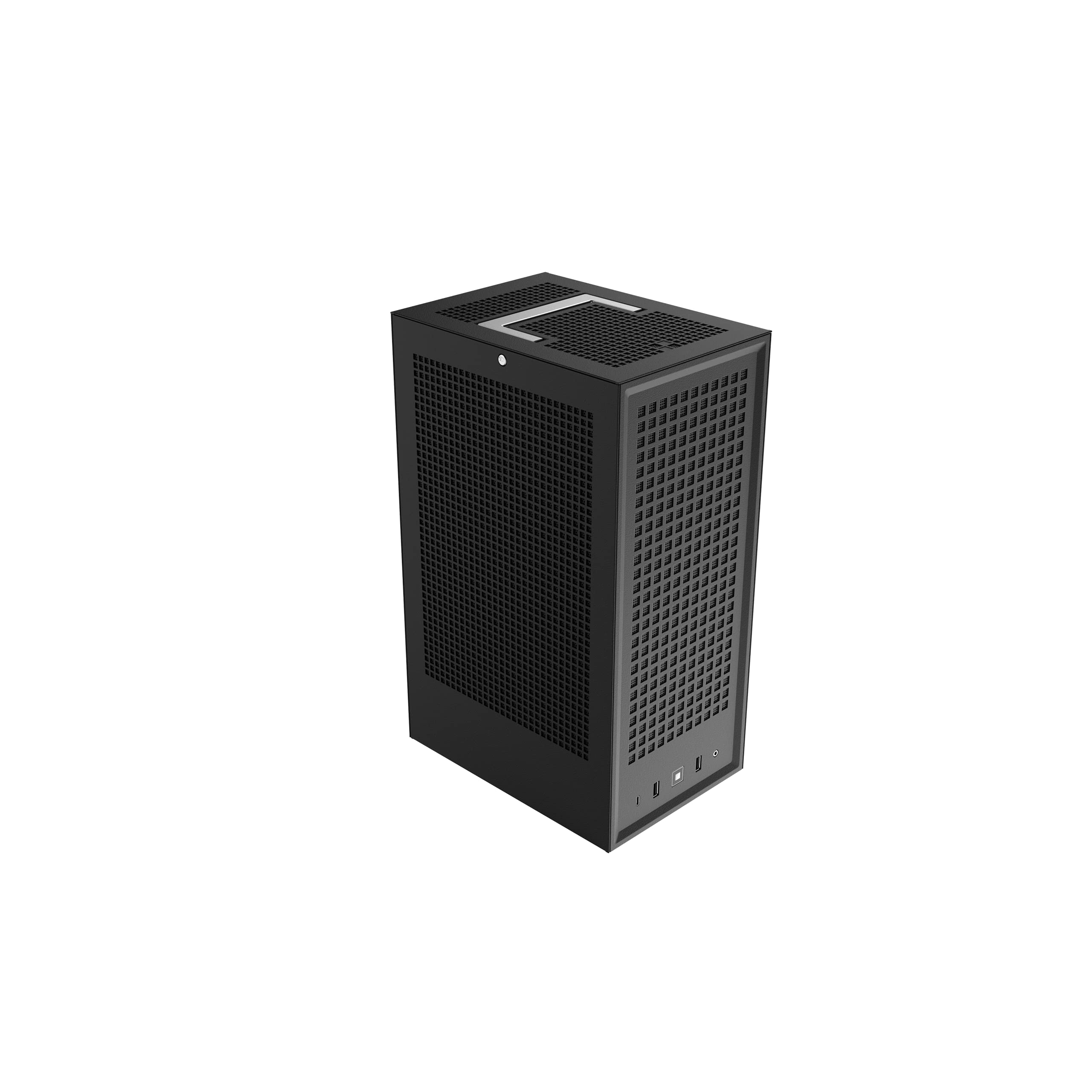
A metal Mini-ITX case with a carrying handle, built to travel as often as it sits still.
The handle is the reason this one exists. It turns a desktop into something you carry to a friend’s house for a LAN night, and the metal body is meant to take that life. Every exterior panel comes off, so you get access to the components from all sides — a far easier install than the cramped SilverStone above. It takes any standard-layout Mini-ITX motherboard, graphics cards up to 335 x 140 x 58 mm, and CPU coolers up to 140 mm tall.
Front connections are generous for a small case: two USB 3.2 Gen 1 Type-A ports, a headset combo jack, and a USB 3.2 Gen 2 Type-C port. That covers a headset, a keyboard dongle and a fast drive at once without a hub. It also carries 2 internal bays and a 3-year case warranty, so the case is covered longer than most parts inside it.
Building in it is the part that wins people over, and the clean black finish appeals to anyone who dislikes a light show. Owners run 280 mm radiators inside, though a 240 mm AIO makes the interior genuinely cramped and pump orientation needs thought. There is one recurring nuisance worth knowing: the downward-facing motherboard antenna can hurt WiFi reception, and the fix is an external antenna. Treat the case as a metal shell that blocks radio, and plan around it.
Where it shines
- Carrying handle makes it a genuine portable build
- Drop-off panels on every side give full access while you build
- 335 mm GPU clearance and 140 mm cooler height cover most parts
- USB 3.2 Gen 2 Type-C on the front
What to watch
- Downward-facing antenna can weaken WiFi, so plan an external one
- A 240 mm AIO leaves the interior tight and the tubing needs care
- The handle and metal frame suit travel more than a shelf display
Right call when: the machine moves between rooms or houses and you want to grab it by the handle and go.
Wrong call if: it will sit in one spot and you would rather have clearer airflow or a glass window.
7. JONSBO Z20 Micro-ATX Mini Tower PC Case

Twenty litres of metal with a handle, and room for a 363 mm card next to a full ATX power supply.
A Micro-ATX board with a full-size tower air cooler and a long graphics card would normally need a mid-tower. This case does it in roughly 20 litres, with 363 mm of GPU clearance and a 164 mm cooler height limit for Intel CPUs. It takes ATX, SFX and SFX-L power supplies, and the supply position can be adjusted across several mounting gears — a great way to steal clearance for a long card. There is a detachable handle on top for moving it, and a tempered glass side panel to see the build.
Panels are 2 mm bent steel with square ventilation openings across the surface, and the dust filter is magnetic. It takes a 240 mm AIO on top at up to 60 mm thickness, and holds 2 x 2.5-inch SSDs plus 1 x 3.5-inch HDD, or 3 x 2.5-inch SSDs. Front connections cover USB 3.2 Gen 1 Type-A, USB 3.2 Gen 2 Type-C, plus audio and mic ports. That is a serious hardware list in a case that still fits a narrow desk.
Build quality is the thing everyone loves — thick panels, no sharp edges, and all the case parts come out so a long card goes in from the side. Complete first-time builds go together with a 240 mm AIO and a full ATX supply. Where it bites is storage and order of assembly: realistically you fit 1 or 2 2.5-inch drives up top, and the front panel wires have to be connected before the motherboard is seated. The power LED is very bright. Plan the build order carefully and it goes smoothly.
The real draw: Micro-ATX flexibility in a case that fits on a narrow desk, with a handle when you need to move it.
The real limit: storage space is small and the assembly order matters, so read the pictorial instructions fully before you start.
A strong fit for: a builder who wants a Micro-ATX platform, a big air cooler and one long card without a full-size tower.
Better to look elsewhere if: you keep a media library on multiple 3.5-inch drives.
Know the Specs
Case volume in litres
This is the internal space of the case, measured in litres. Smaller means less desk used and less air inside, which is why a 10.4 L case and a 33 L case behave so differently. A larger volume gives hot air more room to move and makes cable routing easier. A smaller volume fits in places a tower never could. Neither number tells you what hardware fits — for that you need the clearance figures.
GPU clearance in millimetres
This is the maximum graphics card length the case will accept, measured from the rear bracket to the far edge. It is the first number to check, because a card that does not fit cannot be made to fit. Leave slack for the power connectors at the card’s tip, since those plugs and the cable bend need a few extra millimetres. Cards are getting longer, so buy clearance for the card you plan next, not just the one you own.
Radiator and fan support
Radiator sizes run 120 mm, 240 mm, 280 mm and 360 mm, and each indicates how many fans the liquid cooler uses side by side. A bigger radiator removes more heat but needs a matching mount and more internal room. Fan thickness matters too — a radiator plus a fan is deeper than the case drawing suggests. Check both the radiator size and the thickness the case allows before you buy a cooler.
Power supply format
ATX supplies are the standard long units. SFX and SFX-L are shorter, aimed at small builds. A smaller supply leaves more clearance for graphics cards and cables, but often requires a bracket and can cost more. Some cases here accept all three and let you change the mounting position, which gives you room to work with whatever supply you already own.
Common Questions
Will my graphics card actually fit in a small case?
Can I use my existing ATX power supply in a Mini-ITX case?
How do I know if a 280 mm radiator will fit?
Is Mini-ITX harder to build in than Micro-ATX?
Do small cases run hotter than a big tower?
How many hard drives can a small case hold?
Does a handle on a small case actually help?
Why does my WiFi drop when I use a metal Mini-ITX case?
What is the difference between GPU clearance and case volume?
Should I buy fans separately for my small case?
The Bottom Line
For most people shopping for the small pc case, the Lian Li A3-mATX is the one to beat. It clears a 415 mm card and a 360 mm radiator, so the parts you already own will fit, and the steel mesh and walnut front make it something you keep on the desk. If you want liquid cooling you can see, grab the NZXT H2 Flow and its included PCIe 5.0 riser. And for a Micro-ATX build with a big air cooler on a narrow desk, the JONSBO Z20 is the one to reach for.
Measure twice, buy once: GPU length and cooler height rule out more cases than looks ever will.
How we choose
We do not accept paid placement. Every pick is matched to a real buyer and a real use-case; we do not hands-on test units.
Sources
Specifications: manufacturer listings and product documentation. Review insights: verified customer reviews, as of October 2026. Pricing: not shown on this page (it changes often); check the current price via the retailer link.
As an Amazon Associate, Aappliancez earns from qualifying purchases. This does not affect which products we feature.