Disclosure: Some links in this post are affiliate links. As an Amazon Associate I earn from qualifying purchases, at no extra cost to you. Learn more
Specs are compiled from manufacturer listings and verified buyer reviews and can change over time — please confirm the key details on the product page before buying.
If you are shopping for a small CNC, the machine is not the hard part — holding the cut is. A desktop router with a flexing gantry loses position mid-cut, and you only find out when the bit drifts off your line. The picks below are ranked by frame rigidity first, working area second, and upgrade room third, so you can start on wood and grow into aluminum without buying a second machine.
This guide is built by comparing the manufacturers’ published specifications and the patterns across verified customer reviews, so you get each pick’s real strengths and trade-offs instead of marketing spin.
Some machines here are ready to cut in under an hour while others reward a weekend of dialing in. Below is a plain-English walkthrough of the best small CNC options, ranked by what you actually get, with the trade-offs left in.
Top Picks


How To Choose The Best Small CNC
A small CNC is a router table shrunk onto a workbench: a spinning bit moves on three axes — left-right, front-back, and up-down — to cut wood, plastic, or soft metal from a computer file. The buying mistake is chasing the biggest spindle wattage and ignoring the gantry. A powerful motor on a flexing gantry leaves chatter marks on every aluminum pass.
Rigidity comes before wattage
Look at how the gantry is built. Thick aluminum extrusions, dual linear rails on the Z-axis, and lead-screw or ball-screw drive all hold the bit steady under load. Belts and plastic V-wheels are fine for soft wood and light engraving, but they flex when the bit bites into aluminum. The 400W and 500W spindles on these machines cut soft metals — the frame is what decides how clean that cut looks.
Match the working area to your projects
Working area is the maximum size of stock the bit can reach, usually written in millimeters or inches. A 300 x 180 x 80mm bed suits small signs, PCB drilling, and chess pieces. A 400 x 400mm bed fits larger signs and relief carvings. Measure your biggest planned project first, then check whether the machine has an extension kit before you buy.
Software and connection are half the experience
Most of these run GRBL firmware, the open-source control language that talks to sender software like Candle, UGS, or Easel. Check that your machine connects over USB without dropped sessions — a stalled connection mid-cut wastes material. Offline controllers and WiFi modules that let you run jobs without a laptop are a genuine convenience once you trust the machine.
Plan the upgrade path now
Hobby CNCs live long lives because you can grow them. Spindle clamps in 52mm and 65mm let you swap to a handheld trim router or a bigger spindle. Rotary fourth-axis modules add cylindrical carving. Y-axis extension kits widen the bed. Buying a machine with the mounts already in place saves you a second purchase later.
Side-by-Side Comparison
| Model | Best For | Working Area | Spindle / Motor | Weight | Amazon |
|---|---|---|---|---|---|
| FoxAlien Masuter 3S★ Best Overall | All-around rigidity and power | 15.75” x 15.75” x 3.74” | 400W spindle, NEMA23-76 closed-loop | 26.5 kg | Amazon |
| Genmitsu 3018-PROVer V2Best Entry Point | True first machine on a budget | 11.2” x 7.1” x 1.6” | Corded electric, TB6S109 drivers | 9.24 kg | Amazon |
| WolfPawn 4040-PROBig Bed Bargain | Big bed on a tight budget | 15.7” x 15.7” x 2.9” | 500W spindle | 19.12 kg | Amazon |
| LUNYEE 3018 PRO MAX | All-metal safety features | 300 x 180 x 80mm | 500W spindle, 0-12000 RPM | 13 kg | Amazon |
| FoxAlien Masuter Pro | Fast assembly and upgrade room | 15.75” x 15.75” x 2.36” | 60W spindle, 10-15 min setup | 13 kg | Amazon |
| Genmitsu PROVerXL 4030 | Heavy-duty workhorse | 15.7” x 11.8” x 4.3” | 300W spindle, NEMA 23 steppers | 31 kg | Amazon |
| Genmitsu 4040-PRO | Wide bed with anti-flex spoilboard | 17.13 x 15.75 x 3.15 in | 32-bit controller, lead-screw drive | 20.84 kg | Amazon |
| AnoleX 4030-Evo Ultra 2 | Precision metal cutting | HGH-15 dual rails, NEMA 23 | 800W trim router, 8000-24000 RPM | 38 kg | Amazon |
Detailed Reviews
1. FoxAlien Masuter 3S CNC Router
Our pick — 4.0+★ from 100+ verified ratings; the strongest balance of quality and price.
The desktop router built to stop losing steps when the bit bites
Closed-loop stepper motors are the headline here, and they change how the machine behaves under load. A normal stepper motor spins blind and can slip a step without telling you, so one heavy pass quietly ruins your origin and the rest of the job runs offset. The NEMA23-76 motors on this machine check their own position, and they carry 2.2 Nm of torque to hold the cut. Rapid travel reaches 10,000mm/min, which makes repositioning between cuts feel quick rather than tedious.
The frame backs that up. Reinforced 2360mm extrusions and dual HG-15 linear rails on the Z-axis keep the spindle from wobbling, and the T12 lead screw design holds vibration down to an engraving precision of 0.05mm — fine enough for crisp lettering and shallow relief. The 400W spindle handles wood, plastics, and soft metals like aluminum. A 65mm clamp is included, so swapping to a handheld trim router or a 1.5kW spindle later is a mounting job, not a rebuild.
Setup really is the easy part, and the review pages reflect it. Buyers report: “I could not believe how easy this was to set up and get running. There was a small issue with a broken button on the control box but they took care of it immediately.” What wins people over most is sheer quality of build, and the machine runs smooth and quiet for its size once dialed in. The 15.75” x 15.75” x 3.74” workspace covers most sign and relief work, and the controller box is dust-resistant with tactile shortcut buttons. An Offline Controller and a 4th Axis Rotary Module are both sold separately, so PC-free carving and cylindrical work like mugs or chess pieces are on the table if you want them.
What holds up over long jobs
- Closed-loop NEMA23-76 steppers with 2.2 Nm of torque stop the position drift that plagues open-loop machines
- Dual HG-15 linear rails on the Z-axis and 0.05mm engraving precision keep detail sharp
- 10,000mm/min rapid travel and a 15.75” x 15.75” x 3.74” bed suit both small parts and larger signs
- 65mm clamp opens the door to a trim router or 1.5kW spindle upgrade
Where it needs attention
- At 26.5 kg it is the heaviest compact pick here — plan a permanent bench spot, not a shelf you move weekly
- Support runs on email, which is slow if you are on the other side of a time zone
- A 4th axis and offline controller are extra purchases, not included
Straight verdict: the pick for anyone who wants to cut aluminum and hardwood without babysitting every pass, and who values a machine that holds its origin.
Fair warning: if you need phone support or a machine you can lift onto a shelf between projects, this one is a bench resident.
2. Genmitsu 3018-PROVer V2 CNC Milling Machine for Beginners
The lightest way into G-code, at 9.24 kg and an 11.2-inch bed
Start with the honest number: 9.24 kg. You can carry this machine to a table and back, which makes it the natural first CNC for someone renting space or working from a kitchen counter. The working area is 11.2” x 7.1” x 1.6”, so think small signs, PCB drilling, and carved gifts rather than full cabinet doors. Semi-preassembly gets you running in about 35 minutes, and the one-piece machined aluminum spoilboard means your bed is flat on arrival.
The upgrades inside this version matter for a beginner. Limit switches are included, which let the machine find its own home position instead of you guessing a zero. Emergency stop is right there for when a bit digs in deeper than you planned. Upgraded Toshiba TB6S109 drivers with 32-bit chips control the motion, and the redesigned Z-axis carriage tightens engraving accuracy. CAD/CAM software like Carveco, Fusion360, and Easel all speak to it, so you are not locked into one program.
The trade-off a buyer should know about is reliability, and it is genuinely mixed rather than bad. Some units run great from the start and some never function properly, so the safest move is a careful unboxing and an early test cut while returns are easy. Assembly time also runs longer than the marketing claims — the estimate is around 35 minutes, but a careful, unhurried build takes a few hours. The 7×11-inch work area is the other limit worth checking before you plan a project; a sign bigger than that will not fit.
Who this serves best: total beginners who want to learn G-code on real wood before spending more, plus anyone who needs a machine that stores on a shelf. Buyers who start here often add a laser later for etching.
Reach for this if: you want the cheapest honest entry into desktop CNC and are comfortable with a few hours of assembly and a careful first test.
Look elsewhere if: your first project needs more than 11.2 x 7.1 inches of surface. That bed is the real ceiling here, not the electronics.
3. CNC Router Machine 4040-PRO
A 15.7-inch square bed and 500 watts for about the price of a 3018
The comparison that matters: this machine runs a 500W spindle where the FoxAlien Masuter 3S runs 400W. Twenty-five percent more motor at the business end, and on both the spindle drives straight into the cut. That extra push shows up where a small router usually gives up — dense acrylic, hardwood, and light aluminum passes. Paired with a 15.7” x 15.7” x 2.9” working area, you are getting bed size and power that normally sit a tier higher.
The motion system splits duties sensibly. Belt and V-wheel drive on the X and Y axes keeps the cost down, while the Z-axis uses a round linear guide and a TR8-2T screw for stability in the plunge direction. A 42 stepping motor handles the third axis. Everything comes in one box too — clamps, a Z-probe, a test wood board, a brush, wrenches, hex keys, USB and power cables — so you are not hunting for a probe on day one.
What wins people over here is build quality relative to the price, and the packaging gets the same praise. It is a genuinely well-made frame for the tier. The catch is compatibility and consistency: it does not talk to some hosted platforms like Carve, and there is at least one report of a unit arriving with hardware that would not assemble and an emergency stop that was a momentary switch rather than a latching stop. Test the stop button and do a dry run before your first real job. GRBL control over USB with Candle gives you 3D preview, origin setting, and real-time status, and 52mm and 65mm spindle clamps are included for later upgrades.
What earns its place
- 500W spindle vs the 400W FoxAlien Masuter 3S — real headroom for acrylic and aluminum
- 15.7” x 15.7” x 2.9” working area covers large signs without an extension kit
- Complete kit with Z-probe, clamps, and test stock included
- 52mm and 65mm spindle clamps support trim router and laser upgrades
What to check on arrival
- Does not work with some hosted carving platforms — plan around GRBL sender software
- Occasional assembly hardware and switch quality issues make an unboxing check worthwhile
- Belt and V-wheel drive on X and Y flex under heavier aluminum cuts
Best match: the buyer who wants a wide bed and real spindle power without stepping into the premium tier, and who is comfortable running GRBL sender software.
Think twice if: a fully hosted, guided carving platform is part of your plan — this machine wants a direct GRBL connection.
4. LUNYEE 3018 PRO MAX CNC Machine
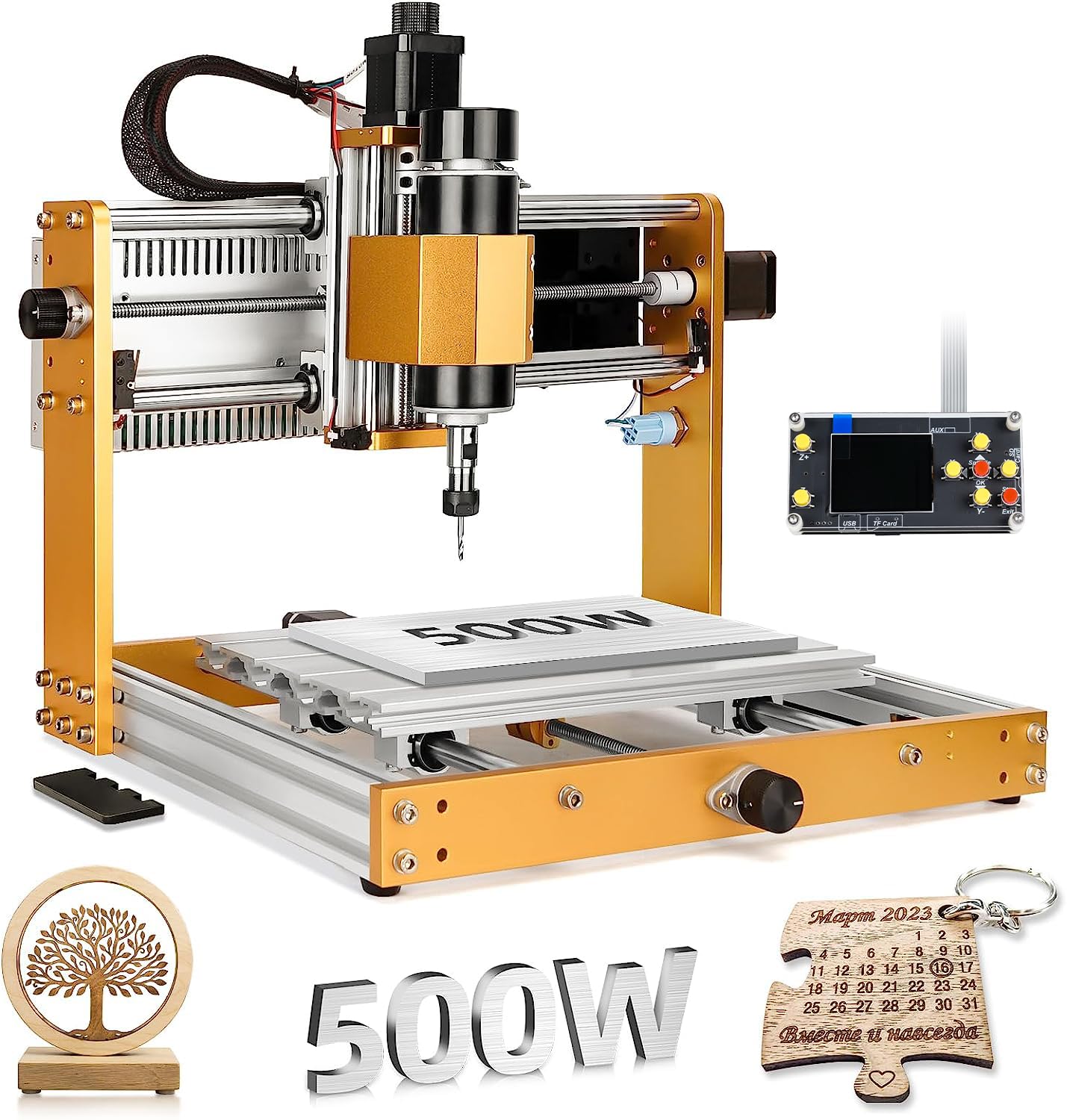
Six limit switches and an emergency stop on an all-metal frame
For a beginner, the safety system on this machine is the reason to buy it. Six limit switches mean each axis knows where it stops, and the emergency stop button is a real one you can hit when a bit digs in. Manual handwheels on the X, Y, and Z axes let you position the origin by feel before you commit to a cut. No plastic parts except the electrical components means the frame holds its structural integrity even when you are running long jobs with vibration.
The 500W spindle spins from 0 to 12,000 RPM and moves up to 5,000mm/min. That is enough to push through aluminum and copper, not just pine. The Z-axis long travel of 80mm is the longest here among the standard-bed machines, useful for thicker stock and longer bits. A 12mm optical axis keeps linear motion precise, with an upgrade kit sold separately if you want to push it further. The flash drive ships with software pre-installed, and installation and wiring videos are on the product page.
Quality of the metalwork is what gets praised most, and it shows in the details. Reviewers who started on 3D-printed frames describe the LUNYEE as a leap in accuracy, with one experienced user reporting a build of about an hour versus days on older hardware. The recurring caveat is the software and connection side — some machines connect and run smoothly, others bring connection trouble, and CAM/CAD programs carry a steep learning curve regardless. Plan a careful first session with the wiring videos, and start with simple projects before chasing big V-carves. There is also a laser option, though it is a separate capability and carved cuts are the machine’s first job.
The metalwork argument: all-metal construction, linear screws instead of belts, and manual handwheels for origin setting make this the most predictable of the mid-size picks for someone cutting aluminum for the first time.
The learning side: the hardware is friendlier than the software. Budget an evening for the controller connection and a second one for your first CAM file, and this machine pays that back in clean cuts.
The one to choose when: safety and metal rigidity are your priorities — the six limit switches, emergency stop, and all-metal frame make it a confident first aluminum machine.
Skip the hype if: you want a plug-and-play software experience. Wiring guidance lives in the videos, and the CAM programs take real learning.
5. FoxAlien Masuter Pro CNC Router

From box to first cut in 10 to 15 minutes, all metal and pre-wired
Assembly is where this machine separates from the rest. Main parts arrive pre-assembled, the wiring is already run to the controller, and the manual walks you through the rest — the maker quotes 10-15 minutes, and it really is a build you can do on a lunch break. For a hobbyist who dreads a day of hardware, that speed is a feature worth paying for.
The all-aluminum framework and linear rail Z-axis give you a rigid platform for detailed engraving on wood, acrylic, MDF, and nylon. Two spindle clamps come in the box in 52mm and 65mm, supporting 60W and 300W spindles plus custom options like a 65mm router or 1.5kW spindle. The controller box is dust-resistant with easy-to-reach emergency stop and home buttons — small touches that matter every session. The working area is 15.75” x 15.75” x 2.36”, and an optional Y-axis extension kit widens it later.
The honest limit here is the stock spindle. At 60W it is meant for beginner work, and it will not chew through aluminum without patience. That is a fit note, not a flaw — the machine has 600+ ratings at 4.0+ stars, which tells you plenty of hobbyists are happy with what it does. The path forward is the point: buyers swap in a Makita RT0701C router, upgrade to NEMA 23 motors, and describe the result as competitive at a fraction of the cost. Quality and assembly are what get mentioned most, and the machine is genuinely straightforward to put together. Just know the stock motor is the starting point.
Where it shines: the fastest build of the group and an aluminum frame that holds up, giving you a capable hobby platform from day one.
The upgrade truth: the 60W stock spindle is the weak link, and the 52mm and 65mm clamps exist specifically to let you replace it — plan for that.
Made for: the hobbyist who wants to be cutting within the hour and will happily upgrade the spindle once the projects get serious.
Not the fit for: anyone running production aluminum jobs from the start — start with wood and look at the Masuter 3S or the AnoleX for metal.
6. Genmitsu PROVerXL 4030 CNC Router Machine for Wood & Metal

A 31 kg C-beam platform that stays rigid through aluminum and hardwood
The number that tells you what this is: 31 kg. That mass is the point. A C-beam frame, lead-screw drive on all axes, a dual screw on the Y-axis, and an optical-axis Z driver all contribute to a machine that does not walk or flex mid-cut. NEMA 23 stepper motors do the pushing, and the working area is 15.7” x 11.8” x 4.3” — that 4.3 inches of Z clearance is generous for thicker stock and longer bits than most compact routers allow. It comes with limit switches, emergency stop, speed control, and a Z-probe in the box, plus a three-month Carveco Maker subscription by email after purchase.
For anyone stepping up from a 3018-class machine, the jump is huge. Buyers describe it as far more rigid than tubular-rail machines, and the frame takes a DeWalt DWP611 upgrade through an included adapter when you want a real 1/4-inch collet. Assembly is mostly pre-done, running about 2.5 hours, and the 500+ ratings at 4.0+ stars reflect a large body of happy owners. The recurring caveat is the assembly documentation — some find the instructions well thought out, others do not — and one power wire has been known to fail early. If a lead frays, a real replacement part from support solves it quickly.
What wins people over most is the raw quality of the machine, and it earns that. The one behavior to plan around is support speed: email is the only channel, and when something goes wrong, the wait can stretch across days. This is the machine best for someone who lets the hardware do the talking and keeps a spare power wire on hand.
Why it earns the workhorse badge
- 31 kg of C-beam frame with lead-screw drive on every axis holds accuracy under load
- NEMA 23 steppers and included DeWalt DWP611 adapter open a 1/4-inch collet path
- 15.7” x 11.8” x 4.3” working area with 4.3 inches of Z clearance
- Limit switches, emergency stop, speed control, and Z-probe all included
The honest friction points
- Assembly instructions divide opinion, so budget extra time to cross-check the build
- Email-only support means slow back-and-forth when a part needs replacing
- Stock spindle is fine for engraving but wants a router upgrade for deeper milling
The right owner: someone moving up from a small router who wants one rigid machine to grow with, and who will take the assembly seriously.
Not for: anyone who needs quick phone support or a machine they can store easily — 31 kg is a permanent bench tool.
7. Genmitsu 4040-PRO CNC Router

A reinforced bed that stays flat across the whole 17.13-inch span
Bed sag is the quiet enemy of large desktop routers. When the spoilboard dips in the middle, your cut depth changes from one end of a sign to the other, and you get a relief that looks uneven under raking light. This machine counters that with a reinforced hybrid spoilboard and a center aluminum support bar, keeping the surface flatter across the full span. The working area is 435 x 400 x 80mm — 17.13 x 15.75 x 3.15 inches — which makes it the widest bed in this group for the money.
The motion side is built for stability too. Dual 16mm HSS steel tubes on every axis, lead-screw drive, and a 32-bit controller with silent Toshiba drivers keep movement smooth and quieter than you would expect for the size. Pre-assembled modules mean assembly is roughly 15 minutes in practice, and close to 20 minutes when you are being careful. The relocated Z-probe port is a small but welcome improvement. A redesigned Z-axis carriage takes 65mm or 69mm spindle mounts with an extra part, and dedicated 3-pin ports are ready for air assist or an MPG controller as you advance.
The honest bit is reliability and alignment. Some machines run day and night without complaint — one owner describes four straight days of workload — while others lose their vector orientation mid-job and need the controller board replaced. Frame quality and assembly are the consistent strengths. The step worth taking before your first real cut is a homing test and a dry run through a known file, so any issue surfaces while returns are easy. Software like the bundled Candle is basic; most owners graduate to a full sender and CAM package.
Where the money went: into the frame and bed — dual steel tubes, lead screws, and a supported spoilboard, all aimed at consistent cutting depth across large projects.
Pick this when: your projects are wider than a 3018 can handle and cut depth consistency across the bed matters more than the spindle badge.
Step up instead if: you want a guaranteed straight-from-box experience — a careful first test matters here more than on the metal-framed picks.
8. CNC Router Machine 4030-Evo Ultra 2
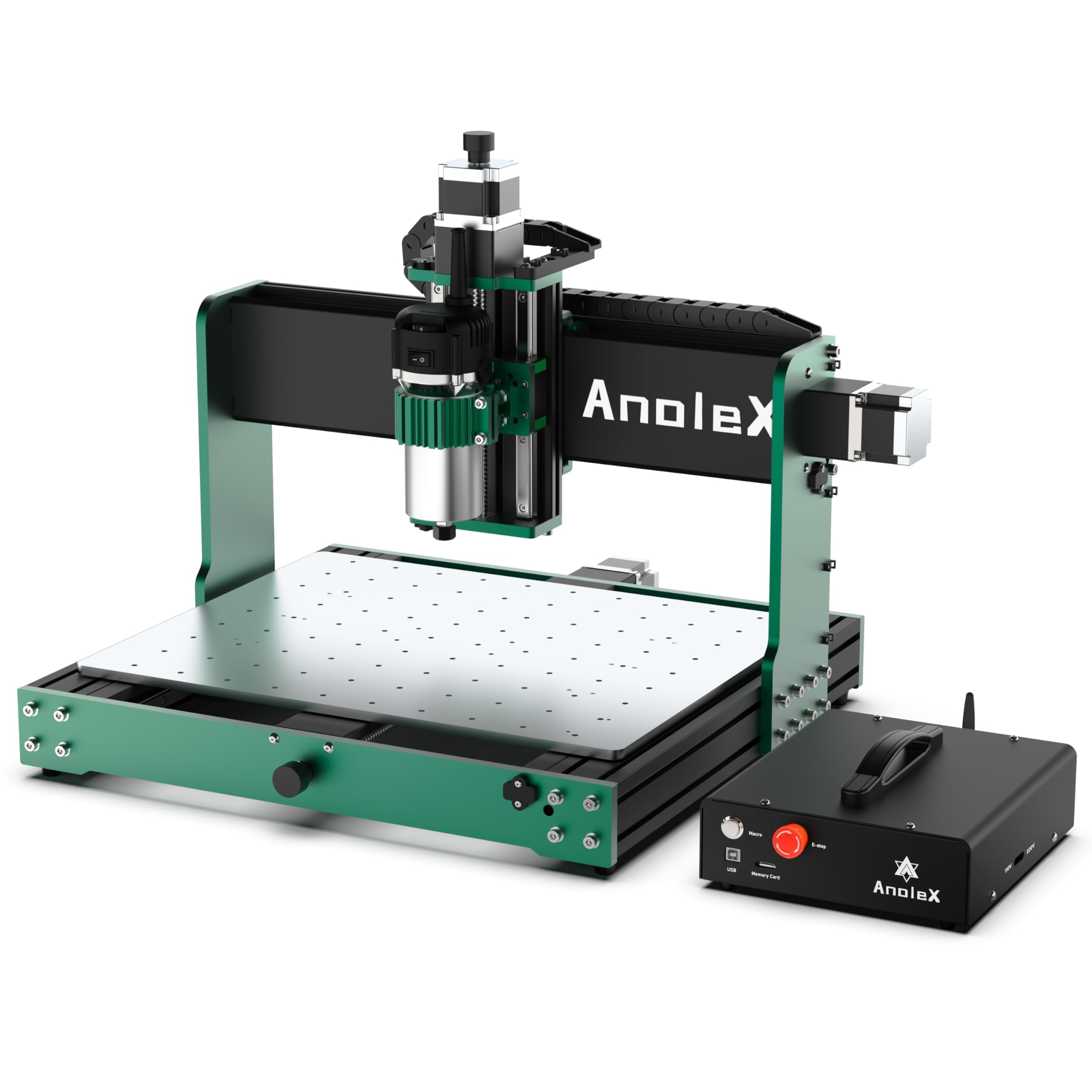
Ball screws, dual rails on every axis, and 800 watts of trim router
Repeatability of ±0.005mm is the spec that separates this machine from the rest of the list. In plain terms, that is the machine’s ability to return to the exact same point over and over. Actual cutting accuracy on 6061 aluminum reaches ±0.02mm. To get there, every axis — X, Y, and Z — runs HGH-15 dual linear rails and 1204 ball screws with a dual-bearing design at both ends. That is a level of motion hardware you normally see on machines far above this tier, and it explains why this machine can take a 1/4-inch endmill through aluminum without losing steps.
The spindle is a genuine upgrade too. An 800W trim router with six speed settings from 8000 to 24000 RPM replaces the usual fixed spindle, and run/stop can be software-controlled while speed is set on the dial. The control board runs GRBL 1.3a on an ESP32, supporting laser engraving, a fourth rotary axis, coolant control, closed-loop steppers, and a 3-pin touch probe. You can drive it over WiFi from a PC, phone, or tablet using the ESP3D web interface, and the macro button is reprogrammable from homing to pause or G-code execution. NEMA 23 steppers (2.8A, 1.2N/m torque) do the moving, and closed-loop interfaces are ready for upgrades.
Assembly is easier than the hardware suggests — major parts arrive pre-assembled with clean cable management and a detailed paper manual plus video. The caveat worth knowing is connectivity: the web interface can lag, some users have hit WiFi or USB connection trouble on Windows 10, and one 3-pin probe port was reported as incompatible with fluidnc. One unit arrived missing its Plexiglass alignment tool, which makes assembly harder. Neither is fatal — support has been reported as fast and free with replacement parts.
The precision case: ball screws and dual linear rails on all three axes put ±0.005mm repeatability into a tabletop frame, so repeat parts come out identical.
The wiring case: WiFi control is a real convenience when it works, and the connection quirk is the fixable trade-off.
For the metal-focused maker: anyone cutting aluminum, brass, or PCB who needs repeatable accuracy and does not want to fight a flexing gantry.
Understand this first: it is the heaviest machine here at 38 kg and the most connectivity-dependent — expect a learning curve on the WiFi and web interface.
Know the Specs
Spindle wattage and spindle RPM
The spindle is the motor that turns the bit. Wattage is how much cutting force it can sustain, and RPM is how fast it spins. A 400W spindle can handle wood, plastics, and soft metals like aluminum with the right bit and feed. An 800W trim router reaches 24000 RPM and pushes deeper cuts before bogging down. Higher wattage is not a free upgrade — it also needs a rigid frame to keep the bit from chattering.
Stepper motors and closed-loop control
A stepper motor moves in fixed increments. An open-loop stepper assumes it arrived; a closed-loop stepper checks and corrects. That matters when a heavy cut loads the bit and the motor risks slipping a step, which throws off your origin and ruins the rest of the job. NEMA 23 is a larger motor frame size than the smaller NEMA 17 common on entry machines, and the 2.2 Nm and 1.2N/m torque figures on the picks here tell you how much holding force you get.
Working area and Z clearance
Working area is the maximum stock size the bit can reach, written as width by depth by height. Z clearance is the height number — how thick a piece you can fit under the gantry. A 300 x 180 x 80mm bed handles small signs and PCB drilling. A 435 x 400 x 80mm bed fits larger signs and relief work. Check your thickest planned stock against the Z figure before you buy; that is usually the limit people hit first.
Linear rails, ball screws, and belts
These are the three ways to move an axis. Belts are cheapest and fine for light work, but they stretch. Lead screws are more rigid and handle heavier loads. Ball screws run on recirculating bearings for the smoothest, most repeatable motion — the kind of precision you need for repeatable aluminum parts. Dual linear rails guide the carriage on a hardened track instead of a wheel, which keeps the bit from wandering under sideways load.
Common Questions
Can a small CNC cut aluminum or only wood and plastic?
How long does assembly actually take on these machines?
Do I need to buy software separately for a small CNC?
Is closed-loop better than open-loop stepper motors on a desktop CNC?
What is the difference between a 3018 and a 4040 CNC?
Can I add a laser to these CNC routers later?
How do I keep a small CNC accurate after months of use?
Do I need an offline controller to run a small CNC without a laptop?
What materials can a small desktop CNC cut besides wood?
The Bottom Line
For most buyers, the winner is the FoxAlien Masuter 3S because closed-loop NEMA23-76 steppers and dual HG-15 linear rails eliminate the step-loss and frame flex that ruin desktop cuts. If you want a wide bed and real spindle power without the premium tier, the WolfPawn 4040-PRO delivers a 500W spindle and a 15.7” x 15.7” work area. And for metal-focused precision work, the AnoleX 4030-Evo Ultra 2 is the one to reach for — ball screws and dual rails on all three axes with 800W of trim router.
The simplest advice: buy the rigid frame first, the spindle second. A rigid machine with a modest motor cuts cleanly; a powerful motor on a flexing gantry just makes a louder mess. If you are starting from zero and want to learn G-code, the Genmitsu 3018-PROVer V2 is the lightest, most affordable on-ramp — small enough to store, cheap enough to learn on.
One nudge worth heeding: every machine here rewards an honest first session. Do a dry run with the bit raised, check your emergency stop, and test a scrap piece before you commit your project stock. That ten-minute habit prevents most of the ruined stock that sends people away from CNC.
How we choose
We do not accept paid placement. Every pick is matched to a real buyer and a real use-case; we do not hands-on test units.
Sources
Specifications: manufacturer listings and product documentation. Review insights: verified customer reviews, as of October 2026. Pricing: not shown on this page (it changes often); check the current price via the retailer link.
As an Amazon Associate, Aappliancez earns from qualifying purchases. This does not affect which products we feature.