Disclosure: Some links in this post are affiliate links. As an Amazon Associate I earn from qualifying purchases, at no extra cost to you. Learn more
Specs are compiled from manufacturer listings and verified buyer reviews and can change over time — please confirm the key details on the product page before buying.
A single-colour machine is not the compromise it sounds like. Skipping the multi-material box is exactly what keeps the price down, the print head light, and the failure points few — and for toys, brackets, replacement knobs and workshop jigs, one colour is all you ever needed. Colour is not the spec that decides your buy. It is bed size, top nozzle temperature, and whether the frame can hold steady at speed without rattling your desk apart.
This guide is built by comparing the manufacturers’ published specifications and the patterns across verified customer reviews, so you get each pick’s real strengths and trade-offs instead of marketing spin.
Below you will find nine machines sorted by what they actually do well, from a one-click levelling workhorse to a fully enclosed carbon-fibre rig. Every entry below is a genuinely single-extruder machine, so you never pay for a filament-changing system you will not use on a single color 3d printer.
Top Picks


How To Choose The Best Single Color 3D Printer
Start with the model you actually want to print, not the spec sheet. A print that fits inside the build volume in one piece saves you hours of gluing, sanding and seam repair — and that single number rules out more machines than any other figure on the box.
Build volume: the number that decides your projects
The build volume is the box of space the nozzle can reach, written as width by depth by height in millimetres. A 220 x 220 x 220mm plate handles a desk toy, a phone stand or a replacement bracket comfortably. Anything larger — a full helmet, a shoe last, a drone frame — needs the bigger plates on this list, or the model splits into parts.
Check the height figure separately, because height is the one dimension people forget. A tall vase or a lamp shade can clear the width and still hit the ceiling of the chamber. Buy for the tallest thing you plan to print, not the widest.
Nozzle temperature sets your material ceiling
The hotend melts the filament, and its top temperature is the hard limit on what you can feed it. PLA prints comfortably at the low end. PETG needs more heat. Carbon-fibre blends, ASA and nylon need a hotend that reaches far higher and stays there without clogging.
If you only ever print PLA and PETG for the family, a lower-temperature nozzle is fine and cheaper. If you want functional parts that survive heat and load, buy the nozzle temperature you need on day one — it is not something you upgrade casually later.
Auto levelling and the first layer
Auto bed levelling is a sensor that measures the plate at several points and adjusts the nozzle height as it prints. A bad first layer ruins everything above it, so this feature does more for your success rate than any speed claim. One-click levelling is what separates a printer you use daily from one you avoid.
Enclosure: fumes, drafts and curious fingers
An enclosed chamber keeps warm air around the part, which fights warping on big flat prints and lets you print engineering plastics in a cold garage. It also keeps small hands away from a hot nozzle. An open-frame printer is easier to watch and service, but it is more sensitive to a draughty room.
Speed and acceleration, read honestly
Print speed is measured in millimetres per second and acceleration in millimetres per second squared. These numbers describe the motion system’s ceiling, not the quality you will get at that ceiling. A rigid frame and vibration compensation matter more than the headline figure, because ghosting and ringing show up fast in a flexy chassis.
Side-by-Side Comparison
| Model | Best For | Build Volume | Max Nozzle Temp | Top Print Speed | Amazon |
|---|---|---|---|---|---|
| FLASHFORGE Adventurer 5M★ Best Overall | First machine, minimal fuss | 220 x 220 x 220mm | 280 °C | 600mm/s | Amazon |
| Original Prusa MK4S KitBest for Tinkerers | Builders who want to learn | 9.84 x 8.3 x 8.6 in | — | High-speed FDM | Amazon |
| Creality K1CCarbon-Fibre Ready | Carbon-fibre and high-temp work | — | 300 °C | 600mm/s | Amazon |
| Dremel DigiLab 3D45 | Classrooms and out-of-box reliability | 6.7 x 10 x 6 in | 280 °C | — | Amazon |
| Hephi3d TINA2S | Tiny desks and true beginners | Compact semi-enclosed | — | 200mm/s | Amazon |
| Entina Tina2 Plus | Kids, classrooms and supervised use | Compact desktop footprint | — | 250mm/s | Amazon |
| Entina Tina2C Bundle | Starter kit with filament included | 3.9 x 3.9 x 3.9 in | — | — | Amazon |
| ELEGOO Centauri Carbon | Big enclosures and long runs | 256 x 256 x 256mm | 320 °C | 500 mm/s | Amazon |
| Original Prusa CORE One | Workshop-grade engineering plastics | 250 x 220 x 270mm | — | High speed | Amazon |
Detailed Reviews
1. FLASHFORGE Adventurer 5M
Our pick — 4.0+★ from 600+ verified ratings; the strongest balance of quality and price.
The first-layer cheat code for anyone who has never levelled a bed by hand.
The headline number is 600mm/s. That is the motion system’s top print speed, and Flashforge pairs it with a bed that levels itself at the press of one button, so your first print happens minutes after unboxing rather than an evening of feeler gauges.
Setup really is the headline here. The one-click levelling probes the plate and sets the nozzle gap for you, which is the step most new owners get wrong on a cheaper machine. Then the 220 x 220 x 220mm build plate takes a desk toy, a phone stand or a replacement bracket without splitting the model. The dual-sided PEI plate is a coated spring-steel sheet you bend to pop finished prints free, and it holds PLA, PETG and TPU well.
The 280°C nozzle matters for material range. It clears PLA and PETG easily, and the 0.4mm nozzle covers the everyday stuff while a 0.6mm nozzle opens up the carbon-fibre blends. While a print runs, the run-out sensor catches an empty spool and power-loss recovery picks the job back up after a trip at the breaker.
What wins owners over is reliability: it holds up as a workhorse and keeps printing. Print quality and print speed follow close behind as the things owners talk about most. The honest catch is noise: this is the loudest machine in this line-up by consensus, and a fair number of buyers question the value. Most owners are happy, though, and a small handful land a unit that never prints straight, so it is worth a careful test print during the return window. It weighs 23.8 pounds, so it is a desktop machine, not a portable one.
What earns its keep
- One-click levelling gets you a clean first layer without hand-gapping
- 600mm/s top speed with the 0.025-second ramp from zero it publishes
- 280°C hotend, plus a 50W heater reaching 200°C in 35 seconds
- Run-out sensor and power-loss recovery finish the job
Where it asks patience
- Noise is the recurring gripe — startup runs louder than the print itself
- Build quality and adhesion draw the occasional doubt
- An open frame means a draughty room can bite into big flat parts
Go for it when: you want your first machine to print the same evening it arrives.
Think twice if: it lives beside a bedroom wall and you print overnight.
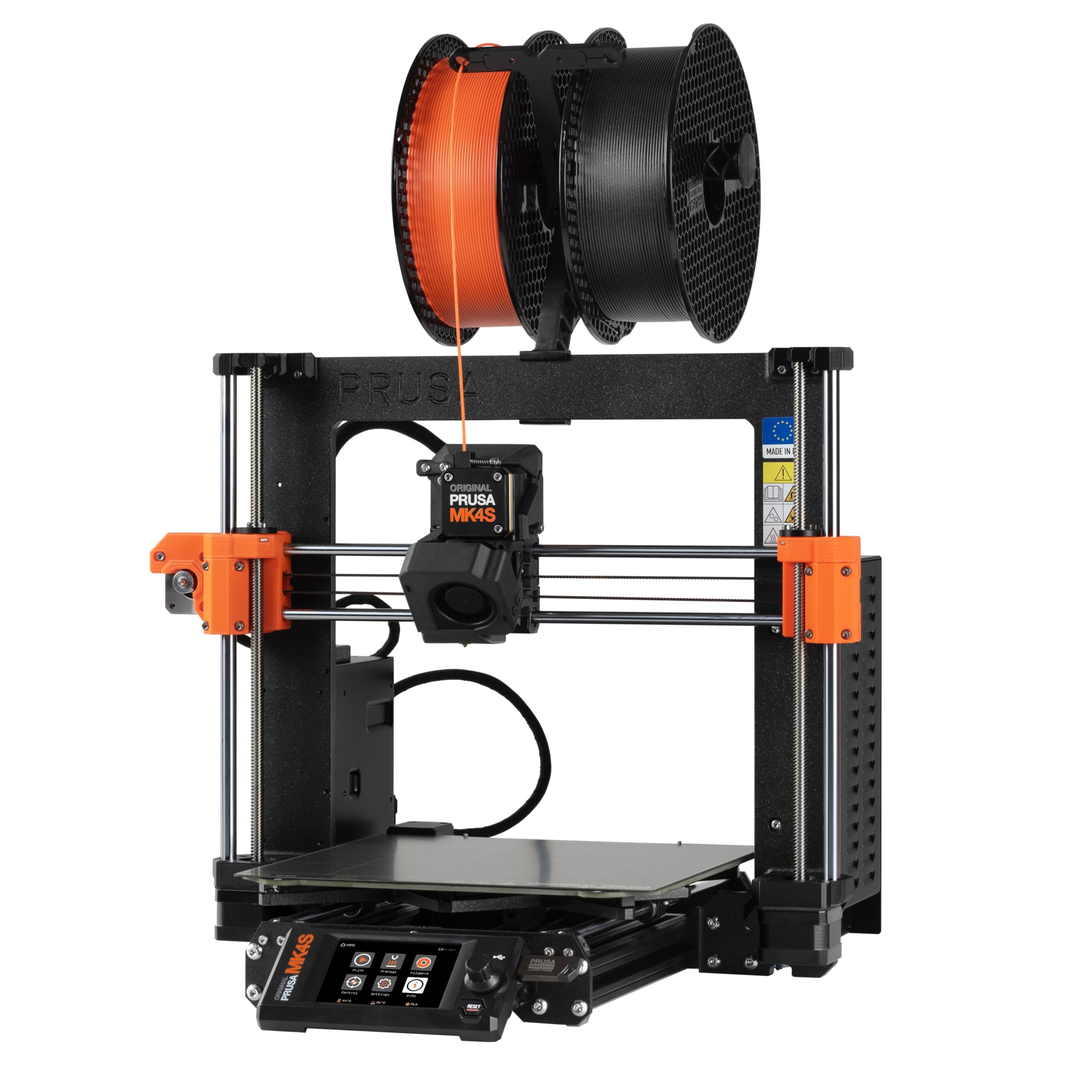
2. Original Prusa MK4S Kit
You bolt this one together yourself, and that is exactly the point.
At 15.4 pounds the MK4S is the lighter machine next to the 23.8-pound Adventurer 5M, and its footprint runs 19.6 x 15.7 x 21.6 inches versus 14.29 x 15.83 x 17.64 inches for the Flashforge — so it asks for noticeably more bench real estate. What you get in return is a machine you understand down to the belts.
The build volume reads 9.84 x 8.3 x 8.6 inches, enough for the keychain-to-enclosure range this machine was designed around. Input shaping is the piece that keeps corners sharp at speed, because it damps the vibration that shows up as ghosting in the walls of a print. This is an open-frame design, so it needs a reasonably still room.
Assembly is the fork in the road. Buyers report building theirs over roughly 14 hours spread across two days, and describe the instructions as well-written with extra user comments online. One buyer’s verdict was blunt: the kit rewards a careful build, and anyone who would rather not spend that weekend should buy an assembled machine instead. The engineering is open source and upgradeable, and a sample of Prusament PLA comes in the box with lifetime technical assistance behind it.
The trade you make: the build teaches you the mechanics and electronics, so tuning later is second nature — but a rushed build shows up in print quality straight away.
Made for: the owner who wants to know why every part works, not just that it does.
Not the one if: a box that needs assembling sounds like a chore rather than a project.
3. Creality K1C
Three hundred degrees of hotend turning this into a carbon-fibre machine.
The 300°C nozzle is the spec that decides this pick. It sits above the 280°C of the Adventurer 5M, and that extra headroom is what open up PLA-CF, PA-CF and PET-CF — the blends used for strong, stiff functional parts. The tri-metal nozzle is a steel-tipped copper design with a titanium alloy heatbreak, built to shrug off the abrasion that eats a plain brass nozzle.
Speed is the other half of the pitch: a 600mm/s top speed with 20000mm/s² acceleration from the CoreXY frame, plus dynamic fan balancing to cut the wobble that causes ringing. The enclosed chamber holds heat for those higher-temperature materials, and an activated carbon air purification system handles the odours. Silent mode drops noise to 45dB when you are working in the same room.
Quality is what carries this machine — it is far and away the thing buyers praise most, with ease of use and setup right behind. One owner called it “fantastic first printer with plenty of space for 95% of all needs.” The honest caveat is that print quality, durability and value all draw mixed feedback, and there is a well-documented story of a unit failing the same height into a print until support worked it through to a resolution. The AI camera monitors the job and shoots time-lapses while you are away.
Why it earns the shelf space: genuine high-temp capability at 300°C inside a sealed chamber, with the carbon-fibre nozzle already fitted.
The follow-up question: an enclosed machine at 27.3 pounds wants a stable bench, and its 45dB silent mode is quieter than its normal running voice.
Right call for: makers printing functional, heat-resistant parts rather than decorative toys.
Look elsewhere if: you only ever run PLA and never need the extra 20°C.
4. Dremel DigiLab 3D45

The one that behaves like an appliance instead of a workshop project.
A 5-inch full-colour touchscreen with intuitive icons takes you from box to first print in under 15 minutes, and the glass build plate heats up to 100°C to hold parts flat. The all-metal 0.4mm nozzle reaches 280°C, and the enclosed plastic body carries a 6.7 x 10 x 6-inch build volume along with a built-in carbon filter and particulate filter.
Reliability is the selling point, and it is not a quiet one. Owners mention running it 15 to 24 hours a day without complaint, and the automatic leveling and removable glass plate keep the daily routine simple. A mechanical engineer who bought one had it ready in minutes where a Prusa kit had been a struggle, and rated the enclosure as the key feature — fume separation, child safety and temperature control for printing in a cold garage without warping.
The recurring gripe is filament. Dremel’s own spools are the expensive route, and the spool size pushes many owners into a mod for third-party rolls. The smaller build area shows up as a limitation too, and the slicer has had trouble on some Macs. Nothing here is broken — it is simply a closed ecosystem, and you pay for the hand-holding.
Reach for this if: it lives in a classroom or a shared workshop where anyone must be able to press a button and print.
Worth knowing: budget for the mod that lets you run third-party spools, or accept the OEM filament cost.
5. Hephi3d TINA2S

A 5.68-pound printer that fits beside a monitor and prints within five minutes.
This is the smallest thing on the list at 5.68 pounds, and it arrives fully assembled with auto bed levelling already fitted. The pitch is simple: plug it in, pick a model, print. The 3,500-plus model library in the companion app covers the one-tap crowd, and the semi-enclosed desktop frame keeps the hot end and moving parts away from casual contact.
Print speed tops out at 200mm/s, and the self-developed motherboard runs silent printing at 40 to 50dB — quiet enough to sit in a living room. A filament sensor and power-loss resume both help keep failed prints and wasted spools down. It prints PLA, PLA Pro and TPU, and a spool of PLA comes in the box.
The honest maths is that this is a young listing with a small review base, so the long-term track record simply is not there yet. What exists is warm: one buyer wrote “FANTASTIC!!! Almost Returned this item because I didn’t attempt to put it together myself” and found it printing in minutes once they did. Treat the compact frame as a feature for a desk and a limit for anything larger than a trinket.
The pitch in one line: silent, assembled, and small enough to disappear on a shelf — with a model library that removes the designing step entirely.
Suits you if: you have a corner of a desk and want the shortest possible path from box to a printed trinket.
Outgrows fast if: you plan to print anything structural or full-size.
6. Entina Tina2 Plus

A family machine that heats its nozzle in forty seconds flat.
The ceramic hotend is the quiet hero: it reaches temperature in about 40 seconds, so a child’s patience is not tested while the machine warms up. Print speed runs to 250mm/s, and the partially enclosed frame keeps the hot end and moving assembly away from casual contact while leaving the print area easy to see.
Dual Z-axis support is the structural detail that steadies the gantry, and automatic leveling plus a PEI spring-steel plate handle the first layer and the finished-part release. An included TF card arrives with models preloaded, and the Poloprint Cloud app carries 3,000-plus printable designs. It prints over TF card, WiFi or USB, and works with Windows, macOS, Linux and Chromebook.
Ease of use is what buyers talk about, with gift-giving and plain fun close behind. One parent’s line sums it up: “My ten year old is having a blast printing things!! We are having so much fun!” Be clear-eyed about the rest: performance gets mixed reports, connectivity tops the complaints, and the unit is 9.98 pounds on a compact desktop footprint. It is built for supervised use and small models, so it is not the machine for a large functional print.
What the kids get
- 40-second heat-up means no long wait before the first print
- 3,000+ preloaded app models keep the ideas flowing
- PEI spring plate pops finished prints free with a bend
- Partially enclosed frame adds a layer of safety for home use
What to plan around
- WiFi connectivity is the most-discussed complaint
- Performance reports split between working great and never working
- Small build area limits it to toys and trinkets
The one to grab when: a child is getting their first printer and an adult will be nearby.
Skip the wifi if: you can plug in a TF card — the offline route sidesteps the connectivity gripe entirely.
7. Entina Tina2C Starter Bundle

Filament, models and a built machine in one box — nothing else to buy on day one.
Pulling four 250g rolls of PLA in different colours into the box is the difference between a gift that works out of the wrapper and one the family has to shop for first. The printer arrives fully assembled, and guided setup through the Poloprint Cloud app gets a first print going in as little as 5 minutes.
The build volume is a tight 3.9 x 3.9 x 3.9 inches, which is the honest headline: this prints keychains, figurines, buttons and small toys, not brackets or boxes. Automatic leveling handles the first layer, power-loss recovery resumes an interrupted print, and the flexible magnetic plate releases finished parts with a gentle bend. A quick-swap nozzle makes maintenance straightforward, and a 2.4GHz WiFi link or a TF card covers printing on or offline. Cura and Simplify3D are both supported for slicing.
Built-in LED lighting helps you watch a job, and the low-noise, compact frame suits a home or a classroom desk. Ease of use is the strongest theme in the feedback, with gift-giving right alongside it. One buyer described a birthday present that has been making “lil toys and gadgets for friends” ever since it was unwrapped. The same mixed performance and connectivity notes that apply across this family of mini printers apply here too, so plan on supervised use.
Where the value sits: the four-roll filament bundle and the preloaded model library mean zero extra spend before the first successful print.
Best as a gift: a complete first printing kit for a child’s birthday.
Know the ceiling: a 3.9-inch cube rules out anything bigger than a toy or a trinket.
8. ELEGOO Centauri Carbon

A quarter-metre cube of enclosed printing, shipped pre-calibrated and assembled.
Look at the plate before anything else: 256 x 256 x 256mm, which is a full 10-inch cube in imperial and the largest volume among the enclosed machines here. It arrives fully assembled and pre-calibrated, with auto bed leveling and a touchscreen taking over the setup.
Speed runs to 500 mm/s with 20000 mm/s² acceleration on a CoreXY frame, and the 320°C brass-hardened steel nozzle opens the door to carbon-fibre reinforced filament. The die-cast aluminium frame is the part that makes those speeds usable — it is built to damp vibration and hold stability, and automatic vibration compensation and pressure advance keep the layers smooth. A high-flow hotend and heated bed back it up for large parts done quickly.
Quality and ease of use dominate the buyer conversation by a wide margin, with print speed and value close behind. Owners describe it as a set-up-in-minutes machine that can run 24 hours without issue; one print-farm buyer had a first unit running in 30 minutes and, as a machinist, measured dimensional accuracy within.010″. The honest follow-up is durability: that is the one aspect drawing negative reports, including a first unit that failed within days and went through seven weeks of diagnostics before being replaced. Adhesion and auto-leveling also split opinions. At 38.5 pounds it is a bench fixture, not a portable one.
Its real strength: the biggest plate on this list inside a sealed chamber, with the 320°C nozzle for engineered filament.
The recurring annoyance: the built-in light and time-lapse quality are weak, the fans and vibration are loud, and the filament path needs a riser under the lid.
Pick it for: long unattended runs on large parts in an enclosed machine that sets up in half an hour.
Buy with a plan if: you are running it commercially — test hard in the early weeks and keep the return paperwork close.
9. Original Prusa CORE One

The 55°C heated chamber that turns nylon and PC into everyday jobs.
Fifty-five degrees is the number that separates this from everything else here. An actively temperature-controlled enclosed chamber lets you print PLA and PETG with the door shut, and then push into ASA, PC and Nylon without the warping that plagues an open frame in a cold room. The all-steel exoskeleton frame is there to hold firmness at speed, and a 250 x 220 x 270mm print area gives you real height for tall parts.
This ships assembled and tested, with a 1kg spool of Prusament PLA Galaxy Black in the box and lifetime technical assistance behind it. It is a substantial machine at 56.8 pounds, so treat it as a dedicated bench rather than something you move around. Sensorless homing and nozzle-based levelling simplify the flow, and the quiet linear rails keep the room calm while it runs.
Print quality is what buyers praise most, with speed next in line. The honest counterweight is that reliability, calibration and value all split down the middle — and the vibration at full speed needs a solid platform, or the machine knocks itself out of calibration. Owners with long histories on the brand also note the steel frame is heavy enough to be moved only deliberately. The 3.5+ star figure is lower than the rest of this list, so read it as a specialist tool rather than a universal recommendation.
Where the money goes
- 55°C active chamber control for ASA, PC and Nylon
- All-steel exoskeleton frame built for firmness
- Assembled and tested, with a 1kg Prusament PLA spool included
- Lifetime technical assistance and 24-hour support
Každému its own
- Full-speed vibration demands a very solid bench
- Nozzle changes need an adapter for older Mk.6 fitment
- The aluminium heat block is at its limit with PC
The specialist choice: engineering plastics and tall parts from a machine that arrives already tested.
Not the starter pick: the calibration and bench requirements punish a casual first setup.
Know the Specs
Build Volume
The build volume is the box of space the nozzle can reach, given as width by depth by height. It decides whether a model prints in one piece or splits into parts you glue and sand. A 220 x 220 x 220mm plate handles desk toys and brackets; a 256 x 256 x 256mm plate takes much larger functional parts. Height matters just as much, because a tall lamp shade can fit the width and still hit the ceiling of the chamber.
Max Nozzle Temperature
The hotend melts the filament, and its top temperature caps the materials you can print. PLA and PETG sit comfortably at the low end. Carbon-fibre blends, ASA and nylon need more heat and a hardened nozzle tip that resists abrasion. Buy the temperature you need on day one, because swapping a hotend later is a project, not an accessory change.
Print Speed and Acceleration
Print speed is measured in millimetres per second, and acceleration in millimetres per second squared — how quickly the head reaches that speed. Both describe the motion system’s ceiling, not the quality you will see at that ceiling. A rigid frame and vibration compensation matter more, because a flexy chassis turns speed into ghosting and ringing in the walls of the print.
Levelling and Adhesion
Auto levelling is a sensor that measures the plate and trims the nozzle gap automatically, so your first layer lands flat without hand-gapping. The build plate surface then holds the part down while it prints and releases it afterwards. A coated spring-steel plate bends to pop prints free, which beats scraping at a finished part with a blade.
Common Questions
Is a single colour printer enough if I only want one filament at a time?
How big a build plate do I need for helmets or large props?
Can a printer with a 280°C nozzle handle carbon-fibre filament?
Do I need an enclosure to print ABS or nylon at home?
How noisy are these printers in a spare bedroom or home office?
How long does it take to assemble the Prusa MK4S kit?
What is the difference between the Tina2 Plus and the Tina2C bundle?
Can these printers run unattended overnight?
Do I have to use the manufacturer’s own filament?
What is the difference between print speed and acceleration?
The Bottom Line
For most people, the single color 3d printer that wins is the FLASHFORGE Adventurer 5M, because one-click levelling and a 280°C nozzle get a beginner printing the same evening the box arrives. If you would rather have the largest enclosed plate and a 320°C hotend for engineered filament, take the ELEGOO Centauri Carbon. And for a child’s first machine with filament already in the box, the Entina Tina2C Bundle is the one to reach for.
One last nudge: the Adventurer 5M holds 4.0+ stars across 600+ owners, and that is the pickup that needs the least faith from you — a levelled bed and a clean first layer are what make or break a first machine.
How we choose
We do not accept paid placement. Every pick is matched to a real buyer and a real use-case; we do not hands-on test units.
Sources
Specifications: manufacturer listings and product documentation. Review insights: verified customer reviews, as of October 2026. Pricing: not shown on this page (it changes often); check the current price via the retailer link.
As an Amazon Associate, Aappliancez earns from qualifying purchases. This does not affect which products we feature.