Disclosure: Some links in this post are affiliate links. As an Amazon Associate I earn from qualifying purchases, at no extra cost to you. Learn more
Specs are compiled from manufacturer listings and verified buyer reviews and can change over time — please confirm the key details on the product page before buying.
You know the feeling: you lose a round because your quarter-circle came out as a forward dash. On PS5 the fix is usually a fightstick that talks to the console natively, without a legacy adapter in the chain. That is the whole decision in one line — native PS5 support first, everything else second. Below you get seven solid choices, sorted by what they actually do well, plus one blunt warning about lever length before you spend a cent.
This guide is built by comparing the manufacturers’ published specifications and the patterns across verified customer reviews, so you get each pick’s real strengths and trade-offs instead of marketing spin.
Some of these boards are leverless, some use a proper arcade lever, and the difference matters more than any other choice you will make. What follows is a straight read on each one so you can pick the right ps5 fightstick.
Top Picks

How To Choose The Best PS5 Fightstick
Start with the shape of the controls, not the badge on the box. A joystick gives you an arcade lever you push around a gate; a leverless board replaces that lever with buttons you tap. Neither is a step up — they are two different hand skills, and the one you already have in your fingers will feel right faster.
Leverless or lever, and how to decide in five minutes
Leverless boards give you a clean, crisp result for charge inputs and quick direction swings, because each direction is a separate button. If you grew up on a controller d-pad, the switch is short: each direction is a thumb press, not a key reach.
A joystick suits players who like the physical throw and the audio feedback of a clicky lever. Just check the lever’s total height before you buy an aftermarket one; see the HORI notes below for why that number matters.
Native PS5 support saves you a headache
A stick that connects straight to the console with no adapter is simpler and one less thing to fail at a tournament. Adapters exist, but every extra link in the chain is another thing to troubleshoot when your inputs feel wrong.
What to check before you buy
Button count tells you whether you lose options: an all-button board may list only 4 movement buttons, while a full arcade panel carries 17. Check whether the top opens for modding, whether the cable detaches, and whether a SOCD mode (the rule that resolves pressing left and right at once) matches your tournament’s rules. If you plan to swap parts, confirm the stock joystick and buttons are compatible with Sanwa-style parts.
Side-by-Side Comparison
| Model | Best For | Control Layout | Buttons | Connectivity | Amazon |
|---|---|---|---|---|---|
| HORI Fighting Stick Alpha★ Best Overall | All-round arcade feel | Lever + buttons | 17 | USB wired | Amazon |
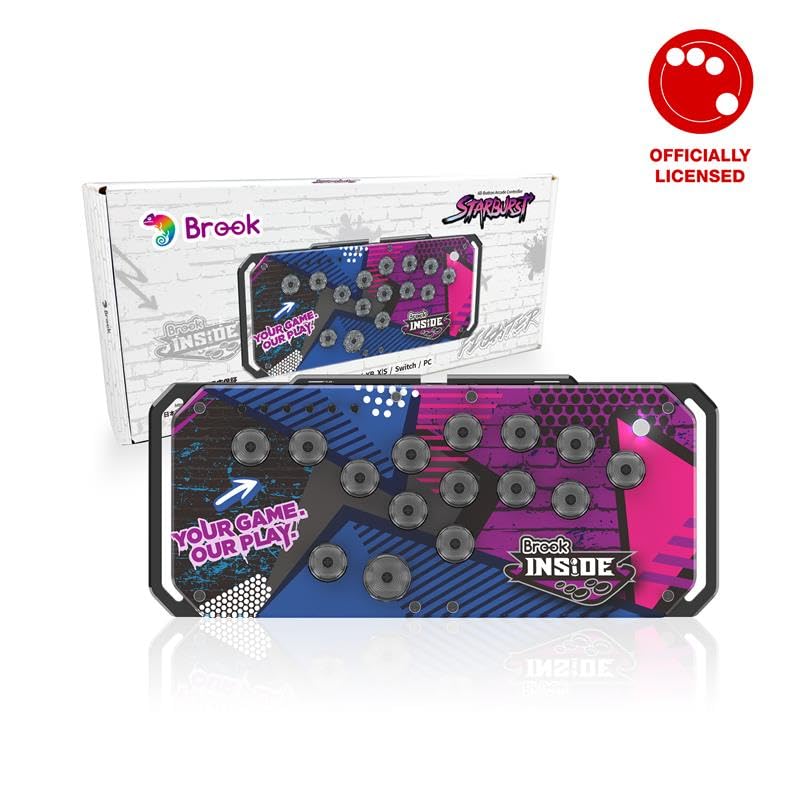
| Brook Fighter StarburstBest For Tinkerers | Swappable-switch tinkerers | All-button leverless | 16 | USB wired | Amazon |
| Qanba N3 Drone 2 | Portable entry stick | Lever + buttons | — | USB wired | Amazon |
| 8BitDo Arcade Stick | Wireless couch play | Lever + buttons | 8 | 2.4G / USB wired | Amazon |
| Mayflash F700 | Multi-platform swapping | Lever + buttons | 10 | Bluetooth / 2.4G / USB | Amazon |
| Razer Kitsune | Crisp leverless speed | All-button leverless | 4 | USB wired (USB-C) | Amazon |
| Nacon Daija | Sanwa purists | Lever + buttons | 8 | USB wired | Amazon |
Detailed Reviews
1. HORI PlayStation 5 Fighting Stick Alpha
Our pick — 4.5+★ from 850+ verified ratings; the strongest balance of quality and price.
The tournament-grade arcade panel that opens like a clamshell so you can mod it in minutes.
HORI’s Hayabusa parts (their own lever and button design) arrive ready to play, and the whole top shell pops open for maintenance. That matters because most fightstick owners end up swapping a lever or a button within the first year.
Native PS5 support means no adapter in the middle, so the console reads it as a PlayStation controller from the first boot. It weighs 1500 g, which is heavy enough to sit steady on your legs during a set. The 17 buttons include the touchpad and a set of extra top-mounted buttons.
Size is the honest catch: at 18.9 x 6.5 x 14.37 inches it takes real desk or lap space, and Brook’s Starburst is 5.12 x 0.98 x 11.93 inches — a far more compact board. If you plan to swap levers, listen to the buyers who measured: the stock Hayabusa lever runs 35mm handle-to-plate and 35mm plate-to-base, the LSX-NOBI-01 at 43.7mm does not fit, and you should keep levers under roughly 41mm. An LS-56-01 at 38.5mm drops in and plays well.
What earns the top spot
- Native PS5, PS4 and PC support — no adapter needed
- Clamshell top opens for painless part swaps and artwork changes
- Hayabusa stick and buttons feel responsive with no perceptible lag
- 17 buttons plus a touchpad and extra top-mount inputs
- 1500 g body stays planted during heavy inputs
Where it asks patience
- Cable storage hooks can bunch the cord and fight the lid closing
- The cable is not detachable
- Occasional units arrive with shipping damage
- Faceplate art swaps require pulling the buttons first
Reach for it if: you want the classic lever feel plus the easiest mod path on this list.
Think twice if: you need a stick that slips into a backpack — this is a desk-and-lap board.
2. Brook Fighter Starburst All-Button Arcade Controller
An all-button board that lets you swap the switches and rewrap the art without a soldering iron.
Brook built this one around hot-swappable POM switches — pop the old switch out and drop a clicky one in for a completely different feel. You can also lay down custom artwork, and one buyer described swapping the stock switches for clicky ones and adding their own art as the whole job.
The 5.12 x 0.98 x 11.93 inch body is thin and travel-friendly, and the same listing carries 16 buttons versus the HORI’s 17 — a small gap that mostly reflects the lever you give up. Some of the most notable details: four SOCD modes built in (UP Priority, Capcom/Neutral, Last Priority, and Bypass) so you can match a tournament’s rules, plus five RGB lighting modes, and a magnetic protective case for transport. It covers PS5, PS4, Xbox Series X|S, Switch, Switch 2, and PC.
It sits in the middle ground, and some buyers frame it as a near-miss given Brook’s reputation for adapters. Heavier-travel hands may want a different switch weight, and the all-button layout takes a session or two to click. The build still feels solid, and the fast, smooth inputs are the reason people keep it.
The travel-light feel: POM switches give a short-travel tap that registers quickly, so quarter-circle motions become a sequence of clean clicks instead of one long throw.
What to budget for: the switch swap is the point of this board, so plan on trying a couple of switch types before settling.
Who this is for: players who want a leverless board they can keep rewiring as their taste shifts.
The honest ceiling: if you want something turnkey with no fettling, spend a little more and skip the setup phase.
3. Qanba N3 Drone 2 Wired Joystick
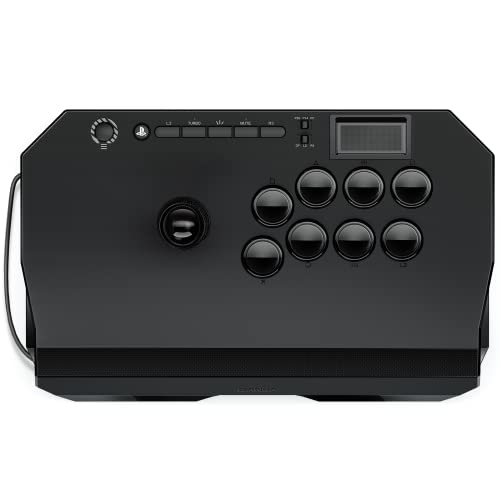
The one that slips into a tote and still gives you a real Sanwa-style feel.
Qanba made the Drone 2 to be light, and it lands near 4 pounds. What wins people over is the grippy panel that replaced the glossy plastic on the original Drone, so your palms stay put through a four-hour session. Underneath, the Qanba OV7 with OMRON switch gives a clicky swing with pronounced feedback.
Native Sony licensing means it boots on PS5 without a workaround, and the touchpad button is finally present. You get a full control panel, Qanba’s 30-mm B30 buttons, and a 3.5-mm mic input with a mute button. Plug it into a PC and it works the same way, which is why Linux and PC players tend to keep it around.
Two things you should hear. The stock buttons are loud and clanky — padding inside the case quiets it down if that bugs you. And the lightweight body can skate on your lap during aggressive motions because the underside padding is minimal; the fix is a quick weight or a non-slip pad. At 14 x 8.7 x 4.6 inches it travels easily, and one buyer’s unit shrugged off a rainwater soaking and still worked.
The portability math: 4 pounds and a slim footprint mean you can carry it in a backpack and still have a genuine lever in front of you.
The upgrade most owners make: buttons and the balltop are on a swap list for a reason — the stock feel is good, but it’s an entry tier that rewards a little work.
Pick it if: you want a officially licensed PS5 lever that fits in a bag on day one.
Not for: players who lean heavy on the case and expect it to stay glued to their thighs.
4. 8BitDo Arcade Stick for Xbox and Windows (White)

A wireless arcade stick with a dongle compartment so the little receiver never goes missing.
8BitDo’s licensed stick runs on a 2.4G connection (a dedicated wireless link via the bundled dongle) or a wired USB connection, and it carries a 1000mAh battery. The maker quotes 30 play hours max and 4 hours of charging, and a dongle tray built into the case keeps the receiver with the stick.
This is technically an Xbox-licensed stick — the listing targets Xbox Series X|S, Xbox One, and Windows 10 and above. If PS5 is your only console, this is the wrong pick, but as a PC or Xbox board it is excellent. Build quality is solid and adequately heavy, so it stays put while playing, and the matte and gloss black and white design feels premium.
Two trade-offs live on the edges. The all-black buttons with small text can be hard to read at a glance, and the fix is a swap to Sanwa OBSF-30 buttons — or just learning the layout. There is no Bluetooth either, so wireless means the dongle only. Battery life also drops if you push toward heavier or upgraded parts, so plan on charging more often if you mod it.
The wireless payoff: a clean 2.4G link with no perceptible lag on Xbox Series X|S and Windows 10, per player reports, plus fast-mapping and profile buttons on the shell.
The dongle story: the built-in storage compartment is the detail that keeps a wireless stick usable at a tournament — lose the receiver and the board is dead weight.
Suits you if: you play on Xbox or a Windows PC and want the cable gone without losing a second to lag.
Don’t buy it for: a PS5-only setup — the official compatibility list here is Xbox and Windows.
5. Mayflash F700 Arcade Stick

One case that connects to PS5, Switch, PC, and a lot of older hardware without an adapter.
Mayflash built this one for flexibility. Three connection methods — Bluetooth, a 2.4G receiver, and wired USB — cover the same console and several others. The PS5 support is limited to fighting games (the list includes Street Fighter 6, Tekken 8, Mortal Kombat 1, and Mortal Kombat 11), and it does not work with Xbox Series S/X or Xbox One at all.
The 10-button layout, 3.3 kg body, and 14.72 x 9.69 x 2.48 inch case put it in the serious-home-setup camp. Support for Sanwa Denshi buttons and joystick means the mod path is open from day one, and the turbo functions with multiple speed settings suit players who want that. A dedicated 2.4G compartment keeps the receiver from going missing.
The honest gripe is the stock lever: it can be overly sensitive, with a light down-tap occasionally triggering up during play. Swapping in a Sanwa gate and lever is the common fix, and the magnetic top panel makes it easy. The bottom grip is also modest, so it can slide in your lap on a smooth surface.
Why it ranks high on flexibility: no other stick here covers PS5, PS4, PS3, Switch, Switch 2, Windows, macOS/iOS/iPadOS, Android, the SEGA mini consoles, and Steam Deck in one box.
What you trade: that wide reach leans on firmware and the 2.4G receiver for Switch 2, and Xbox is simply not on the menu.
Choose it when: you play across several consoles and want to buy one stick instead of three.
Skip it when: your PS5 time goes beyond fighting games — this one is explicitly restricted to that genre.
6. Razer Kitsune All-Button Arcade Controller

The leverless board that makes a charge input feel like a single clean click.
Razer replaced the joystick with four movement buttons, so every direction is a discrete press rather than a throw. That layout is why charge characters and quick-motion combos feel more consistent on it. Low-profile linear optical switches (light-actuated switches with a short travel) cut the actuation height, so each press lands sooner on screen than a mechanical arcade button.
At 1.7 pounds and 11.66 x 0.76 x 8.27 inches it is the slimmest board here, thin enough to slide into a backpack. The detachable USB Type-C cable removes the coiling fuss, and a cable security clasp plus a tournament lock switch (which disables non-essential buttons) help avoid accidental inputs. What wins people over is the button feel: textured, quietly responsive, and easy on long sessions.
Two things to know before you commit. The top plate is a fingerprint magnet, though it wipes clean easily. SOCD modes are currently set for Street Fighter 6, and Razer has said a firmware update will add customization — check the status before a major event. Also, four listed buttons refers to the movement cluster, and the case layout has its own learning curve that can take weeks to fully adjust.
The speed argument: optical switches and a quad movement layout mean your directional input stops being a motion and starts being a button press, which is the whole point of going leverless.
The honest warning: the SOCD story is the one you need to verify against your tournament’s rules, and the plate shows fingerprints fast.
Made for: PS5 players ready to trade the lever for four buttons and chase faster inputs.
The catch: you pay premium for the slim build, and the first week will feel like learning a new controller.
7. Nacon Daija Arcade Fight Stick

The heavy Sanwa-parts stick that opens like a car hood for quick part swaps.
Nacon’s Daija comes with genuine Sanwa joystick and action buttons — the same parts many pros keep in their own builds. The two side buttons release the faceplate for instant access, and the package includes two joystick heads (a ball top and a bat top) plus two tools for swapping them.
At 7.7 pounds and 14.96 x 10.28 x 2.76 inches, this is the heaviest board here — a deliberate choice so it stays solid on a desk or lap. A textured palm rest supports long sessions, and the 3.5mm audio jack takes a gaming headset directly. The included 3-meter detachable USB-A to USB-C cable is a generous length; there is also a lock function to stop accidental presses.
The real friction point is the front edge. On a lap, the flat rectangle can dig into your forearm or wrist at a downward angle; on a table, it is comfortable. Some games also flip between left-stick and d-pad input, so you may need to check the profile before a match. And shipping damage is a real risk on a unit this big and heavy.
The part-quality argument: Sanwa stick and buttons from the factory mean you get the pro-standard feel without a first-day mod.
Who it fights with: lap players at a low angle — the flat front wants a desk or an angled grip.
Right for you if: you want a heavy, stable Sanwa board with a fast-open shell and a long cable.
Wrong for you if: you mostly play on your knees and prefer a board with a sculpted front edge.
Know the Specs
Leverless vs joystick layout
A leverless board turns each direction into a button, which suits charge inputs and fast direction changes. A joystick uses a physical lever that swings through a gate; you feel and hear each motion. Neither is better — try the type you already have muscle memory for.
Button count and what it tells you
Button counts range from 4 on an all-button board (movement only) up to 17 on a full arcade panel with extra system buttons and a touchpad. Check that the count includes the system buttons you use most.
Native PS5 support
A stick that connects straight to the PS5 without an adapter avoids extra troubleshooting. Some listings are officially licensed by Sony, and others explicitly target other consoles — read the compatibility line before buying.
SOCD modes explained
SOCD stands for simultaneous opposite cardinal direction — the rule that resolves pressing left and right at once. Modes like UP Priority, Capcom/Neutral, Last Priority, and Bypass let you match tournament rules. Check that your tournament allows the mode your stick uses.
Common Questions
Will a PS5 fightstick work on a PS5 without an adapter?
Is a leverless controller better than a joystick for fighting games?
What does SOCD mean and why does it matter at tournaments?
Can I swap the buttons and joystick on these sticks?
How long will an arcade stick last?
Does a fightstick need a firmware update before it works?
What is the difference between a lever and a leverless layout for quarter-circle motions?
Are these fightsticks wireless?
What lever length fits the HORI Alpha?
Do any of these sticks work on Xbox as well as PS5?
The Bottom Line
If you want one board that covers arcade comfort, native PS5 support, and an easy mod path, the HORI Fighting Stick Alpha is the one to beat. Players who want a leverless setup that can grow with them should look at the Razer Kitsune, and anyone playing across several consoles will appreciate the Mayflash F700. Pick the layout you already have muscle memory for, and you skip the relearning phase entirely.
How we choose
We do not accept paid placement. Every pick is matched to a real buyer and a real use-case; we do not hands-on test units.
Sources
Specifications: manufacturer listings and product documentation. Review insights: verified customer reviews, as of October 2026. Pricing: not shown on this page (it changes often); check the current price via the retailer link.
As an Amazon Associate, Aappliancez earns from qualifying purchases. This does not affect which products we feature.