Disclosure: Some links in this post are affiliate links. As an Amazon Associate I earn from qualifying purchases, at no extra cost to you. Learn more
Specs are compiled from manufacturer listings and verified buyer reviews and can change over time — please confirm the key details on the product page before buying.
You want one remote that actually replaces the four or five cluttering your coffee table — and the honest answer is that the SwitchBot Universal Remote Control with Hub Mini is the one to start with. It handles both infrared gear (the line-of-sight signal your TV and soundbar use) and Bluetooth devices, runs on a battery rated for up to 150 days per charge, and asks only about ten minutes of setup. The rest of this list covers the alternatives worth knowing: the screen-based classics, the budget button pads, and the hub-driven premium units that control gear from anywhere in the room.
This guide is built by comparing the manufacturers’ published specifications and the patterns across verified customer reviews, so you get each pick’s real strengths and trade-offs instead of marketing spin.
Below you’ll find how the IR and Bluetooth types differ, which button counts suit older hands, and where each remote genuinely falls short — all laid out so you can pick once and stop hunting. These are the seven strongest contenders for the best programmable remote when you want one handset to rule the living room.
Top Picks


How To Choose The Best Programmable Remote
The single biggest mistake buyers make is assuming every universal remote speaks to every device. It doesn’t. Before you compare button layouts or screens, you need to know what kind of signal each of your components listens for — and whether the remote you’re eyeing can send it.
Know your signal types before anything else
Infrared (IR) is the classic line-of-sight beam: point the remote at the box, and it fires. That means it works with almost any TV, soundbar, or projector, but it also means a coffee table or a cabinet door in the way can kill the command. Bluetooth remotes pair directly with a device — handy for streaming boxes like Apple TV or Fire TV — but they only control gear that offers Bluetooth pairing. A hub-based remote sidesteps the aiming problem entirely, because the hub sits in the room and blasts IR from a fixed spot.
Count the devices you actually own
Add up your TV, soundbar or receiver, cable or satellite box, streaming stick, Blu-ray player, and game console. That total is your hard floor. Some remotes cap out at 4 devices, others reach 8, and the hub-driven models stretch much further. Buying a 4-device remote for a 6-device rack means two handsets on the couch forever.
Decide if you want a screen or plain buttons
A color or OLED screen shows channel icons and labeled commands, which is lovely in a dark theater — but screens drain batteries and add menu layers. A pure button pad with backlighting is faster to operate by feel and sips power. If elderly hands or kids will use it, fewer, larger, backlit buttons win over a glossy display every time.
Check the setup path and the learning feature
Most remotes pull codes from a built-in library matched to your brand and model. “Learning” is the backup plan: you point your old remote at the new one and copy the missing buttons key by key. A remote with a large code library needs learning less often; a smaller library leans on it constantly. Either way, poor instructions are the most common frustration in owner reports, so budget a calm half hour.
Side-by-Side Comparison
| Model | Best For | Max Devices | Signal Type | Button Count | Amazon |
|---|---|---|---|---|---|
| SwitchBot Universal Remote with Hub Mini★ Best Overall | Whole-home replacement | 18 | IR + Bluetooth + Wi-Fi | 19 | Amazon |
| Logitech Harmony 650 (Renewed)Budget Pick | Budget activity buttons | 8 | Infrared | 5 | Amazon |
| SofaBaton U2 | App-driven customization | 15 | Infrared + Bluetooth | 15 | Amazon |
| One for All URC7880 | Streaming shortcut keys | 8 | Infrared | 48 | Amazon |
| Anderic 4-in-1 RRU401 | Backlit button pad | 4 | Infrared | 30 | Amazon |
| SofaBaton X1S with Hub | No-aim room control | — | IR + Bluetooth + Wi-Fi | 12 | Amazon |
| Logitech Harmony 700 | Rechargeable theater control | 6 | Infrared | 15 | Amazon |
Detailed Reviews
1. SwitchBot Universal Remote Control with Hub Mini
Our pick — 4.0+★ from 5,000+ verified ratings; the strongest balance of quality and price.
The 25-device IR-and-Bluetooth remote that runs up to 150 days per charge and pairs Apple TV, Fire TV, and Nvidia Shield.
This one wins on device headroom: it controls up to 25 devices in total — 10 infrared devices plus 15 Bluetooth ones. That covers a TV, soundbar, air conditioner, streaming box, and every SwitchBot accessory in the house, so lamps and fans leave the couch table too. When a device isn’t in the code library, you can teach it manually. The maker says the library covers nearly 100,000 appliance models — check your own model list before you commit.
Setup is the easy part: the battery lasts up to 150 days per charge, and the buttons are rated for 100,000 presses. The layout is 19 simple buttons plus a touch wheel for volume and channel — far fewer keys than the One for All’s 48, so there’s less hunting in the dark. Pair it with a SwitchBot Hub Mini or Hub 2 and infrared appliances join Apple Home via Matter (a shared smart-home standard). That helps if you’re building routines, but Matter works only in Apple Home here, not Google Home or Alexa.
The catch is compatibility, and it’s honest to name it plainly: this remote speaks to standard IR appliances and SwitchBot’s own Bluetooth gear plus select Bluetooth TV boxes (Apple TV, Fire TV, Nvidia Shield). It won’t handle RF remotes or most third-party Bluetooth devices, and the Wi-Fi connection needs the 2.4GHz band — 5GHz only won’t do. The other thing to plan for is that Matter features need the hub, which is included here. If your whole rack is plain infrared, the cheaper button pads below cover you just fine.
What earns the top spot
- Controls 25 devices across IR and Bluetooth, among the widest in this lineup.
- Up to 150 days of battery per charge with 100,000-press button durability.
- Hub included, so Matter and Apple Home control is available from the start.
- Only 19 buttons and a touch wheel — less clutter, fewer mispresses.
Where it limits you
- No support for RF remotes or most third-party Bluetooth devices.
- Requires 2.4GHz Wi-Fi; 5GHz-only networks won’t connect.
- Matter works in Apple Home only, not Google Home or Alexa.
Reach for this if: you’re juggling a mixed IR-plus-Bluetooth setup and want one simple, long-lasting handset with Apple Home integration.
Look elsewhere if: your gear is all infrared — the Anderic button pad below does the same job with no hub.
2. Logitech Harmony 650 Remote Control (Renewed)
A renewed 8-device Harmony whose one-touch activity buttons set power and inputs, backed by a 225,000-device library.
This Harmony keeps it simple where the SwitchBot spreads across 25 devices: it replaces up to 8 remotes, and one-touch activity buttons flip the right devices to the right inputs automatically. Press “watch a DVD” and it handles power and source in one go. The bright color screen shows favorite-channel icons, and the code library is vast — over 225,000 devices from 5,000-plus brands, per the listing. You program it through the older MyHarmony software, which takes a couple of hours for a full rack; buyers report roughly that for a TV, receiver, and media-center setup, and note strong signal reach even past 10 feet.
Some owners mention refurbished stock that was actually factory-sealed and transferred their old Harmony configuration perfectly. Others report units that arrived tied to a previous account, making login a headache, plus a couple of dead-on-arrival cases that never got recognized by a computer. The soft recommendation: buy from a seller with a clean returns record, and check it powers on within the first few days. When it works — and most do — the activity buttons genuinely reduce four remotes to one.
The dependable core: one-touch activities and a 225,000-plus device library do the heavy lifting, backed by a 4.0+ star reputation.
The renewed-unit gamble: condition variability is the honest trade-off, so treat the return window as part of the purchase.
Suits the price-conscious tinkerer: someone happy to spend two hours on setup and save with a refurbished unit.
Not for the plug-and-play crowd: if you want zero fiddling, a brand-new hub remote is the safer path.
3. SofaBaton U2 Universal Remote with Customizable APP

The 15-device OLED remote whose app lets you reassign buttons and fire timed macros from one key.
Its talking point is control from your phone. The SofaBaton app lets you reassign buttons, reorder them, and add devices by typing a brand and model — so the 15-button layout becomes a blank canvas rather than a fixed grid. Macro buttons let you fire several commands in one press, with a customizable start delay; you can tell it to switch the TV on first, then power the audio system five seconds later. That last trick is infrared-only, so it won’t work across Bluetooth gear. The OLED display shows what you’re controlling, and its brightness and sleep time are adjustable in the app.
You get more reach than the brand’s older U1: multiple built-in infrared receivers widen the beam, and the listing says the U2 doubles the infrared distance of the U1 — no more hovering right in front of the box. The scroll wheel wakes the screen for quick brightness tweaks, and the larger buttons are easy to grip. With 15 device slots, it handles a full living-room rack without running out of room.
The recurring complaint is battery appetite: the listing highlights the OLED screen as a battery drain, and reports suggest it can chew through cells quickly if you leave sleep time long. Set the sleep timer aggressively in the app and pick a fresh set of batteries on day one — that takes most of the sting out. Beyond that, the U2 lands as a solid, app-flexible choice for anyone who enjoys fine-tuning a remote to their exact taste.
Flexibility worth the effort: reassignable buttons plus timed macros cover setups that fixed-button remotes can’t touch.
Watch the battery: the OLED is the trade-off — shorten the sleep timer to keep it alive.
Pick it if: you like customizing every button and want a scroll-wheel interface that feels different from a plain pad.
Steer clear if: you’d rather not install an app or manage power settings — a battery-light button remote fits you better.
4. One for All URC7880 Universal Smart Remote Control

A 48-button, 8-device remote with Prime, YouTube, and Netflix shortcut keys and a setup app that shows your active device.
This is the remote for someone who wants dedicated keys for everything. It launches Amazon Prime, YouTube, and Netflix from three shortcut buttons, controls up to 8 devices, and works with more than 7000 brands. The free setup app tells you which device you’re currently operating — a small touch that clears up a lot of confusion when six components share one handset. The feature most owners fall for is “punch-through”: once two devices are set up, buttons auto-map to the right component, so volume always hits the soundbar regardless of what’s selected. Customers note setting it up in minutes once they actually read the instructions.
A dedicated shortcut layout beats a screen here, because there’s no menu-diving for Netflix. Learning mode lets you copy missing keys straight from your old remote; you hold them close together for a few seconds. That’s the escape hatch when a code library lags — and this library does lag, because the manufacturer no longer updates the device list.
Two honest caveats: macro programming is the weakest link, and documentation that references keys not on the remote confuses newcomers. Skip macros if you can, and set up per-device buttons instead — the URC7880 is at its best when you use it simply. If you need a small phone-sized programming app and streaming keys more than fancy macros, it’s a straightforward pick.
Why it earns a spot
- Three dedicated streaming buttons for Prime, YouTube, and Netflix.
- 48 keys and punch-through auto-mapping keep volume on the soundbar.
- Free setup app identifies your active device.
- Learning mode copies missing functions from old remotes.
The rough edges
- Device list is no longer updated by the manufacturer.
- Macro programming is fiddly, and documentation references nonexistent keys.
- Batteries not included.
Best for: streaming-heavy households that want instant app keys and don’t need macros.
Skip if: you rely on complex automated sequences — that’s where this one frustrates.
5. Anderic 4-in-1 RRU401 Universal Remote Control

A 4-device, 30-button pad with full key backlighting and a POWER key that switches several devices at once.
If dark-room fumbling is your complaint, this is the one. Full key backlighting lights up every button, and 30 keys cover TVs, DVD players, cable and satellite boxes, Roku, and more. Dedicated HOME, NETFLIX, and APPS keys mean no menu browsing for streaming. Learning and macro abilities let you copy functions from your original remotes, and you can rig the POWER key to switch on or off several devices at once — a genuinely clean way to start a movie session.
It’s the budget-minded button pad, and that means a 4-device limit. If your rack grows past four components, the 8-device URC7880 or the SofaBaton U2 handles more. Owners describe the manual code entry path as the smoothest way in — there’s an On/Off sequence for power control and a punch-through feature that maps volume and channel to whichever device you choose. Setup instructions are the weak spot: they read like they were written by a non-native speaker, so expect to interpret them. Once understood, it’s quick work.
The recurring gripes are IR range and cursor navigation. A few owners find the infrared requires a fairly direct line of sight, and on some TV models the center direction buttons can lag or move erratically, which hurts menu navigation. If you mostly press power, volume, channel, and Netflix, you’ll rarely notice — but heavy on-screen menu users should size their expectations. It’s a simple, battery-friendly pad with no app, no screen drain, and no fuss.
Built for night viewing: backlit keys plus a screw-secured battery cover that won’t pop off mid-movie.
Navigation caveat: cursor buttons can feel sluggish on some TVs, so keep menu work minimal.
Go for it when: you need four devices, backlit keys, and a straightforward no-app remote.
Think twice when: your setup exceeds four components or you navigate deep TV menus daily.
6. SofaBaton X1S Smart Remote Control with Hub
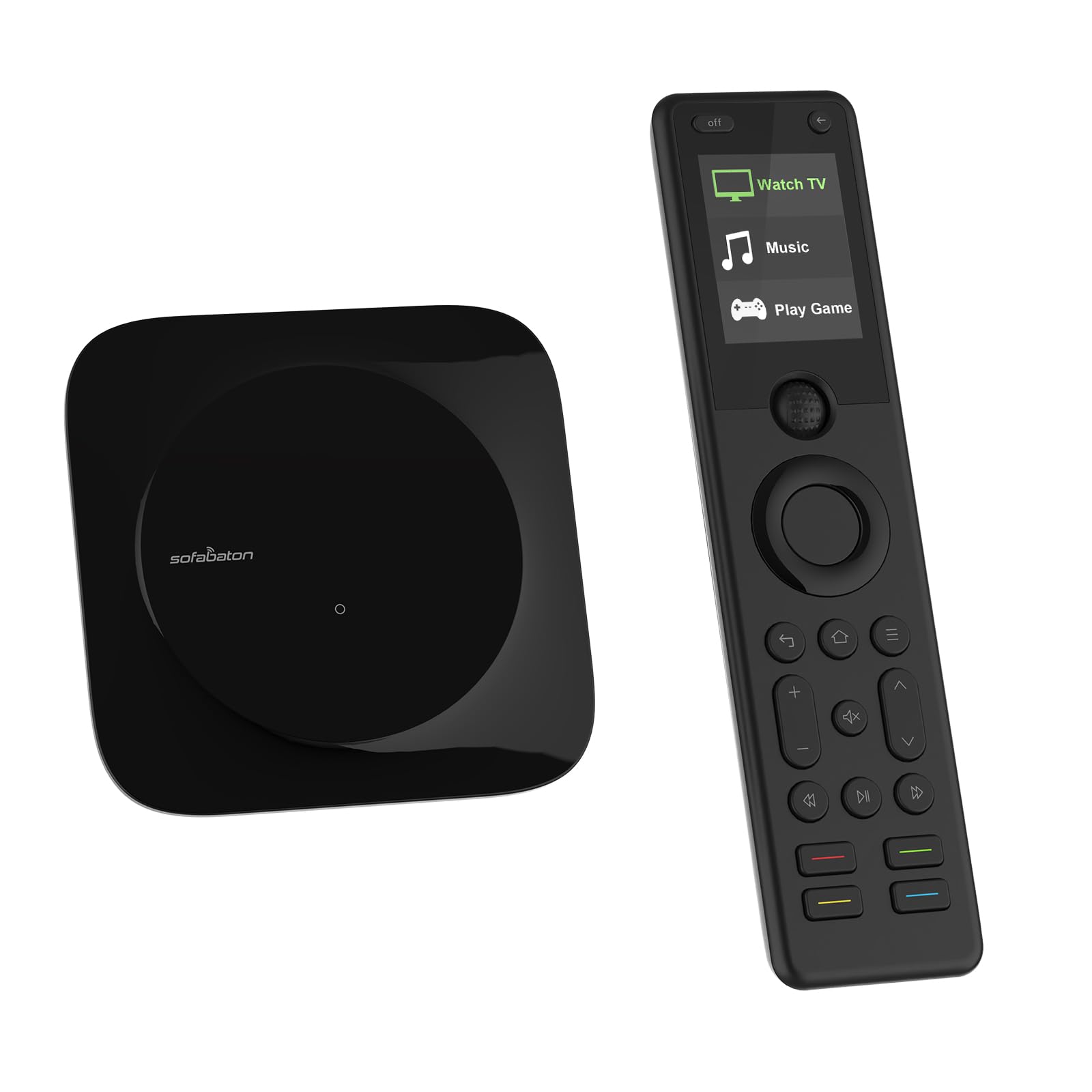
The hub-and-IR-blaster remote that controls the room without aiming and covers 6,000-plus brands.
For the serious home-theater builder, the hub is the payoff. The included SofaBaton hub and IR blasters deliver 360-degree control so you never point — you press, and the gear responds from anywhere in the room. It supports over 6,000 brands and 500,000 device models, which is the broadest code library in this lineup and comfortably beyond the 225,000-plus device pool of the Harmony 650. One-click activities turn on TV, cable box, and receiver together, driven by a scroll wheel and 12 buttons. Bluetooth lets it control three identical TVs in one room independently, sidestepping the cross-fire problem of infrared.
Smart-home folks get a flexible API for building automations, and the panel side earns its keep: backlit buttons, a raise-to-wake LCD, and a “find my remote” chirp for when it vanishes into the couch cushions. Owners note the learning curve is real — this is not plug-and-play, and some tweaking is expected. The reward is a highly customizable remote that handles a sprawling rack with a single handset. With 4.0+ stars across a healthy review base, expectations only snag when buyers expect zero setup.
The lingering niggle is durability. The Fire TV extender clamps, where present, have snapped under normal use in a small number of reports, and durability is the aspect buyers flag most as a concern. Treat the accessories carefully and that risk shrinks. For anyone who wants maximum control with minimum aiming, the reward outweighs the caution.
The big-league strengths
- 360-degree hub control with IR blasters — no aiming required.
- Supports 6,000-plus brands and 500,000 device models.
- Backlit buttons, raise-to-wake LCD, and find-my-remote.
- Bluetooth-independent control of multiple identical TVs.
What to hold gently
- The Fire TV extender clamps have snapped in a few reports.
- Not plug-and-play — expect a real setup and tweak session.
Worth it for: home-theater owners with a big rack who want one remote and zero aiming.
Too much for: a simple two-device living room where a budget button pad already wins.
7. Logitech Harmony 700 Rechargeable Remote with Color Screen

The rechargeable color-screen remote that replaces up to 6 components and supports 250,000-plus devices.
Charge it and skip the battery aisle: the Harmony 700 runs on a rechargeable lithium-ion pack (a battery you plug in to refill) that the maker rates for up to a week per charge. Owner reports stretch from a few days to a couple of weeks, depending on backlight and screen use. A brilliant color screen shows favorite-channel icons and commands, and one-touch activity buttons set every device to the right input. It replaces up to 6 components and supports over 250,000 devices from 5,000-plus brands, so your next TV is likely already covered.
Setup happens on your computer through the Harmony software, with device codes pulled automatically and a drag-and-drop interface. You can back the whole configuration up to the cloud, so upgrading to another Harmony later is painless. The trade is that it takes a proper 30-to-45-minute session to set up and map activities. That’s the price of the customization, and once it’s done, it’s done.
What’s worth knowing honestly: the setup software is older and can be fussy — some report needing a couple of attempts — and if you lose the cable, the non-dock charging means a plug-and-cable routine. Activities also tend to assume all devices are off, which can wrongly switch off an always-on DVR. There’s an aftermarket-battery path if the pack fades, though swapping cells can trigger a re-sync. For a dark home theater that wants a color screen and no battery swaps, it’s a solid modern classic.
The rechargeable draw: no AA replacements and a color screen with favorite-channel icons make it feel premium in a dark room.
The software age: the setup app is older and occasionally fussy — budget time and patience at install.
The right call if: you want a color-screen theater remote that charges instead of eating batteries.
Not if: you refuse to install computer software — plain IR button pads set up faster.
Know the Specs
Signal Type (IR, Bluetooth, Wi-Fi)
Infrared is the classic line-of-sight beam that hits almost any TV or soundbar but needs a clear aim. Bluetooth pairs directly with streaming boxes and SwitchBot-type devices. Wi-Fi lets a hub remote bridge your appliances into smart-home apps. The SwtichBot’s 2.4GHz-only Wi-Fi is note if your network is 5GHz-only — it simply won’t connect.
Device Limit and Range
This is a hard ceiling: count every TV, soundbar, streaming stick, and console you own. A 4-device remote is perfect for a simple living room, an 8-device remote handles a full rack, and hub models like the SofaBaton X1S and SwitchBot stretch to cover nearly every brand and model. Range tells you how far the beam reaches — hub-based models shoot from a fixed spot, so you never point.
Buttons, Screen, and Backlighting
More buttons means dedicated access but slower by-feel operation. A color or OLED screen looks lovely in a dark theater but drains batteries; backlit keys keep things readable without a live display. For older hands and kids, fewer large backlit buttons beat a glossy screen — the SwitchBot’s 19 buttons versus the One for All’s 48 is the trade to weigh.
Macros and Learning
A macro fires several commands on one press — say, power on, switch source, set volume. Learning lets you copy missing functions from your old remote when the code library falls short. Macros are the fiddliest part of any remote, so if you only need basic control, a remote with strong punch-through and learning is the safer bet.
Common Questions
Will a universal remote control my air conditioner and fans too?
What is the difference between infrared and Bluetooth remotes?
Do I need a hub to control devices from across the room?
How many devices should a good programmable remote support?
Can a universal remote replace my streaming box remote?
Do these remotes work with smart home apps like Apple Home?
How long does a programmable remote battery usually last?
What should I do if my device brand isn’t in the code library?
The Bottom Line
For most households, the best programmable remote is the SwitchBot Universal Remote Control with Hub Mini. It controls up to 25 devices across infrared and Bluetooth, runs a battery rated for up to 150 days, and includes the hub that open up Matter and Apple Home control. Owners back it too: 4.0+ stars across a deep stack of reviews. Want a color screen and one-touch activity buttons on a tighter budget? The Logitech Harmony 650 earns its place — just buy from a seller with a clean returns record on renewed stock. And for a dark home theater that wants a rechargeable color-screen remote, the Logitech Harmony 700 is the classic to reach for. Count your devices first, then pick the remote that covers them — and the pile of handsets finally disappears.
How we choose
We do not accept paid placement. Every pick is matched to a real buyer and a real use-case; we do not hands-on test units.
Sources
Specifications: manufacturer listings and product documentation. Review insights: verified customer reviews, as of October 2026. Pricing: not shown on this page (it changes often); check the current price via the retailer link.
As an Amazon Associate, Aappliancez earns from qualifying purchases. This does not affect which products we feature.