Disclosure: Some links in this post are affiliate links. As an Amazon Associate I earn from qualifying purchases, at no extra cost to you. Learn more
Specs are compiled from manufacturer listings and verified buyer reviews and can change over time — please confirm the key details on the product page before buying.
If your coffee table looks like a remote graveyard, the fix is not more remotes — it is one that actually learns your gear. The seven picks below cover the whole spread, from a Wi-Fi hub that puts your air conditioner on your phone to a four-button unit built for a parent with dementia. Read the two or three that match your living room, then stop shopping.
This guide is built by comparing the manufacturers’ published specifications and the patterns across verified customer reviews, so you get each pick’s real strengths and trade-offs instead of marketing spin.
Most buyers pay extra for macro and backlight features they never actually use. The smarter move is matching the remote to your setup — IR or Bluetooth, app or keypad, 4 devices or 15 — and this guide breaks down the best programmable remote control options by setup style and device count.
Top Picks


How To Choose The Best Programmable Remote Control
Start with the one question that eliminates half the field: does your gear listen to infrared or Bluetooth? An infrared remote (IR) fires an invisible light beam at the device, so it needs a clear path to the box. Bluetooth pairs wirelessly and works without pointing, but only with devices that speak Bluetooth. Pick the wrong signal type and the remote will fail on half your gear every night.
Count your devices before you count buttons
A remote rated for 4 devices will not run a TV, a soundbar, a cable box, a Blu-ray player, and a game console at the same time. Write down every box you actually switch between. If the number is five or more, look at the 8-device and 15-device picks below. Underbuying on device count is the most common regret in this category.
Decide if you want an app or a keypad
App-based remotes let you search a code library by brand and model, which is faster than tapping codes into a keypad. The trade-off is that setup lives on your phone, and some apps are more polished than others. Keypad-only remotes skip the phone entirely — good if you want a remote that works the same way in ten years.
Weigh the backlight seriously
If you watch movies with the lights down, unlit buttons are a nightly annoyance. Full backlighting means every key glows so you can find volume in the dark. Check whether the light comes on with a button press or with motion — motion is the more convenient of the two.
Side-by-Side Comparison
| Model | Best For | Max Devices | Range | Connection | Amazon |
|---|---|---|---|---|---|
| SwitchBot Hub Mini★ Best Overall | Phone control of AC and TV | 10 | 120 meters | Wi-Fi | Amazon |
| SofaBaton U2Most Versatile | Replacing a Harmony setup | 15 | 10 meters | Infrared | Amazon |
| Anderic RRU401 | Backlit buttons on a budget | 4 | 30 feet | Infrared | Amazon |
| One For All URC7880 | App setup with shortcut keys | 8 | 10 meters | Infrared | Amazon |
| SofaBaton U2 Backlit | IR plus Bluetooth control | 15 | 35 feet | Bluetooth, Infrared | Amazon |
| Flipper Big Button | Seniors and low vision | 3 | 30 feet | Infrared | Amazon |
| Logitech Harmony 700 | Home theater activities | 6 | 10 meters | Bluetooth, IR, RF | Amazon |
Detailed Reviews
1. SwitchBot Hub Mini Smart Remote – IR Blaster
Our pick — 4.0+★ from 55,500+ verified ratings; the strongest balance of quality and price.
The tiny white puck that turns your phone into a remote for the whole room.
What you get is not a handheld remote at all — it is a small Wi-Fi-connected blaster that sits on a shelf and fires infrared commands at your TV, air conditioner, and anything else with an IR receiver. That shifts control to your phone and to voice assistants, so the remote hunt ends. It reaches 120 meters, which is far more distance than any living room needs, and it talks to up to 10 devices.
Setup is where this one wins people over. SwitchBot’s “Smart learning” mode copies your existing remote in 5 seconds, and the guided app walks you through pairing step by step. It runs on USB power and is small enough to tuck anywhere — 2.56 inches square and just 0.79 inches tall, so it disappears beside a router or on a windowsill. One verified buyer put it plainly: “Worked like a charm. I was able to program my window unit air conditioners (that have an infrared remote control) with this device.” That window-unit trick is the real balance — you get phone and voice control over a basic AC that no other system here reaches.
Voice control runs through Alexa, Google Assistant, Siri, and IFTTT, so “turn off the bedroom AC” becomes a spoken command instead of a walk down the hall. The thing to know is that remote syncing does not always auto-recognize a brand — you may have to teach commands one button at a time within about 4 inches of the sensor. It is also a 2.4GHz-only device, so it will not connect to a 5G Wi-Fi network. Neither is a deal-breaker, but budget ten focused minutes for setup.
Where it earns its keep
- Learns your old remote in about 5 seconds with Smart learning mode
- Controls up to 10 devices from one app, including window AC units
- Works with Alexa, Google Assistant, Siri, and IFTTT
- Compact 2.56-inch square footprint that tucks out of sight
What to plan around
- No 5G Wi-Fi support — must run on a 2.4GHz network
- Some brands need manual button-by-button teaching
- Wall materials and metal between hub and device can interrupt the signal
Reach for this if: you want your phone and your voice to run the AC, the TV, and the fan — not another plastic clicker.
Think again if: you want a physical remote in your hand and hate setting things up through an app.
2. SofaBaton U2 Universal Remote with Customizable APP
Fifteen remotes fold into one, and a scroll wheel does the walking.
This is the handheld that replaces a whole coffee table. A scroll wheel rolls through the on-screen menu while an OLED display (a small screen that shows the current device and function) keeps you oriented in a dark room.
Macros are the feature that changes your routine. One press can fire a chain of commands across one or more devices, and you can set a delay — say, turn on the TV first, then the audio system after 5 seconds. The app adds devices in one click by brand and model, and you can reassign any button that is not behaving. It is a genuine Harmony stand-in at a fraction of that retired system’s cost.
Here is the honest catch: the app is basic. You get limited customization, there are no macros for Bluetooth devices, and there is no backup — if the remote dies, your programming goes with it. A few owners also found the clicks loud and the keys unlit, which is a real annoyance for late-night viewing. Treat the app as a workbench you visit to set things up, not a place you live. Its dimensions — 7.87 inches long by 1.97 inches wide — make it a substantial handset, so it is not the pocketable type.
Best for Harmony refugees: if you are mourning a discontinued Logitech, this is the closest replacement under budget tier, with a code library and macro power that most sub-premium remotes skip.
Grab it when: you have a stack of IR and Bluetooth boxes and want one handset to rule them.
Look elsewhere if: you need backlit keys or fear losing your setup data.
3. Anderic 4-in-1 IR Universal Remote with Macro and Learning
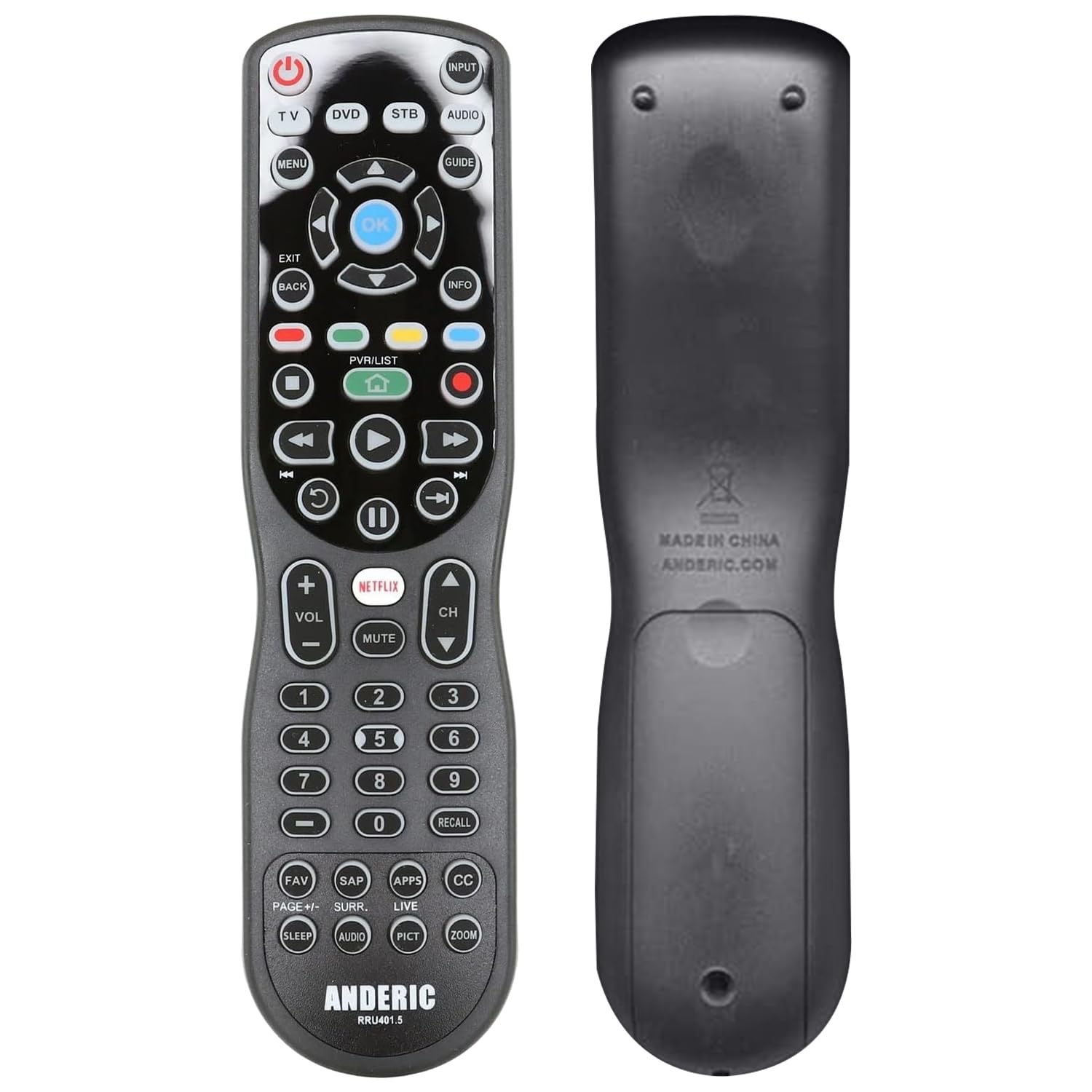
Every key glows, so you can find volume without turning on a lamp.
Full key backlighting is the reason to look here. All 30 buttons light up for dark-room navigation, and the large labeled keys include dedicated HOME, NETFLIX, and APPS shortcuts. It controls 4 devices — TV, DVD, cable, satellite, audio — and reaches 30 feet, plenty for a standard living room.
Programming is old-school but deep. You can learn commands from your original remote button by button, so the remote can hold a mix of gear even if a code is not in the database. Punch-through lets you route volume to one device and keep Roku keys live no matter which device you select — a small thing that removes a constant device-switching dance. A single POWER key can shut off or start several devices at once.
The instructions are the weak spot. The translation is rough and the order is confusing, so expect to read them twice. Some owners found the IR beam weak and wanted a near-direct line of sight, and one family could not get the center navigation buttons to work with a specific Roku TV. None of that is a reason to walk away — it is a reason to buy only if your setup is straightforward and your patience for a paper manual is decent.
Why it holds a spot
- Full backlighting across all 30 keys
- Learning mode copies your existing remotes
- Macro support fires several commands at once
- Punch-through keeps volume and Roku keys live
Small print worth knowing
- 4-device cap — tight for a big theater stack
- Instructions are poorly translated and misordered
- IR range can require a clearer line of sight
Pick this if: your priority is a fully lit keypad and you are fine learning from the manual.
Skip if: you have more than four devices to lasso or you want an app-driven setup.
4. One For All URC7880 Universal Smart Remote Control

Eight devices, three streaming shortcuts, and a free app that does the heavy lifting.
This one is for anyone who wants app setup without a premium sticker. A free smartphone app lets you configure the remote and, handily, shows which device you are currently operating — a small clarity boost when you have eight boxes in the mix. It covers up to 8 devices across more than 7000 brands, which is broad coverage for a mid-range handset.
Three shortcut keys jump straight to Amazon Prime, YouTube, Netflix, or any app you assign, and there is a learning feature for copying commands right off your original remote. Range runs about 10 meters. Owners who came from a Logitech Harmony often prefer this one — faster response, longer reach, and a simpler device-selection flow.
Know the two limits before buying. There is no backlit keypad, so dark-room use means feeling your way, and it is IR-only. That second point matters if you run an Apple TV: the URC7880 cannot wake an Apple TV from sleep on its own, because that box listens over Bluetooth. The app is also described as a bit clunky during tweaks, and the maker has stopped issuing code updates for this model, so confirm your devices are supported up front. Read those as “check first,” not “don’t buy” — for a traditional TV-plus-soundbar setup it does the job reliably.
The value read: eight-device coverage and app programming at the entry end of the mid-range is a genuinely fair deal, provided your gear is IR-friendly and your room is not pitch dark.
Buy it for: a TV, soundbar, cable box, and Blu-ray player you want consolidated without app-store drama.
Hold off if: you rely on Apple TV wake-from-sleep or need glowing keys at night.
5. SofaBaton U2 Universal Remote with Backlight

The U2 grew up — backlit keys, a bigger code library, and room-filling range.
This is the backlit version of the SofaBaton above, and the upgrade is worth noting. Buttons now light up so you can operate it in a dark theater or a bright afternoon, a feature the earlier version lacked. It also pushes infrared range to 35 feet with multiple transmitters — the maker says that is double the reach of its predecessor — and pulls from a code library covering over 6,000 brands and 500,000+ devices.
Functionality is what wins people over here: 15 devices, three setup methods (IR add-by-model, Bluetooth pairing, and learning from your original remote), plus macro buttons that launch a whole routine with one press. The scroll wheel and OLED display make device-switching quick, and the screen auto-lights when you pick it up. Battery cover improvements make for faster swaps when the two AA batteries run down.
The recurring gripe is button responsiveness and app polish. Some owners found certain buttons sluggish or hard to map, and the app can be quirky during setup — one report noted “black dots in macros unlabeled.” Your programming has no backup either, so a hardware failure means starting over. This is not a turnkey remote; it rewards the tinkerer who will spend an evening making it their own. Still, at this price tier it does IR (infrared, the line-of-sight signal most remotes use) plus Bluetooth plus macros (one button that fires a chain of commands) in one handset.
For the patient: if you enjoy dialing in macros and want a backlit remote that handles Bluetooth streaming boxes alongside IR gear, this earns its spot.
Choose it when: you want backlit keys and Bluetooth in one mid-range handheld.
Move on if: you expect perfect out-of-the-box button response or want backup storage.
6. Flipper Big Button TV Remote for Seniors
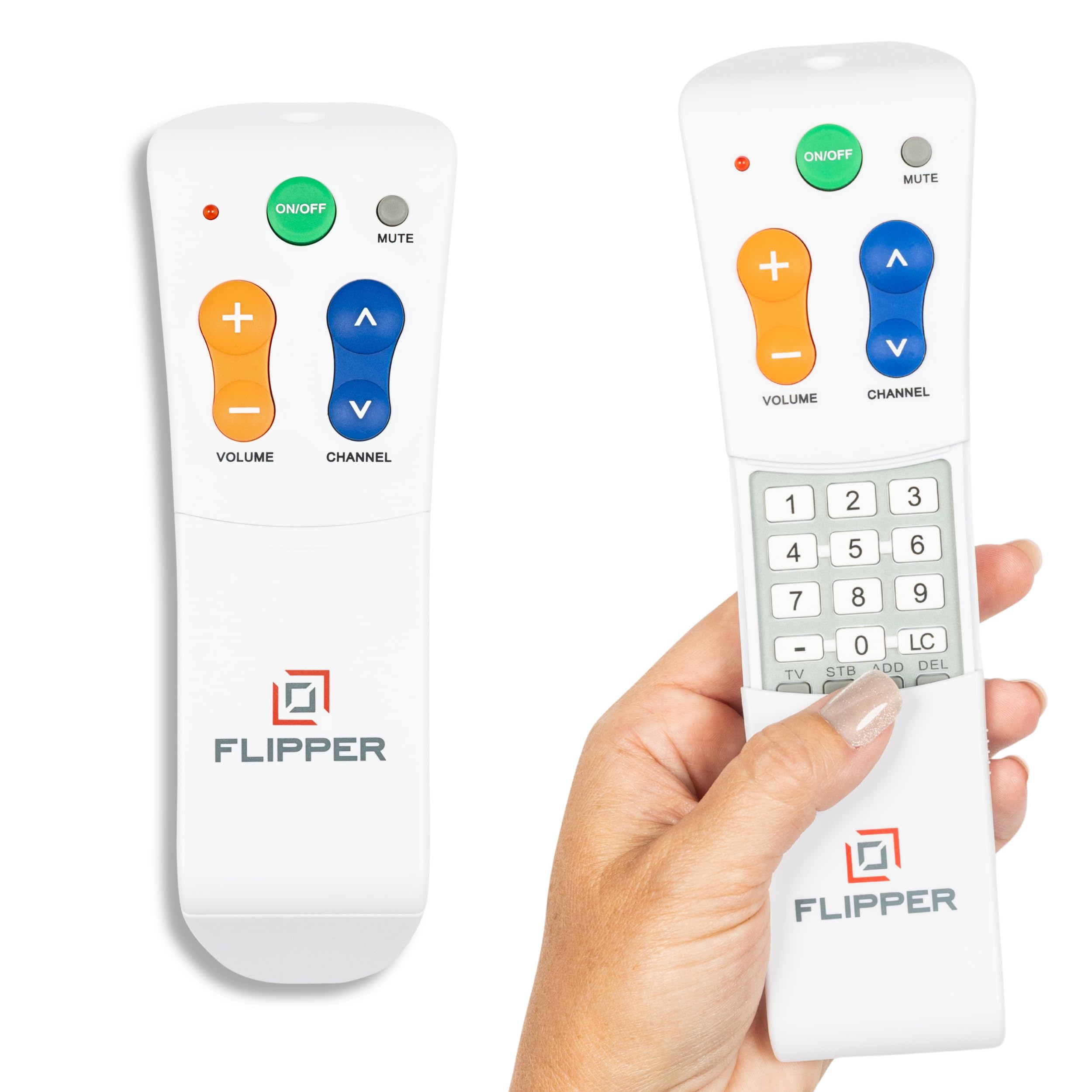
Four big buttons, color-coded by job, so a parent with dementia just presses.
This remote is built around a different problem than the others: not many devices, but too many buttons for the person holding it. The face shows only four keys for daily use — On/Off in green, Volume Up/Down in orange, Channel Up/Down in blue, and Mute in gray. Each is oversized and tactile, made to be seen and felt by someone with low vision or arthritic hands. Hidden buttons slide out for caregiver customization.
That simplicity matters most. One family reported that a mother with dementia, previously unable to manage any remote task alone, could change DIRECTV channels and adjust TV volume herself using the four color-coded buttons. Other families set specific split-device layouts — TV for power and volume, another box for channels — and got it working through the learning mode. You can pre-program up to 25 favorite channels so a loved one cycles only through the shows they watch rather than hunting through hundreds.
The catch is what it is not for. Flipper does not navigate streaming apps — no Netflix or Roku menus — because it has no navigation keys. It also handles only basic functions on a smart TV, and programming via learning mode can take several tries, especially under bright facility lighting. If your household streams everything, this is the wrong pick. If the main TV set is fed by cable, satellite, or an antenna, it is one of the kinder designs available, and the confidence is the whole point.
What makes it kind
- Four oversized color-coded buttons for everyday use
- Hides advanced keys under a sliding cover
- Up to 25 favorite channels pre-programmed
- Works across major TV brands and cable providers
Where it stops
- Cannot navigate streaming apps or Roku menus
- Learning mode can need repeated attempts
- Only basic functions on smart TVs
Reach for this if: you are caring for someone who is overwhelmed by a 50-button remote and mostly watches cable.
Look elsewhere if: the household leans on streaming apps — this one cannot follow you there.
7. Logitech Harmony 700 Rechargeable Remote

The classic one-touch theater remote — press “Watch TV” and everything obeys.
One-touch activities are the whole idea here. A single activity button turns on the right devices, sets the right inputs, and drops you straight into TV, DVD, or music. That is a step above the button-by-button approach of the SofaBaton and Anderic remotes. The color screen shows favorite-channel icons and command labels, and it controls up to 6 components from a library that spans 250,000 devices.
Its built-in rechargeable lithium-ion battery holds a charge for roughly a week between plug-ins, so you stop hunting for AA cells. Setup runs through a web wizard where you match your gear by model number, and the built-in Help button walks you through fixing anything that did not switch correctly, which saves a support call. A motion sensor wakes the backlight when you pick it up.
The honest limits are the ones you would expect from a long-in-the-tooth classic: no charging dock, just a cable, and a shortish battery that some owners solve with rechargeable AA cells. Its activity logic assumes every device starts off, which can flip an always-on DVR. Programming software has been known to hang on submit and require retries. Those are the trade-offs for the smoothest whole-room automation in this lineup.
The home-theater verdict: if you want one button to run a projector or TV plus receiver plus disc player, this delivers the cleanest version of that experience in the lineup — at premium-tier cost.
It suits you if: you want activity-based automation and hate swapping batteries.
Pass if: you refuse a weekly charge or want something that programs without a computer.
Know the Specs
Infrared (IR) vs Bluetooth vs Wi-Fi
An infrared remote fires an invisible beam, so it must have a clear path to the device — the reason a coffee table or a cabinet door blocks it. Bluetooth pairs wirelessly and needs no pointing, but only works with devices that support it. Wi-Fi, as in the SwitchBot hub, connects through your home network so you can control things from another room or by voice. Match the connection type to your gear before anything else.
Maximum supported devices
This number is the ceiling on how many separate boxes one remote can juggle. A 4-device remote suits a TV, soundbar, and cable box with one slot to spare. Homes with a receiver, game console, and streaming player need more — the 8-device, 15-device, and 6-device picks here cover those setups. Count what you actually switch between, not everything you own.
Learning mode and macros
Learning mode lets the remote copy commands straight from your original remote, button by button, even for a device that is not in the code database. A macro goes further — one keypress fires a sequence, like powering the TV then the soundbar with a set delay between them. These two features are what separate a basic universal remote from a programmable one.
Range and backlighting
Range tells you how far the signal reaches; some listed remotes run 30 to 35 feet, while the Wi-Fi hub lists 120 meters because it broadcasts over your network. Backlighting decides whether you can find the volume key in the dark. Full key lighting beats a single lit screen, and motion- or pickup-activated light is more convenient than one that needs a button press.
Common Questions
Will a universal remote work with my Roku TV or Roku stick?
Do programmable remotes work with Apple TV?
How many devices can one programmable remote control?
What is a macro button and why does it matter?
Can a universal remote control an air conditioner?
Does a backlit remote use more battery?
Why won’t my remote connect to Wi-Fi?
Can I use a big-button remote with a cable box and a smart TV together?
Do I need to point an IR remote directly at the device?
Is a rechargeable remote better than one that takes AA batteries?
The Bottom Line
For most people, the programmable remote control winner is the SwitchBot Hub Mini, because it turns your phone and your voice into the remote for the whole room — AC included — without you hunting for a handset. If you want a physical remote that swallows a whole stack of devices, grab the SofaBaton U2 for its 15-device reach and macros. And if the person using the TV is overwhelmed by buttons or living with dementia, the Flipper Big Button is the one to reach for.
How we choose
We do not accept paid placement. Every pick is matched to a real buyer and a real use-case; we do not hands-on test units.
Sources
Specifications: manufacturer listings and product documentation. Review insights: verified customer reviews, as of October 2026. Pricing: not shown on this page (it changes often); check the current price via the retailer link.
As an Amazon Associate, Aappliancez earns from qualifying purchases. This does not affect which products we feature.