Disclosure: Some links in this post are affiliate links. As an Amazon Associate I earn from qualifying purchases, at no extra cost to you. Learn more
Specs are compiled from manufacturer listings and verified buyer reviews and can change over time — please confirm the key details on the product page before buying.
If your Wi-Fi keeps dropping mid-print, a corded printer is the fix — not a downgrade. A wired model plugs straight into your computer or router with a USB or Ethernet cable, so the job goes through every time and nobody has to reconnect anything. This guide covers seven printers that skip wireless entirely, from compact home-office lasers to heavy-duty dot matrix machines built for carbon forms and multi-part invoices.
This guide is built by comparing the manufacturers’ published specifications and the patterns across verified customer reviews, so you get each pick’s real strengths and trade-offs instead of marketing spin.
The picks below are sorted by what they actually do best, not by brand loyalty.
Top Picks


How To Choose The Best Printers That Are Not Wireless
Buying a corded printer is simpler than buying a wireless one, but three or four numbers separate a machine that lasts from one that frustrates you by week two. Here is what to check before you commit.
USB vs Ethernet changes how you share it
A USB printer plugs into one computer only — that is the HP LaserJet M209d, which ships with a USB cable and no network port. An Ethernet printer, like the HP LaserJet Pro 400 M401n or the HP P1505N, connects to your router or switch so several machines can print to it. Think honestly about whether anyone else in the room needs to print.
Speed and tray size tell you who it is built for
A 19-page-per-minute engine is fine for a home desk, while a 33-page-per-minute machine like the HP LaserJet Pro 400 M401n keeps a small office moving. The input tray matters just as much — a 250-sheet tray means fewer refills than a 150-sheet one, and a flip-down envelope slot saves you swapping paper for a single mailing.
Duplex is a money decision, not a luxury
Automatic two-sided printing uses half the paper and leaves your pages stacked and ready. Some models here do it automatically, others ask you to flip the sheet by hand, and a few skip it. Check which one you are buying, because the label on the listing is not always clear about it.
Side-by-Side Comparison
| Model | Best For | Print Speed | Input Tray | Duplex | Amazon |
|---|---|---|---|---|---|
| HP LaserJet Pro 400 M401n (Renewed)★ Best Overall | High-volume office printing | 33 ppm | 250 sheets | Manual | Amazon |
| HP P1505N Laserjet (Renewed)Best for Envelopes | Shared workgroup with envelopes | 24 ppm | 250 + 10 sheets | Manual | Amazon |
| HP LaserJet Pro 4001dn (Renewed) | Small teams needing speed | 42 pages_per_minute | — | auto | Amazon |
| HP LaserJet M209d | Home office on one computer | 30 ppm | 150 sheets | Automatic | Amazon |
| Canon imageCLASS MF3010 | Print, copy, and scan in one box | 19 pages_per_minute | 150 sheets | Automatic | Amazon |
| Brother MFC7240 | Fax plus copy and scan | 21 pages_per_minute | 250 sheets | No | Amazon |
| Epson LQ-590II | Multi-part carbon forms | 366 pages_per_minute | — | Automatic, Manual | Amazon |
Detailed Reviews
1. HP LaserJet Pro 400 M401n Printer
Our pick — over 4★ from 100+ verified ratings; the strongest balance of quality and price.
The refurbed office workhorse that outruns the rest of this list by a wide margin.
If your day is measured in stacks of paper rather than single pages, this is the one to beat.
What wins people over is reliability in daily use. Owners describe it as an exact replacement for a machine they ran for years, and one long-standing user ran the same model for about two decades before ordering this refurbished unit as a second printer. One Enrolled Agent with 165 clients ran two of these as workhorses for 7 years, printing thousands of pages. There is also a dedicated envelope tray you pull down without reconfiguring the paper tray — a detail the Brother models here do not offer.
Renewed means refurbished: the seller checks rollers, separation pads, the transfer roller, and the fuser, and replaces what needs replacing. You get a toner cartridge, a power cable, and a 90-day warranty. The honest catch is the paper pickup mechanism — durability gets mixed signals from owners, with some reporting pickup failure around the 7-month mark, so treat the tray mechanism gently and keep the warranty paperwork. It also has no Wi-Fi at all, which is the whole point, but plan on a powerline Ethernet adapter if the router is not nearby. Manual duplex means you flip the stack yourself for two-sided jobs.
What earns its keep
- 33 ppm and a 250-sheet tray handle real office volume without babysitting
- Dedicated pull-down envelope tray, no paper-tray reconfiguration needed
- Refurbisher inspects rollers, pads, transfer roller, and fuser before shipping
Where it asks for care
- Paper pickup is the weak point — some units fail around 7 months
- Manual duplex only, and 90 days of warranty coverage
- Ethernet and USB only, so no wireless printing of any kind
Grab it for: a busy desk or small office where speed and fewer refills matter more than a fresh warranty.
Think twice if: you need automatic two-sided printing or have no wired network point near the printer.
2. HP P1505N Laserjet Printer (Renewed)
A compact desk laser that keeps a second slot free for envelopes and labels.
This one is built for a shared workgroup — plug it into Ethernet and several computers can print to it, or run USB 2.0 straight into a single machine. The 24-page-per-minute engine turns out the first page in about 6.5 seconds, so short jobs feel instant. Resolution is 1200 dpi (dots per inch, the measure of how fine the printed detail is) for both printing and copying, which keeps small text crisp on letter, legal, executive, and A4 paper.
Paper handling is where it separates from the pack. You get a 250-sheet main tray plus a 10-sheet priority slot for envelopes, labels, and specialty stock — so a single mailing does not mean emptying the main tray. It is rated for up to 8,000 pages a month, and it takes the HP 36A (CB436A) toner cartridge, which yields about 2,000 pages. At roughly 13 lbs it sits easily on a desk or shelf without commandeering the whole surface.
The trade-off is pace. Its 24-page-per-minute speed falls short of the HP LaserJet Pro 400’s 33, so if volume is your priority, that machine is the faster buy. This one rewards the buyer who prints steadily rather than in bursts and wants a tidy footprint instead of a floor-standing unit.
The real draw
- Ethernet plus USB 2.0 lets a small group share one printer
- 10-sheet priority slot handles envelopes and labels without swapping paper
- 1200 dpi output and a 2,000-page cartridge keep costs predictable
Set your expectations
- 24 ppm trails the faster HP LaserJet Pro 400 M401n above
- Manual duplex, so two-sided work is a hands-on job
- Only legal-size paper at the top end, nothing larger
Reach for this if: you print regularly on envelopes and specialty paper and want a small machine that shares cleanly.
Look elsewhere if: raw speed or automatic double-sided output tops your list.
3. HP LaserJet Pro 4001dn Black & White Printer (Renewed)

Forty-two pages a minute, automatic two-sided output, and it is built for teams of ten.
Speed leads everything here. Single-sided output runs up to 42 pages per minute and the first page lands in 6.1 seconds — the quickest single-sided engine on this list. Automatic two-sided printing comes standard, so double-sided reports stack themselves without you touching the paper. A small team of up to 10 users can share it, and HP Wolf Pro Security (a set of pre-configured protection settings already switched on) is active from the moment you power it up. Auto paper jam recovery clears the machine without a service call.
You can also save on toner over time. It accepts three cartridge capacities, so you can buy small and frequent or large and rare depending on your volume. Instant Ink for lasers is an option here: HP claims Instant Ink for lasers can save up to 50% on toner, with cartridges shipped only when you need them. Treat that as a manufacturer claim rather than a guarantee, and confirm if you want a subscription at all before signing up.
Two honest caveats. The refurbished units vary in what arrives — some owners found the provided toner cartridge empty, meaning a fresh one landed on the bill right away, and one buyer hit a network card that would not connect and a printer that refused to wake from sleep. A separate buyer had no problems at all and prints remotely with no smudges or streaks. If you rely on Ethernet specifically, test the network connection in the first week and use the return window if it misbehaves.
Wire it and forget it: Ethernet plus USB on a renewed chassis with the highest single-sided speed in this group.
Check the cartridge first: renewal means the included toner may arrive spent, so budget for a replacement cartridge if the test page comes out faint.
Built for: a shared office touchpoint where fast double-sided output matters every day.
Not ideal when: you need wireless at all, or you want certainty that the bundled cartridge is full on arrival.
4. HP LaserJet M209d Laser Printer

The plug-and-print home laser that arrives with the cable you actually need.
This is the model to pick when one computer does the printing and you want the box to include everything required. There is a USB cable in the packaging, so nothing extra to order, and the compact chassis slides neatly onto a home desk. Output runs 30 pages per minute with automatic two-sided printing, and smart-guided buttons walk you through the setup. The 150-sheet input tray tops up with a standard ream.
Owners lean on the same themes again and again — quality, easy setup, and value, with the printer drawing far more positive notes than any other machine here. What they describe is a quick, quiet machine that handles both single and double-sided work without drama. Buyers report a Unix and Mac setup that connected over USB in under a minute, printing at 600×600 DPI with output described as smudge and waterproof. Laser toner also means no inkjet cartridges drying out on the shelf.
The well-documented wrinkle is Mac support. Driver compatibility breaks on macOS versions later than 11.x according to more than one frustrated buyer, with one user burning 2.5 hours across four support agents before returning it for a different brand. Windows 11 recognized it without issue. Also note this machine only accepts HP cartridges with the correct chip — third-party or refilled cartridges can be blocked by firmware updates. And the 150-sheet tray is the smallest in this group, so heavy print runs will have you reloading more often.
Why it sells
- USB cable included, so setup needs nothing else ordered
- 30 ppm with automatic duplex and guided on-printer buttons
- Compact footprint, praised widely for print quality and easy setup
Know before you buy
- Mac driver support stops at macOS 11.x for some owners
- HP-chip-only cartridges, so refills are not interchangeable
- 150-sheet tray is the smallest here, and no Ethernet port
Pick it when: you run Windows and want a single-computer laser with the cable already in the box.
Give it a pass when: your desk machine is a Mac, or a whole team needs to share one printer.
5. Canon imageCLASS MF3010 Multifunction Laser Printer
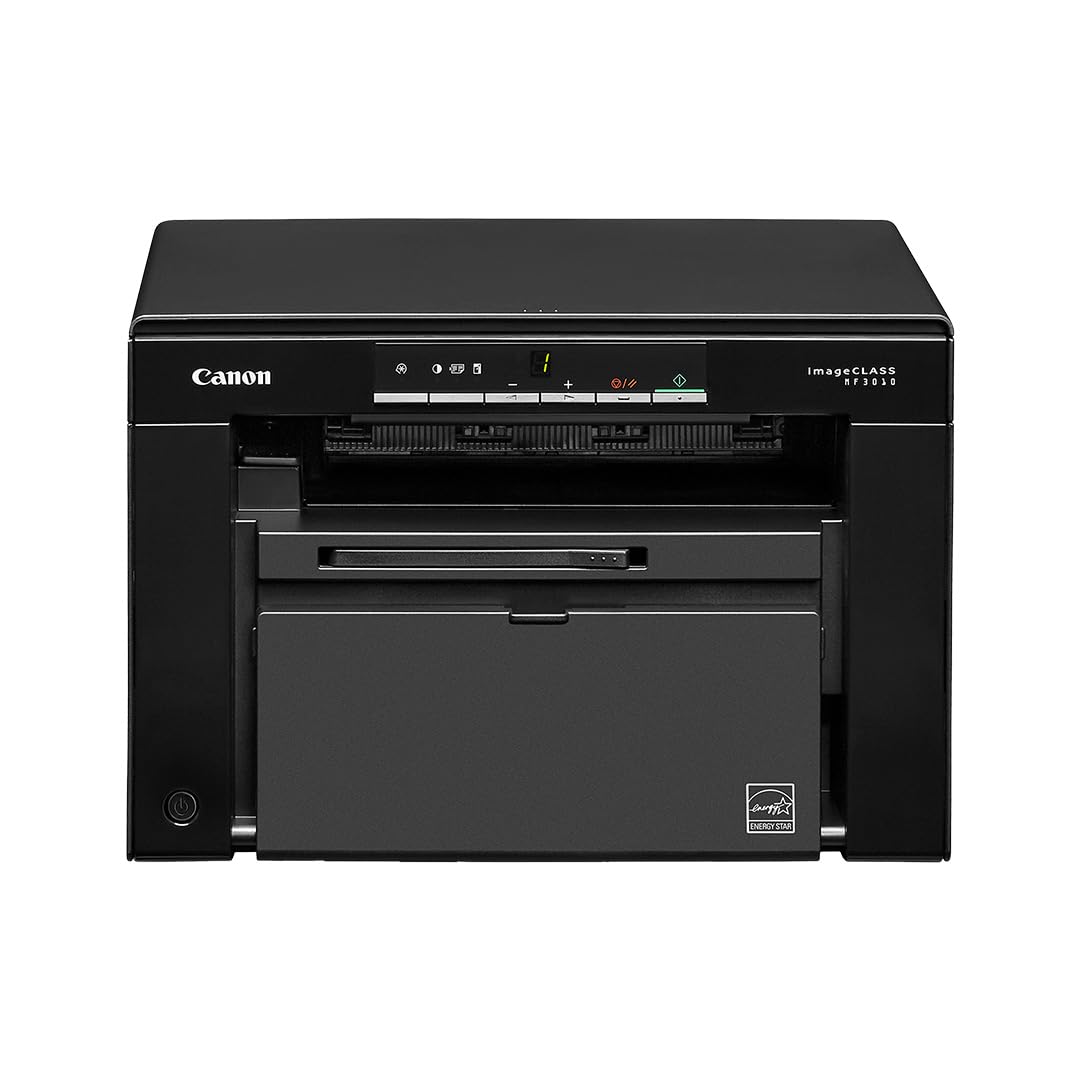
The one machine here that scans and copies as readily as it prints.
You get print, copy, and scan all in this single box, which is what separates it from the pure printers above. Black-and-white pages come out at up to 19 pages per minute, and the first page lands in about 8 seconds. Scanning reaches up to 9600 dpi interpolated (a software-assisted maximum resolution that smooths edges beyond the hardware’s native limit), and you can capture both black-and-white PDFs and color scans. A 150-sheet front-loading cassette slides in from the front, and there is automatic two-sided printing for longer documents.
The scanning abilities are the reason buyers hang onto it — one owner calls it one of the only laser scanners on the market and praises the toner lifespan alongside it. A parrot rescue bought three of these units for its sanctuary work, relying on them as dependable daily machines. The single cartridge system keeps supply replenishment straightforward with one part to reorder.
Know the friction points before ordering. Installing it can be awkward, and the bundled driver disk is useless — track down the current driver online first, then plug the printer in. Value draws mixed feelings from owners. One buyer hit paper jams constantly, with the jam indicator tripping before any page printed. Scan quality, print quality, and the copy function all earn praise when the machine is set up correctly, so treat a smooth driver install as the difference between a great little office machine and a bad first afternoon.
Three jobs, one footprint: printing, copying, and scanning at up to 9600 dpi interpolated scanning resolution, with a 150-sheet front-loading cassette and automatic duplex.
First-hour friction: skip the included disk and download the latest driver from Canon before connecting — and treat a jam-free first week as your test.
Best suited to: a small office that needs to scan and copy documents as often as it prints them.
Avoid it if: you want fast output — at 19 ppm it is the slowest laser in this lineup.
6. Brother MFC7240 Monochrome Printer
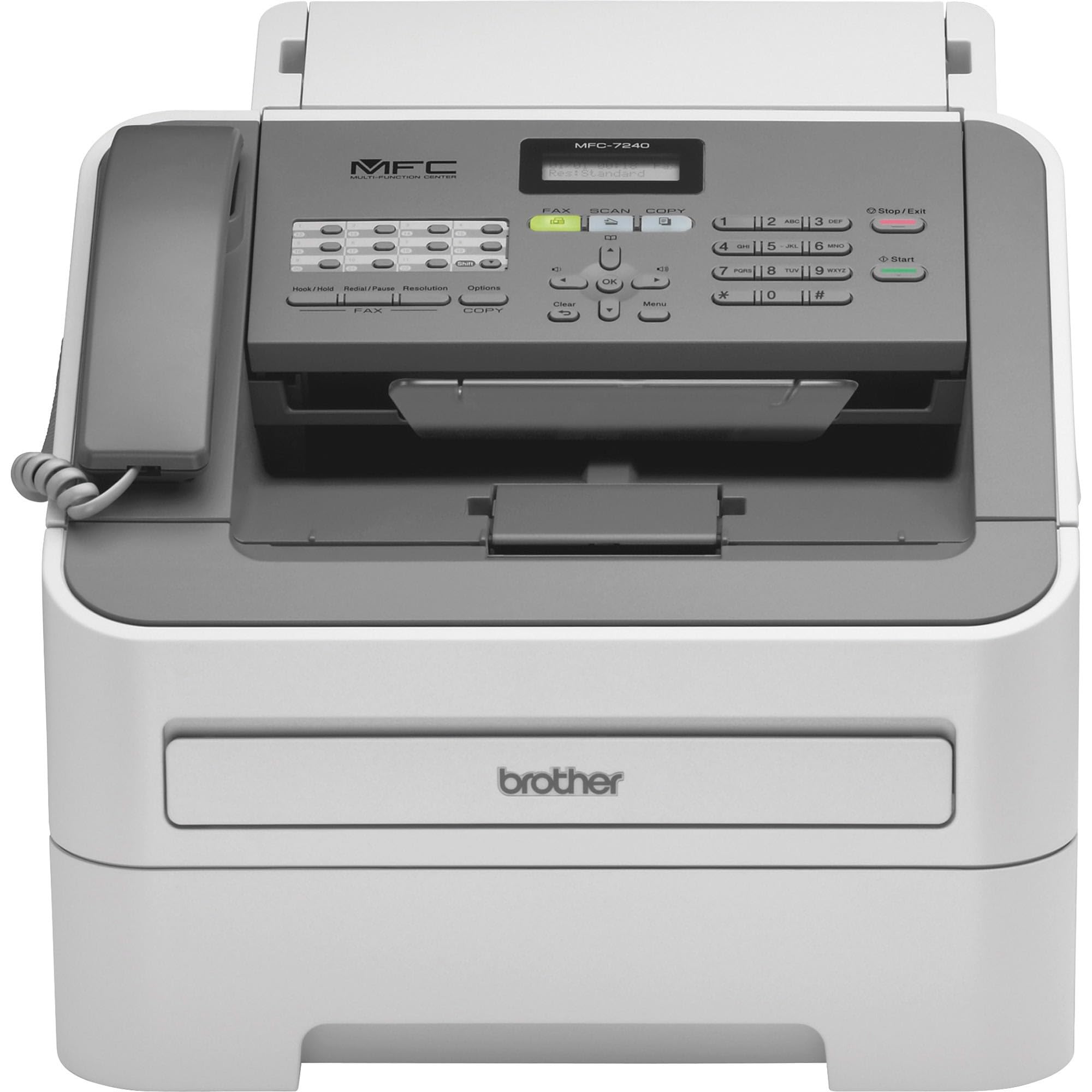
Fax, copy, scan, and print — the office machine for anyone still sending documents down a phone line.
If faxing is a genuine business requirement, this is your pick. It prints and copies at up to 21 pages per minute and covers print, copy, scan, and fax in one chassis. The adjustable 250-sheet paper tray pairs with a manual feed slot for single sheets or special stock. A 20-page automatic document feeder takes the tedium out of scanning a multi-page contract. Print resolution reaches up to 2400 x 600 dpi, and monochrome scanning stretches to 19200 x 19200 dpi interpolated.
Owners describe a durable workhorse that prints reliably even without updates or reconfiguration. Fax users get clear scan-to-computer quality alongside an easy manual setup. Setup itself is manageable — the substantial printed manual covers it, and younger buyers tend to find the install straightforward. The duplex function is absent entirely, so two-sided jobs are a manual process.
Its 451 ratings make it one of the more-reviewed machines here, and the feedback is mixed rather than glowing. The sheet-feed scanner tends to pull pages in crooked, which matters if scanning will be a frequent job rather than an occasional one. The phone line connector on some units is loose enough that a slight tug can interrupt a fax mid-send — securing the cable with tape solves it, but it is worth knowing. That first toner cartridge also gives out around 700 pages, well short of what a laser cartridge typically covers, so a replacement comes early.
Fax without a second machine: print, copy, scan, and fax together, with a 20-page document feeder and 250-sheet adjustable tray.
Where it shows its age: the sheet feeder pulls pages crooked and there is no duplex printing, so it suits occasional scanning rather than heavy document work.
Your machine if: a fax line is still part of your daily business and you want printing and copying beside it.
Look past it if: you scan in bulk, want double-sided printing, or your volume sits above what a 700-page starter cartridge can cover.
7. Epson LQ-590II Dot Matrix Printer – Monochrome

The only machine here that prints through carbon paper and still runs old accounting software.
Dot matrix printing occupies its own category, and this Epson is the reason the category exists. A 24-pin print head strikes the paper directly, which means multi-part carbon forms come out clear on every layer — a job no laser in this lineup can do. It works with DOS-based programs that modern printers abandoned years ago, and the tractor feed pulls continuous paper through in a straight, aligned line. It is a print-only machine, with no scan, copy, or fax functions.
Running costs sit far below the laser machines. Owners mention replacement ribbons cost a fraction of laser toner, plus a low-noise setting and a letter-quality font mode for formal documents. A parallel-to-USB adapter brings it onto a modern computer, and the bundled driver installs cleanly on Windows 10. A two-year owner check-in found the original ribbon fading and a replacement ordered, with no durability issues to report.
Two things will tell you quickly whether this machine is right. It is loud — genuinely loud by laser standards — so an office with shared space should plan for the noise. It also leans on a parallel connection, which means older hardware or an adapter cable, plus there is a weight and footprint that a desk-mounted laser will never match. Ribbon changes are fiddly with a thin manual to guide you. Buy it for carbon forms, invoices, and legacy software; skip it for everyday document printing.
What it owns
- 24-pin print head handles multi-part carbon forms on every layer
- Replacement ribbons cost a fraction of laser toner
- Tractor feed plus DOS support keeps legacy workflows running
Honest limits
- Loud in use, so a shared office needs to plan for it
- Parallel connection, which needs old hardware or an adapter
- Ribbon changes are tricky and the manual is thin
The right tool for: accountants, invoice printers, and anyone still running carbon-copy forms or DOS software.
Wrong tool if: you want quiet, compact, everyday document printing — a laser is a better fit.
Know the Specs
Pages per minute and first-page-out time
Pages per minute tells you how fast a printer turns out consecutive sheets once it is warmed up. First-page-out time tells you how long the machine takes before that very first sheet appears. A high page-per-minute figure matters for long print runs, while a short first-page time matters for one-off jobs. The Epson LQ-590II lists 366 pages per minute as a dot matrix figure — a different measurement from a laser’s rated speed, so do not read it as a straight comparison to a laser printer.
Toner yield, cartridges, and running cost
Laser printers use toner rather than liquid ink, and a toner cartridge carries a yield rating in pages. The HP P1505N’s HP 36A cartridge yields about 2,000 pages — compare that number against how much you actually print to estimate how often you will reorder. A higher-yield cartridge costs more upfront but stretches the interval between replacements. Watch for chip requirements too: the HP LaserJet M209d only accepts HP cartridges with the correct chip, so refills are not always interchangeable.
Duplex printing explained
Duplex means printing on both sides of a sheet. Automatic duplex flips the paper inside the machine; manual duplex asks you to reinsert the stack yourself. Automatic saves time and paper on long documents, while manual duplex is a hands-on step that suits occasional double-sided jobs. Several machines on this list do it automatically, others list it as manual, and the Brother MFC7240 skips it entirely. Check the exact wording on the model you plan to buy.
Input trays and specialty slots
Input tray capacity is the number of sheets the printer holds before you reload. A 250-sheet tray covers roughly a ream of paper, while a 150-sheet tray fills sooner. A separate priority slot, like the one on the HP P1505N, holds envelopes and specialty paper without emptying the main tray. If you mail items regularly, that small second slot saves real time. For offices, tray capacity is a fair measure of how often you will walk over and top up.
Common Questions
Do I need a wireless printer if I want to print from a phone?
Can I share a wired printer across several computers?
How long does a laser toner cartridge last?
Can I use third-party or refilled toner cartridges?
How do I connect a printer that only has a parallel port?
Is a renewed or refurbished printer a safe buy?
What is the difference between a laser and a dot matrix printer?
Can a wired-only printer scan and copy as well as print?
How much desk space do these printers need?
Are wired printers reliable over time?
The Bottom Line
For most buyers, the printers that are not wireless winner is the HP LaserJet Pro 400 M401n because it prints 33 pages per minute from a 250-sheet tray with a dedicated envelope slot, and its refurbishing process covers the rollers, pads, transfer roller, and fuser. If you want the fastest output and automatic two-sided printing for a shared team, grab the HP LaserJet Pro 4001dn — just verify the bundled cartridge is not spent. And for printing carbon forms or running old accounting software, the Epson LQ-590II is the one to reach for. One nudge before you go: the HP LaserJet M209d has the most reviews here — 4.2 stars across 900-plus ratings — so if you run Windows from a single desk and want the cable included, it is the safest mainstream pick.
How we choose
We do not accept paid placement. Every pick is matched to a real buyer and a real use-case; we do not hands-on test units.
Sources
Specifications: manufacturer listings and product documentation. Review insights: verified customer reviews, as of October 2026. Pricing: not shown on this page (it changes often); check the current price via the retailer link.
As an Amazon Associate, Aappliancez earns from qualifying purchases. This does not affect which products we feature.