Disclosure: Some links in this post are affiliate links. As an Amazon Associate I earn from qualifying purchases, at no extra cost to you. Learn more
Specs are compiled from manufacturer listings and verified buyer reviews and can change over time — please confirm the key details on the product page before buying.
Wedding DIY printing lives or dies on three things: crisp invitations, thick cardstock that does not jam, and an ink bill that does not quietly double your stationery budget. The practical answer is a tank-fed or cartridge inkjet with a flat paper path and a photo-grade color system — a laser prints fast and sharp but cannot touch the textured cardstock or soft pastel color that wedding suites demand. Below are nine printers that real DIY couples and home crafters actually run for save-the-dates, menus, place cards and thank-you notes, ranked by what they genuinely do well.
This guide is built by comparing the manufacturers’ published specifications and the patterns across verified customer reviews, so you get each pick’s real strengths and trade-offs instead of marketing spin.
Thick cardstock, soft pastels and a flat feed path are what separate a wedding-workhorse from an office box. This breakdown of the best printer for wedding diy covers which models actually feed 110 lb card, which sip ink across 200 invitations, and which to skip.
Top Picks


How To Choose The Best Printer for Wedding DIY
Wedding stationery is not normal office printing. You are running heavyweight textured card, you are printing near-photographic color for florals and watercolor designs, and you are doing it in batches — 80 to 250 pieces at a time. That narrows the field fast: you want a flat rear feed or a dedicated heavy-media path, a color ink system with enough range to keep pastels soft, and an ink cost structure that does not punish a 200-piece run.
Cardstock Handling and Paper Path
Most 250-sheet trays bend paper around a tight curve, which can crack thick textured card or leave roller marks. A rear or multipurpose feed runs the sheet almost straight through, so 110 lb card exits flat. If the spec sheet lists a rear feed or a specialty paper tray, that matters more for wedding work than an extra 100 sheets of capacity on the main tray. Duplex is nice for RSVP inserts, but thin textured stock printed both sides will sometimes curl, so plan on single-sided for anything over 80 lb.
Ink System and Cost Per Invitation
Cartridge printers produce lovely color, but cartridges are the single biggest surprise cost in DIY wedding stationery. Tank printers load ink from bottles and refill the reservoir, so the per-sheet ink cost drops enough to change the math on a 200-piece job. A six-color photo ink set — meaning black, cyan, magenta, yellow plus light cyan and light magenta — adds range in pastels and skin tones for portraits and florals.
Print Speed, Resolution and Borderless Output
Print speed is measured in pages per minute (ppm), and photo printers are slower than office models because the head lays down more passes. A quick back-of-envelope estimate helps: at 5.5 ppm color, a 200-page invitation run will take over half an hour. Borderless printing, where the image runs to the sheet edge with no white margin, is a must for place cards and menu cards — check the spec actually lists borderless before you assume it.
Side-by-Side Comparison
| Model | Best For | Print Speed | Color Output | Duplex | Amazon |
|---|---|---|---|---|---|
| Brother INKvestment 6960★ Best Overall | 11×17 small-business printing | 31 ppm B&W / 30 ppm color | 4-Color Inkjet | Automatic | Amazon |
| HP OfficeJet Pro 9125Top Performer | Small office all-in-one | 22 ppm B&W / 18 ppm color | 4-Color Inkjet | Automatic | Amazon |
| Brother DCP-L2640DWSpeed Champion | Fast text-only output | 36 ppm B&W | Monochrome | Automatic | Amazon |
| HP Envy Photo 7975 | Home photo and craft | 15 ppm B&W / 10 ppm color | 4-Color Photo | Automatic | Amazon |
| Canon MAXIFY GX2020 | Tank-fed high volume | 15 ppm B&W / 10 ppm color | 4-Color Tank | Automatic | Amazon |
| Epson Expression Photo XP-980 | Wide-format photo printing | 8.5 ppm B&W / 8 ppm color | 6-Color Photo HD | — | Amazon |
| HP OfficeJet Pro 9730 | Wide-format office printing | 22 ppm B&W / 18 ppm color | 4-Color + P3 | Automatic | Amazon |
| Brother MFC-L8730CDW | Business color laser | 33 ppm B&W / 33 ppm color | Color Laser | Automatic | Amazon |
Detailed Reviews
1. Brother 6960 Printer
Our pick — over 4★ from 70+ verified ratings; the strongest balance of quality and price.
Wide-format color at 30 ppm with a 500-sheet combined paper capacity.
If you are printing 11″ x 17″ table plans, welcome signs, seating charts, or menu boards and you want them moving fast, the INKvestment 6960 is the machine most DIY wedding planners land on. Print speeds run up to 31 pages per minute black and 30 ppm color — rivaling the Brother MFC-L8730CDW’s 33 ppm black tier — and the machine handles up to 11″ x 17″ across all functions. A 500-sheet combined paper capacity across two trays plus a 100-sheet multipurpose tray means you can load cardstock in one tray and plain text paper in another without swapping. A 50-page single-pass duplex ADF (a feeder that flips the sheet once and grabs both sides) scans and copies both sides of an RSVP card in one pass.
The ink economics set it apart from cartridge printers. The 6960 ships with one 1,800-page black cartridge plus 750-page cyan, magenta and yellow cartridges in the box — a genuine starter kit for a wedding-sized print project. Cloud destinations for scanning include Google Drive, Dropbox, Box and OneDrive so RSVP card scans go straight to the cloud.
The known snag: connectivity splits opinions — some owners describe rock-solid networks, others report disconnects. Two trays that hold about 200 sheets each (not the wider 250 figure sometimes quoted) is enough for wedding work but worth knowing before you plan a 400-sheet load. Paper position in the trays matters — off-center stacking causes stops. No auto-switching between trays when one runs dry. And the honest high point reported repeatedly: one jam after hundreds of pages. For a machine printing a wedding suite, that is a real result.
Where it delivers
- 30 ppm color is the fastest color output in this round-up at 11″ x 17″.
- 500-sheet combined capacity + 100-sheet multipurpose tray keeps cardstock loaded separately.
- Included ink kit yields 1,800 black pages plus 750 of each color.
- Single-pass duplex ADF scans both sides of an RSVP card in one pass.
Where to plan around it
- Connectivity is the recurring complaint — plan for a wired Ethernet fallback if Wi-Fi drops.
- Trays hold roughly 200 sheets each, not the wider figure some listings imply.
- No auto-switch when a tray empties — paper runs stop until you reload.
- Paper position is critical; off-center stacking causes jams.
Made for you if: your wedding suite includes 11″ x 17″ table plans, welcome boards or menu signage and you want it printed fast.
Think twice if: you need bulletproof wireless — this one has a documented connectivity wobble.
2. Canon PIXMA TR160 Color Wireless Portable Printer

A 4.5-pound portable that prints borderless 8.5″ x 11″ color from a tote bag.
The Canon PIXMA TR160 is the printer you throw in the tote bag for a craft-fair table, an out-of-town venue, or a late-night save-the-date session at a friend’s kitchen table. It weighs 4.5 pounds and runs on a 5-Color Hybrid Ink System (black plus cyan, magenta and yellow plus a fifth cartridge) that produces sharp text and rich color up to 8.5″ x 11″. That is a genuine win for menu cards and place cards where you want a clean edge and full-color florals, and the spec sheet lists borderless printing and square prints alongside standard documents.
Print speed is where the portability trade-off shows. The TR160 runs 9 pages per minute in black and 5.5 ppm in color — the gap against the Brother DCP-L2640DW is real: 36 ppm against 9 ppm on black-and-white. For a stack of 200 invitations that black-and-white gap matters enormously. For 40 thank-you notes it is barely noticeable. Wireless Direct Mode (a router-free connection that lets your phone talk straight to the printer) plus Canon PRINT app, Apple AirPrint and Mpoiria Print Service cover most devices, and the 1.44″ monochrome OLED screen lets you check ink levels and status without opening an app.
What owners consistently praise is the size-to-output ratio. It fits in a bag with room to spare, prints quickly over a phone, and includes two starter cartridges — but the fine print matters: those starter cartridges carry less ink than a standard set, and the first run consumes extra priming the lines. The battery that turns this into a truly wireless printer is sold separately. And photo output is decent but not photo-lab grade. As one long-time Canon portable user put it: “It’s a great size for traveling, has really good quality and performs well.”
What makes it a keeper
- Portable enough to pack in a tote — 4.5 lb and it folds into a shoulder bag.
- 5-Color Hybrid Ink delivers sharp text plus real color for craft projects.
- Wireless Direct Mode prints with no router in sight — ideal for a venue setup.
- Check ink and status on the 1.44″ OLED without reaching for your phone.
Where it asks for patience
- Only 5.5 ppm in color — a 200-piece card run will take real time.
- Print-only, no scan or copy for RSVP duplicates or archival scans.
- Battery pack is extra, and starter cartridges ship with less ink.
- Photo output is acceptable but not a photo-lab match.
Reach for this if: you are printing on the road, at craft fairs, or need a compact printer that slips into a weekend bag.
Look elsewhere if: your wedding run is 200+ pieces and you want a single-pass color job without overnight taping.
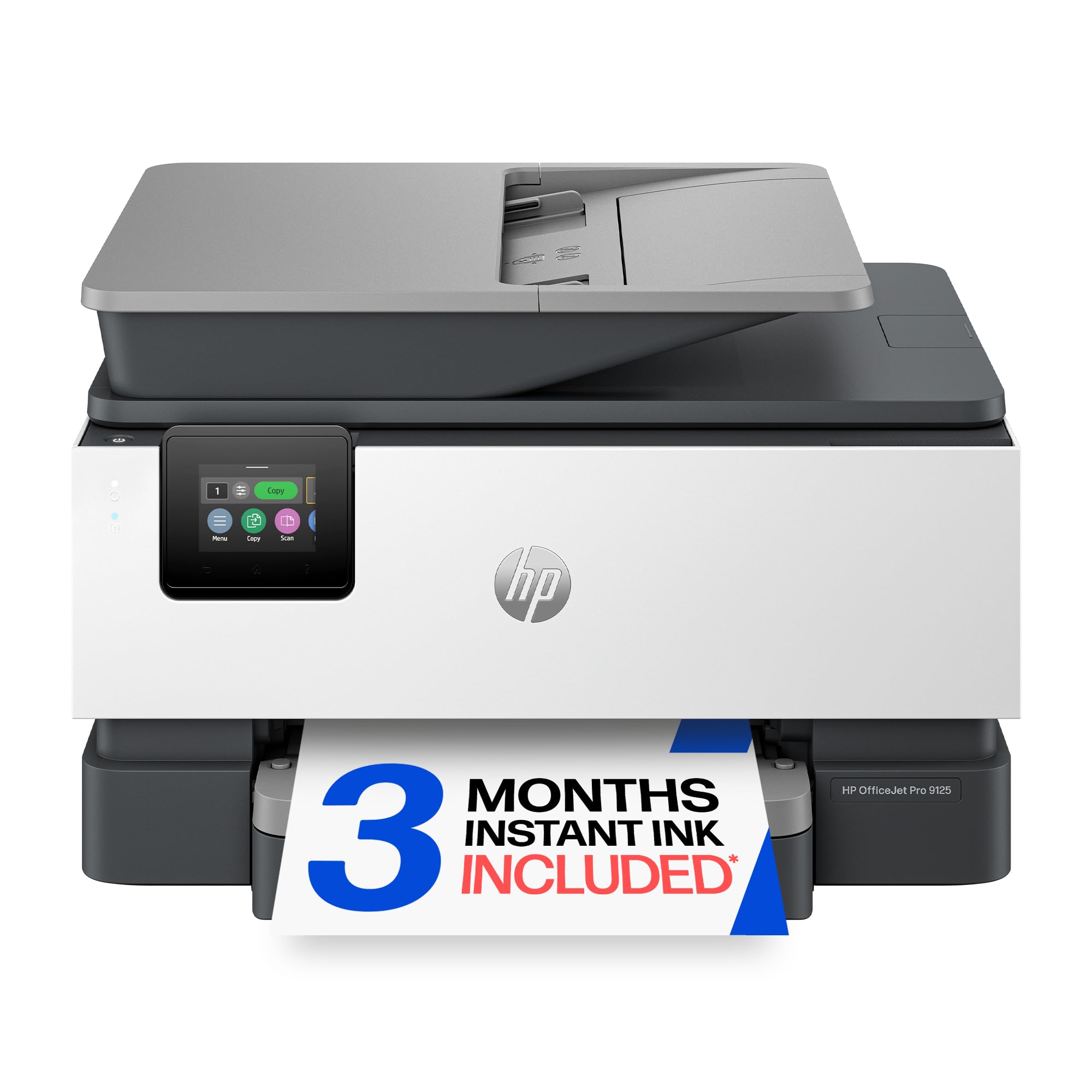
3. HP OfficeJet Pro 9125 Printer
A print-scan-copy all-in-one with a 250-sheet tray and 22 ppm black output.
If you want one machine that prints every suite, scans every RSVP card you receive back, and copies the master for a backup save-the-date, the OfficeJet Pro 9125 is the one to reach for. It is an all-in-one (print, scan, copy, fax in one chassis) with an auto document feeder, auto double-sided printing, and a 250-sheet input tray — enough paper to run a full save-the-date batch without stopping to reload. Print speeds run up to 22 pages per minute black and 18 ppm color, which is faster than the Epson Expression Photo XP-980’s 8.5 ppm black and 8 ppm color. First print lands in about 11 seconds.
Color comes from a standard four-cartridge set — cyan, magenta, yellow and black — which handles most wedding suites well enough, though a 6-color photo printer will edge it out on subtle florals. Setup is the typical HP story: quick when it goes well, occasionally fussy. One buyer’s experience: “Setup took an hour due to ink cartridge holder jammed to the right, blocking cartridge installation. No HP documentation; had to use Google/YouTube to release it. Works great after resolving.” Then it settles down and prints beautifully for weeks.
The honest follow-up: HP’s own firmware is locked to genuine HP chips, so this is not the printer to refill with third-party cartridges. Ink gets expensive over a long DIY run, and a hard three-month Instant Ink trial is baked in, after which a subscription fee applies unless you cancel. The printer itself is built with more than 40% recycled plastic content, and the HP app lets you print, scan, copy and fax from your phone.
Why it earns the second slot: a 250-sheet tray and 22 ppm black make it the machine that physically keeps up with a full wedding print session without babysitting.
The friction nobody warns you about: setup, cartridge chips and subscription billing are the three pain points most owners write home about. Budget an hour for first install and treat the trial clock as real.
Best for: couples who want one box that prints the suite, scans the RSVPs and copies the master — with plenty of paper in the tray.
Think twice if: you plan to refill with third-party cartridges — HP’s chip lock blocks them.
4. Brother DCP-L2640DW Printer
Monochrome only, but 36 ppm black-and-white clears a 200-piece program run in about six minutes.
Here is the honest read: the DCP-L2640DW prints black-and-white only. For color florals or pastel save-the-dates, it is not the tool. But for wedding programs, ceremony order-of-service sheets, table numbers, thank-you cards on textured white, and every envelope your address-list demands, its 36 pages per minute black-and-white output is the fastest in this round-up compared to the 9 ppm on the Canon PIXMA TR160 — a 4.0x gap in raw throughput. First page out in 8.5 seconds, and the 50-page auto document feeder scoops a stack of RSVP cards through in one pass.
The economics are the quiet win. Replacing a -ish toner cartridge is far cheaper per page than inkjet cartridges, and aftermarket TN830-compatible cartridges are widely available. The catch is scanning to a PC. You will need to push through a firmware password that is not on the box (it is found via Print Report > Network Config), and the built-in printer menu is not the smoothest for multi-page scans. Wi-Fi setup has a learning curve, and Brother’s own support line has helped some users get an iPhone connected in minutes.
Owner feedback splits the durability story: some units run clean for years, others report issues around five months. That is a real range, and worth reading as a “how does the unit arrive” variable rather than a design flaw — most owners describe years-old Brother lasers still churning out pages. As one long-time owner said of their replacement: not that they wanted to downgrade, but that they “didn’t think I’d find a laser printer this high quality” at the price.
Worth the shelf space because
- 36 ppm black-and-white outruns every color inkjet in this list for plain-text runs.
- Chip-free toner runs cheaper per page than inkjet cartridges.
- 50-sheet ADF swallows a stack of RSVPs in one pass.
- Ethernet and dual-band Wi-Fi mean it stays on the network reliably.
Real constraints to plan for
- Black and white only — no color florals, no pastel invitations, no photos.
- Wi-Fi setup and firmware password are the two things that trip up first-timers.
- Scanning to PC is less smooth than printing — save to phone or a USB drive instead.
- Some units report issues around the five-month mark; test yours early.
Pick this up if: your wedding stationery leans monochrome and you need volume — programs, seating charts, thank-you notes — at the lowest per-page cost.
Skip this if: color matters to your suite. It is genuinely monochrome.
5. HP Envy Photo 7975 Wireless Color Inkjet Photo Printer

A photo printer with a separate photo tray for 4×6 and 5×7 portrait prints.
For couples printing large portraits or high-detail floral art, the Envy Photo 7975 is the value pick among photo-focused machines. It has a separate photo tray alongside the paper tray — meaning you can create a small batch of 4×6 or 5×7 prints without unloading the cardstock tray — plus an auto document feeder, automatic double-sided printing and borderless output (edge-to-edge with no white margin) for place cards and menu cards. Print speeds run up to 15 ppm black and 10 ppm color, and first page exits in about 22 seconds.
What owners tend to love is the marriage of convenience and photo color. A long-time HP loyalist who had been wary: “This printer is the best! It connects quickly to your wifi, prints photos like a professional and it’s compact. The color quality is spot on without having to customize settings.” Setup via the HP app runs in under 10 minutes for most owners, and Wi-Fi connects on the first try. The separate photo tray is genuinely useful for a mixed workflow: print a save-the-date on cardstock, then walk over and swap in a photo print without a paper shuffle.
The catch is cartridge economics. Some buyers report tiny yields on the standard HP 64 cartridges — a few mention roughly ten photos per set before needing to swap — which is a real cost problem at wedding volume. There are also reports of lines appearing on large solid-color areas, which matters if you plan to print photo-realistic watercolor backgrounds. Printing on the HP glossy photo paper that the machine was tuned for sharpens results noticeably; on plain cardstock those lines can show.
The strongest card: a dedicated photo tray plus borderless output plus 10 ppm color is a hard combination to beat at this tier for mixed document-and-photo wedding work.
Where the math bites: cartridge yield is this printer’s honest weak point. If you plan to print more than ~100 photos, price out XL cartridges or a tank-fed model instead.
Buy this if: you want one machine that handles both invitation cardstock and portrait prints for the suite.
Reconsider if: your output is heavy on large solid-color photo backgrounds — thin line artifacts show up there.
6. Canon MAXIFY GX2020 Printer

Refillable ink tanks rated at 3,000 black-and-white and 3,000 color pages per bottle set.
For any wedding run past 100 invitations, ink cost is the number that decides the winner. The MAXIFY GX2020 prints up to 3,000 black-and-white and 3,000 color pages on a single set of GI-25 ink bottles. That is the entire reason this model lands on a wedding DIY shortlist: you fill the reservoirs from bottles, top up every few months, and never run to the store mid-project. It is also a full all-in-one — print, copy, scan, fax — with an auto 35-sheet document feeder, automatic double-sided printing and a 2.7″ color touchscreen. It uses standard 4-color pigment ink (cyan, magenta, yellow and black) and produces solid everyday color work.
Where it earns its keep: heavy duty cardstock. Owners who have pushed hundreds of pages through the machine report that ink levels barely move and the tank system sidesteps the cartridge-yield problem entire. Cardstock feeds cleanly from the multipurpose tray, and the flat paper path is kind to heavy stock — the single biggest physical concern in wedding printing. Wi-Fi has been described as rock-solid even against a mesh network setup where other brands struggled to stay connected. Setup on Mac and iPhone runs clean, no paper jams, and quiet operation.
The honest headline problem: color realism on this machine is inconsistent. Multiple owners describe “gray skies, bad photos” on florals and landscapes, and the machine’s touchscreen gives no low-ink warning, letting deep-clean cycles waste tank ink. Cardstock also curls unless you print single-sided (double-sided on textured stock is not the printer’s friend). And the phone app works only on Android, not iPhone — pair it with a Mac or PC for full control.
Why the numbers work
- 3,000-page yield per bottle set — reload mid-project and keep going.
- Automatic double-sided printing plus a 35-sheet ADF for RSVP cards.
- Flat multipurpose feed handles heavyweight cardstock without cracking.
- Reliable Wi-Fi and quiet running — no jams, no fuss.
Where it falls short
- Color reproduction can show “gray skies” on photo-realistic florals and landscapes.
- Cardstock curls on double-sided output — plan for single-sided printing.
- No low-ink warning before the reservoir runs dry mid-cycle.
- Companion app is Android-only.
Your pick if: ceremony volume and per-page cost matter more than photo-lab color accuracy.
Pass on this if: your suite includes high-fidelity color florals or landscape photography that needs subtle color range.
7. Epson XP-980 Printer

A 6-color wide-format photo printer that prints borderless up to 11″ x 17″ at 5760 x 1440 dpi.
If you are printing oversized table signs, photo booth backdrops or a signature guestbook with full-bleed floral art, this is the tier you are shopping in. The XP-980 prints borderless up to 11″ x 17″ — a size no other machine in this list claims — using a 6-color Claria Photo HD ink set (black, cyan, magenta, yellow plus light cyan and light magenta) at 5760 x 1440 dpi. That extra light-cyan and light-magenta pair is what smooths out pastel transitions in watercolor florals and soft skin tones in portraits; standard 4-color printers can band these transitions. A 4×6 borderless photo exits in as fast as 11 seconds.
The XP-980 also earns its keep on versatility. Separate trays hold plain and photo paper so you can flip between media without a reload, and there is a rear feed for specialty stock. The flatbed scanner resolves crisp scans for archival duplicates of RSVP cards and handwritten notes. Epson’s Smart Panel app handles setup and control from your phone, and the Creative Print app lets you design custom cards and stationery directly, so the design-to-print loop stays short.
Wide-format shopping comes with two honest caveats. First, ink economics are steep at this tier — 6-color cartridges cost meaningfully more per page than 4-color work, and one owner noted that a full photo print run consumed cartridges faster than expected. Second, formatting 11″ x 17″ output means some paper feed workflows expect single-sheet feeding at that size, so multi-page wide-format runs take time. Setup is straightforward but the Mac companion apps have been called less friendly on the software side.
The standout spec: 5760 x 1440 dpi from a 6-color Claria Photo HD set plus 11″ x 17″ borderless support is the biggest color-and-size leap in this article.
The honest trade-off: per-page ink cost at this tier is high; this is a machine for a handful of showpiece prints, not a 300-piece invitation run.
The one for you if: wedding signage, oversized portraits and pastel-perfect florals are on your print list.
Not for you if: you need volume. That is the Canon MAXIFY GX2020 or the Brother DCP-L2640DW’s job.
8. HP OfficeJet Pro 9730 Printer

Wide-format color with a P3 gamut and dual 250-sheet trays.
When color accuracy tops your list — think mood boards, watercolor florals, printed skin tones of your couple portraits blown up on 11″ x 17″ — the OfficeJet Pro 9730 is the only printer here that claims a wider P3 color gamut in wide format, which means it can render colors the standard sRGB scale cannot reach. It also prints at 22 ppm black and 18 ppm color at up to 11″ x 17″, and offers an auto document feeder (ADF) with single-pass double-sided scanning plus two 250-sheet input trays. A 4.3″ color touchscreen and the HP app handle the walk-up workflow, and the machine is built with more than 30% recycled plastic content.
Print volume is where dual trays matter. Load cardstock in one and plain paper in the other and you can run invitation inserts, thank-you cards and envelope liners without the mid-project paper swap that slows every single-tray workflow down. First print from a sleep state lands fast for a wide-format machine, and the same HP AI that trims email and web content to fit cleanly on the page works for menu printouts and formatted programs.
The honest trade-off: the wide-format body takes up real desk space, and setup splits reviews — some owners describe a barcode-app setup in minutes, others get blocked by an HP Smart app registration step that stalls the Instant Ink incentive. Print quality itself also splits: some owners (like the one printing ledger size choir music) love the speed and consistency; others note ink waste and occasional print artifacts. HP firmware ties this to genuine HP chips, so third-party cartridges are not an option.
what separates it: P3 color plus dual 250-sheet trays plus 11″ x 17″ support is a very specific combination for a couple who cares about exact color reproduction.
The honest catch: the wide-format chassis takes up a lot of table, and setup occasionally stalls on the HP Smart app registration step. Budget an evening for first install.
Choose this if: color fidelity is your priority and you are printing wide-format floral art or mood boards on mixed paper stocks.
Reconsider if: desk space is tight or you want a plug-in-and-print experience with no setup friction.
9. Brother MFC-L8730CDW Business Color Laser All-in-One Printer

A 33 ppm color laser that mows through programs, menus and thank-you cards for the entire wedding party.
For monochrome and solid-color wedding stationery at volume, this laser prints at 33 ppm in both black and color — the fastest color throughput in this round-up, tied with the Brother INKvestment 6960’s 31 ppm black on the B&W side but beating every inkjet here on color. First page out in 9.9 seconds. It ships with a 3,000-page black toner cartridge and 1,800-page cyan, magenta and yellow cartridges, plus a 80-sheet auto document feeder that scans both sides at up to 104 images per minute — a serious number for archiving RSVP cards and thank-you notes. There is also a 3.5″ color touchscreen with up to 48 customizable shortcuts for the tasks you repeat most (print program, print menu, scan RSVP).
Laser output is genuinely different from inkjet. Black text and graphics land crisp and non-smudging — pencil-proof for place cards and menu cards that will get handled. The 25% smaller footprint versus the previous model makes it easier to fit next to a home office desk, and the machine ships with EPEAT Silver and ENERGY STAR credentials plus 12% post-consumer recycled material. Remote printing from a phone or laptop works cleanly when the connection holds, which makes it useful for a partner printing emergency place cards from another room.
Two honest limits. Color photos are not this machine’s strength — it is a business laser, not a photo printer, so booking-photo-quality portraits and watercolor florals are out of scope. And toner costs add up over a longer project; a high-yield replacement set runs meaningfully more per page than the maxed-out alternatives. Some owners note that low-toner states can waste unused toner due to a page-count algorithm, so top up before a big print day rather than push to empty. The 80-page ADF is generous, so a 100-piece RSVP return batch goes through quickly.
The bet this machine makes: business-grade reliability and speed beat perfection on photo-realistic color. For text-heavy wedding collateral at volume, that is exactly the right bet.
What you should know: toner cost per page edges up at this tier, and this is not a machine for photo prints. Combine with a photo printer if your suite mixes both.
Reach for this if: you want laser-grade speed and durability for text and solid-color stationery at wedding volume.
Not the one if: your suite leans on floral photography or watercolor pastels — this is the wrong tool for that tier of color.
Know the Specs
Print Speed (ppm) — Why Wedding Runs Feel Slow or Fast
Pages per minute, or ppm, is how many sheets the printer finishes in a minute under ideal conditions. It matters most when you are running 200 or more pieces, because every minute of print speed stacks. A 30 ppm color machine finishes a 200-piece color suite in roughly seven minutes of pure print time; a 5.5 ppm model takes over half an hour. Speed numbers flag whether a machine is built for one box of thank-you notes or a full wedding-party run — check them before you commit to a large print job.
Ink Systems — Cartridges vs. Refillable Tanks
Cartridge printers (a sealed plastic tank per color that you snap in) are simple and consistent, but per-page ink cost is highest. Refillable tank printers (like Canon MegaTank) load ink from a bottle into an internal reservoir, so a set of bottles lasts hundreds or thousands of pages and the per-page cost drops sharply. Six-color photo ink systems add light cyan and light magenta for smoother pastel gradients in florals and portraits. Pick the ink system based on how many pieces you are printing, not on how the printer looks on a shelf.
Common Questions
Can these printers handle 100 lb cardstock for wedding invitations?
Is a laser printer or an inkjet better for wedding invitations?
How much ink will a 200 invitation print run actually use?
Do I need borderless printing for place cards and menu cards?
Will these printers work with my phone without a computer?
How long does the toner or ink last on these printers?
Can I print wedding thank-you notes on textured or handmade paper?
How do the print speeds compare for a 200-piece order of service?
Are refillable ink tank printers really cheaper than cartridges for a whole wedding?
Can the Brother INKvestment 6960 print 11×17 without special paper handling?
Do I need to worry about firmware locks on third-party ink cartridges?
Is a wide-format printer worth it for wedding stationery?
What resolution do I actually need for wedding photos on invitations?
The Bottom Line
For most couples printing a modern wedding suite with both documents and photos, the printer for wedding diy winner is the Canon PIXMA TR160 because it packs a 5-Color Hybrid Ink System, borderless printing and Wireless Direct Mode into a 4.5-pound body you can actually move between venues. If ink cost is the deciding factor for a 200-piece run, the Canon MAXIFY GX2020 and its 3,000-page yield per bottle set is the one to reach for. And for wide-format words and text-heavy programs, the Brother INKvestment 6960 and the Brother DCP-L2640DW sit at opposite ends of the speed scale — the 6960 printing 11″ x 17″ color at up to 31 ppm, the 2640 putting out monochrome text at up to 36 ppm. Whichever route you take, print a full test piece on your final cardstock before you commit the whole run — wedding DIY rewards the printer that behaves on day one.
How we choose
We do not accept paid placement. Every pick is matched to a real buyer and a real use-case; we do not hands-on test units.
Sources
Specifications: manufacturer listings and product documentation. Review insights: verified customer reviews, as of October 2026. Pricing: not shown on this page (it changes often); check the current price via the retailer link.
As an Amazon Associate, Aappliancez earns from qualifying purchases. This does not affect which products we feature.