Disclosure: Some links in this post are affiliate links. As an Amazon Associate I earn from qualifying purchases, at no extra cost to you. Learn more
Specs are compiled from manufacturer listings and verified buyer reviews and can change over time — please confirm the key details on the product page before buying.
The short answer: buy the HP OfficeJet 250 if you print on the move, and the Canon PIXMA TR7120 if the printer lives on a desk at home. Everything else here is a specialist — one that nails photos, one that never touches ink cartridges, one that spits out black-and-white pages at 36 per minute. The trick with this category is that “prints from your phone” means wildly different things on different machines. Some connect straight to your handset with no router in the room, some lean on an app, and some need a home network before your phone can see them at all.
This guide is built by comparing the manufacturers’ published specifications and the patterns across verified customer reviews, so you get each pick’s real strengths and trade-offs instead of marketing spin.
Below you will find each machine sorted by the job it does best, with the exact page speeds, connection types, and ink setups spelled out in plain words. It is a practical shortlist of the printer for printing from phone that actually fits how you work.
Top Picks


How To Choose The Best Printer for Printing From Phone
Most people buy a printer, get it home, and discover their phone can only see it when the home Wi-Fi is behaving. That is the wrong order. Decide first how your phone will talk to the machine, then pick the hardware around that.
Three ways a phone connects, and only one needs no router
The easiest is a direct link — the printer broadcasts its own signal and your phone joins it, so you can print in a hotel room or a van with no internet at all. The Canon PIXMA TR160 offers this as a wireless direct mode, and the HP OfficeJet 250 connects “with or without a router” through HP Auto Wireless Connect. The second way is app-based, where the maker’s app (HP Smart, Canon PRINT, Epson Smart Panel, Brother Mobile Connect) handles the handshake. The third is plain network printing, where the printer and phone share a home router.
Why the pages-per-minute figure matters less than you think
A printer rated at 10 pages per minute in black is quoting its fastest draft mode on simple text. Color pages are almost always slower. The HP Envy 6155 is rated at 10 black and 7 color; the Canon TR7120 at 14 black and 9 color. If you mostly print school forms and shipping labels, either is fine. If you run invoices all day, the jump to a laser like the Brother DCP-L2640DW at 36 pages per minute changes your working day.
Cartridges, tanks, or toner — pick your running cost
Cartridge printers are cheap to buy and expensive per page. Tank printers like the Epson EcoTank ET-2803 are the reverse: you fill reservoirs from bottles, and Epson states one replacement bottle set equals about 80 individual cartridges. Laser toner costs more per box but delivers far more pages and never dries out between jobs. Think about how often you actually print before you pick a side.
Side-by-Side Comparison
| Model | Best For | Print Speed (B&W / Color) | Phone Connection | Duplex | Amazon |
|---|---|---|---|---|---|
| HP OfficeJet 250★ Best Overall | Printing away from home | 20 ppm / 19 ppm | HP app, Wi-Fi with or without router | Manual | Amazon |
| HP Envy 6155Best for Home | Everyday home documents | 10 ppm / 7 ppm | HP app, dual-band Wi-Fi | Automatic | Amazon |
| Canon PIXMA TR7120Best Scanner Setup | Home office with scanning | 14 ppm / 9 ppm | Canon PRINT app, AirPrint, Mopria | Automatic | Amazon |
| Kodak Dock Plus | 4×6 photo prints from your phone | 1 ppm / 1 ppm | Kodak Photo Printer app over Bluetooth | Simplex | Amazon |
| Epson EcoTank ET-2803 | High-volume low-cost printing | 10 ppm / 5 ppm | Epson Smart Panel app, AirPrint | Simplex | Amazon |
| Canon PIXMA TR160 | Travel and bag-sized printing | 9 ppm / 5.5 ppm | Canon PRINT app, AirPrint, wireless direct | Simplex | Amazon |
| Brother DCP-L2640DW | Fast black-and-white office output | 36 ppm / — | Brother Mobile Connect app, dual-band Wi-Fi | Automatic | Amazon |
| HP Envy Photo 7975 | Photos and family paperwork | 15 ppm / 10 ppm | HP app, Wi-Fi | Automatic | Amazon |
| Xerox C325dni | Color laser pace for a busy office | 35 ppm / 35 ppm | Xerox Easy Assist app, AirPrint, Mopria | Automatic | Amazon |
Detailed Reviews
1. HP OfficeJet 250 Mobile Printer
Our pick — 4.0+★ from 3,500+ verified ratings; the strongest balance of quality and price.
A full print-scan-copy machine that lives in your bag and runs off its own battery.
This is the only pick here that does all three jobs — printing, scanning, and copying — while running on a battery, and that combination is why it takes the top slot. The battery is included, and HP sells it as a separate accessory, so a good share of the price is the cordless hardware. Charging takes 90 minutes with the printer switched off, using HP Fast Charge, so you can top it up overnight in an office and take it out the next morning.
Speed is where it leaves the small home machines behind. Color output runs at 19 pages per minute and black at 20 pages per minute, against the HP Envy 6155’s 7 color and 10 black — measured side by side that is a 2.7x gap on color and a 2.0x gap on black. Trucks, field engineers and sales reps notice that difference immediately, because a batch of invoices finishes while you are still standing there. As owners put it: “Used in work van: fast printing, battery lasts a week with weekly charging, prints from phone/computer.”
What wins people over is the sheer print quality — the most-praised part of this machine by a wide distance — followed by how easily it travels. A single 5×8 card, a legal page, or an 8×10 photo all feed through, which is more paper flexibility than most portable printers bother with.
Where it earns its keep
- Battery built in, so no wall socket needed mid-job
- 20 ppm black and 19 ppm color — the fastest inkjet here
- Print, scan and copy all from one bag-sized unit
- Full charge in 90 minutes with the printer switched off
- Accepts cards, envelopes and photos up to 8×10 inches
What to plan around
- Pairing a phone or older laptop is the recurring snag
- Two-sided printing is manual, not automatic
- Replacement HP 62 ink is not cheap
Pick this one: if the printing happens in a van, a hotel room or a client’s office rather than at a desk.
Think twice: if you only ever print at home — a fixed desktop unit gives you the same pages for less effort on setup.
2. HP Envy 6155 Wireless All-in-One Color Inkjet Printer
Homework, forms and the odd photo — handled quietly from your phone without a fuss.
A 2.4-inch color touchscreen is the feature that separates this from most budget home printers, which still make you peck at arrow buttons. Tap through the menus, and the same jobs are available in the HP app on your phone. Dual-band Wi-Fi is the part that matters for phone printing — it uses both the 2.4GHz and 5GHz bands and is built to detect and repair dropouts on its own, which is exactly the failure that makes people give up on wireless printing.
Print speed runs to 10 pages per minute in black and 7 in color. That is slower than the HP OfficeJet 250 above, and slower than the Canon TR7120’s 14 black and 9 color, so treat it as a document machine rather than a workhorse. The 100-sheet input tray and automatic two-sided printing are what you actually use day to day: a school project prints on both sides without you flipping anything. One owner described exactly this use, saying “I don’t print a lot at home, but need to print about 10-20 sheets a month,” and finding setup simple despite not being tech-savvy.
The recurring gripe is the ink subscription tie-in. Some buyers find the wireless connection demands an HP Instant Ink account first, and cancelling that service can leave cartridges refusing to print — which is worth knowing before you sign up for the free trial. It is also built with at least 60% recycled plastic content, if that matters to you.
Quiet by design: the machine is genuinely hushed in operation, and the cartridge bay opens wide for easy swaps. It is comfortable on plain documents and less so on high-resolution photos, per buyers who have tried both.
Reach for this if: your printing is a handful of pages a month and you want a touchscreen and two-sided output without learning a manual.
Look elsewhere if: you refuse to tie a printer to a paid ink plan — the account requirement is the trade-off here.
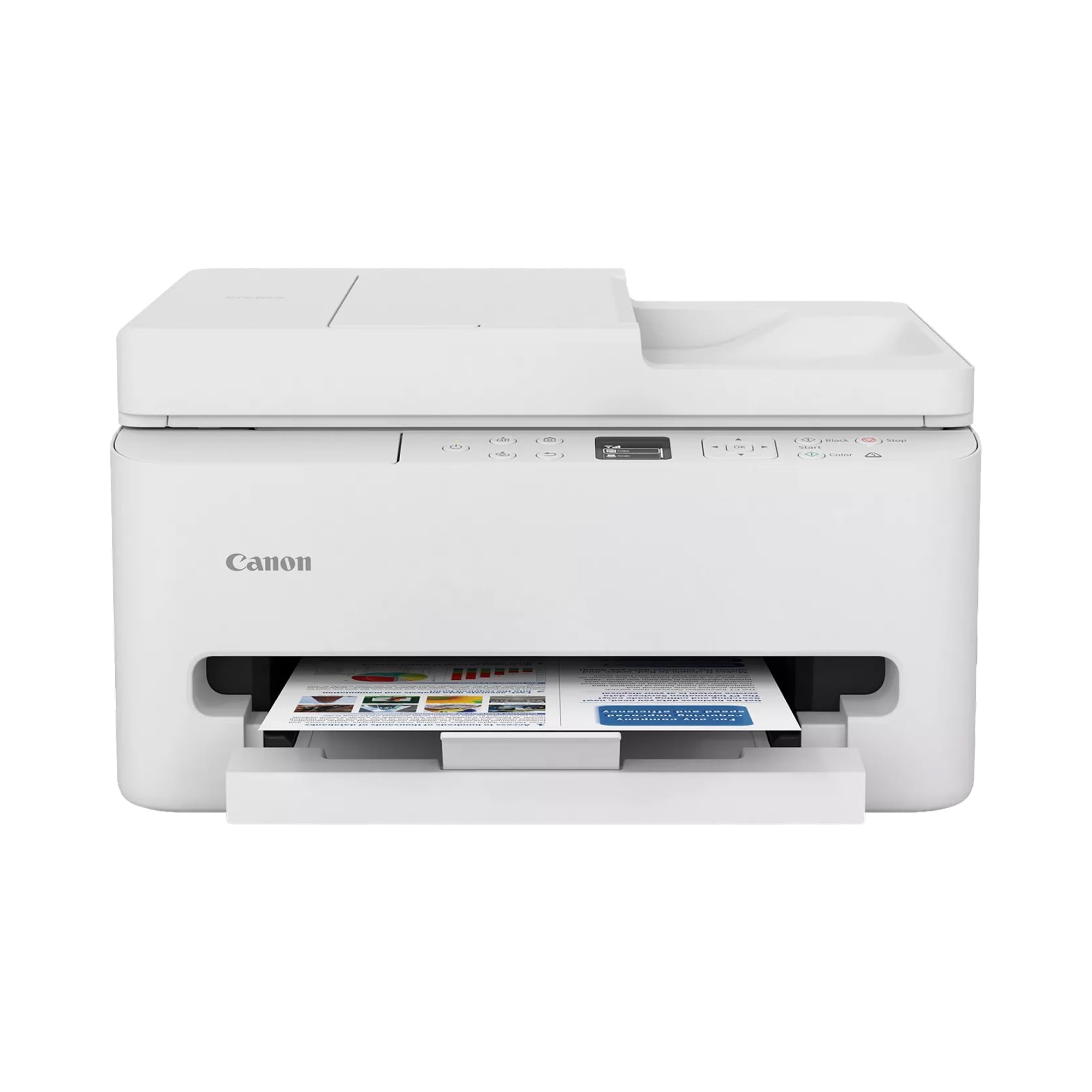
3. Canon PIXMA TR7120 Wireless Color Inkjet Printer
The desk printer that also swallows a stack of pages and scans them without you babysitting each one.
An auto document feeder is the reason this one beats the HP Envy 6155 for anyone with paperwork. It pulls multi-page documents through for scanning and copying on its own — no lifting the lid for page two, three, and four. Toss in automatic two-sided printing, a 1.42-inch monochrome OLED panel that shows ink levels at a glance, and dual-band Wi-Fi that runs on either 2.4GHz or 5GHz, and you have a hybrid-work machine that covers the boring jobs properly.
Print quality is the thing owners talk about first, and setup is what they mention next — a good sign, because those are the two moments that decide whether a printer gets used or shoved in a cupboard. One five-star write-up put it simply: “It was very easy to set up and connect to my mobile phone and lap top. Copies are clean and clear.” Another said it was up and printing with no issues at all.
Here is the catch worth checking before you buy: the color inks are combined in one cartridge, so when the cyan runs dry you are replacing the whole color unit. That is a cost quirk, not a defect, and at low volume most people shrug it off. There is also a documented gap for laptops running ARM processors, where no Windows 11 ARM driver exists — if you use one of those, confirm compatibility first. Output runs at 14 pages per minute black and 9 color, and it takes paper up to 8.5 x 11 inches.
The tray trade-off: the paper holder is on the small side and holds somewhere in the region of 50 to 100 sheets, which is fine for a household but means refilling during a big run. Buyers who pushed it to about 500 pages reported zero jams.
Best fit: a home office where you scan as often as you print and want both jobs to happen from your phone.
One caveat: an ARM-based work laptop will not connect — verify your machine type before ordering.
4. KODAK Dock Plus 4×6 Photo Printer
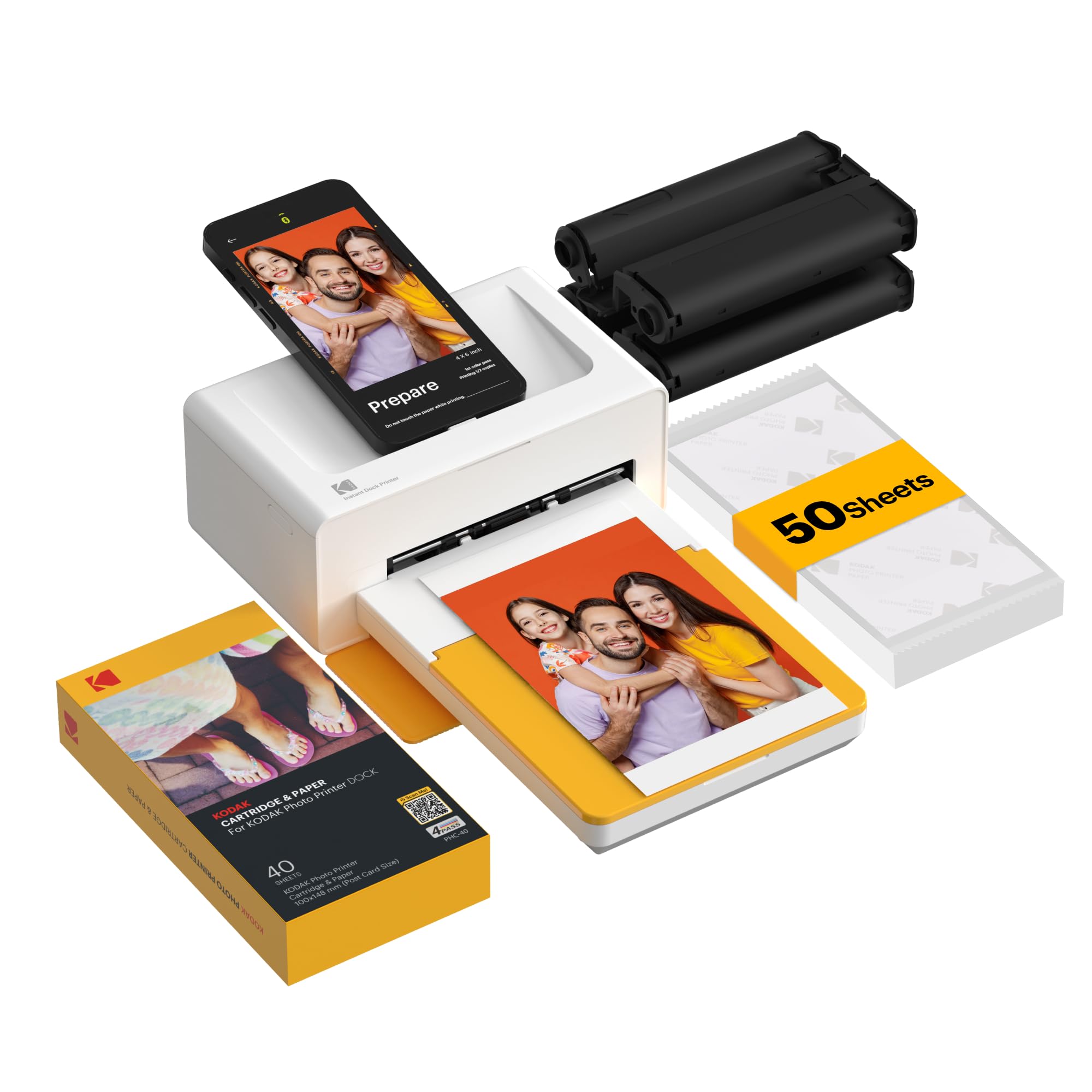
Dock your phone, get a 4×6 print in roughly 55 seconds, and never touch a cartridge again in your life.
This machine exists for one job, and it does that job with a method nothing else here uses. 4PASS dye sublimation lays down three color layers and then seals the print under a clear protective laminate, so the finished photo shrugs off fingerprints, water, and fading. Each 4×6 print takes about 55 seconds from dock to finished sheet. The physical docking station is the clever bit: your phone sits on the printer for a steadier connection and charges while it works, which solves the classic phone-photo problem of the battery dying mid-session.
Treat it as a casual photo printer rather than a lab, and it delivers. Buyers print gift photos and family-gathering snaps by the dozen — one ran through roughly 200 photos in a week with only a couple of restarts. Another put it bluntly: “I love this printer. Easy to use, easy to set up, and great photos.” The Bluetooth route through the Kodak Photo Printer app works, and the dock works, so you have two ways in if one misbehaves.
The honest limits sit on the photo side. Colors can land slightly off with weak yellows, and sharpness is not lab grade, so it suits casual prints rather than framing a portrait. Paper handling is fussy too — load single sheets, not a stack, or it will jam. Refill cartridges and paper can be harder to track down than standard ink, so buy a spare set when you order the printer.
Running cost to weigh: each print consumes both a paper sheet and a cartridge strip, so this is a per-photo cost, not a per-page one. That is the price of a laminated 4×6 that survives handling and years in an album.
Buy it for: birthdays, weddings and thank-you cards where a real print beats a texted JPEG.
Skip it for: documents — it prints photos only, one at a time.
5. Epson EcoTank ET-2803 Printer

Fill it from bottles twice a year and stop thinking about ink costs entirely.
Epson’s whole pitch lives in one number: a full replacement ink set is rated for up to 4,500 pages in black and 7,500 in color. That is why the box ships with up to two years of ink inside, based on roughly 125 pages a month. Instead of cartridges you pour from four 65 mL bottles into top-mounted reservoirs, and Epson states each bottle set equals about 80 individual cartridges. If you print school packets, forms, or work-from-home documents in volume, refillable tanks cut your monthly ink spend more than any other spec here.
Print speeds are modest: 10 pages per minute in black and 5 in color, with a first page out in 10 seconds. There is no automatic duplex — you flip the stack yourself for two-sided jobs. What you get instead is AirPrint and the Epson Smart Panel app for printing straight from a phone or tablet, a flatbed scanner with a color display for copying, and a Micro Piezo print head Epson describes as heat-free, which is gentler on a wide range of paper types.
The one thing to plan for is the network. Setup is considered easy by most, but the Wi-Fi wants a 2.4GHz band, and a few people ended up joining directly through the printer rather than through the phone app. If your home router pushes both bands under one name, sort that before you start. Beyond that, a handful of owners note it can be louder than their old machine until quiet mode is switched on.
Where the savings reappear: there is no subscription and no chip to argue with — you buy bottles on your own schedule.
Worth owning if: you print hundreds of pages a month and are tired of replacing cartridges every few weeks.
Not for you if: you print a couple of pages a month — a tank will dry out before it pays anything back.
6. Canon PIXMA TR160 Color Wireless Portable Printer

At 4.5 pounds, it slides into a backpack beside a laptop and prints pages the size of a full sheet.
Portability here is measured in pounds, and 4.5 is the figure that matters. The HP OfficeJet 250 is the only other portable machine on this list and it carries a battery and a scanner with it; the TR160 strips those out to get down to that weight, and it still prints a full 8.5 x 11-inch page. A 1.44-inch monochrome OLED panel shows ink levels and status, so you are not guessing before you set it down on a café table.
The cleverest part for phone users is wireless direct mode — your handset joins the printer’s own signal, no router involved. That is what lets you print a boarding pass in a hotel lobby with no network login. The Canon PRINT app handles it, AirPrint and Mopria cover the rest, and there is a 50-sheet tray, which is far more than most travel printers offer. One 5GHz-capable owner was set up in 10 minutes flat and called the print speed and quality “just fine.”
Now the trade-offs, and there are a few honest ones. Output is 9 pages per minute in black and 5.5 in color, so it is for a handful of documents rather than a bulk run. Photos come out with a warm, dull cast that needs correcting in your phone’s editor first. There is also no scanner — this is print only. A battery is sold separately if you want to work with no wall outlet at all.
The case for the travel bag
- 4.5 pounds, with room left in a backpack for a laptop
- Wireless direct mode prints with no router present
- Full-size 8.5 x 11-inch pages from a bag printer
- 50-sheet paper tray beats most portable rivals
- Can load an optional battery for cord-free use
The parts you give up
- Prints only — no scanner, no copier
- Photo colors run warm and need editing first
- Ink capacity is limited, so carry a spare on long trips
Perfect for: the sales rep, van driver or traveller who needs sharp text pages away from a desk.
Wrong pick if: you need to scan anything or print photos straight from the phone without retouching.
7. Brother DCP-L2640DW Printer

Thirty-six black-and-white pages a minute, and the toner never dries out between jobs.
Nothing else on this list prints this fast. 36 pages per minute in black and white, a first page out in 8.5 seconds, and a 50-sheet auto document feeder that sweeps through multi-page scans at up to 23.6 images per minute in black and 7.9 in color. It is a laser, not an inkjet — so it sits idle for three weeks and then fires up perfectly, with no clogged nozzle or dried cartridge to clean. For a small business or home office with steady paperwork, never clearing a clogged print head is worth the higher sticker price.
Connectivity is generously covered: dual-band Wi-Fi on 2.4GHz or 5GHz, Ethernet for a wired desk, and USB for one computer. The Brother Mobile Connect app handles printing and scanning from a phone, and duplex printing works automatically from the start. Owners who print hundreds of pages a week describe years of trouble-free service, sharp text, and toner swaps that take a minute when the time comes.
The friction point is setup, specifically the wireless side. Several people found the firmware update asks for a password printed on the back label, which you then have to change through the web interface before the machine behaves. Scanning and saving to a PC can also be fiddly, with one frustrated user describing the software as arcane. Get it onto Ethernet first, then add Wi-Fi, and most of this melts away.
What the price buys: refillable toner with aftermarket options, and a browser-based admin page you can run with a static IP — so you are not forced through an app for every setting. Buyers who switched from ink described years of not thinking about the printer at all.
Made for: anyone printing dense text, invoices or sheet music who wants a laser that never dries out.
Cross it off if: you need color — this one prints black and white only.
8. HP Envy Photo 7975 Wireless Color Inkjet Photo Printer

A separate photo tray means borderless pictures come out without reloading the paper you print documents on.
A second, dedicated photo tray is the detail that makes this a family machine rather than a document machine. You leave plain paper in the main tray and photo paper in the other, so a homework sheet and a birthday print do not fight for the same slot. Borderless printing runs up to 10 pages per minute in color and 15 in black, with automatic two-sided printing and an auto document feeder as standard. The touchscreen is one of HP’s larger color panels, and the whole thing is AI-enabled to strip adverts and web clutter out of printed pages so you do not waste sheets.
Where it delights is photos. Prints on glossy paper come back true to screen with color that lands accurately without fiddling with settings, and the machine stays quiet while it works. One delighted owner summed up the phone side perfectly: “It connects quickly to your wifi, prints photos like a professional and it’s compact.” For kids’ projects, recipe cards and framed snapshots, that is the whole use case covered.
The catch, and it is a real one, is setup. When the network connection and the app line up, it is quick — inside 10 minutes for plenty of buyers. When they do not, people report reinstall loops and a cartridge error solved only by wiping a contact. Printed pages have also been known to land on the floor rather than in a tray, which is a quirk of the paper path rather than a fault. Persist through first-time setup and it settles down.
Ink behaviour worth knowing: cartridges here resist drying out between uses, and a head-cleaning cycle clears minor clogs — which means the photo tray stays usable even if you only print pictures a few times a year.
Choose this when: photos and family paperwork share the same desk and you want both handled from a phone.
Prepare for: a first setup that rewards patience — the network handshake is the known soft spot.
9. Xerox C325dni Wireless Color Laser All-in-One Printer

35 pages a minute in full color, from a machine built for a busy office floor.
Color laser output at 35 pages per minute in both black and color is a different class of machine from everything else here. The Xerox runs single-pass duplex scanning, so a two-sided stack of contracts goes through once rather than twice. It comes with starter toner — 1,500 pages in black and 1,000 in color — and takes high-yield cartridges, which is what you want if you are pushing up towards its stated 2,500 pages a month. A 4.3-inch touchscreen makes the setup menus navigable, and the Xerox Easy Assist app guides the phone-pairing and network steps instead of handing you a manual.
Phone and tablet printing come through built-in Wi-Fi, Apple AirPrint and Mopria, with scan-to-cloud alongside it. Print quality on card stock and full-color documents is where buyers get their money back — one owner who replaced a desk-sized inkjet noted that despite deeper specifications, the Xerox takes no more table space because the output stays inside its own footprint instead of extending a tray out the back.
Be clear-headed about toner cost. Laser cartridges are the price of laser speed, and this one is no exception — the cost per page is lower than ink, but the cartridge price itself is steep. There is also a size warning: at 59.5 pounds this is a two-person lift, not something you shift around the house. Set it up once, on a solid table, and leave it.
Where the money goes: office-grade network and admin settings, and single-pass duplex scanning that saves real minutes across a morning of paperwork. That is the target buyer, not a household printing a form a week.
The right call for: a small team or agency needing fast color documents, scanning, and a proper touchscreen interface.
Overkill for: home use — the weight, the toner cost and the 59.5 pounds all point at a shared office.
Know the Specs
Pages per minute (ppm)
This is how many sheets the printer can push through in one minute. It is measured on simple text in draft mode, so your real average will be a little lower — photos and graphics slow any printer down. On the inkjets here the black figure is always higher than the color figure, because laying down three inks takes longer than laying down one. A laser like the Brother at 36 ppm outruns every inkjet here by a wide margin on long runs.
Wireless direct versus app printing
Wireless direct means the printer broadcasts its own signal and your phone joins it — no router, no home network, no internet. That is what makes printing in a hotel or a van possible. App printing relies on the maker’s own software (HP Smart, Canon PRINT, Epson Smart Panel, Brother Mobile Connect) to find the printer over a shared network. AirPrint and Mopria are the built-in alternatives that skip the app entirely on a compatible handset.
Ink tanks versus cartridges versus toner
A cartridge is a sealed block of ink you swap out; when it is empty, you replace the whole thing. A tank printer gives you reservoirs you refill from bottles, and the makers rate a full set in thousands of pages. Toner is laser powder, which never dries out — that is why a laser can sit idle for weeks and still print on demand. Your decision hinges on volume: low volume favours cartridges, high volume favours tanks, and text-heavy volume favours toner.
Duplex printing
Automatic duplex prints on both sides of the sheet without you touching it. Manual duplex means the printer prints one side, then asks you to flip the stack and feed it back in. For contracts and long reports, automatic saves trips to the machine. For occasional two-sided jobs, manual is a mild inconvenience rather than a problem.
Common Questions
Can I print from my phone without any Wi-Fi or internet at all?
Do I need the manufacturer’s app to print from a phone, or will AirPrint alone work?
Is a tank printer cheaper to run than a cartridge printer?
Will a laser printer dry out if I only print a few times a month?
Can I print photos from my phone on any of these printers?
What happens if I cancel an ink subscription on an HP printer?
Why does the printer go offline when my phone can still print sometimes?
How long does a full ink set last on a tank printer?
Can a portable printer print a full 8.5 x 11 inch page?
Do I need to plug a portable printer into the wall to use it?
The Bottom Line
For most people buying a printer for printing from phone, the winner is the HP OfficeJet 250 — the crowd favourite at 4.0+ stars across 3,500+ ratings, and the only pick here that prints, scans and copies on its own battery at 19 color and 20 black pages per minute. If the machine lives on a desk and you scan paperwork as much as you print it, the Canon PIXMA TR7120 adds an auto document feeder for the same money band, while the HP Envy 6155 keeps things simple for a light home workload. For anyone drowning in black-and-white text pages, the Brother DCP-L2640DW at 36 ppm ends the ink argument permanently. Match the machine to how your phone actually connects — direct where there is no router, app-driven where the network is yours — and the offline light stops being a problem.
How we choose
We do not accept paid placement. Every pick is matched to a real buyer and a real use-case; we do not hands-on test units.
Sources
Specifications: manufacturer listings and product documentation. Review insights: verified customer reviews, as of October 2026. Pricing: not shown on this page (it changes often); check the current price via the retailer link.
As an Amazon Associate, Aappliancez earns from qualifying purchases. This does not affect which products we feature.