Disclosure: Some links in this post are affiliate links. As an Amazon Associate I earn from qualifying purchases, at no extra cost to you. Learn more
Specs are compiled from manufacturer listings and verified buyer reviews and can change over time — please confirm the key details on the product page before buying.
Booklet printing punishes the wrong printer fast. You need a machine that can turn a stack of sheets into clean, folded pages without jamming, smearing the fold line, or running out of toner halfway through the run. The picks below cover that job from every angle: a fast monochrome workhorse for text-heavy booklets, a tank-fed color model for illustrated programs, a portable unit for short runs on the road, and wide-format machines for oversized spreads. If you want the short answer, the HP LaserJet Pro 4001dn handles the most booklet jobs per hour for the least fuss — but read on, because paper size and color decide this more than raw speed does.
This guide is built by comparing the manufacturers’ published specifications and the patterns across verified customer reviews, so you get each pick’s real strengths and trade-offs instead of marketing spin.
Booklet work lives or dies on duplex printing, paper handling, and how cheaply each folded page comes out. Here is how the best printer for booklets shakes out once you match each machine to the paper you actually fold.
Top Picks



How To Choose The Best Printer for Booklets
A booklet is a different animal from a normal print job. Every sheet carries two pages per side, and the sheet gets folded, so the printer has to place ink or toner exactly where the fold will crease. Get the wrong machine and you end up with pages that misalign at the spine, smeared fold lines, or a paper tray that can’t hold enough sheets to finish a run without a refill.
Duplex printing is the make-or-break feature
Duplex means the printer flips the sheet and prints the back automatically. Automatic duplex is what you want for booklets — manual duplex makes you re-feed every sheet by hand, which is slow and easy to get wrong. Several picks here offer automatic duplex, and the ones that don’t are simplex-only, which means they print one side at a time and leave the flipping to you.
Match the paper size to your fold
Most booklets fold down from Letter or A4, so any standard printer can feed the sheets. But if you are building oversized programs or fold-out spreads, you need a wide-format machine that handles paper up to 13″ x 19″. Check the maximum media size before you commit — a printer that tops out at 8.5″ x 11″ cannot produce a tabloid-style booklet no matter how fast it prints.
Decide on monochrome or color early
Text-heavy booklets — agendas, handouts, manuals — print faster and cheaper in black and white, and a monochrome laser keeps every page sharp. Color booklets need a color machine, and the cost per folded page depends heavily on whether you are buying cartridges or refilling tanks. A refillable tank model spreads ink cost far thinner than a cartridge model, which matters on a 300-page run.
Side-by-Side Comparison
| Model | Best For | B&W Speed | Color Speed | Duplex | Amazon |
|---|---|---|---|---|---|
| HP LaserJet Pro 4001dn★ Best Overall | Fast text-only booklet runs | 42 ppm | — | Automatic | Amazon |
| Epson EcoTank ET-2803Best Value | Cheap color booklet runs | 10 ppm | 5 ppm | Simplex | Amazon |
| Canon PIXMA TR160Portable Pick | Booklets on the road | 9 ppm | 5.5 ppm | Simplex | Amazon |
| Epson WorkForce Pro WF-7840 | Oversized booklet spreads | 25 ppm | 12 ppm | Automatic | Amazon |
| Xerox B315DNI | Compact all-in-one booklet office | 42 ppm | — | Automatic | Amazon |
| Brother MFC-L5710DW | High-volume booklet production | 48 ppm | — | Automatic | Amazon |
| Brother MFC-L3780CDW | Color booklets with scanning | 31 ppm | 31 ppm | Automatic | Amazon |
| Brother MFC-L8730CDW | Big color booklet workloads | 33 ppm | 33 ppm | Automatic | Amazon |
Detailed Reviews
1. HP LaserJet Pro 4001dn | Monochrome | Laser Printer
Our pick — 4.0+★ from 300+ verified ratings; the strongest balance of quality and price.
The mono workhorse that folds booklet after booklet without you babysitting it.
A black-and-white laser that turns a booklet run into a coffee break. This one fires out up to 42 pages per minute, which means a twenty-sheet booklet — forty printed sides — is done in about a minute. Compare that to a color inkjet like the Canon PIXMA TR160 at 9 pages per minute, and the gap is enormous on text-heavy handouts. It also prints its first page in 6.1 seconds, so short runs stay snappy.
Automatic duplex is where this pick earns its place for booklets. It flips each sheet and prints the back on its own, which is the whole ballgame when every sheet carries two booklet pages. What wins owners over is the sheer print quality of the output — crisp, professional text that looks like it came off an office copier. The thing people talk about constantly is speed; jobs finish before you’ve refilled your coffee. HP Wolf Pro Security protects your data with customizable settings, useful if booklets carry client information.
One honest limit first: this model connects over Ethernet or USB only — there is no wireless at all. If you need to print booklets from a phone or a tablet on the couch, this is not the machine. Setup splits the room: some plug in and print within minutes, others hit network trouble and get frustrated. And it blocks non-HP cartridges through firmware, so budget for genuine toner. For anyone with a fixed desk and a wired network, though, it is a dependable, fast, paper-saving black-and-white specialist.
Fast mono laser
- 42-page-per-minute black-and-white output finishes booklet runs in a fraction of the time an inkjet needs
- Automatic duplex prints both sides of every folded sheet without hand-feeding
- 6.1-second first page means short print jobs stay quick
- HP Wolf Pro Security with customizable settings keeps document data locked down
No color output
- Ethernet and USB only — no wireless printing on this model
- Firmware blocks cartridges without original HP chips, so toner stays brand-locked
- Black and white only; no color booklets
- Setup experience is hit-or-miss on a network
Busy print desk: the desk-bound office or small team that prints text-only booklets all day and wants speed above all.
Needs color pages: you need wireless printing or color pages — the straight-through wired connection is the whole point here.
2. Epson EcoTank ET-2803 Printer
The color booklet machine that keeps refilling itself instead of draining a cartridge.
Color booklets eat ink, and that is exactly the problem this Epson solves. Instead of cartridges, it uses refillable ink tanks, and a replacement bottle set is equivalent to about 80 individual cartridges. Each refill bottle set is rated for up to 4,500 black pages and 7,500 color pages. For a run of illustrated programs, that spreads the ink cost so thin it barely registers per folded page.
Speed is the trade-off, and it is a real one. This prints 10 pages per minute in black and 5 pages per minute in color, so a color booklet takes far longer here than on a laser. It also prints one side at a time — no automatic duplex — so you flip every sheet by hand before the fold. Across a short run of a few dozen booklets that is manageable; across hundreds it becomes a chore.
The reviews show a printer that delights on ink cost and fights on wireless. One buyer who printed 300 pages of large patterns reported zero issues, chose the tanks to dodge subscriptions and page limits, and found USB reliable while WiFi was spotty. Photo scan and print quality impresses, refills are described as cheap and mess-free, and setup goes smoothly for most. The recurring gripe is the wireless link dropping mid-run; wired USB cures it. If cheap color pages matter more than speed and you can live without auto duplex, this is the value play.
Low ink costs: when your booklets are in color, your runs are long, and ink cost is the number you want to crush.
Wants fast speed: you want automatic two-sided printing — this is a simplex machine, so you refeed the back by hand.
3. Canon PIXMA TR160 Color Wireless Portable Printer
A 4.5-pound booklet printer that rides in a backpack and folds at the venue.
Some booklet jobs happen where no desk printer can follow. This Canon weighs 4.5 pounds and fits into a bag with room to spare, so you can print programs at the event itself instead of hauling finished copies across town. It prints documents and photos up to 8.5″ x 11″ using a 5-Color Hybrid Ink System, and it has a 1.44-inch monochrome OLED display for checking ink levels and settings on the spot.
Speed tells the story of where it fits. This runs 9 pages per minute in black and 5.5 pages per minute — actually a touch faster in color than the Epson EcoTank’s 5 pages per minute. But it is a simplex machine, printing one side at a time, so every booklet sheet gets refed by hand. That’s fine for a handful of short programs, tedious for a bulk run. Wireless Direct Mode connects your phone even without a router, and the Canon PRINT app handles the rest.
What owners genuinely like is the portability and the print quality together — sharp documents and color pages in a device this small. Setup is quick over wireless, and the 50-sheet tray saves constant reloading. The honest limits: photo output comes out warm and flat unless you pre-edit on your phone, ink capacity is small so long runs need cartridge swaps, and one laptop format wasn’t recognized. As a travel booklet printer for short, in-the-field jobs, it earns its keep.
4. Epson WorkForce Pro WF-7840 Printer

The wide-format machine for booklets too big for a standard letter fold.
When your booklet is a fold-out program or an oversized spread, ordinary Letter printers can’t produce it. This Epson prints wide-format pages up to 13″ x 19″, which opens the door to tabloid-style booklets and large folded spreads. It prints 25 pages per minute in black and 12 pages per minute in color, and it does automatic duplex so both sides land without hand-feeding.
The connectivity is built for remote work — 802.11a/b/g/n/ac wireless plus Ethernet and USB, and support for Apple AirPrint, Android printing, and Mopria Print Service. Epson’s app suite covers email printing and remote printing from a phone. For a small studio producing large-format booklets, that reach is genuinely handy.
Here is the honest picture. The mechanics are respected — owners running AutoCAD lineweights praise the crisp output and heavy-duty durability. But the software and firmware are the recurring sore point. Updates nag constantly and appear aimed at locking out remanufactured cartridges. Wi-Fi drops mid-run for some, and drivers throw false “paper does not match tray” warnings. It is also bulky and heavy, and the scan-to-PC path is clunky. If your booklets need 13″ x 19″, this is a rare and affordable route; if you can fold at Letter size, a simpler machine will spare you the headaches.
Large layouts: your booklet design requires tabloid-sized or 13″ x 19″ paper and nothing smaller will fold right.
Tight desk space: you only need standard folds — the firmware nagging and bulky footprint are needless weight at Letter size.
5. Xerox B315DNI Printer
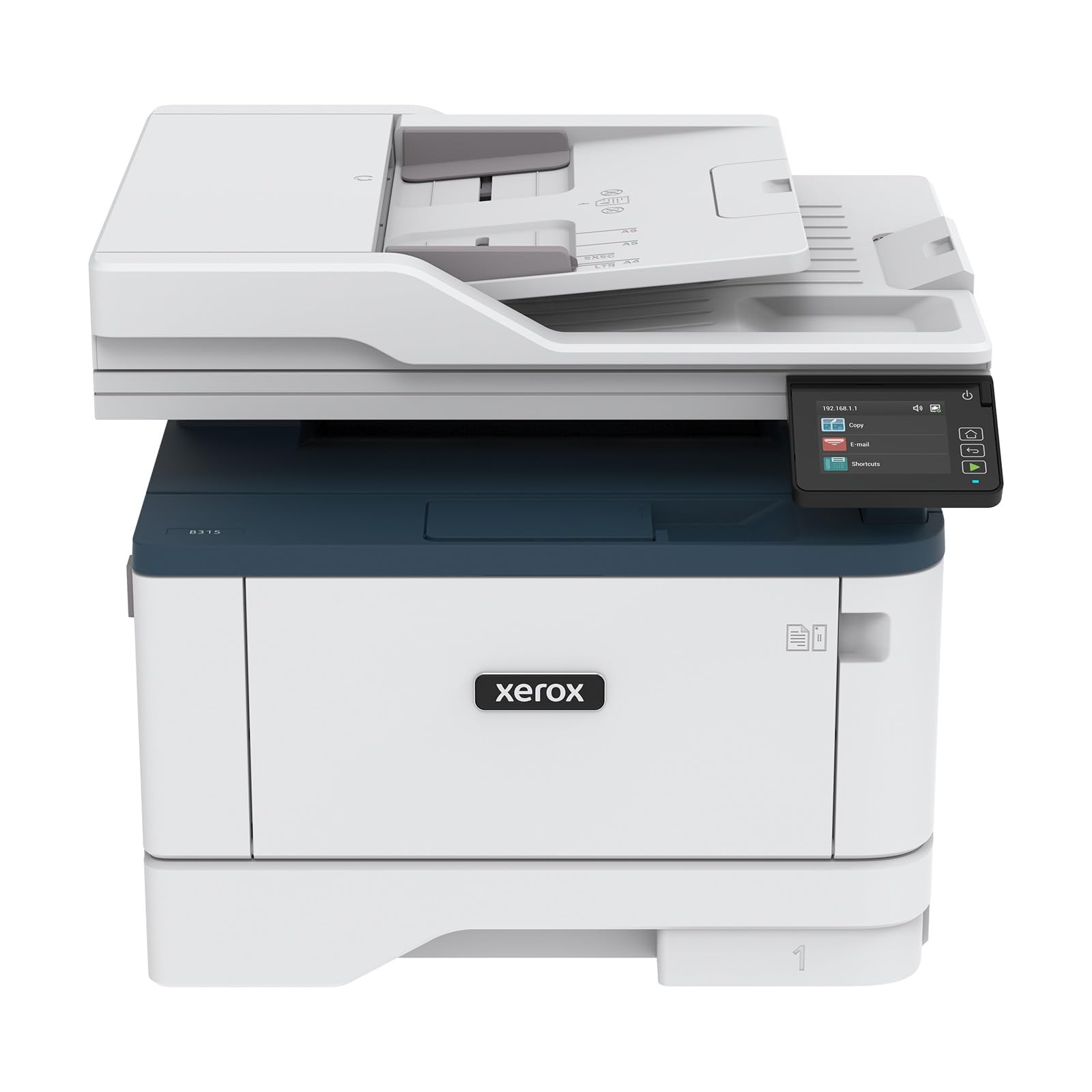
A fast black-and-white all-in-one that fits a small booklet office and scans too.
A mono laser that behaves like a small office machine. It prints up to 42 Letter-sized pages per minute, auto-duplexes both sides, and holds 250 sheets in the tray — enough to finish a short booklet run before you reload. It also copies and scans, so producing a booklet stays inside one device.
Connectivity covers the modern desk: built-in Wi-Fi with Apple AirPrint, Mopria Print Service, and Chromebook printing. The Xerox Print & Scan Experience software handles auto-straighten, receipt scanning, and auto-cropping, which helps when you are digitizing reference material before a print run. Security features protect access and sensitive documents, useful when booklets carry client details.
The quiet truth is that setup is the swing factor. Buyers report ultra-fast print speeds with crisp, professional quality — professional-looking output, ADF time-saving, and reliable feeding without jams. But a small office can hit a setup wall that eats hours. Chromebook users specifically need Mopria Print to get going, since Xerox drivers don’t install there. Wi-Fi sometimes needs a couple of attempts before it holds. It is a compact, well-built machine for a small team that wants scanning and fast duplex booklets in tight space.
Shared workgroup: a small office that wants fast duplex booklets plus scanning in one compact footprint.
Photo printing: the setup path can be stubborn, and Chromebook owners should plan on Mopria Print from day one.
6. Brother MFC-L5710DW Printer

The 48-page-per-minute bruiser for offices that print booklets like a production line.
If your booklet volume is high enough that speed stops being nice-to-have and starts being the bottleneck, this is the machine. It prints and copies up to 48 pages per minute — the fastest black-and-white rate in this group, edging the 42 pages per minute of the HP LaserJet Pro above. It also auto-duplexes, so every sheet comes out printed on both sides.
The scanner is a quiet strength. A 50-page auto document feeder does single-pass, two-sided scanning up to 60 images per minute, saving searchable and editable Microsoft Office files straight to cloud services, email, and SharePoint from the touchscreen. For an office producing booklets that reference scanned source material, that speed compounds. It runs on Gigabit Ethernet and dual-band wireless so a whole team shares one machine.
The thing people talk about most is the print quality, followed by how painless the setup is. One business buyer ran roughly 1,500 pages on the included toner without a hiccup and praised the searchable-PDF scanning. Toner economics help too: The TN920XXL replacement cartridge is rated for 11,000 pages, and the box includes a 3,000-page starter cartridge. The caveat is fit — one mobile professional hit a USB connector snag that stalled a job, so confirm your cable and connection before a deadline. For a busy office, this is a fast, high-yield booklet workhorse.
7. Brother MFC-L3780CDW Printer

Color booklets at full laser speed, with duplex scanning thrown in.
A digital color all-in-one that treats color booklet pages ruthlessly. It prints 31 pages per minute in both black and color — a whole tier above the 5 pages per minute color pace of the Epson EcoTank — and it auto-duplexes so folded sheets print both sides. Single-pass duplex copy and scan up to 29 images per minute black and 22 color keeps the document side moving too.
The build uses LED illumination instead of a laser, which trims moving parts and points to longer reliability. Connection options are generous: dual-band 2.4GHz and 5GHz wireless, Gigabit Ethernet, Wi-Fi Direct, and a USB port for a single computer. For a small business putting out color programs, that combination means a whole team shares one fast machine without a print server.
What everyone raves about is the output quality and the ease of setup — phenomenal print quality, fast double-sided printing, and an app that links a phone plus several PCs. Colors land bright for documents though not photo-grade, which is exactly right for booklet design. Two things to know: the toner cartridges run costly (the high-yield versions stretch further), and the optional Refresh subscription is best avoided if you dislike services shutting off. Heavy card stock also jams in the auto-duplex path, so hand-feed thick covers. For color booklets at volume, it is a strong performer.
Small color team: you print color booklets every week and want fast duplex output plus scanning in one machine.
Budget tight: thick card-stock covers jam the auto-duplex path, so plan to feed heavy cover sheets by hand.
8. Brother MFC-L8730CDW Business Color Laser All-in-One Printer

A color laser built for booklet runs so big the paper tray never gets a break.
This is the heavy end of the color booklet category. It prints and copies up to 33 pages per minute in both black and color, auto-duplexes, and prints its first page in 9.9 seconds. The box includes Brother Genuine toner rated at 3,000 black and 1,800 color pages, and high-yield replacements are rated at 5,500 black and 4,500 color pages — the numbers that set your cost per folded booklet.
The scanning rig is built for volume too. An 80-page auto document feeder runs two-sided scans up to 104 images per minute, with legal-size glass and a 3.5-inch color touchscreen holding up to 48 customized shortcuts for recurring tasks. Dual-band wireless and Gigabit Ethernet keep a team connected, and a triple layer of security with an integrated NFC card reader lets badge authentication control access.
The reputation here is “serious business machine” — sharp text, professional color, and stable remote printing that lets a team send jobs from another location. The trade-off is size and cost. It is a genuinely large, heavy unit that takes two people to lift, it runs noisy, and replacement toner is expensive and chipped so third-party cartridges won’t work. The auto-duplex path is also unhappy with heavy stock, and some find the color output less bright than they expected. For a color booklet operation where volume is the job, the capacity and speed justify the bulk.
Know the Specs
Pages Per Minute (ppm)
This is how many sheets the printer turns out in a minute, and for booklets it sets your run time. A 42 pages-per-minute laser finishes a stack of text booklet pages in a fraction of the time a 5-pages-per-minute color inkjet needs. Color speed matters too — a machine that prints color at 31 pages per minute keeps pace, while one at 5 pages per minute slows every illustrated program to a crawl.
Duplex (Two-Sided) Printing
Duplex means the printer flips a sheet and prints the back automatically — the core feature for any booklet, because every sheet is printed on both sides before it folds. Automatic duplex saves you hand-feeding each sheet; a simplex printer only prints one side at a time, which is fine for a few short programs but slow for a bulk run. Match this to your volume before buying.
Toner and Ink Yield
Yield is how many pages a cartridge or ink set prints before it runs dry, and it decides your cost per booklet. A refillable tank set rated for 4,500 black and 7,500 color pages spreads ink cost far thinner than a small cartridge set. A monochrome toner cartridge rated at 11,000 pages does the same for black-and-white booklet runs. High yield lowers the per-page cost across a long booklet run.
Paper Size and Tray Capacity
Maximum paper size caps your booklet dimensions — a standard printer folds from Letter or A4, while a wide-format model handles up to 13″ x 19″ for oversized spreads. Tray capacity in sheets decides how many booklets you print before reloading: a 250-sheet tray finishes more before a refill than a small tray, which matters on a multi-copy run.
Common Questions
Do I need automatic duplex to print booklets?
Can a standard printer handle a folded booklet size?
Is a monochrome laser or a color inkjet better for booklets?
How many pages will a toner cartridge print for a booklet run?
Can I print booklets from my phone or tablet?
Will third-party ink or toner work in these printers?
What paper capacity do I need for a booklet run?
Can these printers duplex heavy card stock for booklet covers?
Is wide-format worth it if I only sometimes need large booklets?
How fast does the first page come out on these printers?
The Bottom Line
For most booklet work, the printer for booklets that wins is the HP LaserJet Pro 4001dn because 42 pages per minute plus automatic duplex clears text-heavy runs faster than anything else here. If your booklets are in color and ink cost is the enemy, grab the Epson EcoTank ET-2803 with its refillable tanks. And for oversized 13″ x 19″ spreads, the wide-format Epson WorkForce Pro WF-7840 is the one to reach for — with the honest reminder that firmware updates and bulk are the price of that capability.
How we choose
We do not accept paid placement. Every pick is matched to a real buyer and a real use-case; we do not hands-on test units.
Sources
Specifications: manufacturer listings and product documentation. Review insights: verified customer reviews, as of October 2026. Pricing: not shown on this page (it changes often); check the current price via the retailer link.
As an Amazon Associate, Aappliancez earns from qualifying purchases. This does not affect which products we feature.