Disclosure: Some links in this post are affiliate links. As an Amazon Associate I earn from qualifying purchases, at no extra cost to you. Learn more
Specs are compiled from manufacturer listings and verified buyer reviews and can change over time — please confirm the key details on the product page before buying.
If you need internet in a barn, shop, or second building and you do not want to dig a trench or pay a second monthly bill, an outdoor point to point wireless bridge is the fix. Two small radio units aim at each other and pass your existing connection across open air — no cable in the ground, no second ISP. Clear line of sight decides whether the link works: trees, steel walls, and hills block 5GHz and 2.4GHz signals, and no bridge on this list changes that. The second thing is what you plug in at each end — the ports and power method have to match your gear. Every pick below was chosen on published specs plus what buyers report after a season or two outdoors.
This guide is built by comparing the manufacturers’ published specifications and the patterns across verified customer reviews, so you get each pick’s real strengths and trade-offs instead of marketing spin.
You are about to see which kits run on ordinary PoE, which reach past a kilometer, and which ones quietly cap your speed at the port. Below is what you need to choose the right point to point wireless bridge outdoor.
Top Picks

How To Choose The Best Point to Point Wireless Bridge Outdoor
An outdoor bridge is two matched radios that talk to each other across open space. One sits at your router and one sits at the far building. They aim at each other, and your internet rides that invisible path. Getting it right depends on four things you can check before you buy.
Line of sight is the whole ballgame
Radio waves at 5GHz behave a lot like a flashlight beam — they want an unobstructed path between the two units. Trees, walls, and steel structures block that path. Every manufacturer on this list calls out line of sight as a requirement, and the rated distance only holds when the path is clear. Mount as high as you safely can and aim both units face to face.
Port speed caps your real throughput
The radio may be fast, but the Ethernet port at each end is the gate the data has to pass through. A 100Mbps (fast Ethernet) port cannot pass more than that no matter what the wireless link claims. If you want to stream several TVs or run a camera array, look for 1000Mbps gigabit ports. This is the single most common mismatch in owner reports.
How the units get power
PoE (power over Ethernet) sends electricity up the same network cable that carries data, so you only run one wire to each outdoor unit. Some kits use active PoE that works with standard switches, and some use passive PoE with a supplied adapter. Check which one your kit includes and whether the adapter is rated for outdoor use — a surprising number are meant for indoor placement only.
The weather rating explained
IP65 and IP67 are enclosure ratings. IP65 means dust-tight and protected against water jets. IP67 adds protection against temporary immersion. Both matter for a unit bolted to a pole that will see rain, snow, and summer sun for years. Pair the rating with shielded, UV-resistant cable and you have a link that survives the seasons.
Side-by-Side Comparison
| Model | Best For | Rated Range | Data Rate | Frequency | Amazon |
|---|---|---|---|---|---|
| The EZ-Bridge-Lite EZBR-0214+★ Best Overall | Plug-and-play barn links | 3 miles | 100 Mb/sec | 2.4GHz | Amazon |
| Wireless Bridge NBE-5AC-GEN2 BundleLongest Reach | Long 15+ km rural links | 15+ km | 450+ Mbps | 5 GHz | Amazon |
| WAVLINK AX1800 Outdoor WiFi 6 ExtenderStarlink Ready | Starlink and off-grid coverage | Outdoor coverage | 1800 Mbps | 2.4GHz + 5GHz | Amazon |
| BrosTrend 5KM Wireless Bridge | Budget building-to-building | 5 km | 867 Mbps | 5 GHz | Amazon |
| Omada EAP215-Bridge KIT | Managed multi-site networks | 5 km | 867 Mbps | 5 GHz | Amazon |
| AdaLov CPE660 3KM Bridge | Farm and camera links | 3 km | 300 Mbps | 5.8 GHz | Amazon |
| UeeVii CPE5824 Dual Band Bridge | Dual-band flexibility | 5 km | 1200 Mbps | 2.4GHz + 5GHz | Amazon |
| UeeVii CPE450 + WR3000K Kit | Full bridge plus router solution | 3 km | 300 Mbps | 2.4GHz + 5.8GHz | Amazon |
| Ubiquiti LOCO5AC Bundle | Compact high-throughput links | 10+ km | 450+ Mbps | 5 GHz | Amazon |
Detailed Reviews
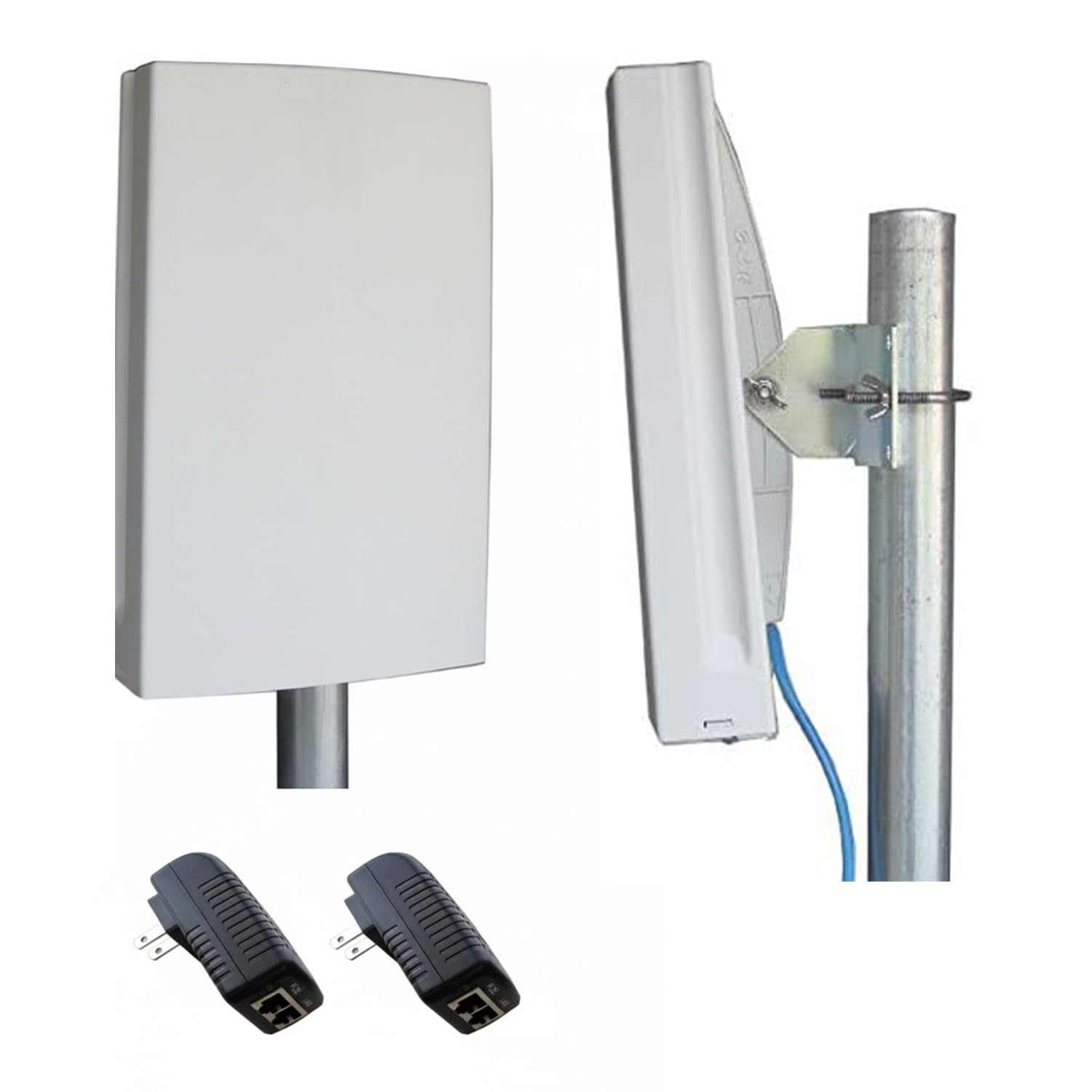
1. EZ-Bridge-Lite EZBR-0214+ Outdoor Wireless Point to Point System
Our pick — 4.5+★ from 650+ verified ratings; the strongest balance of quality and price.
The 2.4GHz barn-link workhorse that has been bridging buildings since 2010.
The number that defines this kit is 3 miles — that is the distance it will bridge between two networks when you have good line of sight. It runs in the 2.4GHz unlicensed spectrum at 250mW, which is the crowded band your home router, microwave, and cordless phones also use. The upside of 2.4GHz is that it pushes through walls and foliage far better than the higher 5GHz band, which is exactly why it holds up in real yards with a few trees in the path.
The setup story is where this one wins. It ships as a plug-and-play kit — you mount, you aim, you power up, and it links. What owners keep coming back to is how reliably it just comes up and stays up. A barn workshop 500-plus feet from the house runs a Roku TV and a Zoom call at the same time with no speed loss, and that link came through two Michigan winters.
Budget around the extras before you mount it. It needs four CAT5 cables that are not in the box, plus PoE to power each radio over the network cable. Owners also flag the mounting bar as stiff to turn left and right, and the bottom cover as fiddly — the jack does not line up cleanly with the hole and the plastic tabs are thin. Set against the units at the top of this list, it is the slower link by a wide margin — 100 Mb/sec here against 450+ Mbps on the NBE-5AC-GEN2 — but it is also the one that has been proven in the field the longest.
What earns its keep
- 2.4GHz spectrum cuts through walls, foliage, and the kind of clutter that stops higher bands
- 3-mile clear-sight bridging covers a big property from two fixed points
- Plug-and-play kit means no laptop config session before you climb the ladder
- Outdoor build has survived multiple winters in real installations
Budget these in too
- You supply four CAT5 cables and PoE hardware — neither is included
- Mounting bar is stiff to adjust, and the cable cover is fiddly to seat
- 100 Mb/sec ceiling is the slowest link on this list, so plan around it for heavy streaming
Settled choice for: homeowners linking two buildings on one property where reliability trumps raw throughput, and where 100Mbps feeds a few devices at the far end.
Think twice if: you want gigabit-class speed to a shop full of cameras and TVs — go up the list for a faster radio.
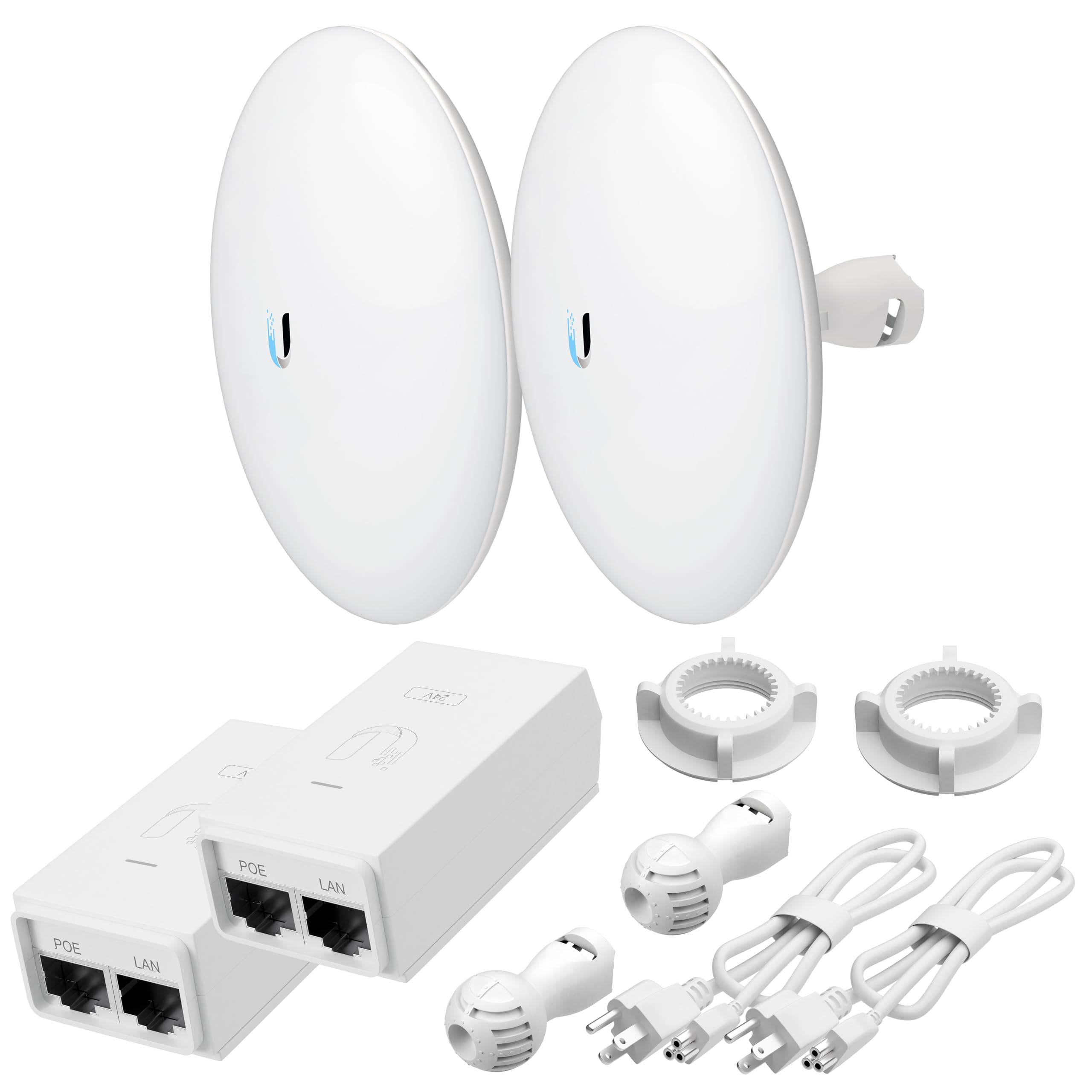
2. NBE-5AC-GEN2 Bundle of 2 Outdoor Point-to-Point Wi-Fi Bridge
The 19dBi long-haul specialist for links measured in kilometers, not feet.
When the distance is measured in kilometers rather than feet, antenna gain does the heavy lifting. This bundle pairs a 19 dBi directional antenna with the 5GHz band and hits over 450 Mbps real-world throughput. That 19 dBi figure is a measure of how tightly the radio focuses its energy — think of it as a spotlight versus a bare bulb. Against the WAVLINK unit’s 8dBi antennas further down this list, the focused beam is the reason this kit can hold a link that the wider-coverage units simply cannot.
It arrives pre-configured, so the two radios are already talking to each other before you take them from the start. Alignment is made easier by a built-in signal strength indicator that tells you, as you turn the unit, when you have found the balance. Owners who have done the install describe a roughly one-hour job once you have run the cabling, and the link holds right away. Aimed 300 feet apart, the pair works as expected — the other install pattern that comes up again and again is that buying the mounting arms separately is the only extra piece you need to sort out before the units go up.
There is an honest caveat worth hearing before you order. A small number of owners mention the two units shipping with the same IP address from the start, which means neither can speak to the other without logging in and changing one of them. If that happens, you need a laptop with an Ethernet port and a bit of patience. Most pairs arrive correctly configured and link up right away, but if you are not comfortable editing network settings, budget for a call to a tech-savvy friend or take a close look at the Omada kit below, which manages its own pairing through the TP-Link Omada cloud platform instead of relying on manually stamped settings.
Distance-to-size trade: a compact all-in-one design that combines radio and antenna in a single weatherproof housing, which is what lets you get the tight aiming this range requires without a separate dish.
The honest bit: mounting arms are a separate purchase, and a few units arrive with matching IP addresses that need a laptop and a change to fix — worth knowing before the ladders come out.
Who it fits: rural, farm, or multi-property setups where the far point is genuinely far — kilometers, not hundreds of feet — and where a focused beam beats a wide spray.
Look elsewhere if: you want zero setup friction and can live with shorter range — the ones further down this list hand you that trade.
3. WAVLINK AX1800 Outdoor WiFi 6 Extender
The Starlink companion that turns one dish into WiFi 6 coverage for a whole acre.
Under the hood this is a WiFi 6 access point, which means it speaks the newest wireless standard and can hold 256 device connections at once. That number matters if you are running a farm full of cameras, sensors, and phones off one point. It puts out 1800 megabits per second across dual bands — 1201Mbps on 5GHz and 574Mbps on 2.4GHz — so a single radio feeds both the fast devices nearby and the slow ones far away. For a remote install with no power outlet, the 54V passive PoE adapter that ships in the box means one Ethernet cable carries both power and data up to the unit. Full Starlink compatibility makes it the natural pairing for off-grid and rural internet.
The protection here is a step above the rest — a true IP67 enclosure, which is the rating that includes protection against temporary immersion, not just rain and dust. Fiberglass antennas, 15kV ESD protection, and 6kV lightning surge protection round out the outdoor story. Customers note it covering ground in a single broadcast — one install reaches 300 yards in line of sight, another gets 391 feet of reliable range in one direction before dropping off. The multi-mode flexibility (AP, Router, Repeater, Mesh, WISP) means you can run it as a standalone access point or mesh several units together on one name and password.
Two things to know before you commit. The setup instructions are vague, and a few users have had trouble getting the admin interface to cooperate on first boot — one report describes the radio output being dead until the next day, which is not reassuring for a critical link. The other issue is the admin password: it cannot be set to a strong custom value, which means this unit is better kept on a network you do not mind being lightly protected. For a private farm or rural setup, neither is a deal-breaker. For a shared or public-facing install, factor that in.
The spec that sells it: WiFi 6 dual-band output at 1800 Mbps, with 256 concurrent connections and IP67 weatherproofing in one housing.
The trade you accept: vague setup docs and an admin interface that does not let you set a strong custom password — fine for a private network, not the unit for a public one.
The right buyer: someone with a Starlink dish or a rural plot who needs one strong, weatherproof access point covering a big open area.
Pass on it if: you need this to be a locked-down, hardened network endpoint — the admin password limitation will bite.
4. BrosTrend 5KM Wireless Bridge Point to Point Outdoor

A real 5km bridge with dual gigabit ports at the value tier — and the 100Mbps internal switch that comes with the price.
The headline makes sense on paper: 5 kilometers of barrier-free line-of-sight range, 867 Mbps on 5GHz, dual 1000 Mbps LAN ports on each unit, and full IP65 weatherproofing with 6kV lightning protection. That is a serious spec sheet at this tier, and it is compatible with Starlink as well as the usual barn, shop, garage, and farm distances. Each unit comes with two ports, which lets you feed a router on one end and a PoE camera on the other without adding a switch in between.
On setup, the pattern in the owner reports is that pairing works and speed holds up. Owners describe real links: 400 feet through trimmed trees delivering 98 Mbps downstream and 80 upstream, a 75-yard house-to-shop run that eliminated buffering and now carries computers, pool WiFi, and two Ring cameras, and one install that replaced a pair of cheap extenders entirely and was recommended to a friend. The included online setup video is clear enough to walk you through the pairing even where the printed instructions are a bit muddled. This is what a decent budget-tier bridge looks like when the pairing holds.
The catch is reliability, and one specific spec detail underneath it. The dual ports are gigabit, but the internal switch is a 100Mbps switch — this is what one reviewer caught when they measured 25 Mbps at 12 feet apart and worked out that no matter what the wireless link can do, the wired port is the ceiling. Reports of needing to reset both ends after even a ten-second power blip also come up, and one longer-term report notes it working for about six months before it stopped connecting. Most owners have it running without any of that, but if your link feeds anything critical, know what you are buying.
Big features at the value tier: 5km rated range, 867 Mbps radio, dual 1000 Mbps ports on each unit, IP65 enclosure, 6kV lightning protection — a real bridge, not a toy extender.
What to watch: the internal switch runs at 100Mbps, so a fast wireless link can still be capped at the port, and a small minority report needing periodic resets after power interruptions.
Best for: budget-conscious buyers linking a house to a shop, driveway, or outbuilding where 100Mbps is enough and reliability has a known floor.
Not for: anyone feeding a camera cluster or media server that needs the full wireless speed — the 100Mbps switch is the real limit.
5. Omada 5GHz AC867 Wireless Bridge EAP215-Bridge KIT

The one that plugs into a managed network and behaves like the rest of your gear.
What sets this kit apart is the management layer. It runs on the TP-Link Omada cloud platform, which means you manage the bridge, your access points, switches, and gateway all from one place. For a small business, that is worth more than any radio spec. On the radio side you get 867 Mbps on 5GHz across up to 5km of clear-sight range, three 1000Mbps ports on the unit, and IP65 weatherproofing with 6kV lightning protection. It gets power either through PoE (adapter included) or a DC adapter, so you have options depending on where each unit lands.
The pairing is pre-configured from the start and the LEDs do the walking — they light up as you aim so you can dial the link in without opening a laptop. Owners describe real-world links between buildings up to 300 feet apart, throughput holding at 400 to 500 Mbps under favorable conditions, and 600 to 650 Mbps download in the best line-of-sight cases. The setup aspect is what people speak about most — it earns the top spot on the list of things owners mention. One recurring pattern in the reports is that the same unit usually connects buildings on a wide property, from a few hundred feet to 75 yards, without cable in the ground.
The trade-off is that this is the most “network technician” pick here. The Omada management layer is a genuine strength on a business network, but on a single home install with one bridge and two routers it is more machinery than you need. It is also priced in the mid range, above the cheaper bridges but below the long-haul specialist. Both units have to be on the same Omada controller to get the full benefit, which means a small extra step for a home user who just wants the link to come up and stay up.
Why this earns the pro label
- Omada cloud management ties the bridge into a managed network alongside APs, switches, and gateways
- Three 1000Mbps ports per unit — enough for multiple wired devices without a switch downstream
- PoE or DC power, so you can choose by where the unit sits, not the other way around
- Pre-configured pairing with LED-guided aiming gets the link up without a laptop
When it is more than you need
- Full Omada benefits want a controller, which is overhead for a single home link
- Mid-range price sits above the value-tier bridges, so budget-conscious single-property buyers may not need the management layer
Suits: small businesses and multi-building properties already running Omada gear, or anyone who wants to manage the outdoor link from the same dashboard as everything else.
Overkill for: a single home-to-shop link where the management layer never gets used — the value pick above handles that job for less.
6. AdaLov CPE660 3KM Outdoor Wireless Bridge

Two radios, two PoE ports, and a farm-worth of use cases — the utility player of the group.
This is the pick with the widest list of supported use cases — farm to barn, home to detached garage, warehouse to warehouse, camera pole to NVR, even a construction site office. The radio runs on 5.8GHz at up to 300 Mbps, sits behind a 14dBi directional antenna, and bridges up to 3km with a clear line of sight. The 14dBi is a measure of how much the antenna focuses the beam — enough concentration to hold a stable link over distance without needing an oversized housing. It is compatible with Starlink, which makes it a natural fit for rural setups where the dish is your only internet.
Setup is pre-paired WDS mode, so it links without a laptop session — mount, aim, power on, and the two units find each other. Owned reports back that up: a boathouse router 400 feet away that buried CAT6 could not reach has been running fine since install, security cameras and mobile browsing included, and one installer put it up solo to give a guest house 500 feet of streaming capability, getting around 20 Mbps on the soft install and closer to 45 Mbps once cabling was firmed up.
Two real cautions before you power it. First, the ports are not interchangeable — one is 24V-only and one takes 24-48V, and feeding the wrong port can damage the unit. Second, the user instructions are on the light side, plenty of buyers have had to fall back on the community forums or a helper to get the initial link sorted. The good news is that both issues are known and simple to avoid once you have read the manual. The 300 Mbps rating also means this is not the throughput pick — it is the “cover a lot of remote corners with one kit” pick.
The practical result: 3km clear-sight range at 300 Mbps, 14dBi directional antenna, dual 100Mbps Ethernet ports with a 24V and a 24-48V PoE option, and pre-paired WDS mode so no laptop is needed for the first link.
The fine print: the two PoE ports take different voltages — mixing them up can fry the unit — and the user guide is thin enough that many buyers look online for help with the first pairing.
Reach for this if: you are wiring up a property with camera locations, outbuildings, or a construction site, and you want one kit that handles most of those layouts.
Skip if: you want a butter-smooth manual — the PoE voltage note and the sparse guide make this a read-the-docs install.
7. UeeVii 2.4G & 5G Dual Band Wireless Bridge CPE5824

Dual-band on both ends — the pick that lets the far building fall back to 2.4GHz when 5GHz struggles.
What makes this one useful is that both ends speak 2.4GHz and 5GHz, which gives you a fallback when one band gets crowded. The radio peaks at 1200 Mbps with 433 Mbps network speed, and each unit carries two 1000Mbps ports for wired gear. The antenna is a fixed 15dBi directional, and the transmit power auto-adjusts up to 27dBm to adapt to environmental changes.
The owner reports on reliability are the strongest signal here — it earns the most mentions by far for staying connected. Set the two units up a foot apart before mounting and they pair in seconds; owners describe pairing again at 400 feet, easing the job by watching the green LEDs that show signal strength as you aim. A pair across a 100-yard house-to-shop link with good line of sight runs at full speed and holds, and setting up on a small property to feed a master router and 10 security cameras works once the pair is initially bench-tested. The manual is well translated, and the config screens are straightforward for non-techies.
Two honest catches. The kit ships with default SSIDs and weak default passwords, and changing them takes real time because the config interface has one-to-five-minute delays between screens. Skim past it and you leave open networks that were never meant to be. The other is speed variability — some installs run full and some land around 200 Mbps on a 500 Mbps fiber line at 80MHz channel width, which is a big gap. Neither is a flaw, but the first units also require a laptop session to lock down before they go up a pole.
What makes it worth the shelf space
- Dual 2.4GHz and 5GHz link makes the far end more sturdy across changing conditions
- Two 1000Mbps ports per unit let you wire cameras and a router without a downstream switch
- 15dBi directional antenna with auto-adjusting up to 27dBm transmit power
- IP65 weatherproof enclosure for continuous outdoor use
Worth planning around
- Config interface has 1-5 minute delays between screens, making security changes time-consuming
- Units ship with default open SSIDs and weak passwords that need changing before deployment
- Real-world throughput varies widely across installs — from full speed to around 200 Mbps
The right setup: a barn, shop, or outbuilding where you want flexibility across both bands and multiple wired devices at each end.
Skip if: you expect a hard-lockdown network from the start — get ready to spend an hour in the config screen first.
8. UeeVii CPE450 Wireless Bridge and WR3000K WiFi Router Kit

Two-part kit that includes the bridge and the router — the “one box, one project” approach.
Most bridges stop at the far end and leave you to source a router for the remote building. This kit does not. You get the CPE450 outdoor bridge pair to cross the gap plus the WR3000K, a WiFi 6 router with six antennas on the far side to broadcast the connection inside. Between the two, you have the full link from main building to far building without adding another purchase. The 5.8GHz bridge runs at up to 300 Mbps across dual 10/100Mbps RJ45 ports and covers up to 3km with the built-in 14dBi directional antenna.
Power flexibility is a real strength here. The bridge LAN2 port accepts both non-standard 24V/48V and standard 48V, and LAN1 takes non-standard 24V/48V — so this is the friendlier one if you already have a PoE switch in a rack. Mounting options are wall or pole using the included hoops, and the IP65 casing handles the weather. Owners describe short links running beautifully — a 150-foot point-to-point delivering full WiFi and lag-free streaming, a metal shed getting a clean signal, and one barn-link test at 50 Mbps service pushing a constant 5 Mbps out to the building. The pairing is a simple dial if you ever need to re-pair.
Two known caveats, and both are fixable. The mounting brackets that hold the units onto the poles are not in the box, which is easy to miss until you are on the ladder. And the printed instructions are thin — the recurring advice from owners is to read the manual cover to cover and be careful about which side of the unit the CAT cable plugs into. The router bonus matters here too: this kit is the natural pick if you want every piece of the solution in a single order.
The whole solution: CPE450 bridge pair plus a WR3000K WiFi 6 six-antenna router — link and local broadcast in one box, with bridge speed up to 300 Mbps over a 3km rated range.
The parts to note: mounting brackets are not included, and the printed guide is thin enough that owners consistently recommend reading it end to end before touching the pole.
Best for: anyone who wants a single order to cover the whole house-to-barn link and the WiFi at the far end, without shopping for a separate router.
Not for: someone with an existing router on both sides who only needs the bridge — you would be paying for a router you will not use.
9. Ubiquiti LOCO5AC Bundle of 2 Nanostation LOCO 5AC

Tiny, quiet, and rated for links past 10km — the professional’s favorite in a compact shell.
At the top of the range, the spec that matters is link distance, and this bundle clears 10km with the 5GHz band running over 450 Mbps throughput. The units are the compact airMAX NanoStation 5 AC Loco, and what people love about them is how much link they put out from a housing small enough to disappear on a pole. Noise immunity is specifically called out — these devices hold peak performance even in crowded radio environments, which is worth its weight if you are on a hilltop or in a place with a lot of other towers around.
The bundle arrives pre-programmed as a point-to-point link, so far as the pair goes it is ready to use. Two PoE injectors with power cords ship in the box, so you power each unit over the same Ethernet run that carries the data. Owners describe real-world links in the range most people actually need — 350 feet line of sight holding a stable ~100 Mbps with essentially automatic setup, and outbuilding coverage that took one user from 1 bar of signal to 5. The main effort in those installs was the cable routing and mounting, not the network side, which is exactly what you want from a networking product.
Two honest caveats. First, some pre-configured pairs ship locked to a matching setting that needs fixing before they will link — the setup aspect on this kit is one of the two things owners discuss most, and the pre-configured claim is genuinely situational. Second, the physical install still requires an Ethernet port on the setup laptop, which is why some newer laptops need a USB-to-Ethernet adapter, and the included printed material is effectively a photo walkthrough rather than a text guide. Neither is fatal — both come up because the audience is professional installers who expected more documentation.
The reason it earns the top tier: a 10+ km rated link with 450+ Mbps throughput, firm noise immunity, and two PoE injectors in the box — the ready-to-deploy professional answer.
What to have on hand: a laptop with an Ethernet port (or a USB adapter) and enough cable to reach each unit, plus a willingness to hop onto the owner forums if the pair ships with a conflicting setting.
Pick this if: you want the most compact, highest-rated link at the top of the range, and you are comfortable with a networking product that assumes you know what you are doing.
Look below if: you need a fully hand-held setup — several of the picks further up the list get you a live link without opening a network admin page.
Know the Specs
Data transfer rate (Mbps)
This is the maximum speed the radio can push under ideal conditions — often called the “wireless link rate.” A 300 Mbps unit sounds fast on paper, but remember that the rated speed assumes a clean line of sight and no interference, and the wired port at each end is the real ceiling. If you have 100Mbps ports, the practical speed cannot exceed 100 Mbps even if the radio claims 867. Match this spec to what you are actually sending across — a few cameras and a phone, or a full media server.
Antenna gain (dBi)
Higher dBi means the antenna focuses the wireless signal into a tighter beam, like a flashlight versus a lamp. More gain gives longer reach but a narrower “balance” for alignment — so mounting precision matters more. A 19 dBi unit will reach across kilometers if you aim it right, while an 8dBi unit covers a broader area but at shorter range. For a very distant point, high gain wins. For a closer building where you want easy aiming, lower gain can be the friendlier choice.
PoE (power over Ethernet)
PoE sends electrical power and network data over one cable, which is essential outdoors because it means you only run a single wire to each unit. Some kits use “active” PoE that plays nicely with standard PoE switches, others use “passive” PoE with a supplied adapter. Check which one ships with your kit and whether the adapter is rated for outdoor placement. A surprising number of included adapters are intended to stay indoors, which changes how you plan the install.
Weather rating (IP65, IP67)
These are enclosure ratings that describe what the case can survive. IP65 means dust-tight and protected against water jets — a hard-driving rain is fine. IP67 goes further and adds protection against temporary immersion. Both are enough for pole-mounted outdoor use in normal weather. What they do not cover is the cable — that is why outdoor bridges want shielded, UV-resistant Ethernet cable, or the cable itself fails long before the electronics do.
Common Questions
Do I really need a clear line of sight for an outdoor wireless bridge?
What is the difference between 2.4GHz and 5GHz bridges?
Will a point-to-point bridge work with my existing router?
How long do outdoor wireless bridges typically last before failing?
Does PoE power the bridge through a regular Ethernet cable?
How is IP65 different from IP67 for outdoor bridge enclosures?
Can I run an outdoor wireless bridge without line of sight?
Do these bridges work with Starlink?
What cable do I need for an outdoor wireless bridge install?
What speed can I actually expect from a 5km bridge?
Can I mount these bridges on a wall or only on a pole?
The Bottom Line
For most buyers, the point to point wireless bridge outdoor that earns its keep is The EZ-Bridge-Lite EZBR-0214+, because it has been doing this exact job since 2010, is genuinely plug-and-play, and clears walls and foliage on the 2.4GHz band that its faster 5GHz rivals struggle with. If your two buildings are more than a kilometer apart and you want the longest reach, grab the NBE-5AC-GEN2 bundle — its 19dBi focused antenna is what makes long links possible. And for a complete house-to-barn solution in one order, with the router included so nobody has to buy a second box, the UeeVii CPE450 + WR3000K kit is the one to reach for.
One nudge before you commit: the honest truth in this category is that the spec sheet on the box rarely tells you what your install will feel like once trees, port speed, and aiming are in play. The EZ-Bridge-Lite’s real edge is that it does not ask much of you — mount, aim, power on, and it comes up. If reliability and simple setup are your top two priorities, that is the pick to order first.
How we choose
We do not accept paid placement. Every pick is matched to a real buyer and a real use-case; we do not hands-on test units.
Sources
Specifications: manufacturer listings and product documentation. Review insights: verified customer reviews, as of October 2026. Pricing: not shown on this page (it changes often); check the current price via the retailer link.
As an Amazon Associate, Aappliancez earns from qualifying purchases. This does not affect which products we feature.