Disclosure: Some links in this post are affiliate links. As an Amazon Associate I earn from qualifying purchases, at no extra cost to you. Learn more
Specs are compiled from manufacturer listings and verified buyer reviews and can change over time — please confirm the key details on the product page before buying.
If you want a printer that actually prints instead of turning your evenings into a calibration project, the answer is a machine that levels its own bed, sets its own nozzle height, and hands you a finished part. That is what “plug and play” means in 3D printing — the printer does the tedious setup work, and you just load a model and press start. The nine picks below all ship mostly or fully assembled, all run automatic bed leveling, and all are aimed at people who would rather hold a finished object than a feeler gauge.
This guide is built by comparing the manufacturers’ published specifications and the patterns across verified customer reviews, so you get each pick’s real strengths and trade-offs instead of marketing spin.
Speed, build volume, and how much you have to fiddle after unboxing are what separate these machines. Here is what to look at inside every plug and play 3d printer before you commit.
Top Picks



How To Choose The Best Plug and Play 3D Printer
Three numbers do most of the work in this category: how fast the machine prints, how big an object it can produce, and how hot the nozzle gets. Get those three right for your projects and the rest is comfort features.
Print speed and acceleration are two different things
Print speed is how fast the nozzle travels — the headline figure you see quoted, like 500mm/s. Acceleration is how quickly it reaches that speed, measured in mm/s² (millimeters per second squared, essentially how hard it can brake and punch out of every corner). Many CoreXY printers here run 20,000 mm/s², which matters because a printer that reaches top speed fast finishes small detailed parts quicker than one that never gets out of first gear.
Build volume sets what you can actually make
Build volume is the box of space the nozzle can reach, written as width x depth x height. A 220 x 220 x 220mm printer handles figures, brackets, and organizers. A 12 x 12 x 11in chamber fits helmets, large props, and a full plate of parts at once. Buy for the biggest single object you plan to print, not the sum of everything you will ever make.
Hotend temperature decides your filament menu
Ordinary PLA prints around 200°C. Carbon-fiber reinforced and high-temp nylon blends need far more heat — that is why some machines here top out at 300°C, 320°C, or 370°C. If you already know you want strong engineering parts, match the nozzle temperature to the filament spec sheet before you buy.
Side-by-Side Comparison
| Model | Best For | Max Speed | Build Volume | Nozzle Temp | Amazon |
|---|---|---|---|---|---|
| Bambu Lab A1★ Best Overall | First printer, auto everything | 10,000 mm/s² accel | — | — | Amazon |
| Creality K1CTop Performer | Carbon-fiber and high-temp work | 600mm/s | — | 300°C | Amazon |
| ELEGOO Centauri CarbonEnclosed Pick | Enclosed printing with camera | 500mm/s | 256x256x256mm | 320°C | Amazon |
| QIDI PLUS4 | Big high-temp parts | Core XY | 12 x 12 x 11in | 370°C | Amazon |
| Anycubic Kobra S1 Combo | Multi-color on a budget | 600mm/s | — | — | Amazon |
| Creality K2 SE | Up to 16-color printing | 500mm/s | 220 x 215 x 245mm | — | Amazon |
| FLASHFORGE Adventurer 5M | Open-frame everyday printing | 600mm/s | 220x220x220mm | 280°C | Amazon |
| Entina Tina2 Plus | Kids and classroom desks | 250mm/s | — | — | Amazon |
| AOSEED 3D Printer for Kids | AI-generated toy models | — | — | — | Amazon |
Detailed Reviews
1. Bambu Lab A1 3D Printer
Our pick — 4.5+★ from 650+ verified ratings; the strongest balance of quality and price.
The one that levels, calibrates, and self-checks so you never touch a paper shim.
For the person who wants a finished model tonight and not a weekend of setup, this is the pick. Its whole pitch is automation: the printer handles bed leveling, Z-offset (how close the nozzle sits to the plate), and flow rate on every job, and it even tunes the flow rate while printing so extrusion stays even. It runs a 10,000 mm/s² acceleration figure, so it gets to work fast and tops out neatly on small detailed parts. Owners keep coming back to the print quality above everything else — it is easily the most-discussed strength of this machine — and they also flag how easy it is day-to-day with kids. A ten-year-old can load filament and start a print without adult help.
You get a big build area, but you pay for it in space: at 22 pounds and 21.76 x 20.83 x 12.87 inches, this printer needs its own table and sits at the heavier end of this whole shortlist. For comparison, the AOSEED kids machine weighs 8.82 pounds, so this is a fixed-home printer rather than something you move between rooms. Setup is still simple — buyers report that the “10 screws into the base we’re a little tricky because it was hard to tell if they were catching but you’ll get the hang of it once you do the first few.” That is about as hard as assembly gets, and after that the printer takes the wheel.
Multi-color printing is available, but only if you add the AMS lite (the multi-spool feeder sold separately or bundled in the Combo version) — the base printer is single-color. So if color-swapping figurines are the whole point, factor that in before you order.
What earns it first place
- Full auto calibration means no manual leveling or Z-offset fiddling
- 10,000 mm/s² acceleration keeps small parts moving quickly
- Print quality is the thing owners rave about most by a wide margin
- Runs quietly thanks to active motor noise canceling
- 1-Clip quick swap nozzle makes maintenance a two-minute job
Where it asks for a trade-off
- 22 pounds and 21.76 x 20.83 x 12.87 inches — plan a permanent spot
- Multi-color needs the AMS lite, sold separately
- A handful of screws in the base take a few tries to seat
Buy it if: you want a first printer where the machine does the setup and you just press go.
Think twice if: multi-color matters from day one and you would rather not buy the AMS lite separately.
2. Creality K1C 3D Printer
Speed and engineering plastic in one enclosed box.
If you need parts that survive real load — brackets, drone frames, functional prototypes — this one prints them in carbon fiber reinforced filament, and that is the reason it sits near the top. The 300°C hotend and hardened steel nozzle tip let it handle PLA-CF, PA-CF, PET-CF, and ASA, which ordinary printers cannot touch. It runs up to 600mm/s with 20,000 mm/s² acceleration, and the enclosed chamber keeps the heat in and the noise down — silent mode drops it to 45dB, roughly the level of a quiet conversation across the room. The direct extruder has a bolster spring and ball plunger that hold grip instead of loosening over time, so clogs and skipped filament are rarer than on older designs.
You can go from box to first print in about 15 minutes, according to owners. One sums up the whole first month this way: “I’ve run PETG, PLA, TPU, and ABS through it with absolutely no issues or defects in print quality.” The K1C is also an upgraded version of the K1 SE and K1, and it comes with an AI camera that watches for foreign objects and records time-lapses while you are away from the desk.
The catch is consistency at the unit level — quality is this machine’s most-praised aspect, but the print quality itself splits feedback: most runs come out clean, and a minority report failures that only resolve after support walks them through a fix. Buy it for the closed chamber and carbon capability; test the first few prints thoroughly while the return window is open.
The real draw: 300°C plus a hardened nozzle is the difference between printing PLA forever and printing PA-CF when a part needs to hold load, and the enclosure enables ASA without warping.
What to verify early: the fault that trips some units shows up mid-print, so run a long job in the first week rather than a test cube.
Matches: makers who need carbon fiber and high-temp plastics in a machine that ships ready to run.
Look elsewhere if: you only ever print PLA — you would be paying for capability you never switch on.
3. ELEGOO Centauri Carbon 3D Printer
An enclosed carbon-ready machine that arrives pre-calibrated and watches its own prints.
This is the closed-chamber option for someone who wants carbon fiber capability but not the fuss of assembling a gantry. It ships fully assembled and pre-calibrated with auto bed leveling, so the whole unboxing-to-printing window is short — owners routinely report the first print inside an hour. The build volume is 256x256x256mm (10 x 10 x 10 inches), which is a genuinely useful box for helmets, big brackets, and batch parts. Speed runs up to 500mm/s with 20,000 mm/s² acceleration, and the die-cast aluminum frame holds steady at those speeds so surfaces stay smooth.
You can print carbon fiber reinforced filament because of the 320°C brass-hardened steel nozzle plus the enclosed chamber. The built-in chamber camera with dual LED lighting lets you check on a long print from your phone — it also records time-lapses. There is a substantial owner base behind this one, with the print-quality and beginner-friendly reports piling up.
Two honest notes. First, the full 256x256x256mm volume requires removing the filament cutter, so plan your big prints accordingly. Second, the enclosed design runs warm — a few owners mention the fans and vibration are louder than expected, and some filaments want a glue stick for adhesion. Compared with the Bambu A1 above at 22 pounds, this is a 38.5-pound machine, so it wants a steady, permanent bench rather than a shelf you might rearrange.
Reach for this if: you want enclosed, carbon-fiber-capable printing with a camera and you are happy to leave it in one place.
Steer clear if: you print only PLA on a small desk and value a light footprint — the chamber and camera are capability you would not be using.
4. QIDI PLUS4 3D Printer

The biggest chamber and the hottest nozzle on the list — built for parts that would warp anywhere else.
When your project is a twelve-inch prop, a large mold, or an engineering part in PPS-CF or PPA-CF, this is the machine that can physically make it. The print area measures 12 x 12 x 11 inches, so you can batch several models at once instead of printing one at a time. The active heated chamber runs 400W and holds temperature more evenly thanks to air circulation and dual-layer insulation — that is what stops big high-temp prints from warping or cracking halfway through. The upgraded 80W hotend reaches 370°C, the highest ceiling here, opening up PPS-CF, PPA-CF/GF, ABS, ASA, PC, PA, and PET.
Sturdiness is the second half of the pitch. An independent dual motor-driven Z-axis, a 6mm thickened aluminum hot bed, and upgraded 10mm linear shafts and lead screws give the frame the flatness and rigidity that large high-temp prints demand. Unbox to first print runs about ten minutes, and remote monitoring, a HD camera, and filament wrap and break detection round out the package.
As a first-time owner, expect an early firmware update over USB as part of the routine, and the heated chamber takes a while to reach its set temperature — owners note the trade-off between high-temp capability and the wait before you press go. It also arrives at 59.4 pounds, the heaviest pick here, so budget a dedicated bench and a second pair of hands. The auto leveling works well for most, with a minority reporting a leveling quirk that a manual Z-offset nudge resolves.
Who it is built for: the maker whose calendar is filled with big, dimensionally critical parts, and who needs the 65℃ chamber plus 370°C nozzle to get there.
Best fit: engineers, prop builders, and small shops with high-temp, oversized prints on the schedule.
Not your machine if: you print PLA miniatures and want a quiet desk companion — the chamber heat and 59.4-pound frame are overkill for that.
5. Anycubic Kobra S1 Combo 3D Printer

Four colors straight from the start, with a filament dryer built into the feed system.
If multi-color is the reason you are buying, this is the combo that gets you there without an extra purchase. The included ACE PRO handles four colors, and pairing two of them takes you to eight. The build chamber is fully enclosed — owners note that helps in a cold garage, where an open-frame printer struggles. Speed reaches 600mm/s with 20,000 mm/s² acceleration, matching the fastest machines here.
The detail that separates this from most multi-color setups is the dual PTC heating module with 360° hot air circulation drying, which keeps filament dry while it feeds. That matters for PETG and any material that soaks up humidity, and it is one of the reasons owners stick with the ACE system despite the learning curve on loading. Setup runs around 30 minutes, and the Anycubic app lets you start a print remotely. One owner who came from a competing multi-color machine put it plainly: this one beat it on build and enclosure, and ran hundreds of hours without clogs.
Two caveats worth naming. First, WiFi connectivity is inconsistent — the printer joins the network, but a PC does not always see it, so many owners fall back to a flash drive. Second, the ACE system itself has a sharper learning curve: multi-color jobs waste more filament than single-color ones, and loading spools with a kinked feed can jam. This machine runs 56 pounds, the second-heaviest here, so it wants its own spot.
Reasons to pick the combo
- 4 colors included, and up to 8 with a second ACE PRO
- Built-in dual PTC filament drying keeps PETG ready
- 600mm/s top speed with 20,000 mm/s² acceleration
- Enclosed chamber works in cold rooms
Things you should know going in
- WiFi pairing is inconsistent; flash drive is the reliable route
- ACE loading rewards patience — kinked feeds jam
- Multi-color jobs cost more filament than single-color ones
- 56 pounds puts it on the heavier side of this list
Right call for: buyers who want color and drying built in rather than added on later.
Not the fit if: you only ever print one color — the ACE system is the reason to pay here, and you would be carrying a learning curve for nothing.
6. Creality K2 SE 3D Printer

Cosplay props and figurines in up to sixteen colors, on a frame that stays flat doing it.
The multicolor ceiling is the headline: attach a Color Filament System (CFS, the four-spool color box) and this printer runs four colors, and by chaining up to four CFS units it reaches 16. That makes it the high-color option for cosplay armor, home décor, and classroom models. The build volume is 220 x 215 x 245mm — enough room for props and functional parts — and speed reaches 500mm/s using the CoreXY layout, which moves the toolhead instead of slinging the bed around.
The frame is die-cast aluminum alloy with gussets and crossbeams to cut vibration, and it works with the auto-leveling probe that checks only the active print area, plus input shaping that reduces ringing. The direct-drive extruder adds a quick-swap nozzle, a filament run-out sensor, and an automatic magnetic cutter. Setup is a matter of attaching the touchscreen and spool holder and running guided auto-calibration.
Now the size of the caveat: this is a 27.5-pound, 17.5 x 17.1 x 22.4-inch machine, so it will occupy real bench space. Reliability splits here — many owners run it for months, some with a six-year-old at the controls, but a handful report failures that trace to specific units or a power-supply region switch that ships set for another market. Owners also note the slicer interface feels cluttered for new users. The CFS is sold separately, so the 16-color dream starts with one extra purchase.
The multicolor math: one CFS gets you four colors; chaining four CFS units gets you up to sixteen, which is what actually separates this from the single-color machines above.
Check at unboxing: confirm the voltage selector matches your region before first power-up — that is a documented setup step, not a defect.
Choose this when: your project list is full of multi-color figures and props and you want the widest color ceiling on the list.
Consider an alternative if: you print single-color parts and want a quieter, smaller footprint without the CFS investment.
7. FLASHFORGE Adventurer 5M 3D Printer

Ten minutes from unboxing to printing, with a nozzle that heats faster than most kettles.
The speed story here is about zero-to-sixty: this CoreXY machine accelerates from a standstill to 600mm/s in 0.025 seconds at 20,000 mm/s², so it keeps moving on busy parts instead of spending the job ramping up. Its 50W hotend pushes 32mm³/s of filament and reaches 200°C in 35 seconds — that is the kind of flow rate that keeps up with a fast-moving nozzle without leaving gaps. Setup is ten minutes from box to first print, and one-click auto leveling calibrates the bed so your first layer lands right.
Practical touches matter here too: a filament run-out sensor lets you swap spools mid-job and resume, and power loss recovery picks the print back up after an outage rather than scrapping it. The dual-sided PEI build plate is flexible and removable, so parts pop off without a scraper fight. It prints PLA, PETG, and TPU with the 0.4mm nozzle, and PLA-CF and PETG-CF with a 0.6mm nozzle. It is a 23.8-pound open-frame machine, so keep it in a well-ventilated space.
The honest limit is the open frame — no enclosure means you will not be printing ABS or ASA reliably, since drafts cool the part and cause warping. It is also a machine that wants a ventilated room by design. For PLA and PETG work, though, performance is exactly what owners highlight first, and the auto-leveling and vibration compensation keep the surface clean.
The pick for: a hobbyist printing PLA, PETG, and TPU who wants fast turnaround and does not need an enclosure.
Skip if: your filament list includes ABS or ASA — an open frame fights you on those every time.
8. Entina Tina2 Plus 3D Printers

Small enough for a desk, simple enough for a ten-year-old to run solo.
This one earns its place by being the least intimidating machine on the list. It arrives fully assembled with a TF card and preloaded models, so a first-time user can be printing within minutes without designing anything. Print speed reaches 250mm/s — not the fastest here, but plenty for small decorations and DIY toys. The build footprint is 11.4 x 8.6 x 8.6 inches, and at 9.98 pounds it weighs less than half of what the Bambu A1 does, so it can sit on a shelf or a classroom desk.
Its ceramic hotend reaches printing temperature in about 40 seconds and swaps nozzles without tools. Dual Z-axis support, automatic leveling, and a PEI spring steel plate handle adhesion and part removal, while an included Poloprint Cloud app opens up 3000+ printable models and lets you start prints from a phone. Its partially enclosed frame keeps heated and moving parts away from casual contact while leaving the print area open and reachable.
Where this one is honest: the machine is new to market, and the earliest owner reports include an out-of-box X-axis fault that worked for about two prints before needing a return. That is a rare early-unit issue, not a pattern, but it is worth testing within the return window. Fine for small toys and gadgets; not built for large or engineering parts. The 250mm/s top speed will feel slow if you are used to a 600mm/s machine.
The everyday reality: a ten-year-old can load a preloaded model and print a small toy solo, and the 40-second heat-up means no long wait between ideas.
Made for: families and classrooms that want supervised, small-scale printing with almost no setup.
Wrong pick if: your projects are large, functional, or high-temp — this machine is built for toys and desk-size decor.
9. AOSEED 3D Printer for Kids
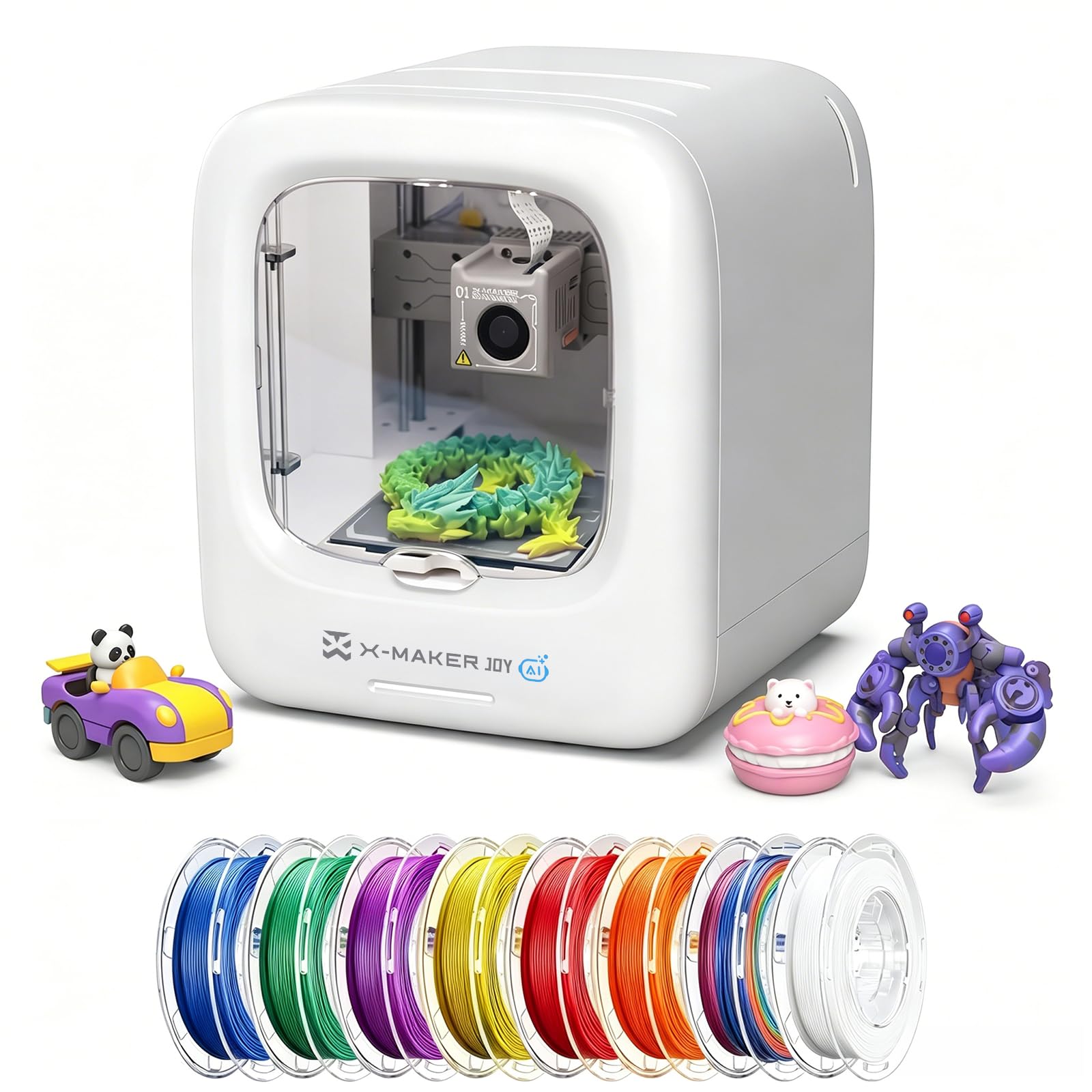
Turns a voice prompt or a photo into a printable toy — no design software in sight.
This is the only machine here where you do not need to find a model at all. AI Doodle generates a 3D model from a simple voice, text, or image prompt, AI MiniMe turns a real photo into a cartoon 3D figure, and MINIMAKIE creates cartoon avatars and DIY toys. An AI Assistant steps in with instant help when a child gets stuck. That makes it a creativity toy first and a 3D printer second — a different job than the ELEGOO or Bambu above, and a much gentler first experience for a child who just wants to see their drawing become an object.
At 8.82 pounds and 11.42 x 10.63 x 12.2 inches, it is the lightest pick in this guide, so it can move between a kitchen table and a bedroom shelf without help. Ease of use is its standout strength — that is what owners praise most, and the print quality gets its share of positive notes too, with one report of a Minecraft fox printed within an hour of setup.
The honest part: reliability and value draw a mixed picture in owner reports, with some units stopping after a few weeks. Connectivity and app stability also land as the weaker aspects. So the smart move is to treat this as a supervised creative toy — buy it for a child who wants to make characters from their imagination, and expect to rely on the AI Assistant and easy prompts rather than deep printer control.
What makes it different: every other printer here starts with a model file; this one starts with a child’s idea and generates the file for them.
Suits: a young maker who wants to invent characters and toys rather than learn slicing software.
Better elsewhere if: you need dependable long-term output for functional parts — pick a workhorse from higher up the list instead.
Know the Specs
Build volume
The maximum object size a printer can make, given as width x depth x height. A 220 x 220 x 220mm machine handles figures, organizers, and brackets. A 12 x 12 x 11in chamber can fit large props and batches of parts. Match this number to the biggest single object you plan to print, since running out of room mid-project means slicing a design into pieces.
Auto bed leveling
This is the feature that makes a printer “plug and play.” Instead of turning four knobs and sliding paper under the nozzle, the machine probes the plate and sets the height for you each time. Without it, a first layer that sits too high peels off; too low, and the nozzle drags. With it, the setup step mostly disappears.
Nozzle temperature
Measured in degrees Celsius, this is the ceiling of how hot the hotend can go. PLA prints around 200°C. The 300°C, 320°C, and 370°C machines here can melt carbon fiber reinforced and high-temperature engineering filaments that a standard hotend cannot. If you know you want strong, heat-resistant parts, this is the spec to check first.
Enclosed vs open frame
An enclosure traps warm air, which helps high-temperature filaments cool slowly and evenly so big parts do not warp. An open frame keeps the machine simpler and easier to ventilate. Enclosed printers suit ABS, ASA, and carbon blends; open-frame machines shine for PLA and PETG and are easier to place in a room.
Common Questions
What actually makes a 3D printer “plug and play”?
Do I need an enclosed printer or is open frame fine?
How big an object can each printer make?
How long does setup actually take before the first print?
Do I really need to add an enclosure or multi-color unit separately?
Will a plug and play printer be quiet enough for a shared room?
Can a kid really operate one of these without help?
Which filaments work with each printer?
Is a faster printer better, or just noisier?
Do I need to level the bed myself on any of these?
The Bottom Line
For most people, the plug and play 3d printer that gets the balance right is the Bambu Lab A1 — it stays at the top of this list for a simple reason: it does the leveling, Z-offset, and flow-rate work for you on every single print, and that is precisely what “plug and play” means. If carbon fiber and high-temp parts are the goal, the Creality K1C‘s 300°C hotend and enclosed chamber are the way to go. And when the biggest chamber and hottest nozzle matter most, the QIDI PLUS4‘s 12 x 12 x 11in build volume and 370°C ceiling make it the tool for the job.
How we choose
We do not accept paid placement. Every pick is matched to a real buyer and a real use-case; we do not hands-on test units.
Sources
Specifications: manufacturer listings and product documentation. Review insights: verified customer reviews, as of October 2026. Pricing: not shown on this page (it changes often); check the current price via the retailer link.
As an Amazon Associate, Aappliancez earns from qualifying purchases. This does not affect which products we feature.