Disclosure: Some links in this post are affiliate links. As an Amazon Associate I earn from qualifying purchases, at no extra cost to you. Learn more
Specs are compiled from manufacturer listings and verified buyer reviews and can change over time — please confirm the key details on the product page before buying.
If your workday keeps dissolving into tabs and doomscrolling, the fix is low-tech: a small cube on your desk that you flip to start a countdown. A physical Pomodoro timer removes the one ingredient that wrecks most productivity apps — your phone — and replaces it with a silent, palm-sized object that does exactly one job. The picks below are the ones that actually hold up to daily desk abuse, ranked by how well they keep a real work session on the rails.
This guide is built by comparing the manufacturers’ published specifications and the patterns across verified customer reviews, so you get each pick’s real strengths and trade-offs instead of marketing spin.
Focus tools live or die on small details: preset times, alarm style, and whether the thing survives being tossed in a bag. Every pick below is a cube or dial timer built for that job, and the shortlist below covers the Best Physical Pomodoro Timer options that reliably keep a session moving.
Top Picks

How To Choose The Best Physical Pomodoro Timer
You want a timer that starts your focus session without a fuss. The best pick is the one you can operate half-asleep in one motion. Three things separate a great cube timer from an annoying one: the preset times it ships with, how it alerts you without breaking your train of thought, and whether the controls are big enough to hit on the first try.
Preset times decide whether it fits your workflow
A classic Pomodoro session runs 25 minutes of work followed by a 5-minute break, which is why the 5 and 25 minute presets show up on nearly every cube timer. If you write, code, or study in longer blocks, a 30 or 60 minute preset keeps you from resetting the thing mid-session. Short-preset-only models are still useful for quick tasks like clearing email, but you will notice the ceiling fast if your work runs in deep stretches.
How it alerts you matters in shared spaces
Volume is measured in decibels (dB), the same unit used to describe how loud a room is. A 70–80 dB alarm is roughly a firm conversation; 90–100 dB is closer to a noisy kitchen. If you work in a library, a shared office, or a classroom, you want a vibration or silent mode so the timer nudges you and only you. If you time cooking or workouts in a loud room, you want the higher tier available on demand.
Controls and reset behavior
Some timers start the moment you flip them face-up thanks to a gravity sensor (a small motion sensor inside that detects which side is facing up). Others need a button press or a dial turn. Neither is better — it depends on if you want zero-decision starts or the ability to pause. Check whether the model you like offers a pause function, since finishing a task early with no way to stop the count is a small but constant irritation.
Side-by-Side Comparison
| Model | Best For | Preset Times | Alert Style | Power | Amazon |
|---|---|---|---|---|---|
| KADAMS Pomodoro Timer Visual★ Best Overall | Desk focus and gifting | 5 / 10 / 25 / 50 min | Alarm, silent mode | Battery | Amazon |
| LUCKY TIME Rotating Productivity TimerBest for Silence | Library and study sessions | 5 / 10 / 30 / 60 min | Vibration, 70–80 dB, 90–100 dB | Rechargeable | Amazon |
| Wbacon Cube Pomodoro Timer | Monitor-side work blocks | 5 / 10 / 30 / 60 min | Vibration, 70–80 dB, 90–100 dB | USB-C rechargeable | Amazon |
| LIORQUE Visual Timer for Kids with Pause | Home and family routines | 4 settings, up to 60 min | High / Low / Mute alarm | 2 AAA batteries | Amazon |
| LIORQUE 7.5-Inch Large Visual Timer | Classrooms and large rooms | 6 settings, up to 60 min | Sound / Light / Vibration, Mute / Low / High | 2 AA batteries | Amazon |
Detailed Reviews
1. KADAMS Pomodoro Timer Visual
Our pick — 4.5+★ from 600+ verified ratings; the strongest balance of quality and price.
The flip-to-start cube that turns a work block into one hand motion
If your Pomodoro sessions keep dying at the setup step, this is the pick for you. You set 5, 10, 25 or 50 minutes, flip the cube, and a ring of LED lights slowly completes a full circle — the timer is silent while it runs, so nothing beeps at you until the session is actually over. As buyers put it: “Set 5/10/25 min, flip to start countdown.” That is the entire interface, and it is why the cube has become a desk staple for everyone from students to people working through ADHD focus routines.
The presets are the real story here. A 25-minute block covers a standard Pomodoro work sprint, 5 minutes handles a coffee break, 10 minutes fits a quick email sweep, and 50 minutes is the longer stretch for writing or study. Unlike the LUCKY TIME cube below, which tops out its short presets at 30 and 60, the 25-minute side here lines up exactly with the classic Pomodoro rhythm. There is also a countup mode that runs forward to 99 minutes 59 seconds, useful if you want to log how long a task actually took rather than race a countdown. Its 4.5+ star rating across 600+ owners is the strongest showing on this list.
The build is lighter than it looks in the photos — at 2.72 ounces it is a genuine palm-sized cube, and some new owners are surprised by just how small it lands. Set that expectation before you buy and it is a non-issue; the payoff is a timer that takes up almost no desk real estate and slips into a bag pocket. The custom side assignment is the feature most people miss: you can reassign any countdown length to one of the cube’s faces, so you are not married to the four printed presets forever.
Why it earns the top spot
- 4 presets (5/10/25/50 min) map cleanly onto real Pomodoro work and break lengths
- Visual LED ring fills as time passes, so you read progress at a glance without numbers
- Silent running mode keeps a shared office or library quiet
- Countup mode runs forward to 99 min 59 sec for tracking elapsed time
- Custom time assignment lets you repurpose any cube face
What to know before you flip
- No auto-cycle — you flip it manually to start the next session
- At 2.72 ounces and roughly palm-sized, it is smaller than product photos suggest
Reach for this if: you want a silent, glanceable timer for 25-minute work sprints and 5-minute breaks.
Look elsewhere if: you need a bright, classroom-sized display or an auto-cycling session chain.
2. LUCKY TIME Rotating Productivity Timer
The rechargeable cube built for libraries, cafés, and other people’s patience
If your focus time happens in a room where noise is a social crime, this is the one to beat. The LUCKY TIME cube runs on a gravity sensor — a small motion sensor that reads which way the cube is facing — so you flip the side with your chosen time upward and the countdown starts on its own. No buttons, no menu, no beep until the session ends. The thing owners rave about is the alert system: silent vibration, a 70–80 dB low volume, or a 90–100 dB high volume, and the vibration tier is what makes this such a good fit in a library or café.
Battery life is the other quiet win. It recharges over USB instead of using disposable cells, and buyers report it “lasts 3-4 months with 2-3 days/week, ~3 hrs/day use” between charges. That is a real practical edge over the battery-powered LIORQUE models further down this list, which need you to keep 2 AAA or 2 AA cells on hand. The 5/10/30/60 preset set is built for longer study sessions and deep office work, with no repeated manual setting required.
Two honest notes. First, the customizable side of the timer is its most mixed area — there is no dedicated 20-minute preset, so a 20-minute block means running two 10-minute sessions, and the button labels are small enough that some owners find them hard to read. Second, the beep at its quietest setting can be too soft for a noisy room; if you need a loud alert, lean on the 90–100 dB high volume mode instead of the low one. Neither issue changes the core verdict: for quiet environments, this cube is the most considerate timer here.
Study-session specialist: the 30 and 60 minute presets handle long reading or writing blocks that shorter Pomodoro presets cannot cover, and the silent vibration keeps your neighbors out of your work.
Measured practicality: at 1.7 inches per side it sits easily beside a laptop, and the rechargeable design removes the battery-swap chore entirely.
Take this home if: you study or work in quiet shared space and want a rechargeable timer with a true silent-vibration alert.
Pass if: you specifically need a 20-minute preset or larger, easier-to-read control labels.
3. Wbacon Cube Pomodoro Timer

The 1.68-ounce cube that tucks under a monitor and disappears
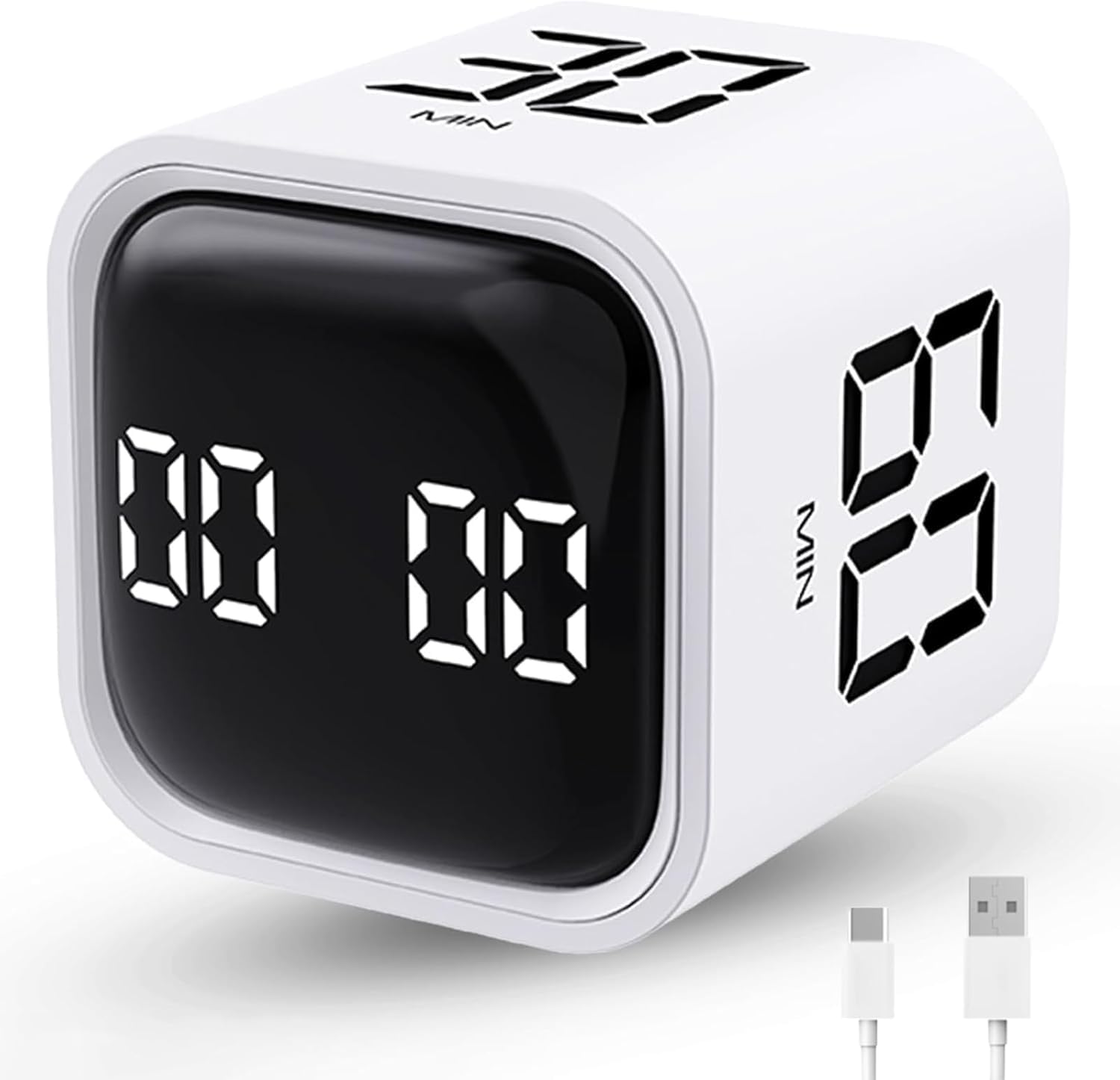
Here is a weight figure that actually changes how you use the thing: this cube comes in at 1.68 ounces, which is about 62% lighter than the KADAMS pick above at 2.72 ounces. In practice that means it is light enough to sit on the corner of a keyboard tray without you ever registering it, or to leave in a pocket for a commute. Owners describe it as unobtrusive in exactly that way — it slides under a monitor and becomes part of the furniture until it buzzes.
The timer runs two ways. Gravity mode covers the 5/10/30/60 minute presets on a flip, while manual mode opens up a full 00:01 to 99:59 range for anything you want to dial in yourself — nine settings in total, which is the widest range on this list. You can pause, resume, mute, adjust the alarm volume, or switch to vibration, so it works as a work timer, a meditation timer, or a cooking timer depending on the day. It recharges over USB-C, and the display is bright enough to read at a glance from a normal sitting distance.
The one caveat to plan around is the control buttons, which are genuinely small — a few owners find picking a setting takes a careful press rather than a casual tap. Flipping to a preset sidesteps this entirely, so the small buttons mostly bite when you go into custom mode. Its 4.5+ star rating across 700+ owners keeps it in trusted territory, and the vibration is loud enough that some owners set the cube on a notepad to soften it. Sound construction, wide range, and a weight that vanishes — a strong all-rounder.
Where it pulls ahead
- 9 settings and a full 00:01–99:59 manual range — the most flexible here
- At 1.68 ounces and 1.73 inches wide, it fits under a monitor or in a pocket
- Recharges over USB-C with no disposable batteries needed
- Gravity mode starts a countdown on a simple flip
- Pause, resume, mute, volume, and vibration all adjustable
The trade-off to expect
- The control buttons are tiny, which makes custom settings fiddly
- The vibration can be loud on a bare hard desk, so a soft mat helps
The flex pick: anyone who wants one compact timer to cover presets, custom countdowns, and countup in a single USB-C device.
The mismatched buyer: someone who needs large, easy-press buttons for setting custom times regularly.
4. LIORQUE Visual Timer for Kids
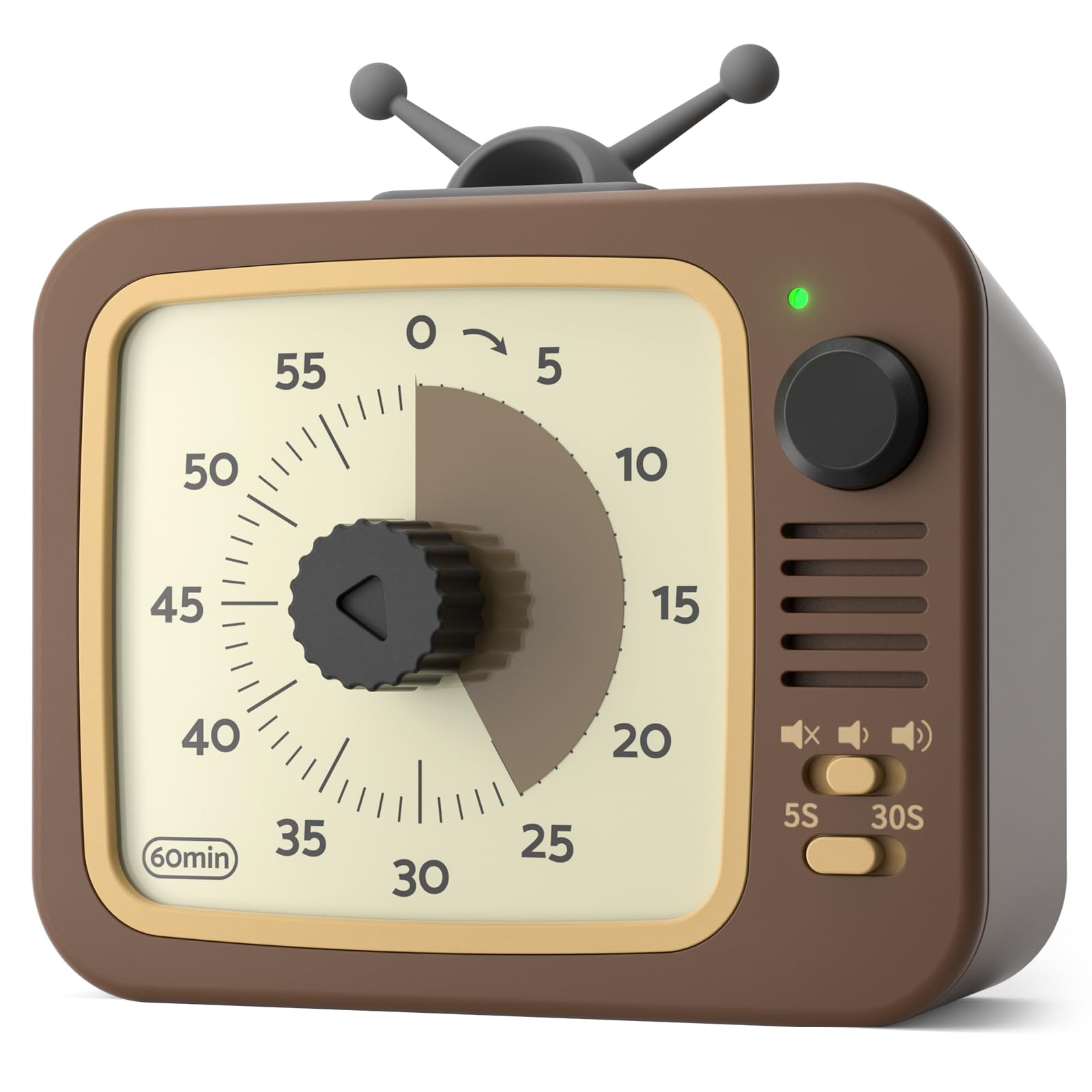
The dial timer that shows time shrinking the way an hourglass does
Not everyone wants to flip a cube. This LIORQUE model is the analog answer — you turn the knob to set up to 60 minutes, and a colored disc shrinks as the time drains away, so you understand how much is left without reading a single number. That is the reason you see it doing duty in classrooms, at kitchen counters, and in homes where someone is trying to stop a phone scroll before it eats the evening.
The standout feature is the pause button. Press and hold the round button for 3 seconds and the light shifts from green to red while the count is frozen; hold again and it resumes. That single control means you can stop the clock during an interruption without losing your place — something most cube timers on this list cannot do at all. It runs genuinely silent, has adjustable volume including a mute setting, and lets you pick a 5s or 30s ring duration. The whole thing is powered by 2 AAA batteries, which come in the box.
Where it earns its keep in a household is placement. A magnet on the back sticks it to the fridge or a whiteboard, so a timer for meals, homework, or screen-time limits lives where the routine actually happens instead of being buried in a drawer. What wins people over is that combination of a strong magnet and a truly quiet run — it does not tick, so it never becomes background irritation. The one point of care is the small center knob, which on a couple of units has pulled off in the hands of rough toddlers, so keep it up high with very young children. For shared family timing, this is the most practical shape here.
Family-friendly function: the pause-and-resume control makes it usable across interruptions, and the shrinking disc teaches time sense to anyone who finds digital numbers abstract.
Built to be placed: the magnetic back and upright stand mean the timer sits at eye level on a fridge or counter rather than rattling around a desk.
Handy for: households and classrooms that want a visual, pausable timer stuck to a fridge or whiteboard.
Skip the mantle for: rough toddler play, since the small center knob can be pulled off without supervision.
5. LIORQUE 7.5-Inch Large Visual Timer
The 7.5-inch face the whole room can read from across a table
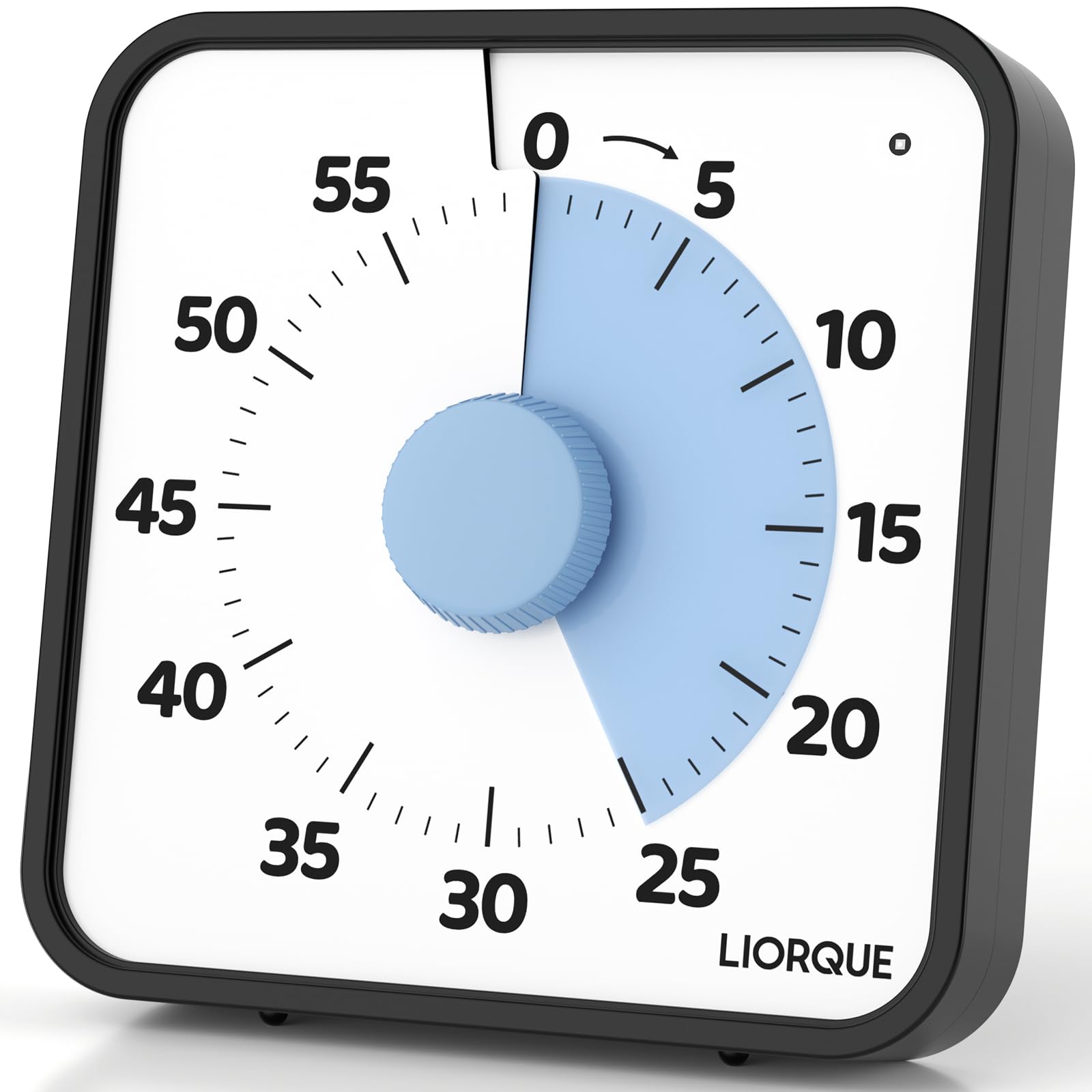
Size is the entire point of this one. A 7.5-inch dial is roughly the face of a stack of sticky notes, and it is big enough that a whole classroom or meeting table can track the countdown from a distance without anyone leaning in. Where the smaller cube timers disappear into a desk, this one is meant to be seen — which is exactly why it holds up in rooms where twelve people all need to know how much time is left.
It gives you three ways to be alerted: sound, light, or vibration. Volume has Mute, Low, and High levels, and the sound only applies in sound mode, so a light-only or vibration-only alert is a real option for a quiet setting. Placement is just as flexible — a magnetic back for a whiteboard or fridge, a foldable bracket to stand it on a table, or a wall-mounting hole if you want it fixed in place. Setup is a simple clockwise turn, with one quirk worth knowing: if your target time is under 3 minutes, you turn past 5 minutes first and then back down.
The honest catch on this one is durability at the dial. The recurring gripe is that overturning the dial can knock it off its track and stop the rotation, which is the main thing to watch if it lives in a busy classroom. That sits against a strong overall picture: owners praise the durability and classroom fit most, and its 4.5+ star rating spans 800+ owners. If you need a large, loud, colorful timer for group time-keeping and you can treat the dial with a firm-but-gentle turn, this is the biggest, most visible option in the lineup.
Made for groups: the 7.5-inch face and 3 alarm modes let an entire room follow the countdown, and the magnetic back makes it a two-second install on a whiteboard.
A dial with a personality: turning past 5 minutes and back down for short counts takes one try to learn, and the physical pomodoro timer behavior for longer sessions is a straightforward clockwise turn.
The crowd-pleaser: teachers, coaches, and meeting leads who need a large, loud, highly visible countdown for a group.
Think twice if: it will be used solo at a small desk, where the large dial and dial-durability trade-off are overkill.
Know the Specs
Preset times vs custom range
Presets are the fixed countdown lengths printed onto a timer’s faces or modes — the KADAMS cube uses 5, 10, 25, and 50 minutes, while the LUCKY TIME and Wbacon cubes use 5, 10, 30, and 60. Presets exist so you never have to dial anything in: you pick a face and go. A custom range is the manual fallback, letting you set nearly any length — the Wbacon covers 00:01 to 99:59, and the LUCKY TIME and KADAMS timers both offer full-range manual adjustment too. If your work is mostly standard Pomodoro sprints, presets are all you need. If your tasks vary in length, a wide custom range is the more flexible choice.
Alert style and volume in dB
How a timer tells you time is up is the difference between a tool you tolerate and one you love. Vibration nudges only you, which is what you want in a library, café, or open-plan office. Volume is rated in dB, or decibels, with 70–80 dB landing around a normal spoken conversation and 90–100 dB closer to a busy kitchen or a loud radio. Several picks here offer three tiers — silent vibration, low, and high — so you can dial the alert to your room rather than the other way around. A mute option on the LIORQUE models rounds out the quiet end.
Power and placement
There are two power paths here. Rechargeable models like the LUCKY TIME and Wbacon cubes refill over USB or USB-C, so you never buy batteries — one owner reports months of use between charges. Battery models like both LIORQUE timers run on 2 AAA or 2 AA cells, which are included in the box, and simply get swapped when they die. Neither is a flaw; it depends on whether you’d rather plug in occasionally or keep spare cells on hand. Placement matters just as much: a magnetic back sticks to a fridge or whiteboard, a bracket stands the timer on a table, and a pocket-sized cube like the Wbacon slides under a monitor entirely.
Flip control and the gravity sensor
Most cube timers start with a flip, and several use a gravity sensor — a small internal motion sensor that detects which face is pointing up — to know which preset you want. You flip the 25-minute side up, and the countdown begins without a button. The alternative is a dial or knob, as on both LIORQUE timers, which you turn to set any length up to 60 minutes. Flip control is faster and more tactile, while a dial gives you finer control and a visual face that a large room can read. Pick based on if you want a one-second start or a visible shared display.
Common Questions
What preset times do the best physical Pomodoro timers use?
Will a cube timer be loud enough for a noisy kitchen or workshop?
Can I use these timers in a library or shared office without disturbing people?
Do these timers run on batteries or do they recharge?
Do any of these timers have a pause function?
How accurate are physical Pomodoro timers compared to a phone?
Is a large classroom timer like the 7.5-Inch LIORQUE good for individual desk use?
What does a gravity sensor do on a flip timer?
Can a physical Pomodoro timer help with ADHD focus routines?
How long do these timers last between charges or battery swaps?
The Bottom Line
For most people, the physical pomodoro timer that earns its place on the desk is the KADAMS Pomodoro Timer Visual, because its 5/10/25/50 minute presets line up exactly with standard Pomodoro sessions and its silent LED ring keeps a shared room calm. If your focus time happens in a library or café, grab the LUCKY TIME Rotating Productivity Timer for its silent vibration and rechargeable build. Want the most custom range and the lightest cube? The Wbacon Cube Pomodoro Timer gives you 9 settings at 1.68 ounces and tucks under a monitor without a trace. And for a whole classroom or family kitchen, the LIORQUE 7.5-Inch Large Visual Timer is the one to reach for.
How we choose
We do not accept paid placement. Every pick is matched to a real buyer and a real use-case; we do not hands-on test units.
Sources
Specifications: manufacturer listings and product documentation. Review insights: verified customer reviews, as of October 2026. Pricing: not shown on this page (it changes often); check the current price via the retailer link.
As an Amazon Associate, Aappliancez earns from qualifying purchases. This does not affect which products we feature.