Disclosure: Some links in this post are affiliate links. As an Amazon Associate I earn from qualifying purchases, at no extra cost to you. Learn more
Specs are compiled from manufacturer listings and verified buyer reviews and can change over time — please confirm the key details on the product page before buying.
You want a router that lets you replace the stock firmware with OpenWrt, and the one that does it best is the GL.iNet Flint 3 — it ships with OpenWrt-based software you can keep using or flash further. But “OpenWrt router” means different things to different buyers. Some models ship with OpenWrt already in charge. Others ship locked down and need workarounds or serial flashing to get there. That difference decides whether you spend fifteen minutes or a whole afternoon.
This guide is built by comparing the manufacturers’ published specifications and the patterns across verified customer reviews, so you get each pick’s real strengths and trade-offs instead of marketing spin.
Below you get seven routers sorted by what they actually do for you — not by how loudly they advertise Wi-Fi 7. The picks run from a budget AX3000 you can flash to a quad-band gaming monster. Every entry states its real coverage, port layout, and firmware path, so you know what you’re buying before you commit. This breakdown covers the best openwrt router options for people who want real control over their own network.
Top Picks


How To Choose The Best OpenWRT Router
The first question you should ask is not “how fast is it” — it’s “how open is it.” A router that ships with OpenWrt already running gives you a package manager, a full firewall, and the ability to install plugins without cracking the case. A router that ships with manufacturer firmware and can merely be flashed later is a project, not a product feature. Know which you’re buying.
Built-in firmware versus flashable firmware
Built-in OpenWrt shows up as a web admin panel (often called LuCI) where you can add packages, set up per-device routing rules, and build VLANs. That’s what the GL.iNet Marble and Flint 3 offer from the start. Flashable means you’ll need to download a firmware image, find the right hardware revision, and often connect a serial cable. The Cudy WR3000E falls in that second camp — its internals match the WR3000 line, and there’s no intermediate image yet, so serial flashing is the route in.
Wired ports decide your real ceiling
Wi-Fi speeds are printed in huge type; Ethernet ports are printed in tiny type, and they matter more. A single gigabit port caps you at 1 Gbps no matter what the wireless radio claims. Look for how many 2.5G ports a model has and whether they’re WAN, LAN, or switchable. The Omada ER707-M2 gives you two 2.5G ports plus an SFP slot. The Flint 3 gives you five 2.5G ports. The ASUS ROG Rapture GT-BE98 Pro pairs dual 10G ports with four 2.5G ports. If your internet plan sits under a gig, gigabit ports are fine and you shouldn’t pay for more.
VPN throughput is its own spec
Running a VPN on the router means every device behind it is tunnelled — no per-device app installs. The catch is that encryption runs on the router’s processor, not your laptop’s. That’s why a router can advertise multi-gigabit Wi-Fi and still push far less through a VPN tunnel. The Marble lists maximum VPN speeds of 30 Mbps on OpenVPN and 190 Mbps on WireGuard. The Flint 3 claims up to 680 Mbps on both. WireGuard is the lighter protocol, so it’s the one to check first if VPN speed matters to you.
Side-by-Side Comparison
| Model | Best For | Wi-Fi Standard | Stated Speed | Ethernet Ports | Amazon |
|---|---|---|---|---|---|
| NETGEAR Nighthawk RAX36★ Best Overall | Simple whole-home upgrade | Wi-Fi 6 (dual-band) | AX3000 / 3 Gbps | 4 x 1G | Amazon |
| GL.iNet Flint 3 (GL-BE9300)Also Great | OpenWrt plus Wi-Fi 7 control | Wi-Fi 7 (tri-band) | BE9300 / up to 9 Gbps | 5 x 2.5G | Amazon |
| GL.iNet Marble (GL-B3000) | OpenWrt built in, small spaces | Wi-Fi 6 (dual-band) | AX3000 / 3 Gbps | 3 x 1G | Amazon |
| Cudy WR3000E V2.0 | Budget flashing project | Wi-Fi 6 (dual-band) | AX3000 / 2402 Mbps on 5 GHz | 5 x 1G | Amazon |
| Omada ER707-M2 | Wired multi-gig VPN gateway | Wired only (no Wi-Fi radio) | 2.5 Gbps port rate | 2 x 2.5G, 4 x 1G, 1 x SFP | Amazon |
| TP-Link Archer BE600 | Wi-Fi 7 on a mid-range budget | Wi-Fi 7 (tri-band) | BE9700 / 9.7 Gbps | 1 x 10G, 1 x 2.5G, 3 x 2.5G | Amazon |
| ASUS ROG Rapture GT-BE98 Pro | Gaming and huge homes | Wi-Fi 7 (quad-band) | 30 Gbps | 2 x 10G, 4 x 2.5G | Amazon |
Detailed Reviews
1. NETGEAR Nighthawk WiFi 6 Router (RAX36)
Our pick — 4.0+★ from 550+ verified ratings; the strongest balance of quality and price.
A dual-band AX3000 router rated to 2,000 sq ft for 25 devices, running NETGEAR’s own firmware with no OpenWrt path.
This is the pick for the person who just wants their internet to stop dropping. The Nighthawk RAX36 is a dual-band AX3000 Wi-Fi 6 router rated to 3 Gbps combined, covering up to 2,000 square feet for up to 25 devices. Four gigabit Ethernet ports take wired gear, and there’s a USB 3.0 port plus built-in VPN support. It connects to your existing cable modem and works with any provider up to 1 Gbps — but note that no modem is included, so you’ll need a separate one with coax inputs. What it isn’t is an OpenWrt playground; this is NETGEAR’s own firmware.
What wins people over is reliability. Owners describe fixing daily internet disconnections outright — one called it “night and day difference” from the router it replaced. Setup through a PC browser is reported as straightforward, with one buyer noting it was “very easy to setup.” Speeds on 5 GHz climb close to gigabit, and one report describes solid coverage across 2,000 square feet with 20 devices attached and 2.4 GHz running flawlessly. That last bit matters, because unlike the Archer BE600, this router doesn’t choke on older smart devices.
Settle in for a few real limitations. There’s no power on/off switch, the status lights sit only on top, and a unit can arrive without the USB ports the listing implies. One buyer hit a failure exactly 30 days in that took firmware updates and a factory reset to resolve. The model is also marked end-of-life as of December 2024, which means firmware support has a horizon.
Where the money goes: you’re buying proven reliability and easy setup, not OpenWrt access. If your goal is really “flash the firmware,” skip to the Cudy or either GL.iNet above.
Suits you if: you need dependable Wi-Fi 6 coverage on a budget and your router shopping ends at “works and stays working.”
skip it if: OpenWrt, custom firmware, or long-term update support is a requirement rather than a nice-to-have.
2. GL.iNet GL-BE9300 Flint 3 Tri-Band Wi-Fi 7 Router
The only pick here that ships with OpenWrt-based firmware active and Wi-Fi 7 tri-band radios in one chassis.
If you want OpenWrt without the flashing ritual, the Flint 3 is the straightest answer here. It runs open-source firmware by default, which means the LuCI-style admin panel, plugin installs, and full firewall control are there on day one. That’s a very different feeling from buying a locked router and hoping a community image exists for your hardware revision. And underneath that software sits Wi-Fi 7 tri-band hardware rated to 9 Gbps, with a documented 1 GB of DDR4 RAM and 8 GB of eMMC storage for the plugins and packages you’ll pile on.
The wired side is where this thing quietly beats most of the list. You get five 2.5G ports — that’s a 2.5-gigabit-per-second Ethernet jack five times over, enough for a NAS, a desktop, and a couple of access points without adding a switch. Compare that to the Omada ER707-M2 below, which offers two 2.5G ports and needs an extra switch for more. Coverage is rated to 2,000 square feet, and the antennas retract into the body. The other number worth knowing: VPN speeds up to 680 Mbps on both WireGuard and OpenVPN, the highest figure quoted on this list.
The honest catch is range at the edges. Buyers report the Wi-Fi footprint is real but not generous — it covers a 2,000 sq ft footprint when placed centrally, and one comparison put it at roughly half the reach of a carrier-supplied router. The USB 3 port is another compromise: NAS transfers over it reportedly drop to around 30MB/s, so don’t plan on it as a fast file server. And it doesn’t have Matter radios built in, so a smart-home hub is still on your shopping list.
What tilts the decision
- OpenWrt-based firmware ships active — no flashing, no serial cable, no hardware revision hunt.
- Five 2.5G ports means wired multi-gig without a companion switch.
- VPN throughput quoted up to 680 Mbps on both WireGuard and OpenVPN.
- AdGuard Home and Bark parental controls are supported from the admin panel.
Where it asks you to compromise
- Wi-Fi reach fades at the edges of a large home; central placement matters.
- USB 3 storage speeds are slow for NAS duty.
- No Matter radios, so a separate smart-home hub is still needed.
Reach for this if: you want OpenWrt control and Wi-Fi 7 headroom without ever opening a terminal — this is the pick that does both.
Look elsewhere if: your house is sprawling and one central box won’t reach the far corners, or you need fast USB-attached storage.
3. GL.iNet GL-B3000 (Marble) Wireless WiFi 6 Router

An 8-inch picture-frame router that hangs on a wall or stands on a shelf without looking like networking gear.
Most routers look like routers. The Marble looks like a photo frame with an 8-inch print in it, and it can hang on a wall, sit on a table, or stand on its included stand. Behind that face sits a dual-band Wi-Fi 6 radio rated to 574 Mbps on 2.4 GHz and 2402 Mbps on 5 GHz, plus three gigabit Ethernet ports. GL.iNet ships it with OpenWrt underneath, so you get the LuCI interface, AdGuard Home for network-wide ad blocking, and a built-in OpenVPN and WireGuard client that works with 30+ VPN providers.
Owner reports read like a list of small victories. A buyer using it as a Wi-Fi bridge for wired servers got about 115 Mbps — twice what a laptop pulled from the same access point — and set it up in roughly fifteen minutes after spending days on Cisco gear. Another reports it maxing a 370/370 fiber line wirelessly, then hitting 970/970 locally on an iPhone 16 Pro in the same room. Tailscale support arrives natively, and the firmware can be replaced down the road, which is why buyers concerned about future update cycles pick it.
Here’s the trade you’re making. There are no external antennas, and the coverage shows it — a wall-mounted unit in a small apartment is fine, but it won’t match an antenna-heavy router across a big floor plan. VPN server setup is also reported as failing after hours of attempts on US firmware, so treat this as a VPN client, not a VPN host. Two LAN ports plus one WAN port is the whole wired story.
Best seat in the house: small apartments, studio setups, and anywhere the router sits in plain sight and you’d rather it didn’t look like networking gear.
Fair warning: if you plan to run this as a VPN server rather than a client, verify your region’s firmware supports it before you buy.
Pairs well with: a compact home where the router lives on a bookshelf and the priority is OpenWrt access plus a real ad blocker.
Poor fit for: anyone counting on VPN-server duty or long-range coverage from a single unit.
4. Cudy AX3000 5-Port Gigabit Mesh Wi-Fi 6 Router, WR3000E V2.0
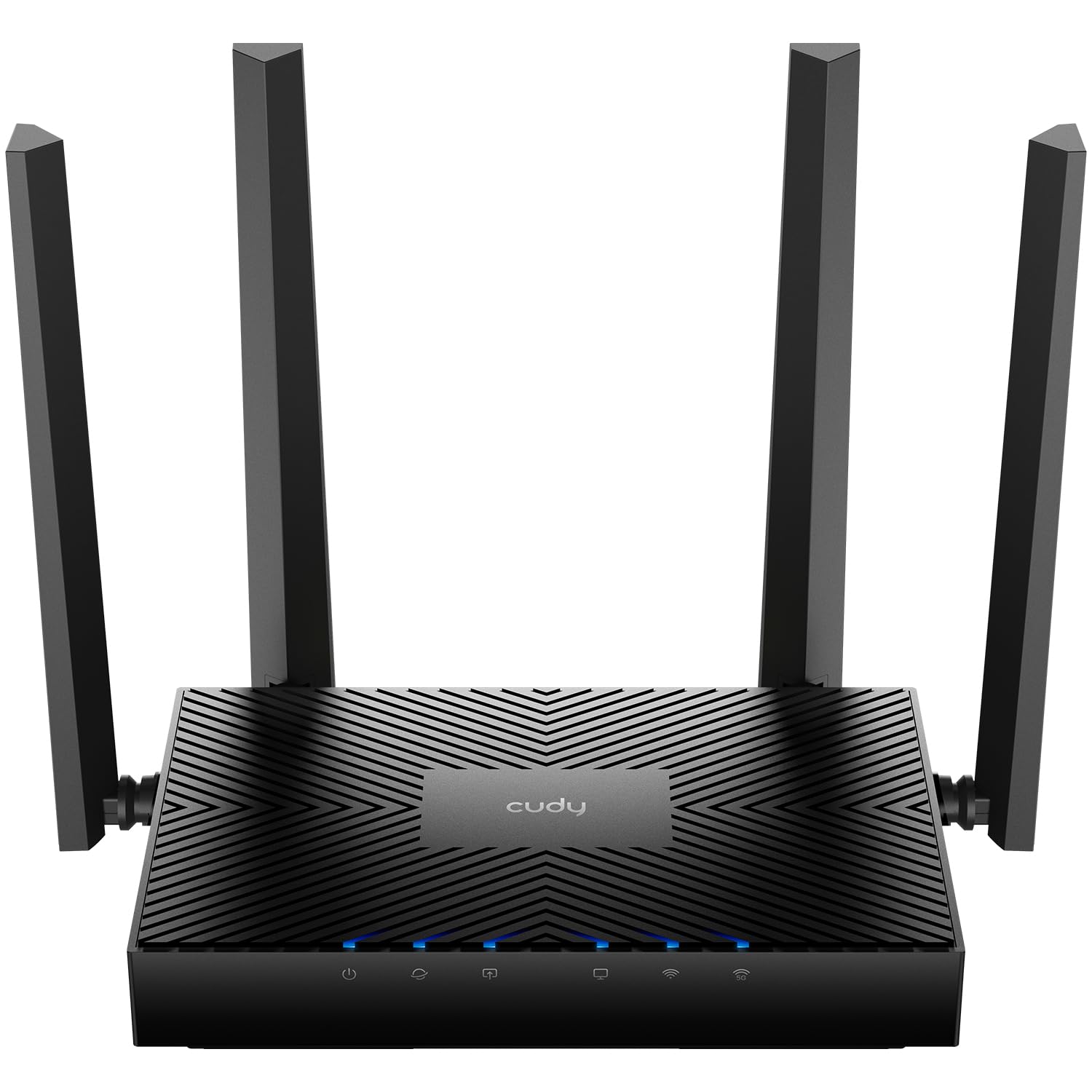
Five gigabit ports and OpenWRT-based firmware at a budget price, with full OpenWrt reachable only by serial flashing.
The Cudy WR3000E is the cheapest way onto this list to get OpenWrt-flavored software, and it makes that trade loudly. The firmware it ships with is OpenWRT-based, with a clean web dashboard and far more advanced settings than most budget routers expose. Under the hood is a 1.2 GHz dual-core processor with 128 MB of DDR3 RAM and 128 MB of NAND flash, driving 2402 Mbps on 5 GHz through 160 MHz channels and 574 Mbps on 2.4 GHz. Those 160 MHz channels are the wide-lane version of Wi-Fi 6, so a compatible laptop can pull real speed without a wired cable.
Five gigabit Ethernet ports is the number that surprises people at this tier — one WAN plus four LAN, all rated for full gigabit throughput at the same time. That’s more wired jacks than the Marble above offers, for a router in the budget bracket. It also acts as a six-protocol VPN gateway: WireGuard, OpenVPN, IPsec, ZeroTier, PPTP, and L2TP, in both server and client roles, with per-device routing so you can tunnel one device and leave the rest alone. Parental profiles, per-device scheduling, and WPA3 round out the app side.
Flashing it to full OpenWrt is the catch. Its internals match the WR3000 line, and there’s no intermediate image yet, so serial flashing with a WR3000S image is the documented route — with minor UI glitches along the way. The physical build also reads budget in the hand, and a few units have arrived with setup quirks. Fixed antennas mean you can’t angle them.
The value math: you’re paying entry-level money for five gigabit ports, a quad-core-class MediaTek Filogic 820 processor, and a firmware base that’s already Linux-flavored. That combination doesn’t show up often at this tier.
What you’re signing up for: a weekend project, not a plug-and-play box. If serial cables and firmware images sound like a chore, buy the Flint 3 instead.
Built for: tinkerers who want maximum ports per dollar and don’t mind the flashing process — this is the enthusiast’s entry ticket.
Not for: anyone who wants OpenWrt running the moment they plug in the power cable.
5. Omada ER707-M2 Multi-Gigabit VPN Router

A wired-only router with dual 2.5G ports and an SFP slot, built to route multi-gig traffic behind separate access points.
Before anything else: the ER707-M2 has no wireless radio at all. It’s a wired router, so you pair it with an access point or a mesh system and let it handle the traffic. What you get for that is serious port flexibility — one 2.5G WAN port, one 2.5G WAN/LAN port, four gigabit WAN/LAN ports, a gigabit SFP slot for a fiber module, and a USB 2.0 port that supports storage or an LTE dongle for backup internet. Ports are fully programmable between WAN and LAN, so you can shape the box to your setup rather than the reverse.
The capacity numbers are enterprise-flavored. Up to 500,000 concurrent sessions and support for 1,000+ clients puts this well past what a home router is built to track. VPN support is listed at up to 100 LAN-to-LAN IPsec, 66 OpenVPN, 60 L2TP, and 60 PPTP connections. Buyers chasing faster-than-gig internet report the full 1,400 Mbps through the line where an older router managed 700 Mbps. A homelab owner singles out the wide range of SFP modules and configurations it accepts. Cloud access through the Omada app ties multiple sites into one dashboard.
Setup is the split verdict here. It’s more involved than a consumer router, and one unit arrived used and password-protected, needing a factory reset before it could be configured. If you’re not comfortable with VLANs, load balancing, and firewall rules, budget real time for the learning curve. The flip side is five years of warranty coverage with weekday technical support.
Right call when: you want a dedicated wired brain behind separate access points, with multi-gig WAN and room to grow.
Wrong call when: you expect a router to broadcast Wi-Fi from the start — this one never will.
6. TP-Link Tri-Band BE9700 WiFi 7 Router (Archer BE600)

A 10 Gbps WAN/LAN port and a 6 GHz band rated to 5,765 Mbps at a mid-range price.
The Archer BE600 puts Wi-Fi 7 within reach of people who aren’t ready to spend flagship money. The tri-band radio is rated up to 5,765 Mbps on the 6 GHz band, 2,882 Mbps on 5 GHz, and 1,032 Mbps on 2.4 GHz, for a combined 9.7 Gbps. Coverage is listed at 2,600 square feet for up to 120 devices at once, with six internal antennas and beamforming to push signal toward weak spots. Multi-Link Operation, one of the headline Wi-Fi 7 features, bundles several bands into a single stream so a roaming device holds its connection instead of dropping it.
Wired connectivity is generous for the tier: one 10 Gbps WAN/LAN port, one 2.5 Gbps WAN/LAN port, and three 2.5 Gbps LAN ports. Setup routinely finishes in about fifteen minutes, and owners mention phone coverage reaching up to 350 feet. One owner running a second unit in mesh watched speeds climb from a 20–50 MHz range to 150–250 MHz. Separate passcodes for different bands come up as a liked feature.
Now the part that decides it for you: 2.4 GHz performance is the weak spot. Multiple buyers describe 2.4 GHz devices going unresponsive — smart plugs, cameras, doorbells — even though the box says it’s backwards compatible. A firmware jump from 1.1.1 to 1.2.5 reportedly wiped settings and forced an hour-plus of reconfiguration. If your smart home leans hard on 2.4 GHz, that’s the thing to weigh against the spec sheet.
Why it earns a spot
- 6 GHz band at 5,765 Mbps with MLO for steadier roaming.
- A 10 Gbps port plus four 2.5G ports — unusually forward-looking wiring for this tier.
- Fifteen-minute setup and coverage rated to 2,600 sq ft.
Where it tests your patience
- 2.4 GHz reliability is the recurring complaint from smart-home owners.
- Firmware updates have reportedly reset configurations.
- USB media server setup needs outside instructions to get working.
Ideal owner: someone with fast fiber, modern phones and laptops, and a modest number of 2.4 GHz smart devices.
Think twice if: your house is thick with budget smart plugs and cameras that only speak 2.4 GHz.
7. ASUS ROG Rapture GT-BE98 Pro WiFi 7 Gaming Router

Quad-band Wi-Fi 7 rated to 30 Gbps, dual 10G ports, and triple-level game acceleration.
This is the one to look at if your home network has to serve a gaming PC, a console, and a household of streaming devices at the same time. Quad-band Wi-Fi 7 with 320 MHz channels in the 6 GHz band and 4096-QAM is rated up to 30 Gbps. Two 10G ports plus four 2.5G ports is the deepest wired roster on this list — deeper than the Flint 3’s five 2.5G ports, and far past what the Omada ER707-M2 offers on the 2.5G side. Triple-level game acceleration prioritizes gaming traffic from the PC port all the way to the game server. External dual-feeding antennas are there to hold signal strength across a large floor plan.
Real-world reports back the hardware up. Owners in a 3,000 sq ft home describe full coverage without a mesh node. Wi-Fi 7 speeds of around 4 Gbps are reported within roughly 25 feet, with 5 GHz clients matching 1 Gb wired speeds. Game Booster reportedly trimmed ping from 14ms to 12ms. The quad-core 2.6 GHz processor runs around 42°C under load, and USB 3.2 transfers reach about 1,750 Mbps. A buyer who stuck with it through early firmware describes the current board revision as a winner after updates landed.
The honest downside is complexity and the occasional stubborn bug. VPN Fusion, ASUS’s per-app VPN feature, is described as fragile — a misconfigured rule can break network connectivity for everything. Early firmware was genuinely rough, with 2.4 GHz IoT devices disconnecting every half hour on some units before fixes. And it’s a big, expensive box. If you want a set-and-forget router, this flagship’s complexity and early-firmware bugs will wear on you.
The case for it: you get the highest port count, the widest band count, and gaming-specific traffic prioritization that actually shows up in ping tests. For a household that treats gaming and streaming as first-class citizens, the headroom is real.
The homework: budget time to learn the web UI, and check that your firmware is current before you judge the unit.
Choose this when: you’re building a serious gaming setup and want Wi-Fi 7, dual 10G wired, and mesh expansion all in one flagship chassis.
Pass on it if: you want a set-and-forget router, or your current internet plan sits well under a gig.
Know the Specs
AX3000, BE9700, and What the Numbers Mean
An AX3000 rating means the router’s total advertised throughput across both bands adds up to roughly 3,000 Mbps — usually split around 574 Mbps on 2.4 GHz plus 2402 Mbps on 5 GHz. BE9700 works the same way for Wi-Fi 7, adding a third band and a higher ceiling. No single device ever gets the full figure; it’s a total across radios. Read it as a tier indicator, then look at the wired ports and real test reports to judge actual speed.
2.5G and 10G Ports Explained
A gigabit port tops out at 1 Gbps. A 2.5G port tops out at 2.5 Gbps, and a 10G port at 10 Gbps. You only benefit if your internet plan or local network gear can feed it those speeds. On a sub-gig fiber or cable plan, gigabit ports are plenty. The 2.5G and 10G ports become useful when you’re moving large files to a NAS, or when your ISP sells speeds above a gig and you need a matching WAN jack. Count how many you actually need — one for the modem, the rest for devices — before paying for extra.
WireGuard versus OpenVPN on a Router
WireGuard is the newer, lighter VPN protocol, and it consistently produces higher throughput on the same hardware. The Marble quotes 190 Mbps on WireGuard against 30 Mbps on OpenVPN. The Flint 3 quotes up to 680 Mbps on both. Those gaps matter if you stream through a VPN tunnel. OpenVPN is the older standard with wider compatibility, so it’s the fallback when a provider doesn’t support WireGuard.
Mesh, Roaming, and Coverage Claims
Coverage listed in square feet assumes an open-ish floor plan and central placement. Walls, floors, and appliance interference shrink that number. Mesh lets two or more units share one network name so devices hand off as you walk. The Cudy WR3000E, Archer BE600, and ASUS GT-BE98 Pro all support mesh modes with a matching unit. If one router can’t reach every corner of your home, a second node is usually a better fix than a bigger single router.
Common Questions
What does an OpenWrt router actually give me over a normal one?
Is the GL.iNet Flint 3 really running OpenWrt from the start?
Can I flash the Cudy WR3000E to full OpenWrt?
Do I need a modem to use the NETGEAR Nighthawk RAX36?
Will the Omada ER707-M2 work as my only router if I need Wi-Fi?
How fast is the Cudy WR3000E over Wi-Fi 6?
Which of these routers is best if I want whole-home VPN coverage?
Is Wi-Fi 7 worth it if most of my devices are Wi-Fi 6?
Why do some buyers complain about 2.4 GHz on these newer routers?
Can I add a second unit later for mesh?
The Bottom Line
If you want a router that gives you OpenWrt control without the flashing ritual, the GL.iNet Flint 3 is the pick — open firmware active from first boot, five 2.5G ports, and VPN speeds quoted up to 680 Mbps. For a smaller space where the router sits in view, the GL.iNet Marble hides an OpenWrt client in a picture frame and brings AdGuard Home with it. And if you want the cheapest route into OpenWrt-flavored firmware plus five gigabit ports, the Cudy WR3000E is the project worth taking on. For a home that’s happy with stock firmware and just wants reliable coverage, the Nighthawk RAX36 does the job without fuss. One nudge worth making: the Flint 3 carries 4.0+ stars across 1,000+ ratings, and that’s the kind of consistent feedback that makes an open-firmware router easy to recommend.
How we choose
We do not accept paid placement. Every pick is matched to a real buyer and a real use-case; we do not hands-on test units.
Sources
Specifications: manufacturer listings and product documentation. Review insights: verified customer reviews, as of October 2026. Pricing: not shown on this page (it changes often); check the current price via the retailer link.
As an Amazon Associate, Aappliancez earns from qualifying purchases. This does not affect which products we feature.