Disclosure: Some links in this post are affiliate links. As an Amazon Associate I earn from qualifying purchases, at no extra cost to you. Learn more
Specs are compiled from manufacturer listings and verified buyer reviews and can change over time — please confirm the key details on the product page before buying.
If your wrists ache by 3 p.m. and your desk sounds like a rainstorm on a tin roof, you need a keyboard built for long days, not for gaming flash. For most people, the best office keyboard is the Logitech MK955 Signature Slim combo. It pairs quiet, laptop-style keys with a mouse that shares the same wireless receiver, so one setup covers typing, scrolling, and switching between your work laptop and home desktop. Below are seven picks that cover every desk: split ergonomic boards for sore wrists, a mechanical option for people who miss that deep key thunk, and compact picks for small spaces.
This guide is built by comparing the manufacturers’ published specifications and the patterns across verified customer reviews, so you get each pick’s real strengths and trade-offs instead of marketing spin.
You do not need to memorize switch types or DPI numbers to pick well. This roundup separates the keyboards that survive an eight-hour workday from the ones that only look good in photos, so you can choose an office keyboard that fits your hands, your desk, and your noise tolerance on the first try.
Top Picks

How To Choose The Best Office Keyboard
An office keyboard is a tool you touch more than any other object on your desk, so the buying decision should start with your hands and your room, not with a spec sheet. Three things actually decide whether you will still like the board in month six: how the keys feel under your fingertips, how the deck holds your wrists, and whether the sound it makes is welcome in your workspace.
Key feel: membrane, scissor, or mechanical
Most office keyboards use a membrane or scissor mechanism, which means a rubber dome under the keycap pushes back when you press. That gives you a shallow, quiet stroke — the Logitech K950 and the Nulea Wave Keys both work this way. A mechanical board instead uses an individual spring-loaded switch under every key. The Cherry KC 200 MX uses MX2A Silent RED switches, described in the listing as linear with no click, which is the mechanical world’s answer to a quiet office board.
Wrist posture and palm support
A keyboard that forces your wrists to bend upward or reach sideways is the one that hurts by mid-afternoon. Split and wave layouts spread the keys so your hands sit at shoulder width rather than angled inward. If you would rather keep a familiar layout and add support instead, look for a built-in wrist rest — the TECKNET board uses a dual-density rest with a memory foam top layer, and the ProtoArc EKM01 Plus pairs a memory foam rest with adjustable tilt legs.
Noise, multi-device pairing, and desk space
If you share a room, quiet matters as much as comfort. Many of these boards pair over Bluetooth with several devices at once, letting one keyboard serve a work laptop, a personal tower, and a tablet. Full-size boards include a number pad, which helps anyone working in spreadsheets — but the ProtoArc listing warns its full-size ergonomic frame takes up more desk space, so measure before you commit.
Side-by-Side Comparison
| Model | Best For | Connection | Key Type | Devices | Amazon |
|---|---|---|---|---|---|
| Logitech MK955 Signature Slim Combo★ Best Overall | All-day office typing with a mouse included | Bluetooth / Logi Bolt | Low-profile scissor | Up to 3 | Amazon |
| Nulea Wave KeysBudget Champion | Budget wrist relief on a small desk | 2.4G wireless | Membrane crater | 1 | Amazon |
| TECKNET Wireless Ergonomic | Sore wrists plus device switching | Bluetooth 5.0 + 2.4G | Membrane, split layout | Up to 4 | Amazon |
| Keychron C2 Full Size | Mechanical feel on Mac and Windows | Wired USB-C | Tactile mechanical | 1 | Amazon |
| Logitech Signature Slim K950 | Keyboard only, three-device switching | Bluetooth / Logi Bolt | Low-profile scissor | Up to 3 | Amazon |
| Cherry KC 200 MX | Quiet mechanical typing on one PC | Wired USB-A | Mechanical MX2A Silent Red | 1 | Amazon |
| ProtoArc EKM01 Plus Combo | Split ergonomic typing across three devices | Bluetooth + USB receiver | Scissor, split frame | Up to 3 | Amazon |
Detailed Reviews
1. Logitech MK955 Signature Slim Wireless Keyboard Mouse Combo
Our pick — 4.5★ from 900+ verified ratings; the strongest balance of quality and price.
One receiver, one quiet pair of hands, two computers handled without a cable swap.
The pitch here is simple: your keyboard and your mouse arrive together, share one wireless link, and stay quiet enough for a shared office. The K950 keyboard inside this bundle uses familiar laptop-style keys — short-travel keys with a light, snappy press rather than a deep mechanical thunk. The bundled M750 L Signature Plus mouse fits larger hands and uses SilentTouch technology, which the listing rates at 90% less click noise than a standard mouse. If your desk partner flinches every time you open a new tab, that is the number that matters.
Quality is what this combo gets right, and it is not a close call — it is the trait that dominates owner feedback by a wide margin, with quiet operation and connectivity rounding out the top three. Buyers report that low-profile keys hold up across a heavy week. As the review pages put it: “Low-profile scissor keys cut finger travel for 40+ hr/week typing.” On the multi-device side, the K950 switches typing between three devices with a single tap, and it pairs over Bluetooth or Logi Bolt — the small USB receiver Logi uses when Bluetooth is off-limits on a locked-down work machine.
The honest catch is the full-size footprint and the labels. One buyer who ran this on a dual laptop setup found the numeric keypad took more desk space than they wanted, and the same owner noted the tiny F-key labels are hard to read if you touch-type by feel — a small friction, not a dealbreaker for most desk setups. If you want a keyboard alone and already own a mouse you love, the standalone K950 further down this list covers the same typing feel.
Where it pulls ahead
- Keyboard and mouse share one wireless connection, so you free up a USB port
- SilentTouch mouse cuts click noise 90% versus a standard mouse, so shared desks stay quiet.
- One-tap typing handoff between three devices
- Customizable keys and buttons through the Logi Options+ app on Windows and macOS
- Plastic parts include certified post-consumer recycled material — minimum 48% in the keyboard, 25% in the mouse
What to weigh first
- Full-size deck with a number pad eats more desk width than a compact board
- Small function-key legends are tough to read for touch typists
- Paired as a set — no way to buy just one half
Right desk match: anyone running a laptop and a desktop who wants one quiet setup covering both, without buying a mouse separately
Think it over if: your desk is narrow or you need to read function keys by feel in a dim room
2. Nulea Wave Keys Ergonomic Keyboard
A wave-shaped deck and padded wrist shelf for people whose wrists file complaints by Thursday.
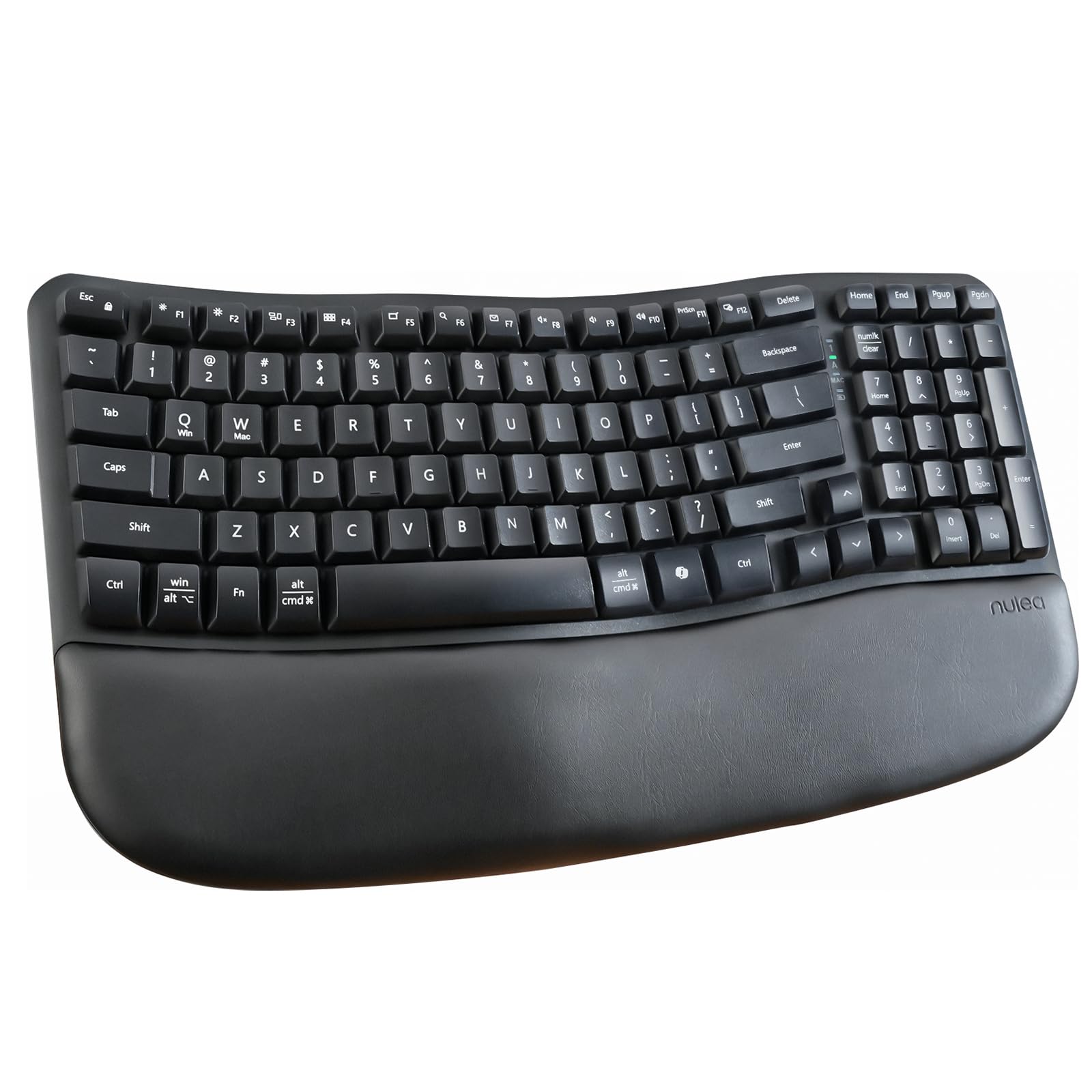
Ergonomics is the selling point here, and it shows in the shape rather than the software. The keys sit in curved rows instead of flat lines, so your fingers travel a shorter arc and your hands sit closer to a natural spread. A cushioned palm rest runs along the front edge, and rear footrests let you pick a slightly raised or flatter deck depending on how you sit. That matters to anyone who has spent a long week on a flat membrane board and felt the ache creep up the forearm.
Type in this position for long enough and the fatigue drops. The wave profile and the soft, fast keys are what people bring up when they recommend it, and the cushioned rest does real work — it stays comfortable and has held up through months of daily use, in at least one case across both a white and a pink unit. It is also smaller than a traditional full-size board while keeping the number pad, which frees up mouse room on a tight desk.
The part nobody mentions in the listing: it takes batteries rather than a charge cable, and the size splits opinion. On the battery point, one owner simply wished it were rechargeable. On size, some find it handy for travel and others find the deck tighter than expected. There is also a small-key-sticking concern that shows up in the feedback. A handful of units and a decade-old complaint pattern is not a reason to write off the board — just know that this is a compact desktop keyboard, not a wide ergonomic beast.
The real draw: the wave layout keeps your hands in a relaxed spread while the padded rest cradles the wrist — comfort-first shopping without paying for a split frame.
Before you commit: budget board, budget power — no charging cable in the box and no backlight, and the keybed is smaller than a standard office deck.
Reach for this if: sore wrists on a small desk are your daily reality and you want the ergonomic fix without the split-key learning curve
Look elsewhere if: you refuse to keep spare batteries around or you need backlit keys for night work
3. TECKNET Wireless Ergonomic Keyboard Rechargeable

Split keys, a memory foam wrist shelf, and enough juice to survive a full working month.
This is the pick for anyone juggling screens. It pairs over Bluetooth 5.0 with memory for up to three devices and ships with a USB dongle for a fourth connection, so a desktop, a tablet, and a phone can all sit on the same board with a shortcut key between them. That is the spec to care about if you are tired of unplugging a receiver every time you change machines — more devices on one deck than the Nulea Wave Keys offers.
Two numbers do the heavy lifting on the ergonomic side. The deck is split with a curved key arrangement, and the base offers four tilt settings at 0°, 1.2°, 3°, and 6.2° so you can find a seated or standing angle that works. Under the palm, the wrist rest is dual-density — a firm high-density bottom layer with a slow-rebound memory foam top that conforms to your hand instead of sinking under it. The keyboard’s 500mAh battery charges in about four hours and runs roughly 200 hours.
Be honest with yourself about the layout before ordering. Split boards move the arrow keys and add an extra key between the modifier positions, so the first week feels wrong. One long-term user described the shift off a regular keyboard as an adjustment, and the same feedback flagged a keycap working loose a couple of days in — a rare case that was put back by hand. Mac users in particular should expect a layout that fights them slightly, since the board is built around Windows and the shift means hitting new muscle memory for a while.
What the specs buy you: four devices, four tilt angles, and a battery that lasts a month of workdays per charge — that is more flexibility than anything else under the TECKNET’s mid-range price tier.
Suits you if: you want the split-ergonomic benefit plus the freedom to hop between four machines
skip it if: you game heavily on the same board or you work primarily inside macOS and want native key placement
4. Keychron C2 Full Size Wired Mechanical Keyboard
The retro board for typists who want every keystroke to land with a satisfying, audible answer.
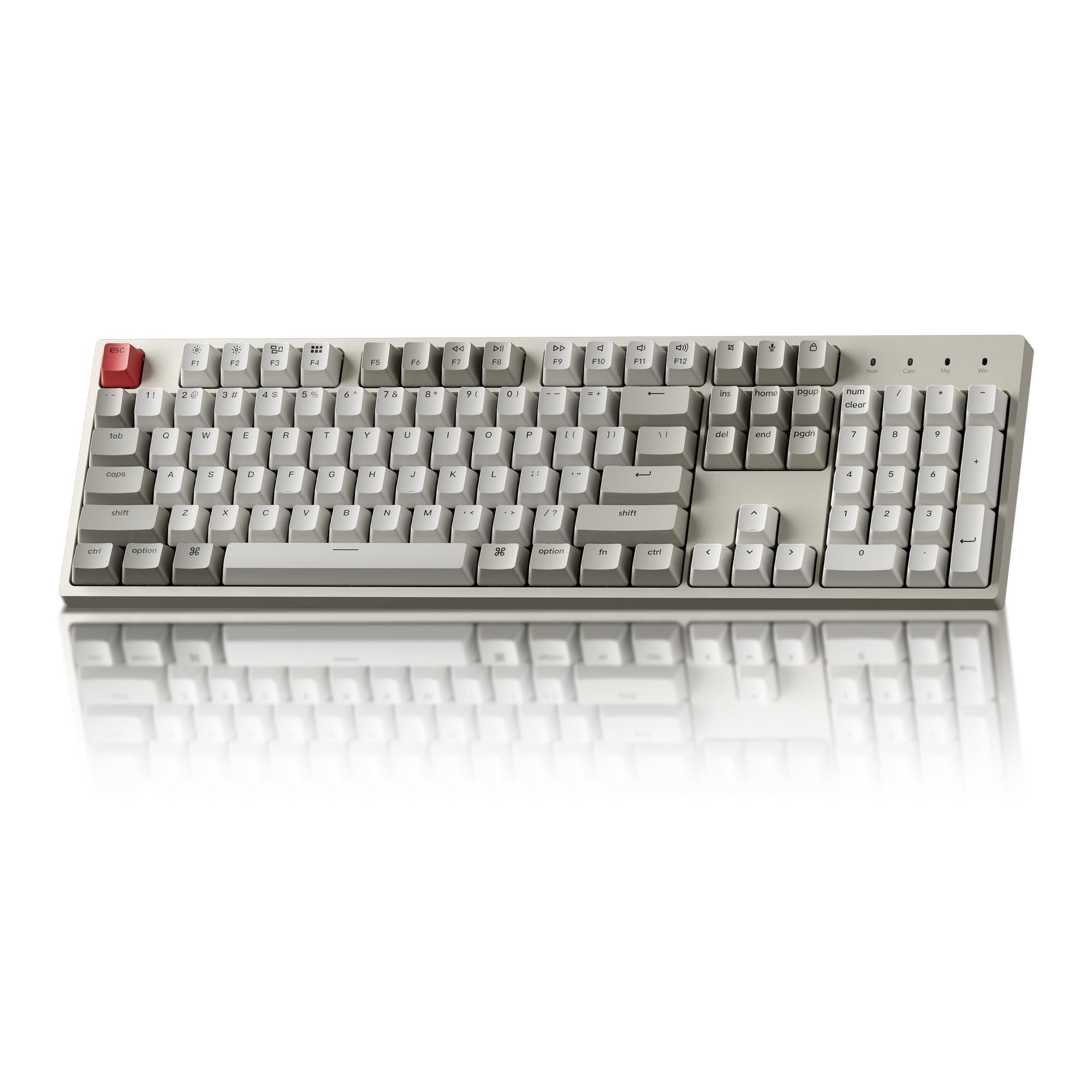
If a shallow laptop-style key feels like typing on a calculator, this is your correction. The C2 packs 104 keys into a full-size layout — number pad included — and the pre-installed tactile key switch gives each press a distinct bump you can feel before the key bottoms out. The listing rates the switch at up to 50 million keystrokes. The retro colourway reads as office-appropriate rather than flashy, and extra keycaps for both Mac and Windows are in the box.
The character of this board is what holds up. Owners describe a deep, satisfying THOCK sound with a clean click on every key, and it is the keyboard’s overall quality — not a single feature — that earns the most praise, with its appearance and sound close behind. Fast, accurate typing without hunting for keys comes up again and again. The feel and weight of the deck earn genuine love: one buyer called the keystrokes “deliberate yet easy,” which sums up why tactile fans stay loyal to this design.
The trade-off is the cable. This is a wired USB-C board with a braided cable, so there is no battery to charge and no Bluetooth to switch machines — it stays tethered to one computer. The C2 is also a heavier desk resident at 1.5 kg, so it is not the board to carry to a different office each day. For anyone at a fixed desk who wants the mechanical experience without wireless complexity, neither of those is a real cost.
Your board if: you sit at one desk all day and you want tactile feedback and retro character rather than silence
Not your board if: you need to move between devices or you share a quiet room where any click is too much
5. Logitech Signature Slim K950 Wireless Keyboard

The clean, quiet desk reset for anyone who already owns a mouse they refuse to replace.
Same typing surface as the combo above, sold on its own. The K950 keeps the familiar laptop-style keys, the full-size deck with a number pad, and the one-tap switch between three devices — Windows, macOS, Chrome OS, Linux, iPadOS, iOS and Android all connect over Bluetooth or Logi Bolt. At 685 g it stays put on the desk but is light enough to slide into a bag when you move between home and office. The build includes a minimum of 48% certified post-consumer recycled plastic in the casing.
What people keep coming back to is the overall keyboard quality, with connectivity and smooth operation right behind it. Multi-device control is the reason most buyers pick this one — hopping between a work laptop, a Mac, and a personal tower with a single button press, and preferring the dedicated home and end keys over what they had before. It also runs on two AAA batteries, and owners mention long stretch between changes. Battery life shows up as a strength rather than a complaint, and the low-profile feel is often compared to a MacBook Pro’s key action.
The friction is sound and value. Those are the honest edges of a board that is otherwise the closest thing to a set-and-forget office keyboard in this roundup.
Why it holds up: three-device switching, a no-fuss battery setup, and a typing feel that sits in the middle ground between laptop shallow and mechanical deep — that is the recipe for a desk you stop thinking about.
The fair caveat: “quiet” here is relative; it is a low-profile board, not a stealth one, and a few owners feel the asking price sits above what they wanted to pay.
Pick it when: you want the soft laptop-style feel, clean multi-device switching, and battery power you can replace from a drawer
Pass on it if: you type in absolute silence next to someone on calls, or your heart is set on mechanical feedback
6. Cherry KC 200 MX Wired Mechanical Office Keyboard

A mechanical board with a mute button built into the switch — office-quiet without giving up the spring.
Mechanical keyboards usually announce themselves. This one does not. The KC 200 MX runs CHERRY MX2A Silent RED switches, which the listing describes as smooth and quiet with linear switching characteristics (no click) — linear meaning the key moves straight down with no bump or click stop, like an elevator with no floors in between. Each switch is rated for more than 50 million actuations per key. Even the colourway is restrained: black with a bronze-toned aluminum surface plate.
Owners back up the quiet claim in the strongest terms — the silence here is genuinely the headline, and the tactile smoothness that comes with it ranks as the next most-loved quality. As one buyer put it, the switches are the “smoothest, quietest linear switches ever used.” Keycaps are laser-etched and abrasion-resistant, so the letters stay legible rather than wearing off, and the layout uses molded keycaps with four extra keys for the calculator app and volume control. Full N-key rollover means every key registers when pressed together, and anti-ghosting stops false inputs during fast typing.
Two small things separate this from a perfect fit for everyone. The rear feet are hard plastic rather than rubber-tipped, so on a smooth desk the board can slide without a mat. And because it is wired USB-A with no bundled software or lighting, the layout cannot be remapped, which will annoy anyone who wants to reprogram keys. For a fixed desk and a standard Windows setup, neither limitation gets in the way.
Why it earns its spot
- MX2A Silent Red linear switches with more than 50 million actuations per key
- Anodized metal plate and laser-etched keycaps that resist wear over years
- Full N-key rollover plus anti-ghosting for clean simultaneous keypresses
- Plug-and-play with no software or RGB overhead
- Dedicated calculator and volume keys built in
Where it stops short
- Hard plastic rear feet slide against a smooth desk without a mat
- No software support means no remapping — Windows-focused layout only
- Wired only, so no multi-device switching
Made for: typists who want mechanical smoothness and near-silent key travel on a single Windows workstation
Not the one if: you work across multiple machines or you want to remap keys to your own layout
7. ProtoArc EKM01 Plus Wireless Ergonomic Keyboard Mouse Combo
A split, sculpted board plus a shaped mouse — the full desk reset for wrists that have had enough.
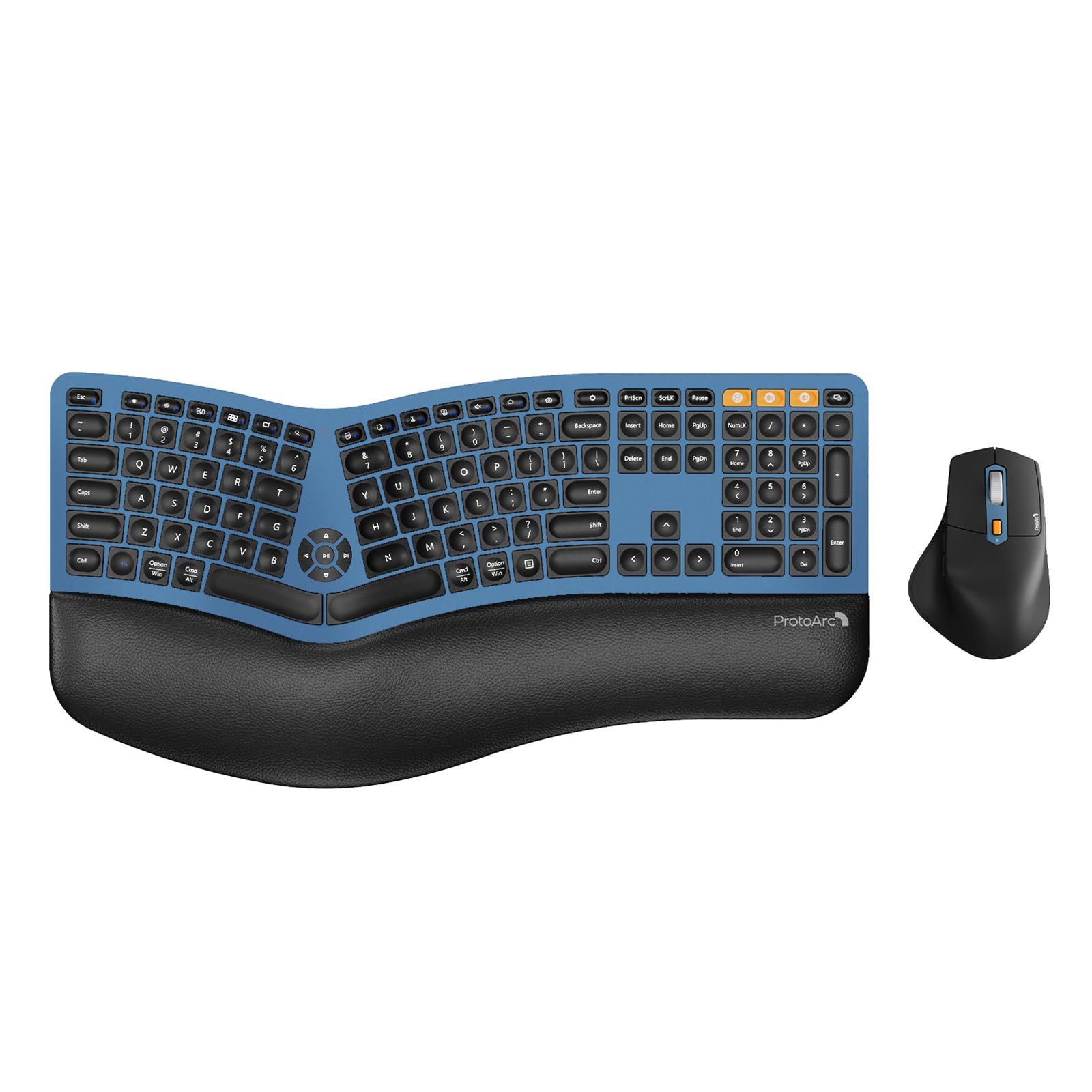
The EKM01 Plus is the pick for someone whose hands hurt at the end of the week and who wants the whole workstation to change, not just the keyboard. It ships as a combo: a full-size 117-key split layout with scooped keys that curve to match your fingertips, plus a sculpted mouse with palm and thumb rests so your hand sits neutral instead of rolled over. The keyboard alone is substantial — the listing measures it at 20.75 inches long and 11 inches wide, and warns you to check your desk dimensions before ordering because a split full-size deck takes real estate.
Ergonomics is the reason it earns its keep, backed by a memory foam wrist rest and adjustable tilt legs that angle the deck for seated or standing work. Connectivity is the strong second — it pairs with up to three devices over Bluetooth or the USB receiver and switches between them with a single button press. Both halves are rechargeable: keyboard and mouse each carry a 500mAh lithium battery charged over USB-C, with an auto-sleep mode after 30 minutes idle. The mouse adds forward and backward buttons and adjusts to 2000 DPI for precise cursor control.
Two quirks worth knowing before you buy. The first is the large ‘0’ key, which a buyer found only registers center presses — miss the middle and the zero does not land. The second is the included dust cover: a couple of owners found it can interfere with Bluetooth, so it is better treated as protection for when the board is idle, not an accessory for daily use. The Bluetooth link itself has been clean for most, with quick setup reported at under two minutes and no lag during typing.
Where it stands out: the split sculpted frame and the curved mouse share one design goal — keeping wrist and forearm in a relaxed line through a long writing or coding session.
One thing to know: it is a full-size split deck with a wide footprint, and the dust cover can interrupt the Bluetooth link if you leave it on while typing.
Best for: writers, coders, and anyone whose hands protest at the end of a workday, especially if they want a mouse included in the same ergonomic redesign
pass on it if: your desk is narrow or you play games on the same board — the split layout favours typing over twitch input
Know the Specs
Switch Type: Linear, Tactile, or Scissor
A switch is the mechanism under each keycap that decides how the key feels and sounds. A scissor or low-profile mechanism, as on the Logitech K950, uses a short, quiet press — good for close offices and quiet rooms. A linear mechanical switch, like the MX2A Silent Red in the Cherry KC 200 MX, travels straight down with no click and no bump, so it brings mechanical smoothness without the noise. A tactile mechanical switch, like the one in the Keychron C2, adds a small bump you feel before the key bottoms out, which some typists find more accurate for touch typing.
Wrist Rest and Tilt Angle
A wrist rest is the padded strip in front of the keys that keeps your palm level instead of bending your wrist upward. The TECKNET board uses a dual-density rest — a firm bottom layer plus a slow-rebound memory foam top — while the ProtoArc combo pairs a memory foam rest with adjustable legs. Tilt legs raise the rear of the keyboard so you can set a slight angle; a raised back can suit some typists and a flatter deck suits others, which is why adjustable tilt is worth having. A flat board with no rest can leave the wrist bent toward the desk for hours, which is the pattern most likely to cause fatigue.
Common Questions
Will a split ergonomic keyboard slow down my typing at first?
Is a mechanical keyboard too loud for a shared office?
Can one office keyboard really switch between a work laptop and a home desktop?
Do I need a wired connection for an office keyboard or is wireless fine?
How long does a rechargeable office keyboard last on one charge?
What is the difference between a wave keyboard and a split keyboard?
Can a wireless keyboard work with both Windows and Mac?
Do I need a number pad on my office keyboard?
How do I keep the keycaps from wearing out over time?
Should I buy the keyboard alone or a keyboard and mouse combo?
The Bottom Line
For most desks, the office keyboard to beat is the Logitech MK955 Signature Slim combo, because it delivers the quiet, low-fatigue typing most people are chasing and pairs it with a matching mouse on one wireless link. If wrist relief is the priority, the TECKNET Wireless Ergonomic pairs a split layout with a memory foam rest and the longest battery story in the group. And if you want mechanical smoothness without the noise, the Cherry KC 200 MX is the quiet mechanical pick that earns its premium tier.
One nudge worth taking: the Logitech MK955 holds the group’s highest rating at 4.5 stars across 900+ ratings.
How we choose
We do not accept paid placement. Every pick is matched to a real buyer and a real use-case; we do not hands-on test units.
Sources
Specifications: manufacturer listings and product documentation. Review insights: verified customer reviews, as of October 2026. Pricing: not shown on this page (it changes often); check the current price via the retailer link.
As an Amazon Associate, Aappliancez earns from qualifying purchases. This does not affect which products we feature.