Disclosure: Some links in this post are affiliate links. As an Amazon Associate I earn from qualifying purchases, at no extra cost to you. Learn more
Specs are compiled from manufacturer listings and verified buyer reviews and can change over time — please confirm the key details on the product page before buying.
If your game stutters every time someone in the house starts streaming, the fix is usually not a new router — it’s the tiny network card inside your desktop. A Wi-Fi card that plugs into a PCIe slot (the long expansion slot on your motherboard) gives you a proper antenna and a dedicated radio instead of the flimsy USB dongle most people start with. This guide sorts the seven cards worth your money by what actually matters in a firefight: real throughput, a stable link, and Bluetooth that doesn’t drop your headset mid-match.
This guide is built by comparing the manufacturers’ published specifications and the patterns across verified customer reviews, so you get each pick’s real strengths and trade-offs instead of marketing spin.
The short answer: buy for your router, not for the biggest number on the box, because a Wi-Fi 7 card on an old router gains you very little. Below you’ll find the honest breakdown of network card for gaming options, from budget plug-and-play picks to a dual-port 10-gigabit card for wired setups.
Top Picks


How To Choose The Best Network Card for Gaming
Match the card to the router you already own before you look at anything else. A card’s top speed is a ceiling, not a promise — the router on the other end has to reach it too. If your router tops out at Wi-Fi 6, a Wi-Fi 6E card still works fine, but you won’t see the 6GHz band’s benefit until you upgrade the router as well.
The band question: 2.4GHz, 5GHz, or 6GHz
Each band trades range for speed and congestion. The 2.4GHz band reaches furthest through walls but is the most crowded. The 5GHz band is the everyday middle ground. The 6GHz band is the newest, widest, and least crowded — it’s where Wi-Fi 6E and Wi-Fi 7 cards do their competitive work, but it has the shortest reach through walls and floors.
Why the antenna setup beats the spec sheet
A card’s radio can only work with the signal it receives. Two external antennas on a magnetized base let you move the receiving end to a spot with a clear view of your router instead of burying it against a metal PC case. That physical placement often matters more than the headline speed figure on the box.
Check your motherboard before you buy
Two physical checks save you a return. First, confirm you have a free PCIe slot — most of these cards fit an x1 slot, while a 10-gigabit wired card needs x8 or x16. Second, find a free 9-pin USB header on the motherboard if you want Bluetooth; that header is what feeds the card’s Bluetooth radio, and without it the Wi-Fi still works but Bluetooth stays dark.
Side-by-Side Comparison
| Model | Best For | Max Speed | Wireless Standard | Bluetooth | Amazon |
|---|---|---|---|---|---|
| TP-Link Archer TX3000E★ Best Overall | Most gamers upgrading a desktop | 2400 Mbps | Wi-Fi 6 (802.11ax) | 5.3 | Amazon |
| VIMIN 10G Dual RJ45Wired Speed King | Wired 10-gig LAN and servers | 10000 Mbps | 10 Gigabit Ethernet | — | Amazon |
| QFly AX210 PCIe | Cheapest way into 6GHz | 2400 Mbps | Wi-Fi 6E (802.11ax) | 5.3 | Amazon |
| FENVI FV-AXE3000 | Tri-band build on a budget | 5400 Mbps | Wi-Fi 6E (802.11ax) | 5.3 | Amazon |
| MSI Herald-BE Wi-Fi 7 MAX | AMD builds needing stability | 5.8 Gbps | Wi-Fi 7 (802.11BE) | 5.4 | Amazon |
| UGREEN BE6500 PCIe | Windows 11 rigs on Wi-Fi 7 | 6500 Mbps | Wi-Fi 7 (802.11be) | 5.4 | Amazon |
| TP-Link Archer TBE550E | Top-tier Wi-Fi 7 with a desk antenna | 9300 Mbps | Wi-Fi 7 (802.11be) | 5.4 | Amazon |
Detailed Reviews
1. TP-Link WiFi 6 PCIe WiFi Card for PC, AX3000 Dual Band
Our pick — 4.5+★ from 10,500+ verified ratings; the strongest balance of quality and price.
A 2400 Mbps Wi-Fi 6 card with a magnetized antenna base that steadies a desktop’s link.
Most gamers should start with the TP-Link Archer TX3000E, because it tops out at 2400 Mbps on the 5GHz band (or 574 Mbps on the slower, longer-reaching 2.4GHz band). That 2400 Mbps comes from Wi-Fi 6, the standard that introduced OFDMA (a traffic-sharing trick that lets your PC grab small slices of airtime instead of waiting in line behind every phone and TV in the house). In a firefight, that’s the difference between a clean hit registration and a stutter you blame on the server.
What wins people over is how completely it just works. Owners talk about functionality most, and the install backs that up — the driver is a short download from TP-Link’s support page, and one buyer described a sub-10-minute install with the card recognized on first boot. The payoff shows up in the reviews: buyers report a home NAS (a storage drive on your home network) transferring 2-3x faster after the swap, and signal quality climbing from the 50-60% range to roughly 85%. As one buyer reports of their setup: “Connection ~1153Mbps receive/576Mbps transmit, throughput 500-600Mbps.”
The magnetized antenna base is the quiet hero here. Two high-gain antennas sit on a magnetic puck you can park anywhere on your desk, so you can aim the receiving end at your router instead of leaving it jammed against a metal case. That’s a real advantage over the fixed-antenna FENVI below, where owners note you may need to swap in base-mounted antennas to get the most out of it. A low-profile bracket comes in the box for slim cases.
Where it stumbles is Bluetooth. Connectivity scores are genuinely mixed, and Bluetooth is the fussiest part — the card needs its USB cable run to a motherboard header (the small internal USB socket on your board), and a few owners hit a driver conflict on first install that a clean Windows reinstall and the newest driver cleared up. The 6GHz band isn’t here at all; that’s Wi-Fi 6E territory, which the QFly and FENVI cover.
What earns the top spot
- 2400 Mbps on 5GHz with OFDMA and MU-MIMO to keep latency low on a busy network
- Magnetized antenna base lets you place the signal where it actually reaches
- Bluetooth 5.3 for controllers, headsets and keyboards without a separate dongle
- Low-profile bracket included for small-form-factor builds
Where it asks patience
- Driver install goes smoother via TP-Link’s website than the included disc
- Bluetooth needs a free motherboard USB header and its own cable run
- No 6GHz band — you’re on Wi-Fi 6, not 6E
Reach for this if: you have a Wi-Fi 6 router and want the most reliable, best-documented upgrade path with minimal fiddling.
Think twice if: you already run a Wi-Fi 6E or Wi-Fi 7 router and want the 6GHz band — this card can’t reach it.
2. VIMIN 10G PCI-E Network Card
A dual-port 10-gigabit Ethernet card for desktops that can run a cable to the router.
This is the only card on the list that isn’t wireless, and that changes who it’s for. Two RJ45 copper ports running through the Intel X540-T2 controller push 10000 megabits per second — a full order of magnitude above the 2400 Mbps the TP-Link Archer TX3000E tops out at. For a gaming PC sitting next to a router, that much headroom is mostly wasted. For a machine that also acts as a NAS or media server and hands files to the rest of the house, it’s the whole point.
Installation is the strong suit. It fits PCIe x8 and x16 slots and ships with both standard and slim brackets for different case heights, and a heatsink keeps it cool under sustained load. On Proxmox it came up plug-and-play and auto-negotiated a 10-gigabit link straight away. One caution that catches people out: this card does not do 2.5Gbps or 5Gbps. If your switch or router is a 2.5G or 5G device, you’ll drop to 1Gbps — a deal on paper that’s really just a negotiation limit.
Now the honest part. Owners mention mixed feelings on the core functionality and the chip inside, and one buyer who ran a bandwidth test said the “Card drops all packets after initial traffic—256MB file transfer stalls halfway with 0 packets received.” Others found the PCB (the circuit board) is a third-party board carrying an X540 die (the actual network chip) rather than a fully branded Intel card, and it runs warm. On the flip side, buyers running it in a TrueNAS box (a home storage server) and in a Windows 11 machine both got the full 10-gig link once drivers were in place — the Windows 11 trick is switching Speed and Duplex from auto-negotiation to 10 Gig Full Duplex in the driver settings.
Who this actually serves: the builder running a home lab, a NAS, or a direct router cable who needs raw wired throughput and doesn’t care about Wi-Fi.
The honest catch: it’s a Gen2 x8 card, wants drivers from the vendor site, and refuses to negotiate 2.5G or 5G — set your expectations for exactly 10G or 1G and you won’t be surprised.
Right call for: a wired gaming and server build where both ends support true 10-gig Ethernet.
Look elsewhere for: a plain gaming desktop on Wi-Fi — you’d be paying for bandwidth your switch can’t use.
3. QFly PCIe WiFi 6E Card, AX210 Network Card for PC Gaming

The cheapest way to add a 2400 Mbps 6GHz band to a desktop.
The QFly runs an Intel AX210 chipset and splits its speed across three bands: 574 Mbps on 2.4GHz, 2400 Mbps on 5GHz, and 2400 Mbps on 6GHz. That last number is the reason to pick it. The 6GHz band is newer and far less crowded than 5GHz, so a gaming PC on it competes with fewer neighbours’ routers and fewer of your own household’s devices. The card also supports 160MHz channels — double the width of older 80MHz channels, which means more data per transmission and lower latency.
Setup is where it earns its keep. Installation is the second-most-discussed strength after raw functionality, and the card was recognized on boot in a Linux Mint 21.3 machine with no driver install at all. One owner running Mint 22.1 on a Dell Optiplex 7060 got it working by using the included disc, then downloading newer drivers for Bluetooth from the vendor’s site. Bluetooth 5.3 rides along for headsets and controllers — but only if you plug the power cable into the motherboard’s 9-pin USB header.
The catch worth flagging: this card is Windows 10/11-focused, and to actually use that 6GHz band you may need Windows 11 or the Windows 10 Dev build. A minority of units turn up used or faulty — one arrived unsealed and caused boot errors before it was returned. It’s also a 2400 Mbps card, not a 5400 Mbps one, so the FENVI below has more total throughput across its bands for a similar entry point.
Why the value stands up
- True tri-band with 6GHz at 2400 Mbps for interference-free play
- Intel AX210 chipset with OFDMA, MU-MIMO and 160MHz channels
- Plug-and-play on Linux Mint with no driver install
- Two 6dBi high-gain external antennas for better penetration
Before you commit
- 6GHz needs Windows 11 or the Windows 10 Dev build to open up
- Bluetooth requires a free motherboard 9-pin USB header
- Occasional unsealed or faulty unit slips through
Best fit: a budget-conscious builder who wants a genuine 6GHz path without spending much, especially on Linux.
Second thoughts: stick to the FENVI if you need every band running at 2400 Mbps or more.
4. FENVI FV-AXE3000 WiFi 6E AX210 Desktop PCIe Card

Same Intel AX210 chip as the QFly, but rated 5400 Mbps across three bands, with a red PCB for themed builds.
FENVI’s FV-AXE3000 pairs the Intel AX210 chipset with a total of 5400 Mbps across three bands — 2400 Mbps on 6GHz, 2400 Mbps on 5GHz, and 574 Mbps on 2.4GHz. That’s the headline over the QFly above, which stops at 2400 Mbps total on its two fast bands. Both cards carry OFDMA and MU-MIMO to share airtime efficiently, and both add WPA3 encryption to keep your home network locked down.
Quality is what buyers talk about most, and the install is repeatedly called out as easy with both full-height and low-profile brackets in the box. Signal strength gets concrete praise: one owner went from 50mb/s to 500mb/s after the swap, and another called it a massive improvement over the powerline adapters they’d been suffering with. Two external antennas and 160MHz channel support stretch coverage into bigger rooms and through a wall or two.
Two things to know before you buy. First, it’s not truly plug-and-play — drivers need to come from another device via USB, since the mini CD is impractical for most modern builds. Second, coverage from the fixed antennas is limited compared to a magnetized base, and owners suggest swapping to base-mounted SMA antennas if you need more reach. A handful note the Linux kernel requirement is stated as 5.1 but really needs 5.11, so check that if Linux is your OS.
Why it lands here: a genuine tri-band 6E card with WPA3, dual brackets, and the same Intel chip as the budget QFly — just with more total throughput to spread across your devices.
Small friction: budget an extra ten minutes to sideload drivers from a USB stick, and plan on aftermarket antennas if your router sits two rooms away.
Pick this for: a mid-range build that wants 6E’s clean band without the Wi-Fi 7 price, with the red PCB to match a themed case.
Not the one if: you need true plug-and-play drivers straight from the start.
5. MSI Herald-BE Wi-Fi 7 MAX

A Wi-Fi 7 card on a Qualcomm chipset that avoids the Intel adapter conflicts some AMD builders hit.
The MSI Herald-BE is a Wi-Fi 7 (802.11BE) card built on the NCM865 module, with a top speed of 5.8 Gbps and support for 320MHz channel widths on the 6GHz band. For comparison, the Wi-Fi 6E cards above top out at 160MHz channels — doubling the channel width is Wi-Fi 7’s main party piece, and it’s how this card squeezes more throughput out of a less crowded band. It also moves from 1024-QAM to 4096-QAM modulation, which packs more data into each transmission.
what separates it is AMD compatibility. One owner swapped out a failing Asus adapter and was relieved to find this uses a Qualcomm chipset (the chip that runs the Wi-Fi), sidestepping the Intel Wi-Fi 7 chipset conflicts some AMD builders hit. The same install was rock-solid with no drops on an older B450 board running the card in a PCIe 2.0 x1 slot (an older, slower motherboard slot). Speed gains on real hardware are concrete: one build with a Wi-Fi 7 router climbed from 300mbps to about 1200mbps, and a Dell desktop jumped from under 10Mb to over 400Mb.
Now the trade-offs. It requires Windows 11 — no Windows 10 support at all. Bluetooth runs through a USB header cable to your motherboard, and one ASUS Prime X570-P board had an unwired header pin that kept Bluetooth from being detected, so check your board’s manual if wireless controllers and headsets matter. The metal shield is specific to the MAX version, and drivers on the included media occasionally misbehave — the manufacturer’s website is the safer route.
What it gets right
- Wi-Fi 7 at 5.8 Gbps with 320MHz channels and 4096-QAM for wider, denser transmissions
- Qualcomm chipset sidesteps Intel Wi-Fi 7 issues on AMD boards
- Bluetooth 5.4 for all your wireless peripherals in one card
- Works in an older PCIe 2.0 x1 slot without a real-world bottleneck
What to plan around
- Windows 11 only — no Windows 10 fallback
- Bluetooth needs a working, wired USB header on the motherboard
- Driver install can be temperamental; the vendor website is more reliable than the disc
Made for: an AMD build on a Wi-Fi 7 router that wants the newest standard without Intel chipset headaches.
Only skip if: you’re still on Windows 10 — it won’t run.
6. UGREEN WiFi 7 BE6500 PCIe WiFi Card
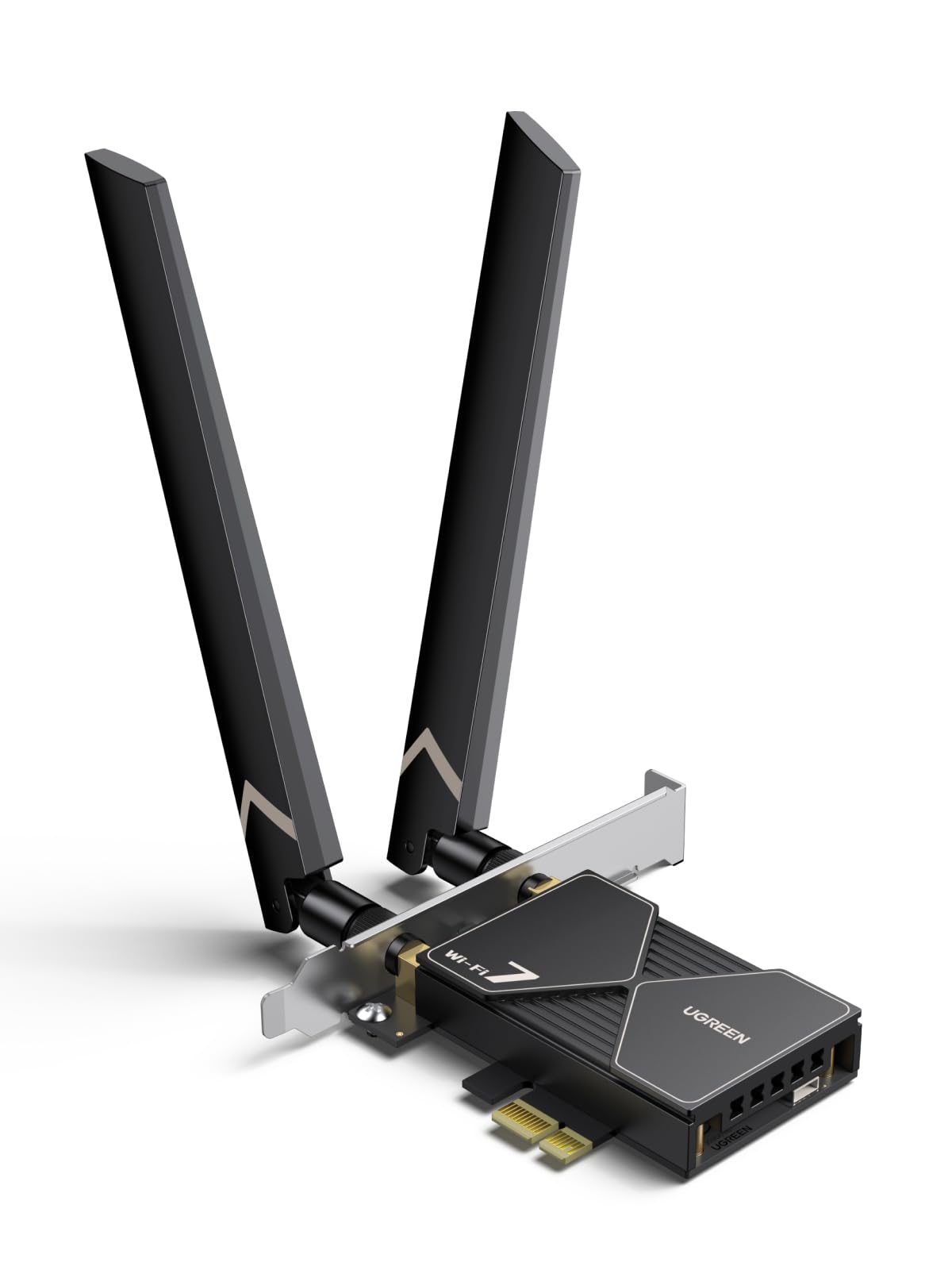
A tri-band Wi-Fi 7 card whose MLO support lets your PC use two bands at once to cut lag.
UGREEN’s BE6500 runs WiFi 7 tri-band at 2882Mbps on the 6GHz band, 2882Mbps on 5GHz, and 688Mbps on 2.4GHz, with 160MHz bandwidth in that 6GHz space. Its big feature is MLO — Multi-Link Operation — which transmits data across more than one Wi-Fi band at once so your PC can pick whichever path is cleanest at that instant. In a game, that’s the mechanism meant to keep picture and sound synced and stop unexpected disconnects when someone else in the house starts a 4K stream.
The install story is one of its best-liked traits. A driver USB stick comes in the box, so there’s no hunting for drivers or dealing with a disc. Once running, the card competes with other Wi-Fi 7 options and adds Bluetooth to PCs that didn’t have it. Flexible dual 6dBi high-gain antennas let you angle for better signal strength, and WPA3 keeps the network secured.
Here’s the honest caveat. Reliability is the most-discussed topic and it’s genuinely mixed — some units perform exactly as promised, while a minority never work at all. Windows 11 is also a hard requirement, and the card pairs with Windows 11 21H2 only in the sense that older builds are excluded. Bluetooth conflicts with your motherboard’s own Bluetooth, so switch the built-in one off first. And if your motherboard already has a Wi-Fi chip, this won’t magically outpace it — it’s for PCs that lack one.
Where it shines: MLO across three bands, a driver stick in the box, and flexible 6dBi antennas — a genuine Wi-Fi 7 setup for a desktop that shipped without a wireless card at all.
What to weigh: Windows 11 only, and you want a build where adding your own Wi-Fi actually matters rather than upgrading a board that already has it.
A smart buy for: a Windows 11 desktop with no onboard Wi-Fi that wants MLO’s dual-band trick and a wipe-clean driver install.
Look past if: you’re on Windows 10 or your board’s built-in adapter already handles Wi-Fi 6E well.
7. TP-Link WiFi 7 BE9300 PCIe WiFi Card (Archer TBE550E)

The fastest card here: 9300 Mbps across three bands, with a magnetized antenna base for your desk.
TP-Link’s Archer TBE550E is the fastest card in this guide, and it’s not close. Its top speeds add up to 5760 Mbps on 6GHz, 2880 Mbps on 5GHz, and 688 Mbps on 2.4GHz, powered by Wi-Fi 7’s 320MHz channels (double the width of older channels) and 4096-QAM modulation (a denser way of packing data into each signal). Against the MSI Herald-BE’s 5.8 Gbps ceiling, this one clears it at 9300 Mbps — a bigger ceiling for anyone on a full Wi-Fi 7 router with the broadband to feed it.
The reduced latency is real in the reviews: replacing a USB dongle brought ping down to sub-millisecond from a previous 5-10ms with drops, and a Wi-Fi 5 card replaced by this one hit nearly halved ISP ping. Local throughput with a Wi-Fi 7 router reached around 2600 Mb/s.
Two hardware quirks you should know. It requires Windows 11 — Windows 10 isn’t supported — and Bluetooth needs an open USB 2.0 header. The magnetized antenna base is flexible with a 1m braided RF cable, letting you put the receiving end on top of your desk rather than behind the case, and it carries an RGB status light you can touch-switch. It also works on both AMD and Intel boards. The one consistent downside: the antenna base occupies desk space, and the card demands the newest TP-Link drivers from the website or you may see ping spikes.
The premium case
- 9300 Mbps total across 6GHz, 5GHz and 2.4GHz with 320MHz channels
- MLO cuts lag on a busy network by using multiple bands together
- Magnetized antenna base with 1m braided RF cable for desk placement
- RGB status LED with a responsive touch switch
- Works on AMD and Intel boards, both brackets included
The costs of going top-tier
- Windows 11 only — no Windows 10 or Linux support
- Antenna base takes up space on the desk
- Needs the latest TP-Link website drivers to avoid latency issues
The one to choose: a Windows 11 gaming PC already on a Wi-Fi 7 router where every millisecond of ping is worth chasing.
Hold back if: you’re still on Windows 10 or still on a Wi-Fi 6 router — the ceiling is wasted.
Know the Specs
Mbps, Gbps, and what they mean for ping
A card’s speed rating is the ceiling of data it can carry in a second, measured in megabits per second (Mbps) or gigabits per second (Gbps). Real gaming rarely needs a huge ceiling — a game session sips data — but a higher ceiling leaves more room for downloads, voice chat and everyone else in the house. What actually keeps your shot on target is low latency: the delay between pressing fire and the server registering it, which is why the calm 6GHz band and MLO matter more than a big top number.
Wi-Fi standards: 6, 6E, and 7
Wi-Fi 6 introduced OFDMA and MU-MIMO so multiple devices share airtime without crowding. Wi-Fi 6E opened the 6GHz band — a newer, less crowded slice of spectrum. Wi-Fi 7 adds wider 320MHz channels and MLO, which lets a card transmit on more than one band at once. A newer card can still work on an older router, but you only gain the top speed when the router supports the same standard.
Antennas and placement
Two external antennas with a magnetized base let you separate the receiver from the metal PC case, which blocks signal. Moving the base to a spot with a clearer line to the router often does more for your connection than any spec figure. Fixed-antenna cards work, but you can’t reposition them as easily, which is why some owners swap in base-mounted antennas later.
Bluetooth and the USB header
Bluetooth on these cards runs through a separate cable that plugs into a 9-pin USB header on your motherboard. If your board has no free header, or its pins are unwired, Wi-Fi still works but Bluetooth stays dead. Check your board’s manual for a spare header before you count on wireless controllers and headsets working from the card.
Common Questions
Will a Wi-Fi 7 card make my games faster if I still have a Wi-Fi 6 router?
Do I need a special slot on my motherboard for these cards?
Why doesn’t the Bluetooth on my new card work?
Is a PCIe Wi-Fi card better than a USB dongle for gaming?
Do I need the 6GHz band to play online?
Will these cards fit a small-form-factor PC case?
Why does a 10-gigabit card drop to 1Gbps on my 2.5G switch?
Can I use a Wi-Fi 6E card on Windows 10?
What does MLO actually do on a Wi-Fi 7 card?
Should I install drivers from the disc or the manufacturer’s website?
The Bottom Line
For most gamers, the network card for gaming winner is the TP-Link Archer TX3000E because it pairs a 2400 Mbps Wi-Fi 6 link with a magnetized antenna base you can aim, and an install most people finish in under a quarter of an hour. If the clean 6GHz band is what you’re after on a tight build, grab the QFly AX210 or the FENVI FV-AXE3000. And if you’ve already moved to a Wi-Fi 7 router and Windows 11, the TP-Link Archer TBE550E is the one to reach for, with MLO (multi-link operation, which uses several bands at once) cutting lag on a crowded network. Its 4.5+ star average across thousands of owners backs up the pick — the crowd favorite and the sensible choice are the same card.
How we choose
We do not accept paid placement. Every pick is matched to a real buyer and a real use-case; we do not hands-on test units.
Sources
Specifications: manufacturer listings and product documentation. Review insights: verified customer reviews, as of October 2026. Pricing: not shown on this page (it changes often); check the current price via the retailer link.
As an Amazon Associate, Aappliancez earns from qualifying purchases. This does not affect which products we feature.