Disclosure: Some links in this post are affiliate links. As an Amazon Associate I earn from qualifying purchases, at no extra cost to you. Learn more
Specs are compiled from manufacturer listings and verified buyer reviews and can change over time — please confirm the key details on the product page before buying.
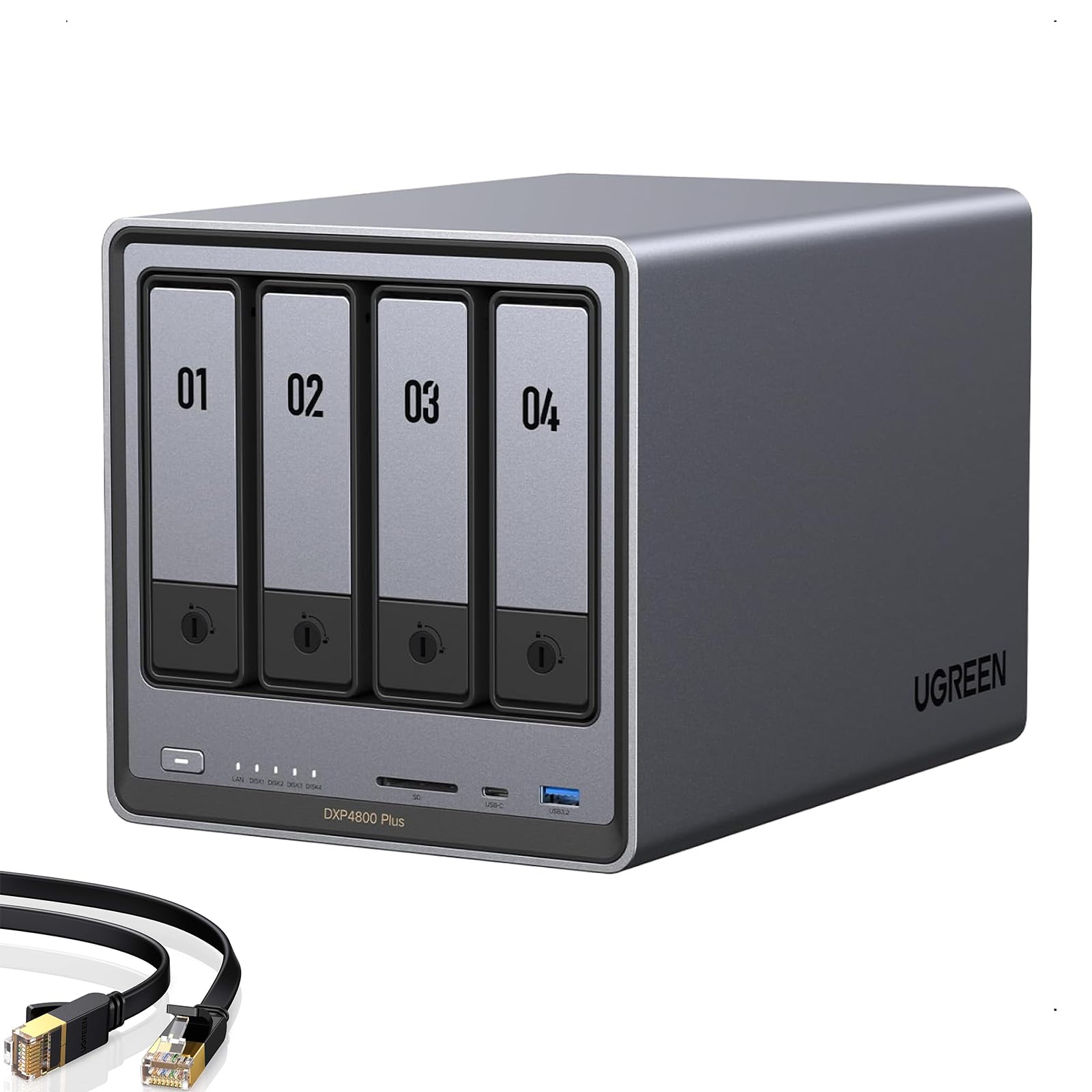
If Time Machine keeps nagging your MacBook for more disk space, a network drive solves it — but only one built to sit on your network and stay awake for hourly backups. Every pick below does that job. The differences that matter are simple: how many drive bays you get, how fast the network port is, and whether the box stays reliable hosting a Mac backup day after day. The UGREEN DXP4800 Plus takes the top spot because it combines four bays, 144 TB of maximum capacity and a 10GbE port (a 10-gigabit network connection, about ten times faster than standard gigabit) with a 4.5+ star welcome from a large owner base.
This guide is built by comparing the manufacturers’ published specifications and the patterns across verified customer reviews, so you get each pick’s real strengths and trade-offs instead of marketing spin.
You will learn which enclosure formats actually work as a Mac backup target, what a 2.5GbE port changes about your first full backup, and how to avoid buying a box your Mac cannot reliably mount. Read on for the honest picks that make a good NAS Drive for Time Machine.
Top Picks


How To Choose The Best NAS Drive for Time Machine
A Time Machine backup is not a one-off copy. Your Mac wakes up roughly every hour and writes another snapshot to the drive. That means the box has to be reachable on your network at any moment, stay awake, and hold many versions of the same files without filling up. A plain USB hard drive plugged into one Mac only helps that one Mac, so most people move to a network box that every computer in the house can reach.
Confirm the box speaks SMB before anything else
Time Machine talks to network storage over SMB, a shared file protocol that Macs, Windows PCs and NAS units all understand. Every NAS reviewed here connects over Ethernet and exposes shared folders, but check the maker’s notes for the specific Mac setup steps. A direct-attached enclosure — a box that plugs into one computer over USB — appears to your Mac as an external disk instead, and that is a different kind of backup target entirely.
Decide how many bays you actually need
A two-bay unit lets you mirror one drive onto the other so a single dead disk does not wipe your backup history. Four bays give you more room and more RAID choices. If you only back up one Mac, two bays is plenty. If you run a small studio or several Macs, the extra bays on something like the four-bay UGREEN DXP4800 Plus are what let you keep separate backup folders without juggling space.
Look hard at the network port
Your first Time Machine backup copies your entire drive across the wire, so the port speed decides whether that takes an afternoon or a day. A 1GbE port moves data at a modest pace. A 2.5GbE port is faster, and a 10GbE port on the UGREEN DXP4800 Plus moves data fastest of the group — but your router or switch has to match for you to feel it. Buy the port you can actually feed.
Side-by-Side Comparison
| Model | Best For | Bays | Max Capacity | Network Port | Amazon |
|---|---|---|---|---|---|
| UGREEN DXP4800 Plus★ Best Overall | Whole-home Mac backup hub with room to grow | 4 | 144 TB | 1x 10GbE + 1x 2.5GbE | Amazon |
| Synology DS225+Premium Pick | Mac owners who want polished backup software | 2 | 40 TB | Not stated in data | Amazon |
| UGREEN NAS DH2300Easiest Start | First-time backups without a learning curve | 2 | 64 TB | 1GbE | Amazon |
| Synology DS223j | Simple scheduled backups on a modest budget | 2 | Not stated in data | Not stated in data | Amazon |
| TERRAMASTER F2-425 | Media server plus Mac backup in one box | 2 | 60 TB | 2.5GbE | Amazon |
| QNAP TS-216G-US | Budget entry to networked Mac backups | 2 | 22 TB | 2.5GbE | Amazon |
| TERRAMASTER D4-320 | Mac users who want a USB drive array, not a NAS | 4 | 120 TB | USB 3.2 Gen2 | Amazon |
| BUFFALO TeraStation 16TB | Set-and-forget protection with drives included | 4 | 16 TB (12 TB usable in RAID 5) | 1x 2.5GbE | Amazon |
| BUFFALO TeraStation 24TB | Long-term backup archive with the most raw space | 4 | 24 TB (18 TB usable in RAID 5) | 1x 2.5GbE | Amazon |
Detailed Reviews
1. UGREEN DXP4800 Plus 4-Bay NAS
Our pick — 4.5+★ from 600+ verified ratings; the strongest balance of quality and price.
Four bays, a 10GbE port and 144 TB of headroom — the box that makes hourly Mac backups feel instant.
The number that changes how you work is 1250 megabytes per second of data transfer. That is roughly ten times a standard gigabit connection, so the first Time Machine copy of a full MacBook becomes a coffee break rather than an overnight wait. UGREEN splits that speed across two ports — one 10GbE and one 2.5GbE — and gives you four bays to fill. Raw capacity tops out at 144 TB, which the maker equates to 50 million 1MB photos or 98K 1.5GB movies, drives not included.
Inside sits an Intel 5-core CPU, 8GB DDR5 RAM, a 128G SSD and an SD 3.0 card reader, all on a 4K HDMI output. In practice that means this is not just a backup target — it runs Docker and virtual machines, streams to your TV through that HDMI port, and keeps the backup share running in the background. The owner pattern confirms the daily experience: setup takes about an hour, the fan stays close to silent even under load, and the 10G link transfers smoothly. What buyers praise most is straightforward performance, followed by day-to-day reliability. For a NAS doing hourly backups this is exactly the right reputation to have.
The honest limit is the software, not the hardware. Mapping the network drive is less intuitive than Synology’s equivalent, and reports note limited support with drives larger than 20 TB. UGREEN also warns that all models except the DXP480T Plus are wired Ethernet only — no Wi-Fi — and that actual speeds depend on your router, CPU, drive and file size. Pair it with a switch that can feed the 10GbE port and you get everything this box is built for. Feed it gigabit and you will still be happy, just not amazed.
What the spec sheet buys you
- 1x 10GbE plus 1x 2.5GbE jump from 1250 MB/s — near-instant first backups and fast recurring snapshots
- Four bays and 144 TB max capacity — separate backup folders for every Mac in the house
- 8GB DDR5 RAM with upgradability, an Intel 5-core CPU and Docker support
- Runs close to silent under load with a 4K HDMI output for direct TV playback
Where it asks for patience
- Network drive mapping is less intuitive than Synology’s DSM
- Documented support gets limited above 20 TB drives
- Wired Ethernet only — no Wi-Fi on any model except the DXP480T Plus
Worth it for: households or small studios backing up several Macs who want the fastest possible transfer and a box that doubles as a media server. The 4.5+ star standing across 600+ ratings backs that call.
Think twice for: a one-Mac setup with a plain gigabit router, where the 10GbE port goes unused.
2. Synology DS225+ 2-Bay Diskless NAS
The Mac-friendly software machine of the group, with 282 MB/s file transfers and a 3-year warranty.
Synology’s DSM software is the reason this one costs more than the UGREEN NAS DH2300. The web dashboard is clean, browser-based and point-and-click, and most people finish setting up a shared folder for macOS backup the same afternoon they unbox it. Synology states 282 MB/s transfer speeds and a 40 TB storage volume across two bays. A mirrored pair of large drives then gives one Mac a long runway of hourly snapshots, so you never have to thin old ones aggressively.
The DS225+ brings an Intel CPU for hardware transcoding, support for up to 30 IP cameras, snapshot technology and a 3-year warranty. Third-party drive concerns that followed this model’s launch have been worked through by owners — the general read is that non-Synology drives do work, though a compatibility file download was needed in one case before a DSM upgrade. An occasional buyer gripes about Synology’s own drives getting the fullest feature access, so check the compatibility list before you buy the drives.
Where the DS225+ differs from the UGREEN above is the ceiling. Two bays and 40 TB against four bays and 144 TB — the UGREEN holds far more raw data (144 TB versus 40 TB). But the Synology’s advantage is polish and long-term support, with a 3-year warranty against the UGREEN’s 2-year cover. For a Mac user who wants to open one app and trust the process, that tradeoff is worth considering.
Why it earns second place: reliability, ease of setup and interface quality are the traits owners return to again and again, and the 4.5+ star score across a large owner base reflects steady satisfaction. If you plan to keep the same NAS for five years and want minimum fiddling, this is the front-runner.
Go with this if: you value a mature, intuitive admin panel over raw bay count, and you want the 3-year warranty to back it.
Look elsewhere if: your Mac library is enormous and you expect to fill more than two drives within a year.
3. UGREEN NAS DH2300 2-Bay for Beginners & Personal Users
Built for the person who just wants their Mac backed up without reading a manual first.
Two bays, a 1GbE network port (standard gigabit Ethernet) and 125 MB/s transfers keep your hourly Time Machine snapshots from dragging the Mac down. That speed moves a 1GB file in about eight seconds. Total capacity reaches 64 TB with proper drives, and UGREEN says that holds 22 million 3MB images or 2 million 30MB songs. For a single Mac’s backup history, that is an enormous amount of room.
The DH2300 is honest about what it is. It handles automatic backups across Windows, iOS, Android and macOS, tags photos with AI so you can search by face or object, and pairs with a straightforward app. What wins people over is the setup — the guided software means even a moderately tech-savvy user can go from unbox to working backup in one sitting. Quality and ease of setup are the two traits buyers cheer most, and the 4.5+ star score across a big owner base says most people land on their feet.
What you should know before buying: no Docker, no virtual machines, no Plex through Docker, and wired Ethernet only. That last one matters — if your Mac is on Wi-Fi and the NAS is on Ethernet, both still need to sit on the same router to see each other. Some owners do report the box can be a touch loud in a very quiet room, so plan its spot with that in mind.
The practical read: this is the starter NAS that does the specific job most homes need — Mac, Windows and phone backups in one place — without demanding server knowledge. Think of it as a private Time Machine target that also holds the family photos.
Pick it if: you have one or two Macs, no interest in Docker, and you want a first network drive that just works.
Pass it over if: you need Docker or heavy media transcoding — look at the UGREEN DXP4800 Plus or the TERRAMASTER F2-425 instead.
4. Synology 2-Bay DiskStation DS223j (Diskless)

Synology’s entry model, priced modestly and quietly reliable for one household’s backups.
For a buyer who wants the Synology interface without the premium price tag, the DS223j delivers the same automated backups, the same set-and-forget scheduling, and the same remote access. Buyers report that the setup runs in about an hour, the thing is dead silent on a shelf, and scheduled laptop backups fire off without fuss. One review specifically notes it pairs well with Time Machine over SMB — the exact protocol macOS uses — making it a clean match for a Mac-only household.
That CPU is the honest limitation. Heavy video transfers slow down, the admin panel lags when the box is busy, and camera monitoring needs extra packages you may have to buy. The dashboard itself is straightforward, but the deeper settings take patience — one owner described the full configuration as hard without YouTube and support. Once dialed in, though, it runs well. Four bays of expandability are not on the menu; this is a two-bay unit and that is the end of the story.
Compared to the DS225+ above, the DS223j trades the Intel CPU, the 3-year warranty and the hardware transcoding for a much lower entry point. If you only need scheduled nightly Mac backups on a quiet two-bay box, the DS223j covers it. If you need to run a media server and backup several Macs, step up to the DS225+.
What earns it a place: for someone whose only requirement is reliable scheduled Mac backups on a quiet box, the DS223j quietly does the entire job. The 4.5+ star average across a mature, sizeable owner base tells you people stay happy.
Reach for this if: you want Synology’s backup software at entry-level cost and your daily load is light.
skip it if: you plan to stream 4K video across the house or run multiple apps — the CPU will buckle.
5. TERRAMASTER F2-425 2-Bay NAS, Intel x86 Quad-Core, 4GB RAM
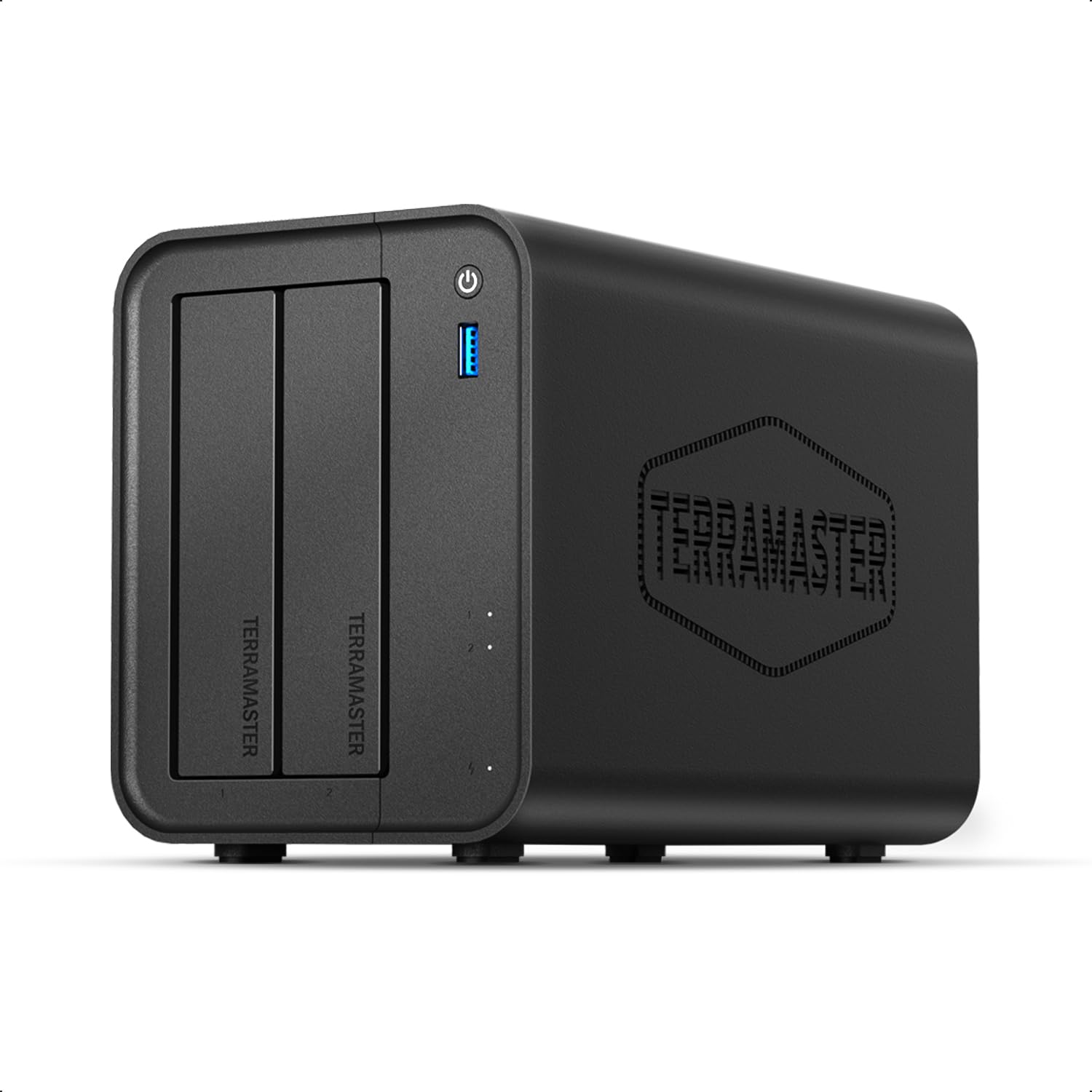
A two-bay that runs quietly enough for a bedroom and doubles as a Plex server beside your Mac backup.
At just 19 dB(A) — a whisper in a silent room — the F2-425 is the quietest option in this group by a clear margin. Its Intel x86 quad-core CPU and 4GB RAM handle 4K transcoding and multitasking in parallel with your Time Machine share. The 2.5GbE port gets file transfers moving at a good clip across the network, and two bays support up to 60 TB of total storage with two 30TB drives. That is a lot of runway for Mac backups and family photos together.
What earns loyalty here is functionality — running several streams at once, using Plex, Emby or Jellyfin without glitches, and managing the whole thing from TNAS Mobile without a PC. The TOS6 interface feels Synology-like in layout, and the tool-free Push-Lock drive trays mean installing HDDs takes seconds. Stack it next to the QNAP at the lower end of the list and the appeal is clear: real Intel muscle under the same small footprint.
The honest catch is speed consistency. Speed is the one aspect where owners leave mixed impressions — internal transfers and Plex library indexing can be slow, and backups of very large libraries can drag on for hours. Build quality gets a similarly split reaction, mostly because the chassis is plastic. For Mac backup duty with moderate library sizes, it performs fine. For a media hoarder with a 20 TB iTunes library, be patient with the first sync.
Why media people like it
- Intel QuickSync hardware transcoding handles 4K H.265 Plex, Emby and Jellyfin streams
- 19 dB(A) operation — quiet enough for a bedroom shelf
- Tool-free Push-Lock trays and TNAS Mobile setup without a PC
- 2.5GbE port for fast network transfers, up to 60 TB across two bays
The friction points
- Speed is mixed — Plex indexing and large internal transfers can be slow
- Plastic chassis draws split reactions on build feel
- First library index can run for days
Best fit: a Mac owner who also wants a home media server and will use the Plex or Emby transcoding. The 4.0+ star score reflects a solid box with a few rough edges.
Not the one for: impatient users who want transfers finished instantly on day one.
6. QNAP TS-216G-US 2-Bay 2.5GbE Desktop NAS

The cheapest way into a 2.5GbE network drive, with a 22 TB ceiling and an AI accelerator built in.
Two things make the TS-216G worth looking at. The first is the price point — this is the most affordable box in the group, and for a basic Mac backup target it costs the least. The second is the 2.5GbE port, which is impressive at this level because most budget NAS units still ship gigabit-only. Inside sits an ARM Cortex-A55 quad-core running at 2.0GHz, 4GB DDR4 RAM, and a built-in NPU — a small dedicated chip that speeds up face and object recognition when the NAS organizes photos.
QNAP’s operating system earns credit for sturdy permissions, useful apps, and a familiar smartphone-like web interface. One buyer who came over from the aging ReadyNAS crowd reported: “installed two 3TB drives with no major issues” and noted the “2.5Gb Ethernet works well.” That is the pattern — the hardware handles standard home backup loads fine. The recurring gripe is that QNAP’s setup software takes an IT mindset to untangle. And standard gigabit Ethernet feels sluggish next to the 2.5GbE port (a 2.5-gigabit connection) once you wire it properly.
For Mac backup only, the 22 TB capacity is enough for most people’s history, and the NPU helps photo organization. But be realistic: this ARM chip is not built for heavy transcoding or running a pile of Docker containers. It is the get-started box, and at 4.0+ stars across 90+ ratings, it sits at the entry level with a real 2.5GbE advantage most rivals at this price do not have.
A careful read: excellent backup unit, mixed on reliability and setup, solid on value. If your only job is hourly Mac snapshots and photo sync, the QNAP handles it. If you want smooth setup from the start, the UGREEN DH2300 takes the edge.
Choose this if: you want the lowest entry cost into 2.5GbE network backups and don’t mind wrestling with QNAP’s settings.
Choose something else if: simplicity matters more than the cheapest entry point.
7. TERRAMASTER D4-320 4-Bay External Hard Drive Enclosure

Not a NAS at all — a four-bay USB enclosure your Mac mounts as one big external disk.
Be clear on one thing up front: the D4-320 is a DAS — direct-attached storage — not a NAS. It plugs into one computer over USB 3.2 Gen2 (a fast USB standard) and behaves like an external disk array. Time Machine will absolutely back up to it, but only from the Mac it is plugged into. There is no network sharing. What you get in exchange is real speed and lots of room: up to 10 Gbps over USB, up to 1,016 MB/s combined read/write across four drives, single-drive support up to 30 TB, for a total of 120 TB.
Setup is genuinely easy. Tool-free trays with TerraMaster’s Push-Lock design lock each drive into place on insertion, and hot swapping means you can pull a drive without powering down. The intelligent temperature-controlled fan with sound-absorbing panels keeps noise below 21 dB(A) in standby — quieter than a library. Owners describe installing four drives in around 25 minutes. The performance and enclosure quality are the two things most praised, and 4.0+ stars across 350+ ratings underlines that the core job is done well.
Hardware caveat: on macOS with software RAID, this enclosure has drawn complaints about faulty-disk warnings and USB driver load — Thunderbolt was recommended as the alternative. So if your plan is four drives in a Mac software RAID, think carefully. If your plan is one big external volume for Time Machine on a single Mac, this is a genuinely simple alternative to a full NAS, and the price per bay is far below network boxes.
Who this suits: single-Mac households that want a large, fast, quiet external backup array without the network setup. Buy it understanding that it is not shared across the house.
The perfect buyer: a Mac user who wants a big, fast USB disk shelf and doesn’t need other computers to reach the backups.
The wrong buyer: anyone who expects Time Machine over Wi-Fi or wants two Macs backing up to the same box — that requires a real NAS.
8. BUFFALO TeraStation Essentials 4-Bay NAS 16TB (4x4TB)

Every other pick here arrives empty — this one shows up with four drives already installed and RAID set.
If buying and installing bare drives sounds like a chore, the TeraStation is the shortcut. Four pre-tested drives ship inside, pre-configured in RAID 5 so 16 TB raw becomes 12 TB usable immediately. Swap to RAID 6 for more redundancy or RAID 0 for the full 16 TB. A buyer using it for Mac work wrote that they use it “for my Mac backup ‘Time Machine'” alongside their photo and document archive.
Beyond drives, the package is practical: 256-bit encryption, a native 2.5GbE port for faster transfers, a closed system for security, and cloud sync to Amazon S3, Dropbox, Azure and OneDrive for hybrid backup. The 3-year warranty covers the drives too, and 24/7 US-based support with a data recovery service is included. Made in Japan and TAA-compliant, it is configured for small-office data protection rather than tinkering.
Given how few owners have reviewed it so far, treat its 4.0+ star score as early. One critical voice returned a unit that went into Emergency Mode shortly after setup — an honest note rather than a pattern. Setup documentation lives online only, and a driver install on a local machine is needed for first-time configuration. For a Mac-only household that expects polished software, that is a small papercut. For a small business that wants drive-included protection with a long warranty, it is not a dealbreaker.
What brings people in
- Drives included and RAID 5 pre-configured — no bare-drive shopping or first-time setup guesswork
- 3-year warranty covers the drives, plus 24/7 US-based support and data recovery service
- 2.5GbE port and 256-bit drive encryption for faster, safer file sharing
- Cloud sync to Amazon S3, Dropbox, Azure and OneDrive
What to weigh first
- Setup manual lives online only, and first-time config needs a local driver install
- One arrived in Emergency Mode shortly after setup — early batch variance worth noting
- Closed system and Synology-style flexibility are not on the menu
Reach for this if: you want a Mac backup target that arrives ready to use, with drive warranty bundled in. That is its whole pitch.
Look elsewhere if: you want to pick your own drives or tinker with the OS — Synology or UGREEN suit better.
9. BUFFALO TeraStation Essentials 4-Bay NAS 24TB (4x6TB)
The same drive-included blueprint as the 16TB model, with enough roomy archive capacity to hold years of Mac backups.
Twenty-four thousand gigabytes is the headline. Four 6TB drives arrive pre-installed in RAID 5, giving 18 TB usable from the start, and that figure can flex to the full 24 TB in RAID 0 if raw capacity is what you want. For a Mac user with a media library and years of Time Machine history to preserve, 18 TB usable is a generous ceiling. And like its sibling, the drives ship pre-tested so drive compatibility is off your plate.
Everything else matches the family: 256-bit drive encryption, closed-system security, flexible replication, a native 2.5GbE port at 2.5 Gbps, cloud sync to Amazon S3, Dropbox, Azure and OneDrive, plus a 3-year warranty that includes the drives. One owner confirms the Mac use case directly, saying they use it “for my Mac backup ‘Time Machine'” and to get photos and documents off Google Drive into one place. That is the right audience for this box — a household consolidating scattered cloud files into one local, protected archive.
The trade-off versus the 16TB model is space against budget. If 12 TB usable is already enough for your Mac history, spend the difference on something else. The 24TB model earns its premium only when your archive is genuinely large. Setup documentation is online only, and the same occasional Emergency Mode report applies — treat early factory failure as a return, not a redesign of the whole category.
Where it fits: large-archive buyers who do not want to deal with bare drives and want a long warranty. Buy it if your Mac backup history plus media library sits comfortably in the 18 TB usable starting point, with room to add.
Yes, if: you need more drive-included archive room than the 16TB model offers and want that 3-year drive warranty.
No, if: a modest Mac-only budget makes the 16TB version the smarter spend for the same software.
Know the Specs
Bays and Storage Capacity
A bay is a slot that holds one drive. Two bays let you mirror one drive onto the other, so a single drive death does not wipe your Time Machine history. Four bays give more room and more RAID choices. Total capacity works differently across these boxes — the UGREEN DXP4800 Plus reaches 144 TB, the UGREEN DH2300 tops out at 64 TB, and the BUFFALO models ship with drives included for 16 TB or 24 TB raw. Size the bays for two years of hourly snapshots, not just your current Mac drive.
Network Port Speed
A network port is the Ethernet socket on the back that shuttles data to your Mac. A gigabit (1GbE) port is the older standard, while a 2.5GbE port moves data faster than gigabit, and a 10GbE port is the fastest in this group. Only the UGREEN DXP4800 Plus has 10GbE. The catch every box shares: to actually feel that speed you need a router or switch that can supply the same lane. Without that, the extra speed sits idle.
Common Questions
Will Time Machine work with any NAS, or do I need a specific brand?
Can I back up more than one Mac to the same NAS?
How much capacity do I need for hourly Mac backups?
Will I notice a difference between 1GbE and 2.5GbE on a Mac?
Is the TERRAMASTER D4-320 a good substitute for a proper NAS?
Should I buy an empty NAS or one with drives included?
What RAID mode should I use for a Time Machine drive?
Will the NAS keep backing up if my Mac goes to sleep?
Can I run Plex on the same NAS that backs up my Mac?
What happens if a drive fails inside a NAS used for Mac backups?
The Bottom Line
For most Mac owners, the nas drive for time machine winner is the UGREEN DXP4800 Plus. Its 10GbE plus 2.5GbE ports move data at 1250 MB/s, its four bays give 144 TB of headroom, and its 4.5+ star standing across 600+ ratings says the hardware keeps its promises. If you want the most polished software for a single two-bay Mac backup, reach for the Synology DS225+ with its 282 MB/s transfers and 3-year warranty. And for a first NAS where simplicity matters more than raw speed, the UGREEN NAS DH2300 is the easy on-ramp.
If you need a large fast USB array ratherthan a shared network box, the TERRAMASTER D4-320 delivers 120 TB across four bays over USB 3.2 Gen2. And if you want drives included with the warranty covering them, the BUFFALO TeraStation 16TB arrives ready to back up your Mac.
A NAS costs more than a USB drive, but it keeps hourly versions of your work on drives you own instead of one copy. Keep the NAS wired to your router with matching drives in the bays, and Time Machine will keep writing hourly snapshots for years.
How we choose
We do not accept paid placement. Every pick is matched to a real buyer and a real use-case; we do not hands-on test units.
Sources
Specifications: manufacturer listings and product documentation. Review insights: verified customer reviews, as of October 2026. Pricing: not shown on this page (it changes often); check the current price via the retailer link.
As an Amazon Associate, Aappliancez earns from qualifying purchases. This does not affect which products we feature.