Disclosure: Some links in this post are affiliate links. As an Amazon Associate I earn from qualifying purchases, at no extra cost to you. Learn more
Specs are compiled from manufacturer listings and verified buyer reviews and can change over time — please confirm the key details on the product page before buying.
If clicking and dragging a standard mouse leaves your fingers stiff and your wrist aching by mid-afternoon, the fix is not more clicking — it is a different grip altogether. The best mouse for arthritis changes how your hand meets the desk. A trackball (a mouse you point by rolling a ball with your thumb) lets your thumb do the pointing while your hand sits still. A vertical mouse rolls your wrist into the handshake position it was built to hold. For most achy hands, the Logitech Ergo M575S is the smartest starting point — it keeps your arm anchored and your hand relaxed. It is also the crowd favorite at 4.5+ stars across 2,400+ owners.
This guide is built by comparing the manufacturers’ published specifications and the patterns across verified customer reviews, so you get each pick’s real strengths and trade-offs instead of marketing spin.
Below you will find seven genuinely different ergonomic shapes, from thumb-driven trackballs to tilted vertical grips, so you can match the mouse to how your hand actually feels on a bad day. I matched each one to the hand size, grip style, and desk habits that suit it best, and this breakdown of the best mouse for arthritis keeps every recommendation tied to those real specs.
Top Picks


How To Choose The Best Mouse for Arthritis
The single biggest decision is the shape family, because it decides which part of your hand does the work. A trackball keeps your hand completely still and lets your thumb roll the cursor, so your fingers never have to grip and drag. A vertical mouse works differently — it tilts your wrist so your forearm stays straighter than it does on a flat mouse. Neither is universally “better”; your hand tells you which one it wants.
Trackball versus vertical tilt
Pick a trackball if gripping and moving a mouse across the desk is the motion that hurts. You roll a ball with your thumb and your arm stays put, which is why these suit long editing or spreadsheet sessions. Pick a vertical mouse if you want to keep a familiar left-click and scroll-wheel feel but stop your wrist from twisting flat onto the desk. Many buyers try a vertical first, then move to a trackball when they want even less hand movement.
Match the size to your hand, not the picture
This is the fit note buyers trip over most. Several picks here are built for small to medium hands, and a body that is too tall forces your fingers to stretch for the buttons. Measure across your palm before ordering, and treat “fits most hand sizes” as a starting point rather than a guarantee. A mouse that is slightly small is easier to live with than one your thumb cannot comfortably reach.
Silent clicks, battery style, and device switching
Quiet clicks matter if you share an office or work late beside someone. Battery style splits into two camps: rechargeable (plug in a cable, no swapping) and AA or AAA (swap a cell and keep going, often for a year or more). If you juggle a laptop, a desktop, and a tablet, look for a model that pairs to multiple devices and switches with a button. Silent clicks, a battery you rarely swap, and one-button device switching all cut fiddling, and less fiddling means less strain.
Side-by-Side Comparison
| Model | Best For | Shape / Angle | Connectivity | Battery | Amazon |
|---|---|---|---|---|---|
| Logitech Ergo M575S★ Best Overall | All-day desk work with minimal arm movement | Thumb trackball, right hand | Bluetooth or Logi Bolt USB | Up to 18 months (AA) | Amazon |
| Uineer Vertical Ergonomic MouseBudget Champion | Budget multi-device switching | Vertical, handshake grip | Dual Bluetooth 5.0/4.0 + 2.4G | 500mAh rechargeable | Amazon |
| Acer Ergonomic Mouse | Small to medium hands, multi-screen work | 59° vertical tilt | Bluetooth + 2.4G (3 devices) | AAA (not included) | Amazon |
| Kensington Pro Fit Ergo Vertical | Precise cursor control on a budget | 46° vertical slope | 2.4G Nano receiver | Up to 1 year (AA) | Amazon |
| Nulea Wireless Vertical Trackball | Silent trackball with fast infinite scroll | 65° vertical trackball | Bluetooth + USB receiver (3 devices) | Long battery (per listing) | Amazon |
| Logitech Lift for Mac | Mac users with small to medium hands | 57° vertical, right hand | Bluetooth Low Energy | Up to 24 months (AA) | Amazon |
| Microsoft Sculpt | Ambidextrous comfort for small hands | Sculpt ergonomic, ambidextrous | USB wireless receiver | AA | Amazon |
Detailed Reviews
1. Logitech Ergo M575S Wireless Bluetooth Trackball Mouse
Our pick — 4.5+★ from 2,000+ verified ratings; the strongest balance of quality and price.
The mouse that does the pointing so your hand does not have to.
Here is the trade that makes a trackball a genuine relief: your hand stays planted while your thumb rolls the ball, so the small grip-and-drag motion that wears out fingers simply disappears. Logitech builds the M575S around that idea and pairs it with a sculpted right-hand body and quiet clicks. You will charge it roughly never — an AA battery included with the mouse is rated for up to 18 months, so a single cell can cover the better part of two years of desk work.
What wins people over is the daily usefulness of the thing. It moves without moving your hand, so it sits happily in a cramped corner of a small desk or on a sofa arm, and it tracks on any surface. Owners call the thumb control almost easy and the clicks genuinely quiet, which is why it holds up in meetings and lectures. Battery and Bluetooth both draw lighter praise, with the freedom to drop the dongle and connect straight to a laptop being a running theme.
The honest catch is a short settling-in period. If you have pointed with your whole hand for years, the first day or two of thumb control feels foreign. Buyers report more mixed feedback on the responsiveness and the trackball button areas than on the core body — a nudge in the ball rather than a smooth push can feel stiff. Keep it on the desk too; the ball sits loose enough that a drop can send it rolling. That is a handling note, not a reason to pass, and on balance the strongest all-round argument in this guide.
thumb-ball wrist relief
- Thumb control means your arm stays anchored — no reaching across the desk all day.
- Quiet clicks suit shared offices and late-night work.
- Up to 18 months from one AA battery (included), so you rarely think about power.
- Bluetooth or the included Logi Bolt USB receiver — drop the dongle when you want to.
steep learning curve
- Thumb control takes a few days to feel natural after years of a flat mouse.
- Some buyers find fine cursor pushes a touch stiff.
- The loose ball needs care — a fall can pop it out of the socket.
pick for desk work: your fingers ache from clicking and dragging, and you want your hand to sit still all day.
skip for gaming: you swap batteries reluctantly — this is AA, not rechargeable.
2. Uineer Vertical Ergonomic Mouse
Handshake grip, three devices, six buttons — the friendly entry into vertical shapes.
The Uineer gets your wrist vertical with a natural handshake grip, and it does it while juggling more buttons than most competitors: six in total, against the Logitech M575S’s two. That extra real estate gives you forward and back on the thumb, so browsing and folder work stay put under a finger. You also get four DPI levels (800, 1200, 1600, and 2400) to dial cursor speed to your own feel, from slow and precise to quick for long scrolls.
What people love is that the six buttons and three-device switching just work, day in and day out. Performance is the thing it gets praised for most, followed by comfort, with wrist-strain relief and a budget price showing up again and again. The dual Bluetooth and 2.4G connection is a real convenience — pair up to three devices and hop between them without re-pairing. It is built for small to medium hands, so check your fit first. One 17cm-hand buyer found it comfortable with quiet buttons and 20+ hours per charge, noting the tall body is easy to bump and the angle could be steeper.
Where it asks a little back: the scroll wheel and the back and forward buttons are not soft-click, and those back and forward buttons do not work on Mac OS. The base is a touch less slippery than premium models, so the first nudge of a movement can feel jumpy. Its charging is the winner over the Kensington’s AA cell — plug in the included Type-C cable and skip the battery drawer entirely. Expect a week or so of adjustment before the vertical hold feels like second nature.
budget vertical shape: six buttons, silent main clicks, three-device Bluetooth, and a rechargeable 500mAh battery make this the most feature-dense pick for the least outlay — a strong first vertical mouse if your hands are small to medium.
small hand fit: if your hands run large, the compact body may leave your thumb stretching, and the stiffer scroll wheel is worth noticing before you commit.
cheap ergo entry: pricier verticals on button count and flexibility, and it adds Bluetooth and a rechargeable battery on top.
skip for big hands: Mac users lose the back and forward buttons, so that trio of devices matters less on an Apple setup.
3. Acer Ergonomic Mouse Wireless with Side Scroll

A 59° tilt with a side wheel that does three jobs in one click.
The Acer tilts your hand into a 59° vertical hold, which sets your wrist and forearm into a straighter line than a flat mouse ever can. Fit is the first thing to note, because Acer builds this one for small to medium hands and says so plainly. The body weighs a light 87g, so it glides rather than plows across the desk. Its party piece is a 3-in-1 side scroll wheel with a center button — one click flips it between window toggle, zoom in and out, and horizontal scrolling. Flipping through a wide spreadsheet stops being a two-hand job.
Build quality is what earns the most respect here, and the value for money follows it closely. People switching between devices call out how easy the Bluetooth pairing is, and the customizability of that side wheel makes multi-screen work feel less like plate-spinning. One owner with post-surgery wrist issues used it through 12-hour shifts and described the scrolling as excellent with a good, comfortable fit. It pairs to three devices and switches quickly, which matters if your workday moves between a laptop, a desktop, and a tablet.
The honest trade-offs are worth knowing before you order. This is not a rechargeable mouse — it runs on AAA batteries (not included), so keep spares handy. The click is louder than some rivals, and a few owners mention the tall body is easy to knock over and the sleep-and-wake cycle needs a double-click to rouse it. A small number found the button placement fiddly on smaller hands. None of that undercuts the shape, but the noise level is the one to weigh if you share a quiet room.
good for spreadsheets: multi-screen work where that side wheel saves real hand travel.
skip for travel: you need total silence or a rechargeable battery — this one clicks audibly and eats AAA cells.
4. Kensington Pro Fit Ergo Vertical Wireless Mouse
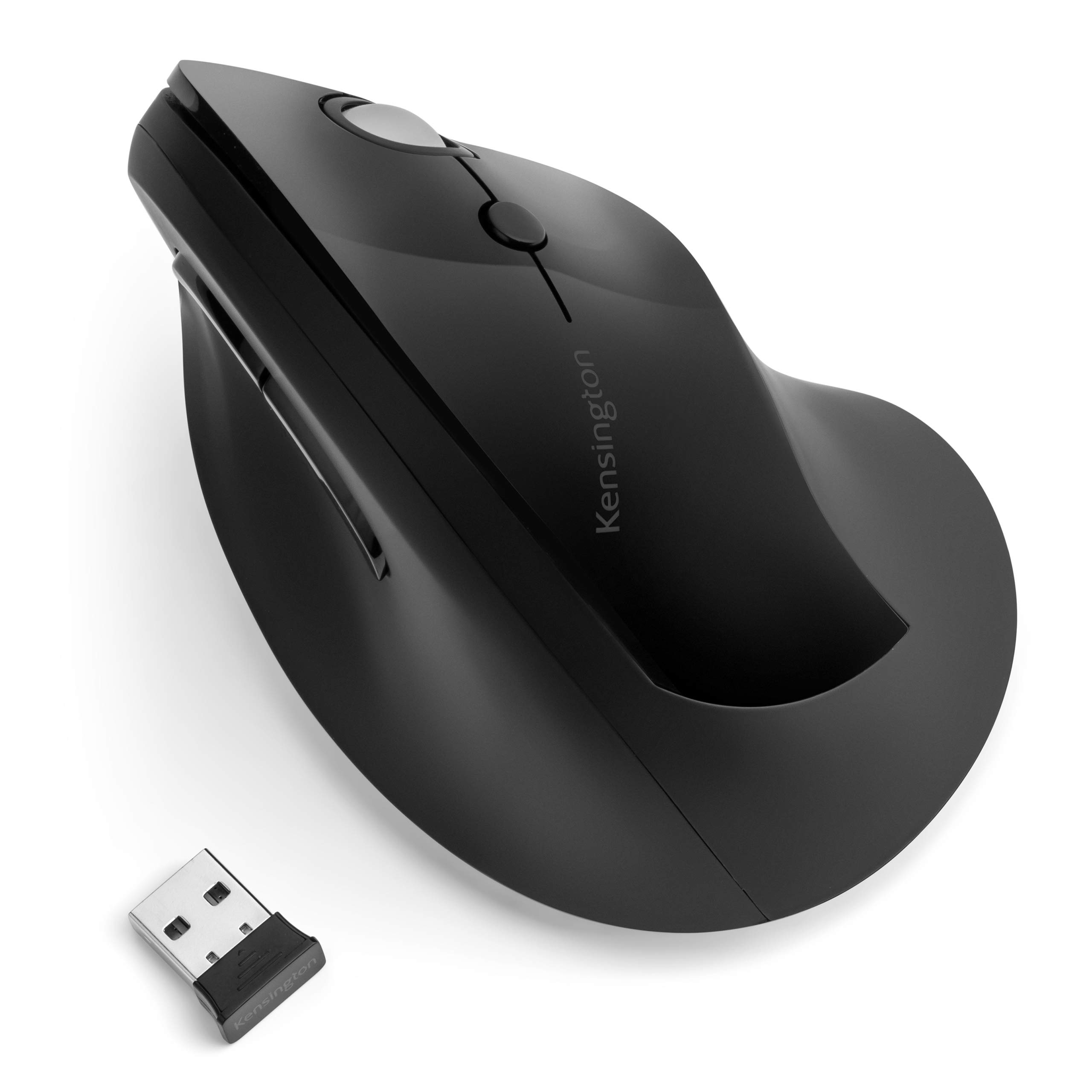
An unglamorous workhorse whose sensor punches above its bracket.
Kensington keeps the wrist in a neutral handshake position with a 46° slope, and pairs that with a fully featured layout: a scroll wheel plus left, right, forward, and back, and DPI buttons (sensitivity settings) for 800, 1000, 1200, and 1600. The one AA battery is rated to run up to a year, and a low-battery light warns you before it dies. Plug the Nano receiver (the small USB plug that connects the mouse) in and you are working in seconds — no pairing dance, and the receiver tucks inside the mouse for travel. A downloadable KensingtonWorks app handles button customization.
Build quality is the headline for its buyers, and the 46° ergonomic slope sits right behind it. The sharpest endorsement comes from people who have run through a stack of vertical mice and keep returning to this one for its accuracy — pinpoint control with no cursor drift, and gliding that feels more expensive than the price suggests. Reviewers single out the wide, grippy rubber scroll wheel, and for anyone doing photo or design work that steadiness is the whole game. The right-bottom flare also keeps the edge of your hand off the desk, which cuts drag as you move.
Two things to plan for. This is a receiver-only mouse, not Bluetooth, and Windows ARM-based computers are not supported — check your machine before you buy. The forward button sits a stretch away for shorter thumbs, and cursor movement draws some mixed notes, with a few users seeing a jumpy pointer. There are isolated mentions of longevity trouble down the road too, so register the purchase and keep the receipt. It is not the quietest or the most modern, but the core tracking is the real draw.
built for long days: precise tracking, a year of AA power, and plug-and-play simplicity for design or detail work.
skip for small desks: no Bluetooth, and it is explicitly unsupported on Windows ARM-based computers.
5. Nulea Wireless Ergonomic Vertical Trackball Mouse

Steep, silent, and built to keep your thumb rolling instead of your arm reaching.
Nulea tilts this trackball to 65°, one of the steepest holds here, and puts the cursor under your thumb so your hand and arm stay still. The wave-textured surface is shaped to fit your palm, and the whole thing runs silent — trackball, buttons, and scroll wheel all. The wheel is the standout: it is an infinite scroll (it keeps spinning with no click stops) that reads how fast you spin it and switches between precise and fast modes on its own. It also supports 4-way scrolling for sweeping through long documents with a single spin.
Build quality and the 65° palm fit are the two things it earns the most credit for, with the adjustable DPI tracking close behind. It connects over Bluetooth or the included USB receiver, pairing up to three devices and switching at a button tap, and it handles PC, Mac, laptops, tablets, and phones. Buyers moving over from pricier trackballs repeatedly call out the fast wheel scrolling, the three DPI settings, and the easy finger-push ball removal that makes cleaning simple. For a shape this steep, the switch often clicks within days rather than weeks.
The honest snag is button placement. The forward and back buttons sit over the ergonomic ridge, so only your thumb can reach them and the back button can be hard to find by feel, which leads to some thumb stretching. A few buyers also find the cursor fast out of the gate — drop to a lower DPI setting and it settles. One niche note: a darker-colored ball has tracked less smoothly for some, so a lighter ball runs cleaner. Set those aside and it is an awful lot of trackball for the money.
finger trackball control: a silent, self-adjusting infinite scroll wheel and a 65° vertical hold are the two features that make long editing sessions feel gentler.
ball cleaning upkeep: the thumb buttons sit high on the ridge — workable, but not the most intuitive spot on the body.
great for tight space: anyone who wants trackball relief plus the slickest scrolling on this list.
skip for fast aiming: you rely heavily on forward and back and want those buttons right under your thumb without a stretch.
6. Logitech Lift for Mac Vertical Ergonomic Wireless Mouse

Built for Apple, angled at 57°, and quiet enough to run beside a sleeping laptop.
If your desk runs on a Mac, the Lift is tuned for it from the ground up, connecting over Bluetooth Low Energy to MacBook Pro, MacBook Air, iMac, and iPad models. The 57° angle sets your hand into a natural handshake hold, keeping your wrist off the desk and your forearm closer to straight. The clicks are whisper-quiet, the magnetic SmartWheel scrolls smoothly in slow or fast modes, and there are four customizable buttons to program through the Logi app for different programs. One AA battery keeps it running up to 24 months.
Wrist comfort is the running theme with this mouse, and owners with carpal tunnel discomfort report genuine relief from the 57° upright hold. The device-switching button earns particular praise — flipping between a work and home machine is a single press. Zero dongle is a quiet bonus for anyone with scarce USB-C ports, and the light feel takes pressure off the hand and wrist through a long day. It is sized for small to medium hands, so a smaller grip gets a break here that larger verticals do not offer.
Two honest notes. Second, mind the connection type when you order — versions differ, and one variant is Bluetooth-only with no dongle. Neither point dents the ergonomics. For Apple users who want a calm, silent, wrist-friendly mouse, it is the obvious partner.
made for mac users: small-to-medium Mac hands get a 57° hold, near-silent clicks, and two years from one AA cell.
skip for windows setups: no rechargeable option, so plan on an eventual battery swap.
7. Microsoft Sculpt Wireless Ergonomic Mouse
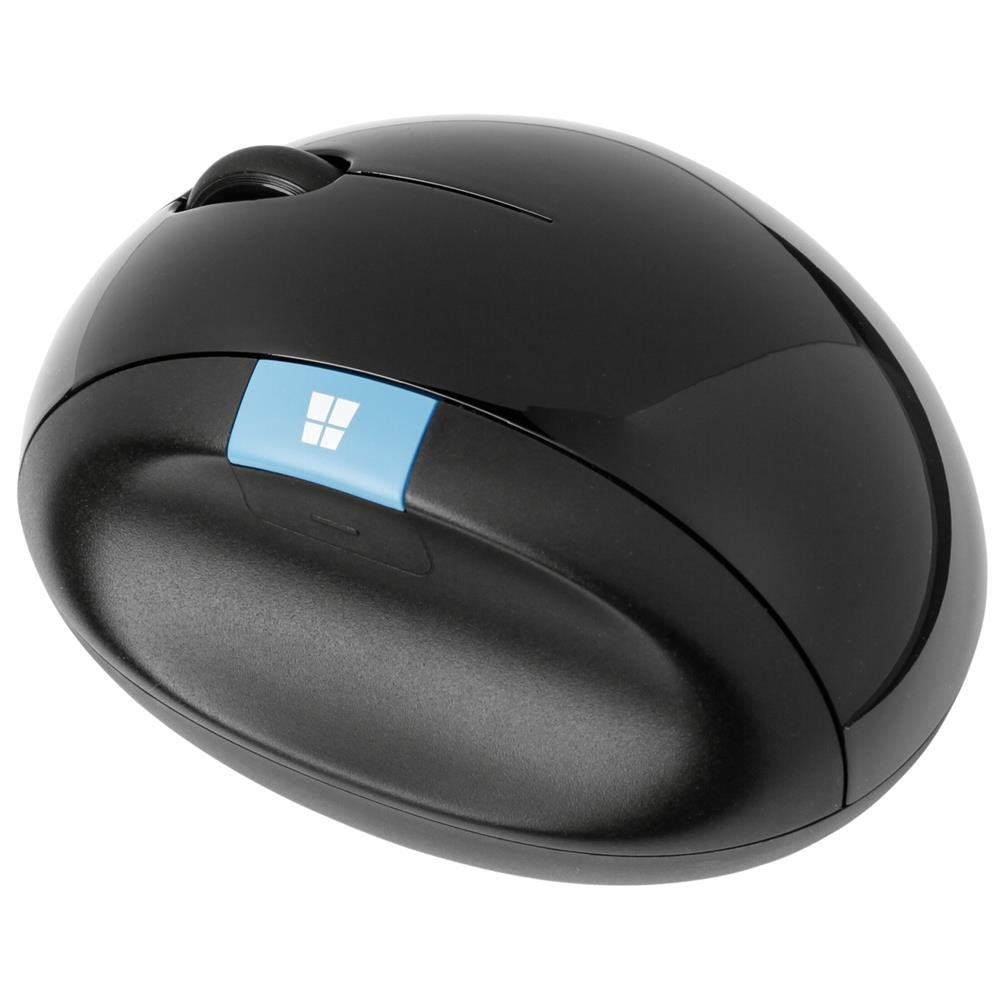
A rounded, do-it-both-hands shape that lets your palm rest at an angle.
The Sculpt goes its own way: instead of tilting hard to one side, it uses a rounded, ambidextrous body (shaped for either hand) that lets your hand sit at roughly a 45° angle, which keeps your wrist and forearm tendons out of a twist. It is light, glides smoothly, and tracks precisely. The wired-receiver setup runs on AA batteries. The curvy top gives your palm large support surfaces to rest on, and the whole thing feels sturdy without being heavy. If two hands share a desk or you swap hands through the day, the symmetric shape is a real advantage the one-sided verticals do not have.
For small hands, this is a sleeper favorite. Buyers with small hands have bought a second unit on the strength of the fit, and people working through elbow or wrist tendon trouble describe real improvement after switching from heavier mice. It earns praise for combining a simple shell with functionality — good materials, precise tracking, and a low, gliding profile — at a modest outlay for the shape. A storable magnetic receiver underneath keeps it tidy when you travel.
Be clear-eyed about two things. There are no forward or back thumb buttons, and the scroll wheel does no side-to-side navigation, so you give up some shortcut convenience. It is also receiver-based USB wireless, not Bluetooth, so losing the dongle means losing the connection — mind that, and buy from a reputable seller. A heavier palm rest is not for everyone either. None of this changes the comfort story, but the wired-style connection is the one to accept going in.
sculpted thumb rest: an ambidextrous rounded shell that lets small hands share the mouse and keeps the wrist out of a twist.
flaky wireless link: it is USB wireless, not Bluetooth, and the dongle is your lifeline — store it well.
comfort for office: you have small hands, share a desk, or want a symmetric shape with a storable receiver.
skip if signal weak: you need Bluetooth freedom or dedicated back and forward buttons.
Know the Specs
Vertical angle (degrees)
The vertical angle is the tilt from flat to upright — how far the mouse rolls your hand toward a handshake hold. A shallow tilt like 46° nudges you upright; a steeper one like 65° positions your hand more fully on its side. The right angle depends on your hand, since a very steep tilt can feel tall and easy to knock over while a gentle one stays closer to a familiar feel. A neutral wrist is the goal, and the angle is how each mouse reaches it.
Trackball versus moving mouse
A trackball keeps the body still and puts cursor control under your thumb, so your hand never grips and drags across the desk. A moving ergonomic mouse keeps the familiar left-click and scroll feel but changes the wrist angle. Trackballs reduce hand travel most; vertical mice keep a more familiar motion. Neither is universally better — match it to whether the dragging motion or the wrist flatness is what bothers you.
DPI (cursor sensitivity)
DPI stands for dots per inch — how far the cursor travels for a given movement of your hand, ball, or sensor. Higher DPI means a faster cursor with less effort; lower means more precise, deliberate moves. Many of these mice let you switch between fixed DPI levels, so you can slow things down for detail work and speed up for browsing. If your cursor feels too fast on arrival, dropping a level usually settles it.
Battery style and life
Rechargeable mice run from a built-in battery and a cable, so no swapping — but you must remember to charge. AA and AAA mice swap a standard cell, and the best of them run up to a year or more per battery, which trades a rare swap for never hunting a cable. Either way it is a comfort decision: less fiddling over power means fewer interruptions through a long workday.
Common Questions
Is a trackball or a vertical mouse better for an achy wrist?
Will a vertical mouse work with a small hand?
How long does it take to get used to a vertical mouse?
Do these mice work with a Mac?
Can I switch between several computers with one mouse?
Which is quieter, a trackball or a vertical mouse?
Do I need to install software to use the extra buttons?
Is a rechargeable mouse or a battery mouse better?
What happens if I drop a trackball mouse?
The Bottom Line
For most achy hands, the winner among these mouse for arthritis picks is the Logitech Ergo M575S: a thumb trackball keeps your hand planted, clicks stay quiet, and up to 18 months from one AA cell means almost no upkeep. If you want a familiar click feel with a vertical hold and a rechargeable battery, the Uineer delivers six buttons and three-device switching for the most flexibility per dollar. And if your desk is Apple to the core with small to medium hands, the Logitech Lift for Mac is the calm, quiet, wrist-friendly partner built for it. Whichever you choose, give the new grip a week of honest trial — the relief comes as the hold becomes second nature.
How we choose
We do not accept paid placement. Every pick is matched to a real buyer and a real use-case; we do not hands-on test units.
Sources
Specifications: manufacturer listings and product documentation. Review insights: verified customer reviews, as of October 2026. Pricing: not shown on this page (it changes often); check the current price via the retailer link.
As an Amazon Associate, Aappliancez earns from qualifying purchases. This does not affect which products we feature.