Disclosure: Some links in this post are affiliate links. As an Amazon Associate I earn from qualifying purchases, at no extra cost to you. Learn more
Specs are compiled from manufacturer listings and verified buyer reviews and can change over time — please confirm the key details on the product page before buying.
If you are shopping the premium end of gaming controllers, the answer you actually want is simple: the PlayStation DualSense Edge is the one to beat, because its swappable stick modules and adjustable trigger travel let you fix the two parts that fail first on every other controller. Everything past that point is a trade-off between hall effect sticks (magnetic sensors that read position without any parts rubbing together, so they never wear into drift), button count, and how much tinkering you are willing to do before you can just play.
This guide is built by comparing the manufacturers’ published specifications and the patterns across verified customer reviews, so you get each pick’s real strengths and trade-offs instead of marketing spin.
Premium controllers live or die on three numbers — stick technology, mappable button count, and trigger travel — and the picks below split cleanly by which of those you care about most. Whether you are chasing tournament seeding or just want a pad that survives past year one, this breakdown of the most expensive game controller tier shows which of those three numbers each pick buys.
Top Picks


How To Choose The Best Most Expensive Game Controller
At this end of the market you are not paying for a prettier shell. You are paying for parts that survive contact with your hands night after night — and for the ability to change those parts instead of replacing the whole pad. Here are the three specs that separate a smart buy from an expensive mistake.
Stick technology decides how long the controller lasts
Standard analog sticks use potentiometers — tiny carbon contact strips that physically rub as the stick moves, which is why so many pads eventually drift and start steering on their own. Hall effect sticks replace that rubbing contact with magnetic sensing, so there is nothing to wear down. If you have burned through controllers in under a year, hall effect sticks matter more than any other spec on the box.
Mappable buttons and profiles change how you play
Back buttons and paddles let you keep your thumbs on the sticks while jumping, reloading, or dodging. The number of mappable buttons you get ranges widely — some pads give you two, others carry far more. Profiles matter just as much: save one layout for a shooter and another for a racer, then switch between them without diving back into a menu mid-session.
Trigger travel is the quiet performance lever
Trigger travel is how far the trigger has to move before it registers a full press. Shorten it to 1.5 to 2mm and you get a mouse-click snap that fires faster in shooters. Lengthen it and you get the smooth, gradual squeeze that makes throttle control in racing games possible. A pad that lets you set this yourself, per trigger, is doing something a fixed-travel controller simply cannot.
Know your layout before you commit
Gamepads, fight sticks, and leverless all-button controllers are three different sports. A leverless stick swaps the joystick for four directional buttons, which removes a whole class of input errors but demands a real adjustment period. If you have never used one, budget that learning curve into your decision rather than assuming it will feel natural on day one.
Side-by-Side Comparison
| Model | Best For | Buttons | Weight | Connectivity | Amazon |
|---|---|---|---|---|---|
| PlayStation DualSense Edge★ Best Overall | PS5 players who want swappable, repairable parts | 4 | 2.6 pounds | USB / Wireless | Amazon |
| Nacon Revolution X UnlimitedCustomization King | Xbox and PC tinkerers who want maximum customization | 14 | 230 g | Bluetooth, RF, USB-A | Amazon |
| HEXGAMING PHANTOMClickiest Buttons | PS5 shooter players chasing the clickiest back buttons | 22 | 330 g | Wireless | Amazon |
| ProControllers Elite Series 2 (Clear Green) | Xbox and PC players who want a custom-look Elite 2 | 12 | 2.5 pounds | Wireless | Amazon |
| Turtle Beach Victrix Pro KO | Fighting game players who want swappable switches | 16 | 2.7 pounds | USB-C (wired) | Amazon |
| Crazy Controllerz Midnight Crush | Xbox players who want a one-of-a-kind Elite 2 finish | 19 | — | Bluetooth | Amazon |
| Razer Kitsune | PS5 and PC fighters moving to a leverless layout | 4 | 1.7 pounds | USB-C | Amazon |
| Razer Raiju V3 Pro | PS5 competitors who want a wireless esports pad | 16 | 258 g | RF 2.4GHz, USB | Amazon |
| Victrix Pro FS-12 | Tournament fighting game veterans who want aluminum | 9 | 7.8 pounds | USB | Amazon |
Detailed Reviews
1. PlayStation DualSense Edge Wireless Controller
Our pick — 4.5+★ from 6,500+ verified ratings; the strongest balance of quality and price.
The one premium pad that lets you swap the parts that usually end a controller’s life.
The thing that wins people over here is quality — it is the single most-praised trait on this pad’s review pages, and the reason it sits at the top of the premium pile. The design does something no fixed controller can copy: you can pull a worn stick module out and drop a fresh one in, so the failure that retires most gamepads is a swap instead of a repurchase. Three types of changeable stick caps are included, so grip and comfort are adjustable rather than decided for you at the factory.
Play feel lives in the triggers. You can manually set the travel distance of your left and right triggers, which means a shorter pull in fast-paced shooters and a longer, more gradual squeeze for precise throttle control in racing games. Two swappable sets of back buttons can be configured to any other button input, and once you land on a layout you can save it to a profile and swap between saved setups on the fly.
The catch is the money conversation — opinions on value split sharply, and it is genuinely the most-debated point on this controller. Buyers report: “Skeptical due to price; owned 7 modded controllers (Scuf, Battle Beaver, Razer) that broke in 5-12 months.” That context matters, because the same owner rates this sturdy, not heavy, and calls its instant triggers a match for the digital tap found on far more expensive modded pads. If you are replacing a modded controller every year, the math here reads differently than if this is simply your first nice pad.
What Sets It Above The Rest
- Fresh stick modules swap in when the old ones wear, so drift is a repair and not a replacement
- Adjustable trigger travel per side — shorter pulls for shooters, longer squeeze for racers
- Saved control profiles swap on the fly, so your shooter and racer setups are always one press away
- Two swappable back-button sets map to any other button input
Where You Feel The Compromise
- It is a deliberately small button count — 4 in total — so players who want a dozen mappable buttons should look at the Nacon Revolution X Unlimited’s 14 instead
- Value is the most argued point on the review pages, and a real share of owners mention it is not worth the spend
- It also measures 8 x 8 x 4.5 inches, which is considerably bulkier in the hands than the Nacon’s 2.76 x 6.34 x 4.49-inch shell
Best for: PS5 players who have already killed a controller or two and want the failing parts to be replaceable.
Think twice if: you want the widest possible button count — the Nacon offers 14 buttons to this pad’s 4.
2. Nacon Revolution X Unlimited Controller
Fourteen buttons, three sets of weights, and a screen on the pad itself.
If you measure a controller by how much you can change about it, nothing else here comes close. You get 14 buttons against the DualSense Edge’s 4, and the sticks and triggers both use hall effect magnetic sensing — meaning the joysticks rely on magnets rather than rubbing contacts, which is exactly the wear point that produces drift on standard sticks. Four vibration motors sit two-to-a-handle and two-in-the-triggers, so rumble has somewhere to travel from.
Physical tuning is where the fun is: a 4-way and 6-way D-pad, three sets of weights, three sets of joystick heads in concave, convex, and high-dome, two sets of joystick rings in medium and large, and a storage case — more than 60 combinations by the maker’s count. The on-controller LCD screen handles remapping, profile programming, and audio source mixing without a trip through a menu. It is also compact for what it carries, at 2.76 x 6.34 x 4.49 inches and 230 g.
Here is the honest part: this pad asks you to earn it. Customers note it is “On paper near-perfect: 4 back buttons, 2 shoulder buttons, remappable via screen, keyboard mapping on PC, gyroscope,” and then describe setup that fights back — updates that take several attempts, a PC mode switch to remember, and an app whose interface is genuinely confusing for newcomers. Larger hands get along with it far better than smaller ones, and casual players may find the depth of tuning more than they want.
The tinkerer’s tax: nearly everything here is adjustable, and nearly everything here needs adjusting before it feels right. The LCD screen means you can remap and mix audio without opening a single app on your console.
Ports and power: a charging station is in the box and battery life runs up to 10 hours, with wireless over a 2.4GHz USB-A transmitter or Bluetooth for compatible Android devices, plus a 3-meter braided cable for wired play.
Pick this one if: you enjoy dialing in weights, sticks, and dead zones and want the deepest bench of adjustable parts of any pad here.
Leave it alone if: you want to unbox, pair, and play — the setup steps are a genuine hurdle before the payoff.
3. HEXGAMING PHANTOM Controller
Twenty-two buttons, eight stick swaps, and trigger stops you can flip mid-match.
This is the PS5 pad for someone who wants options on every finger. It carries 22 buttons — the highest count on this list — with four remappable back buttons, six swappable profiles, and eight interchangeable textured sticks across concave, domed, and extended shapes. The triggers flip between adaptive and digital modes with a switch, and digital mode shortens the pull to a 1.5 to 2mm trip for mouse-click response in shooters.
The sticks use hall effect sensors, so accuracy comes from magnetic reading rather than wearing contacts, and both the centering point and outer range are calibratable — a genuine rarity, since most pads make you live with the factory dead zone. Quality is the trait this controller is praised for most across its review pages, and it is not hard to see why when the raw feature sheet reads the way this one does.
The asterisk is durability. A recurring pattern across buyer reports involves triggers and bumpers failing early, with returns and replacements in the mix, and an occasional unit arriving with a miscalibrated stick. That is a real reason to test this one hard in its first week and lean on the return window rather than trusting it from the start. It is also sold without a cable or case, so plan for those separately.
The feel: owners describe mouse-click hair triggers and a grip that holds up through long sessions, with four back buttons sitting right where your middle fingers rest — though those same buttons are sensitive enough that a looser grip is the fix if you trigger them accidentally.
The reality check: there are more gripes about long-term reliability here than on most of this list, which makes testing it early the smart move.
The right buyer: a PS5 player who wants the highest button count here and does not mind paying a premium for trigger switches and calibratable hall effect sticks.
The caution: reliability is the weak spot — verify every trigger, bumper, and back button inside the return window.
4. Elite 2 Custom Controller
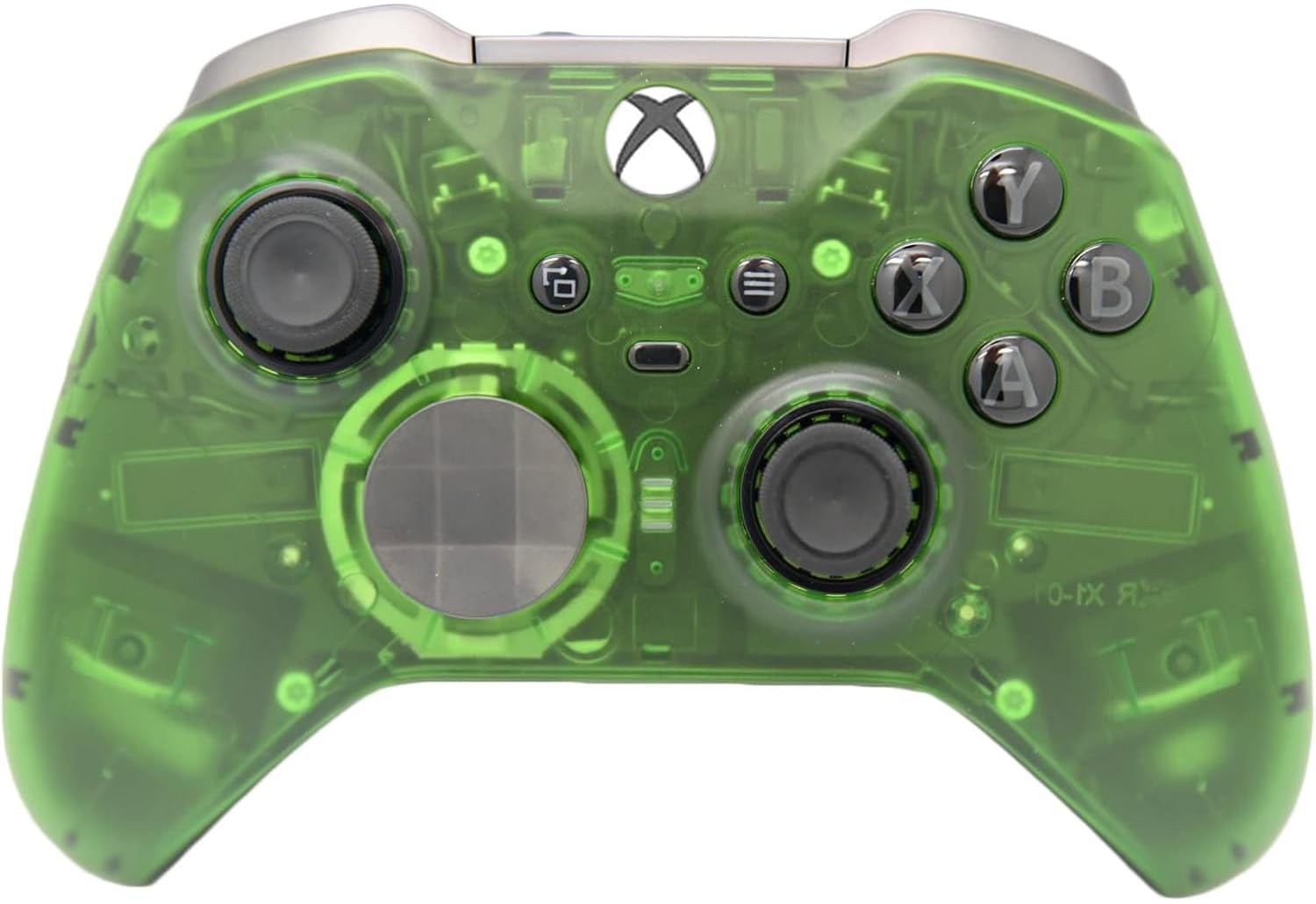
An authentic Elite Series 2 rebuilt in clear green with the whole accessory kit in the box.
You buy this one for a specific reason: it starts life as a genuine Elite Series 2, gets a ProControllers-exclusive front shell, and arrives with the entire factory kit — a carrying case, 6 thumb sticks (2 standard, 2 classic, 1 tall, 1 wide dome), 4 paddles, 2 d-pads in standard and faceted, a thumb stick adjustment tool, a charging dock, and a USB-C cable. Nothing is missing and nothing is aftermarket.
The finish does the heavy lifting. As one owner put it, it is “a sexy piece of military-grade equipment for gaming,” and the clear green shell genuinely does read like equipment rather than a toy. Buyers consistently describe it as cool-looking and well-built, and the material feels slick and solid in the hand rather than hollow.
Two things to weigh. Reliability draws the harshest words, with thumbstick registration the specific complaint, so this is the pick for someone who values the look and is willing to use the return window if a unit misbehaves.
Why the finish matters: the custom shell is the entire proposition, and the reviews agree it lands — the color and clarity are what buyers mention most after build quality.
The one thing to watch: a small share of units arrive with a stick that fails to register, so test both sticks immediately and keep your packaging until you are satisfied.
Reach for this if: you want an authentic Elite Series 2 with a shell nobody else at the table has, plus the complete accessory kit in one box.
Look elsewhere if: you want your money going into internal upgrades — this is a premium cosmetic build, and the internals are the standard Elite 2.
5. Turtle Beach Victrix Pro KO Fight Stick
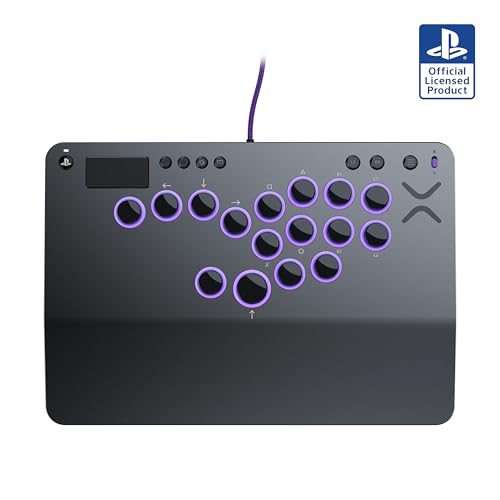
Hot-swappable Cherry switches in a fight stick you can actually carry.
Sixteen moveable and mappable buttons sit on this board, and every one of them rides on hot-swappable Cherry MX Speed Silver RGB switches — meaning you can pull a switch and drop in a different one without soldering, which is the kind of freedom almost no fight stick offers. It won the 2024 Best Tech Product award from the EVO Awards, and it is tuned specifically for fighters like Street Fighter 6, Guilty Gear, TEKKEN 8, and Fatal Fury.
The shape is the other half of the pitch. At 9.25 x 13.2 x 0.88 inches and 2.7 pounds it is a slim, travel-ready slab, and it runs wired through an included 3-meter braided USB-C cable for the fast response times competitive play demands. RGB light rings around the buttons are customizable on the stick itself or through the Victrix Control Hub. Build quality and ergonomics are the two traits buyers praise most, and the flat platform gives your wrists a place to rest that a traditional joystick simply does not.
The risk here is connectivity. That is the single most-discussed topic on this product’s review pages, and the reports are not minor — some units stop connecting to PlayStation entirely, and a share of players describe input quality that feels laggy with the stock switches. If you buy this, buy it with the intent to test it thoroughly and keep your receipt close.
The Case For It
- Hot-swappable Cherry MX Speed Silver switches mean broken or unwanted buttons are a swap, not a repair
- 16 mappable buttons give fighting game players the widest input canvas on this list
- Under an inch thick and 2.7 pounds — genuinely packable for tournaments
- Removable, customizable RGB rings let you mark your buttons your own way
What To Accept Going In
- Connectivity is this stick’s weakest point, with reports of it refusing to link to PlayStation
- Input quality with the stock switches draws complaints, so switch-swapping may not be optional
- It is wired only — no wireless mode at all
Fits best: fighting game players who want a slim, swappable-switch leverless board and are ready to tune it to their taste.
Not the pick if: you want a wireless fight stick or need guaranteed plug-and-play reliability from the start.
6. Crazy Controllerz Customz Controller
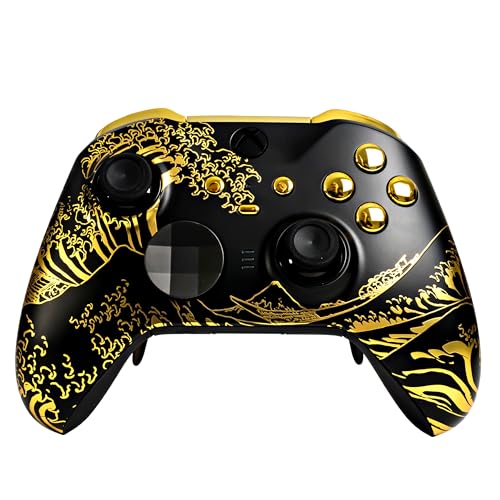
A Midnight Crush shell over a full set of gold chrome buttons — and 19 of them.
Where the ProControllers build keeps the standard Elite 2 button layout, this one carries 19 buttons under a limited-edition Midnight Crush front shell paired with gold chrome buttons. It starts as a brand-new official Microsoft Xbox Elite Series 2 pulled from its original packaging, gets customized top to bottom with Crazy Controllerz parts, runs through a testing process, and then goes back into that original box with all the standard inclusions — case, charging block, cable, and the rest.
The color is the headline and the reviews treat it that way, with buyers describing a finish that shifts character depending on the light — it can read purple in a dark room and truer to its name in daylight. Soft-touch plastic gets called out by owners as a genuinely nice feel in the hands, and quality is the trait buyers praise most here by a clear margin.
Two honest caveats. Some buyers find it feels top-heavy compared to a standard Elite Series 2, though most report adapting quickly. And the reliability picture is mixed, with trigger reliability and stick performance drawing the most critical comments and an occasional sticky button from the start — so as with any custom build, test it thoroughly the day it arrives and keep the packaging until you are sure.
The look: an official Elite Series 2 retained in full, dressed in a limited-edition shell — every original feature and function carries over, including Xbox software updates.
The feel: soft-touch plastic and a slight top-heavy bias versus a stock Elite 2, which most owners adjust to within a session.
Made for: Xbox and PC players who want an Elite Series 2 that no one else at the table owns, complete with the original box and accessories.
Steer clear if: you want boring reliability above all — value and reliability are the two most-debated points on this listing.
7. Razer Kitsune Controller

Four movement buttons instead of a joystick, in a 1.7-pound slab built for a backpack.
The Kitsune replaces the joystick with four movement buttons, which removes the input errors typical fight sticks produce — no accidental diagonals, no dropped motion inputs, just four clean directions your fingers already understand. It runs on low-profile linear optical switches with a shorter actuation height than standard buttons, which is what gives it the immediate response and quiet click that buyers notice right away. At 1.7 pounds with a slim profile it also travels easier than anything else in the fighting game section of this list.
Two details show the competitive thinking. A cable security clasp locks the detachable USB Type C cable so it cannot pull free mid-match, and a tournament lock switch disables the non-essential buttons so you never lose a round to an accidental press. The aluminum top plate unscrews for replacement, so custom vinyl wraps or a downloaded template both work.
The adjustment is real and worth respecting. Moving from a joystick or d-pad to four directional buttons takes roughly a week to get moderate at and a couple more to reach full speed — players coming from a d-pad tend to adapt fastest. The most-discussed gripes are softer: the surface picks up fingerprints readily, and the button layout itself splits opinion even among people who love everything else about the board.
Why it feels fast: low-profile optical switches register with a shorter travel, so inputs land sooner, and the quad-button layout eliminates the diagonal errors that cost rounds on a stick.
The trade-off: this is a leverless board, and it will feel foreign for the first week — the layout is the feature, and it is also the adjustment.
The right fit: PS5 and PC fighting game players ready to leave the joystick behind for cleaner, more repeatable directional inputs.
Wrong turn if: you want a traditional stick under your palm — this board deliberately has none.
8. Razer Raiju V3 Pro Controller
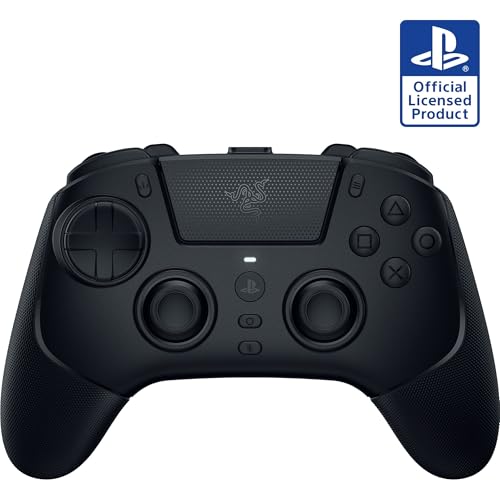
TMR sticks, claw-grip buffers, and four magnetic back buttons you can pull off at will.
This is Razer’s take on a PS5 esports pad, and it leans hard into competitive specifics. The thumbsticks use symmetrical TMR sensors — a magnetic reading technology in the same family as hall effect, chosen for accuracy without physical wear — with interchangeable anti-skid magnetic heads. Four removable mouse-click back buttons sit in rubberized handles, and two claw retention buffers give your index fingers a resting ledge. There is also an 8-way motion D-pad and mecha-tactile PBT action buttons that combine micro-switch speed with rubber-membrane cushioning.
Triggers are individually adjustable with Razer Pro HyperTriggers, so you can flip between a clear, fast mouse-style click and full analog travel for long, sensitive shots — one button movement per side. Wireless runs on 2.4GHz HyperSpeed, wired mode supports a 2000Hz cradle speed for PC training, and up to four built-in profiles are configurable through the Razer Mobile App or Synapse 4. A carry bag holds the pad, two interchangeable covers, a 2m cable, and the tool kit for removing rear buttons.
Razer patched early complaints — one owner noted the delay issues they had read about were resolved by update 1.06 — but the picture is not spotless. Some buyers still report lag, the front buttons need a firmer press than you might expect, and the pad has no rumble motor at all, which surprises people at this price. It also requires the USB dongle and will not power on your PS5 with the PS button, needing a five-second hold instead.
Where it shines: excellent battery life — reviewers point out recharging every 3 to 4 days — plus six well-placed mapping buttons you can set without ever opening Synapse.
Where it asks something back: no rumble motor, front buttons that demand a deliberate press, and a dongle requirement that rules out cable-free couch play without it.
Suits: PS5 competitors who want wireless esports-class latency and magnetic TMR sticks in the same pad.
Does not suit: anyone who needs rumble feedback or a truly cable-free setup.
9. Victrix Pro FS-12 Controller

A single piece of aircraft-grade aluminum, and 7.8 pounds of it.
This stick is built around one idea: it should not break. The body is cut from a single piece of aircraft-grade aluminum, which makes it exceptionally durable against the bumps and drops that come with tournament travel. It carries 9 buttons, including pro-grade 24mm and 30mm Sanwa Denshi buttons and a control bar with the PS touchpad, and the platform has an integrated 6.28° wrist slope, an ergonomic button layout, and a built-in foam lap pad on the back — the combination that earns it the best-wrist-rest reputation in buyer discussions.
The 7.8-pound heft is both the strength and the cost. It resists sliding on a table thanks to rubber and foam padding, so your inputs stay planted, but it is genuinely heavy to carry across a convention hall. Everything else about tournament life is handled: durable carrying handles, cable organizers, a mode switch for PlayStation 5, PlayStation 4, and PC, a Tournament Mode that locks out the control bar buttons so you cannot be disqualified by an accidental press, and a quick-access back panel with cleanly laid-out components for mods using the included Allen wrench.
Two things to know before committing. The stock Sanwa buttons are described as hard and hollow rather than bouncy, and a fair number of buyers swap them for aftermarket buttons — easy to do, but worth budgeting for. And it is decidedly not a first stick: the seriousness of the build is matched by the seriousness of the commitment, and experienced fighting game players are the ones who get the most out of it.
What Earns Its Keep
- A single-piece aircraft-grade aluminum body that takes travel abuse without flinching
- Pro-grade Sanwa Denshi buttons plus a lockable control bar for tournament-safe play
- Built-in 6.28° wrist slope and foam lap pad for long sessions
- Quick-access panel and included Allen wrench make button swaps simple
What You Accept
- At 7.8 pounds it is genuinely heavy for travel — the portability trade-off is real
- Stock Sanwa buttons feel hard and hollow to many players, so replacement is a common next step
- Reliability splits opinion, with some reports of the stick stopping randomly
The right owner: a tournament fighting game veteran who wants an aluminum-body stick with genuine wrist support and a lockable control bar.
The wrong owner: a first-time stick buyer — the weight, the button-swap culture, and the commitment level all assume prior experience.
Know the Specs
Hall Effect and TMR Sticks
A standard analog stick reads its position through potentiometers — contact strips that rub as the stick moves, which is why so many controllers eventually drift and steer on their own. Hall effect and TMR sticks instead read position magnetically, with no contact to wear down. That is the difference between a pad that lasts years and a pad that lasts months, and it is why the Nacon Revolution X Unlimited, the HEXGAMING PHANTOM, and the Razer Raiju V3 Pro all use magnetic sticks.
Trigger Travel and Trigger Modes
Trigger travel is the distance the trigger moves before it registers a full press. Short travel — the HEXGAMING PHANTOM’s digital mode shortens it to 1.5 to 2mm — gives you a mouse-style snap that fires almost the instant you touch it, ideal for shooters. Longer travel gives you gradual control for throttle work in racing games. Pads that let you set this per trigger, like the DualSense Edge and the Razer Raiju V3 Pro, give you both behaviors from one controller.
Button Count and Mapping
Button count on a premium pad is not just about how many inputs exist — it is about how many you can reassign. The Nacon Revolution X Unlimited carries 14 buttons with 6 mappable shortcuts, the HEXGAMING PHANTOM carries 22 with 4 remappable back buttons, and the DualSense Edge carries 4. More buttons means more of your layout can live under your fingers instead of on the face of the pad, but it also means more setup before the controller feels like yours.
Wired Versus Wireless Response
Wired connections remove any question about latency, which is why fight sticks and esports boards like the Victrix Pro FS-12, the Razer Kitsune, and the Turtle Beach Victrix Pro KO run on USB or USB-C only. Wireless pads trade a little of that certainty for freedom, and the good ones minimize the gap — the Nacon advertises latency reduced to 1ms wired and 2ms wireless, while the Razer Raiju V3 Pro uses 2.4GHz HyperSpeed and a 2000Hz wired cradle speed for PC play.
Common Questions
Do hall effect sticks really stop stick drift?
Can I use a PS5 controller like the DualSense Edge on a PC?
What is the difference between a fight stick and a leverless controller?
How long does the battery last on a wireless pro controller?
Do I need a cable to use the Razer Kitsune on PS5?
Are expensive controllers worth it compared to standard ones?
What is trigger travel and why does it matter for shooters?
Will a customized Elite Series 2 still get official Xbox updates?
How many back buttons do I actually need on a pro controller?
Is a leverless board or a high-end fight stick better for a beginner?
The Bottom Line
For most people buying into the premium tier, the most expensive game controller worth owning is the PlayStation DualSense Edge — not because it has the longest feature sheet, but because its swappable stick modules and adjustable trigger travel let you replace the two parts that kill every other pad. If you play Xbox or PC and want the deepest customization bench there is, the Nacon Revolution X Unlimited gives you 14 buttons, hall effect sticks, and more than 60 physical combinations, provided you are willing to tinker through the setup. And if fighting games are the whole point, the Razer Kitsune takes the joystick out of the equation entirely. Whichever way you lean, pick the controller whose defining strength — stick technology, button count, or trigger travel — matches how you actually play.
How we choose
We do not accept paid placement. Every pick is matched to a real buyer and a real use-case; we do not hands-on test units.
Sources
Specifications: manufacturer listings and product documentation. Review insights: verified customer reviews, as of October 2026. Pricing: not shown on this page (it changes often); check the current price via the retailer link.
As an Amazon Associate, Aappliancez earns from qualifying purchases. This does not affect which products we feature.