Disclosure: Some links in this post are affiliate links. As an Amazon Associate I earn from qualifying purchases, at no extra cost to you. Learn more
Specs are compiled from manufacturer listings and verified buyer reviews and can change over time — please confirm the key details on the product page before buying.
A modular gaming controller is only worth your money if you can actually change the part that wears out. The whole promise of this category is that you swap a stick module, a cap, or a paddle instead of buying a whole new pad when drift sets in. That promise only pays off when the module is easy to reach, the software does not fight you, and the rest of the controller is built well enough to survive the next year. This guide walks through nine pads that let you change something real, and it tells you which one to buy for your console, your hands, and your patience level.
This guide is built by comparing the manufacturers’ published specifications and the patterns across verified customer reviews, so you get each pick’s real strengths and trade-offs instead of marketing spin.
You will see which pads let you swap sticks and paddles in seconds, which ones lock you into a software app, and which ones simply fit your hands better. Every pick below supports some form of remapping or part-swapping, so your console and how much fiddling you want decide the winner. That is what separates a good modular gaming controller from a pad you stop adjusting after a week.
Top Picks


How To Choose The Best Modular Gaming Controller
The wrong way to shop this category is to look at the paddle count first. Paddles matter, but a paddle you cannot comfortably reach is worse than no paddle at all. Start with your console and your hand size, then work outward to the parts you can actually change.
Start with what your console will accept
A modular pad is only modular on a platform that supports it. Some of these controllers are PC-only by design, some are officially licensed for PlayStation 5, and some cover Xbox and PC together. Check that before you fall in love with a swappable stick kit. A pad that cannot connect to your console is not a bargain, no matter how many buttons it has.
Then look at which parts actually swap
The three changeable pieces you will see most are the thumbstick modules, the stick caps, and the back paddles. Stick modules matter most over time, because a worn module is the classic reason a controller starts to drift. Caps change how your thumb sits, which matters for long sessions. Paddles change what your middle and ring fingers can press without leaving the sticks. Know which one you actually want to change before you pay for a kit.
Match the trigger to your game
Trigger travel is a real choice, not a spec to ignore. A short throw with a mouse-click stop fires faster in shooters. A full analog pull gives you throttle control in racing games. Pads with a switch that moves between those two modes cover far more of your library than a pad locked to one feel.
Side-by-Side Comparison
| Model | Best For | Changeable Parts | Connection | Console Fit | Amazon |
|---|---|---|---|---|---|
| PlayStation DualSense Edge★ Best Overall | PS5 players who want swappable stick modules | 2 back-button sets, 3 stick caps, swappable stick modules | USB, wireless | PlayStation 5 | Amazon |
| SCUF Envision Pro Wireless V1Most Buttons | PC players who want a control hub on the pad | 4 rear paddles, 5 G-Keys, 2 SAX buttons | Bluetooth, Wi-Fi dongle | PC | Amazon |
| SCUF Valor Pro (Light Gray)Wired Value | Xbox and PC players who want a wired pad | 4 rear paddles, swappable faceplate and thumbsticks | USB-C | Xbox One, Series X|S, PC | Amazon |
| GameSir G7 Pro 8K | Budget-minded PC players chasing low latency | 2 back buttons, 2 mini bumpers, macro recording | USB, 2.4GHz wireless | PC, Switch, Android | Amazon |
| GameSir G7 Pro Wuchang Edition | Xbox players who want a charging dock and clicky input | 4 extra back/bumper buttons, trigger stops | 2.4GHz, Bluetooth 5.3, wired | Xbox One, Series X|S, PC, Android | Amazon |
| Victrix Pro BFG Reloaded | Xbox players who want to change the stick layout itself | 3 modules, 11 interchangeable components, 4 mappable buttons | Bluetooth, USB-A, USB-C | Xbox One, Series X|S, PC | Amazon |
| Razer Wolverine V3 Pro 8K | Windows players who want an ultralight esports pad | 6 remappable buttons, swappable stick caps, 4 onboard profiles | 2.4GHz wireless, USB-C | Windows 11 PC only | Amazon |
| Razer Raiju V3 Pro | PS5 players who want six remappable controls | 4 removable back buttons, 2 claw-grip bumpers, swappable caps | 2.4GHz wireless, USB-C | PlayStation 5, PC | Amazon |
| HEXGAMING PHANTOM | PS5 players who want the most swappable sticks | 4 back buttons, 8 interchangeable sticks, 6 profiles | Wireless (cable not included) | PlayStation 5, PC, Mobile | Amazon |
Detailed Reviews
1. PlayStation DualSense Edge Wireless Controller
Our pick — 4.5+★ from 6,500+ verified ratings; the strongest balance of quality and price.
The pad that lets you trade a worn stick instead of the whole controller.
The part that matters here is the replaceable stick module. When a thumbstick starts to drift — meaning the on-screen aim creeps even with your thumb off the stick — you pull the module and drop in a fresh one. That is the difference between a pad that lasts years of competitive play and one that goes in a drawer. Three types of stick caps come with it, so you can also change how the thumb sits without swapping hardware. The clean comparison point is button count against the rest of the field: this one lists 4, while the SCUF Valor Pro lists 24 — a difference that tells you this is a stripped-back, Sony-shaped layout rather than a button farm. Rating sits at 4.5+ stars across 6,500+ owners, and the thing buyers rave about is simply the quality; value for money is the split opinion, and it is worth knowing that going in.
Two pairs of back buttons are included, and both sets can be mapped to any other button input. Triggers adjust manually — shorten the left and right travel for shooters, lengthen it for racing throttle. You can save control profiles and flip between them without opening a menu. Owners who moved over from modded pads tend to say the response feels instant even without digital tap triggers. It also reads your PS5’s own stick and trigger adjustments, so the console-side software and the pad work as one unit.
The honest catch is battery life. Haptics and adaptive triggers are what make this pad feel special, and they are also what drains it fastest, so long sessions mean a cable or a break. The glossy white faceplate shows fingerprints, and the stick modules are priced as accessories, so a spare set is an extra purchase rather than a freebie. Buyers report the replacement module hunt is real, and a reseller markup can appear when stock runs thin. Still, the pad itself holds up — one long-term owner on PC and PS5 has run it since early 2023 with no drift.
Where it wins you over
- Swappable stick modules turn a drift problem into a five-minute part swap
- Two back-button sets, both mappable to any input
- Manually adjustable trigger travel for shooters and racers alike
- Quick-swap control profiles without diving into a menu
What to plan around
- Battery runs short with haptics and adaptive triggers engaged
- Glossy faceplate picks up fingerprints fast
- Spare stick modules are a separate buy and can be hard to find
Made for: PS5 players who want native console features plus a stick module they can replace themselves.
Think twice if: you play marathon sessions untethered or want a big back-paddle count from the start.
2. SCUF Envision Pro Wireless V1 PC Gaming Controller
A PC pad with enough extra keys to run your whole desktop from your thumbs.
Sixteen buttons is the headline. Four rear paddles keep your thumbs on the sticks while you fire, and five G-Keys can be assigned macros through Corsair iCUE, the software that configures the pad on your PC. Two side-mounted SAX buttons sit where your fingers naturally rest. The buttons themselves use OMRON mechanical switches, which click like a mouse rather than mush like a membrane pad — that is the whole reason input feels snappy. Wireless runs over Corsair SlipStream, the maker’s low-latency dongle connection, so you are not tethered to the desk.
The ergonomics are the part that lands well. Big hands fit fine, and the grips stay comfortable across long sessions. Going wireless over the dongle brings no input delay that owners can feel. If you are coming from an Xbox Elite pad, the paddle position will feel odd for a few days before it clicks. Comfort and build quality are what carry this one, and roughly three months of daily use is the kind of stretch owners describe before the verdict settles.
Here is the trade-off a buyer has to weigh. The hardware is nice; the software is the risk. One owner hit a failed firmware update and lost more than six hours troubleshooting it, then found iCUE slowed a high-end PC even when the app was closed — an uninstall fixed the slowdown, and the pad went back. Others describe iCUE as clumsy but fine once configured. If you dislike tinkering with background software on your gaming rig, this is the one to think hardest about. If you enjoy deep macro control, few pads give you this much surface to work with.
What the clicks give you: mouse-style OMRON switches make every press feel decisive, and five G-Keys open up macro layers a standard pad cannot reach.
The quiet risk: iCUE is the gatekeeper for remapping, and it is the piece buyers describe as the weak link rather than the controller.
Go for it if: you are a PC player who wants macros, paddles, and side keys in one shell and does not mind living inside iCUE.
Hold off if: a stable, zero-maintenance driver is non-negotiable for your setup.
3. SCUF Valor Pro Wired Performance Xbox Controller
A wired Xbox pad built around swapping the faceplate, the sticks, and nothing else.
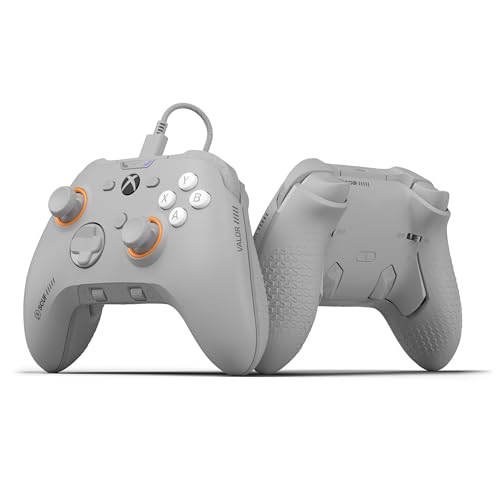
Twenty-four buttons is the number that jumps out — against the DualSense Edge’s 4, that is a 6.0x gap, and it tells you this is a pad built for layered mapping. Four embedded rear paddles can be configured up to 16 functions, and Instant Triggers cut the trigger pull so your reaction lands sooner. Hall Effect thumbsticks, the magnetic kind that resist drift by design, are part of the spec. You can save up to three remapping configurations and flip between them with a switch. The wraparound bumpers add surface area where your fingers grip, and the performance grip is the part that keeps your hands from sliding during a long session.
Build quality is what wins people over here. The shell feels dense and old-school-solid, the presets are quick to program, and the back buttons settle into a natural feel after a short adjustment. One movement-FPS player who used to burn through a controller a year says his hands no longer ache after a full day of play. It runs on Xbox Series X|S, Xbox One, and Windows PC over USB-C, and the swappable faceplate and thumbsticks mean the look can change without a new pad.
The trade-off is on the port. Owners mention the USB-C port can fail after about six months of normal use, dropping the connection mid-game at the slightest movement, and that a high-quality replacement cable does not fix it because the port itself is the weak point. Stick drift and reliability are the mixed notes in the review picture. Treat the cable and connector gently, and this remains a strong wired option for the price. Treat it rough and the port is where it will let you down.
Why it earns its spot
- 24 buttons with four paddles configurable to 16 functions
- Instant Triggers shave the pull for faster shots
- Swappable faceplate and Hall Effect thumbsticks
- Wired design means no charging to think about
Where it asks for care
- USB-C port is the reported failure point over time
- Stick drift and long-term reliability draw mixed notes
- Wired only — no untethered play
Best fit: Xbox and PC players who want paddles and swappable parts without a charging routine, and who will treat the connector kindly.
Skip the wired route if: you want to move around the room freely — the wireless version is the better call there.
4. GameSir G7 Pro 8K PC Wireless Gaming Controller
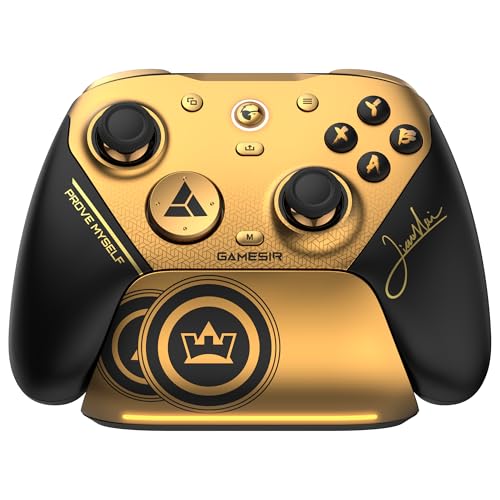
Eight thousand reports per second on a pad that still costs mid-range money.
Polling rate is how often the controller tells your PC where the stick is — 8000Hz means 8,000 reports every second, wired or over 2.4GHz wireless. On paper that is the fastest input loop in this group, and the reviewer consensus is honest about it: some players call 8K a gimmick they cannot feel even at a high level. What they do feel is the Gen 2 TMR sticks, which combine analog precision with the anti-drift durability of Hall Effect sensors. That combination is the real reason to buy this one. Price sits well under the pads that quote – territory, which makes it the value leader for a PC setup.
Around the sticks you get dual-mode trigger stops — switch between Hall Effect analog triggers for linear control and clicky micro-switch stops for instant response. Four programmable macro buttons split into two lockable back buttons and two mini bumpers, each able to record up to a 32-step macro. Optical micro-switch ABXY buttons and a mechanical D-pad round out the contact points. A charging dock with a built-in battery is in the box, and there is a 6-axis gyro for motion aiming plus a 3.5mm headset jack that works wired or wireless. The D-pad is the weak contact point owners point to, firmer than before but still not the star.
One thing to know before you buy: the GameSir Connect software is the weak link. A botched app update once removed the G7 Pro 8K from the home screen and left the pad unable to connect, and the app has been flagged as malware by Windows in at least one case. Later updates restored the icon but not always the function. That is a software problem, not a hardware one, and daily use reports describe instant connection and zero disconnects. If you keep the app updated and test it early, the hardware side is genuinely strong for the money.
The sticks carry it: TMR thumbsticks give you analog feel with drift resistance, and the 8,000Hz polling is there for the players who can use it.
Watch the app: GameSir Connect is where things can go wrong, so set it up on day one while the pad is easy to return.
Reach for it if: you game on PC, want TMR sticks and a dock, and care more about feel than about paying for a brand name.
Look elsewhere if: you need the pad to work from the start with zero software involvement.
5. GameSir G7 Pro Wireless Controller
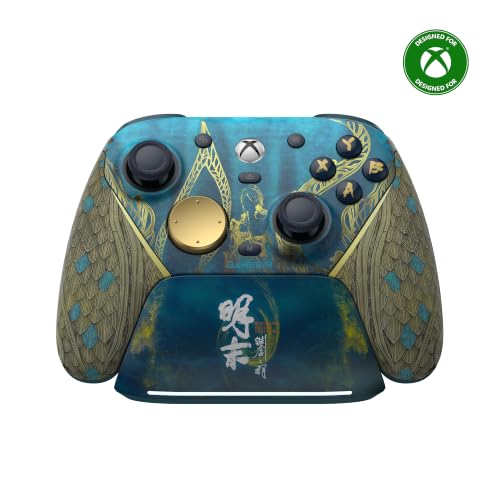
The first GameSir built for Xbox, with a dock that wakes the console when you lift it.
A 1200mAh battery inside a pad that charges on a smart auto start-stop station — that is the setup. Lift the controller off the dock and the Xbox switches on. Set it back down and the charging stops on its own, so you are not cooking the battery overnight. The dock also has a storage compartment at the base for the wireless receiver. This is GameSir’s first officially licensed wireless Xbox pad, and it covers Xbox, PC, and Android over 2.4GHz wireless, wired, or Bluetooth 5.3 depending on the mode you select with the physical switch.
Hall Effect analog triggers are the centerpiece of the play feel, and a Hair Trigger Mode toggles on by holding M plus LT or RT. On PC you get a 1000Hz polling rate over wired or 2.4GHz. Clicky micro-switch buttons and D-pad make every press feel deliberate, and the mic mute button sits within thumb reach. Ergonomics land well — the pad sits naturally in the hands, though owners with broader shoulders note the handles are canted more parallel and read a bit smaller than a stock Xbox pad. Four extra back and bumper buttons are there for mapping, and the Nexus app handles tuning.
The honest note is value for casual use. If you play a few hours a week, the price can feel like a lot for what you gain. Competitive players get more out of it, and the Nexus app on Xbox is described as a clear step up from the Xbox Accessories app that the Elite pads use. One practical quirk: the menu and list buttons sit close to the top edge, so a stray thumb can catch them. Minor, fixable with habit.
What you gain
- Smart dock charges the 1200mAh battery and wakes the Xbox on lift
- Hall Effect analog triggers with a Hair Trigger Mode toggle
- Tri-mode connection across Xbox, PC, and Android
- Nexus app makes tuning more intuitive than the Xbox accessories app
What to expect
- Smaller, more parallel grip than a stock Xbox pad, which suits broad shoulders less
- Menu and list buttons sit close to the top edge
- Harder to justify if you only play casually
Who it suits: Xbox players who want a dock, a drift-resistant trigger, and clicky buttons without moving to PC-only gear.
Who should look elsewhere: players with large hands who need a wider, fuller grip, or casual players who will not use the mapping.
6. Turtle Beach Victrix Pro BFG Reloaded Wireless Xbox Controller
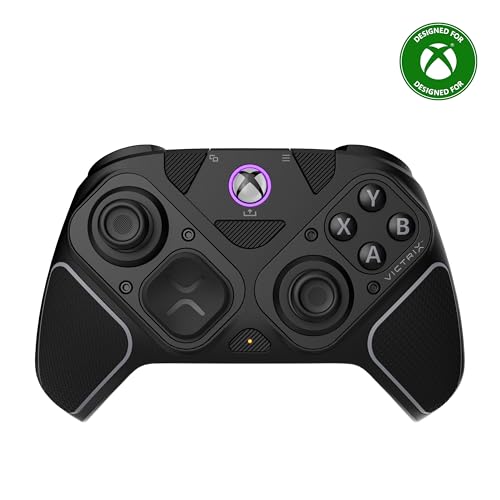
Three swap-in modules let you change the stick layout, not just the caps.
Eleven interchangeable components is the biggest swap kit here. That includes a 6-button fightpad module with Kailh microswitches, so you can turn an Xbox-style pad into a fighting-game layout. Built-in Hall Effect technology runs through the modules, which is the anti-drift tech that matters most over years of play. There are 5-stop Hall Effect clutch triggers with a hair-trigger mode, four mappable quick-action buttons, and a 3.5mm audio jack. A Dolby Atmos lifetime subscription is included, and the pad is officially licensed by Xbox. It runs wired or wireless, with up to 20 hours per charge.
The flexibility is the story. Owners describe setting it up like a PS5 pad or an Xbox pad depending on mood, and the swappable stick modules mean a worn module is a replacement part, not a dead controller. A carrying case and module tool come in the box. Weight lands lighter than the standard Elite pad, which some hands prefer and others take a session or two to settle into. Build quality and customizability are what people say they love most about it.
A few real quirks are worth flagging. The rumble is unusually loud, and in-app settings barely tone it down. The trigger stop uses a button you can bump, so a slider with clear steps would suit competitive play better. Back buttons sit where fingers can catch them if you rest your grip loosely. None of these are fatal — the pad is described as worth the adjustment — but they are things you will notice in week one.
The swap advantage: module-level changes and a fightpad option turn one controller into several setups for the cost of the kit.
Loud and loose: rumble noise and an easily bumped trigger stop are the two things to accept going in.
Choose this one if: you play fighting games and shooters and want to change layout rather than buy another pad.
Pass if: you need quiet, subtle vibration or a trigger stop that will not move unless you move it.
7. Razer Wolverine V3 Pro 8K PC Wireless Gaming Controller

Built to disappear in your hands, with 8K polling and zero rumble to weigh it down.
The 8000Hz polling rate works in both wired and wireless modes, which is rarer than it sounds. TMR thumbsticks with swappable caps give you drift-resistant aim, and Razer’s own framing is that these have moved beyond typical Hall Effect designs. Six remappable buttons sit on the shell — four mouse-click back buttons plus two claw-grip bumpers on the handles. Pro HyperTriggers flick between mouse-click speed and full analog control. The Mecha-Tactile PBT buttons are doubleshot plastic built to hold up under heavy presses. This is a Windows 11 PC pad only; it will not talk to Xbox, PlayStation, macOS, or mobile.
Weight is the other big draw. Lightness gets its own praise in the owner feedback, right behind raw quality. No rumble and no RGB is the reason — you give up vibration feedback to get a pad that sits light in the hands. Owners coming from a DualSense Edge say the TMR sticks have better tension than Razer’s original Hall Effect version, and that the pad is accurate in a demanding FPS. Razer claims 36 hours per charge, though heavy 8K wireless play drains it faster. You get four onboard profiles and a carrying case with two spare stick caps and a 2m braided cable.
There is a genuine build question to weigh. Customers note the R3 stick-click can wear out in about a month of intense use, and that disassembly is complex once it fails. That is a quality-control note rather than a design flaw, and the same review pages still call the pad the best PC controller in the field. If you are hard on stick clicks, buy the warranty. If you want the lightest competitive pad for shooters, the speed is real.
Built for: Windows players chasing low latency in shooters who value a light pad over vibration feedback.
Not for: console owners, or players who lean hard on stick-click buttons and want zero durability risk.
8. Razer Raiju V3 Pro Wireless Esports Controller
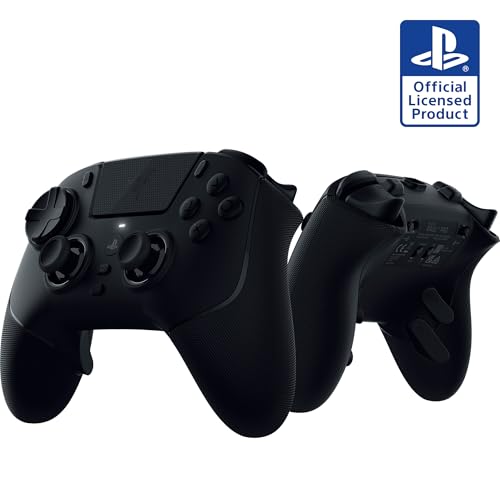
A PS5-licensed pad with symmetrical TMR sticks and six extra controls.
Six remappable controls is the core pitch: four removable mouse-click back buttons plus two claw-grip bumpers. Symmetrical TMR thumbsticks with swappable caps give you the anti-drift benefit and the same thumb spread PS5 players are used to. Razer Pro HyperTriggers switch between mouse-click actuation for shooters and full analog pulls for racing and sports. Mecha-Tactile PBT buttons and an 8-way floating D-pad round out the inputs. On PS5 the connection runs over the 2.4GHz HyperSpeed dongle; on PC you get a 2000Hz wired polling rate for tournaments. Four onboard profiles can be saved and switched via the Razer Mobile App or Synapse 4.
Owners who settle in with it describe premium build, crisp mechanical buttons, and no drift after months — the extra buttons are the reason most buy it. A carrying case, 2m USB-C to USB-A cable, spare caps, and a back-button removal tool all come included. If you play shooters and fighting games, the six-button layout puts a lot within reach without lifting your thumbs off the sticks.
Size and ergonomics are the split point. The shell is chunky and favor fingers resting on R2 and L2, so repeated R1 and L1 presses can fatigue your hands. Players with smaller hands find it too big. Wireless range is also a reported weak spot — use it beyond roughly four feet from the dongle and some units stutter or disconnect, though wired play stays stable. Also know that like other licensed third-party PS5 pads, the PS button will not power on the console and there is no rumble. If those limits match your setup, this is a strong competitive pad; if not, plan around them.
Why competitive players like it
- Four removable back buttons plus two claw-grip bumpers
- Symmetrical TMR sticks suit PS5 muscle memory
- Switchable mouse-click and analog triggers
- Tournament kit included: case, cable, caps, removal tool
Where it asks for a plan
- Large shell can fatigue hands during repeated shoulder-button use
- Wireless range falls short of what many players expect
- No rumble, and the PS button won’t power the console
Worth it for: PS5 players with larger hands who want six extra controls and switchable triggers for shooters.
Not your pick if: your hands are small, you sit far from your console, or rumble matters to you.
9. HEXGAMING PHANTOM Wireless Controller for PS5
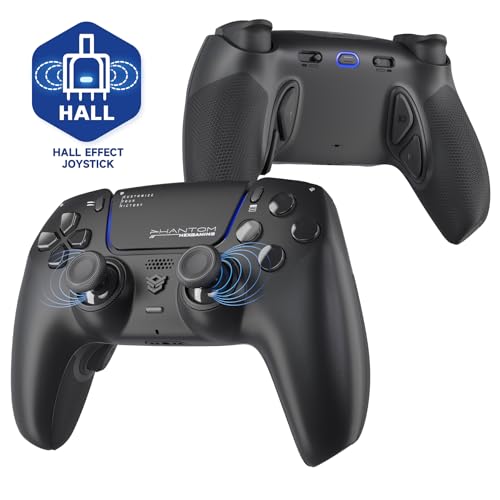
Eight sticks in the box, four clicky back buttons, and a trigger switch on each side.
Eight interchangeable textured sticks is the largest cap kit here, and it covers concave, domed, and extended shapes so you can tune the thumb feel to your grip. Hall Effect joysticks handle the drift resistance side, with adjustable centering points and outer-range calibration built into the control system. The triggers toggle between adaptive and digital modes with a switch — digital gives a short 1.5 to 2mm trip for FPS play, and adaptive gives you full throttle control for racing. Four modded back buttons sit at ergonomic points on the underside, and six swappable profiles let you jump between layouts. Quality is what owners praise here more than any other trait.
Setting it up takes a little patience. Back-button placement pushes some hands into a looser grip, and the back buttons are soft enough that a stray finger can trigger one. The wireless version does not include a cable or other accessories, so if you want wired play you will supply your own USB-C cable. Battery drains faster than a stock pad with the extra buttons active. All of that is the trade for the level of customization.
What you should really weigh is the long-term picture. Reviewer feedback splits on durability — some units have had a shoulder button or trigger stop give out under light use, and calibration has needed a reset. HEXGAMING’s support has a strong story too: after a full year, with a six-month warranty, support asked for photos, took the controller back for inspection, and sent a free brand-new replacement. Test everything thoroughly the day it arrives, and this is a strong PS5 pad. Treat the first week like an audition and the swap kit pays off.
Why you buy this one: the eight-stick kit and switchable trigger modes give you more physical tuning than anything else on this list.
What to plan around: durability varies unit to unit, so test every button and stick in the return window before settling in.
Reach for it if: you are on PS5, want the widest stick and trigger tuning kit, and will test the unit properly on arrival.
Look elsewhere if: you want one purchase to last with zero fuss, or you need a cable in the box.
Know the Specs
Stick Modules and Hall Effect / TMR
Stick modules are the replaceable cartridges that carry the thumbstick. When a stick drifts, the module is usually the worn part, so a swap-in module turns a controller problem into a part replacement. Hall Effect sticks use magnets instead of sliding contacts, which means no physical wear from friction. TMR sticks are a related magnetic design that keeps analog feel with the same anti-drift idea. Look for a pad with either one if you plan to play for years.
Polling Rate
Polling rate is how many times per second the pad tells your device what your hands are doing. A 1000Hz rate reports 1,000 times per second; an 8000Hz rate reports 8,000. Higher numbers mean fresher input, but the benefit shrinks once the rate is fast enough that you cannot feel the gap. Buy high polling for competitive shooters, and do not pay extra for it if you mostly play single-player games.
Trigger Stops and Throw
A trigger stop shortens how far the trigger travels before it registers. A short throw with a mouse-style click fires faster in shooters; a full analog pull lets you feed throttle in racing games. A pad with a switch between the two covers more of your library. The HEXGAMING PHANTOM, for example, quotes a 1.5 to 2mm trip range in digital mode.
Back Buttons and Bumpers
Back paddles and extra bumpers let your middle and ring fingers press mapped inputs without leaving the sticks. Paddle count is less important than position — a paddle you bump by accident costs you more than it gives you. If a pad offers mapping software, test every extra button on day one so an accidental press does not surprise you mid-match.
Common Questions
Will a modular gaming controller work with both my PS5 and my PC?
Do swappable stick modules actually stop stick drift?
How long does the battery last on these controllers?
Is a higher polling rate worth paying for?
Can I remap the back paddles on the fly?
Do these controllers have rumble?
What is the difference between the Hall Effect sticks and the SCUF Valor Pro paddles?
Why do some PS5 controllers have a PS button that won’t wake the console?
Do I need the manufacturer’s app to use all the buttons?
Do I need the manufacturer’s app to use all the buttons?
Are smaller controllers better for players with large hands?
The Bottom Line
For most PS5 players, the modular gaming controller winner is the PlayStation DualSense Edge because it turns the part that wears out — the stick module — into something you can replace yourself, while keeping the adaptive triggers and haptics the console was built around. It holds 4.5+ stars across 6,500+ owners, which is the strongest confidence signal on this list. If you play on PC and want speed without the premium price, grab the GameSir G7 Pro 8K for its TMR sticks (a stick type that resists drift) and 8,000Hz polling (it reports your inputs 8,000 times a second, so your moves land sooner). And for Xbox players who want to change the whole layout rather than just a cap, the Victrix Pro BFG Reloaded is the one to reach for.
One last thing worth doing before you click buy: pick the pad that fits your console and your hands first, then pay for the swap kit. A controller with eight spare sticks is useless if it will not connect to your console, or if its shell fights your grip after an hour. The DualSense Edge earns the top spot on the strength of its quality consensus, but every pad here swaps something real — so choose the one whose changeable parts match what you actually want to change.
How we choose
We do not accept paid placement. Every pick is matched to a real buyer and a real use-case; we do not hands-on test units.
Sources
Specifications: manufacturer listings and product documentation. Review insights: verified customer reviews, as of October 2026. Pricing: not shown on this page (it changes often); check the current price via the retailer link.
As an Amazon Associate, Aappliancez earns from qualifying purchases. This does not affect which products we feature.