Disclosure: Some links in this post are affiliate links. As an Amazon Associate I earn from qualifying purchases, at no extra cost to you. Learn more
Specs are compiled from manufacturer listings and verified buyer reviews and can change over time — please confirm the key details on the product page before buying.
You want a phone-sized printer that turns a camera roll into a real photo you can hold, stick on a journal page, or hand to a friend. The catch is that mini printers split into two very different machines: sticker photo printers that use dye-sub or ZINK paper, and inkless thermal printers that print black-and-white documents on letter paper. Buying the wrong type is the number one reason people end up disappointed. This guide separates them clearly so you pick the one that actually matches what you plan to print.
This guide is built by comparing the manufacturers’ published specifications and the patterns across verified customer reviews, so you get each pick’s real strengths and trade-offs instead of marketing spin.
Below you will find the paper type, print method, and app situation spelled out for every pick, so nothing surprises you after it arrives. The right pick for most people is the one whose paper you can actually afford to keep buying — and that is exactly how these seven were ranked for this mini printer shortlist.
Top Picks

How To Choose The Best Mini Printer
Start with the paper, not the printer. Every mini printer is locked to one paper type, and that paper decides your photo size, your cost per print, and whether the machine is even worth carrying. Pick the right paper and the print size, cost per print, and portability all follow from it.
Match the print technology to what you actually print
Dye-sublimation printing heats color ribbons onto paper in passes, which is why it tends to give the most photo-like color and a laminated, water-resistant finish. ZINK (Zero Ink) paper has dye crystals built into the sheet, so there are no cartridges to swap but colors can skew slightly. Inkjet mini printers use a real ink cartridge for full-color prints on sticky paper. Direct thermal printing needs no ink at all, but it only produces black-and-white images on special thermal paper.
Decide between 2×3 sticker prints and full 4×6 photos
A 2×3-inch print is the size of a business card — perfect for journal pages, planners, phone cases, and wall collages. A 4×6-inch print is a proper photo you can frame or put in an album. If you want frames and gifts, the larger format wins. If you want to decorate, the small sticky format is the whole point.
Weigh the paper cost before you commit
Mini printers are cheap to buy and the paper is where the money goes. Cartridge-based sticker printers typically run several cents to around half a dollar per print, so a habit of printing twenty photos a week adds up. ZINK paper bundles soften that blow. Thermal roll paper is the cheapest of all — but you only get black and white.
Check the app and the connection before you buy
The printer is only as good as the app you drive it with. Look for one that pairs quickly over Bluetooth or its own Wi-Fi, offers basic editing, and does not fight you on every print. A printer that prints beautifully but drops the Bluetooth link every third try ends up in a drawer.
Side-by-Side Comparison
| Model | Best For | Print Method | Paper & Print Size | Connection | Amazon |
|---|---|---|---|---|---|
| Liene Pearl N200 Pro★ Best Overall | Best photo color and journaling | Thermal dye-sublimation | 2×3 adhesive, 50 sheets + 5 cartridges | Bluetooth, USB-C | Amazon |
| NDYIN N80 Thermal PrinterMost Versatile | Documents and travel printing | Direct thermal, inkless | US Letter / A4 thermal paper | Bluetooth, USB-C | Amazon |
| Nelko PP01 | Budget sticker printing | Inkjet with cartridge | 2×3 sticky, 600 DPI | Bluetooth | Amazon |
| Polaroid Hi-Print 2nd Gen | Style and quick sticker prints | Dye-sub cartridge | 2×3 sticker, paper not included | Bluetooth, USB-C | Amazon |
| HP Sprocket 2×3 | Fast ink-free snapshots | ZINK Zero Ink | 2×3 glossy sticky-back | Bluetooth 5.3 | Amazon |
| YOTON Photo Printer | Full-size frameable photos | Dye-sublimation | 4×6, 54 sheets + 1 ribbon | Built-in Wi-Fi | Amazon |
| Canon Ivy 2 Bundle | All-in bundle with case | ZINK Zero Ink | 2×3 sticky, 110 sheets | Bluetooth 5.0 | Amazon |
Detailed Reviews
1. Liene Pearl N200 Pro Portable Photo Printer
Our pick — 4.5+★ from 600+ verified ratings; the strongest balance of quality and price.
The little gold box that prints color like a real photo lab, one layer at a time.
You get the best-looking photo a pocket printer can produce if you start with this one. It uses thermal dye-sublimation (a method that heats color ribbons onto paper in three passes and seals the print with a protective layer), so your results look like a proper lab print rather than a washed-out sticker. It measures 5.69″D x 3.44″W x 1.16″H and weighs 340 g, so it drops into a tote or jacket pocket without a struggle. In your hand that means a printer roughly the size of a thick paperback — small enough to bring to a party and still produce frame-worthy color.
What wins people over is the size and convenience of the whole package — it is the single most-discussed strength in the reviews — followed closely by how good the pictures actually look. It prints 2×3 adhesive paper, and the app handles collages, frames, AI restyling, and even a one-touch shoot-and-print mode with built-in camera filters. A full charge is rated for up to 27 stickers, which covers a solid journaling session away from a socket. One owner put a well-travelled number of prints through it with no jams or misprints and only one recharge, and buyers report the quality beats the Kodak and Zink printers they had tried before.
Running cost and the app’s edge cases are the honest catch. Each cartridge is replaced every 10 photos, and the refill packs — while simple to install — work out to roughly half a dollar a sticker, which is steep if you print constantly. A few people also found the app throws an error when uploading their own custom frames, so if you rely on custom borders, plan to work around that. I also suggest the “Best Overall” label comes with a note: the higher-scoring picks are not always the most-reviewed here, and this one’s rating sits at 4.5+ stars across 600+ ratings — real, but a smaller sample than the big-name competition.
Why It Takes The Top Spot
- Dye-sublimation color looks like a lab print, with lamination that resists smudges and water
- 2×3 adhesive backing means no glue — peel, stick, done
- Built-in 27-print battery keeps you printing off-grid
- App packs AI restyling, frames, and one-touch shoot-and-print for spontaneous shots
What To Plan Around
- Refills run around half a dollar per sticker, so heavy printing gets pricey
- Some users hit app errors uploading their own custom frames
- Cartridge swaps come every 10 photos — less fiddly than feared, but frequent
Reach for this if: you want the most photo-like color from a pocket-sized sticker printer and will happily pay for the paper that delivers it.
Look elsewhere if: you plan to print dozens of photos a week and need the cheapest possible per-print cost — the thermal paper route below saves real money.
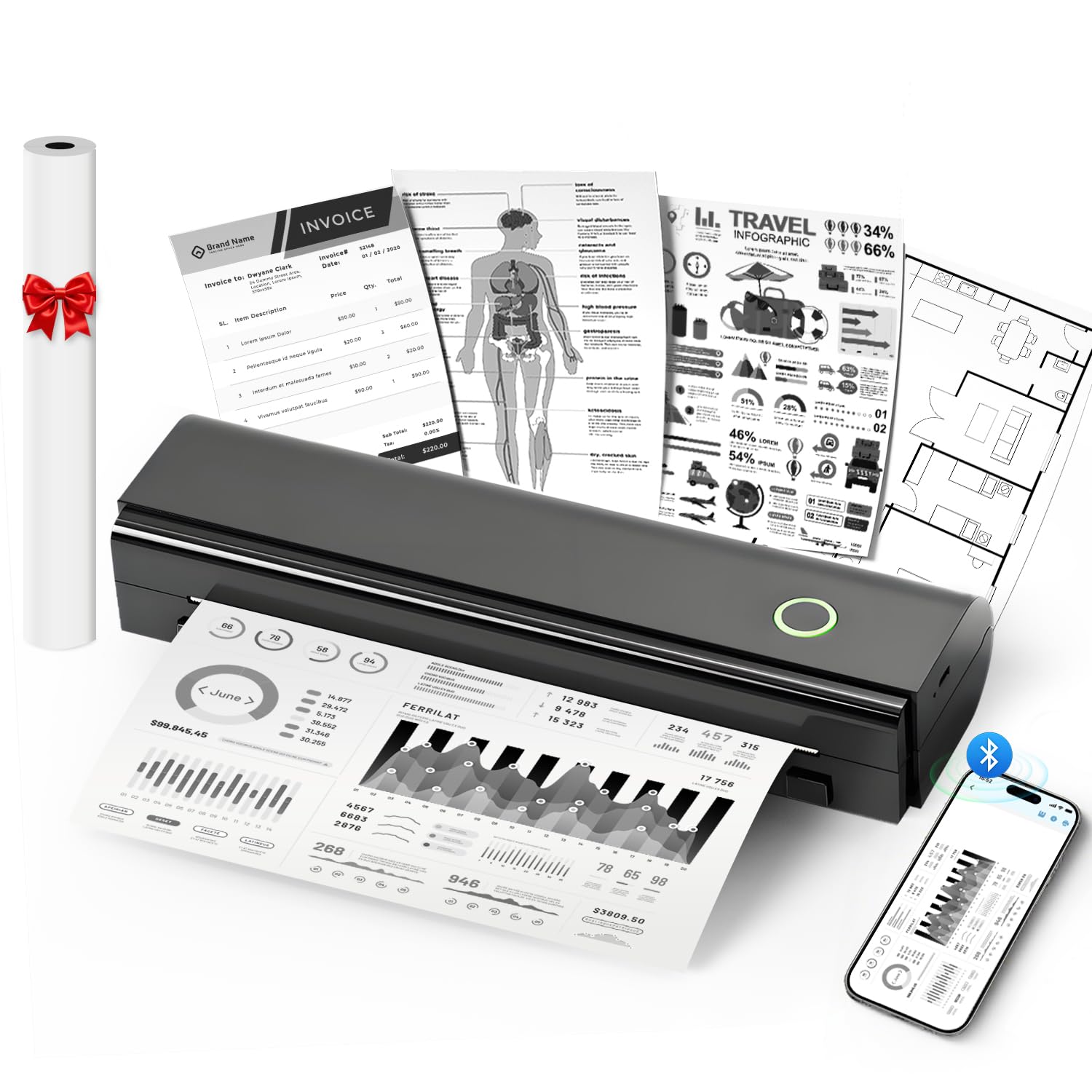
2. NDYIN N80 Portable Wireless Thermal Printer
Prints a full letter-size page from your phone — no ink, no toner, no cartridge to buy ever.
This is not a photo sticker printer, and that distinction matters. The N80 uses direct thermal printing (a method that darkens specially coated paper with heat, so there is no ink, toner, or ribbon at all). It handles US Letter and A4 thermal paper — the full page, not just label strips — and runs at 203 DPI (dots per inch, a measure of print sharpness). In practice that means you can print a contract, packing slip, notes page, or a black-and-white photo straight from your phone without going near a regular printer. Owners mention the comfort of never buying ink again, and it even takes tattoo transfer paper.
Speed is its hidden weapon — 60 pages per minute, versus the single-page-per-minute pace of the photo printers on this list. If your time is being spent queuing at an office printer, that speed difference alone justifies the machine. Charge the built-in 1500mAh battery and the maker rates it for 160 sheets of 8.5″ x 11″ paper, so a week of documents fits in one charge. It weighs 1.7 pounds and packs into a zippered case that slips into a backpack or briefcase. It comes with a roll of US Letter thermal paper, a USB-C cable, and a USB-C adapter (though not the charging adapter itself).
Now the honest limits, because this is where expectations break. It prints only in black and white, and only on thermal paper — ordinary printer paper simply will not work. At 203 DPI, large filled areas show a faint cross-hatch and text can look slightly bumpy at small sizes. The included roll tends to stay curled once unrolled, so sheets may need re-rolling or flattening overnight. Laptops connect only over USB-C with a driver installed, not Bluetooth, and the app does not support Apple’s AirPrint. If you want color snapshots, look at the Liene or the Nelko instead — this is the document workhorse of the group.
What buyers keep coming back to: portability and the total absence of ink costs, which owners describe as working better than far bigger, pricier desk printers.
What to size up first: the black-and-white-only output and the thermal-paper requirement — this printer is brilliant at text and images in gray, and useless for full-color keepsakes.
Best matched to: frequent travelers, students, small-office owners, and anyone who needs to print contracts or invoices from a phone without owning a full desk printer.
Think twice if: color photos are the whole point of the purchase — a sticker photo printer will make you far happier.
3. Nelko PP01 2×3 Portable Photo Printer
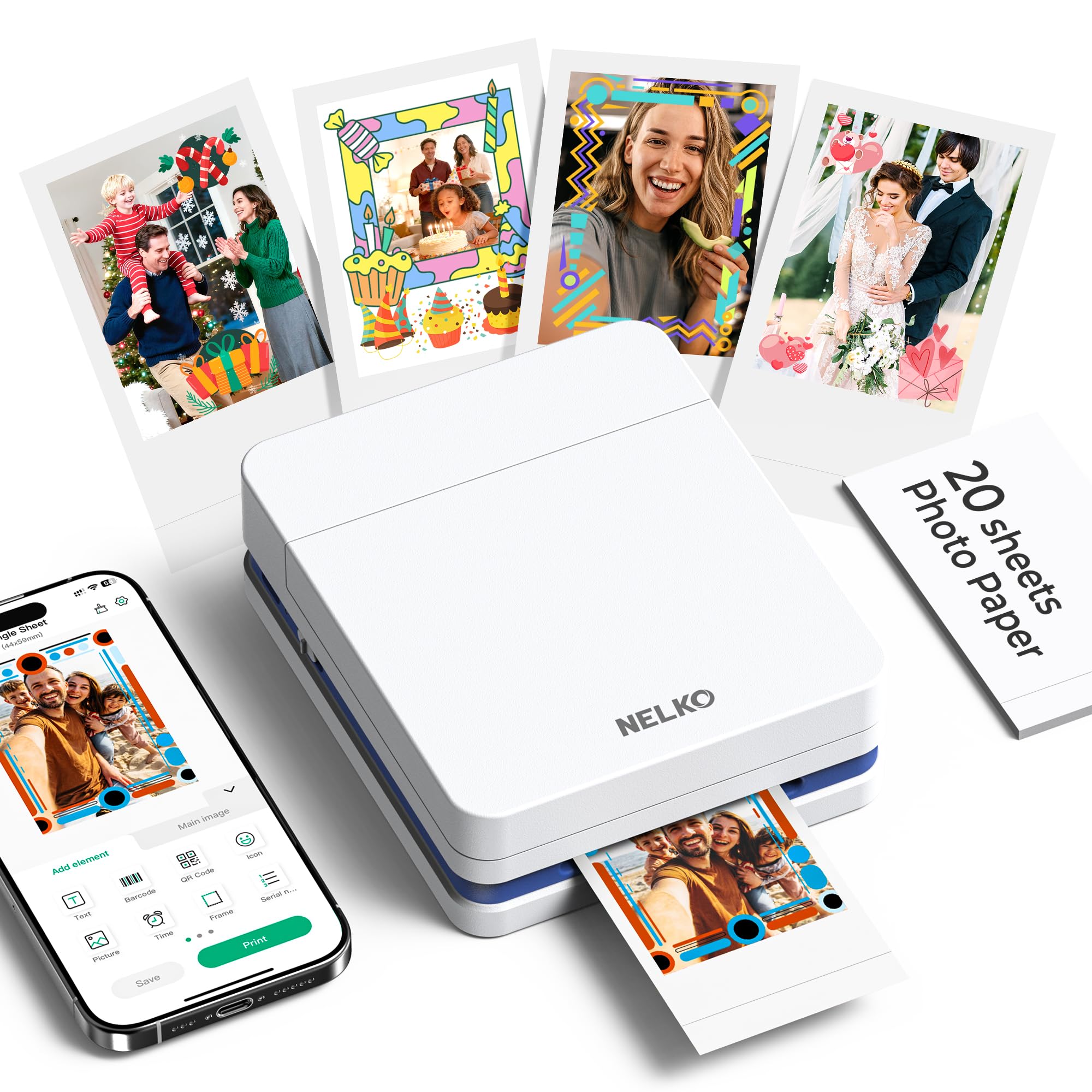
A genuine inkjet in your pocket, printing 600 DPI stickers for school, crafts, and planners.
The number that matters here is 600 DPI — the print resolution — and it shows. It weighs 308 g and measures 4.2″D x 1.69″W x 5.04″H, so it really does fit in a school bag or travel tote. Printed photos land in under 90 seconds and each cartridge is rated for up to 80 full-color 2×3 prints.
People who use it are vocal about how easy the whole thing is — the app pairs over Bluetooth, and you can browse, filter, and print from your phone in seconds. That ease is a big part of why it leads the category for overall satisfaction. Sticky-backed prints mean journaling, scrapbooks, wall collages, and phone-case art happen without a single drop of glue. It is also a smart choice for students and parents, since it produces print-size memories without the hassle of a full camera and print-at-the-store trip.
Here is the one wart. The printable area is fixed at roughly 45x58mm on a 2×3 (52.3x90mm) sheet, which means you lose some paper to white margins around each print. Some owners have found that frustrating because you cannot easily close that gap. It is a cosmetic waste rather than a hardware flaw, and for most people it barely registers, but if your budget per print is tight, it is worth knowing. Outside of that, this is one of the easiest value buys on the list — great photos without the premium-printer price tag.
What Makes It Worth It
- 600 DPI inkjet color that holds up on scrapbooks and cards
- Adhesive backing on smudge-proof, water-resistant paper
- Up to 80 prints per cartridge, so refills stretch farther than dye-sub rivals
- Under 90 seconds per print and a genuinely simple app
The Trade-Off
- Fixed 45x58mm printable area leaves white margins on 2×3 paper
- No adapter included with the USB charging cable
Suits: crafters, students, and journal keepers who want sharp color stickers at a manageable per-print cost.
Pass if: edge-to-edge printing matters to you — the fixed printable area will bother a perfectionist.
4. Polaroid Hi-Print 2nd Generation Pocket Photo Printer

The name that made stickers cool, now with fewer jams and colors that beat the old Zink models.
Polaroid’s second-generation Hi-Print is all about the dye-sub cartridge: it produces high quality, vibrant 2×3 prints in under 50 seconds, with the color sealed into the print so it does not smear. It connects over Bluetooth to the Polaroid Hi-Print app on iOS and Android, and the app offers frames, filters, text, and emoticons for personalizing each print. It runs on a rechargeable lithium-ion battery, so you can print from anywhere, and it pumps out full-color images at an impressive 10 pages per minute on the technical sheet. Put simply: you browse the camera roll, hit print, peel the sticker back, and stick it on your journal, laptop, or fridge.
Color accuracy is where this one earns its keep. Owners repeatedly tell a story of dodging Zink after past disappointments and finding that the Hi-Print’s sharpness and color hold up against larger professional prints. The peel-and-stick backs suit teens, and the pocket-sized body fits in a handbag. The one recurring gripe is adhesive strength — a couple of people found the sticker needed a dab of glue or double-sided tape to stick firmly, so treat it as a light-tack sticker for paper, not a heavy-duty label.
Two things you should know before you buy. First, this version is the printer only — the listing explicitly notes photo paper is not included, so budget for a cartridge straight away. Second, despite the clean record on jams, occasional units have been reported to jam a cartridge irremovably, and the support path in those cases left the owner cold. That is rare, but if you want maximum confidence on the support side, it is worth weighing. Overall, this is the ideal pick for anyone who wants that recognizable Polaroid look without buying film for a camera.
The genuinely winning detail: color that tracks true-to-screen and a print that stays flat and sharp instead of curling like old instant film.
The follow-up question worth asking: if you plan to print a lot, the cost per cartridge adds up fast — but for occasional memory-making, it is a pure delight.
A great fit for: teens, journalers, and gift-givers who want the cool-factor of a Polaroid with the reliability of dye-sub printing.
Not the one for: people who plan to stick photos to textured or heavy paper — you will need extra glue.
5. HP Sprocket 2×3 Instant Smartphone Photo Printer
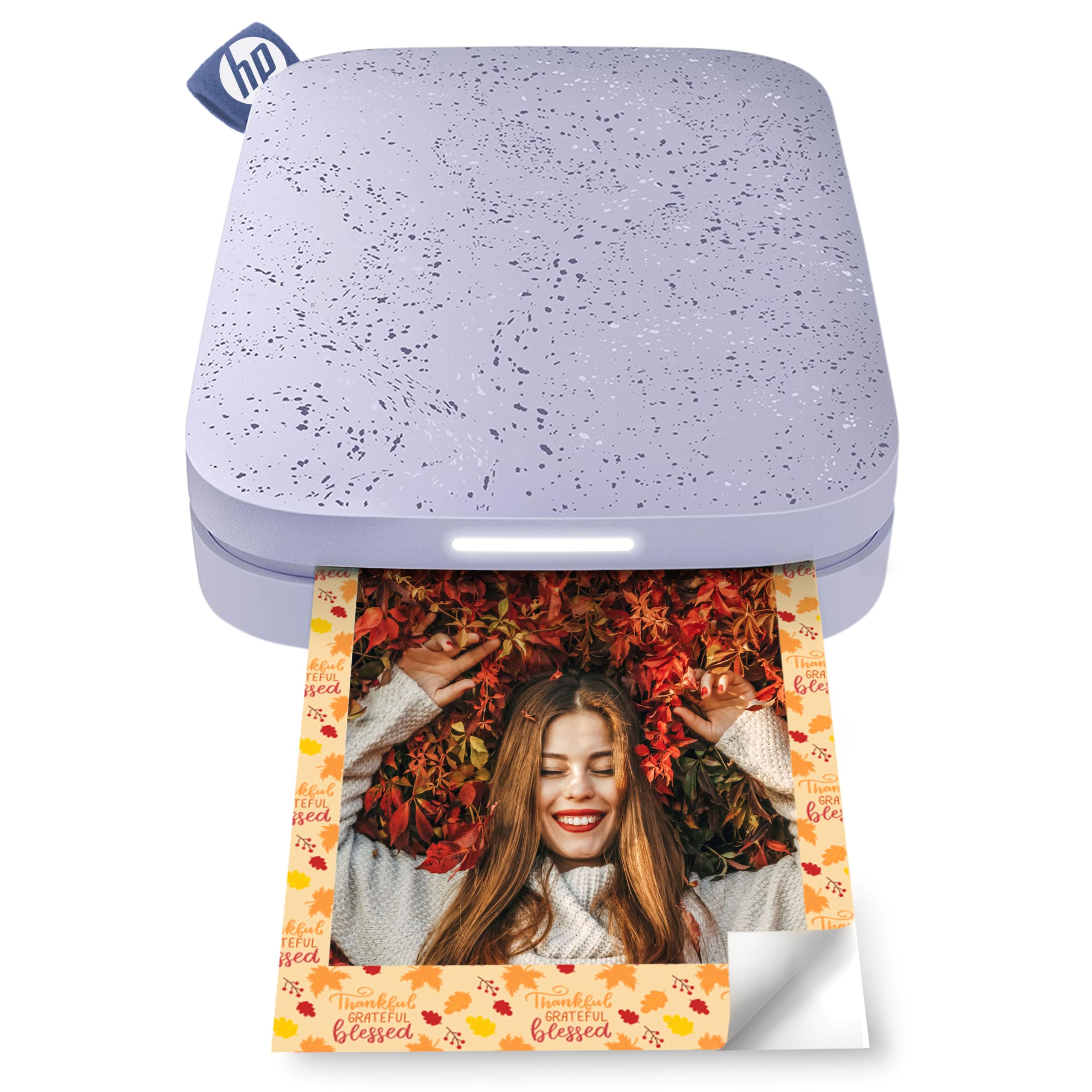
The easiest one to just pick up and use — no ink, no cartridge, just paper in and photos out.
For pure simplicity, the HP Sprocket is hard to argue with. It uses ZINK Zero Ink paper (dye crystals are embedded right in the sheet, so there is no cartridge to buy or install), it pairs over Bluetooth 5.3, and it fits in a pocket or purse. Each charge covers around 35 prints, which is enough for a party or a weekend trip. The free HP app adds borders, stickers, filters, and emojis, and you can share an album so multiple devices print at once — a nice touch for a family or a birthday table. Loads of these have gone into the world, so it is also the one most people have already heard of.
Here is what to expect from real prints. The quality is decent for the size — not lab-grade, but perfectly fun for journals, letters, and cards. A few people find the prints run a bit dark or carry a pink/magenta tint, which most fix by brightening or pre-editing the image in the app before printing. Some prints need a re-feed if the blue barcode does not catch the first time. Battery life is short by design; plan to charge it between uses. None of these are deal-breakers for a casual-user device — they are simply the realities of ZINK printing in a tiny body.
The bigger question is the paper. Refills can be pricey, and the printer itself does not come with a case or film in the base version — budget accordingly. Still, if you want the printer that requires the least explaining and works from the start in a few minutes, this is the one. It is a low-stakes instant printer: load ZINK paper, hit print, and a sticker slides out in seconds.
Why People Love It
- Zero ink or cartridge — just buy the ZINK paper and print
- Bluetooth 5.3 pairs quickly and lets friends print at parties
- Around 35 prints per charge and pocket-sized for a bag
- Free app with borders, stickers, and album sharing
What To Expect
- Photo quality is casual, not professional, and can skew pink or dark
- Battery life is modest; you will recharge between outings
- Paper refills are not cheap and film is not included
The right call for: casual memory makers, families, and anyone buying a first pocket printer for a teen or a party.
Skip if: you want crisp color-accurate prints and a long battery — go for a dye-sub model instead.
6. YOTON Photo Printer with 4×6 Paper and Ink Ribbon

The only pick here that prints a proper 4×6 photo you can frame — with an AR twist.
If your goal is an actual photo, not a sticker, this is the pick. It prints 4×6-inch photos using dye-sublimation, with a protective layer that resists water, scratches, and fingerprints — so the results are keepsake-grade and ready for a frame or album. It ships with 54 sheets of 4×6 paper and a ribbon rated for 40-50 photos, so you can start immediately. The standout feature is AR video printing: print a clip up to 15 seconds long, then scan the finished photo with the app to see it come alive on your phone. It works with iOS and Android phones and computers, and it sets up on its own built-in Wi-Fi rather than a shared network, which means it prints even with no internet around.
Print quality is what owners praise most — vivid, sharp, and close to a store print, with sturdy film that feels substantial in the hand. A scrapbooking parent who prints monthly photos found them better than store prints. At 10.7″ x 4.9″ x 2.2″ and 970g, it sits on a shelf rather than in a pocket. Printing runs at 5 color pages per minute, which is fast enough for a batch of memories. The AR feature turns a printed clip into a 15-second video when you scan it with the app.
Here is the fair warning: connectivity is the weak spot. The setup needs a 2.4GHz Wi-Fi network or a direct connection, and some people found the app slow or fussy to link up on the first try. A few report photos coming out darker than the original screen. These are real, and they are the sort of thing you fix by tweaking exposure before printing. The hardware itself, though, delivers on photo quality — as long as you go in prepared for a bit of setup patience, it is a strong choice for turning your camera roll into frameable prints.
The standout: the 4×6 dye-sub format — this is the only printer in this lineup that gives you a full-size photo you would actually frame.
The honest catch: the app and Wi-Fi pairing demand patience on day one — budget a calm half-hour for setup before you expect a smooth run.
Ideal for: families building albums, new parents tracking milestones, and anyone who wants frameable 4×6 photos without a trip to the store.
skip it if: you want a grab-and-go pocket printer — this one wants a shelf and a plug nearby.
7. Canon Ivy 2 Mini Photo Printer Bundle

A complete starter kit: printer, case, cable, and 110 ZINK prints in one box.
Buying a photo printer usually means buying paper separately on day one — this bundle skips that step. Canon packs in 110 ZINK sheets (two 50-sheet packs plus 10 already inside the printer), a compatible protective case, and a USB-A to USB-C charging cable. The printer itself is the Ivy 2 Mini, a Pure White pocket unit with a small LED light bar. It uses ZINK Zero Ink paper with a peel-and-stick backing, connects over Bluetooth 5.0, and charges in as little as 45 minutes — quick enough that a forgotten charge is a lunch-break fix, not a lost afternoon. Canon also claims improved print quality on this second generation, with tune skin tones, better contrast, and sharper detail.
What people rave about is how naturally it fits into journaling. Print quality is the top praise across reviews — sharp, colorful, and consistently fun for scrapbooks and travel memory books. The Canon Mini Print app is easy to drive, and prints peel and stick onto almost any surface. The LED light bar gives you a quick read on status, and the bundle’s case makes it genuinely travel-proof. For bullet-journal and junk-journal users, the 110 included ZINK sheets mean no ink and no separate paper run.
The trade-offs are honest ones. ZINK prints can carry a slight blue tint and sometimes come out a bit dark, so brightening the image before printing is a smart habit. The sticker adhesive on this paper is also not the strongest, so on textured surfaces you may want a dab of glue. And although the bundle price sits at the premium end of this list, the math on 110 included prints plus a case softens it considerably. If you want the all-in-box experience and a printer that travels as neatly as its case, this is a strong finish.
What’s In Your Favor
- 110 ZINK prints, a protective case, and a USB-C cable included — no separate paper run
- Bluetooth 5.0 and a 45-minute fast charge keep downtime short
- Peel-and-stick ZINK paper with improved contrast and skin tones
Weigh Before You Buy
- Some prints carry a blue tint or come out dark — pre-edit helps
- Adhesive is light-tack and may need extra glue on rough surfaces
Best for: journal keepers and gift buyers who want a full kit that works the moment it is unboxed.
Consider the Liene instead if: color accuracy is your priority — dye-sub still edges out ZINK on true-to-life tones.
Know the Specs
Print Technology — Dye-Sub, ZINK, Inkjet, Thermal
This is the single biggest decision. Dye-sublimation (as on the Liene and YOTON) heats color ribbons onto paper in multiple passes and seals them, giving the most photo-like color and water resistance. ZINK (on the HP Sprocket and Canon Ivy 2) bakes dye crystals into the paper, so no cartridges are needed, but colors can skew slightly. Inkjet mini printers (like the Nelko) use a standard color cartridge for sharp results on sticky paper. Direct thermal (the NDYIN N80) needs no ink but prints only black and white on special paper.
Print Resolution and Size
Resolution is measured in DPI, or dots per inch — higher numbers mean finer detail. The Nelko lists 600 DPI and produces notably crisp prints for a pocket machine, while the NDYIN’s 203 DPI is fine for text but shows cross-hatching in large filled areas. Paper size matters just as much: 2×3-inch prints are card-sized and built for journals and collages, while 4×6-inch prints are a proper photo format you can frame. Choose the size that matches what you plan to do with the print, not what looks smallest on the shelf.
Common Questions
Can a mini printer print photos in full color?
Do I need to buy ink or cartridges for a mini photo printer?
How much does each photo print cost to make?
Will a mini printer work with both an iPhone and an Android phone?
Can I use regular paper in a mini thermal printer?
Are the sticky-backed photos safe to stick in a journal?
Is a 2×3 print or a 4×6 print the better size?
Do these mini printers need a Wi-Fi connection or just Bluetooth?
How long does the battery last on a mini printer?
Is a dye-sub mini printer better than a ZINK printer?
The Bottom Line
For most people, the best mini printer is the Liene Pearl N200 Pro because dye-sublimation gives you the sharpest, most color-accurate sticker prints and a build small enough to carry anywhere. If you need to print documents and invoices from your phone, the NDYIN N80 does it without ever buying ink. And if you want a full-size frameable photo, the YOTON is the one to reach for.
One quiet nudge: the Liene holds a 4.5+ star rating, and its strong owner consensus on size and picture quality is a genuine reason to start there — but check the refill math against your own printing habit before committing. Whichever you pick, the paper type and per-print cost decide how often you actually use it.
How we choose
We do not accept paid placement. Every pick is matched to a real buyer and a real use-case; we do not hands-on test units.
Sources
Specifications: manufacturer listings and product documentation. Review insights: verified customer reviews, as of October 2026. Pricing: not shown on this page (it changes often); check the current price via the retailer link.
As an Amazon Associate, Aappliancez earns from qualifying purchases. This does not affect which products we feature.