Disclosure: Some links in this post are affiliate links. As an Amazon Associate I earn from qualifying purchases, at no extra cost to you. Learn more
Specs are compiled from manufacturer listings and verified buyer reviews and can change over time — please confirm the key details on the product page before buying.
If your mouse keeps bumping the edge of your desk pad, a mini keyboard buys you back the room — and the right one does it without turning your typing into a guessing game. The catch most buyers hit is that smaller also means fewer keys, and the number layout is what decides whether a board suits you or fights you all day. This guide sorts the compact boards by how they actually behave on a desk, from the 60% gaming models that trade the arrow cluster for space to the 75% picks that keep the function row.
This guide is built by comparing the manufacturers’ published specifications and the patterns across verified customer reviews, so you get each pick’s real strengths and trade-offs instead of marketing spin.
You will see how layout size, switch type and connection style change daily use, and which trade-offs are worth living with on a small board. Here is how to pick the right one from the best mini keyboards. Every mini keyboard here trades keys for desk space, so pick your layout before you compare switches or polling rates.
Top Picks


How To Choose The Best Mini Keyboards
Start with the layout, not the lighting. A mini keyboard is defined by how many keys it keeps, and that number tells you more about your daily experience than any other spec. Everything else — switches, connection, keycaps — is a refinement on top of that first decision.
Counting keys: 60% versus 75%
A 60% board keeps the main letter block and pushes everything else onto an FN key layer (a second function you hold to reach arrow keys, delete and the function row). That saves serious desk space, but you pay for it with a learning curve. A 75% board keeps a function row and usually a knob or extra cluster, so it stays compact without hiding the keys you reach for constantly. The Newmen GM326 fits 82 keys into a 75% frame; the Razer Huntsman Mini drops to a 61-key 60% body in a 11.55″L x 4.07″W x 1.45″H frame.
Switch type changes the feel and the sound
Linear switches press straight down with no bump, which suits fast, repeated presses. Tactile switches add a small bump you feel at the point of actuation, which helps touch typists know a press registered. Clicky switches add an audible click on top of that. Optical switches use a beam of light instead of metal contact, and Hall Effect switches use magnets — both aim to register a press without physical wear inside the switch.
Wired, Bluetooth, or both
Wired over USB-C means no charging and no pairing, which is why most competitive gaming boards here still plug in. Bluetooth lets you switch between devices, and the better boards pair with three or more at once. If the board stays on one desk, wired USB-C is enough; if it travels in a bag, pay for Bluetooth.
Side-by-Side Comparison
| Model | Best For | Layout / Keys | Connection | Switch Type | Amazon |
|---|---|---|---|---|---|
| Razer Huntsman Mini 60%★ Best Overall | Gamers with small desks | 60% / 61 keys | USB-A wired | Linear optical | Amazon |
| Newmen GM326Best Value | Budget desk-space saver | 75% / 82 keys | USB-C wired | Hot-swap linear (red) | Amazon |
| DIERYA DK61seCompact Pick | Compact gaming on a budget | 60% / 61 keys | USB-C wired | Linear (red) | Amazon |
| Foldable Bluetooth Keyboard | Travel and phone typing | 67 keys / foldable | Bluetooth | Scissor switch | Amazon |
| Aula WIN60 HE | Competitive FPS gaming | 60% / compact | USB-C wired | Hall Effect magnetic | Amazon |
| XVX M61 Pro | Wireless gaming and looks | 60% / 61 keys | Bluetooth / 2.4GHz / USB-C | Pre-lubed linear | Amazon |
| ProtoArc K110-A | Mac desk work with a numpad | Full size / 110 keys | Bluetooth | Scissor switch | Amazon |
| KiCA Jet Fan 2S | Blowing dust out of keyboards | — | Rechargeable / USB-C | — | Amazon |
| Keychron K3 Version 2 | Slim Mac and Windows typing | 75% / 84 keys | Bluetooth 5.1 / USB-C | Low-profile mechanical | Amazon |
| Logitech G PRO X 60% | Wireless esports play | 60% / 61 keys | LIGHTSPEED / Bluetooth / USB | Optical (tactile) | Amazon |
| Logitech MX Mechanical Mini | All-day wireless typing | Compact / 60 keys | Bluetooth / Logi Bolt | Low-profile clicky | Amazon |
Detailed Reviews
1. Razer Huntsman Mini 60% Gaming Keyboard
Our pick — 4.5+★ from 300+ verified ratings; the strongest balance of quality and price.
The 60% board that keeps a gaming desk quiet without giving up response speed.
The Huntsman Mini earns the top slot because it does the small-board job without feeling like a compromise in your hand. Its linear optical switches register a press the moment a beam of light is broken, and Razer rates that actuation at 1.0 mm — about 15-30% shorter travel than other linear switches. In practice that means your key bottoms out and the input lands sooner, so spraying and strafing feel immediate. The 61-key 60% body measures 11.55″L x 4.07″W x 1.45″H, which is a full 27% smaller than the DIERYA DK61se at 14.65″L x 4.53″W x 2″H. On a cramped desk, that difference decides whether your mouse hand has room to swing.
The built quality is the part that holds up over years. The matte aluminum top frame on this white Mercury edition adds structural rigidity, and the PBT keycaps are doubleshot and oil-resistant, which means the legends and texture survive long typing sessions rather than turning glossy. Razer Chroma RGB gives you 16.8 million colors per key and syncs with Philips Hue plus gear from 30+ partners. If you want your keyboard to match a full lighting setup, this is as deep as the ecosystem gets.
The gripes are real and specific. This is a 60% board, so there is no dedicated arrow cluster or function row — Review 1 calls it ideal for gaming only and unsuitable for work or school, and you will feel that the first week. A handful of buyers also note that the short 1.0 mm actuation makes accidental presses easy with large fingers. Neither is a defect; both are the price of a fast, compact board. The 4.5+ star rating across 300+ ratings reflects a crowd that mostly accepts that trade.
What Earns Its Keep
- 1.0 mm optical actuation lands presses faster than standard linear switches
- Aluminum top frame plus doubleshot PBT keycaps resist long-term grime
- At 11.55″L x 4.07″W x 1.45″H it opens up real mouse space on small desks
- Quiet key press — buyers stream late without waking the house
Where It Asks Something Back
- No arrow keys or function row without the FN layer
- Very short travel can trigger stray presses for big hands
Pick it for: a gaming-only desk where the mouse needs room and you want optical speed with a metal frame.
Not for: spreadsheet work or school essays — the missing arrow cluster will annoy you daily.
2. Newmen GM326 Mechanical Keyboard
A 75% frame that keeps the function row and squashes a knob into the corner.
If you want compact without an FN-layer learning curve, the GM326’s 82-key 75% layout keeps the function row and arrow keys. It packs 82 keys into a 75% layout — a full 34% more keys than the DIERYA DK61se’s 61-key 60% body — so you keep the function row and reach arrow keys without holding FN. A multi-function knob sits in the upper right corner for quick volume control. The three indicator lights below it cover Caps Lock, Win Lock and the Windows/Mac switch, so you can see the board’s state without hunting.
You get a crisp click and a lower noise level than most mechanical boards for the money, thanks to the red linear switches (keys that press straight down with no bump). The ABS keycaps (the plastic caps you type on) use stepped ergonomics, so your fingers stay comfortable through long typing sessions. Two-stage adjustable tilt legs let you set two different heights. It is a wired USB-C board (USB-C is the small oval connector), so there is no charging and no pairing to worry about.
The honest catch is the internals. The hot-swap socket is tighter than standard: buyers report that Gateron switches do not seat properly and their pins bend, so stick with Outemu or the stock switches. The rainbow-only backlight is another limit — it offers 6 backlighting colors and 20 modes, but you cannot dim it as low as some would like. Some owners also report it stops working properly after 2-4 months. With a 4.0+ star rating across 500+ ratings, most buyers are satisfied, but this is a value board, not a long-haul investment.
Value read: For a compact wired board with a knob and real function row, the 82-key layout and hot-swap socket give beginners a cheap way to try customization.
Reach for this if: you want the function row back on a compact desk without paying much.
Look elsewhere if: you plan heavy switch modding — the non-standard socket limits which switches fit.
3. DIERYA DK61se Wired Gaming Keyboard
The budget 60% that makes the jump from a full-size board feel easy.
At the entry tier, the DK61se is the cheapest way to try a 61-key 60% board. The DK61se uses red linear switches — light to press with no tactile bump, so rapid keypresses flow without resistance — and 61 keys with everything else on the FN layer. It supports full N-key anti-ghosting, so every keypress registers even when you press several at once. The stair-up keycap design keeps your hands in a natural angle to reduce fatigue on long sessions.
The backlight is fixed to a single teal-blue color rather than full RGB, but you still get 19 built-in modes with adjustable brightness and speed, which is more than enough for late-night visibility. Buyers describe the keys as sounding good and holding up well, and the blue glow makes the letters easy to read in a dark room. It comes with a keycap puller and the 1.5m Type-C cable.
The catch here is weight and layout adjustment. Review 2 notes it is heavy, and several owners find the compact layout takes a few days to get used to — expected from a 61-key board. A 4.5+ star rating across 900+ ratings tells you most buyers accept that. If you want full RGB or a wireless option, look elsewhere in this list.
First-board value: At the entry tier, you get linear switches, anti-ghosting and 19 lighting modes in a footprint 14.65″L x 4.53″W x 2″H — bigger than the Razer above, so check your desk space.
Fits best: a gamer on a tight budget who wants a genuine 60% board to learn on.
Think twice if: you want RGB color options or cable-free use.
4. Foldable Bluetooth Keyboard
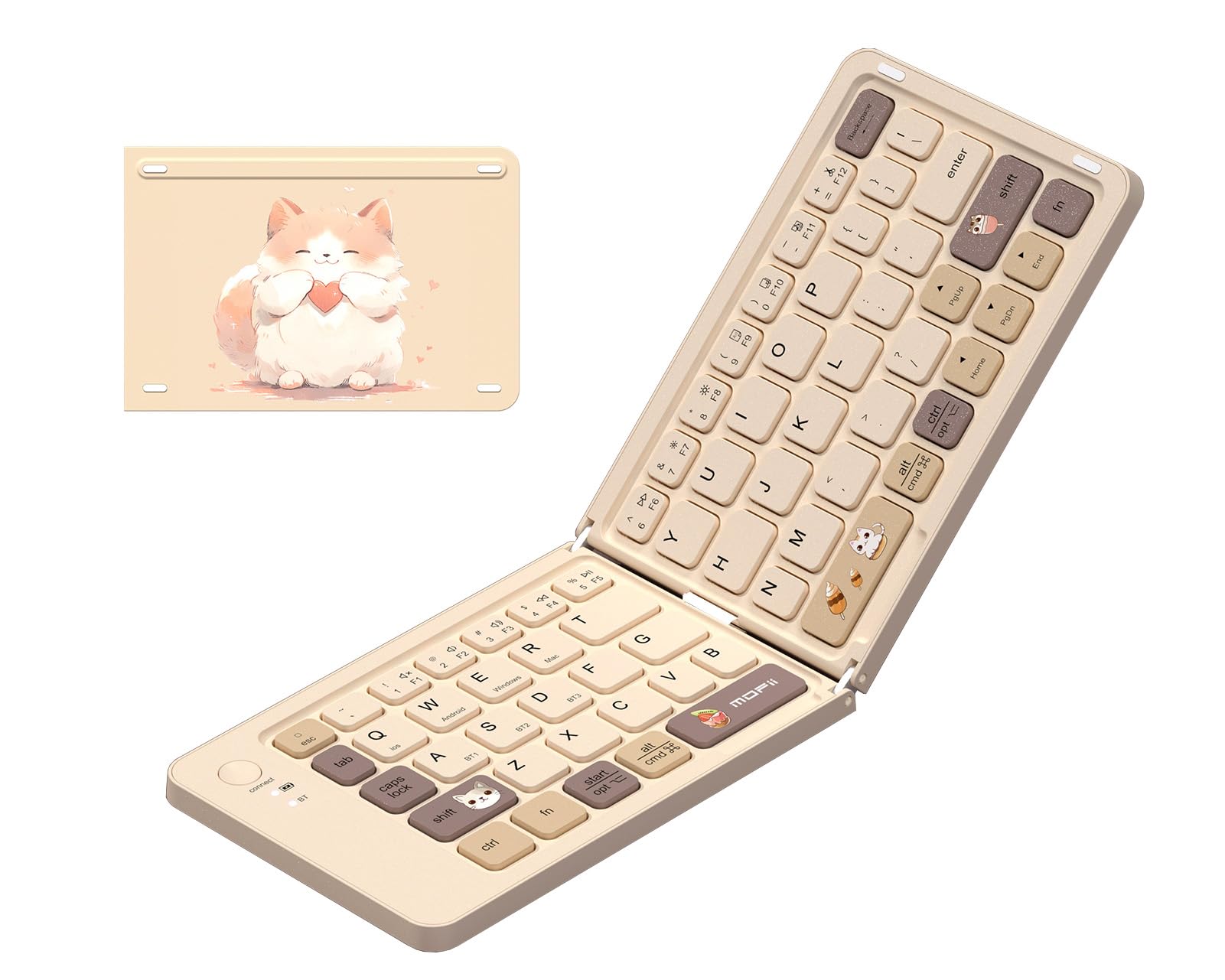
A pocketable milk-tea keyboard that folds flat and pairs with three devices.
For students and travelers who type on a phone or iPad, this is the smallest option here. It has 67 keys and folds in half to slip into a handbag or backpack. Bluetooth pairing covers iPad, iPhone, Android, laptops and Mac, with up to 3 connected devices you switch between. A Type-C charging port and auto-sleep when folded keep it ready for the next trip.
What buyers single out first is the compact size and the appearance — the soft milk-tea color and minimalist look get called cute over and over. The scissor-switch keys are low-profile and quiet, which makes it fit a café, a library or a late-night study session. It comes with a drawstring bag and it pairs quickly with an iPhone 15 Pro or iPad Pro.
The trade-off is the cramped keyboard. This is a tiny board, and keys are spaced tighter than a full-size layout, so touch typists will make mistakes. Some buyers add that certain letters need a firm double press, and one notes the middle hinge is wide enough to cause slip-ups. This is a device for short bursts on the go, not a full workday. With a 4.0+ star rating across a small-but-growing base of owners, it earns its place for portability, not productivity.
The real use: Treat it as a travel companion that lives in a bag and comes out for notes, emails and messages. For that job, the portability and quiet keys are exactly right.
Works well for: a student or commuter who types on a phone and wants a real keyboard that disappears into a bag.
skip it if: you touch-type at speed — the tight key spacing will cost you accuracy.
5. Aula WIN60 HE 60% Mechanical Gaming Keyboard

Hall Effect switches with a 0.02 mm trigger step, aimed squarely at Valorant and CS2.
For Valorant and CS2 players chasing the fastest key reset, start here. The Win60 HE uses magnetic Hall Effect switches, which register key travel without physical contact, so there is no switch wear to degrade over time. Its Rapid Trigger step is rated at 0.02 mm, which means the board resets the moment your key moves back up, so repeated taps fire faster. Polling reaches 8000 Hz, so the board reports to your PC far more often than a standard keyboard. Taken together, that is a real advantage in quick peeks and stop-shooting.
What wins people over is the sound and feel. The stock board is thocky without being noisy, and the adjustable actuation lets you tune how deep a press needs to be before it registers. The build is hefty with a firm USB-C connection. The web-based driver means you can remap keys and set macros from any browser without installing software.
The catch is the software and the occasional unit. The online driver is functional but unpolished, and one buyer reports ghost inputs where a key jams — fixable by replugging. Another complains the keycaps feel cheap and recommends swapping them. The board also works on PC only: the listing says it is not compatible with PS5 or PS4, though one owner found a workaround. At 4.5+ stars across 1,000+ ratings, it remains one of the best-value competitive boards here.
Worth The Money
- 0.02 mm Rapid Trigger step plus 8000 Hz polling for fast competitive play
- Hall Effect switches have no contact wear like a traditional switch
- Web-based driver lets you remap keys without downloads
- Thocky sound and adjustable actuation at the mid tier
What You Give Up
- Web driver is unpolished and the keycaps feel cheap
- An occasional unit shows ghost inputs or a jammed key
Best for: a competitive FPS player who wants Hall Effect response without premium pricing.
Not the one for: console players — the listing marks PS5 and PS4 as unsupported.
6. XVX M61 Pro Wireless Mechanical Keyboard

The Great Wave design hides a board that can switch between three connection modes.
With Bluetooth 5.0, 2.4 GHz and USB-C wired in one 60% frame, the M61 Pro covers gaming, work and travel. It connects three ways: Bluetooth 5.0, 2.4 GHz wireless or USB-C wired. It can pair with up to 5 devices and you switch between them with an FN key combo. The EVA sound-absorbing foam and IXPE switch pad inside reduce the hollow sound most plastic boards have. The pre-lubed linear switches and hot-swap sockets mean you can change switches later without soldering.
Themed keycaps in the Great Wave Off Kanagawa coral pattern look like nothing else on a desk, and the design is genuinely part of why buyers pick this. The 60% frame fits in a bag. RGB covers 19 backlight modes with 9 color choices and 4 brightness levels, and the software lets you remap keys and assign macros. Buyers describe the sound as creamy with a hint of thocky, and the lighting is the kind that makes a gaming corner feel finished.
The catch is durability and legibility. Reliability gets mixed reports — some boards randomly stop working and the letters on the keycaps are hard to see because the lighting comes from underneath. The 4.0+ star rating across 700+ ratings balances that out, and most owners use it for a year or more. Just know that if you touch-type in the dark, the dim legends will fight you.
The design factor: Few mini boards have this much visual identity. That is worth something if your setup is on display — less so if you need keys your eyes can find in the dark.
Great match for: someone who wants one wireless board for desk, couch and travel with a standout look.
Be aware: the keycap legends are dim and the long-term reliability is a mixed bag.
7. ProtoArc K110-A Wireless Keyboard
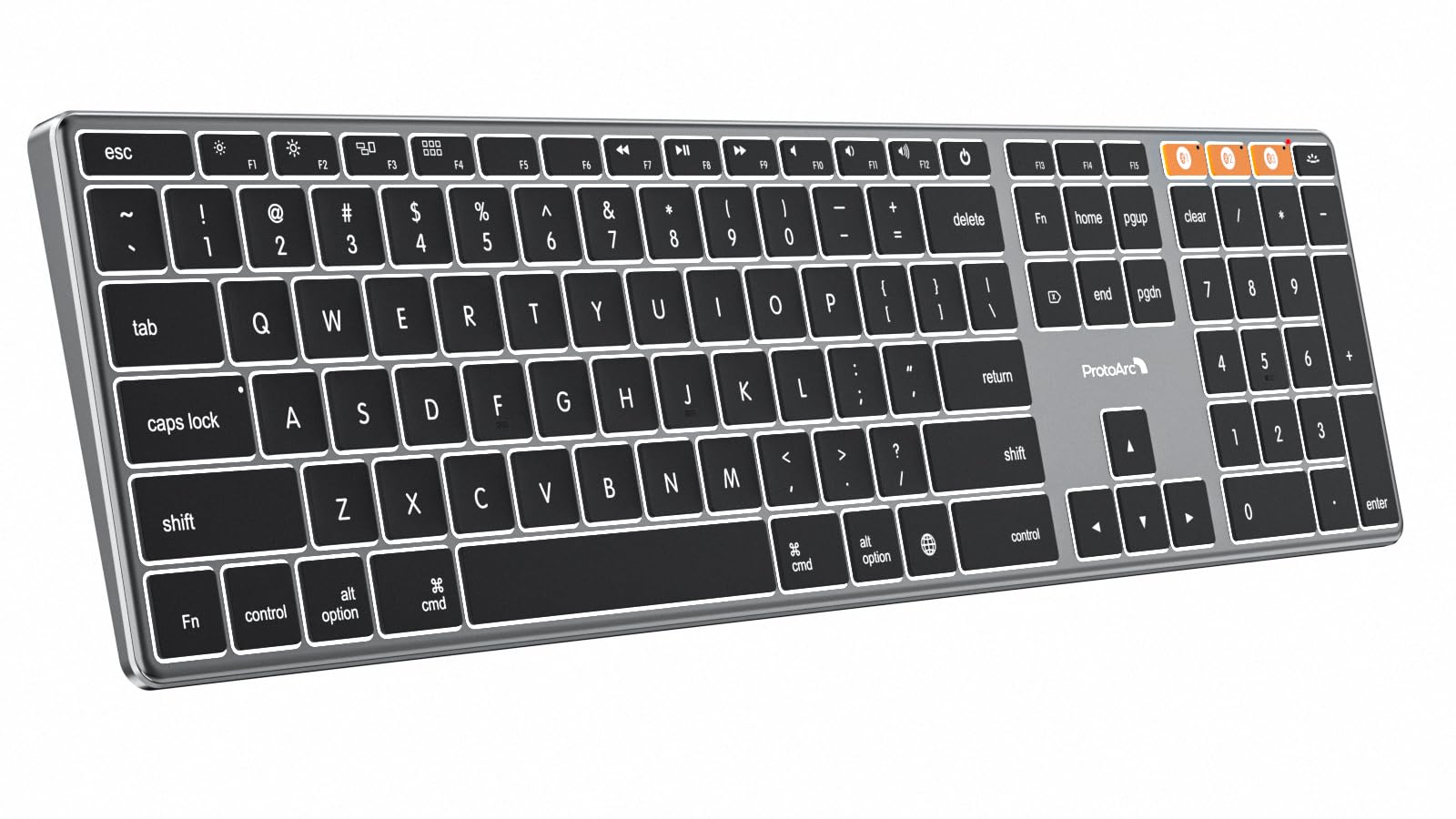
A full-size aluminum Mac board that stands in for a Magic Keyboard with a numpad.
Here is a full-size option for times you need the number pad. The K110-A is built for Mac only — it works with Mac OS 10.12 or later, iOS and iPadOS 13.0 or above, but not Windows, Linux or Macs from before 2013. It pairs with three devices over Bluetooth 5.1 and you switch via the mode button. The 1800 mAh battery recharges over USB-C, and it sleeps after 60 minutes idle and wakes on any key press.
The build is what separates it. The aerospace-grade aluminum unibody is 0.4 inches thick, so it resists scratches in a way plastic boards do not. The 3-level white backlight is soft enough to cut eye strain in a dim room. Owners mention they stick the included silicone dust cover on and leave it there, which handles long-term grime in one move. If you want a full numpad (the number keypad) and a Mac layout, this is one of the few boards that does both.
The catch is the battery reports. Some owners get top-notch battery life, while others report the cells degrade faster and the board needs recharging more often than expected. The keycap legends and backlight do not expose the charge level in the Mac Bluetooth menu, so you only learn the battery is low when the board dies. At 4.0+ stars across 200+ ratings, it is a strong choice for a Mac-only desk that does not travel.
Room it needs: The 16.7″L x 4.4″W x 0.4″H body wants a wide, fixed desk — it is a desktop board, not a bag companion, and that is where the numpad makes sense.
Would suit: a Mac user who wants a full numpad, an aluminum body and multi-device switching in one keyboard.
Skip if: you use Windows or Linux — the board will not connect.
8. KiCA Jet Fan 2S Electric Air Duster

A cordless air blower that clears dust out from between keycaps without canned air.
Mini keyboards have tighter spacing than full-size boards, and dust builds up in those gaps faster. The Jet Fan 2S is the tool for that. Its brushless motor reaches 117,000 RPM and 65 MPH wind speed, with a one-touch Turbo Boost that produces 150 g of instantaneous blowing force. It is a cordless replacement for canned air, which matters because canned air leaves residue on the keycaps and runs out mid-task.
The housing is aerospace-grade aluminum alloy, so it avoids the plastic feel of cheaper dusters, and it weighs only 0.66 lbs. It runs up to 210 minutes on low speed, recharges fully in 2.25 h over Type-C, and ships with 3 nozzles — one for keyboard dust, one for car detailing, one for camping use as a mini fan. What wins owners over is the raw performance, and the stepless slider lets you drop airflow to a gentle breeze when you clean a fragile keycap.
The catch is the top-end drain. Running Turbo eats the battery quickly, and one buyer says the speed dial is awkwardly placed on the front with the turbo button needing to be held. Battery life and value get mixed feedback — some find it worth the money, others consider it overpriced. Buyers use it for light dusting rather than blasting out heavy debris, which is the right expectation. At 4.0+ stars across 200+ ratings, it is a handy desk companion, not a heavy-duty shop tool.
The right job: This is a keyboard-care tool first. It clears dust from between keycaps and PC towers, and the aluminum body holds up in a bag.
Handy for: keeping a mini board free of dust without buying canned air every month.
Not the right tool for: heavy outdoor debris or long blasts — Turbo drains the battery fast.
9. Keychron K3 Version 2 Mechanical Keyboard

A slim 75% with real mechanical feel that Mac users can carry between desks.
The K3 is the pick for someone who types all day and wants a low-profile mechanical board that feels close to a laptop. Its 75% layout keeps 84 keys, including a function row, while the low-profile body measures 12.05″L x 4.57″W x 0.87″H — thin enough to slip into a bag. Brown switches give a quiet tactile bump that does not fire your neighbours. The reinforced aluminum top frame with a plastic bottom frame keeps it light without a flimsy feel.
Mac users get a real Mac layout with all the multimedia keys, and extra Windows keycaps ship in the box. Broadcom Bluetooth 5.1 pairs with 3 devices and you switch between them, and USB-C wired mode is there when you want zero latency. Open-source QMK firmware lets you remap every key and build macros, and the Keychron Launcher web app makes it easy without installing anything. White backlight is the only lighting option, which some owners actually prefer to RGB.
The catch is Bluetooth reliability on some units. Customers note frequent disconnects after minutes of use, though others find that disabling power-saving on the computer’s Bluetooth adapter fixes it. Another unit showed battery issues and a sticking key. When it works, it works well — buyers describe it as sturdy and comfortable with no speed loss versus a laptop keyboard. The 4.0+ star rating across 800+ ratings reflects a mostly happy crowd with a few wireless hiccups.
Why It Types Well
- Low-profile 75% body at 12.05″L x 4.57″W x 0.87″H fits a bag and a crowded desk
- Brown switches give quiet tactile feedback without high-pitched clicks
- Mac layout plus Windows keycaps covers both systems
- QMK firmware and the web app allow full key remapping
The Wireless Caveat
- Some units disconnect over Bluetooth until you change power settings
- Arrow keys are grouped, not separated, and Print Screen is easy to hit
Built for: a Mac-heavy worker who wants mechanical feel in a travel-friendly 75% frame.
Watch out: expect to adjust Bluetooth power settings to keep a stable connection.
10. Logitech G PRO X 60% Wireless Gaming Keyboard

A 61-key wireless esports board that travels in its own carry case.
This is the premium gaming pick — a 60% board built with esports players, and it shows in the wireless. The LIGHTSPEED adapter delivers a 1 ms response rate, and Bluetooth is there for everyday work. GX optical switches register faster with zero debounce delay, and you choose tactile or linear based on your play style. KEYCONTROL lets you remap every key across 5 unique layers, which turns 61 keys into a much bigger control surface.
The build quality is what earns that premium label. The PBT doubleshot keycaps feel great under your fingers, the board is heavy, and the battery lasts for a long time — owners describe it as lasting forever between charges. A volume roller and media controls sit on the edge of the board. The included carrying case protects the keyboard for tournaments, and the board charges over USB-C.
The catch is the price-to-feature balance. Reviewers point out the switches are not hot-swappable, no keycap puller ships in the box, and the black finish and click sound have mixed reviews. A handful call it overpriced, while others consider it worth it for the wireless reliability. At 4.5+ stars across 600+ ratings, it is a serious board — just be sure you want a 60% layout and no switch swaps before you commit.
What the premium buys: The 1 ms LIGHTSPEED link and the 5-layer KEYCONTROL system are the real advantages. If you are not chasing low-latency wireless and remapping, the value is thinner.
The pick for: a tournament player who needs a wireless board that travels and offers deep remapping.
Not worth it if: you want to swap switches down the line — the GX opticals are soldered in.
11. Logitech MX Mechanical Mini Wireless Keyboard

A compact clicky keyboard that runs up to 15 days per charge with the lights on.
If you want one keyboard for a mixed Mac-and-PC desk, start here. The MX Mechanical Mini runs up to 15 days on a full charge with backlighting on, or up to 10 months with it off. That means you can forget about charging for a long stretch. The low-profile clicky switches give an audible click and a tactile bump on every press — a familiar mechanical feel without the height of a full mechanical board. Smart illumination lights up the keys when your hands approach and dims itself when they leave.
The 60-key compact layout sits low enough to type on for hours. Bluetooth Low Energy pairs with up to 3 devices, and the included Logi Bolt receiver gives a more stable link when you want it. Logi Options+ software lets you reassign Fn keys, tune backlighting, and use Flow to move between computers. The body has an aluminum top plate that feels premium, and buyers describe it as heavy, stable and well-weighted. If you are used to a laptop board, the transition is quick.
The catch is the price-to-configuration. Some buyers find the clicky switches louder than expected, and the software has limits — Logi Options+ is not available on Android, so workplace restrictions can block customization. One owner notes the F-keys default to secondary functions rather than F1 and F2, and you need the Bolt receiver only, not the older Unifying one. At 4.0+ stars across 900+ ratings, it is a strong all-day board — but check that you can live with the click before you buy.
The battery argument: The 15-day charge with backlighting on — and up to 10 months with it off — is the loudest reason to pick this over the other wireless boards here. Add the 3-device Bluetooth pairing and it slips into a mixed Mac-and-PC desk without a fuss.
Right for: an all-day typist who wants clicky mechanical feel and a battery that outlasts a work week.
Consider the noise: the click is audible in a shared space and the lighting needs a manual tap to come back.
Know the Specs
Layout size and key count
A 60% board keeps around 61 keys and moves arrows, delete and the function row onto an FN layer. A 75% board keeps around 82 to 84 keys and restores the function row. More keys means less desk savings and less learning curve; fewer keys means more space and more shortcuts. The layout is the number one decision on a mini board.
Switch type: linear, tactile, clicky
Linear switches press straight down with no bump — good for gaming. Tactile switches add a bump you feel at actuation — good for touch typing. Clicky switches add an audible click on top. Optical and Hall Effect switches register without physical contact, which is why boards with them can advertise longer-term consistency.
Actuation distance and Rapid Trigger
Actuation distance is how far a key travels before the press registers. Shorter travel fires input faster but can cause accidental presses. Rapid Trigger resets the key the moment it lifts, so repeated taps fire from a shallower point. That is what makes boards like the Win60 HE suited to fast shooters.
Polling rate
Polling rate is how often the keyboard reports to your computer each second, measured in hertz. An 8000 Hz board reports eight thousand times a second versus a standard board’s far fewer. In practice it reduces the gap between a press and the game engine seeing it, which matters in competitive play but rarely for office typing.
Common Questions
Is a 60% keyboard good for typing documents, or just gaming?
How do I clean dust out between the keycaps on a mini keyboard?
Will a mini keyboard work with my iPad or phone?
What is the difference between optical and mechanical switches?
Can I change the switches inCan I change the switches in a mini keyboard?Only on boards that list a hot-swap socket. The Newmen GM326, XVX M61 Pro and Aula WIN60 HE all support hot-swapping, so you can pull a switch and seat a new one without soldering. The Razer Huntsman Mini and Logitech G PRO X 60% do not list hot-swap support, so their switches stay as shipped. On the Newmen, stick with the stock switch size — shoppers say Gateron pins bend in that socket.How long does a wireless mini keyboard battery last per charge?It depends on the board and the lighting. The Logitech MX Mechanical Mini is rated up to 15 days with backlighting on, or up to 10 months with it off. The ProtoArc K110-A uses an 1800 mAh battery and sleeps after 60 minutes idle. The KiCA Jet Fan 2S is a duster rather than a keyboard, but its own battery runs up to 210 minutes on low speed.Do I lose the arrow keys with a 60% layout?You lose the dedicated arrow cluster, not the function. On a 60% board like the Razer Huntsman Mini or DIERYA DK61se, arrows live on the FN layer. The Keychron K3 keeps arrow keys in a grouped cluster on its 75% layout, and the Logitech G PRO X 60% leaves them out entirely. If you reach for arrows constantly, a 75% board will feel more natural.Is a mini keyboard good for competitive gaming?Yes, and the small footprint is actually an advantage because it leaves more room for mouse movement. The Aula WIN60 HE pairs Hall Effect switches with a 0.02 mm Rapid Trigger step and 8000 Hz polling. The Logitech G PRO X 60% uses a LIGHTSPEED adapter with a 1 ms response rate. The Razer Huntsman Mini rates its optical actuation at 1.0 mm.Can I use a mini keyboard with a Mac and a Windows PC at the same time?Some can. The Keychron K3 ships a Mac layout with extra Windows keycaps and connects to up to 3 devices over Bluetooth 5.1, with a Windows/Mac switch. The Logitech MX Mechanical Mini pairs with up to 3 devices and supports ChromeOS, Linux, MacOS and Windows. The ProtoArc K110-A is the exception — it is Mac only and will not connect to Windows or Linux.What does 8000 Hz polling rate actually change?Polling rate is how often the board reports key states to your computer each second. At 8000 Hz the Aula WIN60 HE reports far more often than a standard keyboard, so the gap between your press and the game reading it shrinks. You will notice it most in fast, repeated inputs. Office typing does not benefit in any way you can feel.Will a 60% board fit in a backpack or laptop bag?Usually yes. The Razer Huntsman Mini measures 11.55″L x 4.07″W x 1.45″H, and the Aula WIN60 HE comes in at 11″L x 5″W x 1.1″H. The Keychron K3 is the thinnest of the mechanical picks at 0.87″H. The Logitech G PRO X 60% ships with its own carrying case for travel. The ProtoArc K110-A is a full-size desktop board at 16.7″L — leave that one at home.?
The Bottom Line
For most people, the mini keyboard worth buying is the Razer Huntsman Mini — it pairs a 1.0 mm optical actuation with an aluminum top frame and PBT keycaps in a 60% body that opens up your desk. If you need the function row back without giving up compactness, grab the Newmen GM326 and its 82 keys plus volume knob. And for fast competitive play, the Aula WIN60 HE is the one to reach for, with its 0.02 mm Rapid Trigger step and 8000 Hz polling.
If you type all day rather than game, the Logitech MX Mechanical Mini earns its keep with up to 15 days per charge and Bluetooth that pairs with three devices, so you can switch between a laptop, tablet and phone without re-pairing. The Keychron K3 suits Mac users who want mechanical feel in a travel-friendly 75% frame (a layout that keeps the arrow keys and drops the numpad). Pick the layout that keeps the keys you actually press, and the desk space comes free.
How we choose
We do not accept paid placement. Every pick is matched to a real buyer and a real use-case; we do not hands-on test units.
Sources
Specifications: manufacturer listings and product documentation. Review insights: verified customer reviews, as of October 2026. Pricing: not shown on this page (it changes often); check the current price via the retailer link.
As an Amazon Associate, Aappliancez earns from qualifying purchases. This does not affect which products we feature.