Disclosure: Some links in this post are affiliate links. As an Amazon Associate I earn from qualifying purchases, at no extra cost to you. Learn more
Specs are compiled from manufacturer listings and verified buyer reviews and can change over time — please confirm the key details on the product page before buying.
If your keyboard, drum module, or synth rig keeps dropping notes or drifting out of sync, the fix is usually the box sitting between your gear and your computer — not your gear. A MIDI interface (a small translator box that carries note data between instruments and a computer over USB) decides whether your timing stays tight or turns to mush. The short answer: match the box to the ports you truly use. A 3-in-3-out router handles a multi-keyboard studio, a 2×2 covers a producer with one synth and one controller, and a simple one-in cable is all a guitarist or iPad user needs. The picks below sort that out for you.
This guide is built by comparing the manufacturers’ published specifications and the patterns across verified customer reviews, so you get each pick’s real strengths and trade-offs instead of marketing spin.
Most buyers overthink this purchase, then discover the real headaches are simpler: driver confusion, a switch that is too small to read, or a cable that pulls the box off the desk. This breakdown walks you through the port counts, the latency you can actually feel, and the routing features worth paying for, so you can choose the right midi interface on the first try.
Top Picks


How To Choose The Best MIDI Interface
The wrong assumption almost every first-time buyer carries is that a MIDI interface is just a cable adapter. It is not. It is the device that decides how many instruments you can run at once, whether your timing stays locked to your DAW, and whether your setup needs a computer at all. Get the port count and the routing right, and everything downstream gets easier.
Count your ports before you buy anything
Each “in” port lets one instrument send data to your computer, and each “out” lets your computer send data to one device. A single keyboard needs one in and one out. A drummer running two electronic drum modules into one piece of software needs at least two ins — and a merge feature so both modules feed the same channel. If you are wiring a rack of synths, a 3-in-3-out unit covers far more ground than a 2×2. Always add one spare port to your headcount; you will use it.
Decide if you want a computer in the chain
A “standalone” interface (one that works without being plugged into a computer) lets a USB keyboard talk straight to an old 5-pin DIN synth or a hardware sequencer. That is the feature that makes a busking rig or a computer-free pedalboard possible. If you always record into a laptop, you can skip it and save. If you ever play live without a screen in front of you, you cannot.
Know what latency and jitter actually feel like
Latency is the delay between pressing a key and hearing the note; jitter is the small timing wobble that builds up over a session. On paper most boxes claim low numbers, but the ones that matter are built with a high-speed optocoupler (a component that isolates and cleans the digital signal so nothing bleeds between ports). Symptom of a bad one: drum hits that flam instead of landing together, or a clock that slowly drifts off a click track. Wired 5-pin DIN transmission tends to be more consistent than USB here.
Side-by-Side Comparison
| Model | Best For | Ports | Connection | Channels | Amazon |
|---|---|---|---|---|---|
| CME U6MIDI Pro★ Best Overall | Multi-synth home studio | 3-in / 3-out DIN | USB-C | 48 | Amazon |
| SSL 2 MKIIBest For Vocals | Vocal + synth recording | 2-in / 2-out DIN | USB | — | Amazon |
| CME H2MIDI Pro | Computer-free USB keyboards | 1-in / 1-out DIN | USB-A Host / USB-C Client | 128 | Amazon |
| Behringer UMC204HD | Budget recording with MIDI I/O | 2-in / 4-out | USB 2.0 | 4 | Amazon |
| Mackie Onyx Artist 1.2 | Guitar and vocal tracking | 1-in / 2-out | USB 2.0 | — | Amazon |
| Roland UM-ONE-MK2 | Guitar pedals and iPad rigs | 1-in / 1-out DIN | USB | 1 | Amazon |
| MIDITECH MIDIFACE 2X2 | Simple driverless setup | 2-in / 2-out DIN | USB | 32 | Amazon |
Detailed Reviews
1. CME U6MIDI Pro 3-in-3-out MIDI Interface
Our pick — over 4.5★ from 700+ verified ratings; the strongest balance of quality and price.
Three ins and three outs in a box smaller than a deck of cards — the router that ends cable spaghetti.
For anyone running more than one keyboard, this is the interface that pays for itself the first time you route two drum modules into one software kit. It hands you three separate MIDI ins and three outs on standard 5-pin DIN sockets, then lets you merge, split, or route any of them to any other using free CME software on Mac or Windows. That means two drum modules can both feed one software drum program without a hardware merger in the middle. One drummer did exactly that, wiring two Alesis Crimson modules into EZDrummer 3 and letting the U6MIDI act as the traffic cop between them.
The configuration tool is genuinely the strong point — a filter stage that blocks unwanted message types, a mapper that reassigns what a controller sends, and programmable routing you set once and forget. Setup runs off a single USB-C cable with no drivers on macOS, iOS, Windows, Android, Linux, or Chrome OS, and the thing is recognized by a DAW almost the instant you plug it in. At 3.49 ounces it is light enough to dangle from its own cables, so anchor it if your desk gets lively.
The honest gap: there is no separate USB host port here, so this is a box you plug into a computer rather than one that talks to a USB keyboard on its own. If you want a rig that runs with no screen at all, that is a different product. For everyone else, the channel count on this thing is enormous — it supports 48 MIDI channels against the 4 you get from the Behringer UMC204HD, which turns a wall of synths into one tidy patch bay. It holds 4.6 stars across 700+ ratings, the highest score here, and owners credit the routing flexibility rather than the marketing.
Where it runs away with the field
- Three ins and three outs on 5-pin DIN — enough for two drum modules plus a keyboard at once.
- Free CME software handles filter, mapper, split, merge, and thru from one screen.
- One USB-C cable powers it and carries data across Mac, Windows, iOS, Android, Linux, and Chrome OS.
- 48-channel support and high-speed optocoupler isolation keep note data clean with no dropouts.
What it will not do for you
- No standalone USB host port — it wants a computer on the other end.
- Moderately complex routing screen; the manual and a video tutorial earn their keep.
- Light enough that unfastened cables can drag it around the desk.
Buy it for: a home studio with two or more instruments that all need to reach one DAW without a hardware merger.
Think twice if: you need your USB keyboard to talk straight to a DIN synth with no computer in the chain.
2. Solid State Logic SSL 2 MKII – 2×2 USB Audio Interface
A recording front end that happens to carry MIDI I/O on 5-pin DIN — and treats your voice right.
Plug a synth into the DIN jacks and a microphone into the XLR combo sockets and you have one box doing the whole job. The converters run at 32-bit / 192 kHz, which is more resolution than most home recordings will ever need, and the two headphone outs let a vocalist and a producer listen at the same time without a splitter. Bus-powered over USB, it draws everything it needs from the cable, so there is no wall wart to hunt for. Weighing 2.57 pounds and built from stainless steel, it sits on the desk with real authority.
You get clearer recordings because the preamp is clean. The High-Pass Filter (a switch that trims low rumble out of the signal before it is recorded) is the sleeper feature here — a voice artist working from a booth reported it cleared background rumble and cut mouth noises, with no driver trouble on Windows 11. The Legacy 4K button adds a touch of analog edge when a vocal sounds flat. Numeric metering tells you exactly where your level sits, which is easier to read at a glance than the color-coded lights on a Focusrite Scarlett 2i2.
One fair caution: this is not true 32-bit float, so a hot input can still clip, and it is bigger and heavier than the compact bus-powered boxes in its class. If your output is limited to the D/A side at 32-bit, that is the ceiling — plan your gain staging around it. It holds 4.5 stars, and owners keep praising the stainless steel build and the clean, warm preamp tone. Choose it when vocals and synths share the same desk; the MIDI I/O is the bonus that keeps you from buying a second box.
The preamp story: two XLR mic inputs, a high-pass filter for taming room rumble, and a stereo loopback for routing audio between apps — all in one desktop unit.
Weight and footprint: at 2.57 pounds in a stainless steel chassis, it is a stay-put studio piece rather than a gig bag companion.
Reach for this if: you record vocals and drive a hardware synth from the same desk and want one interface to do both.
Look elsewhere if: you need a featherweight box that lives in a laptop bag.
3. Behringer U-Phoria UMC204HD
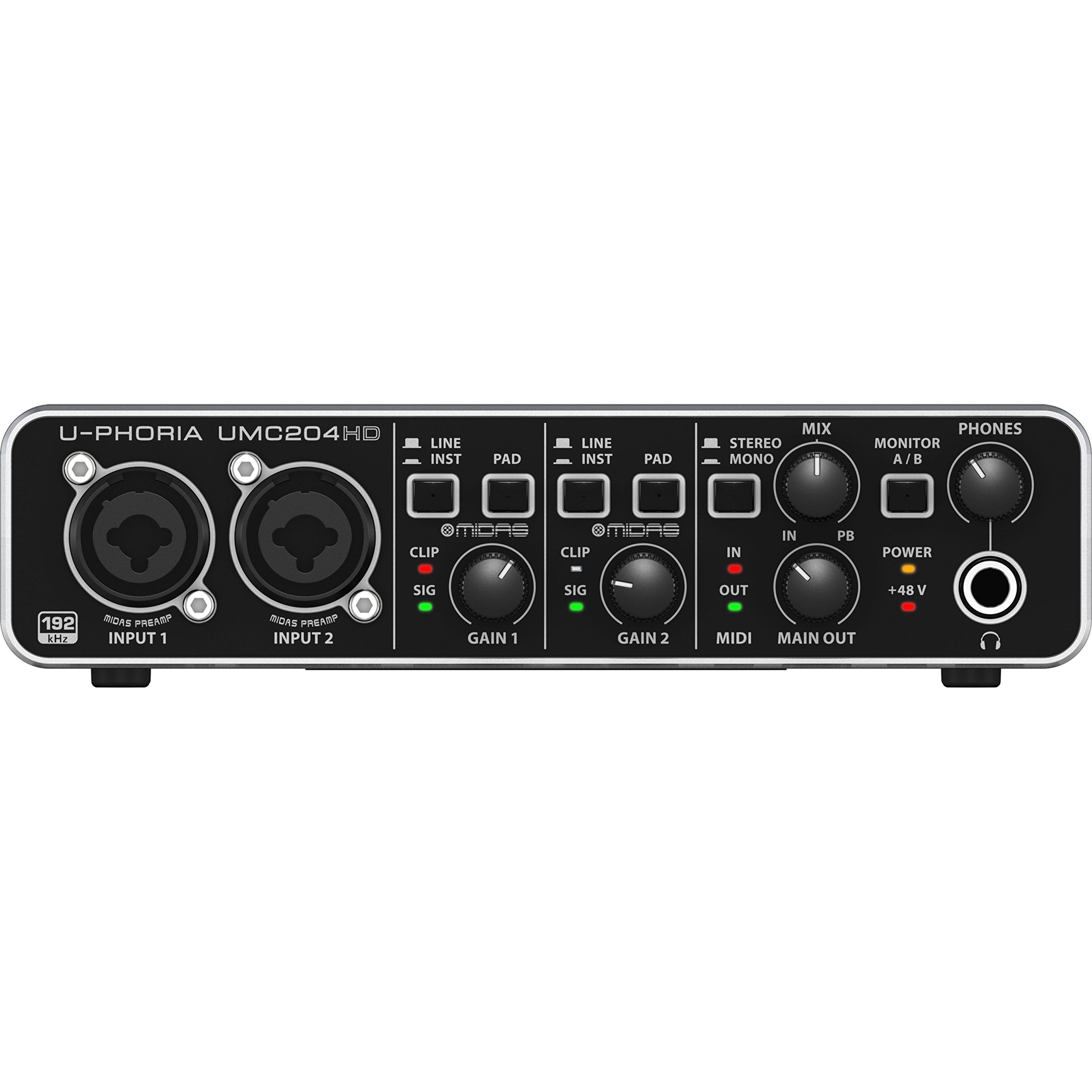
Two ins, four outs, and MIDI I/O for the price of a couple of cables — the value king of this list.
If your goal is to get two instruments and a MIDI keyboard into a computer without spending much, this is the box to beat. It runs two MIDAS preamps with phantom power, records at 24-bit / 192 kHz, and includes true 5-pin MIDI I/O alongside the four outputs. It weighs 499 g, so it stays planted, and the metal chassis with tight XLR/TRS jacks and sturdy knobs takes regular handling well.
What earns it a place on this list is pure value. It decodes 24-bit / 192 kHz FLAC files and properly drives 250-ohm headphones — something the Motu M2 reportedly could not do — which is a real-world win if you mix on high-impedance cans. It also recognizes instantly as a class-compliant device on macOS and Ubuntu with no drivers at all. Linux users in particular seem to get a smooth ride: one setup recognized separate input and output interfaces and handled a condenser mic over phantom power with low noise and no latency for calls or music playback. Against the CME U6MIDI Pro’s 48 routing channels, this box offers 4 — but it is an audio interface first, so that is the trade.
The catch to know going in: there is no on/off switch, and the unit can emit a loud pop on boot that owners treat as a speaker risk. Some units also show inherent noise, and input gain headroom is limited. None of that stops it being the budget pick — it holds 4.6 stars across 200+ ratings, and owners consistently call it the best value per dollar on this list. Pair it with care and it will punch far above its class.
Why the price-to-feature math is brutal: two MIDAS preamps with phantom power, four outputs, and genuine MIDI I/O in a 499 g metal body.
The one ritual to adopt: power your speakers on after the interface, never before — the boot pop is not subtle.
Pick this when: budget rules and you want a MIDI-capable interface that doubles as a clean two-channel recorder.
Step up if: you genuinely need more than two inputs at once.
4. MIDITECH MIDIFACE 2X2
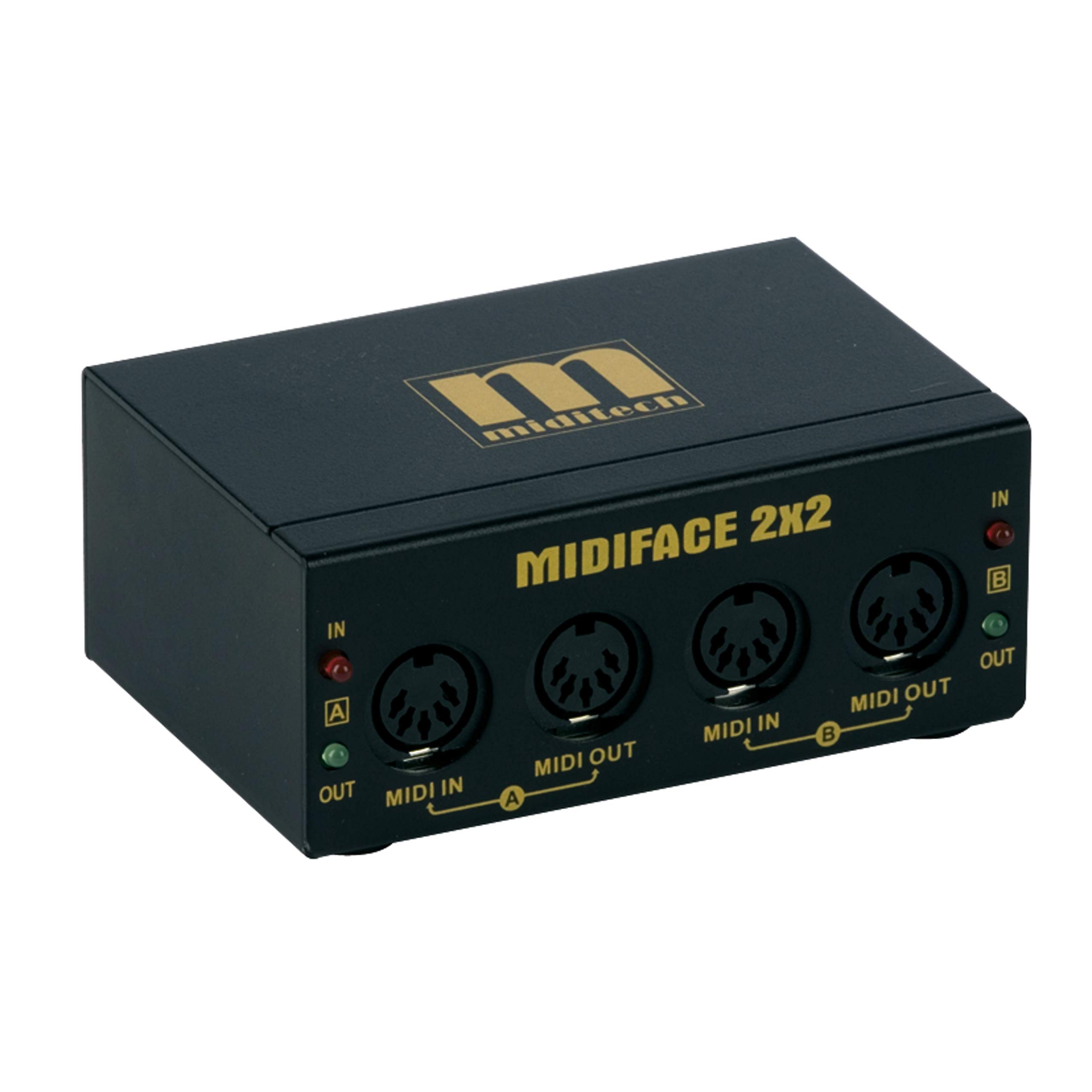
A no-frills 2×2 that connects the second you plug it in — and comes with its own cables.
If your setup does not need routing software or a metal desk anchor, you want a box that just works. This is that box. It is a 2-in, 2-out MIDI interface built on USB with 32 channels of support and a maximum sample rate of 48 kHz (48,000 samples per second, enough for smooth MIDI timing), and it ships with a USB cable plus two 5-foot MIDI cables — no separate purchase to get up and running. It weighs 0.64 kg, sits flat, and supports any DAW that handles MIDI on macOS and Windows XP through 10.
What owners value is the zero-friction install. There are no drivers to chase, and it has been confirmed working on both Windows 10 and iPad without fuss, with no lag detected and a build that feels tight for the money. One buyer even repurposed it as a Rockband guitar controller conversion, plugging the controller in and treating it as a standard MIDI controller — a niche save for anyone recording game controllers into a DAW.
Plan around one real gotcha: at least one buyer found this unit flatly refused to work when plugged into a powered USB hub — it connected fine directly to a computer but failed every time hub power was involved. Plug straight into the machine and you avoid the whole issue. At 4.4 stars across roughly 39 ratings it has the smallest track record here, so treat it as the driverless workhorse for a one- or two-device rig, not the routing hub for a complex one.
What you get right from the start: the interface, a USB cable, and two 5-foot MIDI cables in one package.
The one thing to remember: connect it directly to your computer — powered hubs have been known to break the connection.
Go here if: you run one or two pieces of gear and want a driver-free interface with cables included.
Skip if: you need software routing, merging, or more than two ins and outs.
5. Roland UM-ONE-MK2 One in Two Out MIDI Cable
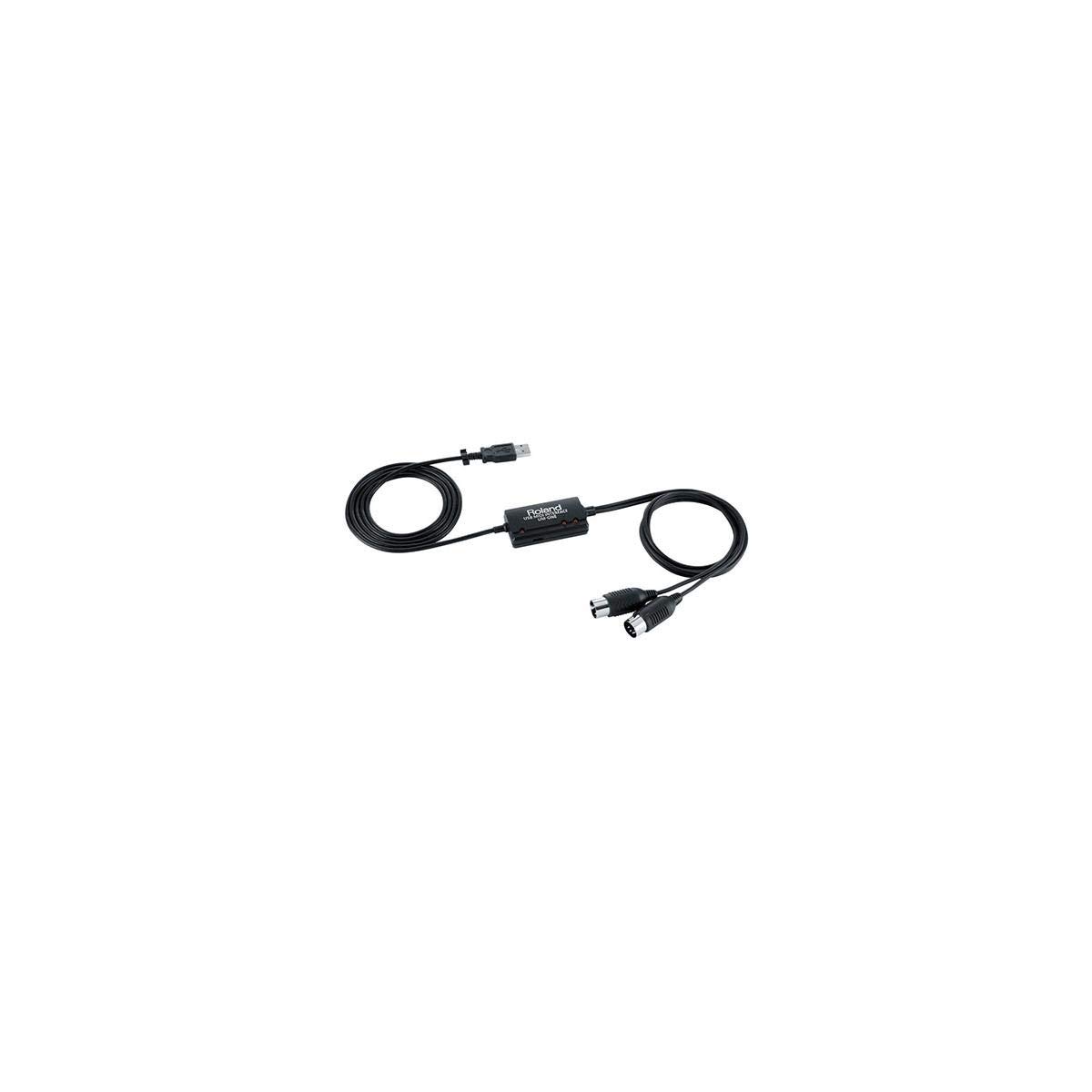
The cable that rescues stuck notes and tired MIDI adapters — one in, one out, tight clock timing.
You buy this when a bus-powered adapter in the chain is causing dropped or repeating notes and you want the problem gone. It is a one-in, one-out MIDI interface with FPT processing (Roland’s own signal handling for tighter clock timing) that keeps note data locked and clean. At 3.2 ounces with integrated USB and MIDI cables, there is nothing to assemble and nothing to lose. It runs on USB bus power, so no external supply is needed.
The win here is consistency. Buyers report it solved stuck or missing notes caused by a Focusrite Scarlett 2i4’s MIDI adapter, and it handled a vintage 1986 Korg Poly-800 into Ableton Live 12 where a cheaper adapter failed outright. Sysex file transfer — the bulk data transfers that restore patch banks on older synths — is handled reliably. There are LED indicators on both the input and output sides so you can watch signals flow, and the cables are long enough to reach a rack without an extension.
The friction lives in the driver setup and the switches, not the sound. There is a recessed COMP/TAB switch (COMP for computer, TAB for iPad) that is genuinely hard to see and hard to move, and installation order matters — reboot, plug in, wait for the device to appear, then power your synth on. Several owners found the printed instructions thin or unhelpful and wound up pulling drivers from Roland’s site instead. It holds 4.5 stars across 2,800+ owner ratings, the deepest track record here, and compatibility is where owners split: it flies on Windows, but one Mac Studio running Monterey 12.3 refused to recognize it despite following every step.
For anyone on an iPad or a Windows laptop who wants one instrument into one app, this is the reliable choice. The trade against the CME U6MIDI Pro is stark — one pair of ports instead of three, but it is also the most trusted single-in box in the room.
What owners keep coming back for
- FPT processing keeps clock timing tight and note data free of dropped or stuck notes.
- LED indicators on both MIDI input and output let you see signal flow at a glance.
- Integrated USB and MIDI cables mean no adapters to buy or lose.
- iPad-compatible through the Apple Camera Connection Kit, and bus-powered with no wall adapter.
Where it gets fiddly
- The recessed COMP/TAB switch is small and hard to change once the box is in place.
- Driver installation order matters, and the printed instructions are thin.
- Mac compatibility is not guaranteed on every OS version.
The clear pick for: an iPad or single-keyboard setup that needs bulletproof note handling with no thought.
Not your box if: you run more than one or two DIN devices at once.
6. CME H2MIDI Pro Compact USB Host MIDI Interface
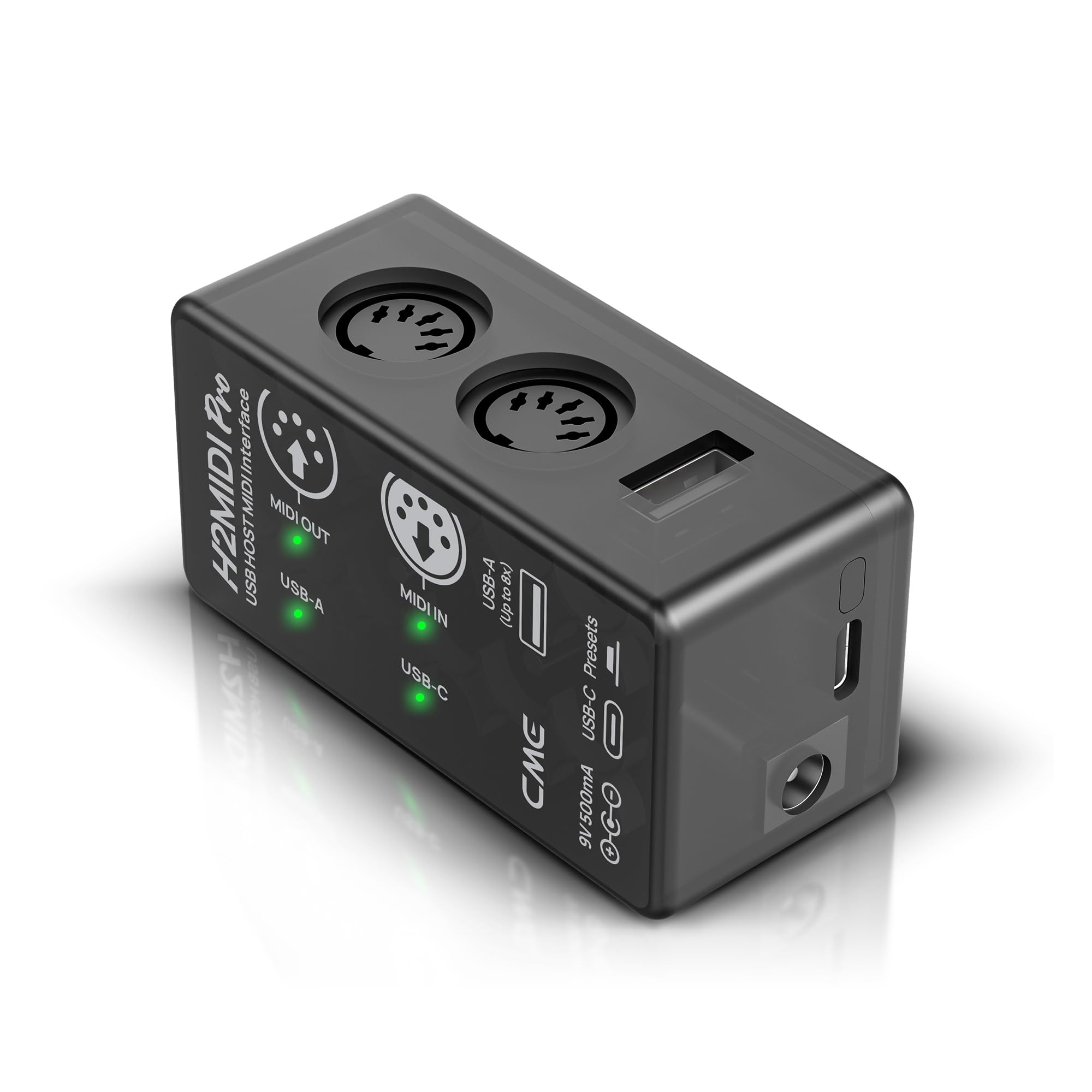
One tiny box that lets a modern USB keyboard talk to your old 5-pin gear — without a computer.
This is the fix for the mismatch every home studio eventually hits: a brand-new USB keyboard that cannot speak to a vintage synth with only DIN sockets. The H2MIDI Pro has a USB-A host port that talks directly to class-compliant USB MIDI devices, so your keyboard can drive hardware with no computer in the picture at all. It expands up to eight USB MIDI device ports through a standard USB hub. It also offers a USB-C port with 2-in-2-out virtual MIDI once you do plug into a computer, and it supports 128 channels against the 4 the Behringer UMC204HD provides.
Inside is a 32-bit processor that handles heavy message types — clock, sysex, MTC, and MPE — with high precision, which is the reason complex, layered rigs stay stable. The free HxMIDI Tools software runs on Windows, macOS, iOS, and Android, and it saves up to 4 presets you can switch between mid-performance. At 2.08 ounces it disappears on a pedalboard, and a maximum sample rate of 192 kHz keeps the data path fast.
Owners are most impressed by the sheer range of jobs it takes on. Drummers route one module’s MIDI channel 10 over to channel 13 to layer a second sound source with no observable delay. Keyboard players use it to turn a simple controller into a four-zone, four-channel instrument that runs standalone. A few users note a small amount of delay in certain setups, so if you are stacking many devices through a hub, that is the constraint to watch. The software interface is deep, and one naming quirk frustrates buyers — the H4 MIDI WC model implies a WIDI Core is included when it is only “ready” for one, so read the listing carefully before assuming the bundle. It holds 4.4 stars across 500+ ratings, and owners single out build quality and versatility.
The features that carry it
- USB-A host port runs USB MIDI keyboards with no computer, expandable to eight devices via a hub.
- 32-bit processor handles clock, sysex, MTC, and MPE messages cleanly.
- Free HxMIDI Tools software saves up to 4 presets across Windows, macOS, iOS, and Android.
- 128-channel support gives complex layered rigs plenty of headroom.
The fine print worth reading
- Some users notice a small delay in busier setups.
- The routing software takes real study to master.
- Certain model names imply a WIDI Core bundle that is not included — check carefully.
Made for: anyone bridging a USB keyboard, a MIDI controller, and a DIN-equipped synth with no computer required.
Bear in mind: a small delay shows up with several devices stacked through one hub.
7. Mackie Onyx Artist 1X2 USB Audio Interface

An Onyx preamp and a Hi-Z input for your guitar in one tank-built desktop box.
If you plug a guitar or bass straight in as often as you plug in a microphone, this is the interface that respects both. The Onyx preamp gives you boutique-quality fidelity with wide dynamic range and 48v phantom power for studio condensers, while the ¼” TRS input with a Hi-Z switch handles instruments directly — no DI box needed. Recording runs at 24-bit / 192 kHz over USB 2.0, and the whole thing weighs just 1.2 pounds and runs on bus power with no adapter. It ships with Pro Tools First software and a 23-plugin Musician Collection bundle.
What you get for tracking is a clean monitoring chain. Zero-latency direct monitoring of the analog inputs means what you play is what you hear, with no software delay in the way. Dedicated outputs feed a pair of studio monitors, and the headphone output has real power behind it. Owners describe the sound as clean and free of noise, the setup as quick, and the build as built-like-a-tank — it is designed to take day-to-day handling without complaint.
The control side is where you should set expectations. There is a gain knob with a narrow usable range, so fine level adjustments take a steady hand, and driver compatibility draws mixed reactions depending on the machine. Those are small trade-offs against a 4.5-star record across roughly 400 ratings, and neither one undercuts the Onyx preamp tone. For a solo guitarist or singer-songwriter tracking one source at a time, this punches well above its tier.
The input flexibility: an Onyx preamp, 48v phantom power, and a Hi-Z instrument switch in one bus-powered unit.
The control caution: the gain knob’s narrow range means small source changes get amplified, so dial in carefully between takes.
The right call for: a guitarist or solo vocalist recording one track at a time who wants studio-grade preamp tone.
Consider a different shape if: you often record two sources simultaneously and need more than one mic input.
Know the Specs
Port count and channel support
Port count is the number of physical ins and outs your gear can occupy at once, and it is the first thing to match to your rig. Each in port takes data from one instrument; each out sends data to one device. Look at the CME H2MIDI Pro, which supports 128 channels, next to the Roland UM-ONE-MK2, which supports 1 — same category, wildly different capacity. If you run two keyboards and a drum module, a 3-in-3-out like the CME U6MIDI Pro is the honest minimum. Buy for your future rig, not just today’s single keyboard.
Latency and clock stability
Latency is the delay between playing a note and hearing it, and clock stability is how consistently the timing holds over a long session. Interfaces such as the Roland UM-ONE-MK2 use FPT processing specifically to keep that timing tight, which matters most when you are syncing a drum machine to a click. In practice a stable clock stops drum hits from flamming and keeps arpeggios locked to the grid. A wired 5-pin DIN connection tends to be steadier than USB for this job, which is why serious studios still route through DIN.
Sample rate and bit depth
These two numbers describe how finely an audio interface captures sound. Bit depth sets the dynamic range, and sample rate sets how many times per second the signal is measured. The SSL 2 MKII records at 32-bit / 192 kHz, the Behringer UMC204HD and Mackie Onyx Artist 1.2 both record at 24-bit / 192 kHz, and the MIDITECH MIDIFACE 2X2 tops out at 48 kHz. Higher numbers give more headroom when you record and edit, but for pure MIDI data, the connector type and channel count matter far more than the audio rate.
Standalone versus computer-tethered
A standalone interface works with no computer attached, letting a USB keyboard drive DIN hardware directly. The CME H2MIDI Pro does this through its USB-A host port. A computer-tethered interface, like the CME U6MIDI Pro, always needs a Mac or PC on the other end. Choose standalone if you play live, use a pedalboard, or want a rig with no screen involved. Choose tethered if every session starts with a laptop open — you will save on complexity and gain a cleaner software routing path.
Common Questions
Will a MIDI interface work with my iPad?
Do I need to install drivers for a USB MIDI interface?
What is the difference between one-in and three-in MIDI interfaces?
Can a MIDI interface work without a computer?
What is MIDI latency and how low should it be?
Will a MIDI interface work with vintage synths like a Korg Poly-800?
Do I need MIDI I/O if I already have an audio interface?
What does it mean when a powered USB hub breaks my MIDI interface?
Is a MIDI cable the same as a MIDI interface?
The Bottom Line
For most setups, the midi interface to buy is the CME U6MIDI Pro — three ins, three outs, and a routing engine that turns a shelf of gear into one clean studio chain. If your rig is computer-free, the CME H2MIDI Pro is the one to reach for, thanks to its USB-A host port. And if you need a single, trusted input that handles vintage synths and iPad apps without drama, the Roland UM-ONE-MK2 is the safest pair of hands on the list. Match the port count to the number of instruments you actually own, and you will not be shopping for a replacement next year.
How we choose
We do not accept paid placement. Every pick is matched to a real buyer and a real use-case; we do not hands-on test units.
Sources
Specifications: manufacturer listings and product documentation. Review insights: verified customer reviews, as of October 2026. Pricing: not shown on this page (it changes often); check the current price via the retailer link.
As an Amazon Associate, Aappliancez earns from qualifying purchases. This does not affect which products we feature.